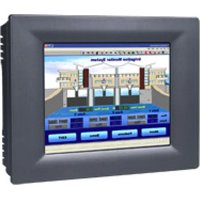
TPC-61T - Industrial touchscreen Advantech - Free user manual and instructions
Find the device manual for free TPC-61T Advantech in PDF.


Pick your language and provide your email: we'll send you a specifically translated version.
| Product Type | Touch Panel Computer |
| Display Size | 6.5 inches |
| Display Resolution | 640 x 480 pixels |
| Processor | Intel Atom N270 (1.6 GHz) |
| System Memory | 1 GB DDR2 (max 2 GB) |
| Storage | 2 GB CompactFlash (user upgradeable) |
| Operating System | Windows XP Embedded / CE 5.0 |
| Touch Screen | 5-wire resistive, analog |
| Power Input | 24 VDC (nominal), 12~30 VDC range |
| Power Consumption | 30 W typical |
| Dimensions (W x H x D) | 230 x 176 x 52 mm |
| Weight | 1.8 kg |
| Mounting | Panel mount, VESA 75mm |
| Front Panel Protection | IP65 (NEMA 4) |
| Operating Temperature | 0 to 50°C |
| Storage Temperature | -20 to 60°C |
| Relative Humidity | 10% to 95% (non-condensing) |
| I/O Ports | 1 x RS-232, 1 x RS-232/422/485, 2 x USB 2.0, 1 x LAN (10/100 Mbps) |
| Primary Functions | Industrial HMI, process control, machine monitoring |
| Cleaning Instructions | Use soft cloth with mild detergent; avoid abrasive cleaners |
| Safety | CE, FCC Class A, UL 60950-1 (by PSU) |
| Spare Parts & Repairability | Replacement LCD, touch panel, power supply; user accessible CF slot |
Frequently Asked Questions - TPC-61T Advantech
How do I install the TPC-61T?
Mount the unit using the panel clips or VESA 75mm holes. Connect 24 VDC power, Ethernet, and serial cables. Boot from the embedded OS.
Can I upgrade the memory?
Yes, the TPC-61T supports up to 2 GB DDR2 memory via a standard SODIMM slot. Access the memory slot by removing the rear cover.
How do I clean the touch screen?
Use a soft, lint-free cloth slightly dampened with water or mild glass cleaner. Avoid ammonia-based products and never spray directly on the screen.
What should I do if the touch screen is not responding?
First, recalibrate the screen via the Touch Calibration utility in the OS. If that fails, check the touch controller cable connection.
How can I restore the original OS?
The unit can be restored from a recovery CF card. Insert the recovery CF and power on. Follow on‑screen prompts to reinstall Windows.
What is the power consumption?
Typical power consumption is 30 W at 24 VDC. Use a power supply rated at least 40 W for safe operation.
Is the TPC-61T suitable for outdoor use?
The front panel is IP65, but the unit is not sun‑light readable. For indoor or shaded installation only.
How do I replace the CompactFlash card?
Power off the unit. Remove the rear panel screws. Slide out the CF card from its slot. Insert a new card (max 2 GB, IDE mode). Reassemble.
Can I use a different power source?
The unit accepts 12-30 VDC. Ensure the supply is clean and regulated. Do not connect AC directly.
What should I do if the display is dim?
Check the Backlight Brightness setting in the OS control panel. If still dim, the backlight inverter may need replacement.
User questions about TPC-61T Advantech
0 question about this device. Answer the ones you know or ask your own.
Ask a new question about this device
No questions yet. Be the first to ask one.
Download the instructions for your Industrial touchscreen in PDF format for free! Find your manual TPC-61T - Advantech and take your electronic device back in hand. On this page are published all the documents necessary for the use of your device. TPC-61T by Advantech.
USER MANUAL TPC-61T Advantech


Manual assistant
Powered by Anthropic
Waiting for your message
Product information
Brand : Advantech
Model : TPC-61T
Category : Industrial touchscreen