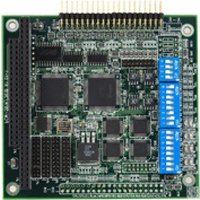
PCM-3614 - Industrial electronic module Advantech - Free user manual and instructions
Find the device manual for free PCM-3614 Advantech in PDF.


Pick your language and provide your email: we'll send you a specifically translated version.
| Brand | Advantech |
| Model | PCM-3614 |
| Product Type | Serial Communication Module (PC/104) |
| Dimensions | 90 mm x 96 mm (PC/104 standard) |
| Weight | Approx. 80 g |
| Power Supply | +5 V DC, 500 mA max |
| Number of Ports | 4 independent serial ports |
| Interface Standards | RS-232 / RS-422 / RS-485 (per port selectable) |
| Data Rate | Up to 115.2 kbps (RS-232) / 921.6 kbps (RS-422/485) |
| Operating Temperature | 0°C to 60°C |
| Storage Temperature | -20°C to 85°C |
| Connectors | 20-pin box header (2x10) for each port |
| Operating System Support | Windows, Linux, QNX, DOS |
| Main Functions | Industrial serial communication, data acquisition, device control |
| Maintenance | Keep dry, clean with soft cloth; ensure proper ventilation |
| Safety Precautions | Install in ESD-safe environment; ensure proper grounding |
| Spare Parts / Repairability | Module is not field-repairable; replace unit if defective |
| Certifications | CE, FCC Class A |
Frequently Asked Questions - PCM-3614 Advantech
What operating systems are supported by the PCM-3614?
The PCM-3614 supports Windows, Linux, QNX, and DOS. Driver packages are available from Advantech's website.
How do I configure the serial port interface (RS-232/422/485)?
Each port's interface is selected via DIP switches on the module. Refer to the manual for switch positions corresponding to RS-232, RS-422, or RS-485.
What is the maximum baud rate for the PCM-3614?
For RS-232, the maximum baud rate is 115.2 kbps. For RS-422/485, it can reach 921.6 kbps.
Can I use the PCM-3614 with a non-PC/104 backplane?
The module is designed for the PC/104 stack but can be used with adapter cables for other bus systems. However, it is optimized for PC/104.
How do I install the drivers on Windows?
Download the driver package from Advantech support. Run the installer and connect the module. For older OS (e.g., DOS), use utility files provided in the package.
What is the power consumption of the PCM-3614?
The module draws 500 mA maximum from the +5 V supply. Ensure your backplane provides adequate current.
How do I check if the module is working correctly?
Use the included diagnostic utility or a terminal program to send/receive data. Loopback test can be performed by shorting TX to RX on each port.
Is the PCM-3614 hot-swappable?
No, you must power off the system before inserting or removing the module to avoid damage.
What are the physical dimensions of the PCM-3614?
It follows the PC/104 standard: 90 mm x 96 mm (3.55 in x 3.78 in). Weight is approximately 80 g.
Where can I find the manual and software?
Visit Advantech's official website and search for PCM-3614. The manual, drivers, and utilities are available for free download.
User questions about PCM-3614 Advantech
0 question about this device. Answer the ones you know or ask your own.
Ask a new question about this device
No questions yet. Be the first to ask one.
Download the instructions for your Industrial electronic module in PDF format for free! Find your manual PCM-3614 - Advantech and take your electronic device back in hand. On this page are published all the documents necessary for the use of your device. PCM-3614 by Advantech.
USER MANUAL PCM-3614 Advantech

Manual assistant
Powered by Anthropic
Waiting for your message
Product information
Brand : Advantech
Model : PCM-3614
Category : Industrial electronic module