
AESEM1S - Earplug Klein Tools - Free user manual and instructions
Find the device manual for free AESEM1S Klein Tools in PDF.


| Product Type | Earplug |
| Brand | Klein Tools |
| Model | AESEM1S |
| Category | Hearing Protection |
| Material | Memory Foam |
| Noise Reduction (NRR) | 32 dB |
| Color | Orange |
| Format | Reusable |
| Weight (per pair) | 3 g |
| Dimensions (per earplug) | 2.5 cm x 1.5 cm |
| Packaging | Pair (2 earplugs) |
| Cleaning | Clean with a damp cloth and mild soap |
| Safety | Complies with ANSI S3.19-1974 standards |
| Usage | For use in noisy environments |
| Maintenance | Check wear regularly |
| Replacement | Change every 3 months or as needed |
| Storage | Store in a dry, clean place |
| Included Accessories | Carrying case |
| Warranty | 1 year |
| Country of Origin | China |
| Certifications | CE, ANSI |
Frequently Asked Questions - AESEM1S Klein Tools
User questions about AESEM1S Klein Tools
0 question about this device. Answer the ones you know or ask your own.
Ask a new question about this device
Download the instructions for your Earplug in PDF format for free! Find your manual AESEM1S - Klein Tools and take your electronic device back in hand. On this page are published all the documents necessary for the use of your device. AESEM1S by Klein Tools.
USER MANUAL AESEM1S Klein Tools
SMART SENSE Situational Awareness Bluetooth® Earmuffs
• DUAL OMNI-DIRECTIONAL MICROPHONES
- BLUETOOTH 5.1 CONNECTIVITY
• INDEPENDENT AMBIENT AND BLUETOOTH VOLUME ADJUSTMENT
- RECHARGEABLE LITHIUM BATTERY PROVIDES UP TO 25 HOURS OF RUNTIME
- VENTED HEADBAND
• NOISE REDUCTION
RATING (NRR) OF 23dB
ESPAÑOL pg. 11
FRANÇAIS pg. 21
KLEIN TOOLS®

AESEM1S


GENERAL SPECIFICATIONS
Klein Tools SMART SENSE Situational Awareness Bluetooth® Earmuffs enable users to remain cognizant of their surrounding environment while expertly incorporated Bluetooth technology lets the user enjoy music simultaneously without compromising the user's hearing protection of up to 23dB NRR. The vented headband design and soft-foam ear cushions allow for a cool comfortable fit.
• Hearing Protection: 23dB NRR (Noise Reduction Rating)
- Bluetooth® Version: 5.1
- Bluetooth® Connection Range: 32.8 ft. (10 m) in open space
• Frequency Response: 20Hz - 20kHz
• Support Profi les: A2DP v1.3/AVRCP v1.6/HFP v1.7/HSP1.2/GAVDP1.3
- Battery Type: Internal, Li-Ion, 3.7V / 500mAh (1.85Wh)
• Runtime: 25 hours @100% Ambient & 50% Bluetooth Volume
- Charging Requirements: Maximum 5V DC, Minimum 0.6A
• Charging Time: Approx. 2 hours
- Dimensions: 6.18" × 7.03" × 3.90" (156.9 × 178.5 × 99 mm)
• Weight: 15.38 oz. (436 g)
- Operating Temperature: 14° to 140F (-10° to 60°C)
- Charging Temperature: 32° to 113°F (0° to 45°C)
• Storage Temperature: -4° to 140° F ( -20° to 60° C)
- Relative Humidity: <85% non-condensing
- Drop Protection: 6.6' (2 m)
- Ingress Protection (IP) Rating: IPX4 Sweat & Water Resistant
• Certifi cations: FCC, IC, DOE/CEC, NRCan, BQB, NOM/IFETEL
• FCC ID: 2AI28-AESEM1S
• IC: 21655-AESEM1S
• IFETEL: KLKLAE23-20787
Specifications subject to change.

WARNINGS
Read, understand, and follow these instructions to ensure safe operation. Keep these instructions for future reference.
These hearing protectors help reduce exposure to hazardous noise and other loud sounds. Misuse or failure to wear hearing protection at all times that you are exposed to noise may result in hearing loss or injury.
- Inspect earmuffs before each use; damage to the earmuffs can reduce noise reduction performance.
- Improper fit of this device will reduce its effectiveness in attenuating noise. Consult the FITTING EARMUFFS section for best protection.
- Do not bend or reshape the headband as this will cause a reduced clamping force reducing the specified NRR (Noise Reduction Rating).
- Prolonged exposure to high volumes can cause hearing damage. It is the responsibility of the user to set the audio input level to the recommended volume. See table in FEATURE DETAILS section for noise exposure levels.
- DO NOT use this product in situations that require special attention: using noise reduction equipment and listening to audio can reduce awareness of the surrounding environment.
Failure to observe these warnings can result in risk of fire or electric shock.
- DO NOT use the product if it is damaged or modified. Damaged or modified batteries may exhibit unpredictable behavior resulting in fire, explosion, or injury.
- Risk of fire and burns. DO NOT open, crush, heat above specified maximum temperature or incinerate. Prolonged exposure to direct sunlight can result in elevated temperatures
• DO NOT immerse in water or other liquids - Properly seal the charging port cover to achieve specified water & foreign object ingress protection. Keep seal free of dirt, oil, sand, or other material that interferes with proper sealing. Failure to do so can result in risk of fire or electric shock.
- DO NOT open the charging port cover if wet or in a wet environment. Thoroughly dry the unit and the seal around water-resistant cover completely before opening water resistant cover.
- DO NOT subject to impacts or drops greater than 6.6ft. (2m). Drops larger than this may not show signs of damage, but internal components may have been compromised. It is advisable to replace the unit if any such severe events occur
- DO NOT attempt to repair the product or charging cable. There are no user-serviceable parts.
FEATURE DETAILS

9


- Bluetooth Volume Knob
- Ambient Volume Knob
- Omni-Directional Microphones (×2)
- Multi-Function Button (MFB)
- Bluetooth Microphones (×2)
- Silicone Port Cover
- USB-C Charging Port
- Indicator LED
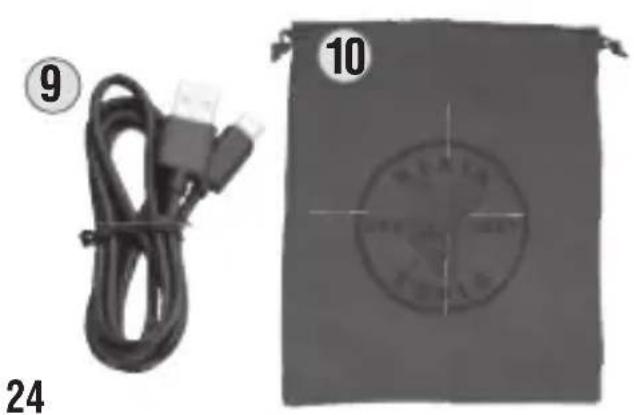
- 35" (90 cm) USB Charging Cable
- Carrying Bag
NOISE EXPOSURE VALUES
| EXPOSURE TIME | EXPOSURE LEVEL PER NIOSH RECOMMENDED EXPOSURE LIMIT | EXPOSURE LEVEL PER OSHA PERMISSIBLE EXPOSURE LIMIT |
| 8 hours | 85 dBA 90 | dBA |
| 4 hours | 88 dBA 95 | dBA |
| 2 hours | 91 dBA 100 | dBA |
| 1 hour | 94 dBA 105 | dBA |
| 30 minutes | 97 dBA 110 | dBA |
| 15 minutes | 100 dBA 115 | dBA |
See www.cdc.gov/niosh/topics/noise/reducenoiseexposure for more details.
SYMBOLS ON PRODUCT

Warning or Caution

Risk of Electrical Shock

Read Instructions

FCC: Conforms with particular Code of Federal Regulations

Bluetooth® SIG Certifi ed
NOISE REDUCTION RATING (NRR)
The NRR for the AESEM1S SMART SENSE Situational Awareness Bluetooth® Earmuffs is 23dB. It is tested and in accordance with ANSI S3.19-1974. To ensure adequate hearing protection, the earmuffs must be properly fitted according to the FITTING EARMUFFS section.
ANSI S3.19-1974 TESTING
| Frequency (Hz) 125 250 500 1000 2000 3150 4000 6300 8000 NRR | ||||||||||
| Mean Attenuation | 18.9 | 19.4 | 25.5 | 33.7 | 36.0 | 40.1 | 44 | 41. | 4 | 39.9 |
| Standard Deviation | 3.4 | 2.9 | 2.7 | 2.5 | 2.8 | 3.1 | 3.3 | 3 | 2.8 | |
NOTE: The above table is based on a headband force of 12N.
The level of noise entering a person's ear when the hearing protector is worn as directed, is closely approximated by the difference between the A-Weighted environmental noise level and the Noise Reduction Rating (NRR).
EXAMPLE:
- The environmental noise level as measured at the ear is 89dB(A).
- The NRR is 23dB.
- The level of noise entering the ear is approximately equal to 66dB(A).
⚠️CAUTION: For noisy environments dominated by frequencies below 500 Hz, the C-weighted environmental noise level should be used.
NOTE: Although hearing protectors can be recommended for protection against the harmful effects of impulsive noise, the Noise Reduction Rating (NRR) is based on the attenuation of continuous noise and may not be an accurate indicator of the protection attainable against impulsive noise such as gunfire. The Environmental Protection Agency uses the Noise Reduction Rating (NRR) as a rating of a hearing protector's noise-reducing performance. Klein Tools cannot guarantee the suitability of the NRR as a method of rating protection as protection relies on the level and exposure of sound and how well a product fits.
AUDIO INPUT LEVEL
The audio level in the hearing protector is dependent on the audio input level. To prevent harmful noise levels, the AESEM1S SMART SENSE Situational Awareness Bluetooth® Earmuffs automatically default to 85dB when wirelessly connected to a music device. If the hearing protector is connected to a music device with a high audio output level, it is the user's responsibility to set the audio input level to safe level. See table in FEATURE DETAILS section for noise exposure levels.
OPERATING INSTRUCTIONS
CHARGING EARMUFFS
- Open the Silicone Port Cover ⑥ to access the USB-C Charging Port ⑦.
- Using the included USB-A to USB-C charging cable ⑨, plug the USB-C end into the USB-C Charging Port ⑦ of the earmuffs while plugging the USB-A end into an appropriate charging source, such as a third party certified USB to AC wall adapter (not included, see GENERAL SPECIFICATIONS for charging requirements).
- While the earmuffs are charging (0-99%), the Indicator LED ⑧ will breathe (dim to bright) red, and will illuminate solid green when fully (100%) charged.
FITTING EARMUFFS
- Fold out the earcups from the storage position by extending the slider arms (FIG. 1).
-
Place earmuffs on the head positioning the earcups over each ear (FIG. 2). The inner headband is labeled (R or L) for convenience.
-
When placing the earcups over the ears be sure to:
-
Completely cover the ear, the ears should never be exposed (FIG. 3).
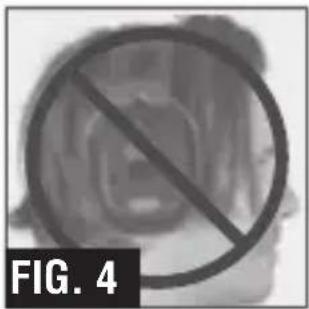
- Avoid obstructions (such as hair) that would prevent a firm seal (FIG. 4).
- Adjust the slider arms up or down to tighten or loosen the headband until a hugging seal and comfortable fit is achieved (FIG. 5).

OPERATING INSTRUCTIONS
POWER ON/OFF
ON: Press and hold the Multi-Function Button 4 for 1.5 seconds. "Power ON" voice prompt will be heard and the LED will turn solid green for one second, then turn off.
OFF: Press and hold the Multi-Function Button 4 for 3 seconds. "Power OFF" voice prompt will be heard and the Indicator LED 8 will turn solid red for one second, then turn off.
BLUETOOTH® PAIRING
After successfully powering on, the earmuffs will automatically enter Bluetooth® pairing mode. “Pairing” voice prompt will be heard and the Indicator LED ⑧ will breathe (dim to bright) blue every three seconds.
- Ensure Bluetooth is enabled on your device and it has discovered “Klein SMART SENSE Muffs” in the pairing list.
- Select "Klein SMART SENSE Muffs" and upon successful connection, "Connected" voice prompt will be heard and the Indicator LED 8 will turn solid blue for three seconds, then turn off.
- In the event pairing fails, double press the Multi-Function Button 4 to manually enter Bluetooth pairing mode.
NOTE: The earmuffs will automatically attempt to re-connect to the last known paired wireless device when turned on, but are ready to pair with any Bluetooth compliant device within two minutes of powering on if the last paired device is not detected.
AUTO POWER-OFF
After 8 hours of use, the AESEM1S will automatically power off.
MUSIC OPERATION
Play/Pause: Single press the Multi-Function Button 4.
Next Track: Double press the Multi-Function Button 4.
Previous Track: Triple press the Multi-Function Button 4.
Volume Up: Scroll up on the Bluetooth Volume Knob
Volume Down: Scroll down on the Bluetooth Volume Knob 1.
OPERATING INSTRUCTIONS
AMBIENT OPERATION
Volume Up: Scroll up on the Ambient Knob ②.
Volume Down: Scroll down on the Ambient Knob 2
Reject Call: Press and hold the Multi-Function Button 4 for one second.
Hold Current Caller and Answer New Incoming Call: Double press the Multi-Function Button 4.
Switch Between Two Active Calls: Double press the Multi-Function Button 4.
End Current Call and Other Call on Hold: Press and hold theMulti-Function
Button 4 for one second to end new call, then single press to end initial call.
CLEANING
The earmuff shell and cushion can be gently wiped clean with lukewarm mild soapy water and dried with a soft cloth without rubbing. Do not submerge earmuffs in water or treat with abrasive cleaners or solvents.
STORAGE
If earmuffs are to be left unused for an extended period of time, charge before storing and recharge periodically during storage to maintain battery's capacity/life.
MAINTENANCE
Regularly inspect earmuffs and ear cushions for excessive wear such as tears and/or visible cracks. Replace earmuffs if tears and/or cracks are visible on the shell and/or cushion. Replace earmuffs if there is a noticeable change in the fit and no longer sealing firmly against your head.
COMPLIANCE
FCC COMPLIANCE
This device complies with part 15 of the FCC RULES. Operation is subject to the following two conditions: (1) this device may not cause harmful interference, and (2) this device must accept any interference received, including interference that may cause undesired operation.
NOTE: Changes or modifications not expressly approved by the party responsible for compliance could void the user's authority to operate the equipment.
This equipment has been tested and found to comply with the limits for a Class B digital device, pursuant to part 15 of the FCC Rules. These limits are designed to provide reasonable protection against harmful interference in a residential installation. This equipment generates, uses and can radiate radio frequency energy and, if not installed and used in accordance with the instructions, may cause harmful interference to radio communications. However, there is no guarantee that interference will not occur in a particular installation. If this equipment does cause harmful interference to radio or television reception, which can be determined by turning the equipment off and on, the user is encouraged to try to correct the interference by one or more of the following measures:
- Reorient or relocate the receiving antenna.
- Increase the separation between the equipment and receiver.
- Connect the equipment into an outlet on a circuit different from that to which the receiver is connected.
- Consult the dealer or an experienced radio/TV technician for help
FCC RF EXPOSURE STATEMENTS:
This equipment complies with FCC radiation exposure limits set forth for an uncontrolled environment and meets the FCC RF Exposure Guidelines.
This device must not be co-located or operated in conjunction with any other antenna or transmitter.
COMPLIANCE
IC COMPLIANCE
This device contains license-exempt transmitter(s)/receiver(s) that comply with Innovation, Science and Economic Development Canada's license-exempt RSS(s). Operation is subject to the following two conditions: (1) This device may not cause harmful interference, and (2) This device must accept any interference received, including interference that may cause undesired operation of the device.
This device complies with RSS-247 of Industry Canada. Operation is subject to the condition that this device does not cause harmful interference. This Class B digital apparatus complies with Canadian ICES-003.
IC RADIATION EXPOSURE STATEMENT:
The equipment complies with SAR limits set forth for an uncontrolled environment and meets the RSS-102 of the IC RF Exposure Rules. This transmitter must not be co-located or operating in conjunction with any other antenna or transmitter.
IFETEL REPORT
For use in Mexico, the operation of this equipment is subject to the following two conditions: (1) This equipment or device does not cause harmful interference and (2) this equipment or device accepts any interference, including that which can cause undesired operation.
WARRANTY
Do not place equipment and its accessories in the trash. Items must be properly disposed of in accordance with local regulations. Please see www.epa.gov/recycle for additional information.
CUSTOMER SERVICE
KLEIN TOOLS, INC.
450 Bond Street Lincolnshire, IL 60069 1-800-553-4676
customerservice@kleintools.com www.kleintools.com
ESPAÑOL

9


CARACTÉRISTIQUES GÉNÉRALES
- Bouton de volume Bluetooth
- Bouton de volume ambiant
- Microphones omnidirectionnels (×2)
- Bouton multifonction
- Microphones Bluetooth (×2)
- Couvercle de port en silicone
- Port de recharge USB-C
- Voyant DEL
- Câble de recharge USB de 90 cm (35 po)
- Sac de transport
| VALEURS D'EXPOSITION AU BRUIT | ||
| DURÉE DE L'EXPOSITION | NIVEAU D'EXPOSITION SELON LA LIMITE RECOMMANDÉE PAR LE NIOSH | NIVEAU D'EXPOSITION SELON LA LIMITE ADMISSIBLE DE L'OSHA |
| 8 heures | 85 dB (A) 90 | dB (A) |
| 4 heures | 88 dB (A) 95 | dB (A) |
| 2 heures | 91 dB (A) 100 | dB (A) |
| 1 heure | 94 dB (A) 105 | dB (A) |
| 30 minutes | 97 dB (A) 110 | dB (A) |
| 15 minutes | 100 dB (A) 115 | dB (A) |
Pour en savoir plus, consultez le www.cdc.gov/niosh/topics/noise/reducenoiseexposure.
SYMBOLES SUR LE PRODUIT



INSTRUCTIONS D'UTILISATION
MARCHE/ARRÊT

- SMART SENSE SITUATIONAL AWARENESS BLUETOOTH® EARMUFFS
- AESEM1S
- GENERAL SPECIFICATIONS
- WARNINGS
- READ, UNDERSTAND, AND FOLLOW THESE INSTRUCTIONS TO ENSURE SAFE OPERATION. KEEP THESE INSTRUCTIONS FOR FUTURE REFERENCE
- FAILURE TO OBSERVE THESE WARNINGS CAN RESULT IN RISK OF FIRE OR ELECTRIC SHOCK
- FEATURE DETAILS
- SYMBOLS ON PRODUCT
- NOISE REDUCTION RATING (NRR)
- NOTE: THE ABOVE TABLE IS BASED ON A HEADBAND FORCE OF 12N
- EXAMPLE
- AUDIO INPUT LEVEL
- OPERATING INSTRUCTIONS
- CHARGING EARMUFFS
- FITTING EARMUFFS
- POWER ON/OFF
- BLUETOOTH® PAIRING
- AUTO POWER-OFF
- MUSIC OPERATION
- AMBIENT OPERATION
- CLEANING
- STORAGE
- MAINTENANCE
- COMPLIANCE
- FCC COMPLIANCE
- FCC RF EXPOSURE STATEMENTS
- IC COMPLIANCE
- IC RADIATION EXPOSURE STATEMENT
- IFETEL REPORT
- WARRANTY
- CUSTOMER SERVICE
- ESPAÑOL
- CARACTÉRISTIQUES GÉNÉRALES
- SYMBOLES SUR LE PRODUIT
- INSTRUCTIONS D'UTILISATION
- MARCHE/ARRÊT
Brand : Klein Tools
Model : AESEM1S
Category : Earplug