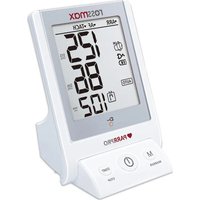
AC1000f - Measuring equipment Rossmax - Free user manual and instructions
Find the device manual for free AC1000f Rossmax in PDF.


Pick your language and provide your email: we'll send you a specifically translated version.
| Product Type | Automatic Blood Pressure Monitor |
| Model | AC1000f |
| Brand | Rossmax |
| Measurement Method | Oscillometric |
| Cuff Type | Upper arm cuff (22-42 cm) |
| Display | Digital LCD, 16 mm digits |
| Measurement Range | Systolic: 60-260 mmHg, Diastolic: 40-200 mmHg, Pulse: 40-200 bpm |
| Accuracy | ±3 mmHg (blood pressure), ±5% (pulse rate) |
| Power Source | 4 x AA batteries or AC adapter (6V, 600 mA) |
| Battery Life | Approximately 300 measurements |
| Memory | 2 x 90 memories with date/time stamp |
| Dimensions | 104 x 98 x 66 mm (device only) |
| Weight | Approximately 310 g (excluding batteries) |
| Additional Functions | Irregular heartbeat detection, WHO classification indicator, averaging of last 3 readings |
| Clinical Validation | Validated by ESH, BHS, and AAMI protocols |
| Accessories Included | Upper arm cuff, instruction manual, 4 x AA batteries |
| Cleaning & Maintenance | Wipe device with a dry or slightly damp cloth; cuff can be hand-washed gently |
| Safety Standards | CE medical device, FDA cleared |
| Spare Parts & Repairability | Replacement cuffs and AC adapters available; repair service by authorized centers |
| Warranty | 2 years (device), 1 year (accessories) |
Frequently Asked Questions - AC1000f Rossmax
How do I set the date and time on my Rossmax AC1000f?
Press and hold the SET button for 3 seconds. The year will flash. Use the MEM button to adjust, then press SET to confirm and move to month, day, hour, and minute. Press START/STOP to exit.
What does the irregular heartbeat symbol mean?
If an irregular heartbeat is detected during measurement, the IHB icon will appear. This is not a diagnosis; consult your physician if the symbol appears frequently.
Can I use the monitor with a pacemaker?
The monitor may interfere with pacemakers. Consult your doctor before use. It is not recommended to use on the arm opposite a pacemaker implant.
How do I clean the cuff?
Remove the cuff from the device. Wipe with a damp cloth and mild soap, then air dry. Do not immerse in water or machine wash. Attach only when fully dry.
Why does the monitor display an error code E1?
Error E1 indicates cuff pressure is too low. Ensure the cuff is properly wrapped and the connector is securely inserted. Check for air leaks in the cuff hose.
How many readings can be stored in memory?
The device stores up to 90 readings for each of the two users (total 180 readings), with date and time stamp.
What is the correct way to sit during measurement?
Sit upright with your back supported, feet flat on the floor, and rest your arm on a table so the cuff is at heart level. Remain still and silent during measurement.
Can I use rechargeable batteries?
Yes, you can use rechargeable AA batteries (Ni-MH). Ensure they are fully charged. The battery indicator will show remaining charge.
How do I transfer readings to a computer?
The AC1000f does not have PC connectivity. Readings are viewed only on the device display. Consider manually logging your readings.
Does the monitor work during motion?
Movement can cause inaccurate readings. The device will display an ERR message if movement is detected. Remain still and repeat the measurement.
User questions about AC1000f Rossmax
0 question about this device. Answer the ones you know or ask your own.
Ask a new question about this device
No questions yet. Be the first to ask one.
Download the instructions for your Measuring equipment in PDF format for free! Find your manual AC1000f - Rossmax and take your electronic device back in hand. On this page are published all the documents necessary for the use of your device. AC1000f by Rossmax.
USER MANUAL AC1000f Rossmax
Manual assistant
Powered by Anthropic
Waiting for your message
Product information
Brand : Rossmax
Model : AC1000f
Category : Measuring equipment