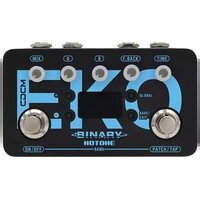
Binary Eko - Effect pedal Hotone - Free user manual and instructions
Find the device manual for free Binary Eko Hotone in PDF.


Pick your language and provide your email: we'll send you a specifically translated version.
| Product Type | Digital Delay / Echo Pedal |
| Brand | Hotone |
| Model | Binary Eko |
| Dimensions | 4.7 x 2.6 x 1.9 inches |
| Weight | 0.5 lbs |
| Power Supply | 9V DC, center negative, 100mA (not included) |
| Battery Option | No battery compartment |
| Input | 1/4" TS mono (instrument level) |
| Output | 1/4" TS mono |
| Expression Pedal Jack | 1/4" TRS (optional) |
| Delay Types | Analog, Tape, Digital, Reverse, Modulation, Filter |
| Controls | Time, Feedback, Mix, Tone, Mode selector, Tap/Hold switch |
| Tap Tempo | Via footswitch, max delay 2 seconds |
| True Bypass | Buffered bypass (trails optional) |
| Construction | Aluminum chassis, compact design |
| Warranty | 2 years limited |
| Clean Surfaces | Wipe with dry cloth; avoid solvents |
| Storage Temperature | -10°C to 50°C |
Frequently Asked Questions - Binary Eko Hotone
How do I power the Binary Eko?
Use a 9V DC power supply with a center-negative plug rated at 100mA minimum. The pedal does not run on batteries.
Can I use an expression pedal with the Binary Eko?
Yes, connect a TRS expression pedal to the EXP jack to control parameters like time or feedback in real time.
What are the different delay types?
The Binary Eko offers six models: Analog, Tape, Digital, Reverse, Modulation, and Filter. Cycle through them with the Mode knob.
How do I set the tap tempo?
Tap the footswitch twice quickly to set the delay time. The LED blinks in sync with the tempo. Max delay is 2 seconds.
Does the Binary Eko have true bypass?
It uses a buffered bypass with switchable trails. When trails are off, the delay repeats stop immediately when bypassed.
How do I enable delay trails?
Hold the footswitch while powering on the pedal. The LED will flash to indicate trails mode is active. Repeat to disable.
What is the maximum delay time?
The maximum delay time is 2 seconds at the highest Time setting.
Can I use the Binary Eko with a bass guitar?
Yes, it works with bass and other instruments. The tone control can help adjust the high-frequency content.
How do I clean the pedal?
Unplug the power and use a soft, dry cloth to wipe the surface. Avoid liquids and abrasive cleaners.
What should I do if the pedal stops working?
Check the power supply and connections. If the issue persists, contact Hotone support or your retailer for warranty service.
User questions about Binary Eko Hotone
0 question about this device. Answer the ones you know or ask your own.
Ask a new question about this device
No questions yet. Be the first to ask one.
Download the instructions for your Effect pedal in PDF format for free! Find your manual Binary Eko - Hotone and take your electronic device back in hand. On this page are published all the documents necessary for the use of your device. Binary Eko by Hotone.
USER MANUAL Binary Eko Hotone


Manual assistant
Powered by Anthropic
Waiting for your message
Product information
Brand : Hotone
Model : Binary Eko
Category : Effect pedal