
S-Play Nano - Lighting Enttec - Free user manual and instructions
Find the device manual for free S-Play Nano Enttec in PDF.
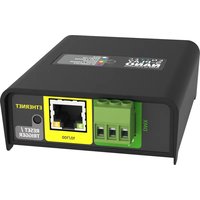


Pick your language and provide your email: we'll send you a specifically translated version.
| Product Type | DMX Player/Controller |
| Brand | Enttec |
| Model | S-Play Nano |
| Category | Lighting |
| Dimensions (approx.) | 100 x 70 x 30 mm |
| Weight | 100 g |
| Power Supply | 5V DC via USB |
| DMX Output | 1 universe (512 channels) |
| Playback | Standalone playback from microSD card |
| Memory | microSD card (not included) |
| Control Interface | Play/Pause, Next, Previous buttons |
| DMX Connector | 3-pin XLR female |
| Firmware Update | Via USB |
| Operating Temperature | 0°C to 40°C |
| Maintenance | Clean with a soft, dry cloth. Do not use solvents. |
| Safety | Use only with provided power supply. Do not expose to moisture. |
| Spare Parts | Not user-serviceable. Contact support for repairs. |
| General Information | Designed for permanent installation or portable use. |
Frequently Asked Questions - S-Play Nano Enttec
How do I connect the S-Play Nano to my DMX fixtures?
Use a standard 3-pin XLR cable from the DMX output to the first fixture. Set the DMX start address on the fixture as programmed in your show file.
What type of microSD card should I use?
Use a microSD card (not included) formatted to FAT32. The card should be class 10 or higher for reliable playback.
How do I load a show onto the device?
Copy your show file (e.g., .ANC or .DDF) onto the microSD card, insert it into the S-Play Nano, and power the device. It will automatically start playback.
Can I control the S-Play Nano via DMX?
Yes, the S-Play Nano can be triggered via DMX values or used as a standalone player. Check the manual for DMX control channels.
How do I update the firmware?
Download the latest firmware from the Enttec website, save it to a USB drive (FAT32), and connect the drive to the S-Play Nano while it is powered on. Follow on-screen prompts.
What power supply is recommended?
Use a 5V USB power adapter with at least 1A output. The included power adapter is recommended.
How many DMX universes does the S-Play Nano support?
It supports one full DMX universe (512 channels).
Can I loop a show?
Yes, the device supports looping. Configure loop settings in the show file or via the control buttons.
What is the maximum length of a show?
The maximum length depends on the microSD card capacity and the show file size. Typically, several hours of playback are possible.
How do I reset the device?
Unplug the power, wait 10 seconds, and reconnect. For factory reset, hold the Play button while powering on.
User questions about S-Play Nano Enttec
0 question about this device. Answer the ones you know or ask your own.
Ask a new question about this device
No questions yet. Be the first to ask one.
Download the instructions for your Lighting in PDF format for free! Find your manual S-Play Nano - Enttec and take your electronic device back in hand. On this page are published all the documents necessary for the use of your device. S-Play Nano by Enttec.
USER MANUAL S-Play Nano Enttec


Manual assistant
Powered by Anthropic
Waiting for your message
Product information
Brand : Enttec
Model : S-Play Nano
Category : Lighting