Nile - Massage device Zen - Free user manual and instructions
Find the device manual for free Nile Zen in PDF.


| Product Type | Massage Device |
| Brand | Zen |
| Model | Nile |
| Dimensions | 25 x 10 x 15 cm |
| Weight | 1.2 kg |
| Power Supply | Rechargeable lithium-ion battery 2200 mAh |
| Battery Life | Approximately 2 hours |
| Charging Time | 3 hours |
| Massage Types | Percussion, vibration, infrared heat |
| Intensity Levels | 3 levels |
| Included Accessories | 4 interchangeable massage heads |
| Material | ABS and silicone |
| Usage | Body, back, legs, shoulders |
| Care and Cleaning | Clean with a soft, damp cloth after use |
| Safety | Automatic shut-off after 15 minutes, overheat protection |
| Warranty | 2 years |
| Certifications | CE, RoHS |
Frequently Asked Questions - Nile Zen
User questions about Nile Zen
0 question about this device. Answer the ones you know or ask your own.
Ask a new question about this device
Download the instructions for your Massage device in PDF format for free! Find your manual Nile - Zen and take your electronic device back in hand. On this page are published all the documents necessary for the use of your device. Nile by Zen.
USER MANUAL Nile Zen
THIS BOOKLET CONTAINS IMPORTANT SAFETY INFORMATION. PLEASE READ AND KEEP FOR FUTURE REFERENCE.


HOME·BODY·SOUL
⚠️ READ INSTRUCTIONS CAREFULLY BEFORE USING THIS DEVICE. RETAIN INSTRUCTIONS FOR FUTURE REFERENCE
WARNINGS AND CAUTIONS
ALWAYS unplug the appliance from the electrical outlet immediately after using and before cleaning. To disconnect, turn all controls to the 'OFF' position, then remove plug from outlet.
- This appliance is not intended for use by persons (including children) with reduced physical, sensory or mental capabilities, or lack of experience and knowledge, unless they have been given supervision or instruction concerning use of the appliance by a person responsible for their safety.
Children should be supervised to ensure that they do not play with the appliance. Cleaning, use of the appliance and user maintenance shall not be made by children without supervision.
DANGER
- DO NOT place or store appliance where it could fall or be pulled into liquid. Do not place in or drop into water or other liquid.
- Should the device fall into water or other liquid DO NOT attempt to retrieve it. Instead, switch off and disconnect at the mains power outlet.
- DO NOT attempt to insert metal items (pins, needles) or any other items into the device.
- DO NOT use the device under a blanket or other cover. This risks fire, electrocution, and injury.
WARNING
- Dry your feet carefully after using the appliance to prevent slipping.
- Do not pour hot water above 45°C directly into the machine to avoid potential burns and deformation of the product.
-
After each use and prior to cleaning, ALWAYS disconnect the appliance from the electrical outlet. Ensure all controls are turned to the 'OFF' position before removing the plug.
-
DO NOT use the device if it is damaged, leaks water, or fails to work correctly, or if the power cord or plug is damaged.
- When in use, ensure power cord is kept dry and away from sources of heat.
- Ensure that the air openings of the appliance are never obstructed and remain free of lint and build-up. Refrain from placing on soft surfaces like beds or couches.
- Do not use in areas where aerosol (spray) products are in use or where oxygen is being administered.
• DO NOT attempt to disassemble or repair the appliance. Repair must only ever be undertaken by qualified service personnel. - Do not attempt to plug in or unplug the device while your feet are in the water.
• Make sure hands are dry when using the control panel and when unplugging the device from the mains power.
• Always remain seated during use. Do not stand on or in the unit.
CAUTION
- Do not use this product without water. After use, disconnect the power supply and pour water away after unplugging the power cord.
- Prolonged use at high temperatures (in excess of 30 minutes) may cause the device to overheat. In this event, turn the device off, unplug from the mains power and allow to cool.
- Ensure that the water level always meets the minimum fill line and never exceeds the maximum fill line.
- Do not press on, or place objects on, the splash guard when the device is filled with water.
- DO NOT leave the device unattended when plugged in. Unplug the device from the mains power when not in use.
-
Only ever use the device for the purpose indicated in this user manual and following the instructions therein.
• DO NOT carry or drag the device by its power cable.
• Always use on a flat surface and store on a flat surface. -
Do not use additives in the water (salts, powders, liquid cleansers).
- Do not place heavy objects in the device.
• For indoor use only.
• This product operates on a 220-240 V AC power supply.
SAFETY CAUTIONS:
- NEVER use on infants, the infirm or on a sleeping or unconscious person. DO NOT use on skin that is insensitive to heat.
- If you have any concerns regarding your health, seek advice from a medical professional before using this appliance. DO NOT use as a substitute for medical attention.
• Patients with heart disease, poor blood circulation, severe thrombosis, advanced diabetes, or those who are pregnant, should not use this device without first consulting a doctor.
• DO NOT use if you have any open wounds, areas of discoloration, swelling, or inflammation or where burns or sores are present. - If you experience discomfort or pain at any time while using the device, cease use immediately. In cases of prolonged pain, consult your doctor.
- If you experience persistent erythema (reddening of the skin lasting more than a day) or other skin colour changes persist after using the appliance, discontinue use and seek medical advice.
- Persons with compromised heat pain sensation should not use the appliance, which includes persons under the influence of alcohol and tranquilizers.
- The dust cover of this product contains magnets. Please keep away from people or objects affected by magnetism.
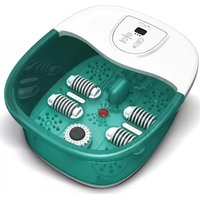
Thank you for your purchase of the Zen Nile foot Spa. This manual explains how to use and gain the maximum benefit from your device.
Product Overview

Display screen – Allows you to see current water temperature and target water temperature
Control panel – Use to activate, adjust, and deactivate Nile's various features
Reflexology nodes – Textured zones providing stimulating pressure to the soles of your feet
Bubble strip – Releases refreshing and invigorating streams of bubbles
Heating element – Warms the water to your desired temperature
Massage rollers – Pass the soles of your feet over these textured rollers for a stress-relieving massage
Red light – Illuminates your spa experience
Pumice stone – To help exfoliate and refresh the skin. This part can be removed and held in your hand for targeted application.
Min./Max. fill lines – Indicate the minimum and maximum levels to which the spa should be filled with water
Control panel - Overview
![graph TD A["Mode Indicator Lights"] --> B["LCD Display Screen"] C["Power On / OFF"] --> D["Set Temperature"] E["ON/OFF"] --> F["LED Display Screen"] G["TEMP"] --> H["LIGHT/Bubbles"] I["VIBRATION"] --> J["Vibration Function"] K["Red Light/Bubble Spa Function"] --> L["Display Screen"]](/content/2026/07/1434958/images/d646c79cc022709851c0c030cb11530d4df7701fc08411e4f51f35e5acec9880.jpg)
Display screen
Displays OF when device is connected to mains and power is OFF
Mode Indicator Lights
Indicate which modes are currently active.
Indicator 1 - Heating mode
Indicator 2 - Bubble spa mode
Indicator 3 - Vibration mode
On/Off
Press once to turn the device ON. The screen will display the current water temperature in °C.
Temp
Allows you to set the target water temperature.
Once the target has been set the spa will heat the water until it reaches the desired temperature.
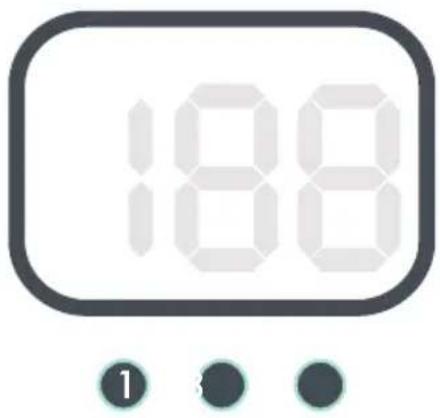

Press the button once to increase the target water temperature by 1° C. The target temperature will be displayed on the LCD screen.
The range of selectable temperatures runs from 35 to 48°C. Repeatedly pressing the button will cycle through the entire temperature range, eventually returning to the start point of 35°C.
Light / Bubble
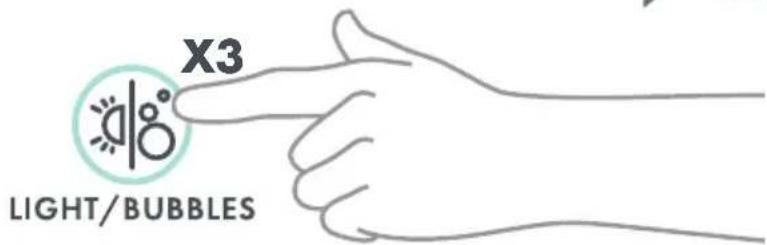
Press to cycle through 3 modes
- Illuminating red light only
- Bubble spa massage only
- Combination red light and bubble spa massage
Vibration
Activates the vibration function

Using your Nile foot spa
Set-up
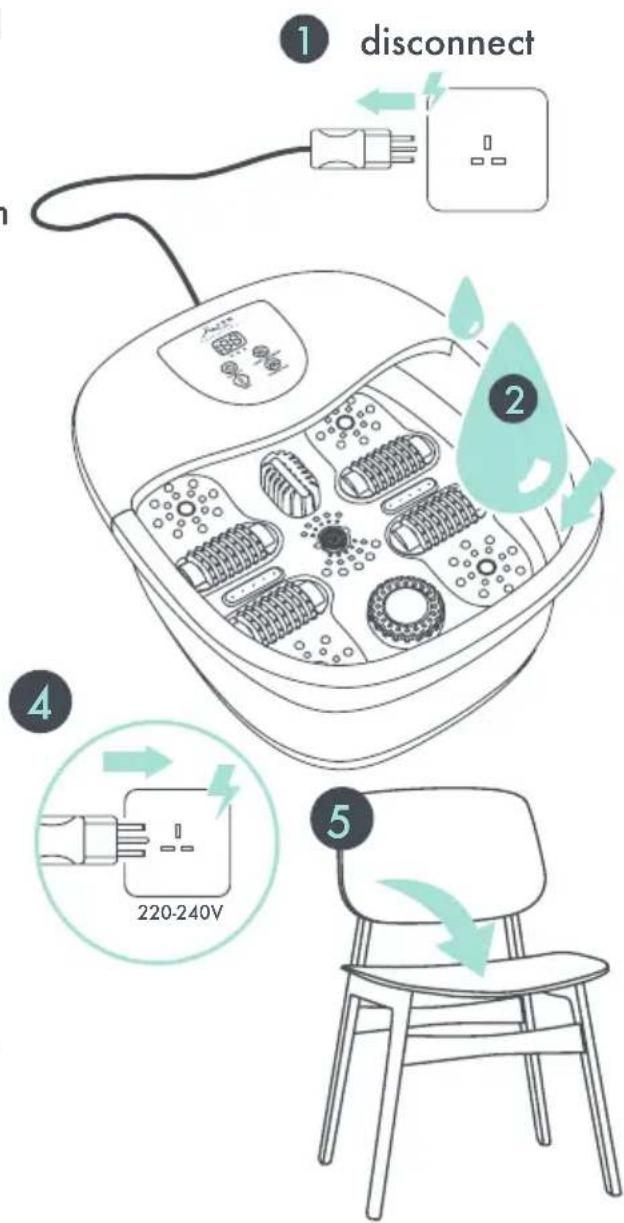
- Before filling the unit with water, first make sure to disconnect it from the mains power.
- Fill with water up to the 'MAX.' fill line indicated on the side of the device.
Note: filling Nile with warm water will help it to heat up more quickly.
- Position the Nile unit on the floor in front of a chair. You can place the device on a towel for added protection against splashes.
- Connect the unit to a 220-240 AC power supply.
- Now take a seat and place your feet in the spa. Note: The basin is 32cm in length, which approximately allows for a maximum 141/2 UK foot size.
Operation
Press the "On/Off" Ⓞ button once to activate Nile.
The LCD display will show the current water temperature.
Use the "Temp" ⏻ button to select your desired water temperature. Press the button repeatedly to cycle through the range of possible temperatures (35 to 48°C). Once selected, the device will start to heat the water to your target temperature.
If at any time the water feels too hot, press the power button ⏻ to turn off the device and allow the water to cool.
To add vibration massage, press the "Vibration" ≈ button. Press again to deactivate this function.
To illuminate the water press "Light/bubbles" once.
To activate bubble massage press "Light/bubbles" 📋 again.
For a combination of light and bubble massage press "Light/bubbles" once more.
Nile's heat, vibration, and bubble functions can be used independently or in combination. Experiment to find your preferred setup.
⚠Warnings and guidance
• Only use the massager while seated. Do not stand in or on the massager.
• Always ensure the device is turned off when not in use and unplugged from the mains power

Cleaning and Maintenance

Disconnect the device and allow to cool down before cleaning. To clean: use a soft, lightly damp cloth or sponge.
DO NOT submerge the device in liquid to clean.


Do NOT use abrasive cleaning agents, brushes, glass/furniture polish, paint thinner, or similar substances.
Storage
Store your Nile in a cool, dry location. Avoid wrapping the power cord around the device or hanging the device from the power cord.
Specification
Model: Nile Foot Spa
Product Dimensions: xxxx
Rated Voltage: xxxxx
Rated Power: xxxW
Time Rating: xx minutes
Noise: xxxdB

HOME·BODY·SOUL
Distributor: QHI Ltd, First Floor, Penrose 2, Penrose Dock, Cork, T23 YY09, Ireland
Customer care: support@zenmassage.shop

WEEE explanation
This marking indicates that this product should not be disposed with other household wastes throughout the EU. To prevent possible harm to the environment or human health from uncontrolled waste disposal, recycle it responsibly to promote the sustainable reuse of material resources. To return your used device, please use the return and collection systems or contact the retailer where the product was purchased. They can take this product for environmental safe recycling.
CE LIVRET CONTIENT DES INFORMATIONS IMPORTANTES SUR LA SÉCURITÉ. VEUILLEZ LE LIRE ET LE CONSERVER POUR RÉFÉRENCE ULTÉRIEURE.


HOME·BODY·SOUL
⚠️ LIRE ATTENTIVEMENT LES INSTRUCTIONS AVANT D'UTILISER CET APPAREIL. CONCERVER CES INSCTRUCTIONS POUR RÉFÉRENCE ULTÉRIEURE.
AVERTISSEMENTS ET MISES EN GARDE


HOME·BODY·SOUL
⚠️ LEES DE INSTRUCTIES ZORGVULDIG DOOR VOORDAT U DIT APPARAAT BLIJFT. GEBRUIKEN INSTRUCTIES VOOR TOEKOMSTIG GEBRUIK.
WAARSCHUWINGEN EN VOORZORGSMAATREGELEN
VEILIGHEIDSWAARSCHUWINGEN:

Operatie
Klantenservice: support@zenmassage.shop

WEEE uitleg

HOME·BODY·SOUL
Operation


HOME·BODY·SOUL
Temperatura
Operación


HOME·BODY·SOUL
⚠️ LEGGERE ATTENTAMENTE LE ISTRUZIONI PRIMA DI UTILIZZARE QUESTO. DISPOSITIVO ISTRUZIONI PER RIFERIMENTO FUTURO


- ⚠️ READ INSTRUCTIONS CAREFULLY BEFORE USING THIS DEVICE. RETAIN INSTRUCTIONS FOR FUTURE REFERENCE
- WARNINGS AND CAUTIONS
- DANGER
- WARNING
- CAUTION
- SAFETY CAUTIONS
- PRODUCT OVERVIEW
- CONTROL PANEL - OVERVIEW
- DISPLAY SCREEN
- MODE INDICATOR LIGHTS
- ON/OFF
- TEMP
- LIGHT / BUBBLE
- PRESS TO CYCLE THROUGH 3 MODES
- VIBRATION
- USING YOUR NILE FOOT SPA
- SET-UP
- OPERATION
- ⚠WARNINGS AND GUIDANCE
- CLEANING AND MAINTENANCE
- STORAGE
- SPECIFICATION
- ⚠️ LIRE ATTENTIVEMENT LES INSTRUCTIONS AVANT D'UTILISER CET APPAREIL. CONCERVER CES INSCTRUCTIONS POUR RÉFÉRENCE ULTÉRIEURE
- AVERTISSEMENTS ET MISES EN GARDE
- ⚠️ LEES DE INSTRUCTIES ZORGVULDIG DOOR VOORDAT U DIT APPARAAT BLIJFT. GEBRUIKEN INSTRUCTIES VOOR TOEKOMSTIG GEBRUIK
- VEILIGHEIDSWAARSCHUWINGEN
- OPERATIE
- TEMPERATURA
- OPERACIÓN
- ⚠️ LEGGERE ATTENTAMENTE LE ISTRUZIONI PRIMA DI UTILIZZARE QUESTO. DISPOSITIVO ISTRUZIONI PER RIFERIMENTO FUTURO
Brand : Zen
Model : Nile
Category : Massage device