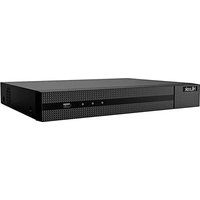
NVR-104MH-C/4P - VCR HiLook - Free user manual and instructions
Find the device manual for free NVR-104MH-C/4P HiLook in PDF.


Pick your language and provide your email: we'll send you a specifically translated version.
| Product Type | Network Video Recorder (NVR) |
| Brand | HiLook |
| Model | NVR-104MH-C/4P |
| Channels | 4 IP camera channels |
| PoE Ports | 4 built-in PoE ports (IEEE 802.3af/at) |
| Video Compression | H.265+/H.265/H.264+/H.264 |
| Recording Resolution | Up to 8MP per channel |
| Storage | 1 SATA HDD up to 6TB |
| Dimensions (W × D × H) | 200 mm × 200 mm × 45 mm |
| Weight | 0.8 kg (without HDD) |
| Power Supply | 48V DC, 2.5A adapter |
| Power Consumption | ≤ 30 W (without HDD) |
| Network Interface | 1 RJ45 10/100/1000 Mbps |
| Video Output | 1 HDMI (up to 1920×1080), 1 VGA |
| Audio | 1 RCA input, 1 RCA output |
| Alarm I/O | 1 input, 1 output |
| USB Ports | 2 USB 2.0 |
| Operating Temperature | -10°C to 55°C |
| Humidity | 10% to 90% non-condensing |
| Mounting | Desktop or wall mount (bracket included) |
| Maintenance | Regular cleaning with dry cloth; avoid liquids |
| Safety | CE, FCC, RoHS compliant |
| Spare Parts | Power adapter, network cables, mounting screws |
| General Information | Plug-and-play setup with HiLook cameras; mobile app support (iVMS-4200, Hik-Connect) |
Frequently Asked Questions - NVR-104MH-C/4P HiLook
How many cameras can I connect to this NVR?
You can connect up to 4 IP cameras directly via PoE ports. Additional cameras can be added via the network if using a switch.
What hard drive is compatible?
The NVR supports one SATA HDD up to 6TB. Use surveillance-grade drives for optimal performance.
Does it support audio recording?
Yes, it has one audio input (RCA) and one output (RCA). Audio recording is supported for cameras with audio input.
Can I view the NVR remotely?
Yes, via the iVMS-4200 software or Hik-Connect mobile app. Ensure the NVR is connected to the internet.
What is the maximum recording resolution?
Each channel can record up to 8MP (3840×2160) resolution at reduced frame rates.
How do I reset the NVR to factory settings?
Press and hold the reset button on the back panel for 10 seconds while powered on. The default IP is 192.168.1.64.
Does it support motion detection?
Yes, motion detection is supported for all channels. You can set up detection zones and triggers.
Can I use non-HiLook cameras?
Yes, as long as they are ONVIF compatible (Profile S or G). Manual configuration may be required.
What is the warranty period?
HiLook typically offers a 2-year warranty from the date of purchase. Check with your retailer for exact terms.
How do I update the firmware?
Download the latest firmware from the HiLook website. Upload via the NVR's web interface or using a USB drive.
User questions about NVR-104MH-C/4P HiLook
0 question about this device. Answer the ones you know or ask your own.
Ask a new question about this device
No questions yet. Be the first to ask one.
Download the instructions for your VCR in PDF format for free! Find your manual NVR-104MH-C/4P - HiLook and take your electronic device back in hand. On this page are published all the documents necessary for the use of your device. NVR-104MH-C/4P by HiLook.
USER MANUAL NVR-104MH-C/4P HiLook


Manual assistant
Powered by Anthropic
Waiting for your message
Product information
Brand : HiLook
Model : NVR-104MH-C/4P
Category : VCR