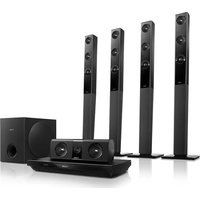
HTB3581 - Home Theater System PHILIPS - Free user manual and instructions
Find the device manual for free HTB3581 PHILIPS in PDF.


Pick your language and provide your email: we'll send you a specifically translated version.
| Product Type | Home Theater System |
| Brand | Philips |
| Model | HTB3581 |
| Channels | 5.1 |
| Total Power Output | 1000 W RMS |
| Main Unit Dimensions (W x H x D) | 435 x 58 x 280 mm |
| Main Unit Weight | 3.5 kg |
| Power Supply | 110-240 V, 50/60 Hz |
| Disc Playback | Blu-ray, DVD, CD |
| Video Features | Full HD 1080p upscaling, 3D Blu-ray |
| Audio Decoders | Dolby TrueHD, DTS-HD Master Audio |
| Connectivity | HDMI (1.4) in/out, USB, Ethernet, Wi-Fi, Bluetooth |
| Smart TV | Yes (with built-in Wi-Fi) |
| Radio Tuner | FM with RDS |
| Optional Speakers | Wireless rear speakers supported |
| Energy Consumption | 90 W (standby < 0.5 W) |
| Accessories Included | Remote control, 2 AAA batteries, FM antenna, HDMI cable, Quick start guide |
| Cleaning and Maintenance | Wipe with a soft dry cloth; clean disc lens with a lens cleaner |
| Safety | Class II, double insulated; do not expose to moisture |
| Spare Parts and Repairability | Contact Philips support; recommended to use original parts |
Frequently Asked Questions - HTB3581 PHILIPS
How do I connect the HTB3581 to my TV?
Use an HDMI cable to connect the HDMI OUT on the main unit to the HDMI IN on your TV. Ensure the TV is set to the correct HDMI input.
Can I play 3D Blu-ray discs?
Yes, the HTB3581 supports 3D Blu-ray playback. You will need a 3D-compatible TV and 3D glasses.
How do I connect wireless rear speakers?
The system supports Philips wireless rear speakers (sold separately). Follow the pairing instructions in the manual to connect them wirelessly.
What audio formats are supported?
The system supports Dolby TrueHD and DTS-HD Master Audio, as well as standard formats like Dolby Digital and DTS.
How do I reset the system to factory settings?
Press and hold the Standby/On button on the main unit for 10 seconds until 'RESET' appears on the display. Confirm with the remote.
Can I stream music via Bluetooth?
Yes, press the Bluetooth button on the remote or main unit to enter pairing mode. Select 'HTB3581' on your device to connect.
What is the maximum USB storage size supported?
The USB port supports FAT32 formatted drives up to 32 GB. Larger capacities may not be recognized.
How do I update the firmware?
Download the latest firmware from the Philips support website onto a USB drive. Insert it into the USB port and follow the on-screen instructions.
The system does not power on. What should I do?
Check the power cord connection and ensure the power outlet is working. Try a different outlet. If still not working, contact Philips support.
Can I use the system as a standalone Bluetooth speaker?
Yes, you can stream audio via Bluetooth to the HTB3581 even without a TV. The system functions as a Bluetooth speaker when in Bluetooth mode.
User questions about HTB3581 PHILIPS
0 question about this device. Answer the ones you know or ask your own.
Ask a new question about this device
No questions yet. Be the first to ask one.
Download the instructions for your Home Theater System in PDF format for free! Find your manual HTB3581 - PHILIPS and take your electronic device back in hand. On this page are published all the documents necessary for the use of your device. HTB3581 by PHILIPS.
USER MANUAL HTB3581 PHILIPS



Manual assistant
Powered by Anthropic
Waiting for your message
Product information
Brand : PHILIPS
Model : HTB3581
Category : Home Theater System