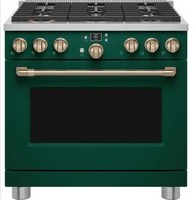
C2Y366P5TG2 - Cooker Café - Free user manual and instructions
Find the device manual for free C2Y366P5TG2 Café in PDF.


Pick your language and provide your email: we'll send you a specifically translated version.
| Product Type | Gas range with electric oven |
| Brand | Café |
| Model | C2Y366P5TG2 |
| Dimensions (W x D x H) | 76.2 cm x 73.7 cm x 91.4 cm |
| Weight | 68 kg |
| Power | Natural gas (convertible to propane) / 240 V, 60 Hz for oven |
| Oven Capacity | 142 L (5 cu ft) |
| Burners | 4 gas burners (power: 1,200 to 18,000 BTU) |
| Ignition | Electronic ignition |
| Cooking Functions | Convection, fan-assisted, broil, slow cook, defrost |
| Cleaning | Self-cleaning by pyrolysis |
| Safety | Overheating protection, child lock, automatic shut-off |
| Material | Stainless steel |
| Repairability Score | 7.5 / 10 |
| Spare Parts | Available (burner caps, grates, burners, bulbs) |
| Warranty | 2 years |
Frequently Asked Questions - C2Y366P5TG2 Café
How to set the oven clock?
Press the Clock button until the display flashes. Use the + and - buttons to set the time. Confirm by pressing Clock again.
How to use the self-cleaning mode?
Remove all racks and accessories. Close the oven door. Press Clean then select the duration (2 to 4 hours). The oven locks automatically and heats to 500°C to burn off residues. Wait for cooling before opening.
What to do if a burner does not light?
Check that the burner caps are properly positioned. Clean the ports with a needle. Make sure the gas supply is open. If the problem persists, contact a professional.
How to switch from natural gas to propane?
This conversion must be done by a qualified technician. You will need the conversion kit supplied with the appliance. Refer to the manual for detailed steps and adjustments of the gas orifice.
The oven does not heat up, what to check?
Check that the oven is properly plugged in and the circuit breaker has not tripped. Make sure the door is fully closed. If the problem persists, the thermostat or heating element may be faulty.
How to clean the oven racks?
The racks can be washed by hand with soapy water or in the dishwasher. For stubborn stains, use a paste of baking soda and water. Dry them thoroughly before replacing.
How to use the convection function?
Select the Convection mode using the function button. The fan distributes heat evenly. Reduce the temperature by 15°C compared to a traditional recipe to avoid drying out food.
How to lock the controls for children?
Press and hold the Lock buttons (or a specific combination) for 3 seconds. An indicator light turns on to show the controls are locked. Repeat the operation to unlock.
What to do if the error code F- appears?
The F- code indicates a temperature sensor fault. Try resetting the appliance by disconnecting power for 30 seconds. If the code reappears, contact technical support.
How to replace the oven bulb?
Make sure the oven is cool and unplugged. Remove the glass cover by turning counterclockwise. Replace the bulb with an identical 40 W halogen bulb. Screw the cover back on.
User questions about C2Y366P5TG2 Café
0 question about this device. Answer the ones you know or ask your own.
Ask a new question about this device
No questions yet. Be the first to ask one.
Download the instructions for your Cooker in PDF format for free! Find your manual C2Y366P5TG2 - Café and take your electronic device back in hand. On this page are published all the documents necessary for the use of your device. C2Y366P5TG2 by Café.
USER MANUAL C2Y366P5TG2 Café
Manual assistant
Powered by Anthropic
Waiting for your message
Product information
Brand : Café
Model : C2Y366P5TG2
Category : Cooker