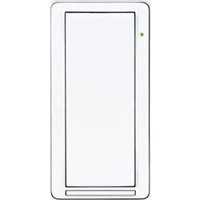
ZUMMESH-DIM-W-S - Smart lighting Crestron - Free user manual and instructions
Find the device manual for free ZUMMESH-DIM-W-S Crestron in PDF.


Pick your language and provide your email: we'll send you a specifically translated version.
| Product Type | Wireless Dimmer Module |
| Part Number | ZUMMESH-DIM-W-S |
| Series | Crestron Zūm Mesh |
| Dimensions (H x W x D) | 2.2 in x 1.8 in x 1.0 in (5.6 cm x 4.6 cm x 2.5 cm) |
| Weight | 3.2 oz (91 g) |
| Power Requirements | 120-277 VAC, 50/60 Hz |
| Maximum Load Rating | 600 W incandescent / 300 W LED |
| Wireless Protocol | Zūm Mesh (2.4 GHz IEEE 802.15.4) |
| Range | Up to 150 ft (45 m) line-of-sight |
| Dimming Capability | Forward-phase (leading edge) dimming |
| Supported Lamp Types | Incandescent, halogen, dimmable LED, dimmable CFL |
| Number of Buttons/Scenes | 1 button with LED indicator; programmable scenes via system |
| Operating Temperature | 32°F to 104°F (0°C to 40°C) |
| Humidity | 10% to 90% non-condensing |
| Mounting Type | Wallbox or remote enclosure |
| Wiring Connections | Line, Neutral, Load, Ground |
| Compliance | UL 60730-1, FCC Part 15, Industry Canada |
| Maintenance | Wipe with dry cloth; do not use liquids or abrasives |
| Safety Notes | Installation must be performed by a qualified electrician in accordance with local codes; disconnect power before servicing |
| Spare Parts and Repairability | No user-serviceable parts; contact Crestron for technical support |
| Warranty | Limited warranty provided by Crestron; refer to documentation |
Frequently Asked Questions - ZUMMESH-DIM-W-S Crestron
What does ZUMMESH-DIM-W-S stand for?
The model ZUMMESH-DIM-W-S indicates a Zūm Mesh wireless dimmer module in white finish, part of the Crestron Zūm lighting control system.
What types of lights are compatible with this dimmer?
It supports incandescent, halogen, dimmable LED, and dimmable CFL bulbs. Check the manual for specific load compatibility.
How do I install the ZUMMESH-DIM-W-S?
Install by a qualified electrician. Connect line, neutral, load, and ground wires according to wiring diagram. Mount in a standard wallbox. Refer to installation guide.
Can I use this dimmer without a neutral wire?
The device requires a neutral connection for proper operation. If your junction box lacks a neutral, consult an electrician for alternatives.
How do I pair the dimmer with other Zūm Mesh devices?
Pairing is done via the Crestron Zūm Mesh Gateway or through the app. Press the button to put the dimmer in pairing mode and follow system prompts.
Why is the LED on the dimmer blinking?
A blinking LED indicates pairing mode or an error. Refer to the manual for blink codes. Solid light means normal operation.
What is the maximum wattage for LED loads?
The maximum rating for LED loads is 300 watts. For incandescent/halogen, it is 600 watts.
Does the dimmer support scene control?
Yes, it integrates with the Zūm Mesh system to recall scenes programmed via keypads or the Crestron app.
How do I clean the dimmer?
Use a dry, soft cloth to wipe the surface. Avoid water or cleaning solvents as they may damage electronics.
How long is the warranty?
Crestron offers a limited warranty (typically 2 years). Contact Crestron support or refer to the warranty card for details.
User questions about ZUMMESH-DIM-W-S Crestron
0 question about this device. Answer the ones you know or ask your own.
Ask a new question about this device
No questions yet. Be the first to ask one.
Download the instructions for your Smart lighting in PDF format for free! Find your manual ZUMMESH-DIM-W-S - Crestron and take your electronic device back in hand. On this page are published all the documents necessary for the use of your device. ZUMMESH-DIM-W-S by Crestron.
USER MANUAL ZUMMESH-DIM-W-S Crestron
Manual assistant
Powered by Anthropic
Waiting for your message
Product information
Brand : Crestron
Model : ZUMMESH-DIM-W-S
Category : Smart lighting