
CM753ET - Monitor HITACHI - Free user manual and instructions
Find the device manual for free CM753ET HITACHI in PDF.


| Product type | CRT Monitor |
| Brand | HITACHI |
| Model | CM753ET |
| Screen size | 19 inches (approx. 48 cm) |
| Maximum resolution | 1600 x 1200 pixels at 75 Hz |
| Refresh rate | Up to 85 Hz |
| Pixel pitch | 0.26 mm |
| Input connectors | VGA (D-sub 15 pin) |
| Dimensions (W x D x H) | 465 x 465 x 460 mm |
| Weight | 22 kg |
| Power supply | 100-240 V, 50/60 Hz |
| Power consumption | 100 W (max) |
| Standards | ENERGY STAR, VESA DPMS |
| Main features | Color display, image adjustments (brightness, contrast, position), power saving mode |
| Maintenance and cleaning | Unplug before cleaning; use a soft dry cloth; do not use abrasive products |
| Safety | Do not open the casing; risk of electric shock; place on a stable surface |
| Spare parts and repairability | No user-serviceable parts; contact a qualified technician |
| General information | 19-inch CRT monitor compatible with PC and Mac |
Frequently Asked Questions - CM753ET HITACHI
User questions about CM753ET HITACHI
0 question about this device. Answer the ones you know or ask your own.
Ask a new question about this device
Download the instructions for your Monitor in PDF format for free! Find your manual CM753ET - HITACHI and take your electronic device back in hand. On this page are published all the documents necessary for the use of your device. CM753ET by HITACHI.
USER MANUAL CM753ET HITACHI
EasyMenu is HITACHI's On Screen Display function for easy operation.
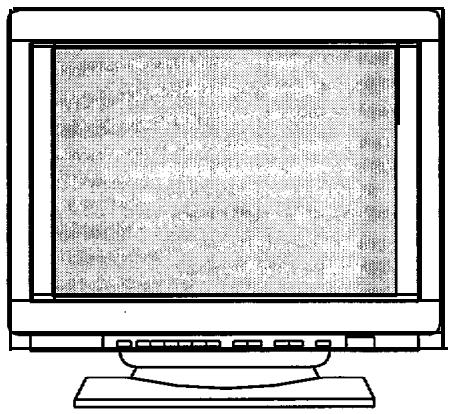
READ THE INSTRUCTIONS INSIDE CAREFULLY. KEEP THIS USER MANUAL FOR FUTURE REFERENCE.
For future reference, record the serial number of your colour monitor.
SERIAL No.
The serial number is located on the rear of the monitor.
This monitor is ENERGY STAR@ compliant when used with a computer equipped with VESA DPMS.
The ENERGY STAR@ emblem does not represent EPA endorsement of any product or service.
As an ENERGY STAR® Partner, Hitachi, Ltd. has determined that this product meets the ENERGY STAR" guidelines for energy efficiency.


NOTE:
The information in this manual is subject to change without notice. The manufacturer assumes no responsibility for any errors that may appear in this manual.
TRADEMARK ACKNOWLEDGEMENT
VGA is a registered trademark of International Business Machines Corporation.
VESA is a trademark of a nonprofit organization, Video Electronics Standard Association.
ENERGY STAR8 is a trademark of Environmental Protection Agency (EPA).
HINWEIS:
The following features are provided by the Colour Monitor.
Sharpest Focus and Highest Contrast
Flat screen Enhanced Dot Pitch (EDP) CRT with anti-glare, dynamic focus circuit, dark glass, and an INVAR shadow mask gives the sharpest focus and highest contrast to minimize eye fatigue.
Wide-range Multi-Scanning
Automatic scanning and automatic adjustment to conform with a wide range of scanning frequencies and user requirements.
Digital Picture Control Function
Position, size, rotation, pincushion, trapezoid, right pincushion and right trapezoid are adjustable by digital controls.
Geometry setting can be stored for different H/V frequencies. Microprocessor-based preset functions can store 26 sets of geometry settings including the standard factory settings.
Digital Colour Control Function
Red, green, and blue colour balance is adjustable by digital control.
An adjusted colour setting can be stored and recalled by the colour select button.
Power Saving System
The Environmental Protection Agency (EPA) has established a voluntary program by which manufacturers enable computer products to go into low power states while not being used. This monitor has a low power "sleep" mode, which is compliant with the EPA requirements for the "ENERGY STAR" program, and will assist you in conserving energy.
Please refer to the section of "POWER SAVING SYSTEM" for details.
EasyMenu
An On Screen Display function that allows direct access to adjust all operations from the front panel.
Moire Reduction
This monitor has horizontal and vertical moire reduction function.
PLUG & PLAY
This monitor is VESA DDC1/2B compliant when used with a computer compliant with VESA DDC (Display Data Channel).

NEVER REMOVE THE REAR COVER!
The rear cover MUST be removed only by authorized service personnel. This colour monitor contains high voltage components.
THE RECEPTACLE SHOULD BE CLOSE TO THE MONITOR AND EASILY ACCESSIBLE!
■ INSTALL THE UNIT IN AN ADEQUATE ENVIRONMENT !
DO NOT expose this monitor to rain or moisture to prevent electric shock or fire hazard. This unit is designed to be used in an office or business environment.
DO NOT subject the unit to vibrations, dust, or corrosive gases.
- KEEP IN A WELL VENTILATED PLACE!
DO NOT cover this monitor or place anything against any sides (not only the top, right and left side but also the rear and bottom side) of unit. Ventilation holes are provided at all sides of the rear cover to prevent the temperature from rising.
- KEEP AWAY FROM HEAT SOURCES!
AVOID placing the unit in direct sunshine or near a heating appliance.
BE CAREFUL OF MAGNETIC FIELDS!
DO NOT place a magnet, loudspeaker system, floppy disk drive, printer, or anything which will generate magnetism near the unit. A magnetic field may cause blurred colours or distortion of the displayed pattern.
BE CAREFUL OF GENERATED MAGNETISM!
After the power has been turned on or "DEGAUSS" button has been pressed, the CRT is demagnetized for approximately 10 seconds. This generates a strong magnetic field around the front cover which may affect the data stored on magnetic tape or disks near the front cover. Place such magnetic recording equipment and tapes/disks away from this unit.
Avoid direct rays of the sun or room lighting onto the CRT screen in order to prevent eye fatigue.
THE ENCLOSED POWER CORD SHALL BE USED IF PROVIDED!
In Europe, a proper European standard approved power cord is to be used with this monitor. For a rated current up to 6 A, a type not lighter than H05VV-F 3G 0.75 mm² or H05VVH2-F 3G 0.75 mm² shall be used.
In USA/Canada, use a UL LISTED/CSA LABELLED or CERTIFIED power cord set meeting the following specifications
Rating: min. 125V, 7A
Length: max. 3.1m
Type: SVT or SJT
Plug type: NEMA 5-15P, Parallel blade, Grounding type, 125V, 10A
Failure to do so may cause fire or electric shock hazard.
USE ONLY THE CORRECT VOLTAGE POWER OUTLET WITH SAFETY GROUND CONNECTION !
100 - 120 V for USA, Canada, etc.
200 - 240 V for Europe, etc.
(This monitor will automatically adjust to the input voltage 100 - 120 I200 - 240V.)
CAUTION for 200 - 240V operation only
This equipment relies on the protective devices in the building installation for short-circuit and overcurrent protection. Refer to the following table for the suitable number and location of the protective devices which should be provided in the building installation.
Protective devices in single - phase equipment or sub - assemblies
| Protection against | Minimum number of fuses or circuit - breaker poles | Location | |
| Equipment to be connected to POWER SYSTEMS with earthed neutral reliably identified | Earth faults | 1 | Both conductors |
| Over-current | 1 | Either of the two conductors | |
| Equipment to be connected to any supply, including IT POWER SYSTEMS and supplies with reversible plugs | Earth faults | 2 | Both conductors |
| Over-current | 1 | Either of the two conductors |
Verify that the protective devices in the building installation meets the conditions in the table prior to installing the equipment.
■ BE CAREFUL OF POWER CORD CONNECTION!
Before inserting the plug of the power cord into a receptacle of the correct voltage, check that the connection portion of the power cord is clean (with no dust). Then, insert the plug of power cord to a receptacle firmly, otherwise it may cause electrical shock or fire.
■REMOVE THE POWER CORD FOR COMPLETE SEPARATION!
For complete separation from the power source, remove the power cord from the monitor or from the wall outlet.
AVOID FREQUENT POWER ON-OFF SWITCHING!
DO NOT repeat OFF and ON in a short period. It may cause blurred colours or distortion of the displayed pattern.
■ BE CAREFUL OF STATIC ELECTRICITY ON CRT SURFACE!
To prevent electrical shock by the static electricity on the CRT surface, disconnect the power cord at least 30 SECONDS AFTER turning off the power.
ABOUT CLEANING
This monitor has a non-glare and anti-electrostatic treatment on the surface of the screen. Use water or alcoholic solvent with soft cloth like gauze to clean the surface of the screen.
NEVER use abrasive, glass cleaner containing highly concentrated ammonia and strong base chemicals since they damage the surface treatment.
Clean the cabinet and controls with a lightly moistened soft cloth.
DO NOT use aerosol sprays, solvents or abrasive cleaners.
FCC (Federal Communications Commission) STATEMENT WARNING
WARNING : This equipment has been tested and found to comply with the limits for a Class B digital device, pursuant to Part 15 of the FCC Rules. These limits are designed to provide reasonable protection against harmful interference in a residential installation. This equipment generates, uses, and can radiate radio frequency energy and, if not installed and used in accordance with the instructions, may cause harmful interference to radio communications. However, there is no guarantee that interference will not occur in a particular installation. If this equipment does cause harmful interference to radio or television reception, which can be determined by turning the equipment off and on, the user is encouraged to try to correct the interference by one or more of the following measures:
Reorient or relocate the receiving antenna.
- Increase the separation between the equipment and receiver.
- Connect the equipment into an outlet on a circuit different from that to which the receiver is connected.
- Consult the dealer or an experienced radio / TV technician for help.
Instructions to Users : This equipment complies with the requirements of FCC (Federal Communication Commission) equipments provided that following conditions are met.
(1) Power cord : Unshielded power cord must be used.
(2) Video inputs : The input signal amplitude must not exceed the specified level.
CAUTION : Changes or modifications not expressly approved by the party responsible for compliance could void the user's authority to operate the equipment.
Declaration of Conformity
According to 47CFR, Part 2 and 15 for
Class B Personal Computers and Peripherals; and I or
CPU Boards and Power Supplies used with Class B Personal Computers:
We: Nissei Sangyo America, Ltd.
Located at: 200 Lowder Brook Drive Suite 2200, Westwood, MA. 02090- 1124 U.S.A.
Declare under sole responsibility that the product identified herein, complies with 47CFR Part 2 and 15 of the FCC rules as a Class B digital device. Each product marketed, is identical to the representative unit tested and found to be compliant with the standards. Records maintained continue to reflect the equipment being produced can be expected to be within the variation accepted, due to quantity production and testing on a statistical basis as required by 47CFR § 2.909. Operation is subject to the following two conditions: (1) This device may not cause harmful interference, and (2) This device must accept any interference received, including interference that may cause undesired operation. The above named party is responsible for ensuring that the equipment complies with the standards of 47CFR § 15.101 to 15.109.
Trade name: Color Monitor
Model Number: CM75/CM752/CM753
Signature of Party Responsible:
Printed name of Party Responsible:
Executed on (Date), at (Place):

Satoshi Tanabe
June 5. 1998.' MA.. U.S.A.
FOR THE CUSTOMERS IN CANADA
NOTICE : This Class B digital apparatus complies with ICES-003.
FOR THE CUSTOMERS IN THE U.K.
THIS PRODUCT IS SUPPLIED WITH A TWO PIN MAINS PLUG FOR USE IN MAINLAND EUROPE. FOR THE U.K. PLEASE REFER TO THE NOTES ON THIS PAGE.
IMPORTANT FOR UNITED KINGDOM
WORDING FOR CLASS I EQUIPMENT INSTRUCTION BOOKS AND LABELS
The mains lead on this equipment is supplied with a moulded plug incorporating a fuse, the value of which is indicated on the pin face of the plug. Should the fuse need to be replaced, an ASTA or BSI approved BS 1362 fuse must be used of the same rating. If the fuse cover is detachable never use the plug with the cover omitted. If a replacement fuse cover is required, ensure it is of the same colour as that visible on the pin face of the plug. Fuse covers are available from your dealer.
DO NOT cut off the mains plug from this equipment. If the plug fitted is not suitable for the power points in your home or the cable is too short to reach a power point, then obtain an appropriate safety approved extension lead or consult your dealer.
Should it be necessary to change the mains plugs, this must be carried out by a competent person, preferably a qualified electrician.
If there is no alternative to cutting off the mains plug, ensure that you dispose of it immediately, having first removed the fuse, to avoid a possible shock hazard by inadvertent connection to the mains supply.
WARNING: THIS EQUIPMENT MUST BE EARTHED
IMPORTANT
The wires in the mains lead are coloured in accordance with the following code:
Green and Yellow = Earth, Blue = Neutral, Brown = Live.
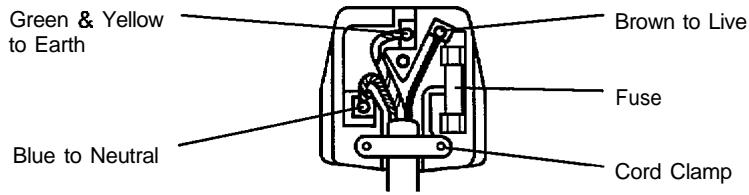
As these colours may not correspond with the coloured markings identifying the terminals in your plug, proceed as follows:
The wire which is coloured GREEN and YELLOW must be connected to the terminal in the plug which is marked with the letter E or by the earth symbol or coloured GREEN or GREEN and YELLOW.
The wire coloured BLUE must be connected to the terminal marked with the letter N or coloured BLUE or BLACK. The wire coloured BROWN must be connected to the terminal marked with the letter L or coloured BROWN or RED.
Install the monitor in the following way, taking care to maintain safety.
1. Installation
Install the monitor on a horizontal base.
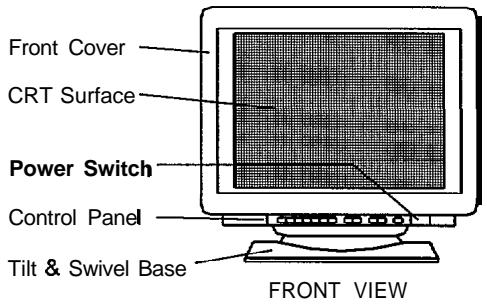
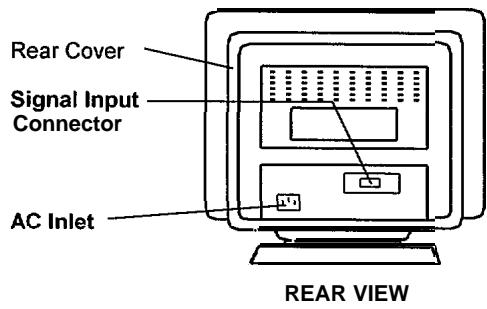
2. Power Cord Connection
① Make sure of using the power cord meeting the safety standard of the country in which you are using the monitor.
② Insert the connector of a power cord to the AC Inlet of the monitor.
③ Insert the plug of the power cord to a receptacle of the correct voltage.
3. Signal Cable Connection
① Insert the connector of a signal cable to the Signal Input Connector of the monitor, with attention to the suitability, and secure the screws on the connector shell firmly.
② Connect the another connector of the signal cable to the host computer.
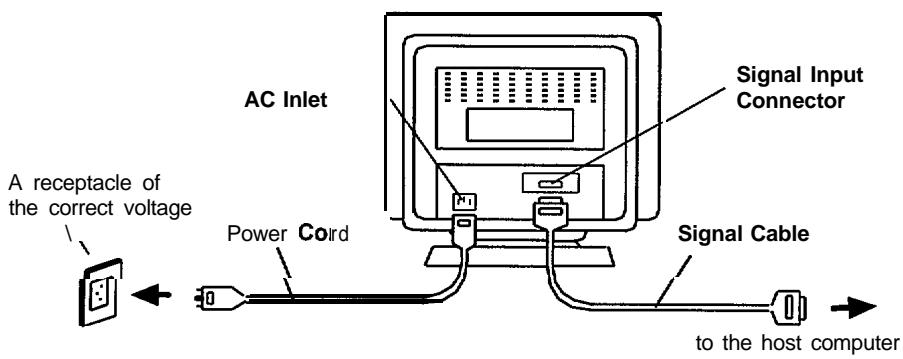
Use a signal cable with the D-Sub Mini 15-pin Connector.
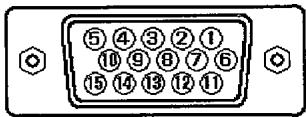
| Pin No. | Signal |
| 1 | Red Video |
| 2 | Green Video (Sync. optional) |
| 3 | Blue Video |
| 4 | No Pin |
| 5 | No connection |
| 6 | Red Ground |
| 7 | Green Ground |
| 8 | Blue Ground |
| 9 | No connection |
| 10 | Ground |
| 11 | No connection |
| 12 | Bi-directional Data [SDA] |
| 13 | H.Sync. (or H/V) |
| 14 | V.Sync. [VCLK] |
| 15 | Data Clock [SCL] |
- If the graphics board supplies more than one type of sync. signal, the sync. signal type will be automatically selected by the monitor, with the priority shown in the following table.
| Sync. Signal Type | Priority |
| H, V Separate Sync. | 1 |
| H/V Composite Sync. | 2 |
| Sync. on Green Video | 3 |
4. Power On
Turn on the Power Switch of the monitor first, then the computer. Refer to Paae 9 "POWER ON/OFF"
NOTICE :
After turning OFF the switch, wait at least 5 seconds to restart the monitor. Otherwise the monitor may operate unusually.
If the picture doesn't appear, turn OFF the power switch, make sure of the following and wait at least 30 seconds to restart the monitor.
Make sure the power switch of the computer, power cord connection, signal cable connection and the input sync. signal are right.
If the colour is impure on the screen after turning ON the monitor, wait for about 10 minutes and press the DEGAUSS button.
STANDARD SETTINGS
Microprocessor-based preset functions can store 26 sets of geometry settings including the standard settings.
The following industrial standard settings have been preprogrammed by the factory.
| No. | Video Mode Name(with Resolution and Vertical Frequency) | Horizontal Frequency | Video Model CM751ETCM752ET | CM753ET | |
| 1 | VGA 640 X 480 -60 Hz | 31.47 kHz | VGA | L | L |
| 2 | VESA 800 X 600 - 85 Hz | 53.67 kHz | VESA | L | L |
| 3 | VESA1024 X 768 - 85 Hz | 68.68 kHz | VESA | L | L |
| 4 | VESA1280 X 1024 - 85 Hz | 91.15 kHz | VESA | L | L |
| 5 | VESA1600 X 1200 - 75 Hz | 93.75 kHz | VESA | L | - |
| 6 | VESA1600 X 1200 - 85 Hz | 106.25 kHz | VESA | - | L |
NOTE :
Input signals with approximately the same frequencies may be regarded as the same signal.
The following horizontal timing conditions are recommended (at sync. H, V separate or H/V composite).
for 31 kHz - 52 kHz horizontal frequency: Horizontal front porch should be more than 0.1 s Horizontal sync. width should be within 1 .O - 3.8 s Horizontal back porch should be more than 1.2 ys. Horizontal blanking width should be more than 3.5 s for 52kHz - 107kHz horizontal frequency: Horizontal front porch should be more than 0.1 s Horizontal sync. width should be within 0.8 - 3.0 s Horizontal back porch should be more than 1 .1 us. Horizontal blanking width should be more than 2.4 s
The following vertical timing conditions are recommended. Vertical front porch should be more than 9 ys. Vertical sync. width should be less than 100 us. Vertical back porch should be more than 400~ s Vertical blanking width should be more than 450 us.
In case the front or back porch is extremely long, or the data display time is extremely short, it may not be able to set the expected size and position.
Standard settings are subject to change without notice.
This monitor is tested and conformed compliance with ZH1/618 and EN29241-3 (ISO9241-3) ergonomics requirement on the following video modes : "VESA 1024 X 768 - 85 Hz" "VESA 1280 X 1024 - 85 Hz"
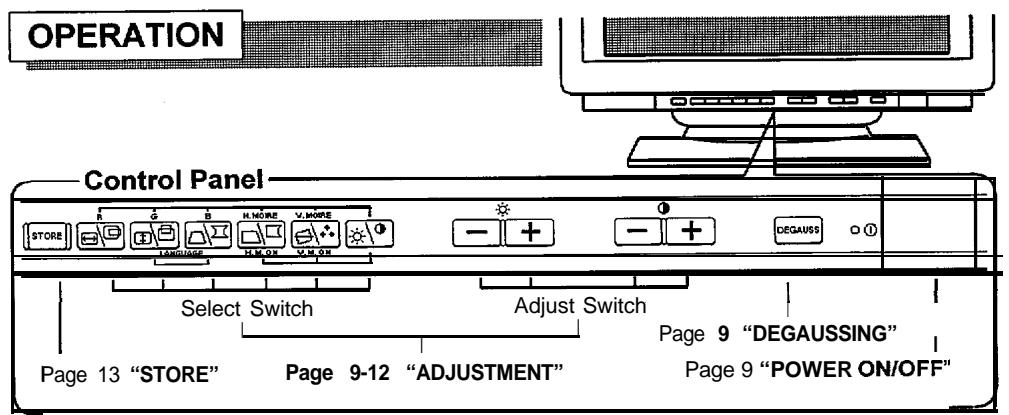
POWER ON/OFF
- Press the Power Switch (Φ), to switch the power ON/OFF.
When power is ON, the power LED lights.
DEGAUSSING
Press the switch degauss, to degauss manually.
Use this function only when you see colour impurities on the screen after turning ON the monitor. Remember, the monitor is automatically degaussed during initial power on.
Wait for about 10 minutes before repeating the function.
ADJUSTMENT
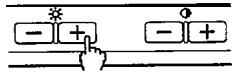
- Press the select switch of the item you want to adjust. Then you can adjust by the adjust switches shown in following tables.
You can store the adjusted condition. Refer to Page 13 "STORE".
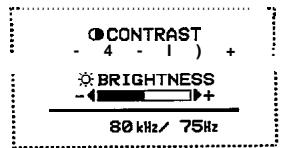
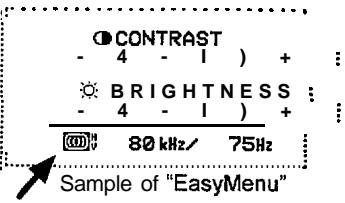
The On Screen Display function of "EasyMenu" shows selected items and adjusting conditions. You can select the EasyMenu Language. See the table below.

Select

Adjust
Sample of "EasyMenu"
| Item | Select Switch | Adjust Switch | Function | |
| Language Select | and simultaneously. | - + - + | changes the language to the next mode. | ENGLISH DEUTSCH ESPANOL ITALIANO FRANÇAIS |
| - + - + | changes the language to the previous mode. | |||
ADJUSTMENT (Continue)
| Item | Select Switch | Adjust Switch | Function |
| Contrast | * -1+ -1+ | makes Contrast brighter excluding background. | |
| * -1+ -1+ | makes Contrast darker excluding background. | ||
| Brightness | * -1+ -1+ | makes Brightness brighter including back-ground | |
| * -1+ -1+ | makes Brightness darker including background. | ||
| H. Position | * -1+ -1+ | moves the position to the right. | |
| * -1+ -1+ | moves the position to the left. | ||
| H. Size | * -1+ -1+ | expands horizontally. | |
| * -1+ -1+ | shrinks horizontally. | ||
| V. Position | * -1+ -1+ | moves the position up. | |
| * -1+ -1+ | moves the position down. | ||
| V. Size | * -1+ -1+ | expands vertically. | |
| * -1+ -1+ | shrinks vertically. | ||
| Rotation | V. MoRRE V. ON | * -1+ -1+ | rotates clockwise. |
| * -1+ -1+ | rotates counter clockwise. | ||
| Pincushion | * -1+ -1+ | curves the left/right sides outwards. | |
| * -1+ -1+ | curves the left/right sides inwards. | ||
| Trapezoid | * -1+ -1+ | expands the top side, and shrinks the bottom side. | |
| * -1+ -1+ | shrinks the top side, and expands the bottom side. |
- When EasyMenu is not shown, you can start the adjustment of Contrast and Brightness only, without pressing any select switch.
It is recommended to follow the following procedures for the adjustment of distortions; "Rotation" "Pincushion" and "Trapezoid" "Right Pincushion" and "Right Trapezoid" (Adjust the left side.) (Adjust the right side.)
ADJUSTMENT (Continue)
| Item | Select Switch | Adjust Switch | Function | ||
| Right Pincushion | H.NOIRE H. | * - + - + - + - + - + - + - + - + - + - + - + - + - + - + - + - + - + - + - + - + - + - + - + - + - + - + - + - + - + - + - + - + - + - + - + - + - + - + - + - + - + - + - + - + - + - + - + - + - + - + -+ - + - + - + - + - + - + - + - + - + - + - + - + - + - + - + - + - + - + - + - + - + - + - + - + - + - + - + - + - + - + - + - + - + - + - + - + - + - + - + - + - + - + - + - + - + - + - + - + - + - - + - + - + - + - + - + - + - + - + - + - + - + - + - + - + - + - + - + - + - + - + - + - + - + - + - + - + - + - + - + - + - + - + - + - + - + - + - + - + - + - + - + - + - + - + - + - + - + - + - = | curves the right side outwards. curves the right side inwards. expands the right top side, and shrinks the right bottom side. $shrinks the right top side, and expands the right bottom side. No.1:9300K ↑- + ↓ No.2:6500K ↑- + ↓ No.3:5000K ↑- + ↓ No.4:User (if available) | ||
| Right Trapezoid | * - + - + - + - + - + - + - + - + - + - + - + - + - + - + - + - + - + - + - + - + - + - + - + - + - + - + - + - + - + - + - + - + - + - + - + - + - + - + - + - + - + - + - + - + - + - + - + - + -+ -+ - + - + - + - + - + - + - + - + - + - + - + - + - + - + - + - + - + - + - + - + - + - + - + - + - + - + - + - + - + - + - + - + - + - + - + - + - + - + - + - + - + - + - + - + - + - + - + - + -+ - | ||||
| Colour Select | V.NOIRE V.M.ON | * - + - + - + - + - + - + - + - + - + - + - + - + - + - + - + - + - + - + - + - + - + - + - + - + - + - + - + - + - + - + - + - + - + - + - + - + - + - + - + - + - + - + - + - + - + - + - + - + - | changes the colour to the next mode. changes the colour to the previous mode. | No.1:9300K ↑- + ↓ No.2:6500K ↑- + ↓ No.3:5000K ↑- + ↓ No.4:User (if available) | |
| Colour Balance | Red | and simultaneously. When Green or Blue is selected. is valid singly. | * - + - + - + - + - + - + - + - + - + - + - + - + - + - + - + - + - + - + - + - + - + - + - + - + - + - + - + - + - + - + - + - + - + - + - + - + - + - + - + - + - + - + - + - + - + - + - + - + | makes the Red stronger. When the Red reaches the upper limit, it makes the Green and Blue weaker. makes the Green and Blue stronger. When the Green or Blue reaches the upper limit, it makes the Red weaker. | When the Red reaches the upper limit, it makes the Green and Blue weaker. When the Green or Blue reaches the upper limit, it makes the Red weaker. |
| Green | and simultaneously. When Blue or Red is selected, is valid singly. | * - + - + - + - + - + - + - + - + - + - + - + - + - + - + - + - + - + - + - + - + - + - + - + - + - + - + - + - + - + - + - + - + - + - + - + - + - + - + - + - + - + - + - + - + - + - + -+ - + - + -+ - + - + - + - + - + - + - + - + - + - + - + - + - + - + - + - + - + - + - + - + - + - + - + - + - + - + - + - + - + - + - + - + - + - + - + - + - + - + - + - + - + - + - + - + - + - + -+ - + - + - | |||
| Blue | and simultaneously. When Green or Red is selected, is valid singly. | * - + - + - + - + - + - + - + - + - + - + - + - + - + - + - + - + - + - + - + - + - + - + - + - + - + - + - + - + - + - + - + - + - + - + - + - + - + - + - + - + - + - + - + - + | makes the Blue stronger. When the Blue reaches the upper limit, it makes the Red and Green weaker. | When the Blue reaches the upper limit, it makes the Red and Green stronger. When the Red or Greene reaches the upper limit, it makes the Blue weaker. | |
| Colour Resel | (This operation is valid only when Red, Green or Blue is selected already.) | * - + - + - + - + - + - + - + - + - + - + - + - + - + - + - + - + - + - + - + - + - + - + - + - + - + - + - + - + - + - + - + - + - + - + - + - + - + - + - + - + - + - + - + - + - + - + - + - + - 2 seconds. | cancels the currently adjusted colour, and calls the colour condition of the previously selected colour mode. | ||
■ The mode "No.4:USER" is not factory set, and it is programmable if desired. After adjustment of "Colour Balance" (Red, Green or Blue) and "STORE" (refer to page 13), your colour balance will be restored by selecting "No.4:User".
ADJUSTMENT (Continue)
| Item | Select Switch | Adjust Switch | Function |
| H. Moire Reduction | H. Moire and H. Moire simultaneously. | * - + - + | operates the horizontal moire changing circuit. |
| * - + - + | stops the horizontal moire changing circuit. | ||
| * - + - + | makes the operation of the horizontal moire changing circuit stronger. | ||
| * - + - + | makes the operation of the horizontal moire changing circuit weaker. | ||
| V. Moire Reduction | V. Moire and V. Moire simultaneously. | * - + - + | operates the vertical moire changing circuit. |
| * - + - + | stops the vertical moire changing circuit. | ||
| * - + - + | makes the operation of the vertical moire changing circuit stronger. | ||
| * - + - + | makes the operation of the vertical moire changing circuit weaker. |
Moire may appear on the screen due to interference between CRT dot pitch and video signal by conditions of video image, display size, display brightness, etc. Adjust the conditions of display size, display brightness, etc., before the adjustment of moir.
In some cases, this function may cause deterioration of display quality, such as focus, jitter, etc.
The condition of the moiré changing circuit will be indicated by pressing the select switch ^ , as the following.
| Indicated symbol | Moire changing circuit condition | |
| Horizontal | Vertical | |
| Hv | ON | ON |
| H | ON | OFF |
| U | OFF | ON |
| not indicated | OFF | OFF |
STORE
- Press the switch [STORE], to store the currently adjusting data, as follows.
| Item | Storing Condition | Restoring Condition |
| H.Position H.Size V.Position V.Size Pincushion Trapezoid Right Pincushion Right Trapezoid H.Moire Reduction V.Moire Reduction | One setting is allowed for each video mode. You can store a maximum 26 sets of geometry settings including the standard settings (refer to page 8 "STANDARD SETTINGS"). ■ If your store is at its maximum already, storing a setting for a new video mode overwrites the oldest user setting. ■ The video mode is distinguished by the horizontal/vertical frequency and polarity of the horizontal/vertical sync. signal. When the video modes are almost similar in these factors however, the video modes may not be discriminated as different. | When the monitor detects the same video mode. |
| Colour Balance (Red, Green, Blue) | One setting is allowed for to the colour balance 'No.4:USER". | When the colour balance "No.4:USER" is selected. |
| Rotation | One setting is allowed. | When the monitor detects a valid signal. |
| Contrast Brightness Colour Select Language Select | One setting is allowed. ■ It is normally not necessary to store them manually. No operation of about 8 seconds stores the currently adjusting data of these items, automatically. |
RESET
- Only when you want to cancel all your storing data, turn ON the power switch (Q) while pressing the
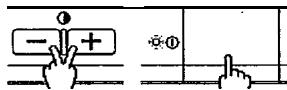
switches -1 + together, to reset to the original standard settings. All your storing data will be lost and the all adjustment condition will be returned to the original settings.
SIGNAL CHECK
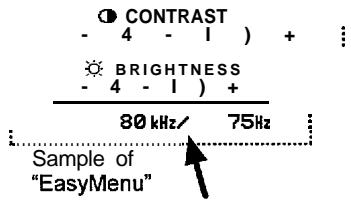
To refer to the input signal condition, press the switch of the (CONTRAST/BRIGHTNESS). The horizontal frequency and vertical frequency will be indicated.
Precision frequency, Horizontal approximately ± 2kHz Vertical approximately ± 2Hz
AUTOMATIC SIGNAL CHECK
- When the monitor has detected the change of the signal input condition, the monitor will indicate the condition automatically, as follows.
| Condition | Indication | Sample of "EasyMenu" |
| When the monitor detects proper signal. | The EasyMenu indicates the horizontal frequency and vertical frequency. ■ Precision frequency, Horizontal approximately ±2 kHz Vertical approximately ±2 Hz | 80 kHz/75Hz |
| When the monitor detects no sync. signal. | The EasyMenu indicates the message "INVALID SYNC." for 5 seconds. ■ Verify power switch of the computer and cable connection. | INVALID SYNC. |
| When the monitor will go into the power saving mode. (Refer to page 15) | The LED of the power switch (①) flashes. ■ Verify power switch of the computer and cable connection. | - |
| When the monitor detects a sync. signal which is out of set-up specification or is unstable. | The EasyMenu indicates the message "INVALID SCAN FREQ". ■ .Verify...the...,specification of input signal. | INVALID SCAN FREQ, INVALID SCAN FREQ, INVALID SCAN FREQ, INVALID SCAN FREQ, INVALID SCAN FREQ, INVALID SCAN FREQ, INVALID SCAN FREQ, INVALID SCAN FREQ, INVALID SCAN FREQ, INVALID SCAN FREQ, INVALID SCAN FREQ, INVALID SCAN FREQ, INVALID SCAN FREQ, INVALID SCAN FREQ, INVALID SCAN FREQ, INVALID SCAN FREQ, INVALID SCAN FREQ, INVALID SCAN FREQ, INVALID SCAN FREQ, INVALID SCAN FREQ, INVALID SCAN FREQ, |
VIDEO MUTING
- When the monitor has detected the change of the signal input condition, the monitor mutes the picture automatically.
This function hides scrambled images which may appear during the changing period of the input signal.
The muting period depends on the time that elapses before the replaced signal becomes stable.
POWER SAVING SYSTEM
- This monitor complies with VESA and ENERGY STAR@ power saving requirements. The power saving system works only when used with VESA DPMS compliant PC's and/or graphic controllers.
| VESA DPMS | Power Saving States | ||||
| Mode | Video | H. Sync. | V. Sync. | Power | Power LED |
| ON | Active | Yes | Yes | 125 W (typical) | Lighting Green |
| Stand-by | Blanked | No | Yes | less than 15 w | Flashing quickly |
| Suspend | Blanked | Yes | No | ||
| OFF | Blanked | No | No | approx. 4 W | Flashing Slowly |
PLUG & PLAY
- This monitor complies with VESA DDC1/2B specifications. Plug & Play is a system with computer, peripherals (including monitors), and operating system. It works when the monitor is connected to DDC ready computer that is running an operating system software that incorporates plug & play functionality.

SPECIFICATIONS
| CRT | 19 inch picture tube, 0.22 mm horizontal dot pitch, (0.21mm horizontal mask pitch), Invar shadow mask, Black matrix, Short persistence phosphors, Dark Tint Anti-Reflection coat. | ||
| Input Signal | Video : 0.70 Vp-p, Analog Sync. : Separate H, V or Composite HN TTL level or Sync. on Green at 0.30 Vp-p | ||
| Synchronization | CM751 ET | CM752ET | |
| Horizontal : 31 - 93 kHz | 31 - 101 .O kHz | 31 - 107 kHz | |
| Vertical : 50 - 160 Hz | 50 - 160 Hz | 50 - 160 Hz | |
| Resolution | Horizontal : Up to 1600 dots Vertical : Up to 1280 lines | ||
| Video Clock Frequency | CM751 ET | CM752ET | |
| 210 MHz | 230 MHz | ||
| (typical) | (typical) | ||
| Viewable Image Size | 18.0 inches (458 mm), diagonal (typical) | ||
| Viewable Image Area | Horizontal : 367 mm (typical) Vertical : 276 mm (typical) | ||
| Colour Temperature | Standard Colour Balance 1 : 9300K Standard Colour Balance 2 : 6500K Standard Colour Balance 3 : 5000K Colour Balance 4 : User defined | ||
| Warm-up Time | 30 minutes to reach optimum performance level. | ||
| Power Supply | AC 100 - 120 / 200 - 240 V, Automatically select. Provided with Power Save Circuit. Power Consumption : 125 W (typical) | ||
| Dimensions | 448 (W) x 454 (H) x 460 (D) mm including Tilt & Swivel base. | ||
| Weight | 25 kg | ||
| Environmental Condition | Operation Storage | ||
| Temperature : 5°C to 40°C | -20°C to 60°C | ||
| Humidity : 10% to 80% | 10% to 90% | ||
Specification and Design are subject to change without notice.
- READ THE INSTRUCTIONS INSIDE CAREFULLY. KEEP THIS USER MANUAL FOR FUTURE REFERENCE.
- NOTE:
- TRADEMARK ACKNOWLEDGEMENT
- HINWEIS:
- Sharpest Focus and Highest Contrast
- Wide-range Multi-Scanning
- Digital Picture Control Function
- Digital Colour Control Function
- Power Saving System
- EasyMenu
- Moire Reduction
- PLUG & PLAY
- NEVER REMOVE THE REAR COVER!
- THE RECEPTACLE SHOULD BE CLOSE TO THE MONITOR AND EASILY ACCESSIBLE!
- ■ INSTALL THE UNIT IN AN ADEQUATE ENVIRONMENT !
- - KEEP IN A WELL VENTILATED PLACE!
- - KEEP AWAY FROM HEAT SOURCES!
- BE CAREFUL OF MAGNETIC FIELDS!
- BE CAREFUL OF GENERATED MAGNETISM!
- THE ENCLOSED POWER CORD SHALL BE USED IF PROVIDED!
- USE ONLY THE CORRECT VOLTAGE POWER OUTLET WITH SAFETY GROUND CONNECTION !
- CAUTION for 200 - 240V operation only
- ■ BE CAREFUL OF POWER CORD CONNECTION!
- ■REMOVE THE POWER CORD FOR COMPLETE SEPARATION!
- AVOID FREQUENT POWER ON-OFF SWITCHING!
- ■ BE CAREFUL OF STATIC ELECTRICITY ON CRT SURFACE!
- ABOUT CLEANING
- FCC (Federal Communications Commission) STATEMENT WARNING
- Declaration of Conformity
- FOR THE CUSTOMERS IN CANADA
- FOR THE CUSTOMERS IN THE U.K.
- IMPORTANT FOR UNITED KINGDOM
- WARNING: THIS EQUIPMENT MUST BE EARTHED
- IMPORTANT
- Installation
- Power Cord Connection
- Signal Cable Connection
- Power On
- NOTICE :
- STANDARD SETTINGS
- NOTE :
- POWER ON/OFF
- DEGAUSSING
- ADJUSTMENT
- STORE
- RESET
- SIGNAL CHECK
- AUTOMATIC SIGNAL CHECK
- VIDEO MUTING
- SPECIFICATIONS
Brand : HITACHI
Model : CM753ET
Category : Monitor