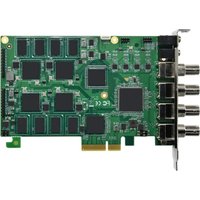
DVP-7635HE - Video Capture Card Advantech - Free user manual and instructions
Find the device manual for free DVP-7635HE Advantech in PDF.


Pick your language and provide your email: we'll send you a specifically translated version.
| Product Type | Digital Video Recorder (DVR) |
| Brand | Advantech |
| Model | DVP-7635HE |
| Video Input Channels | 16 |
| Video Output | 1x HDMI, 1x VGA |
| Audio Input / Output | 1 input, 1 output |
| Recording Resolution | 1080p (1920x1080) |
| Video Compression | H.264 / H.265 |
| Storage Capacity | Up to 2 x 8 TB SATA HDD |
| Network Interface | 10/100/1000 Mbps Ethernet |
| USB Ports | 2x USB 2.0, 1x USB 3.0 |
| Power Supply | AC 100-240V, 50/60Hz, 30W |
| Dimensions (W x D x H) | 430 x 340 x 70 mm |
| Weight | 5.2 kg (without HDD) |
| Operating Temperature | 0°C to 40°C |
| Remote Access | Via mobile app or web browser |
| Motion Detection | Yes, configurable zones |
| Playback | Local and remote playback |
| Backup Methods | USB, network backup |
| Maintenance | Keep ventilated, clean with dry cloth |
| Safety | Connect to grounded outlet; avoid moisture |
| Spare Parts | Power adapter, HDD, cooling fan |
| Included Accessories | Power cord, mouse, mounting brackets |
| Warranty | 2 years |
Frequently Asked Questions - DVP-7635HE Advantech
How do I connect cameras to the DVP-7635HE?
Connect BNC cables from cameras to the video input ports on the back panel. Power the cameras separately or use a power supply. Ensure proper termination (75 ohms).
How do I set up remote viewing on my smartphone?
Download the Advantech surveillance app. Ensure the DVR is connected to your network. Go to Settings > Network > DDNS or use the local IP. Add the device in the app using the IP address, username, and password.
What is the maximum hard drive capacity supported?
The DVP-7635HE supports up to 2 internal SATA hard drives, each up to 8 TB, for a total of 16 TB storage.
How do I format a new hard drive?
Go to Menu > Storage > HDD Management. Select the new HDD and choose 'Format'. The system will prompt for confirmation. Note: formatting erases all data.
Can I connect the DVR to a TV without HDMI?
Yes, use the VGA output. Connect a VGA cable from the DVR to your TV or monitor. You may need to adjust the display resolution in the DVR settings to match your TV.
What should I do if the DVR does not detect cameras?
Check cable connections and camera power. Ensure cameras are set to the correct video output (e.g., NTSC/PAL). Try connecting one camera at a time to identify a faulty cable or camera. Also verify that the DVR video input is not set to 'unused' in the channel setup.
How do I update the firmware?
Download the latest firmware from the Advantech support website. Save it onto a USB drive. Insert the USB into the DVR. Go to Menu > System > Upgrade and select the firmware file. Do not power off during upgrade.
Can I use the DVR without a network connection?
Yes, the DVP-7635HE can operate as a standalone recorder. You can view and playback recordings directly on the connected monitor. Network is only required for remote access and notifications.
How do I set up motion detection alerts?
Go to Menu > Events > Motion Detection. Enable it for selected channels. Adjust sensitivity and area. Then set the action (e.g., send email, trigger alarm) under 'Alarm Output' or 'Network' settings.
What is the default username and password?
The default username is 'admin' and password is 'admin' or blank. For security, change the password immediately after first login via System > User Management.
User questions about DVP-7635HE Advantech
0 question about this device. Answer the ones you know or ask your own.
Ask a new question about this device
No questions yet. Be the first to ask one.
Download the instructions for your Video Capture Card in PDF format for free! Find your manual DVP-7635HE - Advantech and take your electronic device back in hand. On this page are published all the documents necessary for the use of your device. DVP-7635HE by Advantech.
USER MANUAL DVP-7635HE Advantech
Manual assistant
Powered by Anthropic
Waiting for your message
Product information
Brand : Advantech
Model : DVP-7635HE
Category : Video Capture Card