
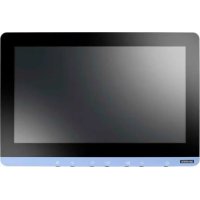
UTC-315H - Laptop Advantech - Free user manual and instructions
Find the device manual for free UTC-315H Advantech in PDF.


Pick your language and provide your email: we'll send you a specifically translated version.
| Product Type | Industrial Panel PC |
| Display Size | 15-inch TFT LCD |
| Resolution | 1024 x 768 pixels |
| Touch Technology | Resistive or projected capacitive |
| Dimensions (W x H x D) | 400 x 300 x 60 mm |
| Weight | 5.0 kg |
| Power Input | 12-24V DC |
| Power Consumption | 30W typical |
| Processor | Intel Atom or Celeron |
| Memory | 4GB DDR3 (max 8GB) |
| Storage | mSATA SSD (32GB/64GB) |
| Operating Temperature | 0°C to 50°C |
| Protection Rating | IP65 (front panel) |
| Mounting | Panel mount, VESA 75/100 |
| I/O Ports | 2x GbE, 4x USB, 2x COM, 1x VGA, 1x Audio |
| Expansion | 1x Mini-PCIe slot |
| OS Support | Windows 10 IoT, Linux |
| Maintenance | Clean with dry soft cloth; avoid liquids |
| Safety Certifications | CE, FCC Class A |
| Spare Parts | Power adapter, mounting kit available from Advantech |
| Repairability | Upgradeable RAM and SSD; contact support for repairs |
Frequently Asked Questions - UTC-315H Advantech
How do I clean the UTC-315H touch screen?
Use a soft, lint-free cloth dry or slightly dampened with water. Avoid alcohol or abrasive cleaners. Turn off the device before cleaning.
Can I mount the UTC-315H on a wall?
Yes, the UTC-315H supports VESA 75mm and 100mm mounting patterns. Use a compatible VESA mount kit.
What operating systems can I install?
The UTC-315H supports Windows 10 IoT and various Linux distributions. Drivers are available from Advantech.
Does the UTC-315H have a fan?
No, it features a fanless design for silent operation and reliability in dusty environments.
How do I connect external devices?
Use the available I/O ports: 2x Gigabit Ethernet, 4x USB 2.0, 2x RS-232/422/485 COM ports, 1x VGA, and 1x audio jack.
What is the power requirement?
The UTC-315H requires a 12-24V DC power input. A power adapter is included with the device.
Can I upgrade the memory or storage?
Yes, the device has a DDR3 SO-DIMM slot (upgradeable to 8GB) and an mSATA slot for storage upgrades. Access via the bottom panel.
Is the UTC-315H waterproof?
The front panel is rated IP65, meaning it is dust-tight and protected against low-pressure water jets. The rear is not sealed.
How do I adjust display settings?
Use the on-screen display (OSD) buttons located on the front bezel to adjust brightness, contrast, and other settings.
Where can I download the user manual?
The user manual is available for free download in PDF format from notice-facile.com or the Advantech support website.
User questions about UTC-315H Advantech
0 question about this device. Answer the ones you know or ask your own.
Ask a new question about this device
No questions yet. Be the first to ask one.
Download the instructions for your Laptop in PDF format for free! Find your manual UTC-315H - Advantech and take your electronic device back in hand. On this page are published all the documents necessary for the use of your device. UTC-315H by Advantech.
USER MANUAL UTC-315H Advantech
Manual assistant
Powered by Anthropic
Waiting for your message
Product information
Brand : Advantech
Model : UTC-315H
Category : Laptop