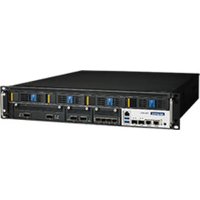
FWA-6070 - Network server Advantech - Free user manual and instructions
Find the device manual for free FWA-6070 Advantech in PDF.


Pick your language and provide your email: we'll send you a specifically translated version.
| Product Type | Network Appliance / Router |
| Dimensions (W x D x H) | 440 x 300 x 44 mm (1U rackmount) |
| Weight | Approx. 6.5 kg |
| Power Supply | 100-240V AC, 50-60 Hz, 250W |
| Processor | Intel Xeon E3-1275 v5 or similar |
| Memory | Up to 32 GB DDR4 ECC |
| Storage | 2 x 2.5" SATA bays, 1 x M.2 slot |
| Network Interfaces | 4 x Gigabit Ethernet, 2 x 10GbE SFP+ |
| Expansion Slots | 2 x PCIe x8 |
| Operating Temperature | 0°C to 40°C |
| Cooling | Dual hot-swappable fans |
| Certifications | CE, FCC, UL |
| Mounting | 19" rackmount kit included |
| LED Indicators | Power, Status, LAN activity |
| Management | Web GUI, CLI, SNMP |
| Maintenance | Accessible internal components for upgrades |
| Cleaning | Use dry cloth; avoid liquids |
| Safety | Overcurrent protection, grounded power cord |
| Spare Parts | Power supply, fan modules, drive trays |
| General Info | Designed for enterprise network security & VPN |
Frequently Asked Questions - FWA-6070 Advantech
What is the default IP address to access the web interface?
The default IP address is usually 192.168.1.1. Check the label on the device or refer to the manual.
How do I reset the FWA-6070 to factory defaults?
Press and hold the reset button on the front panel for about 10 seconds until the status LED blinks rapidly. The device will reboot with factory settings.
What type of power cord does it use?
It uses a standard IEC C13 power cord, typically included in the package.
Can I install third-party software like pfSense?
Yes, the FWA-6070 supports multiple operating systems including pfSense, OPNsense, and other Linux-based distributions.
What is the maximum RAM supported?
The maximum RAM is 32 GB DDR4 ECC, using two 16 GB modules.
How to replace a failed fan?
The fans are hot-swappable. Gently pull the fan module out and insert a new one. Ensure it clicks into place.
Does it support VLAN tagging?
Yes, the device supports 802.1Q VLAN tagging and can be configured via the network settings.
What is the noise level?
Under normal load, the noise level is around 45 dB. It may increase under heavy load.
How to update the firmware?
Download the latest firmware from Advantech's support page, then upload it via the web interface under 'Administration > Firmware Upgrade'.
What certifications does it have?
It is certified with CE, FCC, and UL.
User questions about FWA-6070 Advantech
0 question about this device. Answer the ones you know or ask your own.
Ask a new question about this device
No questions yet. Be the first to ask one.
Download the instructions for your Network server in PDF format for free! Find your manual FWA-6070 - Advantech and take your electronic device back in hand. On this page are published all the documents necessary for the use of your device. FWA-6070 by Advantech.
USER MANUAL FWA-6070 Advantech
Manual assistant
Powered by Anthropic
Waiting for your message
Product information
Brand : Advantech
Model : FWA-6070
Category : Network server