
ICR50 - Home trainer MATRIX - Free user manual and instructions
Find the device manual for free ICR50 MATRIX in PDF.


| Product type | Magnetic resistance home trainer |
| Brand | Matrix |
| Model | ICR50 |
| Dimensions (L x W x H) | Approximately 100 x 50 x 40 cm |
| Weight | Approximately 25 kg |
| Power supply | Self-powered (no batteries) |
| Resistance | Magnetic, adjustable via remote or app |
| Resistance levels | 16 levels |
| Compatibility | Road bikes and MTBs with wheel axle 9x130 or 10x135 mm |
| Connectivity | Bluetooth and ANT+ |
| Compatible apps | Zwift, Kinomap, Strava, etc. |
| Maximum user weight | 120 kg |
| Main features | Hill simulation, interactive training, integrated power meter |
| Maintenance | Clean with a dry cloth; check fastenings regularly |
| Safety | Stabilizer feet, emergency stop brake |
| Spare parts and repairability | Available through Matrix after-sales service |
| Warranty | 2 years |
Frequently Asked Questions - ICR50 MATRIX
User questions about ICR50 MATRIX
0 question about this device. Answer the ones you know or ask your own.
Ask a new question about this device
Download the instructions for your Home trainer in PDF format for free! Find your manual ICR50 - MATRIX and take your electronic device back in hand. On this page are published all the documents necessary for the use of your device. ICR50 by MATRIX.
USER MANUAL ICR50 MATRIX

3 ENGLISH
14 FRANÇAIS
25 ESPAÑOL

WARNING
TO REDUCE THE RISK OF BURNS, FIRE, ELECTRICAL SHOCK OR INJURY TO PERSONS:
- Use this indoor cycle for its intended purpose as described in this manual. Do not use attachments that have not been recommended by the manufacturer.
- Never operate the indoor cycle if it is not working properly, or if it has been damaged. Contact Customer Tech Support or the authorized dealers for examination and repair.
- Do not use the indoor cycle without proper footwear. NEVER operate the indoor cycle with bare feet.
- Do not wear any clothing that might catch on any moving parts of this indoor cycle.
- Keep hands and feet clear at all times from moving parts to avoid injury. Never turn the pedal cranks by hand.
- Do not dismount the indoor cycle until the pedals are at a complete STOP.
- Do not insert any object, hands or feet into any openings, or expose hands, arms or feet to the drive mechanism or other potentially moving part of the indoor cycle.
- Do not use any equipment that is damaged or has worn or broken parts. Use only replacement parts supplied by Customer Tech Support or the authorized dealers.
- Do not operate where aerosol (spray) products are being used or when oxygen is being administered.
- Close supervision is necessary when used near children.
- This equipment is not intended for use by persons with reduced physical, sensory or mental capabilities, or lack of experience and knowledge, unless they have been given supervision or instruction concerning use of the equipment by a person responsible for their safety.
- Ensure that adjustment levers (seat and handlebar fore-and-aft) are properly secured and do not interfere with range of motion during exercise.
- Incorrect or excessive exercise may result in serious injury or death. If you experience any kind of pain, including but not limited to chest pains, nausea, dizziness, or shortness of breath, stop exercising immediately and consult your physician before continuing.
- Do not jump on the unit.
- At no time should more than one person be on unit while in operation.
- This unit should not be used by persons weighing more than specified in the PRODUCT SPECIFICATIONS SECTION. Failure to comply will void the warranty.
- Do not use other attachments that are not recommended by the manufacturer. Attachments may cause injury.
- To clean, wipe surfaces down with soap and slightly damp cloth only; never use solvents. (See MAINTENANCE)
- At NO time should pets or children under the age of 14 be closer to the unit than 10 feet.
- At NO time should children under the age of 14 use the unit.
- Children over the age of 14 should not use the unit without adult supervision.
• Heart rate monitoring systems may be inaccurate.
• After exercising, push down on the brake lever to slow the flywheel down and decrease the potential for injury. - The indoor cycle does not have a independently moving flywheel; the pedals will continue to move together with the flywheel until the flywheel stops.
- Use the stationary training equipment in a supervised environment.
SAVE THESE INSTRUCTIONS
Read the OWNER'S GUIDE before use. When using an electrical product, basic precautions should always be followed, including the following: Read all instructions before using this equipment. It is the responsibility of the owner to ensure that all users of this equipment are adequately informed of all warnings and precautions. If you have any questions after reading this guide, contact Customer Tech Support.
This equipment is intended for in-home use only. Do not use this equipment in any commercial, rental, school or institutional setting. Failure to comply will void the warranty.

DANGER
TO REDUCE THE RISK OF ELECTRICAL SHOCK:
Never operate any product if it appears damaged, or has been immersed in water. Contact Customer Tech Support for replacement or repair.
It is essential that this equipment is used only indoors, in a climate controlled room. If the equipment has been exposed to colder temperatures or high moisture climates, it is strongly recommended that the equipment is warmed up to room temperature before first time use. Failure to do so may cause premature electronic failure.
US ONLY:
This device complies with Part 15 of the FCC Rules. Operation is subject to the following two conditions: (1) this device may not cause harmful interference, and (2) this device must accept any interference received, including interference that may cause undesired operation.


ASSEMBLY
UNPACKING
Unpack the equipment where you will be using it. Place the carton on a level flat surface. It is recommended that you place a protective covering on your floor. Never open box when it is on its side.
IMPORTANT NOTES
During each assembly step, ensure that ALL nuts and bolts are in place and partially threaded.
Several parts have been pre-lubricated to aid in assembly and usage. Please do not wipe this off. If you have difficulty, a light application of lithium grease is recommended.
WARNING!
There are several areas during the assembly process that special attention must be paid. It is very important to follow the assembly instructions correctly and to make sure all parts are firmly tightened. If the assembly instructions are not followed correctly, the equipment could have parts that are not tightened and will seem loose and may cause irritating noises. To prevent damage to the equipment, the assembly instructions must be reviewed and corrective actions should be taken.
TOOLS REQUIRED:
2.5 mm Allen Wrench
5 mm Allen Wrench/Screwdriver
6 mm Allen Wrench
□ Flat Wrench (17mm)
PARTS INCLUDED:
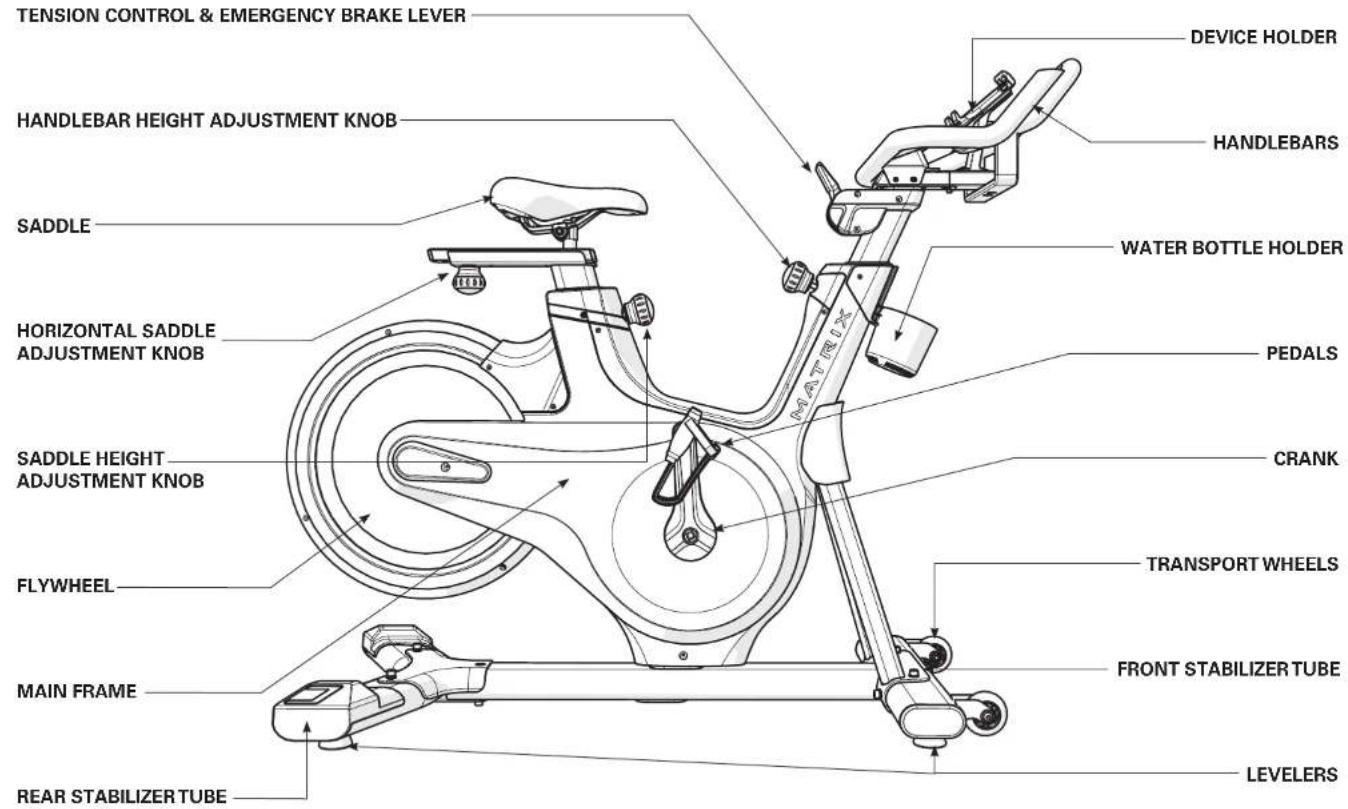
□ 1 Main Frame
□ 1 Front Stabilizer Tube
□ 1 Rear Stabilizer Tube
1 Handlebar Set
□ 1 Bicycle Saddle
2 Pedals
□ 2 Levelers
□ 1 Hardware Kit

SERIAL NUMBER
MODEL: ICR50 MATRIX INDOOR CYCLE
* Use the information above when calling for service.

HSI75N3

ENGLISH
1 Hardware Qty
A Bolt (M8x20L) 7
B Flat Washer (M8) 5
C Arc Washer (M8) 2

3 Hardware Qty
F Screw (remove and discard) 2
G Screw (M4x10L) 2
H Flat Washer 2

2 Hardware Qty
D Bolt (M6x15L) 6
E Flat Washer (M6) 6


4 Hardware Qty
D Bolt (M6x15L) 2
E Flat Washer (M6) 4
1 Bolt (M6x20L) 2
J Screw (M4x12L) 3
K IX only: Screw (M4x15L) 4

OPTIONAL IX DISPLAY

BEFORE YOU BEGIN
LOCATION OF THE EQUIPMENT
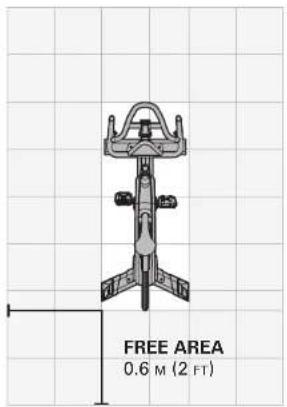
Place the equipment on a level and stable surface away from direct sunlight. The intense UV light can cause discoloration on the plastics. Locate your equipment in an area with cool temperatures and low humidity. Please leave a clear zone on all sides of the equipment that is at least 60 cm (2 ft). This zone must be clear of any obstruction and provide the user a clear exit path from the machine. Do not place the equipment in any area that will block any vent or air openings. The equipment should not be located in a garage, covered patio, near water or outdoors.
MOVING THE EQUIPMENT
Your equipment has a pair of transport wheels built into the front stabilizer tube. To move, firmly grasp the steel portion of the rear stabilizer tube, carefully lift and roll on the transport wheels. Remove the power supply before attempting to move the bike.
WARNING!
Our equipments are heavy, use care and additional help if necessary when moving. Failure to follow these instructions could result in injury.


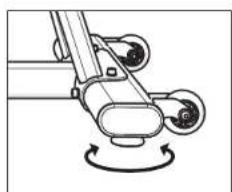
LEVELING THE EQUIPMENT
It is extremely important that the levelers are correctly adjusted for proper operation. Turn leveling foot clockwise to lower and counter-clockwise to raise unit. Adjust each side as needed until the equipment is level. An unbalanced unit may cause belt misalignment or other issues. Use of a level is recommended.

PROPER USAGE
- Sit on the cycle facing the handlebars. Both feet should be on the floor one on each side of the frame.
- To determine proper seat position, sit on the seat and position both feet on the pedals. Your knee should bend slightly at the furthest pedal position. You should be able to pedal without locking your knees or shifting your weight from side to side.
- Adjust pedal straps to desired tightness.
- To get off of the cycle, follow the proper usage steps in reverse.

HOW TO ADJUST THE INDOOR CYCLE
The indoor cycle can be adjusted for maximum comfort and exercise effectiveness. The instructions below describe one approach to adjusting the indoor cycle to ensure optimal user comfort and ideal body positioning; you may choose to adjust the indoor cycle differently.
SADDLE ADJUSTMENT
Proper saddle height helps ensure maximum exercise efficiency and comfort, while reducing the risk of injury. Adjust the saddle height to make sure it's in proper position, one that keeps a slight bend in your knee while your legs are in the extended position
HANDLEBAR ADJUSTMENT
Proper position for the handlebar is based primarily on comfort. Typically, the handlebar should be positioned slightly higher than the saddle for beginning cyclists. Advanced cyclists could try different heights to get the arrangement most suitable for them.
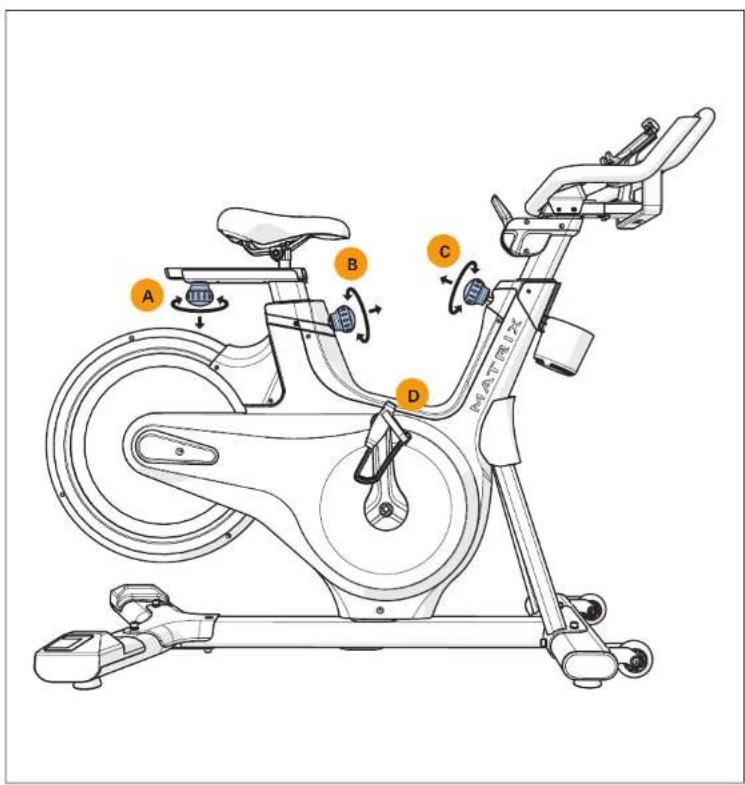
A) SADDLE HORIZONTAL POSITION
Turn the adjustment knob counterclockwise while sliding the saddle forward or backward as desired. Turn the adjustment knob clockwise to lock saddle position. Test the saddle slide for proper operation.
B) SADDLE HEIGHT
Turn the adjustment knob counterclockwise while sliding the saddle up and down with the other hand. Turn the adjustment knob clockwise to lock saddle position.
C) HANDLEBAR HEIGHT
Turn the adjustment knob counterclockwise while raising or lowering the handlebar with the other hand. Turn the adjustment knob clockwise to lock handlebar position.
D) PEDAL STRAPS Place the ball of the foot into the toe cage until the ball of the foot is centered over the pedal, reach down and pull the pedal strap up to tighten prior to use. To remove your foot from the toe cage, loosen the strap and pull out.
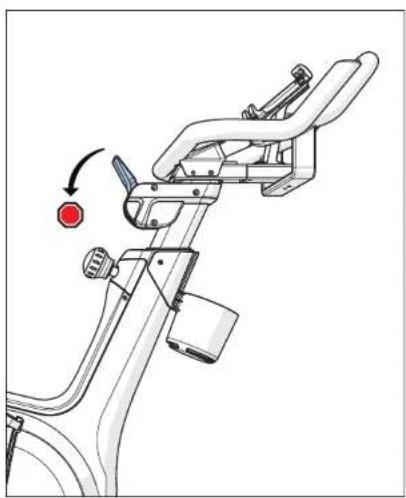
The resistance lever is located in front of the handlebars and provides 11 levels of pedaling resistance. To increase the resistance, push the tension control lever towards the ground. To decrease the resistance, push the lever upwards.
IMPORTANT:
- To stop the flywheel while pedaling, push down hard on the lever.
• The flywheel should quickly come to a complete stop. - Make sure your shoes are fixed into the toe clip or pedal straps.
- Apply full resistance load when the bike is not in use to prevent injuries from moving drive gear components.
WARNING
The indoor cycle does not have a free moving flywheel; the pedals will continue to move together with the flywheel until the flywheel stops. Reducing speed in a controlled manner is required. To stop the flywheel immediately, push down the yellow emergency brake lever. Always pedal in a controlled manner and adjust your desired cadence according to your own abilities. Push the yellow lever down = emergency stop.
The indoor cycle uses a fixed flywheel that builds momentum and will keep the pedals turning even after the user stops pedaling or if the user's feet slip off. DO NOT ATTEMPT TO REMOVE YOUR FEET FROM THE PEDALS OR DISMOUNT THE MACHINE UNTIL BOTH THE PEDALS AND THE FLYWHEEL HAVE COMPLETELY STOPPED. Failure to follow these instructions may lead to loss of control and the potential for serious injury.
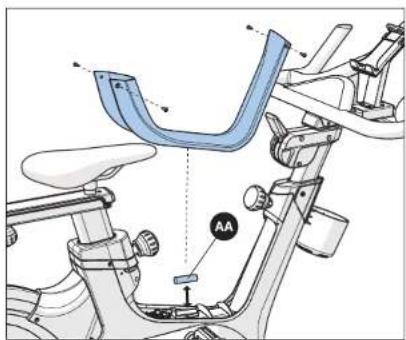
BATTERY REPLACEMENT
If you are not getting workout readings while using the optional console or a third party app, you may need to change the battery (AA).


TROUBLESHOOTING
COMMON PRODUCT QUESTIONS
ARE THE SOUNDS MY EXERCISE BIKE MAKES NORMAL?
Our exercise bikes are some of the quietest available because they use belt drives and friction free magnetic resistance. We use the highest grade bearings and belts to minimize noise. However, because the resistance system itself is so quiet, you will occasionally hear other slight mechanical noises. Unlike older, louder technologies, there are no fans, friction belts, or alternator noises to mask these sounds on our exercise bikes. These mechanical noises, which may or may not be intermittent, are normal and are caused by the transfer of significant amounts of energy to a rapidly spinning flywheel. All bearings, belts and other rotating parts will generate some noise which will transmit through the casing and frame. It is also normal for these sounds to change slightly during a workout and over time because of thermal expansion of the parts.
WHY IS THE EXERCISE BIKE I HAD DELIVERED LOUDER THAN THE ONE AT THE STORE?
All fitness products seem quieter in a large store showroom because there is generally more background noise than in your home. Also, there will be less reverberation on a carpeted concrete floor than on a wood overlay floor. Sometimes a heavy rubber mat will help reduce reverberation through the floor. If a fitness product is placed close to a wall, there will be more reflected noise.
PROBLEM: The exercise bike makes a squeaking or chirping noise
Verify the following:
1) The exercise bike is on a level surface
2) Loosen all bolts attached during the assembly process, grease the threads, and tighten again
PROBLEM: Seat or handlebar post move after locked into position
• Make sure the adjustment knob is tightened
PROBLEM: Clicking noise with each pedal revolution
1) Check shoelaces to make sure the aglet is not tapping the bike as the pedals turn
2) Assure pedal straps are tight and that no excess strap on inner part of pedal is catching on the crank arm as it turns
3) Assure that pedals are tight on crank arms
PROBLEM: Clicking noise when flywheel rotates
1) Ensure nothing is touching flywheel
2) Check for noisy flywheel bearings
3) If flywheel bearings are noisy or rough have authorized service technician replace flywheel hub assembly
PROBLEM: Knocking noise or play felt in pedals/cranks
1) Make sure pedals are tight on crank arms
2) Make sure crank bolts are tight. If loose, apply blue loctite 242 to threads and tighten crank
3) If problem persists check the bottom bracket for looseness
4) If bottom bracket is loose contact authorized service technician for replacement of bottom bracket bearings
PROBLEM: Rocking or movement while in use
1) Using a hex wrench, check the attachment bolts on the front and rear stabilizers and make sure they are tight
2) Assure the bike is level by checking the leveling feet on the bottom of the front and rear stabilizers
MAINTENANCE
WHAT KIND OF ROUTINE MAINTENANCE IS REQUIRED?
Minimal maintenance and cleaning is required. Adhering to this schedule will extend the life of your machine.
We use sealed bearings throughout our bikes so lubrication is not needed. The most important maintenance step is to simply wipe your perspiration off the bike after each use.
HOW DO I CLEAN MY BIKE?
Clean with mild soap and water cleaners only. Never use solvents on plastic parts. Cleanliness of your bike and its operating environment will keep maintenance problems and service calls to a minimum. For this reason, we recommend that the following preventive maintenance schedule be followed.
MAINTENANCE SCHEDULE
| ACTION FREQUENCY | |
| Clean the indoor cycle using soft cloths or paper towels or other Matrix approved solution (cleaning agents should be alcohol and ammonia free). Disinfect the saddle and handlebars and wipe off all bodily residues. | AFTER EACH USE |
| Make sure that the indoor cycle is level and does not rock Ensure that the pedals are tight in crank arms and not crossthreaded, all screws on pedals are tight, and pedal straps are not frayed. | BEFORE EACH USE |
| Clean entire machine using water and a mild soap or other Matrix approved solution (cleaning agents should be alcohol and ammonia free). Clean all exterior parts, the steel frame, front and rear stabilizers, seat and handlebars. | WEEKLY |
| Test the emergency brake to make sure it is functioning properly. To do this, press down the red emergency brake lever while pedaling. When functioning properly, it should immediately slow down the flywheel until it comes to a complete stop. | BI-WEEKLY |
| Inspect all assembly bolts and pedals on the machine for proper tightness. | MONTHLY |
NEED ASSISTANCE?
If this troubleshooting section does not remedy the problem, discontinue use.

Please reference contact information from local service or on the next page for assistance.
The following information may be asked of you when you call. Please have these items readily available:
- Model Name
- Serial Number
• Proof of Purchase (receipt or credit card statement)
Some common troubleshooting questions that may be asked are:
• How long has this problem been occurring?
- Does this problem occur with every use? With every user?
- If you are hearing a noise, does it come from the front or the back? What kind of noise is it (thumping, grinding, squeaking, chirping etc.)?
- Has the machine been maintained per the MAINTENANCE schedule?
Answering these and other questions will give the technicians the ability to send proper replacement parts and the service necessary to get you and your cycle running again!
You may find more troubleshooting suggestions on the customer support section of our website.


CUSTOMER TECH SUPPORT
DO NOT RETURN TO THE RETAILER if you have any problems during assembly or if parts are missing.
For fast and friendly service, please contact one of our trained customer support technicians via phone, email or our website.
1-800-335-4348
www.matrixfitness.com
info@johnsonfit.com
Matrix Fitness
1600 Landmark Drive,
Cottage Grove WI, 53527
We want to know if you have a problem and we want to have an opportunity to correct it for you.
Note: Please read the troubleshooting section before contacting Customer Tech Support. Additional product information is available on our website.
LIMITED HOME USE WARRANTY
WEIGHT CAPACITY: 350 LBS (159 KG)
FRAME: 5 YEARS
Matrix warrants the frame against defects in workmanship and materials for the period specified above from the date of original purchase, so long as the device remains in the possession of the original owner. (The frame is defined as the welded metal base of the unit and does not include any parts that can be removed.
PARTS: 3 YEARS
Matrix warrants the electronic components, finish and all original parts for the period specified above from the date of original purchase, so long as the device remains in the possession of the original owner.
WEAR ITEMS: 1 YEAR
Matrix warrants the wear items (pedals, seat, pedal straps, pedal clips, phone/tablet holder) for the period specified above from the date of original purchase, so long as the device remains in the possession of the original owner.
LABOR: 1 YEAR
Matrix shall cover the labor cost for the repair of the device for the period specified above from the date of the original purchase, so long as the device remains in the possession of the original owner.
LIMITED HOME USE WARRANTY
EXCLUSIONS AND LIMITATIONS
Who IS covered:
• The original owner and is not transferable.
What IS covered:
- Repair or replacement of a defective motor, electronic component, or defective part and is the sole remedy of the warranty.
What IS NOT covered:
- Normal wear and tear, improper assembly or maintenance, or installation of parts or accessories not originally intended or compatible with the equipment as sold.
- Damage or failure due to accident, abuse, corrosion, discoloration of paint or plastic, neglect, theft, vandalism, fire, flood, wind, lightning, freezing, or other natural disasters of any kind, power reduction, fluctuation or failure from whatever cause, unusual atmospheric conditions, collision, introduction of foreign objects into the covered unit, or modifications that are unauthorized or not recommended by Matrix.
- Incidental or consequential damages. Matrix is not responsible or liable for indirect, special or consequential damages, economic loss, loss of property, or profits, loss of enjoyment or use, or other consequential damages of whatsoever nature in connection with the purchase, use, repair or maintenance of the equipment. Matrix does not provide monetary or other compensation for any such repairs or replacement parts costs, including but not limited to gym membership fees, work time lost, diagnostic visits, maintenance visits or transportation.
- Equipment used for commercial purposes or any use other than a single family or Household, unless endorsed by Matrix for coverage.
• Equipment owned or operated outside the US and Canada.
- Delivery, assembly, installation, setup for original or replacement units or labor or other costs associated with removal or replacement of the covered unit.
- Any attempt to repair this equipment creates a risk of injury. Matrix is not responsible or liable for any damage, loss or liability arising from any personal injury incurred during the course of, or as a result of any repair or attempted repair of your fitness equipment by other than an authorized service technician. All repairs attempted by you on your fitness equipment are undertaken AT YOUR OWN RISK and Matrix shall have no liability for any injury to the person or property arising from such repairs.
- If you are out of the manufacturer's warranty but have an extended warranty, refer to your extended warranty contract for contact information regarding requests for extended warranty service or repair.
SERVICE/RETURNS
- In-home service is available within 150 miles of the nearest authorized Service Provider (Mileage beyond 150 miles from an authorized service center is the responsibility of the consumer).
- All returns must be pre-authorized.
- The warranty is limited to replacing or repairing, at the servicer's and/or manufacturer's option, the same or comparable model.
- Defective components may be requested to be returned to the manufacturer upon completion of warranty service using a prepaid return shipping label. If you have been advised to return parts and did not receive a label, please contact Customer Tech Support.
- Replacement units, parts and electronic components reconditioned to as-new condition by the manufacturer or its vendors may sometimes be supplied as warranty replacement and constitute fulfillment of warranty terms.
- This warranty gives you specific legal rights, and your rights may vary from states to state.


AVERTISSEMENT
POUR RÉDUIRE LE RISQUE DE BRÛLURE, D'INCENDIE, DE CHOC ÉLECTRIQUE OU DE BLESSURE :

NIVELLEMENT DE L'ÉQUIPEMENT
UTILISATION APPROPRIÉE
CONTRÔLE DE RÉSISTANCE / FREIN D'URGENCE
REMPLACEMENT DE LA BATTERIE
1600 Landmark Drive,
Cottage Grove WI, 53527
IX PANTALLA OPCIONAL

ANTES DE COMENZAR
USO CORRECTO
© 2020 Johnson Health Tech
Rev 1.2 A ENG FRE SPE


- WARNING
- TO REDUCE THE RISK OF BURNS, FIRE, ELECTRICAL SHOCK OR INJURY TO PERSONS
- SAVE THESE INSTRUCTIONS
- DANGER
- TO REDUCE THE RISK OF ELECTRICAL SHOCK
- US ONLY
- ASSEMBLY
- UNPACKING
- IMPORTANT NOTES
- TOOLS REQUIRED
- PARTS INCLUDED
- SERIAL NUMBER
- MODEL: ICR50 MATRIX INDOOR CYCLE
- 1 HARDWARE QTY
- 3 HARDWARE QTY
- 2 HARDWARE QTY
- 4 HARDWARE QTY
- BEFORE YOU BEGIN
- LOCATION OF THE EQUIPMENT
- MOVING THE EQUIPMENT
- LEVELING THE EQUIPMENT
- PROPER USAGE
- HOW TO ADJUST THE INDOOR CYCLE
- SADDLE ADJUSTMENT
- HANDLEBAR ADJUSTMENT
- IMPORTANT
- BATTERY REPLACEMENT
- TROUBLESHOOTING
- COMMON PRODUCT QUESTIONS
- ARE THE SOUNDS MY EXERCISE BIKE MAKES NORMAL
- WHY IS THE EXERCISE BIKE I HAD DELIVERED LOUDER THAN THE ONE AT THE STORE
- MAINTENANCE
- WHAT KIND OF ROUTINE MAINTENANCE IS REQUIRED
- HOW DO I CLEAN MY BIKE
- NEED ASSISTANCE
- CUSTOMER TECH SUPPORT
- LIMITED HOME USE WARRANTY
- WEIGHT CAPACITY: 350 LBS (159 KG)
- FRAME: 5 YEARS
- PARTS: 3 YEARS
- WEAR ITEMS: 1 YEAR
- LABOR: 1 YEAR
- EXCLUSIONS AND LIMITATIONS
- SERVICE/RETURNS
- AVERTISSEMENT
- POUR RÉDUIRE LE RISQUE DE BRÛLURE, D'INCENDIE, DE CHOC ÉLECTRIQUE OU DE BLESSURE
- NIVELLEMENT DE L'ÉQUIPEMENT
- UTILISATION APPROPRIÉE
- CONTRÔLE DE RÉSISTANCE / FREIN D'URGENCE
- REMPLACEMENT DE LA BATTERIE
- ANTES DE COMENZAR
- USO CORRECTO
Brand : MATRIX
Model : ICR50
Category : Home trainer