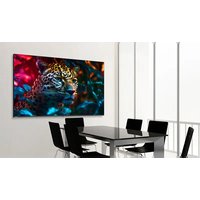
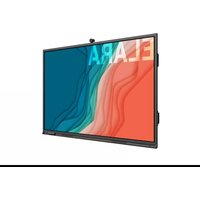
STV-11524-PLUS - Television Newline - Free user manual and instructions
Find the device manual for free STV-11524-PLUS Newline in PDF.


Pick your language and provide your email: we'll send you a specifically translated version.
| Product Type | Interactive Flat Panel Display |
| Screen Size | 75 inches (diagonal) |
| Resolution | 3840 x 2160 (4K UHD) |
| Touch Technology | Infrared, 20-point touch |
| Brightness | 400 cd/m² |
| Contrast Ratio | 4000:1 |
| Built-in System | Android 8.0 or later |
| Connectivity | HDMI (x3), USB 2.0/3.0 (x5), VGA, Ethernet, Audio in/out |
| Dimensions (without stand) | 1708 x 1035 x 86 mm |
| Weight | 45 kg |
| Power Consumption | 220 W (typical), < 0.5 W standby |
| Power Supply | AC 100-240 V, 50/60 Hz |
| Speakers | 2 x 10 W |
| Main Functions | Interactive annotation, wireless screen mirroring (Miracast/AirPlay), built-in whiteboard, OPS slot for PC module |
| Maintenance & Cleaning | Use soft, lint-free cloth; mild soap and water if needed; avoid abrasive cleaners |
| Safety Features | Overheat protection, UL/cUL, CE, FCC certified, tempered glass |
| Spare Parts & Repairability | Spare parts (e.g., touch module, power board) available via authorized service centers; repair by certified technicians |
| General Information | Indoor use only; operating temperature: 0°C to 40°C; humidity: 20% to 80% non-condensing |
Frequently Asked Questions - STV-11524-PLUS Newline
How do I connect my laptop to the Newline STV-11524-PLUS?
Use an HDMI cable to connect from your laptop to one of the HDMI ports on the display. If your laptop supports USB-C, you can use a USB-C to HDMI adapter. For wireless connection, use the built-in screen mirroring feature (Miracast or AirPlay) from your laptop.
Can I use the touch screen with gloves?
The infrared touch technology supports touch from fingers or passive stylus only. Gloves may not be recognized properly unless they are thin capacitive gloves. For better accuracy, remove gloves.
How do I calibrate the touch screen?
Touch calibration is usually not required as the panel comes pre-calibrated. If needed, go to the Android settings menu (accessible via the home screen) and choose 'Touch Calibration' or 'Pen Calibration'. Follow the on-screen instructions.
What is the built-in whiteboard feature and how do I access it?
The built-in whiteboard allows you to draw, annotate, and save notes. Access it by pressing the 'Whiteboard' button on the remote control or the on-screen menu. You can also select it from the Android app drawer. The whiteboard supports multiple colors and eraser tools.
How do I perform a factory reset?
To factory reset, go to Settings > System > Reset Options > Factory Reset. Confirm when prompted. This will erase all data and restore the display to original settings. Note that this does not affect the OPS module if installed.
Why is the screen not responding to touch?
First, ensure the screen is clean and free of obstructions. Check if the touch function is enabled in the settings menu (look for 'Touch Enable'). Restart the display. If problem persists, update the firmware or contact Newline support.
Can I mount the STV-11524-PLUS on a wall?
Yes, the display is VESA compatible (600x400 mm). Use a sturdy wall mount rated for at least 45 kg (100 lbs). Follow the installation instructions provided with the mount and ensure proper wall support.
Does the display support 4K at 60 Hz?
Yes, the display supports 4K resolution (3840x2160) at 60 Hz via HDMI 2.0. For 4K at 60 Hz, use a high-speed HDMI cable and ensure your source device supports HDMI 2.0.
How do I update the firmware?
Firmware updates are available from the Newline support website. Download the update file to a USB drive, insert it into the display's USB port, go to Settings > System > About > Firmware Update, and select the file. Do not power off during update.
What sound output options are available?
The display has built-in speakers (2x10W). For external audio, use the 3.5mm audio out jack or the HDMI ARC port to connect a soundbar or receiver. Audio settings can be adjusted in the menu.
User questions about STV-11524-PLUS Newline
0 question about this device. Answer the ones you know or ask your own.
Ask a new question about this device
No questions yet. Be the first to ask one.
Download the instructions for your Television in PDF format for free! Find your manual STV-11524-PLUS - Newline and take your electronic device back in hand. On this page are published all the documents necessary for the use of your device. STV-11524-PLUS by Newline.
USER MANUAL STV-11524-PLUS Newline
Manual assistant
Powered by Anthropic
Waiting for your message
Product information
Brand : Newline
Model : STV-11524-PLUS
Category : Television