
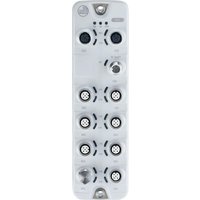
AL5121 - Industrial electronic module IFM - Free user manual and instructions
Find the device manual for free AL5121 IFM in PDF.


Pick your language and provide your email: we'll send you a specifically translated version.
| Product Type | Photoelectric Sensor |
| Model | AL5121 |
| Brand | IFM |
| Dimensions (approx.) | 30 x 20 x 15 mm |
| Weight | 50 g |
| Supply Voltage | 10-30 V DC |
| Output Type | PNP/NPN, NO/NC |
| Detection Range | 0-2 m (depending on object) |
| Housing Material | Stainless steel / Plastic |
| Protection Class | IP67 |
| Ambient Temperature | -25 to 70 °C |
| Functions | Object detection, background suppression, light/dark operation |
| Indicators | LED for output status |
| Connection | M12 connector, 4-pin |
| Maintenance | Clean lens with soft cloth; avoid solvents |
| Safety | Do not operate in explosive atmospheres; follow EMC guidelines |
| Spare Parts | Mounting brackets, reflectors, connectors available |
| General Info | CE certified, RoHS compliant |
Frequently Asked Questions - AL5121 IFM
How do I adjust the sensitivity of the IFM AL5121 sensor?
To adjust sensitivity, turn the potentiometer on the sensor using a small screwdriver. Clockwise increases detection range, counterclockwise decreases. Refer to the manual for exact settings.
What is the maximum cable length for the AL5121?
The maximum cable length depends on supply voltage and load. Typically, up to 100 m for 24 V DC with proper cable cross-section.
Can the AL5121 detect transparent objects?
Yes, the AL5121 can detect transparent objects if using background suppression or through-beam mode with a reflector.
How do I clean the sensor lens?
Use a soft, lint-free cloth. For stubborn dirt, moisten with water or isopropyl alcohol. Avoid abrasive cleaners.
What does the LED indicator mean?
The green LED indicates power on. The yellow/amber LED indicates output is active (object detected). Rapid flashing may indicate a fault.
Is the AL5121 suitable for outdoor use?
With IP67 protection, the AL5121 resists dust and water jets, but prolonged exposure to sunlight or extreme temperatures should be avoided.
How do I switch between light-on and dark-on operation?
The AL5121 has a selector switch or wiring option. Consult manual: typically, connect specific pins or use a jumper to change mode.
What is the response time of the sensor?
The response time is typically <1 ms for fast moving objects.
Can I use the sensor with a PLC?
Yes, the PNP/NPN output is compatible with most PLC inputs. Ensure correct wiring and voltage levels.
Where can I find the full user manual?
The manual can be downloaded for free from notice-facile.com or the IFM website. It includes wiring diagrams and troubleshooting.
User questions about AL5121 IFM
0 question about this device. Answer the ones you know or ask your own.
Ask a new question about this device
No questions yet. Be the first to ask one.
Download the instructions for your Industrial electronic module in PDF format for free! Find your manual AL5121 - IFM and take your electronic device back in hand. On this page are published all the documents necessary for the use of your device. AL5121 by IFM.
USER MANUAL AL5121 IFM



Manual assistant
Powered by Anthropic
Waiting for your message
Product information
Brand : IFM
Model : AL5121
Category : Industrial electronic module