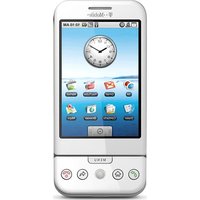
G1 - Mobile Phone T-Mobile - Free user manual and instructions
Find the device manual for free G1 T-Mobile in PDF.


Pick your language and provide your email: we'll send you a specifically translated version.
| Product Type | Smartphone |
| Brand | T-Mobile |
| Model | G1 |
| Dimensions (H x W x D) | 117.7 x 55.7 x 15.7 mm |
| Weight | 158 g |
| Battery Type | Lithium-Ion 1150 mAh (removable) |
| Display | 3.2-inch TFT LCD, 320 x 480 pixels |
| Processor | Qualcomm MSM7201A 528 MHz |
| RAM | 192 MB |
| Storage | 256 MB internal, microSD slot |
| Rear Camera | 3.15 MP, autofocus |
| Front Camera | None |
| Operating System | Android 1.6 Donut (upgradable to 2.2) |
| Connectivity | Wi-Fi 802.11 b/g, Bluetooth 2.0, GPS, microUSB 1.1 |
| Network | GSM 850/900/1800/1900, UMTS 1700/2100 |
| Keyboard | QWERTY slider keyboard |
| Accelerometer | Yes |
| Removable Battery | Yes |
| Talk Time | Up to 5.5 hours |
| Standby Time | Up to 402 hours |
| Repairability Index | 7/10 (battery and back cover replaceable, screen repair possible but delicate) |
Frequently Asked Questions - G1 T-Mobile
How do I perform a factory reset on the T-Mobile G1?
Go to Settings > Privacy > Factory data reset. Note: this erases all data. Backup first.
Can I upgrade the operating system?
Yes, the G1 can be upgraded from Android 1.6 to 2.2 (Froyo) via official updates or custom ROMs.
How do I insert a microSD card?
Remove the back cover and battery. Insert the microSD card into the slot located near the SIM card tray.
Why is my battery draining fast?
Check for apps running in background, disable Wi-Fi and Bluetooth when not needed, and reduce screen brightness.
How can I connect to Wi-Fi?
Go to Settings > Wireless & networks > Wi-Fi. Enable it and select your network.
What type of SIM card does the G1 use?
It uses a standard (mini) SIM card.
How do I take a screenshot?
Press and hold the Power button and the Home button simultaneously.
Is the G1 compatible with modern apps?
Most modern apps require Android 4.0 or higher, so compatibility is limited. Some lightweight apps may work.
How do I clean the screen?
Use a soft, lint-free cloth slightly dampened with water. Avoid harsh chemicals.
How do I replace the battery?
Turn off the phone, remove the back cover by sliding it down, then lift the battery out. Insert a new one with contacts aligned.
User questions about G1 T-Mobile
0 question about this device. Answer the ones you know or ask your own.
Ask a new question about this device
No questions yet. Be the first to ask one.
Download the instructions for your Mobile Phone in PDF format for free! Find your manual G1 - T-Mobile and take your electronic device back in hand. On this page are published all the documents necessary for the use of your device. G1 by T-Mobile.
USER MANUAL G1 T-Mobile
Manual assistant
Powered by Anthropic
Waiting for your message
Product information
Brand : T-Mobile
Model : G1
Category : Mobile Phone