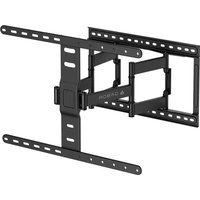
FSM-USX - Flat screen mount Gabor - Free user manual and instructions
Find the device manual for free FSM-USX Gabor in PDF.


Pick your language and provide your email: we'll send you a specifically translated version.
| Product Type | Flat Screen Mount |
| Brand | Gabor |
| Model | FSM-USX |
| VESA Compatibility | Up to 600x400 mm |
| Maximum Weight Capacity | 40 kg (88 lbs) |
| Material | Steel with anti-corrosion coating |
| Color | Black |
| Tilt Range | +5° / -15° |
| Swivel Range | ±90° |
| Rotation (Level Adjustment) | ±3° |
| Distance from Wall | 75 mm to 450 mm (adjustable) |
| Recommended Screen Size | 32" - 65" |
| Mount Type | Full Motion Articulating Arm |
| Cable Management | Yes, with included cable covers |
| Wall Mounting | Stud or concrete wall (hardware included) |
| Tools Required | Included hardware kit, drill, level, screwdriver |
| Weight | Approx. 5.2 kg |
| Package Includes | Mount, hardware kit, cable covers, user manual |
| Warranty | 5 years |
| Safety Certification | TÜV/GS certified |
Frequently Asked Questions - FSM-USX Gabor
What VESA patterns does the Gabor FSM-USX mount support?
The Gabor FSM-USX supports VESA patterns up to 600x400 mm, including common sizes like 200x200, 300x200, 400x400, and 600x400.
What is the maximum weight capacity of this mount?
The maximum weight capacity is 40 kg (88 lbs). Always ensure your screen weighs less than this limit and that the wall is properly reinforced.
Can the FSM-USX be mounted on a plasterboard wall?
It is primarily designed for solid walls (concrete, brick, wood studs). For plasterboard, you must use specialized anchors that can support the weight, and ensure the wall structure is adequate.
How do I adjust the tilt on this mount?
The tilt can be adjusted by loosening the tilt bolts on the arm, setting the desired angle (+5° to -15°), and then tightening the bolts to lock it in place.
Does the mount come with a bubble level for installation?
Yes, the package includes a bubble level to help ensure the mount is perfectly horizontal during installation.
Is the Gabor FSM-USX easy to install?
The mount is designed for DIY installation with clear instructions. It includes all necessary hardware. We recommend using a stud finder and a drill for best results.
What tools do I need to install the Gabor FSM-USX?
You will need a power drill, screwdriver, wrench (provided), a level, and a stud finder (recommended). All mounting hardware is included.
Can this mount hold a curved screen?
Yes, the FSM-USX can hold most curved screens as long as the VESA pattern and weight are within limits. The articulating arm allows for flexible positioning to accommodate the screen's curvature.
How do I manage cables with this mount?
The mount includes cable covers that clip onto the arms, allowing you to route cables neatly along the mount to keep them organized and hidden.
What is the warranty period for the Gabor FSM-USX?
The mount comes with a 5-year warranty from Gabor, covering defects in materials and workmanship.
User questions about FSM-USX Gabor
0 question about this device. Answer the ones you know or ask your own.
Ask a new question about this device
No questions yet. Be the first to ask one.
Download the instructions for your Flat screen mount in PDF format for free! Find your manual FSM-USX - Gabor and take your electronic device back in hand. On this page are published all the documents necessary for the use of your device. FSM-USX by Gabor.
USER MANUAL FSM-USX Gabor
Manual assistant
Powered by Anthropic
Waiting for your message
Product information
Brand : Gabor
Model : FSM-USX
Category : Flat screen mount