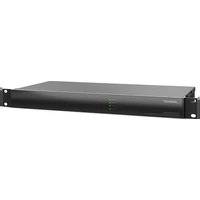
ControlSpace EX-4ML - Processor BOSE - Free user manual and instructions
Find the device manual for free ControlSpace EX-4ML BOSE in PDF.


Pick your language and provide your email: we'll send you a specifically translated version.
| Product Type | Digital Signal Processor |
| Brand | Bose |
| Model | ControlSpace EX-4ML |
| Category | Processor |
| Dimensions (H x W x D) | 1.75 x 19 x 8.5 inches (44 x 483 x 216 mm) |
| Rack Units | 1U |
| Weight | 5.5 lbs (2.5 kg) |
| Power Supply | 100-240 VAC, 50/60 Hz |
| Power Consumption | 25 W (typical) |
| Audio Inputs | 4 analog mic/line inputs (balanced, Phoenix-style) |
| Audio Outputs | 4 analog line outputs (balanced, Phoenix-style) |
| Digital Audio | Dante (2 channels) |
| Processing Power | DSP with 32-bit floating point |
| Sample Rate | 48 kHz |
| Control Protocols | Ethernet (TCP/IP), USB-B for configuration |
| Software | ControlSpace Designer software |
| Mounting | 19-inch rack mountable (brackets included) |
| Operating Temperature | 32°F to 104°F (0°C to 40°C) |
| Humidity | 10% to 90% non-condensing |
| Certifications | CE, FCC, UL |
| Maintenance Instructions | Clean with a dry, lint-free cloth. Do not use solvents or abrasive cleaners. |
| Safety Precautions | Do not expose to rain or moisture. Ensure proper ventilation. Use only provided power cord. |
| Spare Parts and Repairability | Contact Bose professional support for replacement parts and service. |
Frequently Asked Questions - ControlSpace EX-4ML BOSE
What is the Bose ControlSpace EX-4ML?
The ControlSpace EX-4ML is a professional digital signal processor designed for commercial audio systems, offering 4 mic/line inputs and 4 line outputs with Dante connectivity.
How do I install the ControlSpace EX-4ML?
Mount the unit in a standard 19-inch rack using the included brackets. Connect power (100-240V AC) and audio cables. Use ControlSpace Designer software for configuration via Ethernet or USB.
What software is required to configure this processor?
You need ControlSpace Designer software, available for free from Bose's website. It allows full DSP configuration, including routing, EQ, and mixing.
Does the EX-4ML support Dante?
Yes, it includes Dante with 2 channels (1 in, 1 out) for digital audio networking. This allows integration with other Dante-enabled devices.
What type of input connectors are used?
The inputs are balanced Phoenix-style connectors (3.81mm pitch) supporting both mic and line level signals. The outputs also use Phoenix-style connectors.
Can I use the EX-4ML with Bose speakers?
Yes, it is optimized for use with Bose professional speakers and amplifiers. The DSP includes presets for various Bose products.
How do I reset the unit to factory defaults?
Press and hold the Reset button on the front panel for 5 seconds while powering on. Alternatively, use the software to restore factory settings.
What is the maximum input level?
The maximum input level is +24 dBu for mic inputs and +20 dBu for line inputs. The outputs can deliver up to +20 dBu.
Is there a warranty for the EX-4ML?
Bose offers a 5-year limited warranty for the ControlSpace EX-4ML when used in accordance with instructions. Contact Bose support for details.
Can I cascade multiple EX-4ML units?
Yes, multiple units can be cascaded via Dante or analog connections, allowing system expansion for larger installations. Configuration is done in ControlSpace Designer.
User questions about ControlSpace EX-4ML BOSE
0 question about this device. Answer the ones you know or ask your own.
Ask a new question about this device
No questions yet. Be the first to ask one.
Download the instructions for your Processor in PDF format for free! Find your manual ControlSpace EX-4ML - BOSE and take your electronic device back in hand. On this page are published all the documents necessary for the use of your device. ControlSpace EX-4ML by BOSE.
USER MANUAL ControlSpace EX-4ML BOSE

Manual assistant
Powered by Anthropic
Waiting for your message
Product information
Brand : BOSE
Model : ControlSpace EX-4ML
Category : Processor