29250 - Power bank Klein Tools - Free user manual and instructions
Find the device manual for free 29250 Klein Tools in PDF.


| Brand | Klein Tools |
| Model | 29250 |
| Product type | Portable battery |
| Technology | Lithium-ion |
| Nominal voltage | 18 V |
| Capacity | 2.0 Ah |
| Dimensions (L x W x H) | 10 x 7 x 6 cm |
| Weight | 0.5 kg |
| Connector type | Klein Tools tool compatibility |
| External power supply | Dedicated Klein Tools charger |
| Charge indicator | Integrated LED |
| Main functions | Powering Klein Tools portable tools |
| Maintenance and cleaning | Clean with a dry cloth, avoid moisture |
| Storage | Room temperature, away from heat sources |
| Safety | Protection against overcharge, short-circuit and deep discharge |
| Repairability | Non-reparable, sealed unit |
| Country of origin | China |
| Manufacturer warranty | 2 years |
Frequently Asked Questions - 29250 Klein Tools
User questions about 29250 Klein Tools
0 question about this device. Answer the ones you know or ask your own.
Ask a new question about this device
Download the instructions for your Power bank in PDF format for free! Find your manual 29250 - Klein Tools and take your electronic device back in hand. On this page are published all the documents necessary for the use of your device. 29250 by Klein Tools.
USER MANUAL 29250 Klein Tools
ESPAÑOL pág. 5
FRANÇAIS p. 9
CONTENTS
• 29250 Foldable 60W Solar Panel
• 29205 Anderson Power Pole ® (APP ® ) to 8mm
- Instruction Manual
GENERAL SPECIFICATIONS
- Operating Altitude: 6562 ft. (2000m)
• Capacity (Maximum Output): 60W
• Solar Cell Type: Monocrystalline
• DC Output: 60W (Maximum) - Open Circuit Voltage: 22V
• Maximum Power Voltage: 18V
• Port Output (APP®): 18V/3.34A
• USB Output (USB-A): 5V/3.0A - Operating / Storage Altitude: 6562 ft. (2000m)
- Operating / Storage Maximum Humidity: <75% non-condensing
- Operating Temp: 14° to 122°F (-10° to 50°C)
• Storage Temp: 14° to 122°F (-10° to 50°C) - Dimensions: 36.5" x 20.5" x 2" (929 x 522 x 50.8 mm)
• Weight: 5.7lbs (2.6 kg) - Standards: CE, WEEE
Specifications subject to change.
WARNINGS
Read, understand, and follow these instructions to ensure safe operation. Failure to observe these warnings can result in risk of fire, electric shock, serious injury and/or property damage.
- DO NOT use the product that is damaged or modified. Damaged or modified solar panels may exhibit unpredictable behavior resulting in fire, explosion or risk of injury.
- DO NOT subject to impacts or drops. The housing may not show signs of damage, but internal components may have been compromised. It is advisable to replace the unit if any such severe events occur.
- DO NOT expose to open flame, heat sources, equipment that produces heat, or extremes in environmental temperature.
- KEEP AWAY from high voltage devices.
- DO NOT attempt to repair the solar panel. There are no user-serviceable parts.
- DO NOT immerse in water or other liquids. Avoid spilling liquids or falling foreign objects into openings on the enclosure.
- Route the power cables so that it will not be stepped on or pinched by other objects.
- DO NOT attempt to insert other USB connector types into USB-A port. NOT intended for use with plug types or adapters not listed on the product label.
- STOP use immediately if any wires become loose or electronic components are exposed
MAINTENANCE
CLEANING: Be sure device disconnected from all power sources and devices. Use clean, dry, soft, lint-free cloth to wipe down the solar panel surface. Do not use abrasive cleaners or solvents. If necessary, a mild soap and water mix may be used using a damp cloth.
NOTE - Scratching the solar panel surface will impact the performance of the panel
STORAGE: Store in cool temperatures and mild humidity. Avoid storing in direct sunlight for an extended period of time (see GENERAL SPECIFICATIONS). Leaving in a vehicle or other confined spaces in extreme hot temperatures can lead to decrease in service life, overheating, or fire. Extreme cold temperatures below the specified storage range can also harm performance and service life. Keep away from corrosive chemicals and gases. After taking out of storage, inspect visually to make sure device and all accessories look satisfactory. Allow unit to return to ambient conditions before using
FEATURE DETAILS
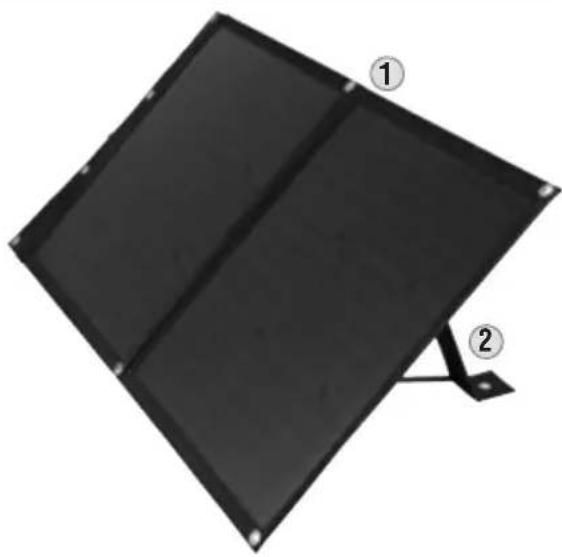
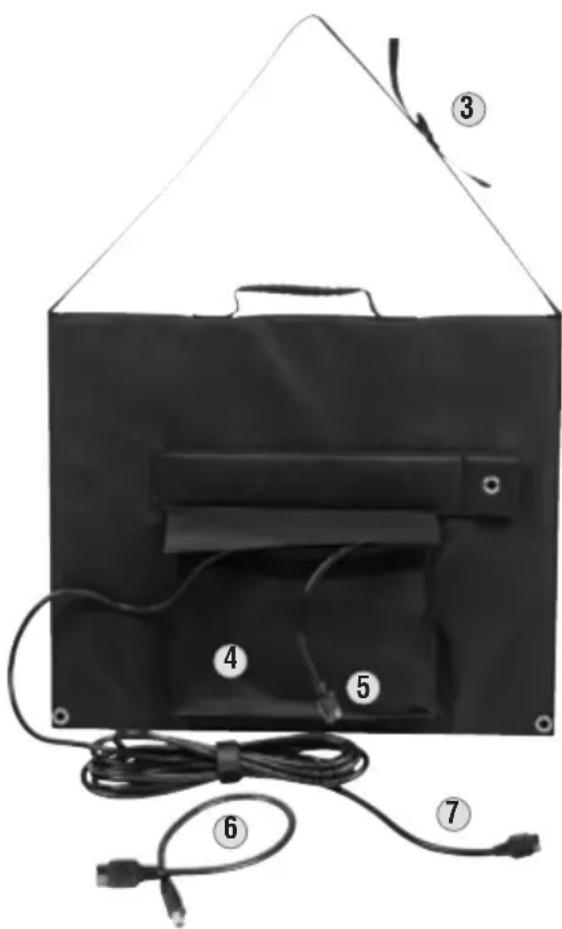
① Mounting hole
② Kickstand(s)
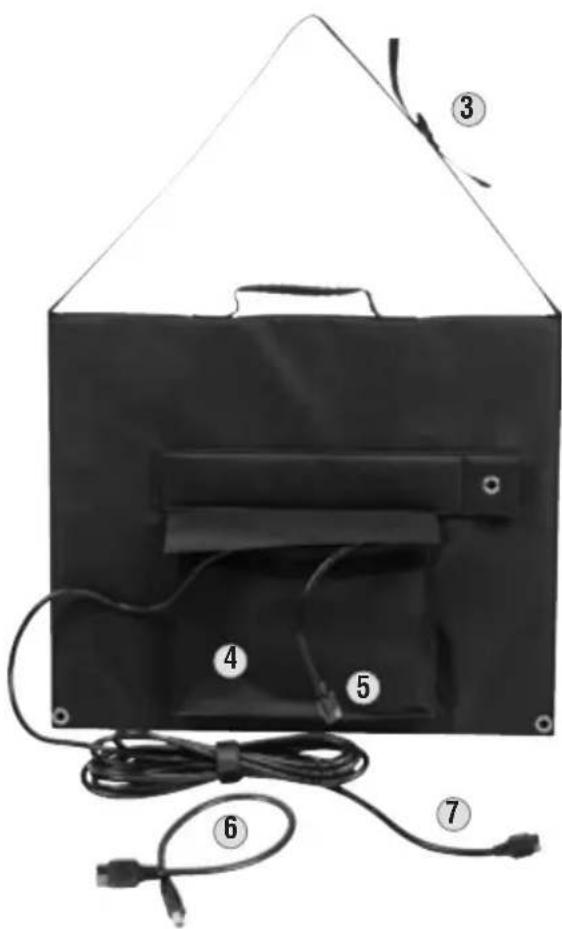
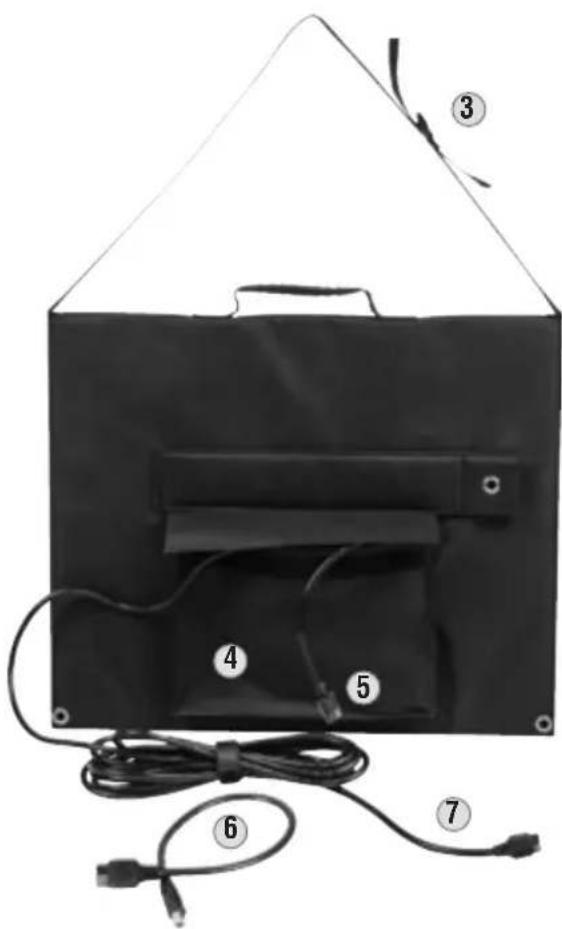
③ Adjustable Shoulder Strap
④ Pocket
CONTROL PANEL FEATURES
⑤ Input port (APP®) to chain an additional solar panel
⑥ Anderson Power Pole® (APP®) to 8mm DC adapter
⑦ Solar Panel Output (APP®)
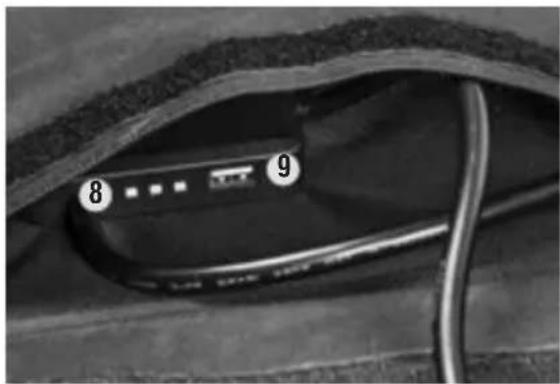
⑧ Power output indicator
⑨ 5V Regulated output (USB-A)
SYMBOLS ON PRODUCT

Warning Caution Symbol
Risk of Electrical Shock
Read instructions
CE – Conforms with European Economic Area Directives
OPERATING INSTRUCTIONS
HOW TO USE:
Unfold the panel and align to the sun. Ensure that no part of the panel is in shade. Connect the output cable (APP®/DC) to the charging port of the portable battery. If using a Klein Tools KTB series portable battery with only an 8mm round port charging input, use the supplier APP® to 8mm adapter (P/N XYS) to connect panel and being charging.
USB Charging
The solar panel has the capability to supply regulated 5V output through the USB-A port. Connect your device that charges via USB-A (5V) to the USB-A Port.
Solar Panel Placement
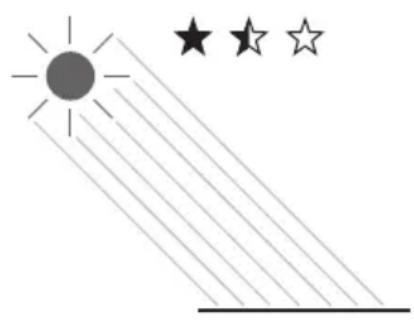
Place the solar panel flat on the ground, or utilizing the kickstand(s) on the reverse side, raise the panel to point toward the sun for improved solar charging capability.
NOTE – The output box has 3 LED lights to correlate to the power output of the panel based upon sunlight position. Use these lights to help position the panel for best power output.

CHAINING
Connecting an additional P/N29250 60W panel is allowable using the input port (APP ® ) connector. The input connector is unregulated, allowing a direct pass-through of power from the additional solar panel to the output port.
NOTE – When connecting additional panels, please consider the limitations of the device charging via the APP® connector.
WARRANTY
www.blackfire.com/warranty
DISPOSAL / RECYCLE

Do not place equipment and its accessories in the trash. Items must be properly disposed of in accordance with local regulations. Please see www.epa.gov or www.erecycle.org for additional information.
CUSTOMER SERVICE
KLEIN TOOLS, INC.
450 Bond Street
Lincolnshire, IL 60069
1-800-553-4876
customerservice@kleintools.com
www.kleintools.com
CONTENIDO
• Panel solar de 60 W plegable 29250
• Anderson Power Pole ® (APP ® ) a 8 mm 29205
- Manual de instrucciones

CONTENU
SYMBOLES SUR LE PRODUIT


INSTRUCTIONS D'UTILISATION
FONCTIONNEMENT

BRANCHEMENT EN CHAÎNE


- CONTENTS
- GENERAL SPECIFICATIONS
- WARNINGS
- MAINTENANCE
- FEATURE DETAILS
- CONTROL PANEL FEATURES
- SYMBOLS ON PRODUCT
- OPERATING INSTRUCTIONS
- HOW TO USE
- USB CHARGING
- SOLAR PANEL PLACEMENT
- CHAINING
- WARRANTY
- DISPOSAL / RECYCLE
- CUSTOMER SERVICE
- CONTENIDO
- CONTENU
- SYMBOLES SUR LE PRODUIT
- INSTRUCTIONS D'UTILISATION
- FONCTIONNEMENT
- BRANCHEMENT EN CHAÎNE
Brand : Klein Tools
Model : 29250
Category : Power bank