Tyxia 1716 - Remote control DELTA DORE - Free user manual and instructions
Find the device manual for free Tyxia 1716 DELTA DORE in PDF.


| Product Type | Wireless Remote Control for Heating Systems |
| Brand | Delta Dore |
| Model | Tyxia 1716 |
| Dimensions (H x W x D) | 125 x 65 x 22 mm |
| Weight | 95 g (including batteries) |
| Power Supply | 2 x AAA alkaline batteries (1.5 V) |
| Battery Life | Approximately 1 year under normal use |
| Wireless Protocol | Delta Dore proprietary radio frequency (868 MHz) |
| Range | Up to 100 m in open field; 30 m indoors |
| Display | Backlit LCD screen with temperature and status icons |
| Main Functions | Temperature adjustment, mode selection (Auto, Manual, Frost Protection), scheduling, boost, holiday mode |
| Compatible Devices | Delta Dore Tyxia and Tydom receivers, compatible heating systems |
| Operating Temperature | 0°C to 50°C |
| Storage Temperature | -10°C to 60°C |
| Protection Rating | IP20 (indoor use only) |
| Certifications | CE, RED compliant |
| Maintenance | Clean with a soft, dry cloth; avoid liquids and abrasives |
| Safety Precautions | Do not expose to water or extreme temperatures; replace batteries with same type |
| Spare Parts & Repairability | Batteries are user-replaceable; no other user-serviceable parts. Contact authorized service for repairs. |
| Environmental Information | Compliant with WEEE directive; recycle batteries responsibly |
Frequently Asked Questions - Tyxia 1716 DELTA DORE
User questions about Tyxia 1716 DELTA DORE
0 question about this device. Answer the ones you know or ask your own.
Ask a new question about this device
Download the instructions for your Remote control in PDF format for free! Find your manual Tyxia 1716 - DELTA DORE and take your electronic device back in hand. On this page are published all the documents necessary for the use of your device. Tyxia 1716 by DELTA DORE.
USER MANUAL Tyxia 1716 DELTA DORE
EN Group remote control

• Power supplied by 3V lithium battery, CR2430
- Class III insulation
• X3D Transmission frequency: 868.7 MHz to 869.2 MHz
• Maximum radio power < 10 mW
- Receiver category II
- Wireless range: 100 to 300 metres outside, variable depending on the associated equipment (the range can vary depending on the installation conditions and the electromagnetic environment)
- Mounted on a base
• Dimensions: 46 x 121 x 10.7 mm
• Degree of protection: IP 40
- Operating temperature: 0 to +55°C
- Storage temperature: -10 to +70°C
- Installation in an environment with normal pollution levels
ContentTechnical characteristics
1/ Location/Mounting 4
1.1 Mounted on the wall 4
1.2 Placed on a flat surface 5
2/ Wireless association 7
3/ Create a group 9
4/ Use 10
5/ Troubleshooting 11
1/ Location/Mounting
1.1 Mounted on the wall

1.2 Placed on a flat surface

WARNING!
Do not ingest battery, chemical Burn Hazard.
This product contains a coin/button cell battery.
If the coin/button cell battery is swallowed, it can cause severe internal burns in just 2 hours and can lead to death.
Keep new and used batteries away from children.
If the battery compartment does not close securely, stop using the product and keep it away from children.
If you think batteries might have been swallowed or placed inside any part of the body, seek immediate medical attention.
2/ Wireless association
This chapter allows you to associate with one or more X3D wireless motor(s), roller shutter receiver(s) or lighting receiver(s). You can associate up to 16 receivers (or motors) per activity or.
① Set all of the motors or receivers for the same «activity» (or) to pending pairing, as follows:
For a motor:
1) If the motor has never been paired: connect it to the power supply. It will activate briefly.
2) If the motor is already paired: from an already paired remote control, press the button down for 3 seconds. The motor activates briefly.
For a receiver: press the button for 3 seconds until the LED flashes.
You can also set the devices to pending pairing via the Tydom application.
② Select the desired "activity" by pressing or
③ On the remote control press and at the same time and hold for 3 seconds, until the LED flashes. Release.
4 After a few seconds, the roller shutters (or lights) turn on briefly when they are associated. The number of associated items (shutters or lights) is displayed on the screen (5).
The association mode is automatically exited when the screen displays.

3/ Create a group
Creating a group allows the simultaneous control of multiple receivers (or motors).
1 Select the desired "Activity" by pressing or, for three seconds until the symbol flashes. Release.

② Press or as many times as required to select the number of the group to create (e.g. 9).
3 Select the receiver (or motor) by pressing on □ as many times as required. The controlled item is activated briefly (roller shutter or lighting).
4 Press to add a group to it. The screen displays "IN". The receiver is associated with the group. or press to remove it from the group. The screen displays "OUT". The receiver is removed from the group.
Repeat stages ③ and ④ for each receiver (or motor). To create another group, repeat stages ②, ③ and ④.

- You can create up to 16 groups per "activity"
- A single receiver can be associated with multiple groups.
- To exit the mode press or for 3 seconds.

4/ Use
1 Select the desired "Activity" by briefly pressing or
2 Press or as many times as required to select the number of the group to control:
- .:Groups 1 to 16
- : Group Total
3 Press, or to control the light(s) or roller shutter(s).
The LED changes from red to green if the receiver has correctly received the information.
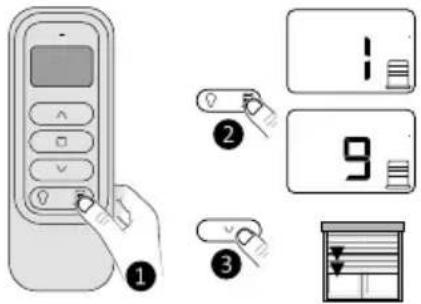
Control in silence mode (Tymoov RP2 motors): In order to reduce the noise level, you can control the motor in slow mode by performing a long press on or (2 seconds).
5/ Troubleshooting

- The screen displays 📄 The battery is low. Change the battery.
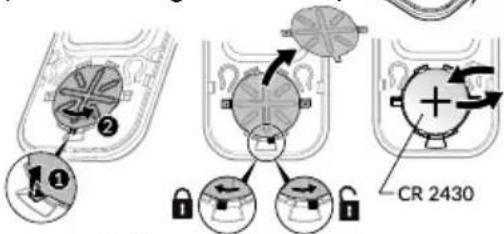
- Remove an association
- Remove the front face of the remote control.
- Press button A. The red LED flashes.
- Press ☐ as many times as required to select the motor (receiver) to remove.
- Press the button.
- Press button A to exit.
- Remove all associations
- Remove the front face of the remote control.
- Press button A. The red LED flashes.
- Press the and buttons at the same time and hold for 3 seconds.
- Press button A to exit.


www.deltadore.com

2705463 Rev.01

Brand : DELTA DORE
Model : Tyxia 1716
Category : Remote control