
CRE-C10 - Hearing aid SONY - Free user manual and instructions
Find the device manual for free CRE-C10 SONY in PDF.


| Product Type | Behind-the-Ear (BTE) Hearing Aid with Receiver-in-Canal |
| Model | Sony CRE-C10 |
| Dimensions | Approx. 30.0 × 15.0 × 10.0 mm (per unit) |
| Weight | Approx. 2.5 g each (including battery) |
| Power Source | Rechargeable lithium-ion battery with charging case |
| Battery Life | Up to 18 hours per charge (typical use) |
| Charging Time | Approx. 3 hours for full charge via USB-C |
| Main Functions | Adaptive noise reduction, feedback cancellation, directional microphones, multi-channel compression |
| Channels | Up to 16 frequency channels for precise tuning |
| Programs | 5 automatic programs (Everyday, Restaurant, Outdoor, Music, TV) |
| Connectivity | Bluetooth® 5.0 for direct streaming from smartphones and TV adapter |
| Smartphone App | Sony Hearing Control app (iOS/Android) for volume, program adjustments, and fine-tuning |
| Water Resistance | IP68 rated – dustproof and water-resistant (up to 1m depth for 30 minutes) |
| Tinnitus Feature | Built-in tinnitus sound therapy (optional masking sounds) |
| Maintenance | Daily cleaning with soft cloth and provided wax filter tool; replace wax filters monthly |
| Safety | Class II medical device; low electromagnetic interference; safe for use with pacemakers (observe 15 cm distance) |
| Spare Parts | Replaceable receiver tubes (size S/M/L), wax filters, ear tips, and charging case available |
| Repairability | User-replaceable receiver and ear tips; professional service available for battery and electronics |
| Warranty | 2 years limited warranty (may vary by region) |
| Package Contents | 2 hearing aids, charging case, USB-C cable, 3 sets of ear tips, cleaning brush, user manual |
Frequently Asked Questions - CRE-C10 SONY
User questions about CRE-C10 SONY
0 question about this device. Answer the ones you know or ask your own.
Ask a new question about this device
Download the instructions for your Hearing aid in PDF format for free! Find your manual CRE-C10 - SONY and take your electronic device back in hand. On this page are published all the documents necessary for the use of your device. CRE-C10 by SONY.
USER MANUAL CRE-C10 SONY
Self-fitting OTC hearing aids CRE-C10

WARNING
If you are younger than 18, do not use this.
You should go to a doctor, preferably an ear-nose-throat doctor (an ENT), because your condition needs specialized care. Over-the-counter hearing aids are only for users who are 18 or older.
This OTC hearing aid is for users who are 18 and older.
People who are younger than 18 with hearing loss should see a doctor, preferably an ENT, because they may need medical testing and management. Hearing loss can affect speech and learning, so professional fitting and continuing care are also important.

WARNING
When to see a doctor.
If you have any of the problems listed below, please see a doctor, preferably an ear-nose-throat doctor (an ENT).
Your ear has a birth defect or an unusual shape. Your ear was injured or deformed in an accident. ▶ You saw blood, pus, or fluid coming out of your ear in the past 6 months. Your ear feels painful or uncomfortable. ▶ You have a lot of ear wax, or you think something could be in your ear. You get really dizzy or have a feeling of spinning or swaying (called vertigo). ▶ Your hearing changed suddenly in the past 6 months.
Your hearing changes: it gets worse, then better again. You have worse hearing in one ear. ▶ You hear ringing or buzzing in only one ear.


WARNING
This hearing aid should not cause pain when inserting it.
Remove the device from your ear if it causes pain or discomfort when you insert or place it. To try again, make sure to follow the instructions. If you feel pain or discomfort again, contact the manufacturer. If your pain or discomfort does not go away, contact your hearing healthcare professional. You can also report this to FDA as an adverse event according to the instructions that appear later.

WARNING
Risk of injury!
Always wear the hearing aid with a Click Sleeve.
▶ Make sure that the Click Sleeve is completely attached. You should feel that it snaps into place. ▶ Ensure that only a single Click Sleeve is attached to each hearing aid. In the very rare case that the click sleeve gets stuck in the ear canal and you cannot remove it yourself, please contact a physician. Do not insert the Click Sleeves in your ears without the hearing aid attached.

WARNING
In case you have any doubt whether this device is appropriate for you, consult a licensed physician before using this device.

WARNING
This hearing aid is intended for you only and should not be worn by others.

NOTICE
Do not use your hearing aids while swimming or while taking a shower.

WARNING
Choking hazard!
Your hearing aids contain small parts which can be swallowed.
Keep hearing aids, batteries and accessories out of reach of children and pets. If parts have been swallowed consult a physician or hospital immediately.

CAUTION
This is not hearing protection.
You should remove this device if you experience overly loud sounds, whether short or long-lasting. If you're in a loud place, you should use the right kind of hearing protection instead of wearing this device. In general, if you would use ear plugs in a loud place, you should remove this device and use ear plugs.

CAUTION
The sound output should not be uncomfortable or painful.
You should turn down the volume or remove the device if the sound output is uncomfortably loud or painful. If you consistently need to turn the volume down, you may need to further adjust your device.

CAUTION
You might need medical help if a piece gets stuck in your ear.
If any part of your hearing aid, like the eartip, gets stuck in your ear, and you cannot easily remove it with your fingers, get medical help as soon as you can. You should not try to use tweezers or cotton swabs because they can push the part farther into your ear, injuring your eardrum or ear canal, possibly seriously.
Note: If you remain concerned, consult a professional.
If you try this device and continue to struggle with or remain concerned about your hearing, you should consult with a hearing healthcare professional.
Note: What you might expect when you start using a hearing aid.
A hearing aid can benefit many people with hearing loss. However, you should know it will not restore normal hearing, and you may still have some difficulty hearing over noise. Further, a hearing aid will not prevent or improve a medical condition that causes hearing loss.
People who start using hearing aids sometimes need a few weeks to get used to them. Similarly, many people find that training or counseling can help them get more out of their devices.
If you have hearing loss in both ears, you might get more out of using hearing aids in both, especially in situations that make you tired from listening - for example noisy environments.
Note: Tell FDA about injuries, malfunctions, or other adverse events.
To report a problem involving your hearing aid, you should submit information to FDA as soon as possible after the problem. FDA calls them “adverse events”, and they might include: skin irritation in your ear, injury from the device (like cuts or scratches, or burns from an overheated battery), pieces of the device getting stuck in your ear, suddenly worsening hearing loss from using the device, etc.
Instructions for reporting are available at https://www.fda.gov/Safety/MedWatch, call 1-800-FDA-1088. You can also download a form to mail to FDA.
Content
Your hearing aids 16
Intended use 16
How to use QR codes 18
What you'll find in the box 20
Get to know your hearing aids 21
Start here 22
How to insert the battery 24
How to power on/off 25
How to insert the hearing aids 26
How to remove the hearing aids 27
How to change Click Sleeves 28
What to do in loud environments 31
Explosive atmospheres 33
Possible physiological side effects 34
Exposure to nickel 35
Adjusting your hearing aid 36
Sony | Hearing Control app 37
Batteries 38
Damaged devices, unauthorized changes 40
Choking hazard 42
Restricted areas for wireless devices 43
Interference by strong radiation 43
Country/region specific information 45
Technical information 46
Clinical data 49
Human factors data 49
Cleaning and maintenance 50
Explanation of symbols 52
Important information 55
Operating, transport and storage conditions 55
Disposal information 57
Conformance information 58
Regulatory information 61
For hearing aid users 62
Quality of Service (QoS) for the ear-to-ear wireless
technology 72
Cybersecurity 74
For children with hearing loss 75
Support 76
Your hearing aids
Your self-fitting Completely-In-Canal (CIC) hearing aids are inserted directly in the ear and are virtually invisible while you wear them.
The wireless functionality enables advanced audiological features and synchronization between your two hearing instruments.
Intended use
The self-fitting hearing aid is intended to amplify sound for individuals 18 years of age or older with perceived mild to moderate hearing impairment. It is adjusted by the user to meet the user's hearing needs through software tools. The device is intended for direct-to-consumer sale and use without the assistance of a hearing care professional.
The Sony | Hearing Control app is intended to support self-fitting and fine-tuning of the hearing aid.

NOTICE
It is necessary to use the Sony | Hearing Control app to set up the device. The left and the right hearing aid are intended to be worn together. They operate as a set.

CAUTION
Read this user guide thoroughly and completely to avoid damage and injury.
How to use QR codes
You will find QR codes* throughout the user guide. These QR codes will help you to install the Sony | Hearing Control app or to view instructional videos.
Follow these simple steps to start using the QR codes in this guide:
- Open the QR Code reader or smartphone camera on your phone.
- Hold your device over the QR Code so that the QR code is clearly visible within your smartphone's screen.
- The phone will automatically scan the QR code. When your smartphone reads the QR code, a link will appear. Click the link to go to the video.
*QR Code is registered trademark of DENSO WAVE INCORPORATED.

NOTICE
Not all smartphone readers work the same. Some may require additional steps.
What you'll find in the box

Left and right hearing aid Click Sleeve size S attached
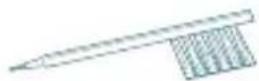
Cleaning brush
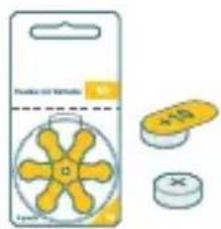
1 pack of size 10 batteries

Cleaning cloth Click Sleeves sizes XS, M, and L

Case

Quick start card and user guide Limited warranty
Get to know your hearing aids

1 Click Sleeve ② Microphone ③ Battery door (on/off switch) 4 Removal cord ⑤ Side indicator
Start here
It is required to complete all steps in the Sony | Hearing Control app to setup the hearing aids for your needs.
You will be guided through the process. It will take around 10 minutes.
Before starting the process, please do the following:
▶ Ensure strong internet access (Wi-Fi or cellular) throughout the customization process ▶ Find a place where you are not disturbed by other loud sounds ▶ Unmute your smartphone and disable silent mode Set the volume for media sounds of your smartphone to a high level (about 75%).
Download the Sony | Hearing Control app to personalize your hearing aids.

Follow the Sony | Hearing Control app for instructions.
How to insert the battery
Open the blister from the back side and take out a battery. Place the hearing aids in front of you on the table as illustrated to the right.
Place the battery inside the battery compartment.
Remove the yellow sticker and close the battery door*.

* Shown for the left device
How to power on/off
There is no on/off button on the hearing aids.
Turning on: Close the battery door.
You will hear a start-up jingle indicating that the hearing aid is turned on.
Turning off: Fully open the battery door.
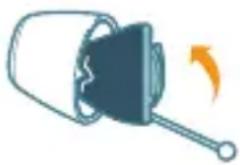

Remove hearing aids while sleeping or bathing/swimming.
When you're not wearing your hearing aids, we recommend leaving the battery door open to conserve battery life.
The battery life is 70 hours*, or about 5-7 days of normal usage. When the battery is running low you will hear an alert signal.
* Actual performance varies based on settings, environmental conditions, and usage.
How to insert the hearing aids
The right hearing aid is marked with R. The left hearing aid is marked with L. Hold the hearing aids with the removal cord at the bottom. Make sure the battery door is closed.
Gently push the hearing aid into the ear canal.


WATCH QUICK VIDEO TUTORIAL
sony.net/hearing-c10-insertion
Please refer to the Sony | Hearing Control app to set up the hearing aids for use.
If the hearing aids do not fit comfortably in your ear, please see the section “How to change Click Sleeves”.
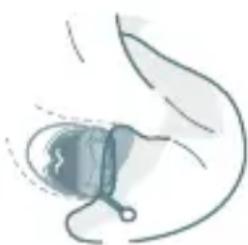
How to remove the hearing aids
Remove each hearing aid by pulling the removal cord toward the back of your head.
How to change Click Sleeves
The hearing aids come with the size S Click Sleeves pre-attached. If you do not feel comfortable using this size, you can change the Click Sleeves.
Please note that left and right ear sizes may differ.
Choose a smaller size if the hearing aid feels tight in your ear. Choose a larger size if the hearing aid feels loose or makes whistling noise.
Removing Click Sleeve
Pinch and pull off the Click Sleeve.
Click Sleeves are designed to be discarded after removal from device.
Installing new Click Sleeve
Make sure that the tab of the Click Sleeve matches the printed line on the hearing aid. You will hear and feel a click when it is fully installed*.

*Shown for the left device

WATCH QUICK VIDEO TUTORIAL
sony.net/hearing-c10-sleeves

NOTICE
▶ Push the device into the intended position, making sure there is no discomfort/resistance.

NOTICE
Select the Click Sleeve size that gives you the best wearing comfort in each ear. Left and right ear sizes may differ.
Choose a larger size in case of whistling problems.
What to do in loud environments
WARNING
Do not use this device as hearing protection in loud environments.

WARNING
Remove hearing aids before using hearing protection equipment. Noise-cancelling headphones should not be used as hearing protection.

WARNING
Frequent exposure to loud sounds may harm your hearing. Keep the loudness at comfortable listening levels. Wear hearing protection when exposed to loud environmental noise.

NOTICE
The smartphone generates short tone sequences to control the hearing aids. Do not hold the smartphone close to the ear while using the app.
Explosive atmospheres

WARNING
Risk of explosion!
Do not use your hearing aids in explosive atmospheres (e.g., mining areas).
Possible physiological side effects

WARNING
In case of a known contact allergy, consult the customer service regarding the presence of the allergen before using the hearing aid. If an allergic reaction develops after wearing the hearing aid, immediately discontinue use and consult a licensed physician.

WARNING
Contact your physician if you experience any unusual skin irritation, excessive accumulation of ear wax, dizziness, change in your hearing, or if you think there might be an object in your ear canal.
Exposure to nickel

WARNING
This product can expose you to nickel, which is known to the State of California to cause cancer. For more information, go to www.P65Warnings.ca.gov.
Adjusting your hearing aid

WARNING
Do not adjust the hearing aid when your attention is required on other activities, for example when crossing a street or driving a car.

WARNING
Your hearing devices may reduce certain background sounds, potentially also traffic or warning signals. Adjust the hearing aid to ensure you can hear surrounding sounds, including alarms and warning signals. Be aware that it may be more difficult to identify where a sound is coming from during the first few weeks of use.
Sony | Hearing Control app
The Sony | Hearing Control app supports you with the following:
Creating an account and signing in ▶ Pairing the hearing aids with the app Assessing your hearing profile ▶ Programming the hearing aids with your personalized settings Fine-tuning assistant For daily use: volume control, sound balance, and directivity

NOTICE
Set up the hearing aids in a quiet environment without interruptions for the best result.
Batteries

NOTICE
Leaking batteries damage the hearing aids.
▶ Turn the hearing aids off when not in use to preserve the battery. Remove batteries when the hearing aids are not in use for a prolonged period of time.
The following table helps you to identify the correct zinc air battery for your hearing aid:
Battery size IEC code ANSI code Typical
color code
10 PR70 7005ZD yellow
Damaged devices, unauthorized changes

WARNING
Risk of injury!
Do not use damaged devices. Please consult the customer service.

WARNING
Note that any unauthorized changes to the device may cause damage to the device or cause injury.
▶ Use only approved parts and accessories. Contact the customer service for support. Do not modify this equipment without authorization from the manufacturer. If this equipment is modified, appropriate inspection and testing must be conducted to ensure safe use of the equipment.
Choking hazard

WARNING
Choking hazard!
Your hearing aids contain small parts which can be swallowed.
Keep hearing aids, batteries and accessories out of reach of children and pets. If parts have been swallowed consult a physician or hospital immediately.
Restricted areas for wireless devices

WARNING
Switch off the hearing aid in areas where the use of wireless devices is restricted.
Interference by strong radiation

NOTICE
Different types of strong radiation, e.g. during X-ray or MRI head examinations, may damage hearing aids.
Do not wear the hearing aids during these or similar procedures like electrosurgery (diathermy, electrocautery, HF-surgery). Weaker radiation, e.g. from radio equipment or airport security, does not damage the hearing aids.

NOTICE
Your devices comply with international standards.
However, it cannot be guaranteed that all products on the market work interference-free, for example some induction cookers, electromagnetic security systems (e.g. anti-theft systems and metal detectors) cellular telephones, RFID, room surveillance systems may cause audible interference.
If you encounter unwanted noise in the vicinity of such device, you should increase the distance between the hearing aid and that device.
Country/region specific information
Certification information for hearing aids with wireless functionality: Sony CRE-C10
NFMI Module 2 - FCC ID: SGI-MIM002
Technical information
| Output 2cc coupler | |
| OSPL 90 (Peak) 104 dB SPL | |
| Full-on gain (Peak) 22 dB | |
| Frequency range and noise | |
| Frequency range 250 – 8000 Hz | |
| Equivalent input noise 28 dBA | |
| Total harmonic distortion @500 Hz, 70 dB SPL / 100 dB SPL output | 1% / 3% |
| Latency 12 ms | |
Battery
Battery voltage 1.3 V
Battery current drain 1.2 mA
All measurements performed according to ANSI/CTA 2051:2017.
Pre-configured sound profiles:
Clinical data
Representative users with mild to moderate hearing impairment experienced similar benefits when comparing the self-fitting device with a comparable professionally fitted prescription hearing aid. There were no adverse events encountered during this study.
Human factors data
It was demonstrated in a human factors validation study, that the product can be used safely and effectively by the intended users and in the intended environments. No risk of unacceptable harm was found that could be reduced by modifying the user interface design.
Cleaning and maintenance
Ear wax may accumulate in the Click Sleeves which may affect sound quality.

NOTICE
Clean your hearing aids daily with a soft and dry tissue. Never use water. Only use cleaning products declared for use with hearing aids.

Protect your hearing aids from high humidity. Do not wear them in the shower or when you apply make-up, perfume, aftershave, hairspray or suntan lotion.

Protect your hearing aids from extreme heat. Do not store them in direct sunlight.

Do not dry your hearing aids in the microwave oven.
Explanation of symbols
Symbols used in this document

Points out a situation that could lead to serious, moderate, or minor injuries.

Indicates possible property damage.
Symbols on the device or packaging

Do not dispose of the device with general domestic waste. Read more in section "Disposal information".
Symbols on the device or packaging
 | Read and follow the instructions in the user guide. |
 | According to IEC 60601-1, the applied parts of this device are classified as type B. |
 | Keep dry during transportation and storage. |
 | Temperature during transportation and storage.Read more in section"Operating, transport and storage conditions". |
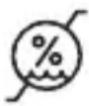 | Relative humidity during transportation and storage.Read more in section"Operating, transport and storage conditions". |
Symbols on the device or packaging

Atmospheric pressure during transportation and storage.
Read more in section
"Operating, transport and storage conditions".

Keep out of reach of children.
Important information
The hearing aids are designed for an expected service life of 5 years. They are expected to remain safe for use for this duration.
Operating, transport and storage conditions
The hearing aids operate in the following environmental conditions (also valid in between uses):
Temperature 0 to 50 °C (32 to 122 °F)
Relative humidity 5 to 93 %
Atmospheric pressure 700 to 1060 hPa
During extended periods of transport and storage, please observe the following conditions:
Storage Transport
| Temperature 10 to 40 °C | -20 to 60 °C |
| (50 to 104 °F) | (-4 to 140 °F) |
| Relative humidity 10 to 80 % 5 to 90 % | |
| Atmospheric pressure 700 to 1060 hPa | 700 to 1060 hPa |
| For other parts, such as batteries, other conditions may apply. | |
Disposal information
▶ Recycle hearing aids, accessories and packaging according to local regulations. To avoid environmental pollution, do not throw batteries or hearing aids into household trash. ▶ Recycle or dispose of batteries or hearing aids according to local regulation.
Conformance information
Devices with the FCC marking comply with the standards of the FCC regarding electromagnetic interferences.
Notices
Changes or modifications made to this equipment not expressly approved by the legal manufacturer may void the FCC authorization to operate this equipment.
This device complies with Part 15 of the FCC Rules and with ISED's licence-exempt RSSs.
Operation is subject to the following conditions:
● this device may not cause harmful interference, and - this device must accept any interference received, including interference that may cause undesired operation.
This equipment has been tested and found to comply with the limits for a Class B digital device, pursuant to Part 15 of the FCC Rules. These limits are designed to provide reasonable protection against harmful interference in a residential installation. This equipment generates, uses and can radiate radio frequency energy and, if not installed and used in accordance with the instructions, may cause harmful interference to radio communications. However, there is no guarantee that interference will not occur in a particular installation. If this equipment does cause harmful interference to radio or television reception, which can be determined by turning
the equipment off and on, the user is encouraged to try to correct the interference by one or more of the following measures:
- Reorient or relocate the receiving antenna.
- Increase the separation between the equipment and receiver.
- Connect the equipment to an outlet on a circuit different from that to which the receiver is connected.
- Consult the dealer or an experienced radio/TV technician for help.
For body worn operation, this device has been tested and meets the FCC RF exposure guidelines when used with the legal manufacturer's accessories supplied or designated for this product. Use of other accessories may not ensure compliance with FCC RF exposure guidelines.
Regulatory information
FDA identifies this generic type of device as:
Self-fitting air-conduction hearing aid.
A self-fitting air-conduction hearing aid is a wearable sound amplifying device that is intended to compensate for impaired hearing and incorporates technology, including software, that allows users to program their hearing aids.
This technology integrates user input with a self-fitting strategy and enables users to independently derive and customize their hearing aid fitting and settings.
For hearing aid users
Hearing aids will not restore normal hearing and will not prevent or improve a hearing impairment resulting from organic conditions. In most cases infrequent use of hearing aids prohibits the wearer from attaining the full benefit from it. The use of hearing aids is only part of hearing rehabilitation and may need to be supplemented by auditory training and instruction in lip reading.
Health considerations
If soreness or skin irritation develops, discontinue wearing your hearing aids.
Battery tips
If a battery is accidentally swallowed, seek medical attention immediately, or call the National Button Battery Ingestion Hotline collect at 1-800-498-8666.
Identification information
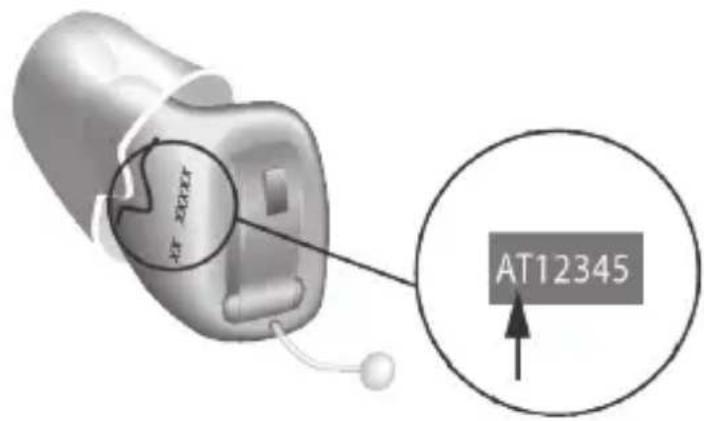
Your hearing aids have a serial number imprinted on them. The location of the serial number will vary according to the style of hearing aid you have chosen. Record the serial number in your user guide for future reference.
The year of manufacture is incorporated into the serial number.
For in-the-ear devices, the year of manufacture is derived from the first two digits.
The month of manufacture is derived from the first digit, the year of manufacture from the second digit:
Code (first digit) Month Code (first digit) Month
| A, N Jan G, U Jul |
| B, P Feb H, V Aug |
| C, Q Mar J, W Sep |
| D, R Apr K, X Oct |
| E, S May L, Y Nov |
| F, T Jun M, Z Dec |
Code (second digit) Year Code (second digit) Year
| B, C 2022 F, G 2024 |
| D, E 2023 H, J 2025 |
Near Field Magnetic Induction (NFMI) functionality
The following tables show the main information on NFMI connectivity. Some parameters differ from product to product, so the worst case is indicated:
Wireless technology: Near Field Magnetic Induction (NFMI)
Modulation: Phase Shift Key
Magnetic field strength: 0.14 A/m
Output power (EIRP): 53 μW
Range: < 20 cm between hearing aids
Center frequency: 3.27 MHz
Channel: Single channel radio
Bandwidth: 330 kHz (-15 dB)
EMI/EMC compliance
Wireless hearing aids comply with the following EMC/EMI standards:
Standard Test Type Note
| 47 CFR Part 15, Subpart C | RF emissions U.S. | FCC requirements for intentional radiators. |
| EN 300 330 RF | emissions including spurious emission | EMC and radio spectrum matters for short range devices in the frequency range 9 kHz - 25 MHz. |
| EN 301 489-1/3/17 | Immunity, RF and ESD | Standard for low power transmitters in the frequency range 9 kHz - 40 GHz. |
| IEC 60118-13 RF immunity International product standard for hearing aids to ensure adequate immunity to radio interference from mobile telephones. | |
| ANSI C63.19 RF immunity American National Standard method of measurement of compatibility between wireless communication devices and hearing aids. | |
| ANSI/AAMI PC69 | RF emissions Implantable medical device EMC immunity, American National Standard. |
| ISO 14117 RF emissions Implantable medical device EMC immunity, International Standard. | |
| EN 45502-2-1 RF emissions Particular requirements for pacemakers. | |
| Emissions CISPR 11, Group 1, Class B. | |
| Immunity ESD, Conducted up to +/-8 kV,Air discharge up to +/-15 kVPower frequency magnetic fields:30 A/m, 50/60 Hz | |
| Immunityto RF fields | 80 MHz-2.7 GHz 10 V/m,2.7 GHz-6 GHz 3 V/m |
| Proximity to wirelesscommunication devices | Up to 28 V/m –See IEC 60601-1-2:2014/AMD1:2020,Table 9 |
| Proximity to magneticfields | 8 A/m@30 kHz, 65 A/m@134.2 kHz,7.5 A/m@50 kHz |
Wireless security measures
Wireless signal security is assured through the device system design that includes:
- A built-in pairing table which specifies valid and legitimate pairing among units.
- A proprietary communication protocol which checks the package numbers during each transmission. ● A Cyclic Redundancy Check (CRC) to check data validity.
- A convolutional encoder/decoder (Viterbi) to correct errors.
Quality of Service (QoS) for the ear-to-ear wireless technology
Synchronization/exchange of low data rate ear-to-ear signals
Similar QoS as with remote controls in typical households. In typical environment it can happen that electromagnetic noise from appliances (light switch, car ignition) lead to non-valid data. Transmission of unsuccessful command is automatically repeated within approximately 3 seconds. Data transfer is checked via CRC16 checksum.
Exchange of high data rate ear-to-ear signals (microphone signal)
Parameter for QoS is the bit error (BER) of the gross data link. This parameter is estimated and monitored during data receive. For BER > 3.5% the channel coding will become less effective thus the transferred microphone signal is automatically muted and not used until the QoS is good enough again. For the used ITU G.722 Audio Codec CRC check is not useful.
It is reasonably foreseeable that no risk/hazard can rise caused by invalid data.
Cybersecurity
Proper set-up and operation of your hearing aids requires a safe, private and secure operating environment.
The U.S. Federal Trade Commission's guidance for online security https://consumer.ftc.gov/online-security
provides examples of best practices for securing your home network and mobile device to ensure your security.
For children with hearing loss
In addition to seeing a physician for a medical evaluation, a child with a hearing loss should be directed to an audiologist for evaluation and rehabilitation since hearing loss may cause problems in language development and the educational and social growth of a child. An audiologist is qualified by training and experience to assist in the evaluation and rehabilitation of a child with a hearing loss.
Support
For more detailed information:
- Visit our website: sony.net/hearing-support
- Phone: 877-864-7669
- Sony Electronics Inc., 115 West Century Road, Suite 250, Paramus, NJ 07652

Supported systems:
For Apple iOS version 13 or above, Google Android 10 or above. (Supported versions are subject to change).
Manufactured for:
Sony Electronics Inc.
115 West Century Road
Suite 250
Paramus, NJ 07652 USA
Hearing aids:
Jewel case:
Made in Singapore
Made in China
Document No. 05280-99T01-7600 EN
Order/Item No. 210 251 29
Master Rev01, 12.2022
Printed in Singapore.

- WARNING
- WHEN TO SEE A DOCTOR
- THIS HEARING AID SHOULD NOT CAUSE PAIN WHEN INSERTING IT
- NOTICE
- CAUTION
- THIS IS NOT HEARING PROTECTION
- THE SOUND OUTPUT SHOULD NOT BE UNCOMFORTABLE OR PAINFUL
- NOTE: IF YOU REMAIN CONCERNED, CONSULT A PROFESSIONAL
- NOTE: WHAT YOU MIGHT EXPECT WHEN YOU START USING A HEARING AID
- NOTE: TELL FDA ABOUT INJURIES, MALFUNCTIONS, OR OTHER ADVERSE EVENTS
- CONTENT
- YOUR HEARING AIDS
- START HERE
- TECHNICAL INFORMATION
- CLEANING AND MAINTENANCE
- EXPLANATION OF SYMBOLS
- IMPORTANT INFORMATION
- SUPPORT
- INTENDED USE
- HOW TO USE QR CODES
- WHAT YOU'LL FIND IN THE BOX
- GET TO KNOW YOUR HEARING AIDS
- HOW TO INSERT THE BATTERY
- HOW TO POWER ON/OFF
- HOW TO INSERT THE HEARING AIDS
- WATCH QUICK VIDEO TUTORIAL
- SONY.NET/HEARING-C10-INSERTION
- HOW TO REMOVE THE HEARING AIDS
- HOW TO CHANGE CLICK SLEEVES
- REMOVING CLICK SLEEVE
- INSTALLING NEW CLICK SLEEVE
- SONY.NET/HEARING-C10-SLEEVES
- WHAT TO DO IN LOUD ENVIRONMENTS
- EXPLOSIVE ATMOSPHERES
- POSSIBLE PHYSIOLOGICAL SIDE EFFECTS
- EXPOSURE TO NICKEL
- ADJUSTING YOUR HEARING AID
- SONY | HEARING CONTROL APP
- BATTERIES
- BATTERY SIZE IEC CODE ANSI CODE TYPICAL
- DAMAGED DEVICES, UNAUTHORIZED CHANGES
- CHOKING HAZARD
- RESTRICTED AREAS FOR WIRELESS DEVICES
- INTERFERENCE BY STRONG RADIATION
- COUNTRY/REGION SPECIFIC INFORMATION
- BATTERY
- CLINICAL DATA
- HUMAN FACTORS DATA
- SYMBOLS USED IN THIS DOCUMENT
- SYMBOLS ON THE DEVICE OR PACKAGING
- OPERATING, TRANSPORT AND STORAGE CONDITIONS
- DISPOSAL INFORMATION
- CONFORMANCE INFORMATION
- NOTICES
- REGULATORY INFORMATION
- FOR HEARING AID USERS
- HEALTH CONSIDERATIONS
- BATTERY TIPS
- IDENTIFICATION INFORMATION
- NEAR FIELD MAGNETIC INDUCTION (NFMI) FUNCTIONALITY
- EMI/EMC COMPLIANCE
- WIRELESS SECURITY MEASURES
- QUALITY OF SERVICE (QOS) FOR THE EAR-TO-EAR WIRELESS TECHNOLOGY
- EXCHANGE OF HIGH DATA RATE EAR-TO-EAR SIGNALS (MICROPHONE SIGNAL)
- CYBERSECURITY
- FOR CHILDREN WITH HEARING LOSS
- MANUFACTURED FOR
Brand : SONY
Model : CRE-C10
Category : Hearing aid