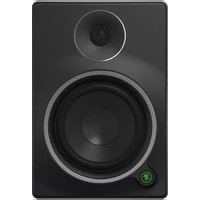
MR5mk3 - Loudspeaker MACKIE - Free user manual and instructions
Find the device manual for free MR5mk3 MACKIE in PDF.


Pick your language and provide your email: we'll send you a specifically translated version.
| Product Type | Powered Studio Monitor |
| Brand | Mackie |
| Model | MR5mk3 |
| Woofer Size | 5 inches (127 mm) |
| Tweeter Size | 1 inch (25 mm) silk dome |
| Amplifier Power | 70W (LF: 45W, HF: 25W) Class A/B |
| Frequency Response | 50 Hz - 20 kHz |
| Maximum SPL | 106 dB peak |
| Input Connectors | XLR, 1/4" TRS, RCA |
| Input Impedance | 20 kΩ balanced, 10 kΩ unbalanced |
| Crossover Frequency | 3 kHz |
| Dimensions (H x W x D) | 12.6 x 7.7 x 9.9 inches (320 x 196 x 251 mm) |
| Weight | 14.3 lbs (6.5 kg) |
| Power Input | 100-240 VAC, 50/60 Hz |
| Power Consumption | 80W max |
| Enclosure Type | Front-ported, dedicated tweeter waveguide |
| Controls | Volume control, HF trim (-2 dB, 0, +2 dB) |
| Mounting Options | Rubber feet, optional brackets |
| Maintenance | Wipe with dry cloth; do not use solvents |
| Safety | Class II equipment; operate in dry conditions only |
| Spare Parts & Repairability | Contact Mackie service for replacement drivers or amplifier modules |
Frequently Asked Questions - MR5mk3 MACKIE
How do I connect the MR5mk3 to my audio interface?
Use a balanced XLR or 1/4" TRS cable from your interface's output to the monitor's input. For unbalanced connections, use RCA cables. Ensure the monitor is powered off when making connections.
What is the ideal placement for the MR5mk3 nearfield monitors?
Place them at ear level, forming an equilateral triangle with your listening position. Keep at least 6 inches away from walls to avoid bass buildup. The front port should not be obstructed.
Can I use the MR5mk3 as a standalone speaker for music listening?
Yes, but they are designed for accurate monitoring. They work well for nearfield listening in a studio or desktop setup. For general listening, consider a subwoofer for deeper bass.
How do I adjust the high-frequency trim on the MR5mk3?
Use the HF trim switch on the back panel. Set to -2 dB for a warmer sound, 0 for flat response, or +2 dB for brighter treble. Adjust based on room acoustics.
What should I do if the monitor produces no sound?
Check power cable connection, ensure the power switch is on, verify audio source is working, and inspect cables. Try a different input. If still no sound, contact Mackie support.
Is the MR5mk3 magnetically shielded?
No, it is not magnetically shielded. Keep it away from CRT monitors or magnetic storage media to avoid interference.
How do I clean the MR5mk3?
Unplug the monitor. Use a soft, dry microfiber cloth to wipe the cabinet. For grime, slightly dampen the cloth with water. Do not use any solvents or abrasive cleaners.
What is the maximum SPL of the MR5mk3?
The maximum peak SPL is 106 dB. This is suitable for nearfield monitoring but avoid sustained high volumes to protect your hearing and the speakers.
Can I mount the MR5mk3 on a wall or ceiling?
Yes, using optional mounting brackets (not included). Ensure the bracket is rated for the monitor's weight (14.3 lbs). Follow the bracket's installation instructions carefully.
What are the dimensions and weight of the MR5mk3?
Dimensions: 12.6 x 7.7 x 9.9 inches (320 x 196 x 251 mm). Weight: 14.3 lbs (6.5 kg) per monitor.
User questions about MR5mk3 MACKIE
0 question about this device. Answer the ones you know or ask your own.
Ask a new question about this device
No questions yet. Be the first to ask one.
Download the instructions for your Loudspeaker in PDF format for free! Find your manual MR5mk3 - MACKIE and take your electronic device back in hand. On this page are published all the documents necessary for the use of your device. MR5mk3 by MACKIE.
USER MANUAL MR5mk3 MACKIE


Manual assistant
Powered by Anthropic
Waiting for your message
Product information
Brand : MACKIE
Model : MR5mk3
Category : Loudspeaker