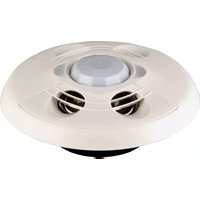
GLA-LDL-PC-0-10 - Motion detector Crestron - Free user manual and instructions
Find the device manual for free GLA-LDL-PC-0-10 Crestron in PDF.


Pick your language and provide your email: we'll send you a specifically translated version.
| Product Type | Motion Detector (Occupancy Sensor) |
| Brand | Crestron |
| Model | GLA-LDL-PC-0-10 |
| Detection Technology | Passive Infrared (PIR) |
| Operating Voltage | 24 VDC |
| Power Consumption | 0.5 W (typical) |
| Output Signal | 0–10 VDC Analog (Dimming Control) |
| Coverage Pattern | 360° |
| Maximum Range | 30 ft (9.1 m) |
| Mounting Type | Ceiling or Wall (surface mount) |
| Dimensions | 4.5 in (114 mm) diameter x 1.5 in (38 mm) height |
| Weight | 0.2 lbs (90 g) |
| Color | White |
| Environmental Rating | Indoor use only |
| Operating Temperature | 32°F to 104°F (0°C to 40°C) |
| Compatibility | Crestron lighting control systems |
| Wiring | Low voltage; see manual for terminal details |
| Maintenance | Clean with dry cloth; do not use solvents |
| Safety | Install per local electrical codes; low voltage device |
| Spare Parts | Not applicable; replace entire unit if faulty |
| Repairability | No user-serviceable parts; contact Crestron for service |
| General Information | Designed for energy-efficient occupancy-based lighting control |
Frequently Asked Questions - GLA-LDL-PC-0-10 Crestron
How do I install the Crestron GLA-LDL-PC-0-10 motion detector?
Mount the sensor on a ceiling or wall using the provided screws. Connect the 0-10V output to your Crestron dimming controller per the wiring diagram. Ensure power is off during installation.
What voltage does the GLA-LDL-PC-0-10 require?
It operates on 24 VDC low voltage. Do not connect to line voltage.
What is the coverage area of this motion detector?
It provides 360° coverage with a maximum range of 30 feet (9.1 m).
Can I use this sensor with non-Crestron systems?
It is designed for Crestron lighting control systems. Using it with other systems may require interfacing with a 0-10V input.
How do I clean the sensor?
Wipe the lens and housing with a dry, soft cloth. Avoid using water, solvents, or abrasive cleaners.
Why is my motion detector not turning lights on?
Check that the sensor receives power (24 VDC) and that the 0-10V output is correctly wired to the dimmer. Verify the dimmer is configured for occupancy control. Also ensure the lens is clean and unobstructed.
Does the sensor have an adjustable time delay?
Time delay is typically configured via the Crestron control system, not on the sensor itself. Refer to your lighting controller manual for programming.
What is the operating temperature range?
The sensor is rated for indoor use from 32°F to 104°F (0°C to 40°C).
Can I mount the sensor outdoors?
No, the GLA-LDL-PC-0-10 is designed for indoor use only. Outdoor installation may cause damage or false triggering.
Where can I find the user manual?
The manual is available for free download from notice-facile.com in PDF format. Search for 'Crestron GLA-LDL-PC-0-10'.
User questions about GLA-LDL-PC-0-10 Crestron
0 question about this device. Answer the ones you know or ask your own.
Ask a new question about this device
No questions yet. Be the first to ask one.
Download the instructions for your Motion detector in PDF format for free! Find your manual GLA-LDL-PC-0-10 - Crestron and take your electronic device back in hand. On this page are published all the documents necessary for the use of your device. GLA-LDL-PC-0-10 by Crestron.
USER MANUAL GLA-LDL-PC-0-10 Crestron
Manual assistant
Powered by Anthropic
Waiting for your message
Product information
Brand : Crestron
Model : GLA-LDL-PC-0-10
Category : Motion detector