
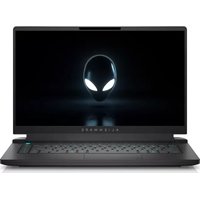
x17 R1 - Laptop ALIENWARE - Free user manual and instructions
Find the device manual for free x17 R1 ALIENWARE in PDF.


Pick your language and provide your email: we'll send you a specifically translated version.
| Product Type | Gaming Laptop |
| Brand | Alienware |
| Model | x17 R1 |
| Display Size | 17.3 inches |
| Display Resolution | 1920 x 1080 or 3840 x 2160 (4K UHD) |
| Processor | Intel Core i7-11800H or i9-11900H |
| Graphics | NVIDIA GeForce RTX 3060/3070/3080 (up to 165W TGP) |
| Memory (RAM) | Up to 64GB DDR4-3200MHz |
| Storage | Up to 4TB PCIe NVMe M.2 SSD (RAID 0/1) |
| Dimensions (W x D x H) | 399.2 mm x 299.5 mm x 20.9 mm |
| Weight | 3.2 kg (7.1 lbs) |
| Power Adapter | 240W or 330W AC adapter |
| Battery | 6-cell 87 Wh Lithium-ion |
| Operating System | Windows 10/11 Home or Pro |
| Keyboard | RGB per-key Alienware CherryMX ultra-low-profile mechanical |
| Ports | 3x USB-A 3.2 Gen1, 1x Thunderbolt 4, 1x HDMI 2.1, 1x mini-DisplayPort, 1x RJ-45, headphone/mic combo, SD card reader |
| Connectivity | Wi-Fi 6 (802.11ax), Bluetooth 5.2 |
| Audio | Stereo speakers with Nahimic 3D Audio |
| Built-in Camera | 720p HD webcam with dual-array microphones |
| Main Functions | High-performance gaming, VR support, content creation, productivity |
| Cleaning & Maintenance | Use soft dry cloth; avoid liquids; clean vents every 3 months with compressed air |
| Safety | Complies with FCC, CE, and other safety standards; use only Alienware chargers |
| Spare Parts | Official Alienware website for replacement keyboards, batteries, fans, and chargers |
| General Information | Alienware Command Center included for performance tuning and lighting control |
Frequently Asked Questions - x17 R1 ALIENWARE
How do I update the BIOS on the Alienware x17 R1?
Visit the Dell/Alienware support website, enter your Service Tag, download the latest BIOS update, and run the executable while the laptop is plugged in. Do not interrupt the process.
Can I upgrade the RAM or storage on the Alienware x17 R1?
Yes, the x17 R1 has two SODIMM slots for DDR4 RAM and two M.2 2280 slots for NVMe SSDs. Refer to the manual for compatible hardware and upgrade steps.
What is the battery life of the Alienware x17 R1?
Battery life varies by usage; typical light use lasts around 4-6 hours, while gaming may reduce it to 1-2 hours. The 87Wh battery supports fast charging.
Does the Alienware x17 R1 support external graphics cards?
Yes, via the Thunderbolt 4 port, you can connect an external GPU enclosure (e.g., Alienware Graphics Amplifier) for additional graphics performance.
How do I clean the Alienware x17 R1?
Turn off the laptop and unplug it. Use a soft, lint-free cloth slightly dampened with water to clean the exterior. For vents, use compressed air to remove dust. Avoid using alcohol or abrasive cleaners.
Is the Alienware x17 R1 good for VR?
Absolutely. With powerful NVIDIA RTX 30 series GPUs and a high-refresh-rate display, it meets or exceeds recommended specs for most VR headsets like the Oculus Rift S and HTC Vive.
What does the Alienware Command Center do?
It allows you to manage performance modes, overclocking, fan speeds, RGB lighting, and game profiles. You can also monitor system temperatures and resource usage.
How do I reset the Alienware x17 R1 to factory settings?
Go to Settings > Update & Security > Recovery, and select 'Reset this PC'. Choose to keep or remove files, and follow the on-screen instructions. Backup important data first.
What ports are available on the Alienware x17 R1?
It includes 3 USB-A 3.2 Gen1, 1 Thunderbolt 4, 1 HDMI 2.1, 1 mini-DisplayPort, 1 RJ-45 Ethernet, a headphone/mic combo, and an SD card reader. The audio jack supports headsets with a single plug.
Does the Alienware x17 R1 have a warranty?
Yes, it comes with a standard 1-year limited hardware warranty. Extended warranty options are available through Dell. Check your specific region for details.
User questions about x17 R1 ALIENWARE
0 question about this device. Answer the ones you know or ask your own.
Ask a new question about this device
No questions yet. Be the first to ask one.
Download the instructions for your Laptop in PDF format for free! Find your manual x17 R1 - ALIENWARE and take your electronic device back in hand. On this page are published all the documents necessary for the use of your device. x17 R1 by ALIENWARE.
USER MANUAL x17 R1 ALIENWARE



Manual assistant
Powered by Anthropic
Waiting for your message
Product information
Brand : ALIENWARE
Model : x17 R1
Category : Laptop