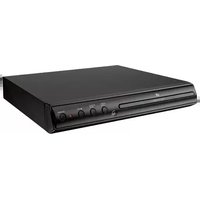
D200B - DVD player GPX - Free user manual and instructions
Find the device manual for free D200B GPX in PDF.


Pick your language and provide your email: we'll send you a specifically translated version.
| Product Type | DVD Player |
| Brand | GPX |
| Model | D200B |
| Disc Compatibility | DVD, DVD±R/RW, CD, CD-R/RW, MP3, JPEG |
| Video Output | Composite Video (RCA) |
| Audio Output | Stereo Audio (RCA), Coaxial Digital Audio |
| Dimensions (W x D x H) | Approx. 280 x 220 x 45 mm |
| Weight | Approx. 1.2 kg |
| Power Supply | AC 120V, 60Hz |
| Power Consumption | < 15W |
| Remote Control | Included (IR) |
| Playback Functions | Play, Pause, Stop, Skip, Fast Forward/Reverse, Repeat, Program Play |
| Region Code | Region 1 (NTSC) |
| Parental Control | Yes |
| Maintenance | Clean lens with soft cloth; avoid solvents |
| Safety | Class 1 Laser Product |
| Spare Parts | Remote control, power cord |
| Repairability | No user-serviceable parts; refer to service center |
| General Information | Designed for home entertainment use |
Frequently Asked Questions - D200B GPX
What disc formats can the GPX D200B play?
It plays DVD, DVD±R/RW, CD, CD-R/RW, and can also read MP3 and JPEG files from discs.
How do I connect the DVD player to my TV?
Use the included composite video (yellow) and stereo audio (red/white) cables to connect to corresponding inputs on your TV.
Does this DVD player support HDMI?
No, the D200B only has composite video and coaxial digital audio outputs.
What is the region code of this player?
It is Region 1, suitable for discs sold in the US and Canada (NTSC).
Can I play discs from other regions?
No, the player is locked to Region 1. Playing discs from other regions may not work.
How do I clean the DVD player?
Unplug the unit and clean the exterior with a soft, dry cloth. The lens can be cleaned with a lens cleaning disc.
The disc won't play, what should I do?
Ensure the disc is clean and free of scratches. Check that the disc is inserted with the label facing up. Try turning the player off and on again.
Can I play MP3 files from a USB drive?
No, the D200B does not have a USB port. MP3 files can only be played from CD-R/RW discs.
Does it have parental control?
Yes, you can set a password and restrict playback based on disc ratings.
Where can I find a replacement remote?
Contact GPX customer support or search for compatible universal remotes that work with GPX DVD players.
User questions about D200B GPX
0 question about this device. Answer the ones you know or ask your own.
Ask a new question about this device
No questions yet. Be the first to ask one.
Download the instructions for your DVD player in PDF format for free! Find your manual D200B - GPX and take your electronic device back in hand. On this page are published all the documents necessary for the use of your device. D200B by GPX.
USER MANUAL D200B GPX


Manual assistant
Powered by Anthropic
Waiting for your message
Product information
Brand : GPX
Model : D200B
Category : DVD player