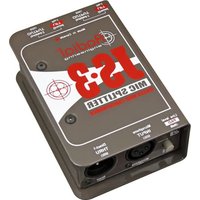
JS3 - Audio accessory Radial Engineering - Free user manual and instructions
Find the device manual for free JS3 Radial Engineering in PDF.


Pick your language and provide your email: we'll send you a specifically translated version.
| Product Type | Direct Box (DI) / Signal Converter |
| Model | JS3 |
| Brand | Radial Engineering |
| Dimensions (H x W x D) | 1.75 x 4.75 x 3.5 inches (4.4 x 12.1 x 8.9 cm) |
| Weight | 0.85 lbs (0.39 kg) |
| Power Supply | Passive (no power required) or 48V phantom power |
| Input Connectors | 1/4" TS instrument input |
| Output Connectors | XLR balanced output |
| Ground Lift Switch | Yes, eliminates ground loops |
| Pad Switch | -15 dB pad for high-level signals |
| Input Impedance | 10 kOhms |
| Frequency Response | 20 Hz - 20 kHz |
| Signal to Noise Ratio | >95 dB |
| Construction | Steel chassis with protective coating |
| Main Functions | Convert unbalanced instrument signal to balanced mic-level; eliminate noise and hum |
| Maintenance & Cleaning | Wipe with a dry, lint-free cloth. Do not use solvents. |
| Safety Information | Do not expose to moisture. No user-serviceable parts inside. |
| Spare Parts & Repairability | Contact Radial Engineering distributor for replacement parts. Device is serviceable by qualified technician. |
| General Information | Designed for professional audio applications; built to withstand touring conditions. |
Frequently Asked Questions - JS3 Radial Engineering
How do I connect the JS3 to my audio interface?
Connect a 1/4" instrument cable from your instrument or pedal to the input jack. Then run an XLR cable from the output to your audio interface's mic input. Set the interface to provide 48V phantom power if needed.
What is the ground lift switch for?
The ground lift switch disconnects pin 1 (ground) of the XLR output to eliminate hum caused by ground loops between equipment.
Does the JS3 require battery or phantom power?
The JS3 is a passive direct box and does not require internal power. However, it works best with phantom power from a mixing console or audio interface to drive the transformer.
Can I use the JS3 with a keyboard or synthesizer?
Yes, the JS3 can handle line-level signals from keyboards. Use the -15 dB pad switch if the signal is too hot to avoid distortion.
What is the frequency response of the JS3?
The frequency response is 20 Hz to 20 kHz, ensuring full audio bandwidth suitable for both instruments and vocals (when used with a mic preamp).
How do I clean the JS3?
To clean the unit, simply wipe it with a dry, lint-free cloth. Do not use any liquids or solvents as they may damage the chassis.
Is the JS3 balanced or unbalanced?
The input is unbalanced 1/4" TS, and the output is balanced XLR. The built-in transformer converts the signal.
What are the dimensions of the JS3?
The device measures approximately 1.75 x 4.75 x 3.5 inches (HxWxD), making it pedalboard-friendly.
Can I use the JS3 with a bass guitar?
Absolutely, the JS3 is ideal for bass guitar. Its high input impedance preserves the low-end frequency response of passive pickups.
What should I do if the JS3 stops working?
First, check all cable connections and ensure phantom power is provided (if required). If the problem persists, contact Radial Engineering support for troubleshooting. There are no user-serviceable parts inside; do not open the unit.
User questions about JS3 Radial Engineering
0 question about this device. Answer the ones you know or ask your own.
Ask a new question about this device
No questions yet. Be the first to ask one.
Download the instructions for your Audio accessory in PDF format for free! Find your manual JS3 - Radial Engineering and take your electronic device back in hand. On this page are published all the documents necessary for the use of your device. JS3 by Radial Engineering.
USER MANUAL JS3 Radial Engineering


Manual assistant
Powered by Anthropic
Waiting for your message
Product information
Brand : Radial Engineering
Model : JS3
Category : Audio accessory