
StageBug SB-48 - Audio accessory Radial Engineering - Free user manual and instructions
Find the device manual for free StageBug SB-48 Radial Engineering in PDF.


| Type | Stereo passive direct box (DI box) |
| Inputs | Two 1/4" TS unbalanced (L/Mono, R) |
| Outputs | Two XLR balanced (L, R) with ground lift |
| Transformer | Jensen JT-DB-DTP custom wound transformer per channel |
| Frequency Response | 20 Hz to 20 kHz |
| Dynamic Range | 112 dB (typical) |
| Total Harmonic Distortion (THD+N) | 0.002% typical @ 1 kHz |
| Pad | -30 dB per channel |
| Ground Lift | Yes, per output via front panel switch |
| Merge Function | Sum L+R to mono with dedicated XLR output |
| Construction | 14-gauge steel chassis with protective corners |
| Dimensions (L x W x H) | 114 x 89 x 38 mm (4.5" x 3.5" x 1.5") |
| Weight | 0.36 kg (0.8 lbs) |
| Power Supply | Passive, no external power required |
| Operating Temperature | 0°C to 40°C (32°F to 104°F) |
| Cleaning | Wipe with dry cloth, avoid solvents |
| Safety | Use only with balanced inputs; do not expose to moisture |
| Spare Parts | Jensen transformers available from Radial; XLRs and jacks as standard Neutrik |
| Warranty | 3 years (parts and labor) |
| Certifications | RoHS, compliant with EU EMC standards |
| Designed In | Canada (manufactured in China) |
Frequently Asked Questions - StageBug SB-48 Radial Engineering
User questions about StageBug SB-48 Radial Engineering
0 question about this device. Answer the ones you know or ask your own.
Ask a new question about this device
Download the instructions for your Audio accessory in PDF format for free! Find your manual StageBug SB-48 - Radial Engineering and take your electronic device back in hand. On this page are published all the documents necessary for the use of your device. StageBug SB-48 by Radial Engineering.
USER MANUAL StageBug SB-48 Radial Engineering
Radial Engineering Ltd.
1845 Kingsway Ave., Port Coquitlam, BC V3C 1S9,
Canada
tel: 604-942-1001 • fax: 604-942-1010
info@radialeng.com
Made in Canada

INTRODUCTION
Thank you and congratulations on your purchase of the Radial StageBug SB-48 dual phantom power supply. We have purposely written this manual to be short, as most users will likely be familiar with the use of phantom power. We do suggest that you take a moment to read through this document to familiarize yourself with the features that are built into the SB-48. For more detailed information, please visit the FAQ section on the Radial website. This is where we post questions and answers that come from users after the product is released. If you do not find an answer, we invite you to send us an email at info@radialeng.com and we will do our best to answer your query in short order.
The StageBug SB-48 is a two channel phantom power supply designed to provide condenser microphones and active direct boxes with 12 or 48 volts of regulated power. The SB-48 can supply one or two phantom powered devices and allows their use with audio systems that do not supply phantom power on their own.
The SB-48 features XLR inputs and outputs wired to the AES standard, an LED power indicator and comes complete with power supply. An integrated lock-down clamp for the power supply cable protects against accidental disconnection. To address speciality microphones that require 12 volts, a recessed ‘set & forget’ switch reduces the voltage output.

FEATURES
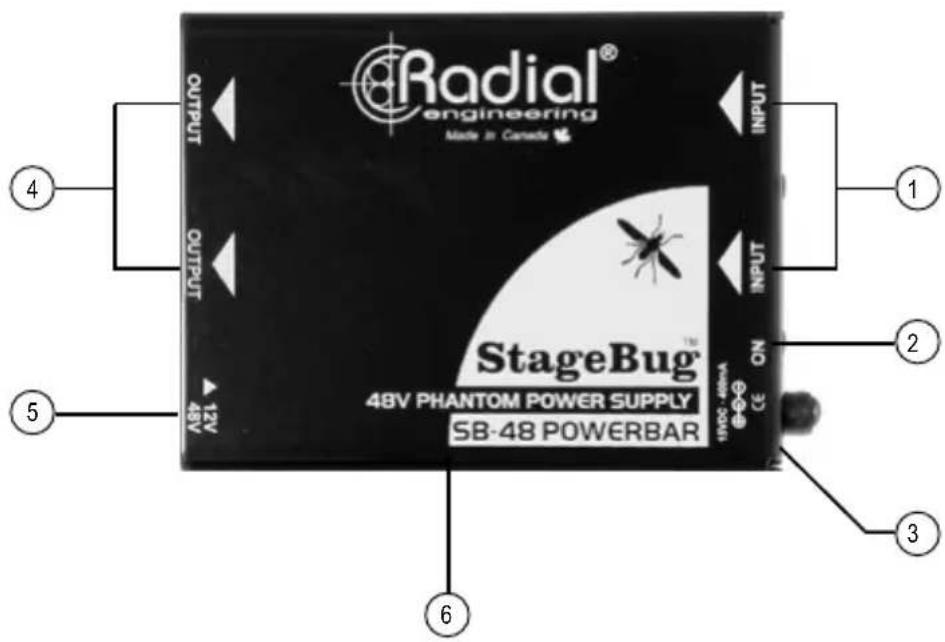
- XLR-F INPUTS: Used to connect the mic signal to the StageBug SB-48. Phantom power is generated inside the SB-48 and injected into the mic capsule via the F-XLR connectors and mic cable.
- POWER INPUT AND LED: The power jack accepts Radial's 15VDC/400mA power adapter. The LED illuminates when the power supply is connected and the SB-48 is active.
- CABLE CLAMP: Used to lock down the power supply cable and prevent accidental disconnection.
- XLR-M OUTPUTS: Used to connect the mic signal to the mixing console or preamp. Equipped to block other sources of phantom power and prevent over-powering your condenser mic or active direct box.
- +12/48V SWITCH: Used to change the phantom supply from the standard +48 volts to +12 volts for speciality microphones.
- FULL-BOTTOM NO-SLIP PAD: This provides electrical isolation and plenty of 'stay-put' friction to keep the SB-48 in one place.
CONNECTION
Before connecting the StageBug SB-48 make sure the sound system is turned off and all levels are set to zero. Do not connect the power supply until all connections to and from the SB-48 have been made. This will avoid loud transients that could cause damage to equipment downstream such as loudspeakers and tweeters. After use, remember to turn off the PA system before you disconnect the SB-48's power supply and the mic lines.
Using balanced XLR mic cables, connect the output of a condenser microphone or active direct box to the XLR-F input. Next, connect the XLR-M output to your mixing console or mic preamp. Connect the second channel following the same steps.

flowchart
graph TD
    A["User"] --> B["StageBug"]
    C["User"] --> B
    D["User"] --> B
    B --> E["Audio Player Interface"]
    B --> F["Audio Player Interface"]
    B --> G["Audio Player Interface"]
    B --> H["Audio Player Interface"]
    B --> I["Audio Player Interface"]
    B --> J["Audio Player Interface"]
    B --> K["Audio Player Interface"]
    B --> L["Audio Player Interface"]
    B --> M["Audio Player Interface"]
    B --> N["Audio Player Interface"]
    B --> O["Audio Player Interface"]
    B --> P["Audio Player Interface"]
    B --> Q["Audio Player Interface"]
    B --> R["Audio Player Interface"]
    B --> S["Audio Player Interface"]
    B --> T["Audio Player Interface"]
    B --> U["Audio Player Interface"]
    B --> V["Audio Player Interface"]
    B --> W["Audio Player Interface"]
    B --> X["Audio Player Interface"]
    B --> Y["Audio Player Interface"]
    B --> Z["Audio Player Interface"]
CONNECT THE POWER
After the audio connections are made you can connect the included 15V/400mA AC/DC power adapter to the SB-48's power jack. The power LED illuminates when the SB-48 is active. Turn your audio system on and test the mic signals at a low volume to ensure the system is properly connected and the microphones are working.
USING THE CABLE CLAMP
A handy cable clamp located next to the power jack can be employed to prevent accidental power disconnection. Use a hex driver to loosen the cable clamp's screw a few turns until the cable can be looped through the clamp and re-tighten.

natural_image
Close-up of a hand inserting cables into an electronic device labeled 'INPUT' (no visible text or symbols on the device itself)USING THE 12/48V SWITCH
You can set the phantom power voltage to 12 volts using the recessed 48/12V switch on the side of the SB-48. Use a small screwdriver to access the switch. When the switch is in the outward position the SB-48 will supply 48 volts of phantom power. When set to the inward position it will supply the mic with 12 volts.

natural_image
Close-up of a hand holding a black electronic device with two circular ports and a 13V 4kV indicator, no visible text or symbols on the device itself.| Stagebug SB-48 SPECIFICATIONS | |
| Circuit type: Non-radiating phantom power supply | |
| Number of channels: 2 | |
| XLR connectors: AES standard pin-1 Ground, pin-2 (+), pin-3 (-) | |
| Phantom output: Switchable +48 / +12 volts DC | |
| Power supply: 15VDC / 400mA external supply included | |
RADIAL ENGINEERING 3 YEAR TRANSFERABLE LIMITED WARRANTY
RADIAL ENGINEERING LTD. ("Radial") warrants this product to be free from defects in material and workmanship and will remedy any such defects free of charge according to the terms of this warranty. Radial will repair or replace (at its option) any defective component(s) of this product (excluding finish and wear and tear on components under normal use) for a period of three (3) years from the original date of purchase. In the event that a particular product is no longer available, Radial reserves the right to replace the product with a similar product of equal or greater value. In the unlikely event that a defect is uncovered, please call 604-942-1001 or email service@radialeng.com to obtain an RA number (Return Authorization number) before the 3 year warranty period expires. The product must be returned prepaid in the original shipping container (or equivalent) to Radial or to an authorized Radial repair center and you must assume the risk of loss or damage. A copy of the original invoice showing date of purchase and the dealer name must accompany any request for work to be performed under this limited and transferable warranty. This warranty shall not apply if the product has been damaged due to abuse, misuse, misapplication, accident or as a result of service or modification by any other than an authorized Radial repair center.
THERE ARE NO EXPRESSED WARRANTIES OTHER THAN THOSE ON THE FACE HEREOF AND DESCRIBED ABOVE. NO WARRANTIES WHETHER EXPRESSED OR IMPLIED, INCLUDING BUT NOT LIMITED TO, ANY IMPLIED WARRANTIES OF MERCHANTABILITY OR FITNESS FOR A PARTICULAR PURPOSE SHALL EXTEND BEYOND THE RESPECTIVE WARRANTY PERIOD DESCRIBED ABOVE OF THREE YEARS. RADIAL SHALL NOT BE RESPONSIBLE OR LIABLE FOR ANY SPECIAL, INCIDENTAL OR CONSEQUENTIAL DAMAGES OR LOSS ARISING FROM THE USE OF THIS PRODUCT. THIS WARRANTY GIVES YOU SPECIFIC LEGAL RIGHTS, AND YOU MAY ALSO HAVE OTHER RIGHTS, WHICH MAY VARY DEPENDING ON WHERE YOU LIVE AND WHERE THE PRODUCT WAS PURCHASED.

Brand : Radial Engineering
Model : StageBug SB-48
Category : Audio accessory