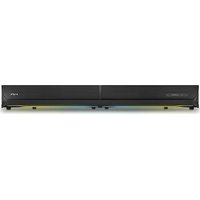
ESG 4 Pulsar - Soundbar ENERGY SISTEM - Free user manual and instructions
Find the device manual for free ESG 4 Pulsar ENERGY SISTEM in PDF.


| Product Type | Soundbar |
| Model | ESG 4 Pulsar |
| Brand | Energy Sistem |
| Dimensions (W x H x D) | Approx. 900 x 70 x 85 mm |
| Weight | Approx. 2.5 kg |
| Power Supply | AC 100-240V via external adapter |
| Total Power Output | 40W RMS |
| Bluetooth Version | 5.0 |
| Wireless Range | Up to 10 meters |
| Audio Inputs | Bluetooth, USB, AUX (3.5mm), Optical |
| Remote Control | Included (battery CR2025) |
| Mounting Options | Tabletop or wall-mountable (brackets included) |
| Cable Length | Power cable: 1.5 m |
| Frequency Response | 50 Hz – 20 kHz |
| Cleaning Instructions | Wipe with a soft, dry cloth. Do not use liquids. |
| Safety Precautions | Keep away from water, do not disassemble, avoid extreme temperatures. |
| Spare Parts Availability | Remote control and power adapter available from manufacturer. |
| Repairability | User-replaceable fuse only. Other repairs by qualified service. |
| General Information | 2.1 channel soundbar with built-in subwoofer. Supports Bluetooth streaming. |
Frequently Asked Questions - ESG 4 Pulsar ENERGY SISTEM
User questions about ESG 4 Pulsar ENERGY SISTEM
0 question about this device. Answer the ones you know or ask your own.
Ask a new question about this device
Download the instructions for your Soundbar in PDF format for free! Find your manual ESG 4 Pulsar - ENERGY SISTEM and take your electronic device back in hand. On this page are published all the documents necessary for the use of your device. ESG 4 Pulsar by ENERGY SISTEM.
USER MANUAL ESG 4 Pulsar ENERGY SISTEM
Care and maintenance 3
Features 4
General features 4
Technical specifications 4
Audio 4
Bluetooth connectivity 4
Audio inputs 4
USB player 4
Power requirements 4
Other features 4
Product content 4
General overview 5
Switching on and off the device 6
Playback modes 6
Bluetooth wireless connection. 6
Optical digital input (PCM) 6
USB playback port 7
Auxiliary audio input (AUX) 7
Playback control 7
Light modes 8
Equaliser 9
FAQ frequently asked questions 9
The product does not output sound through the optical input. 9
Warranty 9
Declaration of conformity 9

Introduction
- Thank you for trusting our company and buying the new Gaming Soundbar ESG 4 Pulsar. We hope you enjoy the product.
- Soundbar with stunning design, several RGB lighting effects and 20 W of power for an unbeatable experience when playing video games, watching movies or TV shows and listening to music. Bluetooth connectivity to manage all functions. Remote control included.
- Before you start using your Gaming Soundbar ESG 4 Pulsar, we strongly recommend reading this manual to get used to it.
Care and maintenance
- Do not expose your Gaming Soundbar ESG 4 Pulsar to impacts, dust, humidity or high temperatures.
- Do not use neither corrosive nor abrasive cleaning products.
- Do not disassemble the device. All repair works should be carried out exclusively by qualified staff of Energy Sistem Technology, S.A.
• Make sure your Gaming Soundbar ESG 4 Pulsar is off when you are not using it.
Features
General features
• 2.0 gaming soundbar with 40 W of peak power to dive into your video games.
- RGB lights with several lighting effects to feel like you are part of the game.
- It features an optical digital input, a 3.5 mm jack connection, Bluetooth 5.0, and a USB player to listen to your favourite music.
- Remote control to manage all soundbar functions remotely.
- Enhance your gaming experience with stunning sound when playing on your console, TV or PC.
Technical specifications
Audio
- Stereo sound system
- Power: 20 W
• 2 full range speakers: 10 W
• Passive radiators: 2 front membranes
• Frequency response: 40 Hz \~ 18 kHz
• Signal/Noise ratio: > 90 dB - 2 EQ modes
Bluetooth connectivity
- Bluetooth 5.0, class 2
- Compatible codec: SBC
• Frequency band: 2.4 GHz
• Maximum output power: < 20.00 dBm - Compatible Bluetooth profiles: A2DP / AVRCP
- Up to 20 m distance range
Audio inputs
• Optical digital input Toslink SPDIF (PCM)
• 3.5 mm audio-in (analogue stereo input)
USB player
- Reads files from USB sticks (up to 128 GB)
• Supported formats: MP3 / WAV
• Supported file system: FAT32 / exFAT - Shuffle mode
Power requirements
• AC/DC power adapter: 100 \~ 240 V/ 50 \~ 60 Hz
• Device adapter: DC
- Plug for electric socket: EU plug
• Power cable length: 150 cm
• Power consumption at medium volume: 2 Wh
• Power consumption at maximum volume: 10 Wh
Other features
- Front RGB lights with several lighting effects
- Remote control with up to 5 meters range
- Plastic casing
Product content
• Gaming Soundbar ESG 4 Pulsar
- Remote control
- Power adapter
• Optical digital audio cable - Audio cable
General overview


Power/LEDs on/off button1.
Playback mode2.
Volume -/Back3.
Volume +/Next4.
Play/Pause/Light mode/Colour5.
On/Off6.
Playback mode7.
Volume +8.
Play/Pause9.
Volume -10.
Back11.
Next12.
EQ mode13.
Light mode/Colour14.
Random playback15.
AC/DC power connector16.
USB playback port17.
Optical digital input18.
3.5 mm audio-in (analogue input)19.
Switching on and off the device
Plug the power adapter into the AC/DC power connector (16).
To switch on the Gaming Soundbar ESG 4 Pulsar, press the Power/LEDs on/off button (1) on the soundbar or On/Off (6) on the remote control. At this point the RGB LEDs light up.
To switch off the Gaming Soundbar ESG 4 Pulsar, press and hold the Power/LEDs on/off button (1) on the soundbar or On/Off (6) on the remote control for 2 seconds.
Note: If you switch off your Gaming Soundbar ESG 4 Pulsar, it saves the last selected lighting effect and colour. If RGB lighting is disabled when switching off the soundbar, it will also be disabled when you switch on the soundbar once again.
Playback modes
Once the Gaming Soundbar ESG 4 Pulsar is on, you can choose the playback mode you prefer. To do so, press Playback mode (2) repeatedly until finding the preferred playback mode. Playback modes will appear in the following order:
Bluetooth --> Line-in --> Optical --> USB
You will also hear the word identifying each mode.
Bluetooth wireless connection.
To pair your soundbar with a source device via Bluetooth, press Playback mode (2). Select Bluetooth mode.
Access the Bluetooth settings on the source device and search for "Energy Sistem GS ESG 4" among the detected devices. Once selected, the devices will be connected immediately. You will hear a sound confirming both devices are correctly paired.
Your Gaming Soundbar ESG 4 Pulsar connects to the last paired device automatically when you switch it on once again, provided that the Bluetooth connection on the source device is enabled.
Press and hold Playback mode (2) for 2 seconds to disconnect the current device and pair it with a new one.
IMPORTANT: The soundbar turns off automatically after 5 minutes if not paired with any device.
Optical digital input (PCM)
Make the most of your Gaming Soundbar ESG 4 Pulsar using the Optical digital input (18). This input allows you to connect an external device using the provided optical audio cable to enjoy digital sound.
IMPORTANT: Set the TV in PCM mode (Pulse-Code Modulation).
USB playback port
The soundabar plays .mp3 and .wav files from USB sticks (up to 128 GB). Playback starts automatically a few seconds after plugging the USB stick into the USB playback port (17).
If you turn off the soundbar or remove the storage unit, the internal memory will save the moment where you paused playback. If you connect the same removable storage unit once again, music playback will resume and the last song you listened to will be then played.
The root folders and files of your removable USB sticks will be read in chronological order and the songs included in the folders in alphabetical order.
Here you have a diagram of the reading order:
![graph TD A["1"] --> B["2"] A --> C["3"] A --> D["4"] A --> E["5"] A --> F["6"] B --> G["7"] B --> H["8"] C --> I["9"] C --> J["10"] D --> K["11"] D --> L["12"] E --> M["13"] E --> N["14"] F --> O["15"] F --> P["16"] style A fill:#f9f,stroke:#333 style B fill:#ccf,stroke:#333 style C fill:#cfc,stroke…](/content/2026/07/1412342/images/d9db0e3bc26eff1a9eb5d00ad43eda5f124c2bccb2e2c9dd1194f3097b11051f.jpg)
Auxiliary audio input (AUX)
Make the most of your Gaming Soundbar ESG 4 Pulsar using the 3.5 mm audio-in (analogue input) (19). This audio input allows you to connect an external device using a 3.5 mm mini jack audio cable.
IMPORTANT: It is not possible to control music playback from the soundbar while using this mode. You will have to use the connected music player instead.
Playback control
Select a playback mode and you will be able to control all playback functions from your Gaming Soundbar ESG 4 Pulsar.
Press Volume -/Back (3) or Volume +/Next (4) to adjust the volume according to your preferences. You can also press the Volume + (8) and Volume - (10) buttons on the remote control to adjust the volume.
Press and hold Volume -/Back (3) or Volume +/Next (4) for 2 seconds to skip to the previous or next track. You can also press the Back (11) or Next (12) buttons on the remote control.
Press Play/Pause/Light mode/Colour (5) on the soundbar or the Play/Pause (9) button on the remote control to play or pause a song.
You can enable or disable shuffle mode using the remote control when playing files from a USB stick. To enable/disable this mode, press the Random playback (15) button.
Important: Bear in mind that you can only control playback from the connected music player while using AUX mode
(audio-in).
Light modes
Your Gaming Soundbar ESG 4 Pulsar features RGB lighting. Adjust it to your liking using the soundbar buttons or the remote control.
Press the Power/LEDs on off button (1) on the soundbar or press and hold the On/Off (6) button on the remote control to enable/disable RGB lighting.
Enable RGB lighting and press and hold Play/Pause/Light Mode/Colour (5) for 2 seconds to switch between the different light modes. You can also do this using the remote control. Press the Light mode/Colour (14) button for 2 seconds.
You can change the colour of each light mode. To do so, press Play/Pause/Light mode/Colour (5) twice in a row or press the Light mode/Colour (14) button on the remote control.
For a better understanding of the lighting effects and colours, please refer to the image below:

<

![graph LR A["4. BOUNCING LIGHT"] -->|1 click| B["Color Scale"] C["5. RAINBOW"] -->|1 click| D["Color Scale"] E["6. FADE COLOURS"] -->|1 click| F["Color Scale"]](/content/2026/07/1412342/images/42a4853ab920f94c587d2d528e3417403a3b85070987d29ae30ff58a395f685d.jpg)

Equaliser
The Gaming Soundbar ESG 4 Pulsar features 2 EQ modes to adjust the sound the way you prefer. To do so, press EQ mode (13) on the remote control and you will hear the different EQ modes available:
Gaming --> Music
FAQ frequently asked questions
The product does not output sound through the optical input.
- Make sure you have removed the protective plastic caps from the ends of the included optical cable.
- Check in the TV settings that it is configured in PCM (Pulse-Code Modulation) mode.
Warranty
You can check the warranty terms here
Declaration of conformity
Issuer's name: Energy Sistem Technology, S.A. - CIF: A53107488
Address: C/ Calpe, 1 - 03509 Finestrat, Alicante (Spain)
Tel: +34 966 830 324
We declare under our sole and exclusive responsibility that the product:
Description: gaming soundbar
Brand: Energy Sistem
Model: Gaming Soundbar ESG 4 Pulsar
Manufacturer: Energy Sistem Technology, S.A.
Manufacturing country: China
referred to in this declaration complies with the essential norms and standards
• EN 62368-1:2014+A11:2017
• EN 62479:2010
• ETSI EN 301 489-1 V2.2.3(2019-11)
• EN 55032:2015
• EN 55035:2017
• ETSI EN 301 489-17 V3.1.1(2017-02)
• ETSI EN 300 328 V2.2.2(2019-07)
ENERGY♥SISTEM
in conformity with the provisions of the Directive 2014/53/EU of the European Parliament and of the Council of 16th April 2014.
Finestrat, 1st July 2021

Miguel Ángel Aragüez García Innovation and Technology Director
CE
- INTRODUCTION
- CARE AND MAINTENANCE
- FEATURES
- GENERAL FEATURES
- TECHNICAL SPECIFICATIONS
- AUDIO
- BLUETOOTH CONNECTIVITY
- AUDIO INPUTS
- USB PLAYER
- POWER REQUIREMENTS
- OTHER FEATURES
- PRODUCT CONTENT
- GENERAL OVERVIEW
- SWITCHING ON AND OFF THE DEVICE
- PLAYBACK MODES
- BLUETOOTH WIRELESS CONNECTION
- OPTICAL DIGITAL INPUT (PCM)
- USB PLAYBACK PORT
- AUXILIARY AUDIO INPUT (AUX)
- PLAYBACK CONTROL
- LIGHT MODES
- EQUALISER
- FAQ FREQUENTLY ASKED QUESTIONS
- WARRANTY
- DECLARATION OF CONFORMITY
- ENERGY♥SISTEM
Brand : ENERGY SISTEM
Model : ESG 4 Pulsar
Category : Soundbar