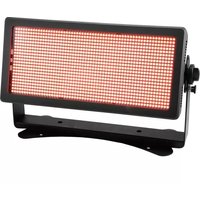
Multiflood Pro - Lamp Eurolite - Free user manual and instructions
Find the device manual for free Multiflood Pro Eurolite in PDF.


Pick your language and provide your email: we'll send you a specifically translated version.
| Product Type | LED Floodlight |
| Dimensions (L x W x H) | 300 x 250 x 150 mm |
| Weight | 2.5 kg |
| Power Consumption | 100 W |
| Light Source | RGBW LEDs |
| Beam Angle | 25° |
| IP Rating | IP65 |
| Control Modes | DMX, Master/Slave, Sound-Active |
| Features | Multi-color mixing, strobe, dimmer, built-in programs |
| Maintenance | Clean with dry cloth; avoid liquids |
| Safety | Ensure ventilation, disconnect power before cleaning |
| Spare Parts | LED modules, power supply unit, housing |
| General Info | Suitable for stage, event, and architectural lighting |
Frequently Asked Questions - Multiflood Pro Eurolite
How do I connect the Multiflood Pro to a DMX controller?
Use a standard 3-pin XLR cable to connect the DMX IN port to your controller. Set the DMX address using the DIP switches or the display menu. For detailed addressing, refer to the manual's DMX section.
What is the maximum ambient temperature for operation?
The maximum ambient temperature is 40°C (104°F). Ensure proper ventilation and do not operate in enclosed spaces without airflow.
Can I use this fixture outdoors?
Yes, the Multiflood Pro has an IP65 rating, making it suitable for outdoor use. However, avoid submerging in water and ensure the power connections are weatherproof.
How do I clean the fixture?
Disconnect power before cleaning. Use a soft, dry cloth to wipe the housing and lens. Do not use abrasive cleaners or solvents. For stubborn dirt, slightly dampen the cloth with water.
What is the recommended distance for DMX cable runs?
For reliable signal, keep DMX cable runs under 300 meters. Use a DMX terminator at the last fixture to prevent signal reflections.
How do I set the fixture to sound-active mode?
Press the 'Mode' button until 'SND' appears on the display. Use the up/down buttons to adjust sensitivity. The fixture will react to ambient sound via the built-in microphone.
What should I do if the fixture does not power on?
Check the power cable and outlet. Verify that the fuse is intact. If power is supplied but the fixture remains off, contact technical support.
Can I replace the LEDs myself?
LED modules are not user-serviceable. If a LED fails, contact Eurolite support or an authorized technician for replacement to avoid damage.
What is the lifespan of the LEDs?
The LEDs have a rated lifespan of up to 50,000 hours under normal operating conditions. This may vary with usage and environment.
How do I update the firmware?
Firmware updates are performed via a dedicated programmer (not included). Visit the Eurolite website for the latest firmware and instructions. Typically, you connect the fixture to a computer via a USB-DMX interface.
User questions about Multiflood Pro Eurolite
0 question about this device. Answer the ones you know or ask your own.
Ask a new question about this device
No questions yet. Be the first to ask one.
Download the instructions for your Lamp in PDF format for free! Find your manual Multiflood Pro - Eurolite and take your electronic device back in hand. On this page are published all the documents necessary for the use of your device. Multiflood Pro by Eurolite.
USER MANUAL Multiflood Pro Eurolite

Manual assistant
Powered by Anthropic
Waiting for your message
Product information
Brand : Eurolite
Model : Multiflood Pro
Category : Lamp