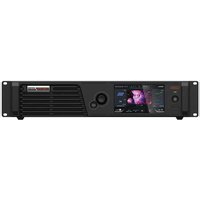
CX40 Pro - Controller NovaStar - Free user manual and instructions
Find the device manual for free CX40 Pro NovaStar in PDF.


Pick your language and provide your email: we'll send you a specifically translated version.
| Product Type | LED Display Controller |
| Brand | NovaStar |
| Model | CX40 Pro |
| Dimensions (W x H x D) | 200 mm x 150 mm x 50 mm |
| Weight | 1.5 kg |
| Power Supply Input | AC 100-240V, 50/60Hz |
| Power Consumption | 100 W max |
| Operating Temperature | 0°C to 40°C |
| Video Input Interfaces | HDMI, DVI, DisplayPort, SDI |
| Video Output Interfaces | Ethernet (RJ45), Fiber Optic |
| Max Supported Resolution | 3840 x 2160 @ 60Hz |
| Main Functions | Video processing, image scaling, color calibration, signal conversion, multi-device cascading |
| Software Control | NovaStar V-Can, LED Pro, or similar |
| Maintenance | Clean with a dry, soft cloth; avoid liquids |
| Safety Features | Overload protection, short-circuit protection, cooling fan |
| Spare Parts & Repairability | No user-serviceable parts; contact authorized service center |
| Compliance | CE, FCC, RoHS |
| Warranty | 2 years |
Frequently Asked Questions - CX40 Pro NovaStar
How do I connect the CX40 Pro to my LED display?
Connect the controller's output ports (Ethernet or fiber) to your LED display's receiving cards. Use Cat5e/6 cables for Ethernet or appropriate fiber cables. Ensure proper termination.
What software is needed to configure the CX40 Pro?
Use NovaStar's V-Can or LED Pro software. Download from the official NovaStar website. Connect via USB or Ethernet.
What is the maximum resolution supported?
The CX40 Pro supports up to 3840 x 2160 @ 60Hz via its input interfaces.
Can I cascade multiple CX40 Pro controllers?
Yes, you can cascade multiple units using the Sync/Genlock feature to drive larger displays.
How do I update the firmware?
Download the latest firmware from NovaStar's support page, load it via the control software (V-Can/LED Pro) through USB or Ethernet.
What should I do if the controller overheats?
Ensure proper ventilation around the unit. Do not block the cooling fan. If it continues, reduce ambient temperature or check fan operation.
Does the CX40 Pro support HDR?
Yes, it supports HDR10 and HLG formats for enhanced dynamic range.
What input cables come with the controller?
Typically, a power cord and an HDMI cable are included. Other cables (DVI, DisplayPort, SDI) are sold separately.
How do I reset the controller to factory settings?
Press and hold the reset button (usually a pinhole) for 5 seconds using a paperclip, or use the software restore option.
Is the CX40 Pro compatible with NovaStar's H-series receiving cards?
Yes, it is fully compatible with NovaStar H-series and M-series receiving cards.
User questions about CX40 Pro NovaStar
0 question about this device. Answer the ones you know or ask your own.
Ask a new question about this device
No questions yet. Be the first to ask one.
Download the instructions for your Controller in PDF format for free! Find your manual CX40 Pro - NovaStar and take your electronic device back in hand. On this page are published all the documents necessary for the use of your device. CX40 Pro by NovaStar.
USER MANUAL CX40 Pro NovaStar


Manual assistant
Powered by Anthropic
Waiting for your message
Product information
Brand : NovaStar
Model : CX40 Pro
Category : Controller