HDR Master 4K - Uncategorized NovaStar - Free user manual and instructions
Find the device manual for free HDR Master 4K NovaStar in PDF.


Pick your language and provide your email: we'll send you a specifically translated version.
| Product Type | 4K HDR Video Processor for LED Displays |
| Model | HDR Master 4K |
| Brand | NovaStar |
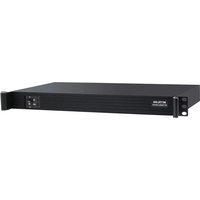
| Dimensions (W x H x D) | 482.6 x 44.5 x 300 mm (19" rackmount, 1U) |
| Weight | 3.5 kg |
| Power Supply | AC 100-240V, 50/60Hz, 150W |
| Max Input Resolution | 4096 x 2160 @ 60 Hz |
| Max Output Resolution | Custom up to 8K (via multiple outputs) |
| Video Inputs | 2x HDMI 2.0, 1x DisplayPort 1.2, 1x 12G-SDI |
| Video Outputs | 8x Gigabit Ethernet (RJ-45) for LED panels |
| HDR Support | HDR10, HLG, Dolby Vision (optional) |
| Color Bit Depth | 10-bit per channel |
| Processing Features | Scaler, frame sync, color calibration, 3D LUT |
| Control Interface | Ethernet (TCP/IP), RS-232, USB 2.0 for firmware |
| Operating Temperature | 0°C to 45°C |
| Cooling | Fan cooled, intelligent thermal control |
| Maintenance | Clean exterior with soft dry cloth; avoid liquids |
| Safety | Indoor use only; do not expose to moisture |
| Spare Parts / Repairability | Contact NovaStar support for replacement parts |
Frequently Asked Questions - HDR Master 4K NovaStar
What is the HDR Master 4K used for?
The HDR Master 4K is a professional video processor designed for high-resolution LED displays, enabling seamless switching, scaling, and HDR content playback.
What video formats does it support?
It supports up to 4K@60Hz input and can output custom resolutions up to 8K via multiple Ethernet ports. It accepts HDMI 2.0, DisplayPort 1.2, and 12G-SDI.
Can I use it with a non-NovaStar LED panel?
Yes, it works with most LED panels that support standard receiving cards compatible with NovaStar controllers. Check your panel's compatibility.
How do I connect the HDR Master 4K to my display?
Connect your source to any input (HDMI, DP, SDI). Then connect the Ethernet outputs to the LED panel's receiving cards. Use the NovaStar software for configuration.
Does it support Dolby Vision?
Yes, it supports Dolby Vision as an optional feature via firmware update. Standard HDR10 and HLG are supported out of the box.
What software is needed to configure it?
You need NovaStar's NovaLCT or SmartLCT software, available for download from the NovaStar website. Configuration is done via Ethernet or USB.
Can I daisy-chain multiple units?
Yes, you can cascade multiple HDR Master 4K units for larger displays. Use the sync port or network connection to synchronize them.
What is the maximum input lag?
The HDR Master 4K has ultra-low latency, typically less than 1 frame (approx. 16ms at 60Hz) depending on processing settings.
How do I update the firmware?
Download the latest firmware from NovaStar's support site. Connect via USB or Ethernet, and use the update tool in NovaLCT. Follow on-screen instructions.
Is the unit rack-mountable?
Yes, it is designed for 19-inch rack mounting and occupies 1U of space. Rack ears are included.
User questions about HDR Master 4K NovaStar
0 question about this device. Answer the ones you know or ask your own.
Ask a new question about this device
No questions yet. Be the first to ask one.
Download the instructions for your Uncategorized in PDF format for free! Find your manual HDR Master 4K - NovaStar and take your electronic device back in hand. On this page are published all the documents necessary for the use of your device. HDR Master 4K by NovaStar.
USER MANUAL HDR Master 4K NovaStar

Manual assistant
Powered by Anthropic
Waiting for your message
Product information
Brand : NovaStar
Model : HDR Master 4K
Category : Uncategorized