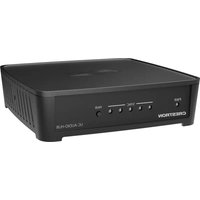
UC-AUDIO-HUB - Conference system Crestron - Free user manual and instructions
Find the device manual for free UC-AUDIO-HUB Crestron in PDF.


Pick your language and provide your email: we'll send you a specifically translated version.
| Product Type | Audio Hub for Unified Communications |
| Brand | Crestron |
| Model | UC-AUDIO-HUB |
| Dimensions (H x W x D) | 1.7 x 8.4 x 6.0 in (43 x 213 x 152 mm) |
| Weight | 1.5 lbs (0.68 kg) |
| Power Supply | PoE (Power over Ethernet) 802.3af Class 3 |
| Power Consumption | Max 10 W |
| Audio Input | 1 x 3.5mm line-in, 1 x USB (device) |
| Audio Output | 1 x 3.5mm headphone/line-out |
| USB Ports | 2 x USB 2.0 (host), 1 x USB 2.0 (device) |
| Network Connection | 1 x Gigabit Ethernet (PoE) |
| Supported Audio Formats | 16-bit/48 kHz stereo, PCM |
| Compatibility | Zoom, Teams, Webex, and other UC platforms |
| Controls | Volume up/down, mute, LED indicators |
| Mounting | Desk or under-table mountable (brackets included) |
| Operating Temperature | 32°F to 104°F (0°C to 40°C) |
| Regulatory Compliance | FCC, CE, IC |
| Cleaning Instructions | Wipe with a dry, soft cloth. Do not use liquids or sprays. |
| Safety Precautions | Do not expose to water or excessive heat. Use only PoE power source. |
| Repairability | No user-serviceable parts. Contact Crestron support for repairs. |
| Warranty | Limited 3-year warranty |
Frequently Asked Questions - UC-AUDIO-HUB Crestron
What is the Crestron UC-AUDIO-HUB?
The Crestron UC-AUDIO-HUB is an audio hub designed for Unified Communications systems, providing high-quality audio input/output for conference rooms and huddle spaces.
How do I connect the UC-AUDIO-HUB to my computer?
Connect the device to your computer via the USB Device port (USB-B) using a USB-A to USB-B cable. Ensure the computer recognizes it as an audio device.
Does the UC-AUDIO-HUB require external power?
No, the device is powered via Power over Ethernet (PoE) using an IEEE 802.3af compliant switch or injector.
Which UC platforms are compatible with this hub?
The hub is compatible with major platforms like Zoom, Microsoft Teams, Cisco Webex, and others that support standard USB audio devices.
Can I connect a microphone to the UC-AUDIO-HUB?
Yes, the hub has a 3.5mm line-in input for external microphones. It also supports plug-and-play microphones via USB.
How do I adjust the volume on the hub?
Use the physical volume buttons on the front panel. There are also mute and LED indicators for status.
What should I do if the device is not detected?
Check the USB connection, ensure PoE is active, and try a different USB port on your computer. Update the USB drivers if needed.
Can I mount the UC-AUDIO-HUB under a table?
Yes, the hub comes with mounting brackets for under-table or desk installation. Use the provided screws.
How do I clean the device?
Use a dry lint-free cloth to wipe the surface. Do not use any liquids, sprays, or abrasive cleaners.
Where can I find the user manual for the UC-AUDIO-HUB?
The user manual is available for download on Crestron's official website or at notice-facile.com in PDF format.
User questions about UC-AUDIO-HUB Crestron
0 question about this device. Answer the ones you know or ask your own.
Ask a new question about this device
No questions yet. Be the first to ask one.
Download the instructions for your Conference system in PDF format for free! Find your manual UC-AUDIO-HUB - Crestron and take your electronic device back in hand. On this page are published all the documents necessary for the use of your device. UC-AUDIO-HUB by Crestron.
USER MANUAL UC-AUDIO-HUB Crestron
Manual assistant
Powered by Anthropic
Waiting for your message
Product information
Brand : Crestron
Model : UC-AUDIO-HUB
Category : Conference system