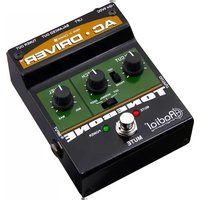
AC-Driver - Audio effect pedal Radial Engineering - Free user manual and instructions
Find the device manual for free AC-Driver Radial Engineering in PDF.


Pick your language and provide your email: we'll send you a specifically translated version.
| Product Type | Acoustic Guitar Preamp / Direct Injection Box (DI) |
| Dimensions (L x W x H) | 4.5 x 3.5 x 2 inches (114 x 89 x 51 mm) |
| Weight | 1.0 lb (0.45 kg) |
| Power Supply | 48V phantom power (XLR) or 9VDC external adapter (optional) |
| Input Connector | 1/4" TS high impedance (1 MΩ) |
| Output Connector | Balanced XLR (low impedance, 600Ω) |
| Other Connectors | 1/4" TS parallel output (unaffected) |
| Input Impedance | 1 MΩ |
| Output Impedance | 600Ω balanced |
| Gain | Variable gain up to +20 dB |
| Frequency Response | 20 Hz – 20 kHz (±0.5 dB) |
| Total Harmonic Distortion (THD) | < 0.01% @ 1 kHz |
| Dynamic Range | > 110 dB |
| Polarity Reverse Switch | 180° polarity inversion (0/180°) |
| Ground Lift Switch | Lifts pin 1 on XLR to reduce ground loops |
| Buffer/Preamp | JFET class-A input buffer with Jensen transformer output |
| Construction | Steel chassis with baked enamel finish |
| Safety Notes | Do not expose to moisture or liquids; disconnect phantom when not in use |
| Maintenance | Clean with a soft, dry cloth; no internal user-serviceable parts |
| Spare Parts & Repairability | Repair only by authorized service; spare parts not available to end users |
| Country of Origin | Designed and built in Canada |
Frequently Asked Questions - AC-Driver Radial Engineering
What is the Radial AC-Driver used for?
The AC-Driver is a powered direct box designed for acoustic guitar or other instruments to deliver a clean, balanced signal to a mixing console or PA system.
Does the AC-Driver require a battery?
No, it can be powered via 48V phantom power from the XLR connection or an optional 9V DC adapter. No battery needed.
How do I connect the AC-Driver?
Connect your instrument to the 1/4" input. Use the XLR output to send a balanced signal to the mixer. The parallel 1/4" output can feed a stage amp.
What do the switches on the front do?
The Gain knob adjusts input level. The 180° switch reverses polarity to eliminate phase cancellation. The Ground Lift disconnects pin 1 of the XLR to stop ground loops.
Can I use the AC-Driver with a bass guitar?
Yes, the high impedance input (1 MΩ) works well with any passive pickup, including bass guitars.
Is the AC-Driver a preamp?
Yes, it features a JFET class-A preamp with adjustable gain up to +20 dB, providing a warm, transparent boost to your signal.
What is the difference between the AC-Driver and a standard DI?
The AC-Driver includes a gain control and Jensen transformer for superior sound quality, making it ideal for acoustic instruments that need a clean preamp.
How do I reduce noise or hum?
Try the Ground Lift switch. If hum persists, ensure phantom power is clean and cables are balanced. Use the polarity switch if other mics cause phase issues.
What is the frequency response of the AC-Driver?
It covers the full audio range from 20 Hz to 20 kHz with ±0.5 dB flatness, ensuring transparent signal transmission.
Can I use the AC-Driver with a condenser microphone?
No, it is designed for instrument-level input only. Phantom power passes through to the output, which could damage a dynamic mic, so do not plug a mic into the 1/4" input.
User questions about AC-Driver Radial Engineering
0 question about this device. Answer the ones you know or ask your own.
Ask a new question about this device
No questions yet. Be the first to ask one.
Download the instructions for your Audio effect pedal in PDF format for free! Find your manual AC-Driver - Radial Engineering and take your electronic device back in hand. On this page are published all the documents necessary for the use of your device. AC-Driver by Radial Engineering.
USER MANUAL AC-Driver Radial Engineering

Manual assistant
Powered by Anthropic
Waiting for your message
Product information
Brand : Radial Engineering
Model : AC-Driver
Category : Audio effect pedal