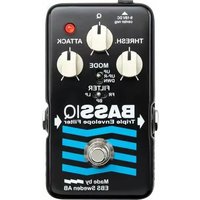
BassIQ - Effect machine EBS - Free user manual and instructions
Find the device manual for free BassIQ EBS in PDF.


| Type | Bass Effect Pedal |
| Brand | EBS |
| Model | BassIQ |
| Power Supply | 9V DC (center negative) or 9V battery |
| Current Draw | ~20 mA |
| Dimensions (W x H x D) | 120 x 55 x 70 mm |
| Weight | 300 g |
| Input | 1/4" mono jack |
| Output | 1/4" mono jack |
| Bypass | True bypass |
| Controls | Blend, Tone, Sens (Envelope Sensitivity), Peak |
| LED Indicator | On/Off status |
| Housing | Metal chassis |
| Main Functions | Envelope filter effect for bass with adjustable blend, tone, and sensitivity |
| Care & Cleaning | Wipe with a dry cloth; avoid liquids and solvents |
| Safety Precautions | Use only specified power supply; avoid extreme temperatures and moisture |
| Spare Parts & Repairability | Not user-serviceable; contact EBS or authorized service center |
| Warranty | 2 years |
| Country of Origin | Sweden |
Frequently Asked Questions - BassIQ EBS
User questions about BassIQ EBS
0 question about this device. Answer the ones you know or ask your own.
Ask a new question about this device
Download the instructions for your Effect machine in PDF format for free! Find your manual BassIQ - EBS and take your electronic device back in hand. On this page are published all the documents necessary for the use of your device. BassIQ by EBS.
USER MANUAL BassIQ EBS
THANK YOU FOR PURCHASING THE EBS BASS IQ - BLUE LABEL PEDAL!
The EBS Bass IQ is an analog envelope filter pedal that is triggered by the notes you play.
The new version has added controls and filters that expands the palette of funky sounds that can be created with the pedal.
We hope you'll enjoy using your EBS BassIQ Blue Label pedal.
/The EBS Team

Visit EBSSWEDEN.COM for info on all EBS effects, amps and accessories.

WWW.EBSSWEDEN.COM
THE CONTROLS
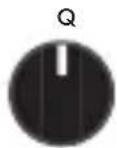
THRESH.

ATTACK

Q controls the bandwidth or the 'Q' value of the filter, i.e. the sharpness and peak of the filter.
THRESH. controls the sensitivity of the filter. The higher the setting, the higher the sensitivity. Use this to fine-tune the BassIQ's dynamic response, so that the filter will react to how hard you play.
ATTACK controls how fast the filter will react. Minimum setting on this knob will allow the filter to react immediately. The maximum setting gives the filter a delayed response of approximately 2 seconds.
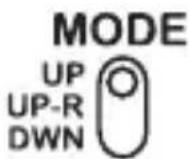
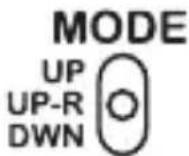
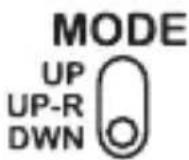
MODE
UP will "open" the filter, that means the response goes from low to high frequencies. This is the classic operation of an envelope filter.
UP-R is a special mode of UP where you can use an internal range trimmer control to set the dynamic sensitivity.
DWN is a reversed action from UP, from high to low frequencies. This mode is useful to create synth-bass like sounds.
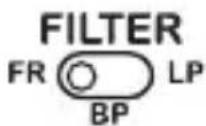
FILTER
FR means Fullrange. In this position the filter regains the higher frequencies when opening up completely, maintaining the high frequency contents of the original signal.

BP is a Bandpass filter. This can be called the AutoWah position, since the effect is similar to wah effects.

LP is the original envelope filter using a moving low pass filter.
TRIMMERS (inside the box)
HP (HIGH PASS FILTER MIX-IN) is a High
Pass filter for further fine-tuning your sound while in low pass mode ONLY (LP). It blends in an amount of the high frequencies from the original “bypassed” sound. The range can be set
from 0% to 100% mix. Factory setting is minimum position.
GAIN sets the overall gain of the EBS BassIQ when in use. The factory setting for this trimmer is minimum position.
RANGE sets the maximum upper range for the pedal while in UP-R mode. Factory setting for this trimmer is 12 o'clock (50%).



POWER OPTIONS


DC POWER ADAPTOR For environmental reasons, we recommend the use of a DC Power Supply, such as the EBS AD-9 Pro. The EBS BassIQ Blue Label handles 9-18 V DC, and require a 2.1 mm pin center negative type of connector.
BATTERY This pedal can run on battery (not included). To place a battery in the pedal follow these steps.
1) Remove the four screws holding the bottom plate.
2) Carefully remove the bottom plate.
3) Place a 9V alkaline type; 6LR61 in the battery holder.
4) Gently place back the bottom plate. Attach the four mounting screws using moderate tension.
TROUBLE SHOOTING GUIDE
Please consult the following checkpoints, before consulting one of the authorized EBS service centers.
Checkpoint
1) Does the cable(s) work properly?
2) Are the 1/4" plugs properly connected all the way in?
3) Are the Instrument cable attached to the Right (input) jack, and the Amp cable connected to the Left (output) jack?
4) Does the pedal have a battery, and is the battery OK?
5) Does the indicator LED light when pressing the foot switch alternatively?
6) Does the instrument work?
7) Does the amplifier work and is the volume turned up?
8) If you are using a DC adapter, Are you using an EBS AD-9?
Action if answered NO
- Replace cable(s).
- Push the 1/4" plugs all the way in.
- Reconnect input and output jacks.
- Put a new battery in the pedal.
- Replace/put in battery, or use a DC power supply.
- Check the instrument.
- Turn up volume or check the amp at your nearest EBS service center.
- Check the voltage and polarity of the adapter you are using.
TECHNICAL SPECIFICATIONS EBS BASS IQ BLUE LABEL EDITION
Nominal Input Level -10 dBv
Input Impedance 1.8 Mohms
Output Impedance 100 ohms
Dry Bandwidth +0/-2 dB 20 - 20kHz
Filter: Range 100 - 2.5k Hz
Q 0.7 - 15
Mode Down/Up-Range/Up
Type Low Pass, Band Pass, Full Range
Threshold
-50 - +6 dBv
Attack Time
(80%)
50 ms - 2 s
Dimensions W x H x D
2.6" × 4.5" × 1.9" (67 × 115 × 48 mm)
Weight
315g (0.7 lb.)
Type
Analog Effect, Relay type Switching
Power Requirements
9, 12 or 18 V DC, 55 mA max.
Pedal shuts off below 6.0 V
Specifications are subject to change without notice.


Brand : EBS
Model : BassIQ
Category : Effect machine