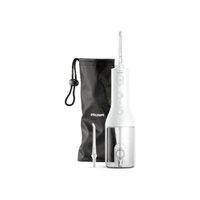
PHILIPS Cordless Power Flosser DiamondClean 9000 HX3886 - Interdental brush

Cordless Power Flosser DiamondClean 9000 HX3886 - Interdental brush PHILIPS - Free user manual and instructions

Find the device manual for free Cordless Power Flosser DiamondClean 9000 HX3886 PHILIPS in PDF.

📄 156 pages English EN Download 💬 AI Question 10 questions ⚙️ Specs
Notice PHILIPS Cordless Power Flosser DiamondClean 9000 HX3886 - page 2
Pick your language and provide your email: we'll send you a specifically translated version.
Product type Cordless Power Flosser
Brand Philips
Model DiamondClean 9000 HX3886
Dimensions (approx.) 15 x 5 x 5 cm
Weight (approx.) 200 g
Power source Rechargeable lithium-ion battery
Charging time 24 hours for a full charge
Battery life Up to 3 weeks of use (2 times per day)
Cleaning modes 3 modes: Clean, Soft, Massage
Jet pressure Up to 1900 pulsations per minute (variable per mode)
Reservoir capacity 200 ml
Nozzle material Plastic with rubber tip
Waterproof IPX7 (submersible up to 1 meter for 30 minutes)
Care and cleaning Rinse the nozzle and reservoir after each use
Spare parts available Replacement nozzles (type HX801), charger
Warranty 2 years

Frequently Asked Questions - Cordless Power Flosser DiamondClean 9000 HX3886 PHILIPS

How to recharge the Cordless Power Flosser?
Place the device on the provided charging base and plug it into a wall outlet. The indicator light shows charging status. A full charge takes about 24 hours.
What is the battery life?
The battery lasts about 3 weeks with two uses per day. The lithium-ion battery offers a long lifespan.
How to clean and maintain the device?
After each use, empty the water reservoir and rinse the nozzle with clean water. Clean the exterior with a damp cloth. Do not immerse the main body.
What are the different modes available?
The device has 3 modes: Clean for daily use, Soft for sensitive gums, and Massage to stimulate blood circulation.
Can I use the device in the shower?
Yes, the device is IPX7 waterproof, allowing use in the shower. However, do not immerse for more than 30 minutes.
How to change the nozzle?
Unclip the nozzle by pressing the release button on the side of the handle, then insert the new nozzle and clip it in place.
Where can I buy replacement nozzles?
Replacement nozzles are available on the Philips website or from authorized retailers. The compatible model is HX801.
What to do if the device stops working?
Check the battery charge. If the problem persists, consult the troubleshooting section in the manual or contact Philips customer service.
Is the device suitable for sensitive teeth?
Yes, the Soft mode is specially designed for sensitive gums and teeth, with a gentler jet.
How to empty the water reservoir?
Remove the reservoir by pulling it downwards, empty it, and rinse it with clean water before putting it back in place.

User questions about Cordless Power Flosser DiamondClean 9000 HX3886 PHILIPS

0 question about this device. Answer the ones you know or ask your own.

Ask a new question about this device

Your email remains private: it is only used to notify you if someone answers your question.

No questions yet. Be the first to ask one.

Download the instructions for your Interdental brush in PDF format for free! Find your manual Cordless Power Flosser DiamondClean 9000 HX3886 - PHILIPS and take your electronic device back in hand. On this page are published all the documents necessary for the use of your device. Cordless Power Flosser DiamondClean 9000 HX3886 by PHILIPS.

USER MANUAL Cordless Power Flosser DiamondClean 9000 HX3886 PHILIPS

phosphorus phosphate 139

简体中文 143

繁體中文 147

한국어 150

153 العربية

הכלה 156

Battery removal instructions for professionals - Sonicare Cordless Power Flosser Series

The built-in rechargeable battery must only be removed by a qualified professional when the appliance is discarded. Before removing the battery, make sure that the battery is completely empty.

Take any necessary safety precautions when you handle tools to open the appliance and when you dispose of the rechargeable battery. Be sure to protect your eyes, hands, fingers, and the surface on which you work.

When you handle batteries, make sure that your hands, the product and the batteries are dry.

To avoid accidental short-circuiting of batteries after removal, do not let battery terminals come into contact with metal objects (e.g. coins, hairpins, rings). Do not wrap batteries in aluminum foil. Tape battery terminals or put batteries in a plastic bag before you discard them.

To remove the rechargeable battery, you need a pair of wire cutters/scissors, a flat-head (standard) and Philips screwdriver.

1 To deplete the rechargeable battery of any charge, unplug the charging cable from the back of the Cordless Power Flosser, turn on the device and let it run until it stops. Repeat this step until you can no longer turn on the device.
2 Remove and discard the nozzle. To remove the nozzle, press the nozzle release button and pull the nozzle from the handle.

Diagram showing a tool interacting with a button, labeled with numbered steps and an arrow indicating direction.

Diagram of a device with labeled parts and directional arrows indicating movement or assembly.

Diagram of a screwdriver inserted into a mechanical component with a gear-like feature (no text or symbols)

Diagram of a mechanical or electrical component with rotational arrows and a tool, no text or symbols present.

Mechanical component diagram showing a cylindrical assembly with mounting holes and a downward arrow indicating motion (no text or symbols)

Pure mechanical component diagram without any text, numbers, or symbols

Diagram showing a speaker with an arrow pointing to the speaker, and a checkmark inside a circle (no text or symbols)

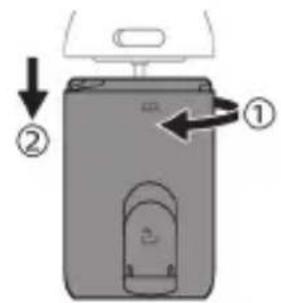
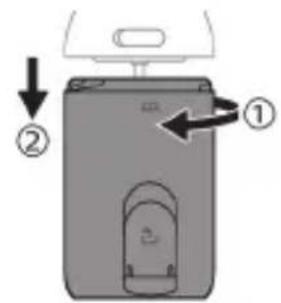
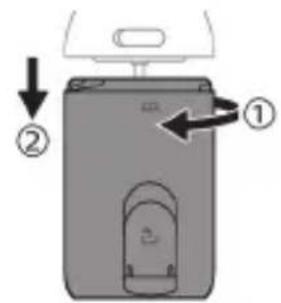
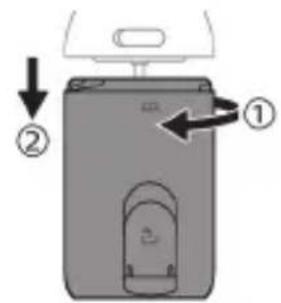
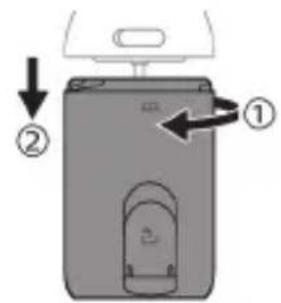
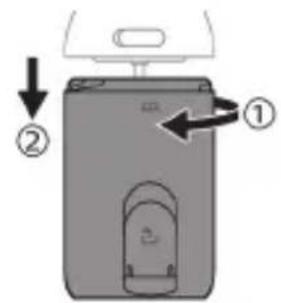
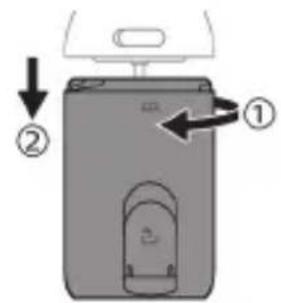
3 Detach the reservoir from the handle.

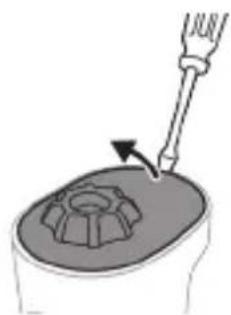
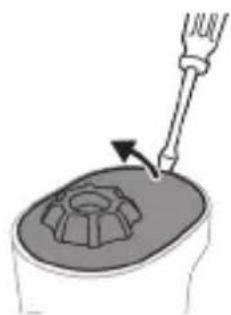
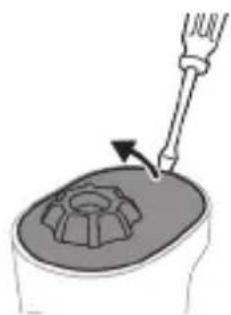
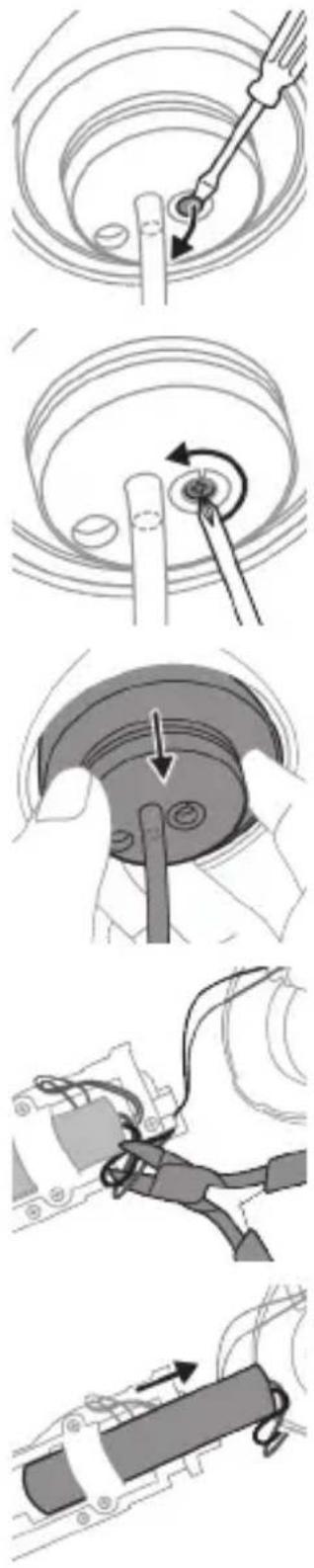
4 Hold the top of the handle with one hand and remove the top cover by prying it with a flat-head screwdriver.

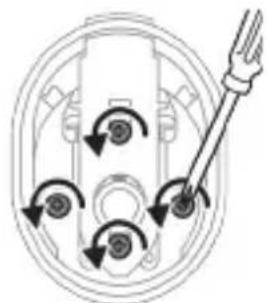
5 Locate and remove all 4 screws under the top cover with a Philips screwdriver.

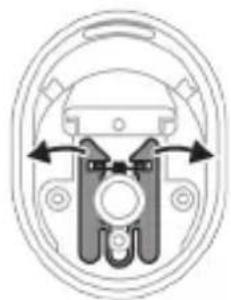
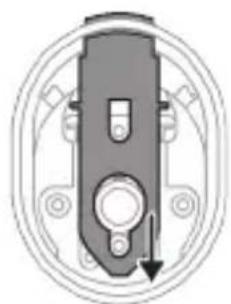
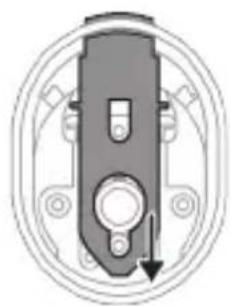
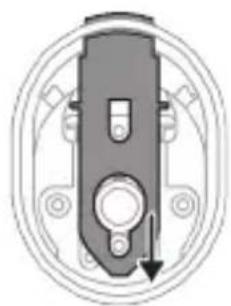
6 Remove the nozzle release button slider.

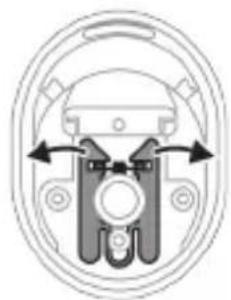
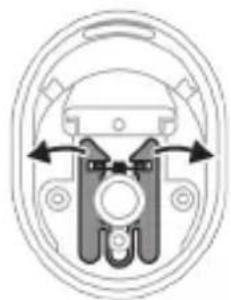
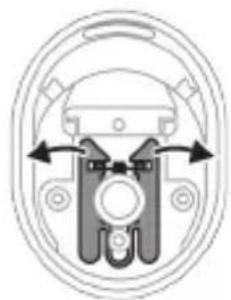
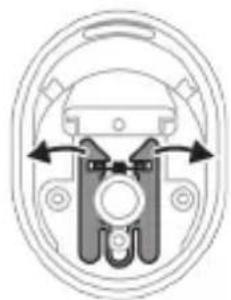
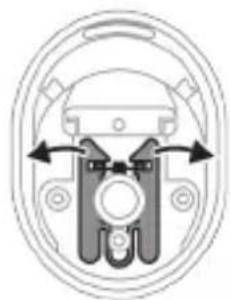
7 Remove the lock arms.

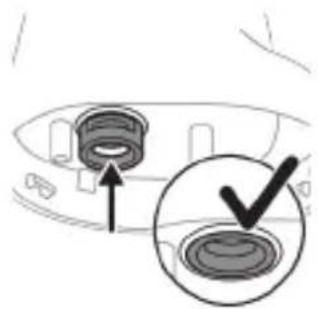
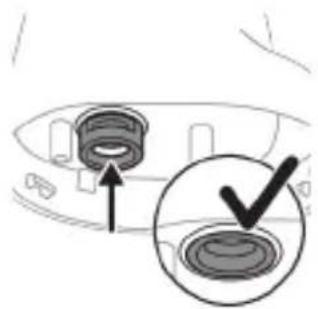
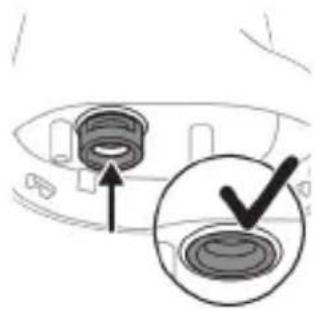
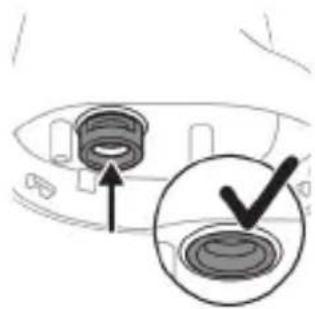
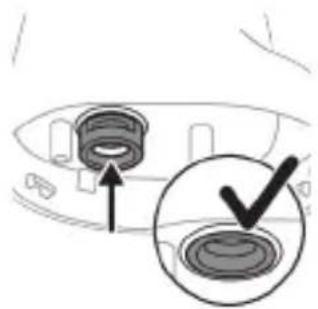
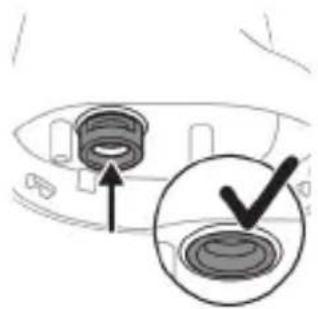
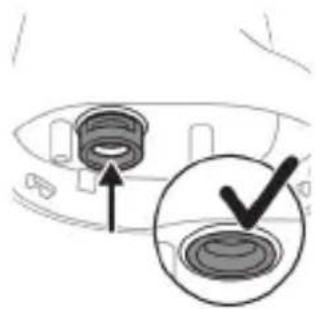
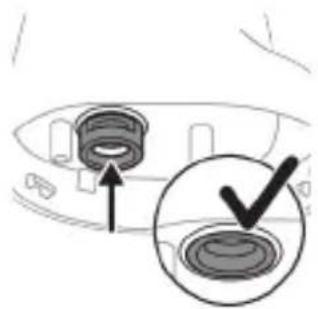
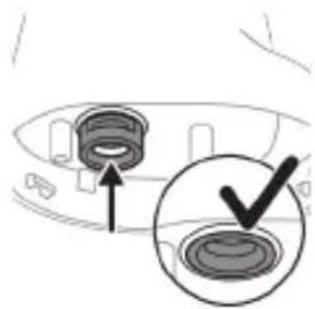
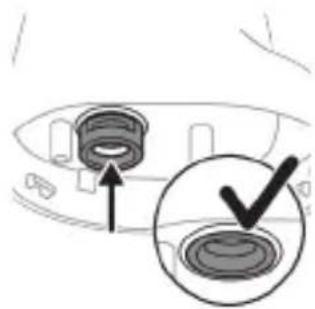
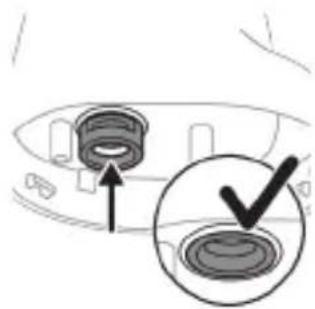
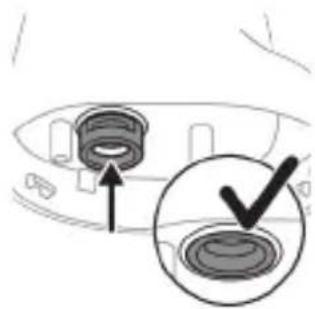
8 Push the nozzle retention ring into the device. The nozzle retention ring should be fully flushed with the body.
PHILIPS Cordless Power Flosser DiamondClean 9000 HX3886 - Battery removal instructions for professionals - Sonicare Cordless Power Flosser Series - 8

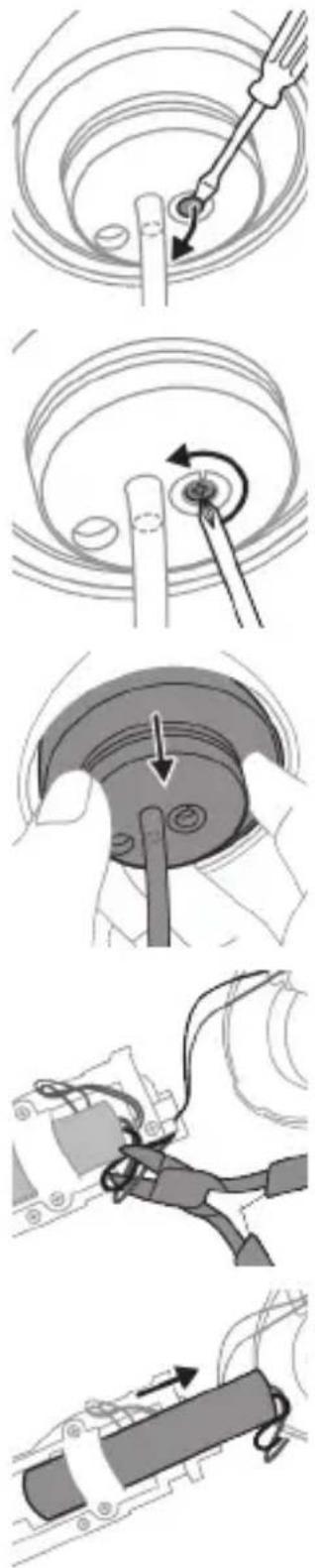
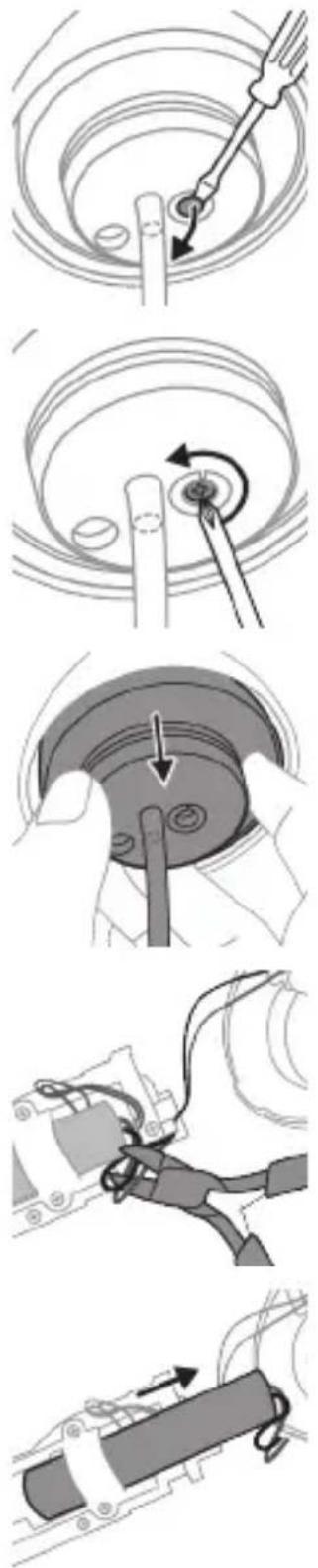
9 At the bottom of the handle, remove the screw cover by prying it with a flat-head screwdriver.
10 Remove the screw with a Philips screwdriver.
11 Grab the bottom cover and pull the internal assembly from the handle.
12 Pull the bottom cover away from the assembly.
13 Locate and cut the wires directly connected to the battery.
14 Slide the battery from the battery cradle

Caution: Be aware of the sharp edges of the battery tabs to avoid injury to your fingers.

15 Cover the battery contacts with tape to prevent any electrical short from residual battery charge.
16 The rechargeable battery can now be recycled and the rest of the product discarded appropriately.

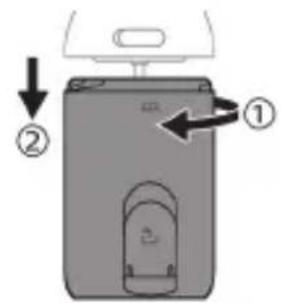
Diagram of a device with labeled parts and directional arrows indicating movement or flow

Diagram of a device with labeled parts and directional arrows indicating movement or flow

7 Lepaskan lengan pengunci.

Diagram showing a speaker grille with an arrow pointing to the grille and a checkmark inside (no text or symbols)

Diagram illustrating a device operation step with labeled steps and directional arrows indicating movement.

3 Odpojte od rukojeti nádržku.

Technical diagram showing a mechanical assembly with labeled steps for tool application and component positioning

Diagram of a device with labeled parts and directional arrows indicating movement or flow

3 Odvojite rezervoar od drške.

Illustration of a screwdriver inserted into a mechanical component with a gear-like base (no text or symbols)

4 Držite vrh drške jednom rukom i uklonite gornji poklopac tako što ćete ga odići odvijačem sa ravnom glavom.

Diagram of a mechanical or electrical component with circular arrows indicating rotation, and a tool inserted into a housing (no text or symbols)

5 Pronadite 4 vijka ispod gornjeg poklopca i uklonite sva četiri odvijačem sa krstastom glavom.
Mechanical component diagram showing a cylindrical assembly with mounting holes and a downward arrow indicating motion (no text or symbols)

6 Skinite klizač dugmeta za oslobadanje mlaznice.
Pure mechanical component diagram without any text, numbers, or symbols

7 Uklonite poluge za blokiranje.

Diagram showing a speaker grille with an arrow pointing to the grille and a checkmark inside (no text or symbols)

8 Gurnite sigurnosni obruč mlaznice u uređaj. Sigurnosni obruč mora biti potpuno poravnat sa telom.
Technical diagram illustrating mechanical assembly steps with labeled components and directional arrows

9 Uklonite poklopac vijka na dnu drške tako što ćete ga odići odvijačem sa ravnom glavom.

Diagram of a device with labeled parts and directional arrows indicating movement or assembly.

Diagram of a screwdriver inserted into a mechanical component with a gear-like feature (no text or symbols)

Diagram of a mechanical or electrical component with rotational arrows and a tool, no text or symbols present.

Mechanical component diagram showing a cylindrical assembly with mounting holes and a downward arrow indicating motion (no text or symbols)

Pure mechanical component diagram without any text, numbers, or symbols

Diagram showing a speaker with an arrow pointing to the speaker, and a checkmark inside a circular button (no text or symbols)

PHILIPS Cordless Power Flosser DiamondClean 9000 HX3886 - Caution: Be aware of the sharp edges of the battery tabs to avoid injury to your fingers. - 19

Diagram showing a speaker with an arrow pointing to the speaker, and a checkmark inside a circle (no text or symbols)

Diagram showing a tool interacting with a device, labeled with numbered parts and an arrow indicating direction.

Diagram of a device with labeled parts and directional arrows indicating movement or flow

PHILIPS Cordless Power Flosser DiamondClean 9000 HX3886 - Caution: Be aware of the sharp edges of the battery tabs to avoid injury to your fingers. - 23

Diagram showing a speaker with an arrow pointing to the speaker, and a checkmark inside a circle (no text or symbols)

Diagram of a device with labeled parts and directional arrows indicating movement or flow

Diagram of a device with labeled parts and directional arrows indicating movement or flow

Diagram of a device with labeled parts and directional arrows indicating movement or flow

5 Pronadite i uklonite sva 4 vijka ispod gornjeg poklopca pomoću križnog odvijača.
Mechanical component diagram showing a cylindrical assembly with mounting holes and a downward arrow indicating motion (no text or symbols)

7 Uklonite pričvrsne ručice.

Diagram showing a speaker grille with an arrow pointing to the grille and a checkmark inside (no text or symbols)

8 Gurnite pričvrsni prsten mlaznice u uređaj. Pričvrsni prsten mlaznice treba se nalaziti u ravnini s tijelom uređaja.
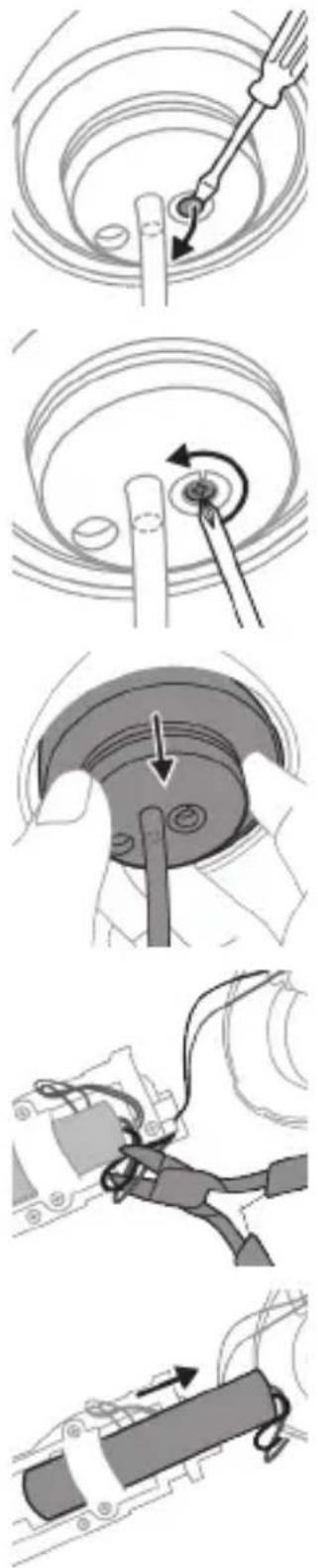

Diagram showing a tool interacting with a device, labeled with numbered parts and an arrow indicating direction.

Diagram showing a tool tip with an arrow indicating direction, alongside a circular icon with a plus symbol and a numbered step.

Diagram of a device with labeled parts and directional arrows indicating movement or flow

3 Nonemiet tvertni no roktura.
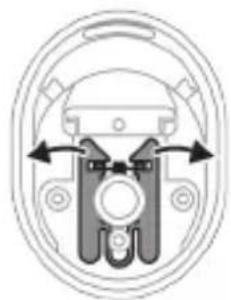
Diagram of a screwdriver inserted into a mechanical component with a gear-like feature (no text or symbols)

Diagram of a device with labeled parts and directional arrows indicating movement or assembly.

Illustration of a screwdriver inserted into a mechanical component with a gear-like base (no text or symbols)

Diagram of a mechanical or electrical component with rotational arrows and a tool, no text or symbols present.

Mechanical component diagram showing a cylindrical assembly with mounting holes and a downward arrow indicating motion (no text or symbols)

Pure mechanical component diagram without any text, numbers, or symbols

Diagram showing a speaker with an arrow pointing to the speaker, and a checkmark inside a circle (no text or symbols)

Diagram of a device with labeled parts and directional arrows indicating movement or flow

Diagram showing a tool tip with an arrow indicating direction, alongside a circular icon with a small rectangle containing a symbol.

Diagram of a device with labeled parts and directional arrows indicating movement or flow

7 Ta av låsearmene.

Diagram showing a speaker grille with an arrow pointing to the grille and a checkmark inside (no text or symbols)

PHILIPS Cordless Power Flosser DiamondClean 9000 HX3886 - Caution: Be aware of the sharp edges of the battery tabs to avoid injury to your fingers. - 44

3 Idishni dastadan ajrating.

Diagram of a device with labeled parts and directional arrows indicating movement or flow

Diagram of a screwdriver inserted into a mechanical component with a gear-like feature (no text or symbols)

Diagram of a mechanical or electrical component with rotational arrows and a tool, no text or symbols present.

Mechanical component diagram showing a cylindrical assembly with mounting holes and a downward arrow indicating rotation (no text or symbols)

Pure mechanical component diagram without any text, numbers, or symbols

Diagram showing a speaker with an arrow pointing to the speaker, and a checkmark inside a circle (no text or symbols)

Diagram showing a tool tip interacting with a device, labeled with step ① and step ②, alongside a circular icon containing a control panel.

Diagram of a device with labeled parts and directional arrows indicating movement or flow

PHILIPS Cordless Power Flosser DiamondClean 9000 HX3886 - Caution: Be aware of the sharp edges of the battery tabs to avoid injury to your fingers. - 53

3 Zbiralnik snemite z ročaja.
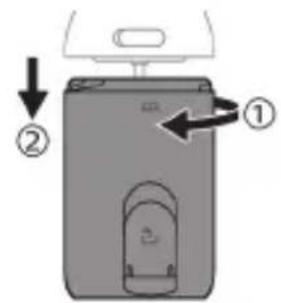
Diagram of a device with labeled parts and directional arrows indicating movement or flow

6 Vyberte posuvné tlačidlo na uvol'nenie trysky.

Pure mechanical component diagram without any text, numbers, or symbols

7 Vyberte zaistovacie ramená.

Diagram showing a speaker grille with an arrow pointing to the grille and a checkmark inside (no text or symbols)

Diagram of a device with labeled parts and directional arrows indicating movement or assembly.

3 Odvojite rezervoar od drške.

Illustration of a screwdriver inserted into a mechanical component with a gear-like feature (no text or symbols)

4 Držite vrh drške jednom rukom i skinite gornji poklopac tako što ćete ga olabaviti ravnim odvijačem.
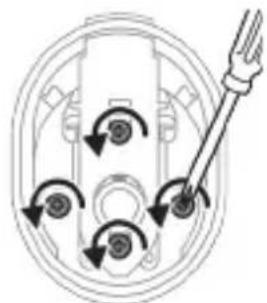
Diagram of a mechanical or electrical component with rotational arrows and a tool, no text or symbols present.

5 Pronadite i skinite sva 4 zavrtnja ispod gornjeg poklopca pomoću krstastog odvijača.

Mechanical component diagram showing a cylindrical assembly with mounting holes and a downward arrow indicating rotation (no text or symbols)

7 Skinite krake za fiksiranje.

Diagram showing a speaker with an arrow pointing to the speaker, and a checkmark inside a circle (no text or symbols)

8 Gurnite prsten za zadržavanje mlaznice u aparat. Prsten za zadržavanje mlaznice treba u potpunosti da bude u ravni sa osnovom.
PHILIPS Cordless Power Flosser DiamondClean 9000 HX3886 - Caution: Be aware of the sharp edges of the battery tabs to avoid injury to your fingers. - 62

9 Skinite poklopac zavrtnja sa osnove drške tako što ćete ga olabaviti ravnim šrafcigerom.
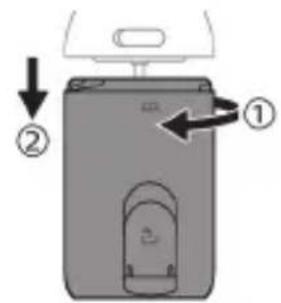
Diagram of a device with labeled parts and directional arrows indicating movement or flow

3 Irrota säiliö rungosta.

Diagram of a screwdriver inserted into a mechanical component with a gear-like feature (no text or symbols)

7 Irrota lukitusvarret.

Diagram showing a speaker with an arrow pointing to the speaker, and a checkmark inside a circle (no text or symbols)

PHILIPS Cordless Power Flosser DiamondClean 9000 HX3886 - Caution: Be aware of the sharp edges of the battery tabs to avoid injury to your fingers. - 66

Diagram showing a speaker with an arrow pointing to the speaker, and a checkmark inside a circle (no text or symbols)

Diagram of a device with labeled parts and directional arrows indicating movement or flow

PHILIPS Cordless Power Flosser DiamondClean 9000 HX3886 - Caution: Be aware of the sharp edges of the battery tabs to avoid injury to your fingers. - 69

3 Gaby tutawaçdan ayryň.

8 Халкаи нигохдории соплоро ба дохили дастгох, тела дихед. Халкаи нигохдории сопло бояд бо корпус пурра баробар шавад.
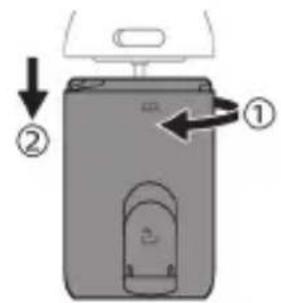
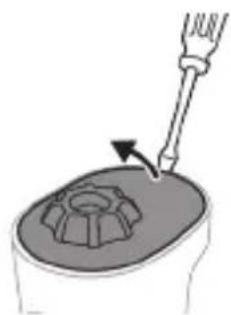
Diagram of a device with labeled parts and directional arrows indicating movement or flow

Diagram of a screwdriver inserted into a mechanical component with a gear-like feature (no text or symbols)

Diagram of a mechanical or electrical component with rotational arrows and a tool, no text or symbols present.

Mechanical component diagram showing a cylindrical assembly with mounting holes and a downward arrow indicating motion (no text or symbols)

Pure mechanical component diagram without any text, numbers, or symbols

Diagram showing a speaker with an arrow pointing to the speaker, and a checkmark inside a circle (no text or symbols)

Diagram of a device with labeled parts and directional arrows indicating movement or assembly.

Diagram of a screwdriver inserted into a mechanical component with a gear-like feature (no text or symbols)

Diagram of a mechanical or electrical component with rotational arrows and a tool, no text or symbols present.

Mechanical component diagram showing a cylindrical assembly with mounting holes and a downward arrow indicating motion (no text or symbols)

Pure mechanical component diagram without any text, numbers, or symbols

Diagram showing a speaker with an arrow pointing to the speaker, and a checkmark inside a circle (no text or symbols)

Technical diagram showing a mechanical assembly with labeled steps and a checkmark indicating inspection or adjustment.

odds funds mgmt debt & debt management, fund debt & debt management, fund debt & debt management, fund debt & debt management, fund debt & debt management


Technical diagram showing a mechanical assembly with labeled steps and a checkmark indicating inspection or adjustment.

Technical diagram showing a mechanical assembly with labeled steps and directional arrows indicating motion or assembly.

Technical diagram showing a mechanical assembly with labeled steps and a checkmark indicating inspection or adjustment.

.Philips Business was interested in making the largest business from Philippines

.הכלה 3

Technical diagram showing a mechanical assembly with labeled steps and a checkmark indicating inspection or adjustment.

4

www.philips.com/Sonicare

www.philips.ca/sonicare

©2023 Koninklijke Philips N.V. (KPNV). All rights reserved.

Philips and the Philips shield are trademarks of KPNV.

Sonicare and the Sonicare logo are trademarks

of Philips Oral Healthcare, LLC and/or KPNV.

©2023 Koninklijke Philips N.V. (KPNV). Tous droits réservés.

Philips Oral Healthcare, LLC.

22100 Bothell Everett Highway

Bothell, WA 98021

300007706802 (23/03/2023)

Manual assistant
Powered by Anthropic
Waiting for your message
Product information

Brand : PHILIPS

Model : Cordless Power Flosser DiamondClean 9000 HX3886

Category : Interdental brush