MEP-K10 - Label printer CASIO - Free user manual and instructions
Find the device manual for free MEP-K10 CASIO in PDF.


| Product Type | Label Printer |
| Brand | Casio |
| Model | MEP-K10 |
| Dimensions (approx.) | 200 x 110 x 60 mm |
| Weight | 0.5 kg |
| Power Supply | 6 AA batteries or AC adapter (optional) |
| Print Technology | Thermal transfer |
| Print Resolution | 180 dpi |
| Max Tape Width | 12 mm |
| Languages Supported | Multiple (keyboard layout) |
| Font Styles | Bold, italic, underline, outline, shadow |
| Barcode Printing | EAN-13, Code 39, etc. |
| Memory | Store up to 100 labels |
| Display | LCD, 2 lines x 12 characters |
| Keyboard | QWERTY, 40 keys |
| Auto Power Off | Yes, after 5 minutes of inactivity |
| Cleaning | Wipe with soft dry cloth; do not use solvents |
| Safety Precautions | Keep away from water and heat sources |
| Replacement Parts | AC adapter (AD-1200), tape cartridges (M series) |
| Repairability | User-replaceable tape cartridge; professional service for other issues |
| Included Accessories | Starter tape cassette, user manual, 6 AA batteries |
Frequently Asked Questions - MEP-K10 CASIO
User questions about MEP-K10 CASIO
0 question about this device. Answer the ones you know or ask your own.
Ask a new question about this device
Download the instructions for your Label printer in PDF format for free! Find your manual MEP-K10 - CASIO and take your electronic device back in hand. On this page are published all the documents necessary for the use of your device. MEP-K10 by CASIO.
USER MANUAL MEP-K10 CASIO
natural_image
Line drawing of a handheld electronic device with control panel and keypad (no text or symbols)User's Guide
RJA527802-002V02
CASIO®
Important!
Be sure to keep all user documentation handy for future reference.
Read This First!
- CASIO COMPUTER CO., LTD. shall not be held liable for any loss or claims by you or any other person or entity that may arise through the use of this printer.
- Reproduction of this manual in any form, either in part or its entirety, is forbidden without the express permission of CASIO COMPUTER CO., LTD.
• The contents of the manual are subject to change without notice. - The software is continually being revised and updated. Because of this, the software supplied to you and the contents of the displays it produces may be different from those described in this manual, or some items described in this manual may no longer be available.
© 2013 CASIO COMPUTER CO., LTD. All rights reserved.
- Be sure to read this manual carefully before attempting to use the product for the first time.
Safety Precautions
Thank you for purchasing this quality CASIO product. Before using it, be sure to read the following Safety Precautions. Keep the manual in a convenient location for future reference when necessary.

Danger
This symbol indicates information that, if ignored or applied incorrectly, creates the danger of death or serious personal injury.

Warning
This symbol indicates information that, if ignored or applied incorrectly, creates the possibility of death or serious personal injury.

Caution
This symbol indicates information that, if ignored or applied incorrectly, creates the possibility of personal injury or material damage.
Examples of graphic markings

indicates something you should not do. The symbol shown here indicates you should not try to take the unit apart.

indicates something you should do.
Danger
Batteries

Perform the following steps immediately if fluid leaking from batteries ever gets into your eyes.
-
Do not rub your eyes! Rinse them with water.
-
Contact your physician immediately.
Leaving alkaline battery fluid in your eyes can lead to loss of sight.
| Warning |
| Smoke, abnormal odor, overheating, and other abnormalitiesContinued use of the product while it is emitting smoke or strange odor, or overheating creates the risk of fi re and electric shock. Immediately perform the following steps whenever any of the above symptoms are present.Turn off power.Contact your original retailer. |
| BatteriesMisuse of batteries can cause them to leak, resulting in damage to nearby objects, or to explode, creating the risk of fi re and personal injury. Always make sure you observe the following precautions.Never try to take batteries apart or allow them to become shorted.Never expose batteries to heat or dispose of them by incineration.Never mix old batteries with new ones.Never mix batteries of different types.Do not charge the batteries.Make sure the positive (+) and negative (−) ends of the batteries are facing correctly. |
| Dropping and rough treatmentContinued use of the product after it has been damaged due to dropping or other rough treatment creates the risk of fi re and electric shock. Immediately perform the following steps if the product should ever become damaged.Turn off power.Contact your original retailer. |
| Warning | |
| Do not disassemble or modify the product.Never try to take the product apart or modify it in any way.Doing so creates the risk of electric shock, burn injury, or other personal injury.Leave all internal inspection, maintenance, and repair up to your original retailer. | |
| Water and foreign objectsWater, liquids, or foreign objects (especially metal) getting inside the product creates the risk of fi re and electric shock.Immediately perform the following steps if liquid or a foreign object should ever get inside the product.Turn off power.Contact your original retailer. | |
| Do not incinerate.Never dispose of the product by incineration. Doing so creates the risk of fi re and personal injury due to explosion. | |
| Plastic bag precautionNever place the plastic bags in which the product comes packed over your head. Doing so creates the risk of suffocation.Particular care is required in households where young children are present. | |
| Do not affi x labels to a container to be used in a microwave oven.Do not affi x labels to any container you plan to use in a microwave oven. The label material contains metal, which creates the risk of fi re and burn injury when heated in a microwave oven. It can also cause deformation of the container to which the label is affi xed. | |
| Caution | |
| BatteriesMisuse of batteries can cause them to leak, resulting in damage to nearby objects, or to explode, creating the risk of fi re and personal injury. Always make sure you observe the following precautions.Use only batteries that are specifi ed for use with this product.Remove batteries from the product if you do not plan to use it for a long time. | |
| Keep backup copies of all important data.Be sure to keep separate copies of important data in a notebook or some other location. Malfunction of the product, repairs, and dead batteries can cause data stored memory to be lost. | |
| Keep heavy objects off of the product.Never place a heavy object on top of the product. Doing so can cause the object to lose balance and fall, creating the risk of personal injury. | |
| Avoid unstable surfaces.Never place the product on an unstable table, desk, etc. Doing so can cause the product to fall, creating the risk of personal injury. | |
| LocationAvoid the locations listed below for the product. Such locations create the risk of fi re and electric shock.Areas subject to high humidity and large amounts of dustFood preparation areas or other locations subjected to oil steamNear heaters, on a heated carpet, in direct sunlight, in a closed vehicle parked in the sun, and other areas subjected to high heat |
| Caution |
| Loading and replacing batteriesThe springs inside of the battery compartment have sharp edges. Take care that you do not touch the springs with your fingers when loading or replacing batteries. Doing so creates the risk of personal injury. |
| Tape Loading and Tape Replacement PrecautionsThe cutter has sharp edges. Do not touch the cutter. Touching the cutter can cause fi nger cuts. |
| Display ScreenNever push on the display screen's LCD panel or subject it to strong impact. Doing so can cause the LCD panel's glass to crack, creating the risk of personal injury.Should the LCD panel ever crack or break, never touch the liquid inside of the panel. LCD panel liquid can cause skin irritation.Should LCD panel liquid ever get inside your mouth, immediately wash out your mouth with water and contact your physician.Should LCD panel liquid ever get into your eyes or onto your skin, rinse with clear water for at least 15 minutes, and then contact a physician. |
| High temperature precautionNever touch the print head or other metal objects near the head. These items become very hot, and touching them creates the risk of burn injury. |
| Cutter PrecautionsDo not insert your fingers into the cutter at the tape outlet.Doing so creates the risk of fi nger cuts and personal injury. |
| Caution |
| Loading and replacing batteriesThe springs inside of the battery compartment have sharp edges. Take care that you do not touch the springs with your fingers when loading or replacing batteries. Doing so creates the risk of personal injury. |
| Tape Loading and Tape Replacement PrecautionsThe cutter has sharp edges. Do not touch the cutter. Touching the cutter can cause fi nger cuts. |
| Display ScreenNever push on the display screen's LCD panel or subject it to strong impact. Doing so can cause the LCD panel's glass to crack, creating the risk of personal injury.Should the LCD panel ever crack or break, never touch the liquid inside of the panel. LCD panel liquid can cause skin irritation.Should LCD panel liquid ever get inside your mouth, immediately wash out your mouth with water and contact your physician.Should LCD panel liquid ever get into your eyes or onto your skin, rinse with clear water for at least 15 minutes, and then contact a physician. |
| High temperature precautionNever touch the print head or other metal objects near the head. These items become very hot, and touching them creates the risk of burn injury. |
| Cutter PrecautionsDo not insert your fingers into the cutter at the tape outlet.Doing so creates the risk of fi nger cuts and personal injury. |
| Caution |
| Loading and replacing batteriesThe springs inside of the battery compartment have sharp edges. Take care that you do not touch the springs with your fingers when loading or replacing batteries. Doing so creates the risk of personal injury. |
| Tape Loading and Tape Replacement PrecautionsThe cutter has sharp edges. Do not touch the cutter. Touching the cutter can cause fi nger cuts. |
| Display ScreenNever push on the display screen's LCD panel or subject it to strong impact. Doing so can cause the LCD panel's glass to crack, creating the risk of personal injury.Should the LCD panel ever crack or break, never touch the liquid inside of the panel. LCD panel liquid can cause skin irritation.Should LCD panel liquid ever get inside your mouth, immediately wash out your mouth with water and contact your physician.Should LCD panel liquid ever get into your eyes or onto your skin, rinse with clear water for at least 15 minutes, and then contact a physician. |
| High temperature precautionNever touch the print head or other metal objects near the head. These items become very hot, and touching them creates the risk of burn injury. |
| Cutter PrecautionsDo not insert your fingers into the cutter at the tape outlet.Doing so creates the risk of fi nger cuts and personal injury. |
| Caution |
| Loading and replacing batteriesThe springs inside of the battery compartment have sharp edges. Take care that you do not touch the springs with your fingers when loading or replacing batteries. Doing so creates the risk of personal injury. |
| Tape Loading and Tape Replacement PrecautionsThe cutter has sharp edges. Do not touch the cutter. Touching the cutter can cause fi nger cuts. |
| Display ScreenNever push on the display screen's LCD panel or subject it to strong impact. Doing so can cause the LCD panel's glass to crack, creating the risk of personal injury.Should the LCD panel ever crack or break, never touch the liquid inside of the panel. LCD panel liquid can cause skin irritation.Should LCD panel liquid ever get inside your mouth, immediately wash out your mouth with water and contact your physician.Should LCD panel liquid ever get into your eyes or onto your skin, rinse with clear water for at least 15 minutes, and then contact a physician. |
| High temperature precautionNever touch the print head or other metal objects near the head. These items become very hot, and touching them creates the risk of burn injury. |
| Cutter PrecautionsDo not insert your fingers into the cutter at the tape outlet.Doing so creates the risk of fi nger cuts and personal injury. |
| Caution |
| Loading and replacing batteriesThe springs inside of the battery compartment have sharp edges. Take care that you do not touch the springs with your fingers when loading or replacing batteries. Doing so creates the risk of personal injury. |
| Tape Loading and Tape Replacement PrecautionsThe cutter has sharp edges. Do not touch the cutter. Touching the cutter can cause fi nger cuts. |
| Display ScreenNever push on the display screen's LCD panel or subject it to strong impact. Doing so can cause the LCD panel's glass to crack, creating the risk of personal injury.Should the LCD panel ever crack or break, never touch the liquid inside of the panel. LCD panel liquid can cause skin irritation.Should LCD panel liquid ever get inside your mouth, immediately wash out your mouth with water and contact your physician.Should LCD panel liquid ever get into your eyes or onto your skin, rinse with clear water for at least 15 minutes, and then contact a physician. |
| High temperature precautionNever touch the print head or other metal objects near the head. These items become very hot, and touching them creates the risk of burn injury. |
| Cutter PrecautionsDo not insert your fingers into the cutter at the tape outlet.Doing so creates the risk of fi nger cuts and personal injury. |
| Caution |
| Loading and replacing batteriesThe springs inside of the battery compartment have sharp edges. Take care that you do not touch the springs with your fingers when loading or replacing batteries. Doing so creates the risk of personal injury. |
| Tape Loading and Tape Replacement PrecautionsThe cutter has sharp edges. Do not touch the cutter. Touching the cutter can cause fi nger cuts. |
| Display ScreenNever push on the display screen's LCD panel or subject it to strong impact. Doing so can cause the LCD panel's glass to crack, creating the risk of personal injury.Should the LCD panel ever crack or break, never touch the liquid inside of the panel. LCD panel liquid can cause skin irritation.Should LCD panel liquid ever get inside your mouth, immediately wash out your mouth with water and contact your physician.Should LCD panel liquid ever get into your eyes or onto your skin, rinse with clear water for at least 15 minutes, and then contact a physician. |
| High temperature precautionNever touch the print head or other metal objects near the head. These items become very hot, and touching them creates the risk of burn injury. |
| Cutter PrecautionsDo not insert your fingers into the cutter at the tape outlet.Doing so creates the risk of fi nger cuts and personal injury. |
| Caution |
| Loading and replacing batteriesThe springs inside of the battery compartment have sharp edges. Take care that you do not touch the springs with your fingers when loading or replacing batteries. Doing so creates the risk of personal injury. |
| Tape Loading and Tape Replacement PrecautionsThe cutter has sharp edges. Do not touch the cutter. Touching the cutter can cause fi nger cuts. |
| Display ScreenNever push on the display screen's LCD panel or subject it to strong impact. Doing so can cause the LCD panel's glass to crack, creating the risk of personal injury.Should the LCD panel ever crack or break, never touch the liquid inside of the panel. LCD panel liquid can cause skin irritation.Should LCD panel liquid ever get inside your mouth, immediately wash out your mouth with water and contact your physician.Should LCD panel liquid ever get into your eyes or onto your skin, rinse with clear water for at least 15 minutes, and then contact a physician. |
| High temperature precautionNever touch the print head or other metal objects near the head. These items become very hot, and touching them creates the risk of burn injury. |
| Cutter PrecautionsDo not insert your fingers into the cutter at the tape outlet.Doing so creates the risk of fi nger cuts and personal injury. |
| Caution |
| Loading and replacing batteriesThe springs inside of the battery compartment have sharp edges. Take care that you do not touch the springs with your fingers when loading or replacing batteries. Doing so creates the risk of personal injury. |
| Tape Loading and Tape Replacement PrecautionsThe cutter has sharp edges. Do not touch the cutter. Touching the cutter can cause fi nger cuts. |
| Display ScreenNever push on the display screen's LCD panel or subject it to strong impact. Doing so can cause the LCD panel's glass to crack, creating the risk of personal injury.Should the LCD panel ever crack or break, never touch the liquid inside of the panel. LCD panel liquid can cause skin irritation.Should LCD panel liquid ever get inside your mouth, immediately wash out your mouth with water and contact your physician.Should LCD panel liquid ever get into your eyes or onto your skin, rinse with clear water for at least 15 minutes, and then contact a physician. |
| High temperature precautionNever touch the print head or other metal objects near the head. These items become very hot, and touching them creates the risk of burn injury. |
| Cutter PrecautionsDo not insert your fingers into the cutter at the tape outlet.Doing so creates the risk of fi nger cuts and personal injury. |
| Caution |
| Loading and replacing batteriesThe springs inside of the battery compartment have sharp edges. Take care that you do not touch the springs with your fingers when loading or replacing batteries. Doing so creates the risk of personal injury. |
| Tape Loading and Tape Replacement PrecautionsThe cutter has sharp edges. Do not touch the cutter. Touching the cutter can cause fi nger cuts. |
| Display ScreenNever push on the display screen's LCD panel or subject it to strong impact. Doing so can cause the LCD panel's glass to crack, creating the risk of personal injury.Should the LCD panel ever crack or break, never touch the liquid inside of the panel. LCD panel liquid can cause skin irritation.Should LCD panel liquid ever get inside your mouth, immediately wash out your mouth with water and contact your physician.Should LCD panel liquid ever get into your eyes or onto your skin, rinse with clear water for at least 15 minutes, and then contact a physician. |
| High temperature precautionNever touch the print head or other metal objects near the head. These items become very hot, and touching them creates the risk of burn injury. |
| Cutter PrecautionsDo not insert your fingers into the cutter at the tape outlet.Doing so creates the risk of fi nger cuts and personal injury. |
| Caution |
| Loading and replacing batteriesThe springs inside of the battery compartment have sharp edges. Take care that you do not touch the springs with your fingers when loading or replacing batteries. Doing so creates the risk of personal injury. |
| Tape Loading and Tape Replacement PrecautionsThe cutter has sharp edges. Do not touch the cutter. Touching the cutter can cause fi nger cuts. |
| Display ScreenNever push on the display screen's LCD panel or subject it to strong impact. Doing so can cause the LCD panel's glass to crack, creating the risk of personal injury.Should the LCD panel ever crack or break, never touch the liquid inside of the panel. LCD panel liquid can cause skin irritation.Should LCD panel liquid ever get inside your mouth, immediately wash out your mouth with water and contact your physician.Should LCD panel liquid ever get into your eyes or onto your skin, rinse with clear water for at least 15 minutes, and then contact a physician. |
| High temperature precautionNever touch the print head or other metal objects near the head. These items become very hot, and touching them creates the risk of burn injury. |
| Cutter PrecautionsDo not insert your fingers into the cutter at the tape outlet.Doing so creates the risk of fi nger cuts and personal injury. |
| Caution |
| Loading and replacing batteriesThe springs inside of the battery compartment have sharp edges. Take care that you do not touch the springs with your fingers when loading or replacing batteries. Doing so creates the risk of personal injury. |
| Tape Loading and Tape Replacement PrecautionsThe cutter has sharp edges. Do not touch the cutter. Touching the cutter can cause fi nger cuts. |
| Display ScreenNever push on the display screen's LCD panel or subject it to strong impact. Doing so can cause the LCD panel's glass to crack, creating the risk of personal injury.Should the LCD panel ever crack or break, never touch the liquid inside of the panel. LCD panel liquid can cause skin irritation.Should LCD panel liquid ever get inside your mouth, immediately wash out your mouth with water and contact your physician.Should LCD panel liquid ever get into your eyes or onto your skin, rinse with clear water for at least 15 minutes, and then contact a physician. |
| High temperature precautionNever touch the print head or other metal objects near the head. These items become very hot, and touching them creates the risk of burn injury. |
| Cutter PrecautionsDo not insert your fingers into the cutter at the tape outlet.Doing so creates the risk of fi nger cuts and personal injury. |
| Caution |
| Loading and replacing batteriesThe springs inside of the battery compartment have sharp edges. Take care that you do not touch the springs with your fingers when loading or replacing batteries. Doing so creates the risk of personal injury. |
| Tape Loading and Tape Replacement PrecautionsThe cutter has sharp edges. Do not touch the cutter. Touching the cutter can cause fi nger cuts. |
| Display ScreenNever push on the display screen's LCD panel or subject it to strong impact. Doing so can cause the LCD panel's glass to crack, creating the risk of personal injury.Should the LCD panel ever crack or break, never touch the liquid inside of the panel. LCD panel liquid can cause skin irritation.Should LCD panel liquid ever get inside your mouth, immediately wash out your mouth with water and contact your physician.Should LCD panel liquid ever get into your eyes or onto your skin, rinse with clear water for at least 15 minutes, and then contact a physician. |
| High temperature precautionNever touch the print head or other metal objects near the head. These items become very hot, and touching them creates the risk of burn injury. |
| Cutter PrecautionsDo not insert your fingers into the cutter at the tape outlet.Doing so creates the risk of fi nger cuts and personal injury. |
| Caution |
| Loading and replacing batteriesThe springs inside of the battery compartment have sharp edges. Take care that you do not touch the springs with your fingers when loading or replacing batteries. Doing so creates the risk of personal injury. |
| Tape Loading and Tape Replacement PrecautionsThe cutter has sharp edges. Do not touch the cutter. Touching the cutter can cause fi nger cuts. |
| Display ScreenNever push on the display screen's LCD panel or subject it to strong impact. Doing so can cause the LCD panel's glass to crack, creating the risk of personal injury.Should the LCD panel ever crack or break, never touch the liquid inside of the panel. LCD panel liquid can cause skin irritation.Should LCD panel liquid ever get inside your mouth, immediately wash out your mouth with water and contact your physician.Should LCD panel liquid ever get into your eyes or onto your skin, rinse with clear water for at least 15 minutes, and then contact a physician. |
| High temperature precautionNever touch the print head or other metal objects near the head. These items become very hot, and touching them creates the risk of burn injury. |
| Cutter PrecautionsDo not insert your fingers into the cutter at the tape outlet.Doing so creates the risk of fi nger cuts and personal injury. |
| Caution |
| Loading and replacing batteriesThe springs inside of the battery compartment have sharp edges. Take care that you do not touch the springs with your fingers when loading or replacing batteries. Doing so creates the risk of personal injury. |
| Tape Loading and Tape Replacement PrecautionsThe cutter has sharp edges. Do not touch the cutter. Touching the cutter can cause fi nger cuts. |
| Display ScreenNever push on the display screen's LCD panel or subject it to strong impact. Doing so can cause the LCD panel's glass to crack, creating the risk of personal injury.Should the LCD panel ever crack or break, never touch the liquid inside of the panel. LCD panel liquid can cause skin irritation.Should LCD panel liquid ever get inside your mouth, immediately wash out your mouth with water and contact your physician.Should LCD panel liquid ever get into your eyes or onto your skin, rinse with clear water for at least 15 minutes, and then contact a physician. |
| High temperature precautionNever touch the print head or other metal objects near the head. These items become very hot, and touching them creates the risk of burn injury. |
| Cutter PrecautionsDo not insert your fingers into the cutter at the tape outlet.Doing so creates the risk of fi nger cuts and personal injury. |
| Caution |
| Loading and replacing batteriesThe springs inside of the battery compartment have sharp edges. Take care that you do not touch the springs with your fingers when loading or replacing batteries. Doing so creates the risk of personal injury. |
| Tape Loading and Tape Replacement PrecautionsThe cutter has sharp edges. Do not touch the cutter. Touching the cutter can cause fi nger cuts. |
| Display ScreenNever push on the display screen's LCD panel or subject it to strong impact. Doing so can cause the LCD panel's glass to crack, creating the risk of personal injury.Should the LCD panel ever crack or break, never touch the liquid inside of the panel. LCD panel liquid can cause skin irritation.Should LCD panel liquid ever get inside your mouth, immediately wash out your mouth with water and contact your physician.Should LCD panel liquid ever get into your eyes or onto your skin, rinse with clear water for at least 15 minutes, and then contact a physician. |
| High temperature precautionNever touch the print head or other metal objects near the head. These items become very hot, and touching them creates the risk of burn injury. |
| Cutter PrecautionsDo not insert your fingers into the cutter at the tape outlet.Doing so creates the risk of fi nger cuts and personal injury. |
| Caution |
| Loading and replacing batteriesThe springs inside of the battery compartment have sharp edges. Take care that you do not touch the springs with your fingers when loading or replacing batteries. Doing so creates the risk of personal injury. |
| Tape Loading and Tape Replacement PrecautionsThe cutter has sharp edges. Do not touch the cutter. Touching the cutter can cause fi nger cuts. |
| Display ScreenNever push on the display screen's LCD panel or subject it to strong impact. Doing so can cause the LCD panel's glass to crack, creating the risk of personal injury.Should the LCD panel ever crack or break, never touch the liquid inside of the panel. LCD panel liquid can cause skin irritation.Should LCD panel liquid ever get inside your mouth, immediately wash out your mouth with water and contact your physician.Should LCD panel liquid ever get into your eyes or onto your skin, rinse with clear water for at least 15 minutes, and then contact a physician. |
| High temperature precautionNever touch the print head or other metal objects near the head. These items become very hot, and touching them creates the risk of burn injury. |
| Cutter PrecautionsDo not insert your fingers into the cutter at the tape outlet.Doing so creates the risk of fi nger cuts and personal injury. |
| Caution |
| Loading and replacing batteriesThe springs inside of the battery compartment have sharp edges. Take care that you do not touch the springs with your fingers when loading or replacing batteries. Doing so creates the risk of personal injury. |
| Tape Loading and Tape Replacement PrecautionsThe cutter has sharp edges. Do not touch the cutter. Touching the cutter can cause fi nger cuts. |
| Display ScreenNever push on the display screen's LCD panel or subject it to strong impact. Doing so can cause the LCD panel's glass to crack, creating the risk of personal injury.Should the LCD panel ever crack or break, never touch the liquid inside of the panel. LCD panel liquid can cause skin irritation.Should LCD panel liquid ever get inside your mouth, immediately wash out your mouth with water and contact your physician.Should LCD panel liquid ever get into your eyes or onto your skin, rinse with clear water for at least 15 minutes, and then contact a physician. |
| High temperature precautionNever touch the print head or other metal objects near the head. These items become very hot, and touching them creates the risk of burn injury. |
| Cutter PrecautionsDo not insert your fingers into the cutter at the tape outlet.Doing so creates the risk of fi nger cuts and personal injury. |
| Caution |
| Loading and replacing batteriesThe springs inside of the battery compartment have sharp edges. Take care that you do not touch the springs with your fingers when loading or replacing batteries. Doing so creates the risk of personal injury. |
| Tape Loading and Tape Replacement PrecautionsThe cutter has sharp edges. Do not touch the cutter. Touching the cutter can cause fi nger cuts. |
| Display ScreenNever push on the display screen's LCD panel or subject it to strong impact. Doing so can cause the LCD panel's glass to crack, creating the risk of personal injury.Should the LCD panel ever crack or break, never touch the liquid inside of the panel. LCD panel liquid can cause skin irritation.Should LCD panel liquid ever get inside your mouth, immediately wash out your mouth with water and contact your physician.Should LCD panel liquid ever get into your eyes or onto your skin, rinse with clear water for at least 15 minutes, and then contact a physician. |
| High temperature precautionNever touch the print head or other metal objects near the head. These items become very hot, and touching them creates the risk of burn injury. |
| Cutter PrecautionsDo not insert your fingers into the cutter at the tape outlet.Doing so creates the risk of fi nger cuts and personal injury. |
| Caution |
| Loading and replacing batteriesThe springs inside of the battery compartment have sharp edges. Take care that you do not touch the springs with your fingers when loading or replacing batteries. Doing so creates the risk of personal injury. |
| Tape Loading and Tape Replacement PrecautionsThe cutter has sharp edges. Do not touch the cutter. Touching the cutter can cause fi nger cuts. |
| Display ScreenNever push on the display screen's LCD panel or subject it to strong impact. Doing so can cause the LCD panel's glass to crack, creating the risk of personal injury.Should the LCD panel ever crack or break, never touch the liquid inside of the panel. LCD panel liquid can cause skin irritation.Should LCD panel liquid ever get inside your mouth, immediately wash out your mouth with water and contact your physician.Should LCD panel liquid ever get into your eyes or onto your skin, rinse with clear water for at least 15 minutes, and then contact a physician. |
| High temperature precautionNever touch the print head or other metal objects near the head. These items become very hot, and touching them creates the risk of burn injury. |
| Cutter PrecautionsDo not insert your fingers into the cutter at the tape outlet.Doing so creates the risk of fi nger cuts and personal injury. |
| Caution |
| Loading and replacing batteriesThe springs inside of the battery compartment have sharp edges. Take care that you do not touch the springs with your fingers when loading or replacing batteries. Doing so creates the risk of personal injury. |
| Tape Loading and Tape Replacement PrecautionsThe cutter has sharp edges. Do not touch the cutter. Touching the cutter can cause fi nger cuts. |
| Display ScreenNever push on the display screen's LCD panel or subject it to strong impact. Doing so can cause the LCD panel's glass to crack, creating the risk of personal injury.Should the LCD panel ever crack or break, never touch the liquid inside of the panel. LCD panel liquid can cause skin irritation.Should LCD panel liquid ever get inside your mouth, immediately wash out your mouth with water and contact your physician.Should LCD panel liquid ever get into your eyes or onto your skin, rinse with clear water for at least 15 minutes, and then contact a physician. |
| High temperature precautionNever touch the print head or other metal objects near the head. These items become very hot, and touching them creates the risk of burn injury. |
| Cutter PrecautionsDo not insert your fingers into the cutter at the tape outlet.Doing so creates the risk of fi nger cuts and personal injury. |
| Caution |
| Loading and replacing batteriesThe springs inside of the battery compartment have sharp edges. Take care that you do not touch the springs with your fingers when loading or replacing batteries. Doing so creates the risk of personal injury. |
| Tape Loading and Tape Replacement PrecautionsThe cutter has sharp edges. Do not touch the cutter. Touching the cutter can cause fi nger cuts. |
| Display ScreenNever push on the display screen's LCD panel or subject it to strong impact. Doing so can cause the LCD panel's glass to crack, creating the risk of personal injury.Should the LCD panel ever crack or break, never touch the liquid inside of the panel. LCD panel liquid can cause skin irritation.Should LCD panel liquid ever get inside your mouth, immediately wash out your mouth with water and contact your physician.Should LCD panel liquid ever get into your eyes or onto your skin, rinse with clear water for at least 15 minutes, and then contact a physician. |
| High temperature precautionNever touch the print head or other metal objects near the head. These items become very hot, and touching them creates the risk of burn injury. |
| Cutter PrecautionsDo not insert your fingers into the cutter at the tape outlet.Doing so creates the risk of fi nger cuts and personal injury. |
| Caution |
| Loading and replacing batteriesThe springs inside of the battery compartment have sharp edges. Take care that you do not touch the springs with your fingers when loading or replacing batteries. Doing so creates the risk of personal injury. |
| Tape Loading and Tape Replacement PrecautionsThe cutter has sharp edges. Do not touch the cutter. Touching the cutter can cause fi nger cuts. |
| Display ScreenNever push on the display screen's LCD panel or subject it to strong impact. Doing so can cause the LCD panel's glass to crack, creating the risk of personal injury.Should the LCD panel ever crack or break, never touch the liquid inside of the panel. LCD panel liquid can cause skin irritation.Should LCD panel liquid ever get inside your mouth, immediately wash out your mouth with water and contact your physician.Should LCD panel liquid ever get into your eyes or onto your skin, rinse with clear water for at least 15 minutes, and then contact a physician. |
| High temperature precautionNever touch the print head or other metal objects near the head. These items become very hot, and touching them creates the risk of burn injury. |
| Cutter PrecautionsDo not insert your fingers into the cutter at the tape outlet.Doing so creates the risk of fi nger cuts and personal injury. |
| Caution |
| Loading and replacing batteriesThe springs inside of the battery compartment have sharp edges. Take care that you do not touch the springs with your fingers when loading or replacing batteries. Doing so creates the risk of personal injury. |
| Tape Loading and Tape Replacement PrecautionsThe cutter has sharp edges. Do not touch the cutter. Touching the cutter can cause fi nger cuts. |
| Display ScreenNever push on the display screen's LCD panel or subject it to strong impact. Doing so can cause the LCD panel's glass to crack, creating the risk of personal injury.Should the LCD panel ever crack or break, never touch the liquid inside of the panel. LCD panel liquid can cause skin irritation.Should LCD panel liquid ever get inside your mouth, immediately wash out your mouth with water and contact your physician.Should LCD panel liquid ever get into your eyes or onto your skin, rinse with clear water for at least 15 minutes, and then contact a physician. |
| High temperature precautionNever touch the print head or other metal objects near the head. These items become very hot, and touching them creates the risk of burn injury. |
| Cutter PrecautionsDo not insert your fingers into the cutter at the tape outlet.Doing so creates the risk of fi nger cuts and personal injury. |
| Caution |
| Loading and replacing batteriesThe springs inside of the battery compartment have sharp edges. Take care that you do not touch the springs with your fingers when loading or replacing batteries. Doing so creates the risk of personal injury. |
| Tape Loading and Tape Replacement PrecautionsThe cutter has sharp edges. Do not touch the cutter. Touching the cutter can cause fi nger cuts. |
| Display ScreenNever push on the display screen's LCD panel or subject it to strong impact. Doing so can cause the LCD panel's glass to crack, creating the risk of personal injury.Should the LCD panel ever crack or break, never touch the liquid inside of the panel. LCD panel liquid can cause skin irritation.Should LCD panel liquid ever get inside your mouth, immediately wash out your mouth with water and contact your physician.Should LCD panel liquid ever get into your eyes or onto your skin, rinse with clear water for at least 15 minutes, and then contact a physician. |
| High temperature precautionNever touch the print head or other metal objects near the head. These items become very hot, and touching them creates the risk of burn injury. |
| Cutter PrecautionsDo not insert your fingers into the cutter at the tape outlet.Doing so creates the risk of fi nger cuts and personal injury. |
| Caution |
| Loading and replacing batteriesThe springs inside of the battery compartment have sharp edges. Take care that you do not touch the springs with your fingers when loading or replacing batteries. Doing so creates the risk of personal injury. |
| Tape Loading and Tape Replacement PrecautionsThe cutter has sharp edges. Do not touch the cutter. Touching the cutter can cause fi nger cuts. |
| Display ScreenNever push on the display screen's LCD panel or subject it to strong impact. Doing so can cause the LCD panel's glass to crack, creating the risk of personal injury.Should the LCD panel ever crack or break, never touch the liquid inside of the panel. LCD panel liquid can cause skin irritation.Should LCD panel liquid ever get inside your mouth, immediately wash out your mouth with water and contact your physician.Should LCD panel liquid ever get into your eyes or onto your skin, rinse with clear water for at least 15 minutes, and then contact a physician. |
| High temperature precautionNever touch the print head or other metal objects near the head. These items become very hot, and touching them creates the risk of burn injury. |
| Cutter PrecautionsDo not insert your fingers into the cutter at the tape outlet.Doing so creates the risk of fi nger cuts and personal injury. |
| Caution |
| Loading and replacing batteriesThe springs inside of the battery compartment have sharp edges. Take care that you do not touch the springs with your fingers when loading or replacing batteries. Doing so creates the risk of personal injury. |
| Tape Loading and Tape Replacement PrecautionsThe cutter has sharp edges. Do not touch the cutter. Touching the cutter can cause fi nger cuts. |
| Display ScreenNever push on the display screen's LCD panel or subject it to strong impact. Doing so can cause the LCD panel's glass to crack, creating the risk of personal injury.Should the LCD panel ever crack or break, never touch the liquid inside of the panel. LCD panel liquid can cause skin irritation.Should LCD panel liquid ever get inside your mouth, immediately wash out your mouth with water and contact your physician.Should LCD panel liquid ever get into your eyes or onto your skin, rinse with clear water for at least 15 minutes, and then contact a physician. |
| High temperature precautionNever touch the print head or other metal objects near the head. These items become very hot, and touching them creates the risk of burn injury. |
| Cutter PrecautionsDo not insert your fingers into the cutter at the tape outlet.Doing so creates the risk of fi nger cuts and personal injury. |
| Caution |
| Loading and replacing batteriesThe springs inside of the battery compartment have sharp edges. Take care that you do not touch the springs with your fingers when loading or replacing batteries. Doing so creates the risk of personal injury. |
| Tape Loading and Tape Replacement PrecautionsThe cutter has sharp edges. Do not touch the cutter. Touching the cutter can cause fi nger cuts. |
| Display ScreenNever push on the display screen's LCD panel or subject it to strong impact. Doing so can cause the LCD panel's glass to crack, creating the risk of personal injury.Should the LCD panel ever crack or break, never touch the liquid inside of the panel. LCD panel liquid can cause skin irritation.Should LCD panel liquid ever get inside your mouth, immediately wash out your mouth with water and contact your physician.Should LCD panel liquid ever get into your eyes or onto your skin, rinse with clear water for at least 15 minutes, and then contact a physician. |
| High temperature precautionNever touch the print head or other metal objects near the head. These items become very hot, and touching them creates the risk of burn injury. |
| Cutter PrecautionsDo not insert your fingers into the cutter at the tape outlet.Doing so creates the risk of fi nger cuts and personal injury. |
| Caution |
| Loading and replacing batteriesThe springs inside of the battery compartment have sharp edges. Take care that you do not touch the springs with your fingers when loading or replacing batteries. Doing so creates the risk of personal injury. |
| Tape Loading and Tape Replacement PrecautionsThe cutter has sharp edges. Do not touch the cutter. Touching the cutter can cause fi nger cuts. |
| Display ScreenNever push on the display screen's LCD panel or subject it to strong impact. Doing so can cause the LCD panel's glass to crack, creating the risk of personal injury.Should the LCD panel ever crack or break, never touch the liquid inside of the panel. LCD panel liquid can cause skin irritation.Should LCD panel liquid ever get inside your mouth, immediately wash out your mouth with water and contact your physician.Should LCD panel liquid ever get into your eyes or onto your skin, rinse with clear water for at least 15 minutes, and then contact a physician. |
| High temperature precautionNever touch the print head or other metal objects near the head. These items become very hot, and touching them creates the risk of burn injury. |
| Cutter PrecautionsDo not insert your fingers into the cutter at the tape outlet.Doing so creates the risk of fi nger cuts and personal injury. |
| Caution |
| Loading and replacing batteriesThe springs inside of the battery compartment have sharp edges. Take care that you do not touch the springs with your fingers when loading or replacing batteries. Doing so creates the risk of personal injury. |
| Tape Loading and Tape Replacement PrecautionsThe cutter has sharp edges. Do not touch the cutter. Touching the cutter can cause fi nger cuts. |
| Display ScreenNever push on the display screen's LCD panel or subject it to strong impact. Doing so can cause the LCD panel's glass to crack, creating the risk of personal injury.Should the LCD panel ever crack or break, never touch the liquid inside of the panel. LCD panel liquid can cause skin irritation.Should LCD panel liquid ever get inside your mouth, immediately wash out your mouth with water and contact your physician.Should LCD panel liquid ever get into your eyes or onto your skin, rinse with clear water for at least 15 minutes, and then contact a physician. |
| High temperature precautionNever touch the print head or other metal objects near the head. These items become very hot, and touching them creates the risk of burn injury. |
| Cutter PrecautionsDo not insert your fingers into the cutter at the tape outlet.Doing so creates the risk of fi nger cuts and personal injury. |
| Caution |
| Loading and replacing batteriesThe springs inside of the battery compartment have sharp edges. Take care that you do not touch the springs with your fingers when loading or replacing batteries. Doing so creates the risk of personal injury. |
| Tape Loading and Tape Replacement PrecautionsThe cutter has sharp edges. Do not touch the cutter. Touching the cutter can cause fi nger cuts. |
| Display ScreenNever push on the display screen's LCD panel or subject it to strong impact. Doing so can cause the LCD panel's glass to crack, creating the risk of personal injury.Should the LCD panel ever crack or break, never touch the liquid inside of the panel. LCD panel liquid can cause skin irritation.Should LCD panel liquid ever get inside your mouth, immediately wash out your mouth with water and contact your physician.Should LCD panel liquid ever get into your eyes or onto your skin, rinse with clear water for at least 15 minutes, and then contact a physician. |
| High temperature precautionNever touch the print head or other metal objects near the head. These items become very hot, and touching them creates the risk of burn injury. |
| Cutter PrecautionsDo not insert your fingers into the cutter at the tape outlet.Doing so creates the risk of fi nger cuts and personal injury. |
| Caution |
| Loading and replacing batteriesThe springs inside of the battery compartment have sharp edges. Take care that you do not touch the springs with your fingers when loading or replacing batteries. Doing so creates the risk of personal injury. |
| Tape Loading and Tape Replacement PrecautionsThe cutter has sharp edges. Do not touch the cutter. Touching the cutter can cause fi nger cuts. |
| Display ScreenNever push on the display screen's LCD panel or subject it to strong impact. Doing so can cause the LCD panel's glass to crack, creating the risk of personal injury.Should the LCD panel ever crack or break, never touch the liquid inside of the panel. LCD panel liquid can cause skin irritation.Should LCD panel liquid ever get inside your mouth, immediately wash out your mouth with water and contact your physician.Should LCD panel liquid ever get into your eyes or onto your skin, rinse with clear water for at least 15 minutes, and then contact a physician. |
| High temperature precautionNever touch the print head or other metal objects near the head. These items become very hot, and touching them creates the risk of burn injury. |
| Cutter PrecautionsDo not insert your fingers into the cutter at the tape outlet.Doing so creates the risk of fi nger cuts and personal injury. |
| Caution |
| Loading and replacing batteriesThe springs inside of the battery compartment have sharp edges. Take care that you do not touch the springs with your fingers when loading or replacing batteries. Doing so creates the risk of personal injury. |
| Tape Loading and Tape Replacement PrecautionsThe cutter has sharp edges. Do not touch the cutter. Touching the cutter can cause fi nger cuts. |
| Display ScreenNever push on the display screen's LCD panel or subject it to strong impact. Doing so can cause the LCD panel's glass to crack, creating the risk of personal injury.Should the LCD panel ever crack or break, never touch the liquid inside of the panel. LCD panel liquid can cause skin irritation.Should LCD panel liquid ever get inside your mouth, immediately wash out your mouth with water and contact your physician.Should LCD panel liquid ever get into your eyes or onto your skin, rinse with clear water for at least 15 minutes, and then contact a physician. |
| High temperature precautionNever touch the print head or other metal objects near the head. These items become very hot, and touching them creates the risk of burn injury. |
| Cutter PrecautionsDo not insert your fingers into the cutter at the tape outlet.Doing so creates the risk of fi nger cuts and personal injury. |
| Caution |
| Loading and replacing batteriesThe springs inside of the battery compartment have sharp edges. Take care that you do not touch the springs with your fingers when loading or replacing batteries. Doing so creates the risk of personal injury. |
| Tape Loading and Tape Replacement PrecautionsThe cutter has sharp edges. Do not touch the cutter. Touching the cutter can cause fi nger cuts. |
| Display ScreenNever push on the display screen's LCD panel or subject it to strong impact. Doing so can cause the LCD panel's glass to crack, creating the risk of personal injury.Should the LCD panel ever crack or break, never touch the liquid inside of the panel. LCD panel liquid can cause skin irritation.Should LCD panel liquid ever get inside your mouth, immediately wash out your mouth with water and contact your physician.Should LCD panel liquid ever get into your eyes or onto your skin, rinse with clear water for at least 15 minutes, and then contact a physician. |
| High temperature precautionNever touch the print head or other metal objects near the head. These items become very hot, and touching them creates the risk of burn injury. |
| Cutter PrecautionsDo not insert your fi ners into the cutter at the tape outlet.Doing so creates the risk of fi nger cuts and personal injury. |
| Caution |
| Loading and replacing batteriesThe springs inside of the battery compartment have sharp edges. Take care that you do not touch the springs with your fingers when loading or replacing batteries. Doing so creates the risk of personal injury. |
| Tape Loading and Tape Replacement PrecautionsThe cutter has sharp edges. Do not touch the cutter. Touching the cutter can cause fi nger cuts. |
| Display ScreenNever push on the display screen's LCD panel or subject it to strong impact. Doing so can cause the LCD panel's glass to crack, creating the risk of personal injury.Should the LCD panel ever crack or break, never touch the liquid inside of the panel. LCD panel liquid can cause skin irritation.Should LCD panel liquid ever get inside your mouth, immediately wash out your mouth with water and contact your physician.Should LCD panel liquid ever get into your eyes or onto your skin, rinse with clear water for at least 15 minutes, and then contact a physician. |
| High temperature precautionNever touch the print head or other metal objects near the head. These items become very hot, and touching them creates the risk of burn injury. |
| Cutter PrecautionsDo not insert your fi ners into the cutter at the tape outlet.Doing so creates the risk of fi nger cuts and personal injury. |
| Caution |
| Loading and replacing batteriesThe springs inside of the battery compartment have sharp edges. Take care that you do not touch the springs with your fingers when loading or replacing batteries. Doing so creates the risk of personal injury. |
| Tape Loading and Tape Replacement PrecautionsThe cutter has sharp edges. Do not touch the cutter. Touching the cutter can cause fi nger cuts. |
| Display ScreenNever push on the display screen's LCD panel or subject it to strong impact. Doing so can cause the LCD panel's glass to crack, creating the risk of personal injury.Should the LCD panel ever crack or break, never touch the liquid inside of the panel. LCD panel liquid can cause skin irritation.Should LCD panel liquid ever get inside your mouth, immediately wash out your mouth with water and contact your physician.Should LCD panel liquid ever get into your eyes or onto your skin, rinse with clear water for at least 15 minutes, and then contact a physician. |
| High temperature precautionNever touch the print head or other metal objects near the head. These items become very hot, and touching them creates the risk of burn injury. |
| Cutter PrecautionsDo not insert your fi ners into the cutter at the tape outlet.Doing so creates the risk of fi nger cuts and personal injury. |
| Caution |
| Loading and replacing batteriesThe springs inside of the battery compartment have sharp edges. Take care that you do not touch the springs with your fingers when loading or replacing batteries. Doing so creates the risk of personal injury. |
| Tape Loading and Tape Replacement PrecautionsThe cutter has sharp edges. Do not touch the cutter. Touching the cutter can cause fi nger cuts. |
| Display ScreenNever push on the display screen's LCD panel or subject it to strong impact. Doing so can cause the LCD panel's glass to crack, creating the risk of personal injury.Should the LCD panel ever crack or break, never touch the liquid inside of the panel. LCD panel liquid can cause skin irritation.Should LCD panel liquid ever get inside your mouth, immediately wash out your mouth with water and contact your physician.Should LCD panel liquid ever get into your eyes or onto your skin, rinse with clear water for at least 15 minutes, and then contact a physician. |
| High temperature precautionNever touch the print head or other metal objects near the head. These items become very hot, and touching them creates the risk of burn injury. |
| Cutter PrecautionsDo not insert your fi ners into the cutter at the tape outlet.Doing so creates the risk of fi nger cuts and personal injury. |
| Caution |
| Loading and replacing batteriesThe springs inside of the battery compartment have sharp edges. Take care that you do not touch the springs with your fingers when loading or replacing batteries. Doing so creates the risk of personal injury. |
| Tape Loading and Tape Replacement PrecautionsThe cutter has sharp edges. Do not touch the cutter. Touching the cutter can cause fi nger cuts. |
| Display ScreenNever push on the display screen's LCD panel or subject it to strong impact. Doing so can cause the LCD panel's glass to crack, creating the risk of personal injury.Should the LCD panel ever crack or break, never touch the liquid inside of the panel. LCD panel liquid can cause skin irritation.Should LCD panel liquid ever get inside your mouth, immediately wash out your mouth with water and contact your physician.Should LCD panel liquid ever get into your eyes or onto your skin, rinse with clear water for at least 15 minutes, and then contact a physician. |
| High temperature precautionNever touch the print head or other metal objects near the head. These items become very hot, and touching them creates the risk of burn injury. |
| Cutter PrecautionsDo not insert your fi ners into the cutter at the tape outlet.Doing so creates the risk of fi nger cuts and personal injury. |
| Caution |
| Loading and replacing batteriesThe springs inside of the battery compartment have sharp edges. Take care that you do not touch the springs with your fingers when loading or replacing batteries. Doing so creates the risk of personal injury. |
| Tape Loading and Tape Replacement PrecautionsThe cutter has sharp edges. Do not touch the cutter. Touching the cutter can cause fi nger cuts. |
| Display ScreenNever push on the display screen's LCD panel or subject it to strong impact. Doing so can cause the LCD panel's glass to crack, creating the risk of personal injury.Should the LCD panel ever crack or break, never touch the liquid inside of the panel. LCD panel liquid can cause skin irritation.Should LCD panel liquid ever get inside your mouth, immediately wash out your mouth with water and contact your physician.Should LCD panel liquid ever get into your eyes or onto your skin, rinse with clear water for at least 15 minutes, and then contact a physician. |
| High temperature precautionNever touch the print head or other metal objects near the head. These items become very hot, and touching them creates the risk of burn injury. |
| Cutter PrecautionsDo not insert your fi ners into the cutter at the tape outlet.Doing so creates the risk of fi nger cuts and personal injury. |
| Caution |
| Loading and replacing batteriesThe springs inside of the battery compartment have sharp edges. Take care that you do not touch the springs with your fingers when loading or replacing batteries. Doing so creates the risk of personal injury. |
| Tape Loading and Tape Replacement PrecautionsThe cutter has sharp edges. Do not touch the cutter. Touching the cutter can cause fi nger cuts. |
| Display ScreenNever push on the display screen's LCD panel or subject it to strong impact. Doing so can cause the LCD panel's glass to crack, creating the risk of personal injury.Should the LCD panel ever crack or break, never touch the liquid inside of the panel. LCD panel liquid can cause skin irritation.Should LCD panel liquid ever get inside your mouth, immediately wash out your mouth with water and contact your physician.Should LCD panel liquid ever get into your eyes or onto your skin, rinse with clear water for at least 15 minutes, and then contact a physician. |
| High temperature precautionNever touch the print head or other metal objects near the head. These items become very hot, and touching them creates the risk of burn injury. |
| Cutter PrecautionsDo not insert your fi ners into the cutter at the tape outlet.Doing so creates the risk of fi nger cuts and personal injury. |
| Caution |
| Loading and replacing batteriesThe springs inside of the battery compartment have sharp edges. Take care that you do not touch the springs with your fingers when loading or replacing batteries. Doing so creates the risk of personal injury. |
| Tape Loading and Tape Replacement PrecautionsThe cutter has sharp edges. Do not touch the cutter. Touching the cutter can cause fi nger cuts. |
| Display ScreenNever push on the display screen's LCD panel or subject it to strong impact. Doing so can cause the LCD panel's glass to crack, creating the risk of personal injury.Should the LCD panel ever crack or break, never touch the liquid inside of the panel. LCD panel liquid can cause skin irritation.Should LCD panel liquid ever get inside your mouth, immediately wash out your mouth with water and contact your physician.Should LCD panel liquid ever get into your eyes or onto your skin, rinse with clear water for at least 15 minutes, and then contact a physician. |
| High temperature precautionNever touch the print head or other metal objects near the head. These items become very hot, and touching them creates the risk of burn injury. |
| Cutter PrecautionsDo not insert your fi ners into the cutter at the tape outlet.Doing so creates the risk of fi nger cuts and personal injury. |
| Caution |
| Loading and replacing batteriesThe springs inside of the battery compartment have sharp edges. Take care that you do not touch the springs with your fingers when loading or replacing batteries. Doing so creates the risk of personal injury. |
| Tape Loading and Tape Replacement PrecautionsThe cutter has sharp edges. Do not touch the cutter. Touching the cutter can cause fi nger cuts. |
| Display ScreenNever push on the display screen's LCD panel or subject it to strong impact. Doing so can cause the LCD panel's glass to crack, creating the risk of personal injury.Should the LCD panel ever crack or break, never touch the liquid inside of the panel. LCD panel liquid can cause skin irritation.Should LCD panel liquid ever get inside your mouth, immediately wash out your mouth with water and contact your physician.Should LCD panel liquid ever get into your eyes or onto your skin, rinse with clear water for at least 15 minutes, and then contact a physician. |
| High temperature precautionNever touch the print head or other metal objects near the head. These items become very hot, and touching them creates the risk of burn injury. |
| Cutter PrecautionsDo not insert your fi ners into the cutter at the tape outlet.Doing so creates the risk of fi nger cuts and personal injury. |
| Caution |
| Loading and replacing batteriesThe springs inside of the battery compartment have sharp edges. Take care that you do not touch the springs with your fingers when loading or replacing batteries. Doing so creates the risk of personal injury. |
| Tape Loading and Tape Replacement PrecautionsThe cutter has sharp edges. Do not touch the cutter. Touching the cutter can cause fi nger cuts. |
| Display ScreenNever push on the display screen's LCD panel or subject it to strong impact. Doing so can cause the LCD panel's glass to crack, creating the risk of personal injury.Should the LCD panel ever crack or break, never touch the liquid inside of the panel. LCD panel liquid can cause skin irritation.Should LCD panel liquid ever get inside your mouth, immediately wash out your mouth with water and contact your physician.Should LCD panel liquid ever get into your eyes or onto your skin, rinse with clear water for at least 15 minutes, and then contact a physician. |
| High temperature precautionNever touch the print head or other metal objects near the head. These items become very hot, and touching them creates the risk of burn injury. |
| Cutter PrecautionsDo not insert your fi ners into the cutter at the tape outlet.Doing so creates the risk of fi nger cuts and personal injury. |
| Caution |
| Loading and replacing batteriesThe springs inside of the battery compartment have sharp edges. Take care that you do not touch the springs with your fingers when loading or replacing batteries. Doing so creates the risk of personal injury. |
| Tape Loading and Tape Replacement PrecautionsThe cutter has sharp edges. Do not touch the cutter. Touching the cutter can cause fi nger cuts. |
| Display ScreenNever push on the display screen's LCD panel or subject it to strong impact. Doing so can cause the LCD panel's glass to crack, creating the risk of personal injury.Should the LCD panel ever crack or break, never touch the liquid inside of the panel. LCD panel liquid can cause skin irritation.Should LCD panel liquid ever get inside your mouth, immediately wash out your mouth with water and contact your physician.Should LCD panel liquid ever get into your eyes or onto your skin, rinse with clear water for at least 15 minutes, and then contact a physician. |
| High temperature precautionNever touch the print head or other metal objects near the head. These items become very hot, and touching them creates the risk of burn injury. |
| Cutter PrecautionsDo not insert your fi ners into the cutter at the tape outlet.Doing so creates the risk of fi nger cuts and personal injury. |
| Caution |
| Loading and replacing batteriesThe springs inside of the battery compartment have sharp edges. Take care that you do not touch the springs with your fingers when loading or replacing batteries. Doing so creates the risk of personal injury. |
| Tape Loading and Tape Replacement PrecautionsThe cutter has sharp edges. Do not touch the cutter. Touching the cutter can cause fi nger cuts. |
| Display ScreenNever push on the display screen's LCD panel or subject it to strong impact. Doing so can cause the LCD panel's glass to crack, creating the risk of personal injury.Should the LCD panel ever crack or break, never touch the liquid inside of the panel. LCD panel liquid can cause skin irritation.Should LCD panel liquid ever get inside your mouth, immediately wash out your mouth with water and contact your physician.Should LCD panel liquid ever get into your eyes or onto your skin, rinse with clear water for at least 15 minutes, and then contact a physician. |
| High temperature precautionNever touch the print head or other metal objects near the head. These items become very hot, and touching them creates the risk of burn injury. |
| Cutter PrecautionsDo not insert your fingers into the cutter at the tape outlet.Doing so creates the risk of fi nger cuts and personal injury. |
| Caution |
| Loading and replacing batteriesThe springs inside of the battery compartment have sharp edges. Take care that you do not touch the springs with your fingers when loading or replacing batteries. Doing so creates the risk of personal injury. |
| Tape Loading and Tape Replacement PrecautionsThe cutter has sharp edges. Do not touch the cutter. Touching the cutter can cause fi nger cuts. |
| Display ScreenNever push on the display screen's LCD panel or subject it to strong impact. Doing so can cause the LCD panel's glass to crack, creating the risk of personal injury.Should the LCD panel ever crack or break, never touch the liquid inside of the panel. LCD panel liquid can cause skin irritation.Should LCD panel liquid ever get inside your mouth, immediately wash out your mouth with water and contact your physician.Should LCD panel liquid ever get into your eyes or onto your skin, rinse with clear water for at least 15 minutes, and then contact a physician. |
| High temperature precautionNever touch the print head or other metal objects near the head. These items become very hot, and touching them creates the risk of burn injury. |
| Cutter PrecautionsDo not insert your fi ners into the cutter at the tape outlet.Doing so creates the risk of fi nger cuts and personal injury. |
| Caution |
| Loading and replacing batteriesThe springs inside of the battery compartment have sharp edges. Take care that you do not touch the springs with your fingers when loading or replacing batteries. Doing so creates the risk of personal injury. |
| Tape Loading and Tape Replacement PrecautionsThe cutter has sharp edges. Do not touch the cutter. Touching the cutter can cause fi nger cuts. |
| Display ScreenNever push on the display screen's LCD panel or subject it to strong impact. Doing so can cause the LCD panel's glass to crack, creating the risk of personal injury.Should the LCD panel ever crack or break, never touch the liquid inside of the panel. LCD panel liquid can cause skin irritation.Should LCD panel liquid ever get inside your mouth, immediately wash out your mouth with water and contact your physician.Should LCD panel liquid ever get into your eyes or onto your skin, rinse with clear water for at least 15 minutes, and then contact a physician. |
| High temperature precautionNever touch the print head or other metal objects near the head. These items become very hot, and touching them creates the risk of burn injury. |
| Cutter PrecautionsDo not insert your fi ners into the cutter at the tape outlet.Doing so creates the risk of fi nger cuts and personal injury. |
| Caution |
| Loading and replacing batteriesThe springs inside of the battery compartment have sharp edges. Take care that you do not touch the springs with your fingers when loading or replacing batteries. Doing so creates the risk of personal injury. |
| Tape Loading and Tape Replacement PrecautionsThe cutter has sharp edges. Do not touch the cutter. Touching the cutter can cause fi nger cuts. |
| Display ScreenNever push on the display screen's LCD panel or subject it to strong impact. Doing so can cause the LCD panel's glass to crack, creating the risk of personal injury.Should the LCD panel ever crack or break, never touch the liquid inside of the panel. LCD panel liquid can cause skin irritation.Should LCD panel liquid ever get inside your mouth, immediately wash out your mouth with water and contact your physician.Should LCD panel liquid ever get into your eyes or onto your skin, rinse with clear water for at least 15 minutes, and then contact a physician. |
| High temperature precautionNever touch the print head or other metal objects near the head. These items become very hot, and touching them creates the risk of burn injury. |
| Cutter PrecautionsDo not insert your fi ners into the cutter at the tape outlet.Doing so creates the risk of fi nger cuts and personal injury. |
| Caution |
| Loading and replacing batteriesThe springs inside of the battery compartment have sharp edges. Take care that you do not touch the springs with your fi ngers when loading or replacing batteries. Doing so creates the risk of personal injury. |
| Tape Loading and Tape Replacement PrecautionsThe cutter has sharp edges. Do not touch the cutter. Touching the cutter can cause fi nger cuts. |
| Display ScreenNever push on the display screen's LCD panel or subject it to strong impact. Doing so can cause the LCD panel's glass to crack, creating the risk of personal injury.Should the LCD panel ever crack or break, never touch the liquid inside of the panel. LCD panel liquid can cause skin irritation.Should LCD panel liquid ever get inside your mouth, immediately wash out your mouth with water and contact your physician.Should LCD panel liquid ever get into your eyes or onto your skin, rinse with clear water for at least 15 minutes, and then contact a physician. |
| High temperature precautionNever touch the print head or other metal objects near the head. These items become very hot, and touching them creates the risk of burn injury. |
| Cutter PrecautionsDo not insert your fi ngers into the cutter at the tape outlet.Doing so creates the risk of fi nger cuts and personal injury. |
| Caution |
| Loading and replacing batteriesThe springs inside of the battery compartment have sharp edges. Take care that you do not touch the springs with your fingers when loading or replacing batteries. Doing so creates the risk of personal injury. |
| Tape Loading and Tape Replacement PrecautionsThe cutter has sharp edges. Do not touch the cutter. Touching the cutter can cause fi nger cuts. |
| Display ScreenNever push on the display screen's LCD panel or subject it to strong impact. Doing so can cause the LCD panel's glass to crack, creating the risk of personal injury.Should the LCD panel ever crack or break, never touch the liquid inside of the panel. LCD panel liquid can cause skin irritation.Should LCD panel liquid ever get inside your mouth, immediately wash out your mouth with water and contact your physician.Should LCD panel liquid ever get into your eyes or onto your skin, rinse with clear water for at least 15 minutes, and then contact a physician. |
| High temperature precautionNever touch the print head or other metal objects near the head. These items become very hot, and touching them creates the risk of burn injury. |
| Cutter PrecautionsDo not insert your fi ners into the cutter at the tape outlet.Doing so creates the risk of fi nger cuts and personal injury. |
| Caution |
| Loading and replacing batteriesThe springs inside of the battery compartment have sharp edges. Take care that you do not touch the springs with your fingers when loading or replacing batteries. Doing so creates the risk of personal injury. |
| Tape Loading and Tape Replacement PrecautionsThe cutter has sharp edges. Do not touch the cutter. Touching the cutter can cause fi nger cuts. |
| Display ScreenNever push on the display screen's LCD panel or subject it to strong impact. Doing so can cause the LCD panel's glass to crack, creating the risk of personal injury.Should the LCD panel ever crack or break, never touch the liquid inside of the panel. LCD panel liquid can cause skin irritation.Should LCD panel liquid ever get inside your mouth, immediately wash out your mouth with water and contact your physician.Should LCD panel liquid ever get into your eyes or onto your skin, rinse with clear water for at least 15 minutes, and then contact a physician. |
| High temperature precautionNever touch the print head or other metal objects near the head. These items become very hot, and touching them creates the risk of burn injury. |
| Cutter PrecautionsDo not insert your fingers into the cutter at the tape outlet.Doing so creates the risk of fi nger cuts and personal injury. |
| Caution |
| Loading and replacing batteriesThe springs inside of the battery compartment have sharp edges. Take care that you do not touch the springs with your fingers when loading or replacing batteries. Doing so creates the risk of personal injury. |
| Tape Loading and Tape Replacement PrecautionsThe cutter has sharp edges. Do not touch the cutter. Touching the cutter can cause fi nger cuts. |
| Display ScreenNever push on the display screen's LCD panel or subject it to strong impact. Doing so can cause the LCD panel's glass to crack, creating the risk of personal injury.Should the LCD panel ever crack or break, never touch the liquid inside of the panel. LCD panel liquid can cause skin irritation.Should LCD panel liquid ever get inside your mouth, immediately wash out your mouth with water and contact your physician.Should LCD panel liquid ever get into your eyes or onto your skin, rinse with clear water for at least 15 minutes, and then contact a physician. |
| High temperature precautionNever touch the print head or other metal objects near the head. These items become very hot, and touching them creates the risk of burn injury. |
| Cutter PrecautionsDo not insert your fi ners into the cutter at the tape outlet.Doing so creates the risk of fi nger cuts and personal injury. |
| Caution |
| Loading and replacing batteriesThe springs inside of the battery compartment have sharp edges. Take care that you do not touch the springs with your fingers when loading or replacing batteries. Doing so creates the risk of personal injury. |
| Tape Loading and Tape Replacement PrecautionsThe cutter has sharp edges. Do not touch the cutter. Touching the cutter can cause fi nger cuts. |
| Display ScreenNever push on the display screen's LCD panel or subject it to strong impact. Doing so can cause the LCD panel's glass to crack, creating the risk of personal injury.Should the LCD panel ever crack or break, never touch the liquid inside of the panel. LCD panel liquid can cause skin irritation.Should LCD panel liquid ever get inside your mouth, immediately wash out your mouth with water and contact your physician.Should LCD panel liquid ever get into your eyes or onto your skin, rinse with clear water for at least 15 minutes, and then contact a physician. |
| High temperature precautionNever touch the print head or other metal objects near the head. These items become very hot, and touching them creates the risk of burn injury. |
| Cutter PrecautionsDo not insert your fi ners into the cutter at the tape outlet.Doing so creates the risk of fi nger cuts and personal injury. |
| Caution |
| Loading and replacing batteriesThe springs inside of the battery compartment have sharp edges. Take care that you do not touch the springs with your fingers when loading or replacing batteries. Doing so creates the risk of personal injury. |
| Tape Loading and Tape Replacement PrecautionsThe cutter has sharp edges. Do not touch the cutter. Touching the cutter can cause fi nger cuts. |
| Display ScreenNever push on the display screen's LCD panel or subject it to strong impact. Doing so can cause the LCD panel's glass to crack, creating the risk of personal injury.Should the LCD panel ever crack or break, never touch the liquid inside of the panel. LCD panel liquid can cause skin irritation.Should LCD panel liquid ever get inside your mouth, immediately wash out your mouth with water and contact your physician.Should LCD panel liquid ever get into your eyes or onto your skin, rinse with clear water for at least 15 minutes, and then contact a physician. |
| High temperature precautionNever touch the print head or other metal objects near the head. These items become very hot, and touching them creates the risk of burn injury. |
| Cutter PrecautionsDo not insert your fi ners into the cutter at the tape outlet.Doing so creates the risk of fi nger cuts and personal injury. |
| Caution |
| Loading and replacing batteriesThe springs inside of the battery compartment have sharp edges. Take care that you do not touch the springs with your fingers when loading or replacing batteries. Doing so creates the risk of personal injury. |
| Tape Loading and Tape Replacement PrecautionsThe cutter has sharp edges. Do not touch the cutter. Touching the cutter can cause fi nger cuts. |
| Display ScreenNever push on the display screen's LCD panel or subject it to strong impact. Doing so can cause the LCD panel's glass to crack, creating the risk of personal injury.Should the LCD panel ever crack or break, never touch the liquid inside of the panel. LCD panel liquid can cause skin irritation.Should LCD panel liquid ever get inside your mouth, immediately wash out your mouth with water and contact your physician.Should LCD panel liquid ever get into your eyes or onto your skin, rinse with clear water for at least 15 minutes, and then contact a physician. |
| High temperature precautionNever touch the print head or other metal objects near the head. These items become very hot, and touching them creates the risk of burn injury. |
| Cutter PrecautionsDo not insert your fi ners into the cutter at the tape outlet.Doing so creates the risk of fi nger cuts and personal injury. |
| Caution |
| Loading and replacing batteriesThe springs inside of the battery compartment have sharp edges. Take care that you do not touch the springs with your fingers when loading or replacing batteries. Doing so creates the risk of personal injury. |
| Tape Loading and Tape Replacement PrecautionsThe cutter has sharp edges. Do not touch the cutter. Touching the cutter can cause fi nger cuts. |
| Display ScreenNever push on the display screen's LCD panel or subject it to strong impact. Doing so can cause the LCD panel's glass to crack, creating the risk of personal injury.Should the LCD panel ever crack or break, never touch the liquid inside of the panel. LCD panel liquid can cause skin irritation.Should LCD panel liquid ever get inside your mouth, immediately wash out your mouth with water and contact your physician.Should LCD panel liquid ever get into your eyes or onto your skin, rinse with clear water for at least 15 minutes, and then contact a physician. |
| High temperature precautionNever touch the print head or other metal objects near the head. These items become very hot, and touching them creates the risk of burn injury. |
| Cutter PrecautionsDo not insert your fi ners into the cutter at the tape outlet.Doing so creates the risk of fi nger cuts and personal injury. |
| Caution |
| Loading and replacing batteriesThe springs inside of the battery compartment have sharp edges. Take care that you do not touch the springs with your fingers when loading or replacing batteries. Doing so creates the risk of personal injury. |
| Tape Loading and Tape Replacement PrecautionsThe cutter has sharp edges. Do not touch the cutter. Touching the cutter can cause fi nger cuts. |
| Display ScreenNever push on the display screen's LCD panel or subject it to strong impact. Doing so can cause the LCD panel's glass to crack, creating the risk of personal injury.Should the LCD panel ever crack or break, never touch the liquid inside of the panel. LCD panel liquid can cause skin irritation.Should LCD panel liquid ever get inside your mouth, immediately wash out your mouth with water and contact your physician.Should LCD panel liquid ever get into your eyes or onto your skin, rinse with clear water for at least 15 minutes, and then contact a physician. |
| High temperature precautionNever touch the print head or other metal objects near the head. These items become very hot, and touching them creates the risk of burn injury. |
| Cutter PrecautionsDo not insert your fi ners into the cutter at the tape outlet.Doing so creates the risk of fi nger cuts and personal injury. |
| Caution |
| Loading and replacing batteriesThe springs inside of the battery compartment have sharp edges. Take care that you do not touch the springs with your fingers when loading or replacing batteries. Doing so creates the risk of personal injury. |
| Tape Loading and Tape Replacement PrecautionsThe cutter has sharp edges. Do not touch the cutter. Touching the cutter can cause fi nger cuts. |
| Display ScreenNever push on the display screen's LCD panel or subject it to strong impact. Doing so can cause the LCD panel's glass to crack, creating the risk of personal injury.Should the LCD panel ever crack or break, never touch the liquid inside of the panel. LCD panel liquid can cause skin irritation.Should LCD panel liquid ever get inside your mouth, immediately wash out your mouth with water and contact your physician.Should LCD panel liquid ever get into your eyes or onto your skin, rinse with clear water for at least 15 minutes, and then contact a physician. |
| High temperature precautionNever touch the print head or other metal objects near the head. These items become very hot, and touching them creates the risk of burn injury. |
| Cutter PrecautionsDo not insert your fi ners into the cutter at the tape outlet.Doing so creates the risk of fi nger cuts and personal injury. |
| Caution |
| Loading and replacing batteriesThe springs inside of the battery compartment have sharp edges. Take care that you do not touch the springs with your fingers when loading or replacing batteries. Doing so creates the risk of personal injury. |
| Tape Loading and Tape Replacement PrecautionsThe cutter has sharp edges. Do not touch the cutter. Touching the cutter can cause fi nger cuts. |
| Display ScreenNever push on the display screen's LCD panel or subject it to strong impact. Doing so can cause the LCD panel's glass to crack, creating the risk of personal injury.Should the LCD panel ever crack or break, never touch the liquid inside of the panel. LCD panel liquid can cause skin irritation.Should LCD panel liquid ever get inside your mouth, immediately wash out your mouth with water and contact your physician.Should LCD panel liquid ever get into your eyes or onto your skin, rinse with clear water for at least 15 minutes, and then contact a physician. |
| High temperature precautionNever touch the print head or other metal objects near the head. These items become very hot, and touching them creates the risk of burn injury. |
| Cutter PrecautionsDo not insert your fi ners into the cutter at the tape outlet.Doing so creates the risk of fi nger cuts and personal injury. |
| Caution |
| Loading and replacing batteriesThe springs inside of the battery compartment have sharp edges. Take care that you do not touch the springs with your fingers when loading or replacing batteries. Doing so creates the risk of personal injury. |
| Tape Loading and Tape Replacement PrecautionsThe cutter has sharp edges. Do not touch the cutter. Touching the cutter can cause fi nger cuts. |
| Display ScreenNever push on the display screen's LCD panel or subject it to strong impact. Doing so can cause the LCD panel's glass to crack, creating the risk of personal injury.Should the LCD panel ever crack or break, never touch the liquid inside of the panel. LCD panel liquid can cause skin irritation.Should LCD panel liquid ever get inside your mouth, immediately wash out your mouth with water and contact your physician.Should LCD panel liquid ever get into your eyes or onto your skin, rinse with clear water for at least 15 minutes, and then contact a physician. |
| High temperature precautionNever touch the print head or other metal objects near the head. These items become very hot, and touching them creates the risk of burn injury. |
| Cutter PrecautionsDo not insert your fi ners into the cutter at the tape outlet.Doing so creates the risk of fi nger cuts and personal injury. |
| Caution |
| Loading and replacing batteriesThe springs inside of the battery compartment have sharp edges. Take care that you do not touch the springs with your fingers when loading or replacing batteries. Doing so creates the risk of personal injury. |
| Tape Loading and Tape Replacement PrecautionsThe cutter has sharp edges. Do not touch the cutter. Touching the cutter can cause fi nger cuts. |
| Display ScreenNever push on the display screen's LCD panel or subject it to strong impact. Doing so can cause the LCD panel's glass to crack, creating the risk of personal injury.Should the LCD panel ever crack or break, never touch the liquid inside of the panel. LCD panel liquid can cause skin irritation.Should LCD panel liquid ever get inside your mouth, immediately wash out your mouth with water and contact your physician.Should LCD panel liquid ever get into your eyes or onto your skin, rinse with clear water for at least 15 minutes, and then contact a physician. |
| High temperature precautionNever touch the print head or other metal objects near the head. These items become very hot, and touching them creates the risk of burn injury. |
| Cutter PrecautionsDo not insert your fi ners into the cutter at the tape outlet.Doing so creates the risk of fi nger cuts and personal injury. |
| Caution |
| Loading and replacing batteriesThe springs inside of the battery compartment have sharp edges. Take care that you do not touch the springs with your fingers when loading or replacing batteries. Doing so creates the risk of personal injury. |
| Tape Loading and Tape Replacement PrecautionsThe cutter has sharp edges. Do not touch the cutter. Touching the cutter can cause fi nger cuts. |
| Display ScreenNever push on the display screen's LCD panel or subject it to strong impact. Doing so can cause the LCD panel's glass to crack, creating the risk of personal injury.Should the LCD panel ever crack or break, never touch the liquid inside of the panel. LCD panel liquid can cause skin irritation.Should LCD panel liquid ever get inside your mouth, immediately wash out your mouth with water and contact your physician.Should LCD panel liquid ever get into your eyes or onto your skin, rinse with clear water for at least 15 minutes, and then contact a physician. |
| High temperature precautionNever touch the print head or other metal objects near the head. These items become very hot, and touching them creates the risk of burn injury. |
| Cutter PrecautionsDo not insert your fi ners into the cutter at the tape outlet.Doing so creates the risk of fi nger cuts and personal injury. |
| Caution |
| Loading and replacing batteriesThe springs inside of the battery compartment have sharp edges. Take care that you do not touch the springs with your fingers when loading or replacing batteries. Doing so creates the risk of personal injury. |
| Tape Loading and Tape Replacement PrecautionsThe cutter has sharp edges. Do not touch the cutter. Touching the cutter can cause fi nger cuts. |
| Display ScreenNever push on the display screen's LCD panel or subject it to strong impact. Doing so can cause the LCD panel's glass to crack, creating the risk of personal injury.Should the LCD panel ever crack or break, never touch the liquid inside of the panel. LCD panel liquid can cause skin irritation.Should LCD panel liquid ever get inside your mouth, immediately wash out your mouth with water and contact your physician.Should LCD panel liquid ever get into your eyes or onto your skin, rinse with clear water for at least 15 minutes, and then contact a physician. |
| High temperature precautionNever touch the print head or other metal objects near the head. These items become very hot, and touching them creates the risk of burn injury. |
| Cutter PrecautionsDo not insert your fi ners into the cutter at the tape outlet.Doing so creates the risk of fi nger cuts and personal injury. |
| Caution |
| Loading and replacing batteriesThe springs inside of the battery compartment have sharp edges. Take care that you do not touch the springs with your fingers when loading or replacing batteries. Doing so creates the risk of personal injury. |
| Tape Loading and Tape Replacement PrecautionsThe cutter has sharp edges. Do not touch the cutter. Touching the cutter can cause fi nger cuts. |
| Display ScreenNever push on the display screen's LCD panel or subject it to strong impact. Doing so can cause the LCD panel's glass to crack, creating the risk of personal injury.Should the LCD panel ever crack or break, never touch the liquid inside of the panel. LCD panel liquid can cause skin irritation.Should LCD panel liquid ever get inside your mouth, immediately wash out your mouth with water and contact your physician.Should LCD panel liquid ever get into your eyes or onto your skin, rinse with clear water for at least 15 minutes, and then contact a physician. |
| High temperature precautionNever touch the print head or other metal objects near the head. These items become very hot, and touching them creates the risk of burn injury. |
| Cutter PrecautionsDo not insert your fi ners into the cutter at the tape outlet.Doing so creates the risk of fi nger cuts and personal injury. |
| Caution |
| Loading and replacing batteriesThe springs inside of the battery compartment have sharp edges. Take care that you do not touch the springs with your fingers when loading or replacing batteries. Doing so creates the risk of personal injury. |
| Tape Loading and Tape Replacement PrecautionsThe cutter has sharp edges. Do not touch the cutter. Touching the cutter can cause fi nger cuts. |
| Display ScreenNever push on the display screen's LCD panel or subject it to strong impact. Doing so can cause the LCD panel's glass to crack, creating the risk of personal injury.Should the LCD panel ever crack or break, never touch the liquid inside of the panel. LCD panel liquid can cause skin irritation.Should LCD panel liquid ever get inside your mouth, immediately wash out your mouth with water and contact your physician.Should LCD panel liquid ever get into your eyes or onto your skin, rinse with clear water for at least 15 minutes, and then contact a physician. |
| High temperature precautionNever touch the print head or other metal objects near the head. These items become very hot, and touching them creates the risk of burn injury. |
| Cutter PrecautionsDo not insert your fi ners into the cutter at the tape outlet.Doing so creates the risk of fi nger cuts and personal injury. |
| Caution |
| Loading and replacing batteriesThe springs inside of the battery compartment have sharp edges. Take care that you do not touch the springs with your fingers when loading or replacing batteries. Doing so creates the risk of personal injury. |
| Tape Loading and Tape Replacement PrecautionsThe cutter has sharp edges. Do not touch the cutter. Touching the cutter can cause fi nger cuts. |
| Display ScreenNever push on the display screen's LCD panel or subject it to strong impact. Doing so can cause the LCD panel's glass to crack, creating the risk of personal injury.Should the LCD panel ever crack or break, never touch the liquid inside of the panel. LCD panel liquid can cause skin irritation.Should LCD panel liquid ever get inside your mouth, immediately wash out your mouth with water and contact your physician.Should LCD panel liquid ever get into your eyes or onto your skin, rinse with clear water for at least 15 minutes, and then contact a physician. |
| High temperature precautionNever touch the print head or other metal objects near the head. These items become very hot, and touching them creates the risk of burn injury. |
| Cutter PrecautionsDo not insert your fi ners into the cutter at the tape outlet.Doing so creates the risk of fi nger cuts and personal injury. |
| Caution |
| Loading and replacing batteriesThe springs inside of the battery compartment have sharp edges. Take care that you do not touch the springs with your fingers when loading or replacing batteries. Doing so creates the risk of personal injury. |
| Tape Loading and Tape Replacement PrecautionsThe cutter has sharp edges. Do not touch the cutter. Touching the cutter can cause fi nger cuts. |
| Display ScreenNever push on the display screen's LCD panel or subject it to strong impact. Doing so can cause the LCD panel's glass to crack, creating the risk of personal injury.Should the LCD panel ever crack or break, never touch the liquid inside of the panel. LCD panel liquid can cause skin irritation.Should LCD panel liquid ever get inside your mouth, immediately wash out your mouth with water and contact your physician.Should LCD panel liquid ever get into your eyes or onto your skin, rinse with clear water for at least 15 minutes, and then contact a physician. |
| High temperature precautionNever touch the print head or other metal objects near the head. These items become very hot, and touching them creates the risk of burn injury. |
| Cutter PrecautionsDo not insert your fi ners into the cutter at the tape outlet.Doing so creates the risk of fi nger cuts and personal injury. |
| Caution |
| Loading and replacing batteriesThe springs inside of the battery compartment have sharp edges. Take care that you do not touch the springs with your fingers when loading or replacing batteries. Doing so creates the risk of personal injury. |
| Tape Loading and Tape Replacement PrecautionsThe cutter has sharp edges. Do not touch the cutter. Touching the cutter can cause fi nger cuts. |
| Display ScreenNever push on the display screen's LCD panel or subject it to strong impact. Doing so can cause the LCD panel's glass to crack, creating the risk of personal injury.Should the LCD panel ever crack or break, never touch the liquid inside of the panel. LCD panel liquid can cause skin irritation.Should LCD panel liquid ever get inside your mouth, immediately wash out your mouth with water and contact your physician.Should LCD panel liquid ever get into your eyes or onto your skin, rinse with clear water for at least 15 minutes, and then contact a physician. |
| High temperature precautionNever touch the print head or other metal objects near the head. These items become very hot, and touching them creates the risk of burn injury. |
| Cutter PrecautionsDo not insert your fi ners into the cutter at the tape outlet.Doing so creates the risk of fi nger cuts and personal injury. |
| Caution |
| Loading and replacing batteriesThe springs inside of the battery compartment have sharp edges. Take care that you do not touch the springs with your fingers when loading or replacing batteries. Doing so creates the risk of personal injury. |
| Tape Loading and Tape Replacement PrecautionsThe cutter has sharp edges. Do not touch the cutter. Touching the cutter can cause fi nger cuts. |
| Display ScreenNever push on the display screen's LCD panel or subject it to strong impact. Doing so can cause the LCD panel's glass to crack, creating the risk of personal injury.Should the LCD panel ever crack or break, never touch the liquid inside of the panel. LCD panel liquid can cause skin irritation.Should LCD panel liquid ever get inside your mouth, immediately wash out your mouth with water and contact your physician.Should LCD panel liquid ever get into your eyes or onto your skin, rinse with clear water for at least 15 minutes, and then contact a physician. |
| High temperature precautionNever touch the print head or other metal objects near the head. These items become very hot, and touching them creates the risk of burn injury. |
| Cutter PrecautionsDo not insert your fi ners into the cutter at the tape outlet.Doing so creates the risk of fi nger cuts and personal injury. |
| Caution |
| Loading and replacing batteriesThe springs inside of the battery compartment have sharp edges. Take care that you do not touch the springs with your fingers when loading or replacing batteries. Doing so creates the risk of personal injury. |
| Tape Loading and Tape Replacement PrecautionsThe cutter has sharp edges. Do not touch the cutter. Touching the cutter can cause fi nger cuts. |
| Display ScreenNever push on the display screen's LCD panel or subject it to strong impact. Doing so can cause the LCD panel's glass to crack, creating the risk of personal injury.Should the LCD panel ever crack or break, never touch the liquid inside of the panel. LCD panel liquid can cause skin irritation.Should LCD panel liquid ever get inside your mouth, immediately wash out your mouth with water and contact your physician.Should LCD panel liquid ever get into your eyes or onto your skin, rinse with clear water for at least 15 minutes, and then contact a physician. |
| High temperature precautionNever touch the print head or other metal objects near the head. These items become very hot, and touching them creates the risk of burn injury. |
| Cutter PrecautionsDo not insert your fi ners into the cutter at the tape outlet.Doing so creates the risk of fi nger cuts and personal injury. |
| Caution |
| Loading and replacing batteriesThe springs inside of the battery compartment have sharp edges. Take care that you do not touch the springs with your fingers when loading or replacing batteries. Doing so creates the risk of personal injury. |
| Tape Loading and Tape Replacement PrecautionsThe cutter has sharp edges. Do not touch the cutter. Touching the cutter can cause fi nger cuts. |
| Display ScreenNever push on the display screen's LCD panel or subject it to strong impact. Doing so can cause the LCD panel's glass to crack, creating the risk of personal injury.Should the LCD panel ever crack or break, never touch the liquid inside of the panel. LCD panel liquid can cause skin irritation.Should LCD panel liquid ever get inside your mouth, immediately wash out your mouth with water and contact your physician.Should LCD panel liquid ever get into your eyes or onto your skin, rinse with clear water for at least 15 minutes, and then contact a physician. |
| High temperature precautionNever touch the print head or other metal objects near the head. These items become very hot, and touching them creates the risk of burn injury. |
| Cutter PrecautionsDo not insert your fi ners into the cutter at the tape outlet.Doing so creates the risk of fi nger cuts and personal injury. |
| Caution |
| Loading and replacing batteriesThe springs inside of the battery compartment have sharp edges. Take care that you do not touch the springs with your fingers when loading or replacing batteries. Doing so creates the risk of personal injury. |
| Tape Loading and Tape Replacement PrecautionsThe cutter has sharp edges. Do not touch the cutter. Touching the cutter can cause fi nger cuts. |
| Display ScreenNever push on the display screen's LCD panel or subject it to strong impact. Doing so can cause the LCD panel's glass to crack, creating the risk of personal injury.Should the LCD panel ever crack or break, never touch the liquid inside of the panel. LCD panel liquid can cause skin irritation.Should LCD panel liquid ever get inside your mouth, immediately wash out your mouth with water and contact your physician.Should LCD panel liquid ever get into your eyes or onto your skin, rinse with clear water for at least 15 minutes, and then contact a physician. |
| High temperature precautionNever touch the print head or other metal objects near the head. These items become very hot, and touching them creates the risk of burn injury. |
| Cutter PrecautionsDo not insert your fi ners into the cutter at the tape outlet.Doing so creates the risk of fi nger cuts and personal injury. |
| Caution |
| Loading and replacing batteriesThe springs inside of the battery compartment have sharp edges. Take care that you do not touch the springs with your fingers when loading or replacing batteries. Doing so creates the risk of personal injury. |
| Tape Loading and Tape Replacement PrecautionsThe cutter has sharp edges. Do not touch the cutter. Touching the cutter can cause fi nger cuts. |
| Display ScreenNever push on the display screen's LCD panel or subject it to strong impact. Doing so can cause the LCD panel's glass to crack, creating the risk of personal injury.Should the LCD panel ever crack or break, never touch the liquid inside of the panel. LCD panel liquid can cause skin irritation.Should LCD panel liquid ever get inside your mouth, immediately wash out your mouth with water and contact your physician.Should LCD panel liquid ever get into your eyes or onto your skin, rinse with clear water for at least 15 minutes, and then contact a physician. |
| High temperature precautionNever touch the print head or other metal objects near the head. These items become very hot, and touching them creates the risk of burn injury. |
| Cutter PrecautionsDo not insert your fi ners into the cutter at the tape outlet.Doing so creates the risk of fi nger cuts and personal injury. |
| Caution |
| Loading and replacing batteriesThe springs inside of the battery compartment have sharp edges. Take care that you do not touch the springs with your fingers when loading or replacing batteries. Doing so creates the risk of personal injury. |
| Tape Loading and Tape Replacement PrecautionsThe cutter has sharp edges. Do not touch the cutter. Touching the cutter can cause fi nger cuts. |
| Display ScreenNever push on the display screen's LCD panel or subject it to strong impact. Doing so can cause the LCD panel's glass to crack, creating the risk of personal injury.Should the LCD panel ever crack or break, never touch the liquid inside of the panel. LCD panel liquid can cause skin irritation.Should LCD panel liquid ever get inside your mouth, immediately wash out your mouth with water and contact your physician.Should LCD panel liquid ever get into your eyes or onto your skin, rinse with clear water for at least 15 minutes, and then contact a physician. |
| High temperature precautionNever touch the print head or other metal objects near the head. These items become very hot, and touching them creates the risk of burn injury. |
| Cutter PrecautionsDo not insert your fi ners into the cutter at the tape outlet.Doing so creates the risk of fi nger cuts and personal injury. |
| Caution |
| Loading and replacing batteriesThe springs inside of the battery compartment have sharp edges. Take care that you do not touch the springs with your fingers when loading or replacing batteries. Doing so creates the risk of personal injury. |
| Tape Loading and Tape Replacement PrecautionsThe cutter has sharp edges. Do not touch the cutter. Touching the cutter can cause fi nger cuts. |
| Display ScreenNever push on the display screen's LCD panel or subject it to strong impact. Doing so can cause the LCD panel's glass to crack, creating the risk of personal injury.Should the LCD panel ever crack or break, never touch the liquid inside of the panel. LCD panel liquid can cause skin irritation.Should LCD panel liquid ever get inside your mouth, immediately wash out your mouth with water and contact your physician.Should LCD panel liquid ever get into your eyes or onto your skin, rinse with clear water for at least 15 minutes, and then contact a physician. |
| High temperature precautionNever touch the print head or other metal objects near the head. These items become very hot, and touching them creates the risk of burn injury. |
| Cutter PrecautionsDo not insert your fi ners into the cutter at the tape outlet.Doing so creates the risk of fi nger cuts and personal injury. |
| Caution |
| Loading and replacing batteriesThe springs inside of the battery compartment have sharp edges. Take care that you do not touch the springs with your fingers when loading or replacing batteries. Doing so creates the risk of personal injury. |
| Tape Loading and Tape Replacement PrecautionsThe cutter has sharp edges. Do not touch the cutter. Touching the cutter can cause fi nger cuts. |
| Display ScreenNever push on the display screen's LCD panel or subject it to strong impact. Doing so can cause the LCD panel's glass to crack, creating the risk of personal injury.Should the LCD panel ever crack or break, never touch the liquid inside of the panel. LCD panel liquid can cause skin irritation.Should LCD panel liquid ever get inside your mouth, immediately wash out your mouth with water and contact your physician.Should LCD panel liquid ever get into your eyes or onto your skin, rinse with clear water for at least 15 minutes, and then contact a physician. |
| High temperature precautionNever touch the print head or other metal objects near the head. These items become very hot, and touching them creates the risk of burn injury. |
| Cutter PrecautionsDo not insert your fi ners into the cutter at the tape outlet.Doing so creates the risk of fi nger cuts and personal injury. |
| Caution |
| Loading and replacing batteriesThe springs inside of the battery compartment have sharp edges. Take care that you do not touch the springs with your fingers when loading or replacing batteries. Doing so creates the risk of personal injury. |
| Tape Loading and Tape Replacement PrecautionsThe cutter has sharp edges. Do not touch the cutter. Touching the cutter can cause fi nger cuts. |
| Display ScreenNever push on the display screen's LCD panel or subject it to strong impact. Doing so can cause the LCD panel's glass to crack, creating the risk of personal injury.Should the LCD panel ever crack or break, never touch the liquid inside of the panel. LCD panel liquid can cause skin irritation.Should LCD panel liquid ever get inside your mouth, immediately wash out your mouth with water and contact your physician.Should LCD panel liquid ever get into your eyes or onto your skin, rinse with clear water for at least 15 minutes, and then contact a physician. |
| High temperature precautionNever touch the print head or other metal objects near the head. These items become very hot, and touching them creates the risk of burn injury. |
| Cutter PrecautionsDo not insert your fi ners into the cutter at the tape outlet.Doing so creates the risk of fi nger cuts and personal injury. |
| Caution |
| Loading and replacing batteriesThe springs inside of the battery compartment have sharp edges. Take care that you do not touch the springs with your fingers when loading or replacing batteries. Doing so creates the risk of personal injury. |
| Tape Loading and Tape Replacement PrecautionsThe cutter has sharp edges. Do not touch the cutter. Touching the cutter can cause fi nger cuts. |
| Display ScreenNever push on the display screen's LCD panel or subject it to strong impact. Doing so can cause the LCD panel's glass to crack, creating the risk of personal injury.Should the LCD panel ever crack or break, never touch the liquid inside of the panel. LCD panel liquid can cause skin irritation.Should LCD panel liquid ever get inside your mouth, immediately wash out your mouth with water and contact your physician.Should LCD panel liquid ever get into your eyes or onto your skin, rinse with clear water for at least 15 minutes, and then contact a physician. |
| High temperature precautionNever touch the print head or other metal objects near the head. These items become very hot, and touching them creates the risk of burn injury. |
| Cutter PrecautionsDo not insert your fi ners into the cutter at the tape outlet.Doing so creates the risk of fi nger cuts and personal injury. |
| Caution |
| Loading and replacing batteriesThe springs inside of the battery compartment have sharp edges. Take care that you do not touch the springs with your fingers when loading or replacing batteries. Doing so creates the risk of personal injury. |
| Tape Loading and Tape Replacement PrecautionsThe cutter has sharp edges. Do not touch the cutter. Touching the cutter can cause fi nger cuts. |
| Display ScreenNever push on the display screen's LCD panel or subject it to strong impact. Doing so can cause the LCD panel's glass to crack, creating the risk of personal injury.Should the LCD panel ever crack or break, never touch the liquid inside of the panel. LCD panel liquid can cause skin irritation.Should LCD panel liquid ever get inside your mouth, immediately wash out your mouth with water and contact your physician.Should LCD panel liquid ever get into your eyes or onto your skin, rinse with clear water for at least 15 minutes, and then contact a physician. |
| High temperature precautionNever touch the print head or other metal objects near the head. These items become very hot, and touching them creates the risk of burn injury. |
| Cutter PrecautionsDo not insert your fi ners into the cutter at the tape outlet.Doing so creates the risk of fi nger cuts and personal injury. |
| Caution |
| Loading and replacing batteriesThe springs inside of the battery compartment have sharp edges. Take care that you do not touch the springs with your fingers when loading or replacing batteries. Doing so creates the risk of personal injury. |
| Tape Loading and Tape Replacement PrecautionsThe cutter has sharp edges. Do not touch the cutter. Touching the cutter can cause fi nger cuts. |
| Display ScreenNever push on the display screen's LCD panel or subject it to strong impact. Doing so can cause the LCD panel's glass to crack, creating the risk of personal injury.Should the LCD panel ever crack or break, never touch the liquid inside of the panel. LCD panel liquid can cause skin irritation.Should LCD panel liquid ever get inside your mouth, immediately wash out your mouth with water and contact your physician.Should LCD panel liquid ever get into your eyes or onto your skin, rinse with clear water for at least 15 minutes, and then contact a physician. |
| High temperature precautionNever touch the print head or other metal objects near the head. These items become very hot, and touching them creates the risk of burn injury. |
| Cutter PrecautionsDo not insert your fi ners into the cutter at the tape outlet.Doing so creates the risk of fi nger cuts and personal injury. |
| Caution |
| Loading and replacing batteriesThe springs inside of the battery compartment have sharp edges. Take care that you do not touch the springs with your fingers when loading or replacing batteries. Doing so creates the risk of personal injury. |
| Tape Loading and Tape Replacement PrecautionsThe cutter has sharp edges. Do not touch the cutter. Touching the cutter can cause fi nger cuts. |
| Display ScreenNever push on the display screen's LCD panel or subject it to strong impact. Doing so can cause the LCD panel's glass to crack, creating the risk of personal injury.Should the LCD panel ever crack or break, never touch the liquid inside of the panel. LCD panel liquid can cause skin irritation.Should LCD panel liquid ever get inside your mouth, immediately wash out your mouth with water and contact your physician.Should LCD panel liquid ever get into your eyes or onto your skin, rinse with clear water for at least 15 minutes, and then contact a physician. |
| High temperature precautionNever touch the print head or other metal objects near the head. These items become very hot, and touching them creates the risk of burn injury. |
| Cutter PrecautionsDo not insert your fi ners into the cutter at the tape outlet.Doing so creates the risk of fi nger cuts and personal injury. |
| Caution |
| Loading and replacing batteriesThe springs inside of the battery compartment have sharp edges. Take care that you do not touch the springs with your fingers when loading or replacing batteries. Doing so creates the risk of personal injury. |
| Tape Loading and Tape Replacement PrecautionsThe cutter has sharp edges. Do not touch the cutter. Touching the cutter can cause finger cuts. |
| Display ScreenNever push on the display screen's LCD panel or subject it to strong impact. Doing so can cause the LCD panel's glass to crack, creating the risk of personal injury.Should the LCD panel ever crack or break, never touch the liquid inside of the panel. LCD panel liquid can cause skin irritation.Should LCD panel liquid ever get inside your mouth, immediately wash out your mouth with water and contact your physician.Should LCD panel liquid ever get into your eyes or onto your skin, rinse with clear water for at least 15 minutes, and then contact a physician. |
| High temperature precautionNever touch the print head or other metal objects near the head. These items become very hot, and touching them creates the risk of burn injury. |
| Cutter PrecautionsDo not insert your fingers into the cutter at the tape outlet.Doing so creates the risk of finger cuts and personal injury. |
| Caution |
| Loading and replacing batteriesThe springs inside of the battery compartment have sharp edges. Take care that you do not touch the springs with your fingers when loading or replacing batteries. Doing so creates the risk of personal injury. |
| Tape Loading and Tape Replacement PrecautionsThe cutter has sharp edges. Do not touch the cutter. Touching the cutter can cause finger cuts. |
| Display ScreenNever push on the display screen's LCD panel or subject it to strong impact. Doing so can cause the LCD panel's glass to crack, creating the risk of personal injury.Should the LCD panel ever crack or break, never touch the liquid inside of the panel. LCD panel liquid can cause skin irritation.Should LCD panel liquid ever get inside your mouth, immediately wash out your mouth with water and contact your physician.Should LCD panel liquid ever get into your eyes or onto your skin, rinse with clear water for at least 15 minutes, and then contact a physician. |
| High temperature precautionNever touch the print head or other metal objects near the head. These items become very hot, and touching them creates the risk of burn injury. |
| Cutter PrecautionsDo not insert your fingers into the cutter at the tape outlet.Doing so creates the risk of finger cuts and personal injury. |
| Caution |
| Loading and replacing batteriesThe springs inside of the battery compartment have sharp edges. Take care that you do not touch the springs with your fingers when loading or replacing batteries. Doing so creates the risk of personal injury. |
| Tape Loading and Tape Replacement PrecautionsThe cutter has sharp edges. Do not touch the cutter. Touching the cutter can cause finger cuts. |
| Display ScreenNever push on the display screen's LCD panel or subject it to strong impact. Doing so can cause the LCD panel's glass to crack, creating the risk of personal injury.Should the LCD panel ever crack or break, never touch the liquid inside of the panel. LCD panel liquid can cause skin irritation.Should LCD panel liquid ever get inside your mouth, immediately wash out your mouth with water and contact your physician.Should LCD panel liquid ever get into your eyes or onto your skin, rinse with clear water for at least 15 minutes, and then contact a physician. |
| High temperature precautionNever touch the print head or other metal objects near the head. These items become very hot, and touching them creates the risk of burn injury. |
| Cutter PrecautionsDo not insert your fingers into the cutter at the tape outlet.Doing so creates the risk of finger cuts and personal injury. |
| Caution |
| Loading and replacing batteriesThe springs inside of the battery compartment have sharp edges. Take care that you do not touch the springs with your fingers when loading or replacing batteries. Doing so creates the risk of personal injury. |
| Tape Loading and Tape Replacement PrecautionsThe cutter has sharp edges. Do not touch the cutter. Touching the cutter can cause finger cuts. |
| Display ScreenNever push on the display screen's LCD panel or subject it to strong impact. Doing so can cause the LCD panel's glass to crack, creating the risk of personal injury.Should the LCD panel ever crack or break, never touch the liquid inside of the panel. LCD panel liquid can cause skin irritation.Should LCD panel liquid ever get inside your mouth, immediately wash out your mouth with water and contact your physician.Should LCD panel liquid ever get into your eyes or onto your skin, rinse with clear water for at least 15 minutes, and then contact a physician. |
| High temperature precautionNever touch the print head or other metal objects near the head. These items become very hot, and touching them creates the risk of burn injury. |
| Cutter PrecautionsDo not insert your fingers into the cutter at the tape outlet.Doing so creates the risk of finger cuts and personal injury. |
A
| Caution |
| Loading and replacing batteriesThe springs inside of the battery compartment have sharp edges. Take care that you do not touch the springs with your fingers when loading or replacing batteries. Doing so creates the risk of personal injury. |
| Tape Loading and Tape Replacement PrecautionsThe cutter has sharp edges. Do not touch the cutter. Touching the cutter can cause finger cuts. |
| Display ScreenNever push on the display screen's LCD panel or subject it to strong impact. Doing so can cause the LCD panel's glass to crack, creating the risk of personal injury.Should the LCD panel ever crack or break, never touch the liquid inside of the panel. LCD panel liquid can cause skin irritation.Should LCD panel liquid ever get inside your mouth, immediately wash out your mouth with water and contact your physician.Should LCD panel liquid ever get into your eyes or onto your skin, rinse with clear water for at least 15 minutes, and then contact a physician. |
| High temperature precautionNever touch the print head or other metal objects near the head. These items become very hot, and touching them creates the risk of burn injury. |
| Cutter PrecautionsDo not insert your fingers into the cutter at the tape outlet.Doing so creates the risk of finger cuts and personal injury. |
A
| Caution |
| Loading and replacing batteriesThe springs inside of the battery compartment have sharp edges. Take care that you do not touch the springs with your fingers when loading or replacing batteries. Doing so creates the risk of personal injury. |
| Tape Loading and Tape Replacement PrecautionsThe cutter has sharp edges. Do not touch the cutter. Touching the cutter can cause finger cuts. |
| Display ScreenNever push on the display screen's LCD panel or subject it to strong impact. Doing so can cause the LCD panel's glass to crack, creating the risk of personal injury.Should the LCD panel ever crack or break, never touch the liquid inside of the panel. LCD panel liquid can cause skin irritation.Should LCD panel liquid ever get inside your mouth, immediately wash out your mouth with water and contact your physician.Should LCD panel liquid ever get into your eyes or onto your skin, rinse with clear water for at least 15 minutes, and then contact a physician. |
| High temperature precautionNever touch the print head or other metal objects near the head. These items become very hot, and touching them creates the risk of burn injury. |
| Cutter PrecautionsDo not insert your fingers into the cutter at the tape outlet.Doing so creates the risk of finger cuts and personal injury. |
:
| Caution |
| Loading and replacing batteriesThe springs inside of the battery compartment have sharp edges. Take care that you do not touch the springs with your fingers when loading or replacing batteries. Doing so creates the risk of personal injury. |
| Tape Loading and Tape Replacement PrecautionsThe cutter has sharp edges. Do not touch the cutter. Touching the cutter can cause finger cuts. |
| Display ScreenNever push on the display screen's LCD panel or subject it to strong impact. Doing so can cause the LCD panel's glass to crack, creating the risk of personal injury.Should the LCD panel ever crack or break, never touch the liquid inside of the panel. LCD panel liquid can cause skin irritation.Should LCD panel liquid ever get inside your mouth, immediately wash out your mouth with water and contact your physician.Should LCD panel liquid ever get into your eyes or onto your skin, rinse with clear water for at least 15 minutes, and then contact a physician. |
| High temperature precautionNever touch the print head or other metal objects near the head. These items become very hot, and touching them creates the risk of burn injury. |
| Cutter PrecautionsDo not insert your fingers into the cutter at the tape outlet.Doing so creates the risk of finger cuts and personal injury. |
A
| Caution |
| Loading and replacing batteriesThe springs inside of the battery compartment have sharp edges. Take care that you do not touch the springs with your fingers when loading or replacing batteries. Doing so creates the risk of personal injury. |
| Tape Loading and Tape Replacement PrecautionsThe cutter has sharp edges. Do not touch the cutter. Touching the cutter can cause finger cuts. |
| Display ScreenNever push on the display screen's LCD panel or subject it to strong impact. Doing so can cause the LCD panel's glass to crack, creating the risk of personal injury.Should the LCD panel ever crack or break, never touch the liquid inside of the panel. LCD panel liquid can cause skin irritation.Should LCD panel liquid ever get inside your mouth, immediately wash out your mouth with water and contact your physician.Should LCD panel liquid ever get into your eyes or onto your skin, rinse with clear water for at least 15 minutes, and then contact a physician. |
| High temperature precautionNever touch the print head or other metal objects near the head. These items become very hot, and touching them creates the risk of burn injury. |
| Cutter PrecautionsDo not insert your fingers into the cutter at the tape outlet.Doing so creates the risk of finger cuts and personal injury. |
A
A
| Caution |
| Loading and replacing batteriesThe springs inside of the battery compartment have sharp edges. Take care that you do not touch the springs with your fingers when loading or replacing batteries. Doing so creates the risk of personal injury. |
| Tape Loading and Tape Replacement PrecautionsThe cutter has sharp edges. Do not touch the cutter. Touching the cutter can cause finger cuts. |
| Display ScreenNever push on the display screen's LCD panel or subject it to strong impact. Doing so can cause the LCD panel's glass to crack, creating the risk of personal injury.Should the LCD panel ever crack or break, never touch the liquid inside of the panel. LCD panel liquid can cause skin irritation.Should LCD panel liquid ever get inside your mouth, immediately wash out your mouth with water and contact your physician.Should LCD panel liquid ever get into your eyes or onto your skin, rinse with clear water for at least 15 minutes, and then contact a physician. |
| High temperature precautionNever touch the print head or other metal objects near the head. These items become very hot, and touching them creates the risk of burn injury. |
| Cutter PrecautionsDo not insert your fingers into the cutter at the tape outlet.Doing so creates the risk of finger cuts and personal injury. |
A
| Caution |
| Loading and replacing batteriesThe springs inside of the battery compartment have sharp edges. Take care that you do not touch the springs with your fingers when loading or replacing batteries. Doing so creates the risk of personal injury. |
| Tape Loading and Tape Replacement PrecautionsThe cutter has sharp edges. Do not touch the cutter. Touching the cutter can cause finger cuts. |
| Display ScreenNever push on the display screen's LCD panel or subject it to strong impact. Doing so can cause the LCD panel's glass to crack, creating the risk of personal injury.Should the LCD panel ever crack or break, never touch the liquid inside of the panel. LCD panel liquid can cause skin irritation.Should LCD panel liquid ever get inside your mouth, immediately wash out your mouth with water and contact your physician.Should LCD panel liquid ever get into your eyes or onto your skin, rinse with clear water for at least 15 minutes, and then contact a physician. |
| High temperature precautionNever touch the print head or other metal objects near the head. These items become very hot, and touching them creates the risk of burn injury. |
| Cutter PrecautionsDo not insert your fingers into the cutter at the tape outlet.Doing so creates the risk of finger cuts and personal injury. |
A
| Caution |
| Loading and replacing batteriesThe springs inside of the battery compartment have sharp edges. Take care that you do not touch the springs with your fingers when loading or replacing batteries. Doing so creates the risk of personal injury. |
| Tape Loading and Tape Replacement PrecautionsThe cutter has sharp edges. Do not touch the cutter. Touching the cutter can cause finger cuts. |
| Display ScreenNever push on the display screen's LCD panel or subject it to strong impact. Doing so can cause the LCD panel's glass to crack, creating the risk of personal injury.Should the LCD panel ever crack or break, never touch the liquid inside of the panel. LCD panel liquid can cause skin irritation.Should LCD panel liquid ever get inside your mouth, immediately wash out your mouth with water and contact your physician.Should LCD panel liquid ever get into your eyes or onto your skin, rinse with clear water for at least 15 minutes, and then contact a physician. |
| High temperature precautionNever touch the print head or other metal objects near the head. These items become very hot, and touching them creates the risk of burn injury. |
| Cutter PrecautionsDo not insert your fingers into the cutter at the tape outlet.Doing so creates the risk of finger cuts and personal injury. |
A
| Caution |
| Loading and replacing batteriesThe springs inside of the battery compartment have sharp edges. Take care that you do not touch the springs with your fingers when loading or replacing batteries. Doing so creates the risk of personal injury. |
| Tape Loading and Tape Replacement PrecautionsThe cutter has sharp edges. Do not touch the cutter. Touching the cutter can cause finger cuts. |
| Display ScreenNever push on the display screen's LCD panel or subject it to strong impact. Doing so can cause the LCD panel's glass to crack, creating the risk of personal injury.Should the LCD panel ever crack or break, never touch the liquid inside of the panel. LCD panel liquid can cause skin irritation.Should LCD panel liquid ever get inside your mouth, immediately wash out your mouth with water and contact your physician.Should LCD panel liquid ever get into your eyes or onto your skin, rinse with clear water for at least 15 minutes, and then contact a physician. |
| High temperature precautionNever touch the print head or other metal objects near the head. These items become very hot, and touching them creates the risk of burn injury. |
| Cutter PrecautionsDo not insert your fingers into the cutter at the tape outlet.Doing so creates the risk of finger cuts and personal injury. |
A
| Caution |
| Loading and replacing batteriesThe springs inside of the battery compartment have sharp edges. Take care that you do not touch the springs with your fingers when loading or replacing batteries. Doing so creates the risk of personal injury. |
| Tape Loading and Tape Replacement PrecautionsThe cutter has sharp edges. Do not touch the cutter. Touching the cutter can cause finger cuts. |
| Display ScreenNever push on the display screen's LCD panel or subject it to strong impact. Doing so can cause the LCD panel's glass to crack, creating the risk of personal injury.Should the LCD panel ever crack or break, never touch the liquid inside of the panel. LCD panel liquid can cause skin irritation.Should LCD panel liquid ever get inside your mouth, immediately wash out your mouth with water and contact your physician.Should LCD panel liquid ever get into your eyes or onto your skin, rinse with clear water for at least 15 minutes, and then contact a physician. |
| High temperature precautionNever touch the print head or other metal objects near the head. These items become very hot, and touching them creates the risk of burn injury. |
| Cutter PrecautionsDo not insert your fingers into the cutter at the tape outlet.Doing so creates the risk of finger cuts and personal injury. |
| Caution |
| Loading and replacing batteriesThe springs inside of the battery compartment have sharp edges. Take care that you do not touch the springs with your fingers when loading or replacing batteries. Doing so creates the risk of personal injury. |
| Tape Loading and Tape Replacement PrecautionsThe cutter has sharp edges. Do not touch the cutter. Touching the cutter can cause finger cuts. |
| Display ScreenNever push on the display screen's LCD panel or subject it to strong impact. Doing so can cause the LCD panel's glass to crack, creating the risk of personal injury.Should the LCD panel ever crack or break, never touch the liquid inside of the panel. LCD panel liquid can cause skin irritation.Should LCD panel liquid ever get inside your mouth, immediately wash out your mouth with water and contact your physician.Should LCD panel liquid ever get into your eyes or onto your skin, rinse with clear water for at least 15 minutes, and then contact a physician. |
| High temperature precautionNever touch the print head or other metal objects near the head. These items become very hot, and touching them creates the risk of burn injury. |
| Cutter PrecautionsDo not insert your fingers into the cutter at the tape outlet.Doing so creates the risk of finger cuts and personal injury. |
| Caution |
| Loading and replacing batteriesThe springs inside of the battery compartment have sharp edges. Take care that you do not touch the springs with your fingers when loading or replacing batteries. Doing so creates the risk of personal injury. |
| Tape Loading and Tape Replacement PrecautionsThe cutter has sharp edges. Do not touch the cutter. Touching the cutter can cause finger cuts. |
| Display ScreenNever push on the display screen's LCD panel or subject it to strong impact. Doing so can cause the LCD panel's glass to crack, creating the risk of personal injury.Should the LCD panel ever crack or break, never touch the liquid inside of the panel. LCD panel liquid can cause skin irritation.Should LCD panel liquid ever get inside your mouth, immediately wash out your mouth with water and contact your physician.Should LCD panel liquid ever get into your eyes or onto your skin, rinse with clear water for at least 15 minutes, and then contact a physician. |
| High temperature precautionNever touch the print head or other metal objects near the head. These items become very hot, and touching them creates the risk of burn injury. |
| Cutter PrecautionsDo not insert your fingers into the cutter at the tape outlet.Doing so creates the risk of finger cuts and personal injury. |
| Caution |
| Loading and replacing batteriesThe springs inside of the battery compartment have sharp edges. Take care that you do not touch the springs with your fingers when loading or replacing batteries. Doing so creates the risk of personal injury. |
| Tape Loading and Tape Replacement PrecautionsThe cutter has sharp edges. Do not touch the cutter. Touching the cutter can cause finger cuts. |
| Display ScreenNever push on the display screen's LCD panel or subject it to strong impact. Doing so can cause the LCD panel's glass to crack, creating the risk of personal injury.Should the LCD panel ever crack or break, never touch the liquid inside of the panel. LCD panel liquid can cause skin irritation.Should LCD panel liquid ever get inside your mouth, immediately wash out your mouth with water and contact your physician.Should LCD panel liquid ever get into your eyes or onto your skin, rinse with clear water for at least 15 minutes, and then contact a physician. |
| High temperature precautionNever touch the print head or other metal objects near the head. These items become very hot, and touching them creates the risk of burn injury. |
| Cutter PrecautionsDo not insert your fingers into the cutter at the tape outlet.Doing so creates the risk of finger cuts and personal injury. |
| Caution |
| Loading and replacing batteriesThe springs inside of the battery compartment have sharp edges. Take care that you do not touch the springs with your fingers when loading or replacing batteries. Doing so creates the risk of personal injury. |
| Tape Loading and Tape Replacement PrecautionsThe cutter has sharp edges. Do not touch the cutter. Touching the cutter can cause finger cuts. |
| Display ScreenNever push on the display screen's LCD panel or subject it to strong impact. Doing so can cause the LCD panel's glass to crack, creating the risk of personal injury.Should the LCD panel ever crack or break, never touch the liquid inside of the panel. LCD panel liquid can cause skin irritation.Should LCD panel liquid ever get inside your mouth, immediately wash out your mouth with water and contact your physician.Should LCD panel liquid ever get into your eyes or onto your skin, rinse with clear water for at least 15 minutes, and then contact a physician. |
| High temperature precautionNever touch the print head or other metal objects near the head. These items become very hot, and touching them creates the risk of burn injury. |
| Cutter PrecautionsDo not insert your fingers into the cutter at the tape outlet.Doing so creates the risk of finger cuts and personal injury. |
| Caution |
| Loading and replacing batteriesThe springs inside of the battery compartment have sharp edges. Take care that you do not touch the springs with your fingers when loading or replacing batteries. Doing so creates the risk of personal injury. |
| Tape Loading and Tape Replacement PrecautionsThe cutter has sharp edges. Do not touch the cutter. Touching the cutter can cause finger cuts. |
| Display ScreenNever push on the display screen's LCD panel or subject it to strong impact. Doing so can cause the LCD panel's glass to crack, creating the risk of personal injury.Should the LCD panel ever crack or break, never touch the liquid inside of the panel. LCD panel liquid can cause skin irritation.Should LCD panel liquid ever get inside your mouth, immediately wash out your mouth with water and contact your physician.Should LCD panel liquid ever get into your eyes or onto your skin, rinse with clear water for at least 15 minutes, and then contact a physician. |
| High temperature precautionNever touch the print head or other metal objects near the head. These items become very hot, and touching them creates the risk of burn injury. |
| Cutter PrecautionsDo not insert your fingers into the cutter at the tape outlet.Doing so creates the risk of finger cuts and personal injury. |
Caution
Loading and replacing batteries The springs inside of the battery compartment have sharp edges. Take care that you do not touch the springs with your fingers when loading or replacing batteries. Doing so creates the risk of personal injury.
Tape Loading and Tape Replacement Precautions The cutter has sharp edges. Do not touch the cutter. Touching the cutter can cause finger cuts.
Display Screen Never push on the display screen's LCD panel or subject it to strong impact. Doing so can cause the LCD panel's glass to crack, creating the risk of personal injury. Should the LCD panel ever crack or break, never touch the liquid inside of the panel. LCD panel liquid can cause skin irritation. Should LCD panel liquid ever get inside your mouth, immediately wash out your mouth with water and contact your physician. Should LCD panel liquid ever get into your eyes or onto your skin, rinse with clear water for at least 15 minutes, and then contact a physician.
High temperature precaution Never touch the print head or other metal objects near the head. These items become very hot, and touching them creates the risk of burn injury.
Cutter Precautions
Do not insert your fingers into the cutter at the tape outlet. Doing so creates the risk of finger cuts and personal injury.
A
 | |
| Loading and replacing batteriesThe springs inside edges. Take care the fi ngers when loading the risk of personal |     |
| Tape Loading and Tap The cutter has shar the cutter can cause |      |
| Display ScreenNever push on th to strong impact to crack, creatingShould the LCD liquid inside of the irritation.Should LCD pan immediately was your physician.Should LCD pan your skin, rinse then contact a p |              |
| High temperature pre Never touch the pri head. These items I creates the risk of b |      |
| Cutter PrecautionsDo not insert your fi ngers into the cutter Doing so creates the risk of fi nger cuts a | |
| Caution |
| Loading and replacing batteriesThe springs inside of the battery compared edges. Take care that you do not touch fi ngers when loading or replacing batter the risk of personal injury. |
| Tape Loading and Tape ReplacementThe cutter has sharp edges. Do not touch the cutter can cause fi nger cuts. |
| Display ScreenNever push on the display screen's LCD to strong impact. Doing so can cause to crack, creating the risk of personal should the LCD panel ever crack or br liquid inside of the panel. LCD panel li irritation.Should LCD panel liquid ever get insi immediately wash out your mouth with your physician.Should LCD panel liquid ever get into your skin, rinse with clear water for a then contact a physician. |
| High temperature precautionNever touch the print head or other meta head. These items become very hot, and creates the risk of burn injury. |
| Cutter PrecautionsDo not insert your fi ngers into the cutterDoing so creates the risk of fi nger cuts a |
| Caution |
| Loading and replacing batteriesThe springs inside of the battery compared edges. Take care that you do not touch fi ngers when loading or replacing batter the risk of personal injury. |
| Tape Loading and Tape ReplacementThe cutter has sharp edges. Do not touch the cutter can cause fi nger cuts. |
| Display ScreenNever push on the display screen's LCD to strong impact. Doing so can cause to crack, creating the risk of personal should the LCD panel ever crack or br liquid inside of the panel. LCD panel li irritation.Should LCD panel liquid ever get insi immediately wash out your mouth with your physician.Should LCD panel liquid ever get into your skin, rinse with clear water for a then contact a physician. |
| High temperature precautionNever touch the print head or other meta head. These items become very hot, and creates the risk of burn injury. |
| Cutter PrecautionsDo not insert your fi ngers into the cutterDoing so creates the risk of fi nger cuts a |
A
A
A
A
A
A. 2014
A. 2014
A. 2014
A. 2014
A. 2
A. 2014
A. 2014
A. 2014
A
A
A
A
A
A
A
A
A
A
A
A
A
A
A
A
A
A
A
A
A
A
A
A
A
A
A
A
A
A
A
A
A
A
A
A
A
A
A
A
A
A
A
A
A
A
A
Operating Precautions
Observe the following precautions to ensure that the printer provides you with the years of trouble-free operation for which it is designed.
- Avoid using the printer in areas exposed to direct sunlight, and in areas subjected to high humidity, electrostatic charge, sudden temperature changes, and temperature extremes. Operating Temperature Range: 10°C to 35°C (50°F to 95°F)
- Battery capacity becomes lower at temperatures of 10^ (50°F) and colder. This can cause the low battery icon (A) to appear sooner than normal. If this happens, move the printer to a location that is within the operating temperature range (10°C to 35°C (50°F to 95°F)).
- Never subject the printer to strong impact or shock.
- Never allow paper clips, pins, or other similar objects to get inside the printer mechanism.
- Do not pull on the tape with undue force or try to push it back into the printer.
- Place the printer on a level surface when printing. A tilted surface can make normal printing impossible.
- Unclear printing can indicate a dirty print head. If printing becomes unclear, use the procedures on page E-14 to clean the print head and rubber roller.
Important!
- Contact a nearby dealer whenever you require servicing.
- Note that the manufacturer shall not be held liable for any loss or claims by third parties, which may arise out of the use of this product.
- Note that the manufacturer shall not be held liable for any damages incurred as a result of data loss caused by malfunctions, repairs, or interruption of power supply.
- It is up to the user to keep backup records of important data.
Contents
Safety Precautions E-1
Operating Precautions E-4
Part 1 Getting Ready E-5
Part 2 Inputting Characters and Symbols ...... E-9
Part 3 Deleting and Inserting Characters ...... E-10
Part 4 Character Size, Text Effects and Character Styles .. E-11
Part 5 Printing E-12
Part 6 Confi guring Form Settings E-13
Part 7 Confi guring the Printer Setup E-14
Part 8 Reference E-14
Appendix ...... APP-1
Part 1 Getting Ready
Important!
- Be sure to read this section before attempting to use the printer.
General Guide
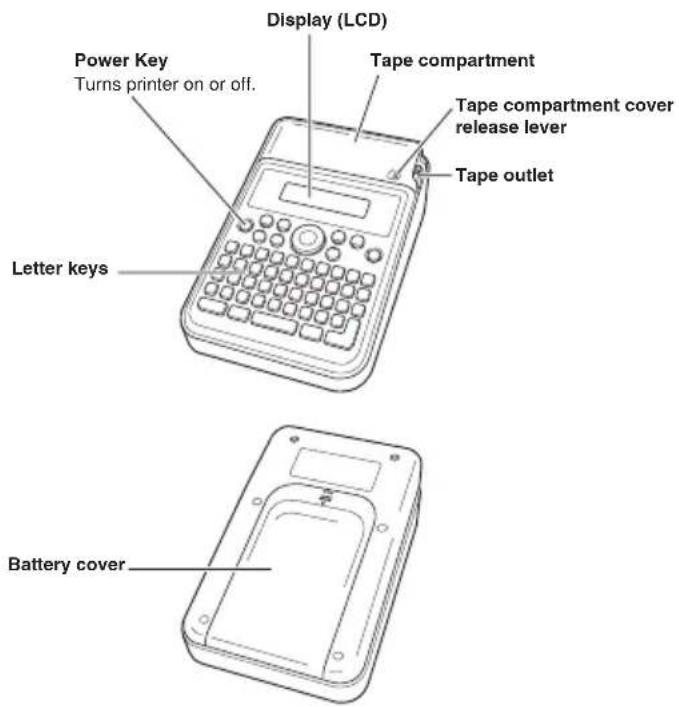
Power Supply
The printer can run on six AA-size alkaline batteries. Be sure to use alkaline batteries only.
Replacing Batteries
A handy low battery power indicator lets you know when battery power is getting too low for proper operation. The low battery icon ( ) appears on the display for about one second if battery power is low when you perform any of the following operations.
- Turn on the printer
• Execute a print operation
Important!
Batteries can burst or leak and damage your printer if you do not use them correctly. Note the following important points.
- Make sure that the plus (+) and minus (−) sides of each battery are facing correctly.
- Never mix batteries of different types.
- Never leave dead batteries in the printer.
- Remove the batteries if you do not plan to use the printer for a long time.
Warning!
- Never use recharged batteries with the printer.
- Do not expose batteries to direct heat, do not short circuit them, and do not try to take them apart.
- Keep batteries out of the reach of small children. If swallowed, consult with a physician immediately.
To load batteries
Caution
- The springs inside of the battery compartment have sharp edges. Take care that you do not touch the springs with your fingers when loading or replacing batteries. Doing so creates the risk of personal injury.

- Turn off the printer.
-
While pressing at the point on the battery cover shown in the illustration, slide the cover in the direction indicated by the arrow and remove it.
-
Load batteries into the battery compartment.
- Be sure to use alkaline batteries.
- Make sure the positive (+) and negative (−) ends of the batteries are facing correctly when you load them.
- Replace the battery cover.

natural_image
Simple line drawing of a rectangular device with a downward arrow indicating a component (no text or symbols)
natural_image
Diagram of a device interior with internal channels and a separate slot, no text or symbols present
natural_image
Simple line drawing of a mobile phone casing with an arrow indicating the pad or button (no text or symbols)Turning the Printer On or Off
Press to turn the printer on or off.

- When you turn on the printer, the tape width selection screen will appear. Use and highlight the tape width setting you want and then press.

Auto Power Off Function
If you do not perform any key operation for about six minutes, the printer will turn off automatically. To restore power, press 🔒
- The printer will remember any text you input before power turned off.
Loading and Removing Tape
Tape must be loaded in the printer in order to print labels. Use the tape that comes with the printer or commercially available tape.
To load tape
- Slide the tape compartment cover release lever in the direction of arrow "a" in the illustration, and then open the tape compartment cover. At this time, take care to avoid catching your fingers on the cutter.
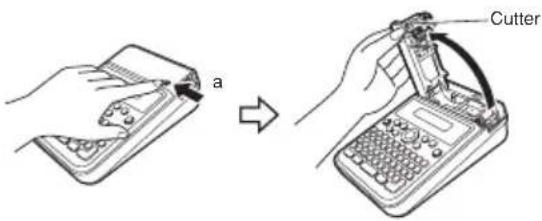
Important!
Do not try to force the tape compartment cover past its normal range of movement. Excessive force creates the risk of printer malfunction and damage.
- Check the condition of the tape.
- Make sure the tip of the tape is not bent. If it is, use scissors to cut off the bent part.

- Place the tape into the printer.
Run the tape over the rubber roller (see figure below). Make sure the tape is seated securely on the bearing.
- When loading tape, take care not to touch the cutter. Touching the cutter can cause finger cuts.
- The printer head becomes hot during printing. Do not touch the printer head when loading tape.
Important!
- Never try to push tape back in.
- Do not pull on the tape with excessive force. Doing so will lead to malfunction of the printer.
- Note that normal printing may not be possible at the leading edge of a new roll of tape.
- Incorrectly loading the tape can cause malfunction of the printer.

- For 18 mm wide tape, pass the tape between the tape guides as shown in the figure below.

- For 12 mm and 9 mm wide tape, pass the tape inside the tape guides as shown in the figure below.

- Close the tape compartment cover.
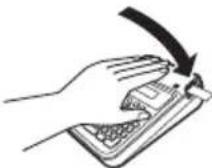
- Press down on the cover until is clicks securely into place.
- Do not pull on the tape or try to push it back after loading it in the printer.
Tape Precautions
- Leaving the tape in the printer for long periods can cause unwanted marks on the tape and deterioration of adhesion, and it can even make proper printing impossible. Be sure to remove the tape and properly store it if you do not plan to print on it for a long time.
-
This tape uses thermal paper. Use in the following types of locations can cause discoloration of the tape, and so should be avoided.
-
Near a window, outdoors, or in any other locations exposed to direct sunlight
- Locations where tape is exposed to high temperatures, rain, or splashing water
- Do not scrape the printing surface of the tape with your finger nail, metal objects, etc.
- This tape uses a re-adherable type adhesive. Depending on the surface or object to which it is affixed, the tape may detach from the surface or leave glue residue when removed.
- Note that long term display of this tape can result in discoloration.
- When not using tape, store it in a plastic bag or its original box.
- Avoid locations exposed to high temperature, high humidity, and direct sunlight when storing tape.
- Do not leave tape in a motor vehicle parked in sunlight.
- The tape is subject to discoloration so use it as soon as possible after unpacking it.
To remove tape from the printer
- Perform step 1 on page E-6 to open the tape compartment cover.
- Grasp the tape with your fingers and lift straight up.
- When removing tape, take care not to touch the cutter. Touching the cutter can cause finger cuts.
- The printer head becomes hot during printing. Do not touch the printer head when removing tape.

Part 2 Inputting Characters and Symbols
Important!
- You can input up to 80 characters per label. Further input becomes impossible after you input the 80th character.
Key Name

① Tape length
② Character size
③ Character style
④ Text effect
⑤ Shift
⑥ Esc
⑦ Caps
⑧ Space
⑨ Accent
Enter/Return
⑪ Symbol
⑫ Backspace
⑬ Setup
⑭ Print (Feed)
15 Print preview
⑯ Text orientation
Display Symbols and Indicators
Before getting into actual input, you should first become acquainted with the symbols and indicators used on the printer display.

Basic Alpha-Numeric Input
Note
- If you hold down any key, it will repeat its operation or input at high speed until you release it.
To input alpha-numeric characters
- Turn on the printer (page E-6).
- Input the first line of characters.
- To input upper-case letters, you can use either or . With you must shift the keyboard for each character. With a A the keyboard stays shifted until you press a A again.
- If you input a wrong character, press to delete it and input again. See page E-10 for other details on editing text.
- When you reach the end of a line of text, press to input a newline mark.
- A newline operation is indicated on the display by the symbol. This shows where you changed lines.
- The maximum number of lines that can be input is one line when the tape width is 9 mm, two lines when the width is 12 mm, and three lines when the width is 18 mm.
- Input the characters in the second line.
- To print the text that you input, press For details on printing, see page E-12.
To input accented characters
- Press A A A
- Press the key that corresponds to the accented character you want to input.
• This will display a menu of accented characters. - Use ◀ and ▶ to select the accented character you want and then press

Special Symbols
You can also access a menu of special symbols by pressing ,?#
To input special symbols
- Press the Rey
• This will display a menu of symbols.

- Use ▲,▼, and cursor keys to select the symbol you want and then press.
Part 3 Deleting and Inserting Characters
To move the cursor
- Press ◀ to move the cursor to the left, and ▶ to move the cursor to the right.
- Press ▲ to move the cursor to the up, and ♦ to move the cursor to the down.
- Press and then to make the cursor jump to the beginning (far left) of the characters on the display.
- Press and then to make the cursor jump to the end (far right) of the characters on the display.
- Holding down the ◀, ▶or cursor key moves the cursor at high speed.
To delete characters
- Use ◀ and▶ to move the cursor to the right of the character you want to delete.
- Press ☒ to delete the character to the left of the cursor position.
To insert characters
- Use ◀ and ▶ to move the cursor to the location where you want to insert the characters.
- Input the new characters.
• This inserts the characters at the current cursor position.
Part 4 Character Size, Text Effects and Character Styles
Character Size
You can select from among four character sizes: extra large, large, medium, and small.
The following shows examples of each.
| Extra large | CASIO |
| Large | CASIO |
| Medium | CASIO |
| Small | CASIO |
Character size changes are applied to printed text only. The size of displayed text does not change.
Important!
- The maximum printable character size depends on the size of the tape loaded in the printer and the number of lines of text to be printed.
To specify a character size
Press A A
• Each press cycles to the next available character size.
Text Effects
There are three text effects that you can assign: boxed text, shaded and boxed text, underlining. The following shows examples of each.
| Text Effect Indicator Sample | ||
| Boxed text | A | ABC.XYZ |
| Shaded and boxed text | A | ABC.XYZ |
| Underlining | A | ABC.XYZ |
Text effect changes are applied to printed text only. The appearance of the displayed text does not change, but the text effect indicators will show you when a text effect is being used.
To specify a text effect
Press AAA
• Each press cycles to the next available text effect.
Character Styles
There are three character styles that you can assign: normal, bold, and outline. The following shows examples of each.
| Style Indicator | Sample | |
| Normal None | ABC.XYZ | |
| Bold | A | ABC.XYZ |
| Outline | A | ABC.XYZ |
Character style changes are applied to printed text only. The appearance of the displayed text does not change, but the character style indicators will show you when a character style is being used.
To specify a character style
Press AAA
• Each press cycles to the next available character style.
Part 5 Printing
Printing a Label
Printing a label is quick and simple. You also can feed the tape any time you need to insert a blank space due to a partially printed label, etc.
Printing Precautions
Keep the following points in mind when printing.
Important!
- Never remove the batteries while printing is in progress.
- Never open the printer's tape compartment cover while printing is in progress.
- Do not touch the tape coming out of the printer until printing is stopped.
- Before printing, check to make sure there is enough tape loaded in the printer so it does not run out during printing. If the printer runs out of tape while printing, press to stop printing.
- Make sure that nothing is blocking the printer's tape outlet. Blocking the tape outlet can cause tape jams and malfunction of the printer.
To display the print preview
- Press
- The print image that appears scrolls on the display for easy viewing.
- To stop the scrolling, press , Press again to restart scrolling.
- Print preview will be exited automatically after you reach the end.
- To exit print preview part way through, press

To print a Label
Important!
Before printing, load tape into the printer and check to make sure nothing is blocking the tape outlet (page E-5). Also, be sure to read the information under "Printing Precautions", to the left.
While the text input screen is displayed, press 📋. This starts the print operation.
• To stop printing of a label part way through, press

To cut the tape
Holding the tape between your fingers as shown in the illustration, pull it up against the printer's tape cutter to cut it.
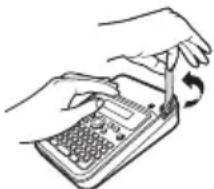
natural_image
Illustration of hands using a handheld device to interact with a keyboard (no text or symbols visible)Important!
Check to make sure that printing is completely stopped before cutting the tape. Cutting the tape while printing is in progress can cause tape jams and damage to the printer.
To affi x a label to a surface
- Use scissors or some other implement to trim the label to the required size, if necessary.
- Affi x the label to the desired surface.
- Affi xing a label to a surface may cause adhesive to remain on the surface when the label is removed.
Important!
Do not affi x labels to the types of surfaces listed below.
- Surfaces exposed to direct sunlight or rain
• Human or animal skin
- Walls, utility poles, and other surfaces located on other people's property
- Containers used for heating in a microwave oven
Unsuitable Surfaces (Label may not stick.)
- Rough surfaces
- Surfaces that are wet, oily, dusty, or covered with other matter
- Special plastic materials (silicon, polypropylene, etc.)
To feed the Tape
Press and then

This will feed the tape approximately 12 mm.
Part 6 Configuring Form Settings
Specifying the Text Orientation
Use the procedure below to select printing of either vertical or horizontal text.
| Text Orientation Ind | cator Sample | |
| Vertical | ||
| Horizontal None | ABC.XYZ |
To specify the text orientation
Press A
• Each press toggles between vertical and horizontal text printing.
Specifying the Tape Length
You can specify the tape length for printing, which will also cause the length of the printed text to change. Available settings are 100% (normal tape length), 75%, or 50%.
| Tape Length Indicator Sample | ||
| 100% | A | ABC.XYZ |
| 75% | A | ABC.XYZ |
| 50% | A | ABC.XYZ |
To specify the tape length
Press AAA
Each press cycles the setting in the sequence; 100% → 75% → 50%.
Part 7 Confi guring the Printer Setup
The printer has a SET UP screen that you can use to configure the display contrast and the print density setting.
To configure the printer setup
- Press
- Use ▶ and ◀ to select [display contrast) or (print density), and then press
- Use the cursor keys to change the setting of the currently selected setup item.
| When this setup item is selected: | Use these cursor keys to change the setting: |
| Display contrast | ◀ and ▶ |
| Print density and | ◀ ▶ |
- After the settings are the way you want, press to apply them.
Part 8 Reference
User Maintenance
Print quality will suffer if the printer head and/or rubber roller become dirty. A dirty tape cutter will result in poor cutting performance. Periodically perform the user maintenance steps below to clean the printer head, rubber roller, and tape cutter.
Important!
Use a cotton swab or some other similar soft object to clean the printer head, rubber roller, and tape cutter. Use of an ultra thin swab is recommended.
To clean printer components
- Perform step 1 on page E-6 to open the tape compartment cover.
- If there is tape loaded in the printer, remove it.
Important!
The printer head is hot during and immediately after printing. Be sure to allow enough time for it to cool before removing the tape.
- Moisten the swab with alcohol and then use it to wipe the printer head, rubber roller, and tape cutter surfaces. At this time, do not directly touch the tape cutter. Touching the cutter can cause finger cuts.
Take particular care when wiping the contact areas of the roller and printer head.

- Rotate the rubber roller by pressing ↑ and then □ (feed). (page E-13)
- You can also use a commercially available cassette tape recorder head cleaning kit for cleaning.
Cleaning the Exterior of the Printer
Moisten a soft cloth with water, completely wring out any excess, and then wipe the exterior of the printer. Do not use benzene, alcohol, thinner, or any other volatile agent, which can damage the printer.
Troubleshooting
Should you experience any problem with printer operation, take the actions described in the table below.
| Symptom Cause and Required Action | ||
| ● Nothing appears on the display. | There is a problem with screen brightness.→ Adjust screen brightness. (page E-14) | |
| Batteries are low, or you are using non-specifi ed batteries.→ Use specifi ed batteries, or replace batteries with new ones. (page E-5) | ||
| Batteries are not loaded correctly.→ Correctly reload batteries. (page E-5) | ||
| ● Nothing is printed. | Your label input contains only spaces.→ Input the text you want to print. | |
| The printer head is overheated.→ Wait for a while and try printing again later. | ||
| ● Printing is unclear.● Cannot produce good-quality printing.● Printing is dim. | Dirt, debris, or other foreign matter on the printer head and/or rubber roller.→ Clean the printer head and rubber roller. (page E-14) | |
| Tape is not loaded correctly.→ Correctly reload the tape. (page E-6) | ||
| Batteries are low.→ Use specifi ed batteries, or replace batteries with new ones. (page E-5) | ||
| The print density setting is not correct.→ Adjust the print density setting. (page E-14) | ||
| ● Printer turns off during printing. | Batteries are low, or you are using non-specifi ed batteries.→ Use specifi ed batteries, or replace batteries with new ones. (page E-5) | |
| ● Tape does not come out of printer when is pressed. | The tape compartment cover is not closed securely.Securely close the cover. (page E-8) | |
| The printer is out of tape.Replace the tape with new tape (available separately). (page E-6) | ||
| Tape is jammed.Remove the tape from the printer, and then pull out the jammed tape with your fingers. Cut the pulled out tape with scissors, etc. After that, reload the tape. (page E-6)Important!Do not do any of the following while printing is in progress.Block the tape outletTouch tape coming out of the printerOpen the tape compartment coverRemove the printer batteries | ||
| Batteries are low.Use specifi ed batteries, or replace batteries with new ones. (page E-5) | ||
| ● Tape will not cut. • You are not performing the tape cut procedure correctly.Cut the tape (page E-12). | ||
| The tape cutter is dirty.Clean the tape cutter (page E-14). | ||
| The tape cutter is dull.Have the tape cutter replaced by your retailer or your local CASIO service center. | ||
| Tape is jammed in the tape outlet.Remove the tape from the printer and remove the jammed tape. (page E-6) | ||
| Symptom Cause and Required Action | |
| ● Label does not adhere properly. | The location or object where you are affi xing the label is not suitable.→ Choose a surface that is smooth, free of water and/or oil, clean, etc. (page E-12) |
| ● Blank label margins are too large. | The printer is designed to always print labels with a blank margin. |
Error Icons
| Error Icons Cause and Required Action Page | ||
| You are attempting to input text that exceeds the maximum input limit for a text label.→ Re-input the text, keeping it within the maximum limit. | E-9 | |
| You are attempting to print more lines than the number allowed for the tape you are using.→ Reduce the number of lines or change to a different tape width. | E-10E-6 | |
| You are attempting to print to a tape that exceeds the maximum allowable length of approximately 30 cm.→ Make the tape length shorter. | E-13 | |
| You are attempting to advance to the next operation when there is no text input.→ Input text before performing the next operation. | E-9 | |
| The printer cover is not closed securely.→ Securely close the printer cover. | E-8 | |
| If the steps described above do not clear the error icon, contact your retailer or your nearest CASIO service center. | — | |
| [322C8] | Consecutive print operations caused the printer to overheat.Wait for a while and try printing again later. | — |
| If the steps described above do not clear the error icon, contact your retailer or your nearest CASIO service center. | — | |
 | Batteries are low.Replace batteries with new ones (commercially available).You are using the printer in an area where temperature is below 10°C (50°F).Use the printer within the allowable operating temperature range of 10°C to 35°C (50°F to 95°F). | E-5 |
Specifications
Model: MEP-K10
Input
Keyboard Layout: Typewriter (QWERTY)
Number of characters: 80
Character Types
Alpha (English and other languages): 151
Numbers: 10
Symbols: 99
Display
Type: Liquid crystal display
Character matrix: 96 × 16 dots, 16 columns × 2 lines
Printing
Type: Thermal
Resolution: 96 dots/200 dpi
Width: Approximately 12 mm maximum
- 6.5 mm for 9 mm wide tape
• 9.5 mm for 12 mm wide tape
• 12 mm for 18 mm wide tape
Length: Approximately 30 cm maximum
Speed: Approximately 12.5 mm/second
Print Character configuration: 48× 48-dot bitmap font
Character font: Sans-serif
Character spacing: 0 dots (fixed)
Print Functions:
- Printing: Auto fi t, horizontal, vertical
•Number of print lines: 1 with 9mm wide tape
2 with 12mm wide tape
3 with 18mm wide tape
•Character styles: Normal, bold, outline
• Text effects: Box, shading, underline
General
Power supply: Six AA-size alkaline batteries
Power consumption: 9W
Auto Power Off: Approximately six minutes after last key operation.
Dimensions: 59(H) × 118(W) × 184(D) mm (2 ^5 / 16 "H × 4 ^5 / 8 "W × 7 ^1/4 "D)
Weight: Approximately 365 g (12.9 oz) excluding batteries
Ambient Temperature: 10°C to 35°C (50°F to 95°F)
Battery Life
Under normal conditions, new batteries should be able to print approximately two rolls of 18 mm tape.
- Battery life is shortened by printing text or images that contain a lot of black areas, printing in cold environments, and storing the printer for long periods with the batteries left inside.
Appendix
Alpha Characters Symbols

| 1 | . , : ; “”, “’ . |
| 2 | ? ! ¿ i & - _ \ / § ¶ |
| 3 | @ # % ‰ ® ©TM ~ a o |
| 4 | + - × ÷ ± = <> ≤ ≥ ≠ * |
| 5 | () [] {} <> 《》 « » |
| 6 | → ← ↑ ↓ ↘ ↗ → ← ↑ ↓ |
| 7 | $ ¢ € £ ¥ Fr° °F°C |
| 8 | ft.in. f l oz lb. ↓ =-./. Ⓤ |
| 9 | ★ ○ ● □ ■ △ ▲ ▽ ▼ ◇ ◆ ♥ |

Manufacturer:
CASIO COMPUTER CO., LTD.
6-2, Hon-machi 1-chome, Shibuya-ku, Tokyo 151-8543, Japan
Responsible within the European Union:
CASIO EUROPE GmbH
This mark applies in EU countries only.
CASIO®
CASIO COMPUTER CO., LTD.
6-2, Hon-machi 1-chome
Shibuya-ku, Tokyo 151-8543, Japan

MO1302-A Printed in China/Imprimé en Chine
© 2013 CASIO COMPUTER CO., LTD.


- Read This First!
- Safety Precautions
- Danger
- Warning
- Caution
- Examples of graphic markings
- Batteries
- Operating Precautions
- Important!
- Contents
- Part 1 Getting Ready
- Power Supply
- Replacing Batteries
- Warning!
- To load batteries
- Turning the Printer On or Off
- Auto Power Off Function
- Loading and Removing Tape
- To load tape
- Tape Precautions
- To remove tape from the printer
- Part 2 Inputting Characters and Symbols
- Display Symbols and Indicators
- Basic Alpha-Numeric Input
- Note
- To input alpha-numeric characters
- To input accented characters
- Special Symbols
- To input special symbols
- Part 3 Deleting and Inserting Characters
- To move the cursor
- To delete characters
- To insert characters
- Part 4 Character Size, Text Effects and Character Styles
- Character Size
- To specify a character size
- Text Effects
- To specify a text effect
- Character Styles
- To specify a character style
- Part 5 Printing
- Printing a Label
- Printing Precautions
- To display the print preview
- To print a Label
- To cut the tape
- To affi x a label to a surface
- Unsuitable Surfaces (Label may not stick.)
- To feed the Tape
- Part 6 Configuring Form Settings
- Specifying the Text Orientation
- To specify the text orientation
- Specifying the Tape Length
- To specify the tape length
- Part 7 Confi guring the Printer Setup
- To configure the printer setup
- Part 8 Reference
- User Maintenance
- To clean printer components
- Cleaning the Exterior of the Printer
- Troubleshooting
- Specifications
- Input
- Character Types
- Display
- Printing
- General
- Battery Life
- Appendix
- Alpha Characters Symbols
- CASIO®
Brand : CASIO
Model : MEP-K10
Category : Label printer