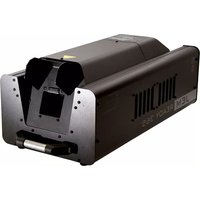
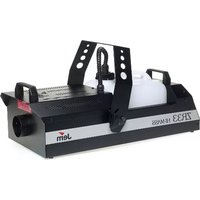
JEM Ready 365 - Effect machine MARTIN - Free user manual and instructions
Find the device manual for free JEM Ready 365 MARTIN in PDF.


| Product Type | Effect Machine (Fog Machine) |
| Brand | Martin |
| Model | JEM Ready 365 |
| Dimensions (H x W x D) | Approx. 280 x 180 x 230 mm |
| Weight | Approx. 5.5 kg |
| Power Supply | 120V / 240V, 50/60 Hz, 1500W |
| Heater Capacity | 1500 W |
| Fluid Tank Capacity | 2.5 L |
| Fluid Consumption | 120 mL/min (max) |
| Output | Up to 300 m³/min (approximate) |
| Warm-Up Time | Approx. 3 minutes |
| Control | DMX, optional remote control |
| Heating Element | Stainless steel block |
| Pump | High-pressure piston pump |
| Protection Features | Thermal cut-out, low fluid shut-off |
| Cleaning | Use distilled water with cleaning agent periodically |
| Safety | CE, ETL certified; do not block vents |
| Compatible Fluid | Martin JEM Fluid (water-based) |
| Warranty | 2 years (parts and labor) |
Frequently Asked Questions - JEM Ready 365 MARTIN
User questions about JEM Ready 365 MARTIN
0 question about this device. Answer the ones you know or ask your own.
Ask a new question about this device
Download the instructions for your Effect machine in PDF format for free! Find your manual JEM Ready 365 - MARTIN and take your electronic device back in hand. On this page are published all the documents necessary for the use of your device. JEM Ready 365 by MARTIN.
USER MANUAL JEM Ready 365 MARTIN
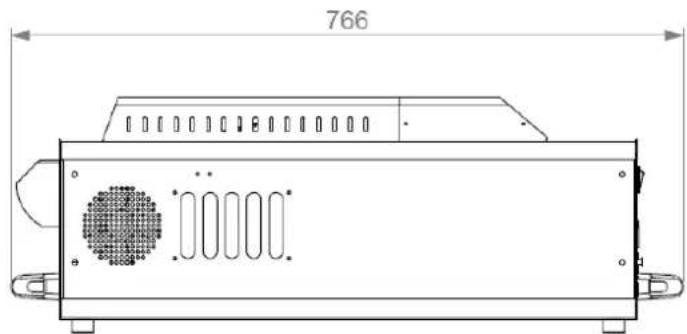
All dimensions are in millimeters



©2013 Martin Professional A/S. Information subject to change without notice. Martin Professional A/S and all affiliated companies disclaim liability for any injury, damage, direct or indirect loss, consequential or economic loss or any other loss occasioned by the use of, inability to use or reliance on the information contained in this manual. The Martin logo, the Martin name and all other trademarks in this document pertaining to services or products by Martin Professional A/S or its affiliates and subsidiaries are trademarks owned or licensed by Martin Professional A/S or its affiliates or subsidiaries.
Contents
Dimensions 2
Contents.... 3
Product overview 7
Product description....7
Features at a glance....7
Product details 8
Quick Start 9
Setting up 9
Making haze 9
Switching off....9
Installation and setting up.... 10
Location 10
AC power.... 10
Setting up 11
Final checks....11
Turning on the power.... 11
Turning off the power 12
Control settings.... 13
Overview 13
Quick access buttons 13
Setting Run mode.... 14
Setting Haze density.... 14
Setting Fan speed 14
Setting the Timer 14
Setting the DMX base address.... 15
Setting the master-client link mode 15
Checking gas pressure 15
Priming the machine after fluid out.... 15
Resetting options to factory settings 16
Aux menu.... 16
Remote control 17
Overview 17
Functions.... 17
Connection.... 17
DMX control 18
Overview 18
Connection.... 18
DMX functions 18
RDM operation....19
Haze fluid types.... 20
Basic service 21
Cleaning 21
Fuse replacement.... 21
Troubleshooting.... 22
Status messages.... 23
Resetting the machine after fluid out.... 23
Specifications 24
Regulator application matrix 26
Safety information
The following symbols are used to identify important safety information:

Caution! Safety hazard. Risk of personal injury.

Caution! Burn hazard. Hot surface. Do not touch.

Danger!
Hazardous
voltage. Contact
will cause electric
shock.

Caution! Fire hazard.

Warning! This product is not for household use. It presents risks of injury due to electric shock, burns, falls and respiratory problems!
Read this manual before operating the machine, follow the safety precautions listed below, and observe all warnings in this manual and printed on the machine. Use the system only as described in this manual and in accordance with local laws and regulations.
If you have questions about how to operate the machine safely, or if you have followed the instructions in this manual and the machine is malfunctioning, please contact Martin Service.
Preventing electric shocks

• Always ground (earth) the machine electrically.
- Use only a source of AC power that complies with local building and electrical codes, and that has both overload and ground-fault protection.
- Before connecting the haze machine to power, check that the voltage indicated on the machine's serial label matches your local AC power voltage. If your AC power voltage does not match, do not use the machine. Contact Martin Service for assistance.
- Before using the machine, check that all power distribution equipment and cables are in perfect condition and rated for the current requirements of all connected devices.
- If the machine or any cables connected to it are in any way damaged, defective, wet, or show signs of overheating, stop using the machine and contact Martin Service for assistance. If the supply cord is damaged, it must be replaced by a special cord or assembly available from the manufacturer or its service agent.
- Disconnect the machine from AC power before servicing and when not in use.
- This system is not waterproof and should not be exposed to wet outdoor conditions. Do not immerse in water or any other liquid. Do not expose to high-pressure water jets.
- Do not spill fluid over or inside the machine. If fluid is spilled, disconnect AC power and clean with a damp cloth. If fluid is spilled onto electronic parts, take the system out of service and contact Martin for advice.
- Do not remove the covers or attempt to repair a faulty machine. Refer any service not described in this manual to Martin.
- Do not operate the machine if any parts are damaged, defective or missing.
- Moisture and electricity do not mix. Do not aim haze output at electrical connections or devices.
Preventing burns and fire


- The haze produced by the machine is hot enough to cause burns when it leaves the nozzle, and very hot droplets of fluid escape occasionally. Keep people and objects at least 60cm (24 inches) away from the haze output nozzle.
- Do not touch the haze output nozzle during or after use – it becomes extremely hot and remains hot for several hours after the machine has been shut down.
- Haze output contains glycol, a flammable alcohol that burns with an almost invisible blue flame. Do not point haze output at sources of ignition such as open flames or pyrotechnic effects.
- Do not attempt to bypass thermostatic switches, fluid sensors or fuses.
- Replace fuses only with ones of the type and rating specified in this manual for the machine.
- Provide a minimum free space of 100mm (4 inches) around the machine.
- Provide a minimum free space of 500mm (20 inches) around fans and air vents and ensure free and unobstructed air flow to and around the machine.
- Keep the machine at least 60cm (24 inches) away from combustible and heat-sensitive materials.
- Do not operate the machine if the ambient temperature (Ta) is below 5° C ( 41° F) or above 40° C ( 104° F).
- Do not operate the machine if the relative air humidity exceeds 80%.
Preventing injuries

- Ensure that the surface on which the machine is located or installed can safely hold the weight of the machine.
- Do not install the machine over areas where people are present.
- This appliance is not intended for use by persons (including children) with reduced physical sensory or mental capabilities, or lack of experience and knowledge, unless they have been given supervision or instruction concerning use of the appliance by a person responsible for their safety. Children should be supervised to ensure that they do not play with the appliance.
- Haze machines can cause condensation. Do not point the output at smooth floors. Floors and surfaces may become slippery. Check these frequently and wipe dry as necessary to avoid any danger of slipping.
- Ensure at least 2m visibility in areas where haze is being produced.
- Haze fluid contains food-grade glycols and glycerol in solution but may present health risks if swallowed. Do not drink it. Store it securely. If eye contact occurs, rinse with water. If fluid is swallowed, give water and obtain medical advice.
Preventing breathing problems

- A haze machine can operate safely only with the haze fluid it is designed for. Use the machine only with fluids specified under “Haze fluid options” on page 20 or you may cause the release of toxic gases, presenting a severe health hazard. You will also probably damage the machine.
- Do not create dense haze in confined or poorly ventilated areas.
- Do not expose people with health problems (including allergic and/or respiratory conditions such as asthma) to haze output.
- Do not point haze output directly at a person's face or at face height.
Product description
The Jem Ready 365 ™ is a versatile haze machine from Martin Professional designed for the highly demanding professional market. Its ability to produce exceptionally fine water-based atmospheric haze with long hang time makes it an ideal choice for rental houses, shows, theatres, TV studios, clubs, bars, cruise ships, theme parks and more, especially where the residue of oil-based hazers presents an issue.
Robust and portable, the Jem Ready 365 ™ is capable of dispersing an even, continuous haze with exceptional optical clarity and reflectivity, the perfect small-particle haze for highlighting today's highly defined light beams. A pressurised gas propulsion system ensures smooth distribution while a unique mixing channel allows the haze to optimize before being expelled.
Congratulations on your purchase of the Jem Ready 365 ™ from Martin. Details of the full range of Martin products are available on our website at www.martin.com.
Features at a glance
• Finest haze production in its class
- Small particle, even haze
- Continuous output
- 5 minute heat-up time
• Water-based fluid with long hang time
• Up to 70 hours continuous operation (subject to gas supply)
- Low noise (Silent Mode available)
- Portable
• Variable haze and fan controls with 5% increments
• 3.8 liter fluid capacity
- Sealed fluid system for transportation
• Advanced Pump Technology (APT)
- Standby battery runs automatic shutdown procedure after power down to prevent clogging
- RDM equipped
- On-board DMX, 5 pin or 3 pin
- User-friendly on-board control panel
• Optional Digital Remote Control

Use only R365 Haze Fluid™. Use of other fluid will void warranty.
Product details


Quick Start
You are no doubt eager to switch on the machine and try it out by making a lot of haze. This section tells you how to do that. However, please also make the time to read the safety and servicing instructions in the remainder of this manual.
Setting up
Locate the machine in a suitably large area with nothing in front of the haze output.
Fill the fluid tank with 3.8 litres of Martin R365 Haze Fluid ™ only. Use of other fluid will void the warranty.
Connect the gas line from the CO2 cylinder using the push fit connector on the rear panel. Connect the regulator to the cylinder ensuring the plastic washer on the regulator is in place and tighten using a suitable spanner. Fully turn on the gas valve at the cylinder. No gas adjustment is required to vary the output of the machine. See page 11 for more information.
Connect a suitably rated power supply to the machine using the supplied Neutrik Powercon cable. The power requirements are 3.1A @ 230V (EU model) or 6.2A @ 120V (US model).
Now turn on the mains switch at the rear of the machine. The display will show HEAT, then after about 5-6 minutes the machine will reach operating temperature. If the display shows OFF, press the RUN button to the right of the display.
Making haze
If the machine does not automatically start making haze, press the RUN quick access button to the right of the display. Press RUN again to stop the haze.
If you want to change the haze density, press the Menu < > buttons until the display shows HAZE, then press the Enter button and use the Value up/down buttons to select a value above 0%.
You can also adjust the fan speed using the FAN menu.

If no haze is produced it may be necessary to prime the machine, press the Menu <> buttons until the display shows PRME, then press the Value Up button so the display shows Y, then press the Enter button.
Switching off
The Ready 365 is designed to run a self-cleaning cycle after power down to help prevent blockages. It uses an internal rechargeable battery to do this.
If cleaning is needed, when the power is disconnected the display will show "WAIT", then "WAIT 89" counting down to "WAIT 00" will scroll across the display. The unit will then automatically power down.
If the unit is not to be used for some time, turn off the valve on the CO2 cylinder.
Installation and setting up

DANGER! DO NOT operate the haze machine until you have read and observed all the precautions listed under "Safety information" on page 4.
Location
The Jem Ready 365 ™ is designed to be located on the floor. An optional trolley is available which holds the machine, two gas cylinders and one AF1 MKII fan.
Ensure that there is at least 100mm clearance all round the machine and at least 60cm in front of the haze output.
AC power
Before using the machine, ensure that a grounding-type (earthed) power plug that fits the local power outlets is installed on the Neutrik Powercon cable provided.

DANGER! Make sure the power plug is correctly rated:
- For EU (230V) use fit a plug rated 10 amp minimum
- For US (120V) use fit a plug rated 10 amp minimum
When installing the plug, follow the plug manufacturer's instructions and connect pins as follows:
Yellow and green wire to ground (earth), blue wire to neutral and brown wire to live.
The table below shows some common pin identification schemes.
| wire | function | marking | screw | colour |
| brown | live | “L” | yellow | |
| blue | neutral | “N” | silver | |
| green/yellow | earth | green |
Before connecting the haze machine to power, verify that the AC supply is adequately dimensioned for the current draw of the machine. The machine requires:
3.1A @ 230V (EU model)
6.2A @ 120V (US model)
Check that the local AC voltage is appropriate, as indicated on the machine's serial number label. If your AC voltage is outside the appropriate range, do not use the machine. Contact Martin Service for assistance.

The Neutrik Powercon outlet connector is provided to power the Jem AF1 or AF2 fan. No other equipment should be connected to this outlet.
Setting up
Fill the fluid tank only with Martin R365 Haze Fluid™ (see page 20).
Connect the gas line from the CO2 cylinder using the push fit connector on the rear panel. Connect the regulator to the cylinder, ensuring plastic washer is in place, and tighten using a suitable spanner (see picture below). Fully turn on the gas valve at the cylinder. If using a variable regulator, set to 30PSI or 2Bar. No gas adjustment is required to vary the output of the machine.

If DMX control is being used, connect the machine to the DMX line (see page 18).
If the Jem Digital Remote is being used (optional accessory), connect the remote to the Remote socket (see page 17).
The haze deflector flap on the front of the machine can be positioned in either the raised position so the haze goes up into the air, or in the lowered position to reduce air turbulence.
Final checks
Before applying power to the haze machine, verify the following:
- the machine is safely located or installed and meets the location requirements stated on page 10
- the operator is familiar with, and able to comply with, the requirements for safe operation listed on page 4.
- the haze fluid is one of the genuine Martin fluids listed under "Haze fluid options" on page 20.
• the machine is electrically grounded (earthed) - the AC power distribution circuits and lines are adequately rated for the current load
Turning on the power
Turn on the main power switch located next to the power inlet. The display will show HERT, then after about 5-6 minutes the display will show RBY and the machine is ready to produce haze.
If the display shows ☐F F, press the RUN button to the right of the display to enable the machine.
Turning off the power
The Ready 365 is designed to run a self-cleaning cycle after power down to help prevent blockages. It uses an internal rechargeable battery to do this.
If cleaning is needed, when the power is disconnected the display will show WRIT, then WRIT 89 counting down to WRIT 80 will scroll across the display. The unit will then automatically power down.
If the unit is not to be used for some time, turn off the valve on the CO2 cylinder.
Control settings
Overview
The four quick access buttons to the left and right of the digital display at the rear of the unit allow you to quickly set the haze level and engage timer or continuous run modes.
The digital display in the centre of the top panel allows you to configure the machine using option menus.

Quick access buttons
The two quick access buttons to the left of the display allow you to quickly set the machine to one of two haze output levels, and engage timer mode or continuous run mode. The display shows the current setting.
quick mode haze and fan settings
| PRE1 | Haze 55%, Fan 20% |
| PRE2 | Haze 20%, Fan 20% |
The buttons to the right of the display change the operating mode.
Press RUN to turn on haze in continuous run mode. The display shows CONT. To stop the haze, press the Run button again to set the machine to Standby mode (heaters remain on).
Press SILENT to engage a low noise mode which slows down the fan. If the RUN button is used to stop the haze, Silent mode is not cancelled. Silent mode is a global setting and will affect both manual and DMX control. Note that using silent mode may cause increased gas consumption.

To change the preset settings, adjust the Fan and Haze settings using the menu, then within 3 seconds press the Pre1/Pre2 button to store the settings. SET will then be displayed if successful.
Setting Run mode
The Run mode sets the operational mode of the unit, either Off, Standby (heaters remain on), Fan only, Timer mode or Continuous mode.
Use the Menu Previous / Next buttons to select the RUN option.
Use the Up/Down buttons to select OFF, STBY, FRN, TIME, CONT.
Press the Enter button to store the setting. The display shows SET.
When the mode is changed to OFF, if the unit has been running it will enter a 90-second shut down sequence before powering down, to prevent block clogging. The display shows WRIT with a countdown. You can cancel the shut-down sequence by changing the run mode back to an active state.
Setting Haze density
Use the Menu Previous / Next buttons to select the HAZE option.
Use the Up/Down buttons to select the density from ☐ % - 1 ☐ ☐ %.
Press the Enter button to store the haze setting. The display shows SET.

If you want to temporarily change the haze density, do not press Enter. The haze setting will go back to its stored value next time the machine is powered up. This applies to all options.
Setting Fan speed
Use the Previous / Next buttons to select the FRN option.
Use the Up/Down buttons to select the fan speed from 7% - 127%.
Press the Enter button to store the fan setting.
The fan will run continuously if set above 0% and the RUN menu is set to FAN, TIME or CONT.
If haze is being produced and the fan is off or set to a low speed, the fan speed will be automatically increased to prevent build-up of haze at the machine output.

If using the deflector on the front of the machine, use a low fan speed.
Setting the Timer
To enable timer operation, select the Time option from the Run menu (or press the quick access TIMER button). You can then set the TRUN (run time) and TOFF (off time) values using the menu options. Times are set in seconds and are in the range 1-90. The timer will cycle continuously until the run menu is changed.
Timer mode is useful for maintaining a low level of haze in smaller venues.

When the timer is running and the display is not showing a menu, the display shows RNxx or OFxx (where the xx is the time counting down) as the timer cycles between run and off modes.
Setting the DMX base address
Use the Previous / Next buttons to select the R I I R option.
Use the Up/Down buttons to set the DMX base address from ☐☐ 1 to 5 ☐9. If you hold down the button the address will count up or down.
Press the Enter button to store the address setting.
The machine will automatically respond to a DMX controller whenever it is connected. The Address may also be set via RDM, and requires 3 channels.
When using in a DMX system ensure the LINK menu is set to RECV to avoid causing DMX errors to other devices on the system.
Setting the master-client link mode
It is possible to control several machines from one digital remote. The machine with the remote plugged into it becomes the Master. The other machines are Clients. The machines are interconnected with DMX cabling.
Use the Previous / Next buttons to select the KNIL option.
Use the Up/Down buttons to select V C E R (client unit) or I N E S (master unit).
Press the Enter button to store the link setting.
The machine should be set to INES only if it is running as a master. If running as a client, stand-alone or DMX controlled it should be set to V C E R.
Checking gas pressure
Select the PSI option, then use the Enter button to display the recorded value. The display will show the gas pressure in PSI which should be about 34 when running at 100% output (not in silent mode). This information is for diagnostic use only and has no effect on the operation of the machine, gas pressure control being fully automatic.
To disable the PSI display, use the menu forward/ back keys or wait for a time-out of the display to occur.

The machine automatically compensates for changing gas pressure. You cannot change the haze density by adjusting the gas cylinder valve. If the gas cylinder runs out, the machine will run for about 30 minutes before shutting down and the display will show GAS LOW, followed by GAS OUT.
Priming the machine after fluid out
If the machine runs out of fluid it should be shut down to prevent damage to the pump. To suck the new fluid back into the machine, replace/refill the fluid tank and use the prime function.
Use the Previous / Next buttons to select the PRME option.
Use the Up/Down buttons to change the option to Y.
Press the Enter button to start the priming function.
The machine will pump at full power for about 10 seconds or until the unit senses fluid in the heat exchanger. You may need to repeat this two or three times if the fluid pipes are completely empty.
To exit this menu if you decide not to activate the Prime function, select N and press Enter.
If the machine is not up to operating temperature the Prime function will do nothing.
Resetting options to factory settings
The factory settings configure a standard mode of operation for the machine.
Use the Previous / Next buttons to select the RSET option.
Use the Up/Down buttons to change the option to ¥.
Press the Enter button to reset all options.
To exit this menu if you decide not to reset the options, select N and press Enter.
The factory settings are:
| option | setting |
| HAZE | 30% |
| FAN | 30% |
| TRUN | 2 8 |
| TOFF | 2 8 |
| RUN | STBY |
| ADDR | 001 |
| LINK | RECV |
| ALT | 00 |
| PRME | N |
Aux menu
The Aux menu currently has no function on this machine.
Remote control
Overview
The Jem digital remote control, available separately, may be used for remote control of the Jem Ready 365 ™ . Several machines may be controlled from one remote using the LINK function (see page 15).

Functions
The remote control provides the following functions:
- Haze button: turns haze output on and off. Press once to start haze and again to stop.
- Timer button: turns the haze timer on and off.
• Haze level setting (HAZE = 0 -100%)
• Fan speed setting (FAN = 0 -100%) - Timer run time/off time settings (TRUN = 1 -90 seconds, TOFF = 20-89 seconds)
- Run mode (RUN = OFF, STBY, FAN, TIME, CONT)
The functions are the same as on the built in control panel and are described on page 13.
The RUN menu duplicates the functions of the Haze and Timer buttons. The buttons are simply a quick way to control this menu function.
Connection
The remote control has two identical XLR sockets on the top and back for connection to the Jem Ready 365 ™ . Plug the cable provided with the remote control into one of these sockets and into the 3-pin XLR socket on the rear panel of the Jem Ready 365 ™ .
The remote control is powered through its cable by the Jem Ready 365 ™ ; no batteries are required.
The cable may be extended to up to 25 m (82 ft.) with a 3-pin XLR DMX cable, available from your Martin dealer.
Overview
DMX is a digital control system widely used in entertainment and architectural lighting. Any controller meeting the DMX-512 standard may be used to control and program the haze output of the Jem Ready 365 ™ .

When a DMX signal is present, the Jem Ready 365 ™ stand-alone functions do not work. To fire the unit from the control panel or remote control, the DMX controller must be powered off or disconnected.
Connection
The Jem Ready 365 ™ provides 3-pin or 5-pin XLR sockets on the rear panel of the base for DMX connection. The sockets are interconnected: a DMX line connected to the 3-pin IN socket may be continued through the 5-pin OUT socket and vice versa. Do not, however, attempt to split a DMX line by using both the 3-pin and 5-pin OUT sockets.
For best results, use cable designed for high speed digital data transmission. Suitable DMX cable is available from your Martin dealer.
DMX functions
The Jem Ready 365 ™ address setting must match the DMX address allocated to it on your lighting console. To set the address, see “Setting the DMX base address” on page 15. The Jem Ready 365 ™ requires three DMX channels.
For example if the Jem Ready 365 ™ is set to DMX address 100, channel 1 will be controlled by address 100 and, channel 2 will be controlled by address 101, etc.
When the machine is at running temperature and is under DMX control it displays DMX, or various error messages such as GRS LOW.
The functions of each DMX control channel are as follows:
| Channel 1 | DMX value range | Function Macro description Default | value | |
| Haze output Level | 0-12 Idle range None 0 | |||
| 13-24 Haze 5% | ||||
| 25-36 Haze 10% | ||||
| ...... | ||||
| 245 -255 Haze 100% | ||||
| Channel 2 | DMX value range | Function Macro description Default | value | |
| Fan output level (fan will always run if haze is active) | 0-12 Idle range None 0 | |||
| 13-24 Fan 5% | ||||
| 25-36 Fan 10% | ||||
| ...... | ||||
| 245 -255 Fan 100% | ||||
| Channel 3 | DMX value range | Function Macro description Default | value | |
| Special functions | 0-50 Idle range None 0 | |||
| 51-100 Prime 5 seconds within range to activate once | ||||
| 101-150 | Auto Fan mode | None (level triggered) | ||
| 151-200 | Heater off & shutdown | 5 seconds within range to activate once | ||
| 201-255 | Heater on (normal operation) | None, but heaters will stay on if channel 3 returns to zero | ||
RDM operation
The Jem Ready 365 ™ supports DMX Remote Device Management (RDM). This allows configuration and status monitoring of the machine from a suitably equipped lighting console or control system.
The following can be configured using RDM:
Set/read DMX start address
Set/read RDM device label
Reset device
Reset options to factory defaults
The following parameters can be read using RDM:
Device status (ready, heating, gas errors)
DMX "slot" functions (channel functions)
Device software version
Device model/manufacturer
Service Data
Haze fluid types
The Jem Ready 365 ™ must only be used with R365 Haze Fluid ™ . Martin supplies high quality haze fluids that are based on ultra-pure deionized water. No other fluid is suitable for use.

DANGER! The Jem Ready 365™ can run safely only on the specific haze fluid it is designed for. Use ONLY the Martin haze fluid designated in this manual. NEVER use any other type of fluid, or toxic gas may be produced. You will probably also cause damage to the system that will invalidate the product warranty. Do not dilute haze fluid with water or any other liquid. Discard haze fluid if it becomes contaminated.
Basic service

Before servicing the Jem Ready 365 ™ , read and observe all the precautions listed in “Safety information” on page 4. Any service not described in this section must be carried out by a Martin service technician.
Cleaning
Excessive dust, haze fluid, and dirt build-up will degrade performance and cause overheating and damage to the machine that is not covered by the product warranty. To maintain adequate cooling, dust must be cleaned from the outer casing and air vents of the machine periodically.

Isolate the machine from power and allow to cool completely before cleaning. The haze output nozzle remains hot for a period after use.
- Remove dust from the air vents with a soft brush, cotton swab, vacuum, or compressed air.
- Clean haze fluid residues from the haze output of the machine using a damp cloth.
- Clean the outer casing with a damp cloth only.
Fuse replacement
The two fuses for the haze machine are located on the electronics board inside the unit.

DANGER! Disconnect the power supply before removing any covers. Live parts inside!
To replace a fuse, disconnect the power cord from the supply, unscrew the screws holding the top cover of the unit and remove the cover. The electronics board is located in the compartment under the display.
Remove the spent fuse and replace with one of exactly the same size and rating. The fuse type is indicated below. Contact Martin Service if the fuse blows repeatedly.
F1
1 2 0 V = 1 0 AT 2 3 0 V = 6. 3 AT
F2
1 2 0 V = 3. 1 5 AT 2 3 0 V = 3. 1 5 AT
Troubleshooting
Problem Probable cause(s) Suggested remedy
| Machine will not produce haze when control panel set to RUN or remote control Haze switch turned on | Machine not at operating temperature | Wait until HERT message no longer shown |
| HAZE set to 0 | Increase setting | |
| TRUN set to 0 Increase setting | ||
| DMX signal present | Disconnect or turn off DMX controller | |
| Machine can be fired from control panel or remote control, but not by DMX controller | DMX address setting incorrect | Change DMX address (page 14) |
| Poor connection in DMX line | Check DMX cables and connections | |
| LINK menu is set to SEND Set | LINK menu to RECV | |
| Haze output is weak Machine | requires priming Prime machine | (page 15) |
| Wet, greasy, non-uniform haze output, fluid drips or spits from nozzle, or very loud noise when firing machine | Incompatible haze fluid Use approved fluid! | |
| Machine appears dead | Mains fuse blown Replace fuse | (page 21) |
| No power at AC cable inlet | Check power cable and circuit breaker | |
| Machine causes DMX errors to occur on other units when connected to a DMX system | LINK menu is set to SEND Set | LINK menu to RECV |
Status messages
| message | reason |
| OFF | The heaters are Off, the unit is shut down. |
| HEAT | The unit is heating up to operating temperature. |
| BUY | The heater is at operating temperature, but Haze is not turned on (RUN set to STBY or HAZE set to 0%). |
| DMX | The heater is at operating temperature and the unit is under DMX control. |
| ON | The heater is in run mode and is producing haze. |
| CAL ERR | The machine has detected an error with its calibration settings and will not operate. Call Martin Service. |
| OVER TEMP | The machine has detected an error in the temperature sensor and will not operate. Call Martin Service. |
| WAIT | The machine is running a cleaning cycle which lasts 90 seconds (number may be 89 to 0) |
| GAS OUT | There is no gas pressure in the cylinder. |
| GAS LOW | The gas pressure is too low to operate and the machine will turn off in approximately 20 minutes. |
| BATT | (on start-up) The internal battery is low and the last shutdown did not complete. If this message displays on every start-up, call Martin Service to obtain a replacement battery. |
Resetting the machine after fluid out
If the machine runs out of fluid simply refill the fluid container and follow the priming instructions on page 15.
Specifications
Physical
Length 766mm
Width 318mm
Height 268mm
Dry weight 19Kg
Performance
Operating time.... continuous
Warm up time (approx) 5-6 minutes
Max' operating time at min output 8 hours
Control and programming
Control options ...... onboard digital control panel, DMX (3&5 pin), ...... Multi function digital remote control (optional).
DMX channels 3
RDM RDM equipped
Fluid system
Fluid pump .... Oscillating piston, high pressure
Capacity 3.8 L
Compatible fluids ...... R365 Haze Fluid™ only
Gas system
Type....Inert gas (CO2)
Supply type......Vapour take off ONLY
Storage....External gas cylinder, self-sealing quick connector
Pressure management ..... Pressure readout, low-pressure warning, OFG (Out of
Gas) system
Typical gas consumption 250g (8.8 oz.) per hour
Connections
DMX data....5 or 3 pin XLR
Remote / machine link....3 pin XLR
AC power ...... Neutrik PowerCon
Electrical
AC power (EU models)....220-240V, 50/60Hz
AC power (US models) 110-120V, 50/60Hz
Main fuse (EU models) 6.3AT
Main fuse (US models) 10AT
Heat exchanger (EU models) 600W
Heat exchanger (US models) 600W
Thermal
Maximum ambient temperature (Ta max) 40°C (104°F)
Exterior surface temperature, steady state, at 20°C ambient.... 40°C (104°F)
Max nozzle temperature 290°C (554°F)
Approvals
CE
European EMC:....EN 61000-6-3:2001
European safety: EN 60 335-1:2002
Immunity:....EN 61000-6-1:2001
EN 50 366 : 2003 Electromagnetic fields
ETL approval (pending) .... UL Std.998, CAN/CSA Std. C22.2 No 104-01
Included items:
User manual
Power cable
Fluid Container 3.8L
Gas connection hose with 9mm and 3/8" BSP connectors
Ordering information
Jem Ready 365 Hazer 120V 50/60Hz 92225975
Jem Ready 365 Hazer 230V 50/60Hz 92225970
Accessories
Remote Control, JEM Ready 365 ™ 92765041
CO2 pressure regulator....Country specific
Flight cases which have been custom designed for transportation and storage of the Jem Ready 365 are available directly from www.swanflight.com.
Specifications subject to change without notice. For the latest product specifications, see www.martin.com
Regulator Application Matrix
Part no. Description Common application
| 92620014 R365 REG UK | UK, Australia, Singapore, Denmark, Sweden, Iceland, Italy, Republic of Ireland, Malta, Austria, Norway, Finland, Algeria, United Arab Emirates, Switzerland, Hong Kong, Spain | |||
| 92620015 R365 REG USA USA, Canada, Brazil | ||||
| 92620016 R365 REG DE Germany | ||||
| 92620017 R365 REG FR France, Belgium, North Africa | ||||
| 92620018 | R365 REG Custom | Contact Factory | ||
| 92620019 | R365 | REG | NL | Netherlands |
| 92620020 | R365 | REG | JPN | Japan |
| 92620021 | R365 | REG | RU | Russia |
Should you wish to use a regulator other than the Martin-approved units above, please ensure that the regulator adheres to the following specifications: CO2 regulator outputting 30psi (2 bar), preferably of two-stage design.


Disposing of this product
Martin™ products are supplied in compliance with Directive 2002/96/EC of the European Parliament and of the Council of the European Union on WEEE (Waste Electrical and Electronic Equipment), as amended by Directive 2003/108/EC, where applicable.
Help preserve the environment! Ensure that this product is recycled at the end of its life. Your supplier can give details of local arrangements for the disposal of Martin products.
www.martin.com • Olof Palmes Allé 18 • 8200 Aarhus N • Denmark
Tel: +45 8740 0000 • Fax: +45 8740 0010



- CONTENTS
- SAFETY INFORMATION
- PREVENTING ELECTRIC SHOCKS
- PREVENTING BURNS AND FIRE
- PREVENTING INJURIES
- PREVENTING BREATHING PROBLEMS
- PRODUCT DESCRIPTION
- FEATURES AT A GLANCE
- PRODUCT DETAILS
- QUICK START
- SETTING UP
- MAKING HAZE
- SWITCHING OFF
- INSTALLATION AND SETTING UP
- LOCATION
- AC POWER
- FINAL CHECKS
- TURNING ON THE POWER
- TURNING OFF THE POWER
- CONTROL SETTINGS
- OVERVIEW
- QUICK ACCESS BUTTONS
- SETTING RUN MODE
- SETTING HAZE DENSITY
- SETTING FAN SPEED
- SETTING THE TIMER
- SETTING THE DMX BASE ADDRESS
- SETTING THE MASTER-CLIENT LINK MODE
- CHECKING GAS PRESSURE
- PRIMING THE MACHINE AFTER FLUID OUT
- RESETTING OPTIONS TO FACTORY SETTINGS
- AUX MENU
- REMOTE CONTROL
- FUNCTIONS
- CONNECTION
- DMX FUNCTIONS
- RDM OPERATION
- HAZE FLUID TYPES
- BASIC SERVICE
- CLEANING
- FUSE REPLACEMENT
- TROUBLESHOOTING
- RESETTING THE MACHINE AFTER FLUID OUT
- SPECIFICATIONS
- PHYSICAL
- PERFORMANCE
- CONTROL AND PROGRAMMING
- FLUID SYSTEM
- GAS SYSTEM
- CONNECTIONS
- ELECTRICAL
- THERMAL
- APPROVALS
- CE
- INCLUDED ITEMS
- ORDERING INFORMATION
- ACCESSORIES
- DISPOSING OF THIS PRODUCT
Brand : MARTIN
Model : JEM Ready 365
Category : Effect machine