
SRT ANT 11 - TV Antenna STRONG - Free user manual and instructions
Find the device manual for free SRT ANT 11 STRONG in PDF.


| Product Type | Active indoor DVB-T TV antenna |
| Brand | STRONG |
| Model | SRT ANT 11 |
| Frequency Range | VHF 47-230 MHz, UHF 470-870 MHz |
| Gain | 21 dB ± 3 dB |
| RF Output Impedance | 75 Ohms |
| Power Supply | 5 V DC 40 mA via the DVB-T receiver antenna connector or 9 V DC 100 mA via external mains adapter (230 V AC) |
| Connector | Female F (2-meter coaxial cable included) |
| Built-in Amplifier | Yes, low noise (LNA) |
| Directivity | High directivity to reduce interference |
| Mounting | Adjustable plastic bracket: horizontal or vertical position according to polarization |
| Package Contents | Main antenna, bracket, 2m coaxial cable, adapter, user manual |
| Usage | Indoor only |
| Safety | Do not install outdoors or in damp rooms; use only original accessories; disconnect before connection |
| Cable Extension | Possible with good quality 75 Ohm coaxial cable, shielded connectors, keep length minimal |
| Maintenance and Cleaning | Wipe with a soft dry cloth, do not use abrasive products or solvents |
| Spare Parts and Repairability | Contact STRONG after-sales service; no user-serviceable parts available |
| General Information | Active antenna designed for reception of digital terrestrial television (DVB-T/T2) |
Frequently Asked Questions - SRT ANT 11 STRONG
User questions about SRT ANT 11 STRONG
0 question about this device. Answer the ones you know or ask your own.
Ask a new question about this device
Download the instructions for your TV Antenna in PDF format for free! Find your manual SRT ANT 11 - STRONG and take your electronic device back in hand. On this page are published all the documents necessary for the use of your device. SRT ANT 11 by STRONG.
USER MANUAL SRT ANT 11 STRONG
Digital Indoor Antenna SRT ANT 11
User Manual
Mode d'emploi
Bedienungsanleitung
Manuale utente
Manual de usuario
Hasznalatiutasitas
Uživatský manuál
User Manual:
PART 1 English 2-5
PART 2 Français 6-9
PART 3 Deutsch 10-13
PART 4 Italiano 14-17
PART 5 Espanol 18-21
PART 6 Magyar 22-25
PART7 Cesky 26-29
PART 8 General Environmental Issues 30
Table of Contents
1.0 INTRODUCTION 3
2.0 PACKAGE CONTENT 3
3.0 SAFTY NOTES 3
4.0 CONNECTING THE ANTENNA 4
5.0 INSTALLATION OF THE ANTENNA 5
1.0 INTRODUCTION
Thank you for purchasing the Strong SRT ANT 11 DVB-T Antenna. This antenna has been specially designed to be used to receive digital terrestrial signals from the air. It can be connected to any Digital Terrestrial Receiver (DVB-T), and is designed for INDOOR use only.
This DVB-T Antenna is a "Active type" antenna, it has an build-in low noise amplifier that amplifies the received signals for better performance.
We recommend you to carefully read this user manual before you install the antenna, this will help you to get the best performance out of your antenna.
Specifications:
Frequency range VHF 47-230 MHz, UHF 470-870 MHz
Gain 21dB±3dB
RF Output Impedance 75 Ohm
Power Supply 5 Volts DC 40mA via ANTENNA connector of the digital terrestrial receiver or
9 Volts DC 100mA via External 230 Volts AC to DC adapter
Special Features : · Build in Low Noise Amplifier technology
- High Directionality: optimised pointing to the transmitter and reduced pick-up of disturbing signals
2.0 PACKAGE CONTENT
- SRT ANT 11 - Active DVB-T Indoor Antenna
- Standing unit
- Coaxial Cable- 2 meter
- Adaptor
- User Manual
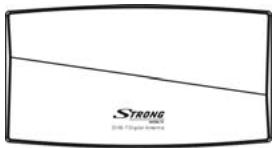
Main unit
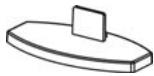
Standing Unit
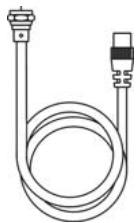
Coaxial Cable
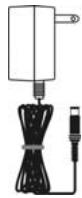
Adaptor
3.0 SAFETY NOTES
Use only originally supplied accessories.
Before you make any connections: disconnect your equipment from the 230 Volts main power to avoid electrical shocks during installation.
- Short Circuit in the coaxial cable MAY permanently damage your Digital Receiver.
- Never install the Antenna outside your house or in humid rooms such as bathrooms.
- Never use AC Adaptors with wrong specifications, this MAY permanently damage your antenna or Digital Receiver. Always check voltages and polarisation of the adaptor before connecting it.
4.0 CONNECTING THE ANTENNA
- Check if the broadcast in your country is Horizontal or Vertical polarized.
- Click the Antenna in the plastic holder as shown in the pictures:

(H-Broadcast) antenna mounted H
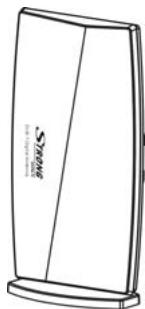
(V-Broadcast) antenna mounted V (Upright)
- Disconnect your Digital Receiver from the 230 Volts main power.
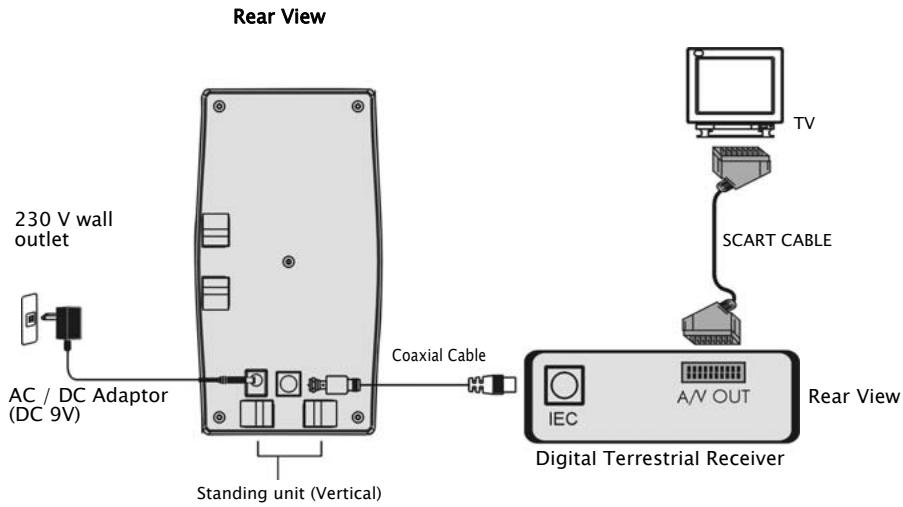
- Connect the supplied coaxial cable to the antenna: carefully press the inner lead of the cable into the Female-F connector at the back of the antenna. Turn the covering nut clockwise with your HANDS until it is fixed.
- Connect the other side of the coaxial cable to your Digital Terrestrial Receiver. Normally the input connector on your receiver is marked as "ANT" (in) or as "RF"(in). Refer to the User Manual of your Digital Terrestrial Receiver.
Connect your Digital Receiver to the 230 Volts main power.
5.0 INSTALLATION OF THE ANTENNA
A: To power the antenna with Digital Terrestrial Receiver
- Turn on your TV set and turn on your Digital Terrestrial Receiver.
- Press the "MENU" button on the remote control of your Digital Terrestrial Receiver. Check in the Set-Up or Installation Menu of your Receiver if the antenna power is set to "ON". (Normally this is indicated in the menu as ANT power, Ext Antenna power or Active antenna power.) Refer to the User Manual of your Digital Terrestrial Receiver.
- Select in the Menu of your receiver the field that shows you the signal level indicators. (Normally you can find the signal meter in the Channel Scan field of the menu).
- Now optimise the signal strength by finding the best position for the antenna. Keep the antenna in your hand and try to reach the highest possible position. Now slowly turn the antenna around it's axis (in the horizontal field), at the same time monitor the signal bars in the menu, once the signal indicator shows the maximum signal, fix the antenna on that position.
- It is important to place the antenna in such way that an acceptable signal level is assured. You can optimise the signal strength by moving the antenna to different locations in your room, for example place it near a window, or place it on a high placed book-shelf. The best position can be found by trying different locations.
NOTE: It is recommended NOT to place the antenna near to:
Devices that are strong source of radiation or interference such as DECT and GSM telephones, Transmitters, Microwaves, etc.
Devices with high power consumption such as Electrical Heater, Air conditioner, Hairdryers, etc.
B: To power the antenna with extra power adaptor
- Use this installation if your Digital Terrestrial Receiver does not support active antenna.
- Connect supplied power adaptor to "DC IN" connector on the back of antenna.
- Proceed with positioning of antenna as described above in section A (points 3, 4, 5).
NOTE: The antenna will not function properly if the build-in amplifier is not powered. Therefore it is required to supply the antenna with power via the coaxial cable or via a external adapter.
Extension of the coaxial cable:
In some cases you may need to extend the standard supplied coaxial cable, we advise you to only do this if you can not get an optimal signal strength within the reach of the standard cable. If you are to extend the coaxial cable, then please note following comments:
Use a good quality coaxial cable, 75 Ohm type only with proper shielding
Use well shielded connectors, your dealer can advise you on this.
- Make sure that both inner cable and shielding are properly connected to the connectors to assure active antenna power supply and to avoid short circuit in the cable.
If you extend the cable, please keep the cable as short as strictly needed. Extending the cable or using bad quality cable will reduce the performance of your antenna
- Digital Indoor Antenna SRT ANT 11
- User Manual:
- Table of Contents
- INTRODUCTION
- Specifications:
- PACKAGE CONTENT
- SAFETY NOTES
- CONNECTING THE ANTENNA
- INSTALLATION OF THE ANTENNA
- A: To power the antenna with Digital Terrestrial Receiver
- B: To power the antenna with extra power adaptor
- Extension of the coaxial cable:
Brand : STRONG
Model : SRT ANT 11
Category : TV Antenna