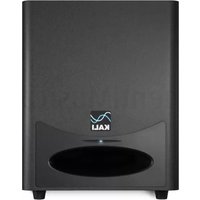
WS-6.2 - Subwoofer Kali Audio - Free user manual and instructions
Find the device manual for free WS-6.2 Kali Audio in PDF.


| Driver Size | 6.5 inches |
| Amplifier Power | 100 W RMS |
| Frequency Response | 40 Hz - 200 Hz |
| Crossover Frequency | 50 Hz - 200 Hz (adjustable) |
| Maximum SPL | 110 dB (peak) |
| Input Connections | XLR, TRS, RCA |
| Output Connections | XLR (through) |
| Phase Control | 0° / 180° switch |
| Enclosure Type | Bass reflex (front ported) |
| Dimensions (H x W x D) | 12.5 x 10.5 x 11.5 inches (318 x 267 x 292 mm) |
| Weight | 17.2 lbs (7.8 kg) |
| Power Supply | 100-240 VAC, 50/60 Hz, internal |
| Standby Power Consumption | < 0.5 W |
| Included Accessories | Power cord, user manual |
| Product Type | Active studio subwoofer |
| Intended Use | Professional audio monitoring |
| Placement | Floor or desk, near listening position |
| Cleaning Instructions | Wipe with dry cloth; do not use solvents |
| Safety Precautions | Do not expose to rain or moisture; keep ventilation clear |
| Repairability | Contact authorized service center for repairs |
| Spare Parts Availability | Contact Kali Audio support |
Frequently Asked Questions - WS-6.2 Kali Audio
User questions about WS-6.2 Kali Audio
0 question about this device. Answer the ones you know or ask your own.
Ask a new question about this device
Download the instructions for your Subwoofer in PDF format for free! Find your manual WS-6.2 - Kali Audio and take your electronic device back in hand. On this page are published all the documents necessary for the use of your device. WS-6.2 by Kali Audio.
USER MANUAL WS-6.2 Kali Audio
natural_image
City skyline at dusk with snow-capped mountains in the background and transmission towers visible in the foreground (no text or symbols)WS-6.2
Studio Subwoofer User's Guide

natural_image
Front view of a black Kali portable electronic device with a circular vent and waveform logo (no readable text beyond branding)Table of Contents
IMPORTANT SAFETY INFORMATION....3
ABOUT YOUR SPEAKERS....7
FULL SPECIFICATIONS....9
INPUTS AND CONTROLS....10
SUBWOOFER PLACEMENT....12
CONFIGURING YOUR SYSTEM....14
CLIMATE CONSIDERATIONS....17
FIRST TIME SETUP....17
TROUBLESHOOTING....18
LIMITED WARRANTY....19
Important Safety Information
- Read these instructions.
- Keep these instructions.
- Heed all warnings.
-
Follow all instructions.
-
Do not use this apparatus near water.
-
Power the product down, and unplug it from power before cleaning.
-
Clean only with a dry cloth.
-
Do not block any ventilation openings.
-
Keep ventilation opening free of dust or other matter.
-
Do not install near any heat sources such as radiators, heat registers, stoves, or other apparatus (including amplifiers) that produce heat.
-
No naked flame sources (such as lighted candles,) should be placed on the product.
-
Do not defeat the safety purpose of the polarized or grounding-type plug. A polarized plug has two blades, with one blade wider than the other. A grounding-type plug has two blades and a third grounding prong. The wide blade or the third prong are provided for your safety. If the provided plug does not fit into your outlet, consult an electrician for replacement of the obsolete outlet.
-
Protect the power cord from being walked on or pinched, particularly at plugs, receptacles, and at the point where they exit the apparatus.
-
Use only attachments and/or accessories specified by the manufacturer.
-
Use only with a cart, stand, tripod, plate, bracket, or table specified by the manufacturer. When a cart is used, use caution when moving the cart/apparatus combination to avoid injury from tip-over.
-
Unplug this apparatus during lightning storms or when unused for long periods of time.
-
Refer all servicing to qualified service personnel. Servicing is required when:
A. The apparatus is damaged in any way
B. The power supply cord or plug is damaged
C. Liquid or other objects have fallen into the product
D. The product has been exposed to rain or moisture
E. The product does not operate normally
F. The product has been dropped
-
This apparatus shall not be exposed to dripping or splashing.
-
No object filled with liquids, such as a vase or a glass, should be placed on the apparatus.
-
This apparatus is to be used in a moderate climate. Do not expose to extremely high or low temperatures.
-
High sound pressure in excess of 85 dB can cause hearing damage and/or loss. Do not expose yourself to high sound pressure levels.
-
The power cord must be connected to a Mains socket/outlet with earthing connection.
THIS DEVICE COMPLIES WITH PART 15 OF THE FCC RULES. OPERATION IS SUBJECT TO THE FOLLOWING TWO CONDITIONS: (1) THIS DEVICE MAY NOT CAUSE HARMFUL INTERFERENCE AND (2) THIS DEVICE MUST ACCEPT ANY INTER-FERENCE RECEIVED, INCLUDING INTERFERENCE THAT MAY CAUSE UNDESIRED OPERATION.
Important Safety Information


natural_image
Warning symbol of a lightning bolt inside a triangle (no text or numbers)The lightning bolt with arrowhead symbol within an equilateral triangle is intended to alert the user to the presence of uninsulated “dangerous voltage” within the product’s enclosure that may be of sufficient magnitude to constitute a risk of electric shock to persons.

The exclamation point within an equilateral triangle is intended to alert the user of the presence of important operation and maintaining (servicing) instructions in the literature accompanying the appliance.
Congratulations on your Kali Audio WS-6.2 Studio Subwoofer. This subwoofer is a perfect companion to stereo pairs of speakers in smaller studios. Occupying less than half the volume of similarly performing subwoofers, the WS-6.2 fits comfortably under any desk and provides accurate, powerful, authoritative low end.
Where does "WS" come from?
The official name of Kali's subwoofer product line is "Project Watts." Kali names all of our product lines after towns in California. Watts is a neighborhood in Los Angeles that features prominently in the history of West Coast Hip-Hop. The name is also an allusion to the high power of our subwoofers.
Features
Dual 6.5-Inch Woofers
“6.2” in the WS-6.2’s name alludes to the fact that this subwoofer uses two horizontally opposed 6.5-Inch woofers as its driver configuration. Not only does this allow for high output in a small form factor, it also eliminates net vibration so the subwoofer will not scoot along the floor at high levels. We designed these woofers for high excursion, with 15mm travel from peak-to-peak.
Output
The WS-6.2 is designed to provide reference level output at a distance of 4 meters. This makes it an ideal subwoofer for use with a stereo pair of speakers in most small studios. Additionally, it can be used as the LFE channel in small multichannel setups.
The WS-6.2 will be an excellent companion to both Kali Audio speakers, and other speakers and studio monitors that are designed for use in small studios and the home.
Kali Audio uses Dolby's music studio reference level spec, which is 85 dB continuous output at the listening position, with 20 dB dynamic headroom, or 105 dB peaks at the listening position. For help configuring a system in Dolby's room design tool (the DARDT,) using the WS-6.2, contact Kali's customer support.
Low Noise Port Tube
Similar to the LP-Series Studio Monitors, the port tube on the WS-6.2 was designed to deliver all the benefits of a front-firing port tube, without any drawbacks associated with noise. This allows the WS-6.2 to have even lower bass extension, while delivering clean, tight, punchy bass.
About Your Subwoofer
Features
Footswitch Bypass
Turn off the subwoofer and listen to your mix through your full-range speakers so you can hear how it will translate to systems that don't have a sub. Footswitch sold separately; most music retailers sell a variety of 1/4-inch footswitches that will work. Contact Kali Customer Support if you need assistance in selecting a suitable footswitch.
Limiter Circuit
The WS-6.2 is equipped with a limiter circuit that will protect the speaker from unsafe operating levels. In other words, you don't need to worry about blowing up the subwoofer by playing it too loud.
Unsafe playback levels will be plainly audible as distortion, indicating that the speaker is receiving too much input signal. If this is the case, it is recommended to reduce the volume of the playback material. In some cases, the subwoofer will shut itself down to protect itself from harm. See page 18 for what to do if this happens to you.
Small Form Factor
The WS-6.2 is less than half the volume of other subwoofers with similar output and bandwidth specs. This allows a variety of placement options that aren't possible with a larger sub.

natural_image
Black electronic device with a red ping pong paddle and mesh fan, no visible text or symbolsFull Specifications
| Self-Powered: Yes | |
| Amplifier Class: D | |
| Continuous Power: 400W | |
| Peak Power: 1000W | |
| Driver Complement 2 x 6.5-Inch High Excursion Woofers | |
| Frequency Response: (-10dB) 27 Hz - 200 Hz | |
| Frequency Range: (+/-3dB) 31.5 Hz - 180 Hz | |
| Recommended Listening Distance: Up to 4 meters | |
| Max SPL: (Peak at 1M) 120 dB | |
| System THD: (90dB SPL at 1M) <2% | |
| Unbalanced Inputs: Stereo RCA (-10dBV) | |
| Balanced Inputs: Stereo XLR/TRS Combi Jack (+4dBu) | |
| Balanced Outputs: | XLR |
| Other Inputs/Outputs: | 1/4-Inch Footswitch for Sub Bypass |
| Enclosure: | Front Ported |
| Height | 14.5 Inches (36.8 cm) |
| Width: | 12.2 Inches (40 cm) |
| Depth: | 11 Inches (27.9 cm) |
| Weight: | 31 lbs (14 kg) |
Inputs and Controls
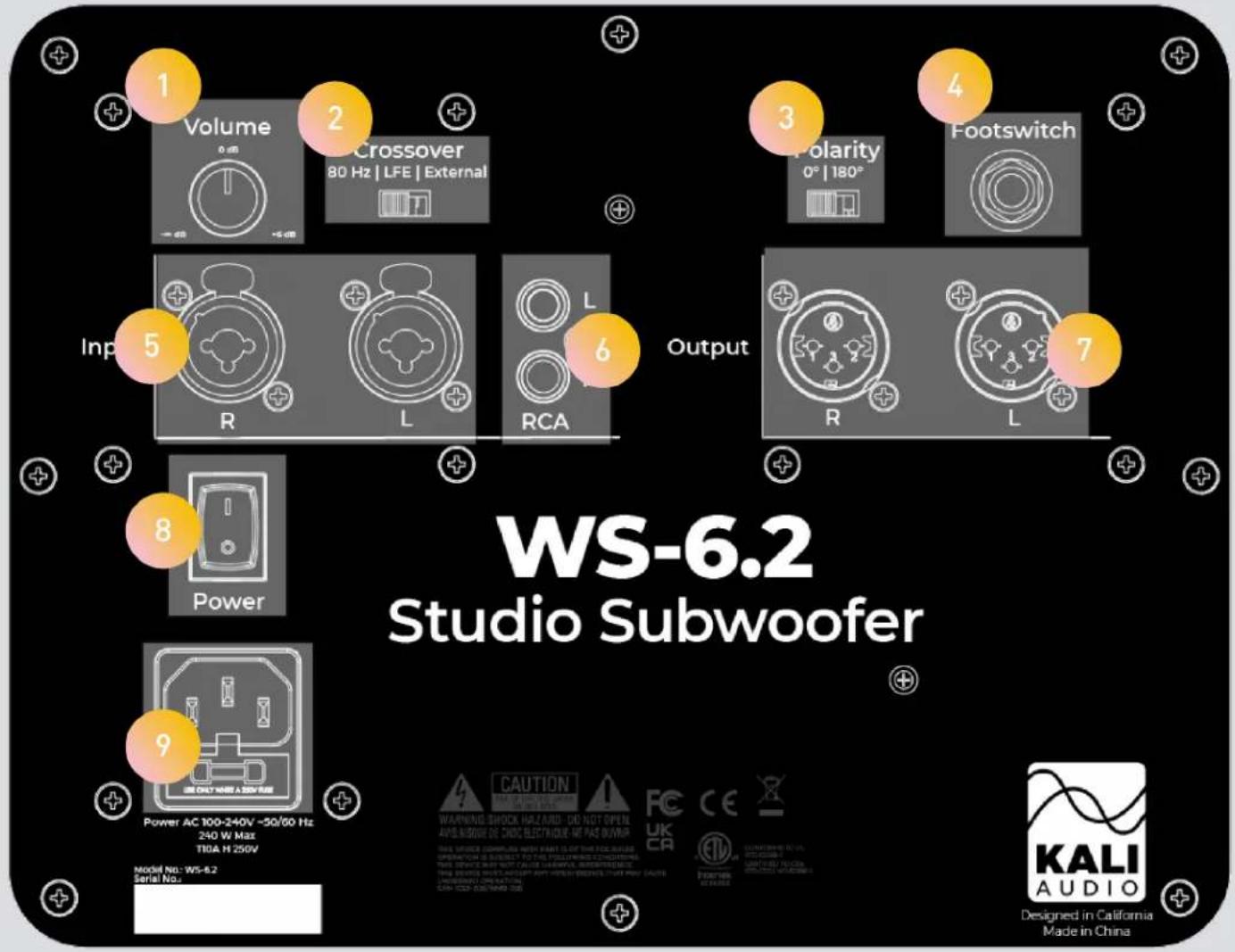
Volume Control
The volume control allows users to adjust the output of the speaker from - (Muted) to +6 dB. There is a center detent at the +0 dB setting.
1
If you have your main speakers running off the outputs of the WS-6.2, start with the volume all the way down, and slowly bring it up.
More detailed information for level-matching your sub to your mains can be found on page 13.
2
Crossover Selector
The crossover selector allows you to switch between an 80 Hz crossover, LFE Mode, and External mode. A detailed explanation about when to use which setting can be found on pages 14-16.
Kali Audio WS-6.2 Users' Guide 10
Inputs and Controls
Polarity Selector
Depending on the shape and size of your room, the position of the subwoofer relative to the monitors, and your listening position relative to all of those factors, the subwoofer may sum better with the monitors with the polarity reversed.
To determine which setting is more appropriate, simply try both settings, and use the one that sounds better. It is also possible to use free software such as Room EQ Wizard (REW) to test the polarity of your subwoofer. Instructions for doing so are readily available with a quick internet search.
Footswitch Input
The footswitch input allows for a footswitch to be connected to the subwoofer to toggle between normal operation and bypassed operation.
When the subwoofer is bypassed, the subwoofer will no longer play, and the high-pass filter on the outputs will be disabled. This is useful for monitoring with or without a subwoofer depending on your current use case, or even just to check mixes back and forth.
Footswitches are readily available from most music retailers. Look for a 1/4-Inch footswitch with a momentary or toggle switch, like what you might use with a guitar amp.
XLR/TRS Combi Jack Inputs
The XLR/TRS input is for use with professional audio devices like mixers, interfaces, and controllers. Depending on your device, it will either use XLR or 14 " TRS outputs, either of which can be used with this input.
RCA Inputs
The RCA input is for use with consumer devices like record players, laptops, smart phones, and A/V receivers. Commonly, the playback device will either have an RCA or a 3.5mm (Aux) output. Cables from either of these outputs to RCA are easy to find.
XLR Outputs
Use the XLR Outputs to pass signal through the subwoofer and to a stereo pair of speakers. The XLR Outputs are only active when the 80 Hz crossover is engaged. Material below 80 Hz will be played by the subwoofer, and material above 80 Hz will be sent to the full range speakers.
On/Off Switch
Power the speaker on and off. Be sure to power the speaker off when connecting or disconnecting the power cable, during lightning storms, or during extended periods of disuse. Turning the power on and off externally, for instance via a wifi power switch, will not harm the device.
Power Input
Plug the provided power cord into the power input.
3
4
5
6
7
8
9
Subwoofer Placement
The low frequencies that subwoofers reproduce make them sensitive to room placement. Some trial and error is usually required to get the subwoofer in the right place in the room. Go into this process with an open mind, and you'll be able to find a workable place to put your sub! Below are some suggestions to help you get started.
All of these suggestions are for stereo use in a studio environment. Some other suggestions for using the WS-6.2 in a 5.1 system, or for using multiple WS-6.2s, can be found on pages 14 and 15.
Go through these different arrangements until you find one that you like. Remember that the WS-6.2 features a polarity switch; don't forget to try switching the polarity if you're having trouble finding a position that works for you.

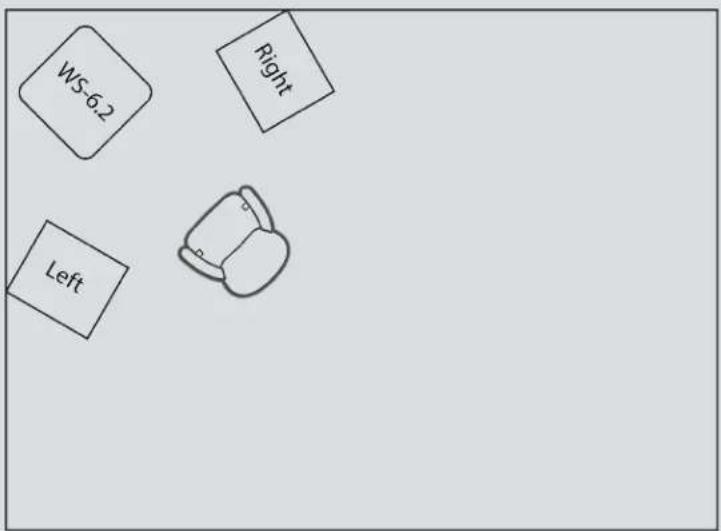
Start with the subwoofer in line with the main speakers, about halfway between them. If you're working in a very small space, you might need to move the sub over to make room for your feet. Moving it a foot or so to either side should not be a problem.
The arrangements that follow will assume that you have your subwoofer in this position.


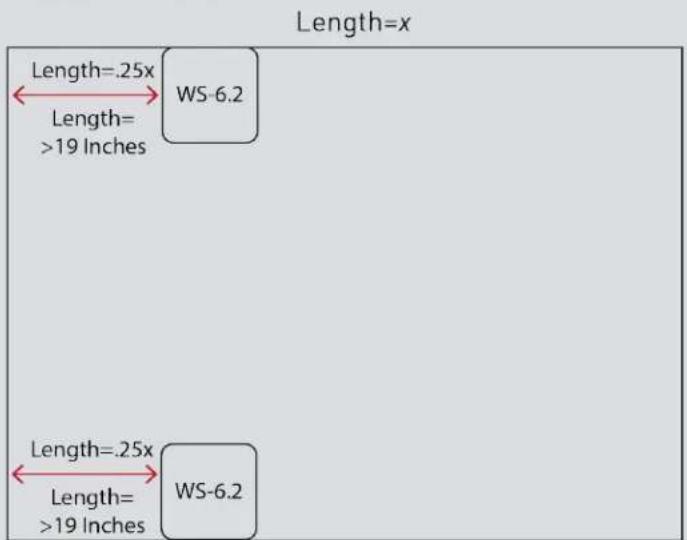
If room allows, positon the subwoofer so that it is 1/4 of the way into the room, with your listening position an additional 1/8 of the way into the room from there.
In other words, if your room is 12' long, the subwoofer should be 3' into the room, with your listening position at 4.5 feet. In this arrangement, the subwoofer and the speakers should each be more than 19 inches away from any walls. The diagram is not to scale.

Kali Audio WS-6.2 Users' Guide 12
Subwoofer Placement

The next position to try is the subwoofer and speakers against a rear wall. This position will excite room modes, but it does so in a predictable way. You may need to adjust the level of the sub down, as the wall will reinforce its response.
Experiment with different listening positions to find one that is relatively unaffected by room modes.


Another good starting point is to put your setup in a corner, with the subwoofer at the apex of the corner. This will allow the floor and both walls to reinforce the sub's response. Depending on your listening position, this gives you a great chance of having powerful, even bass.
Make sure you listen in this position before you commit to it!
Configuring Your System
Stereo
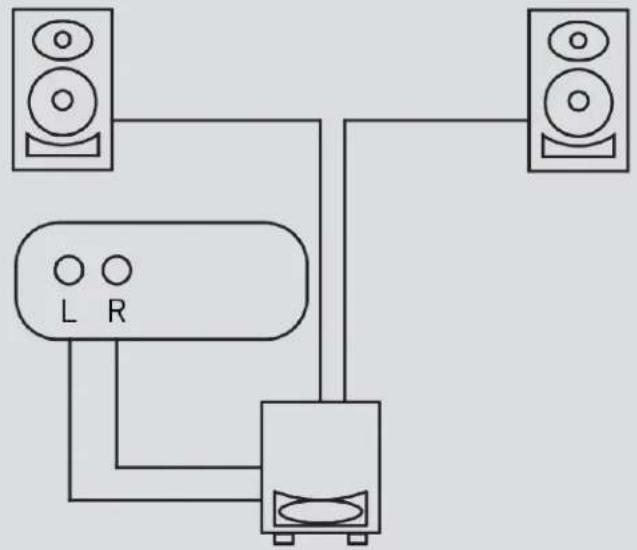
Most users will use the WS-6.2 in a stereo configuration, with left and right signals going into the sub, and then high-passed signal coming out of the sub into the main full range speakers. For this use, engage the "80 Hz" crossover.
This crossover is designed for use with Kali Audio's studio monitors, but it should work well with most popular studio monitors, including the Adam A- and T-Series, the KRK Rokits, the JBL 3- and 7-Series, the Presonus Eris Series, and the Yamaha HS-Series.
flowchart
graph TD
    A["Speaker 1"] --> B["Speaker 2"]
    C["L R"] --> B
    D["Speaker 3"] --> B
    B --> E["Speaker 4"]
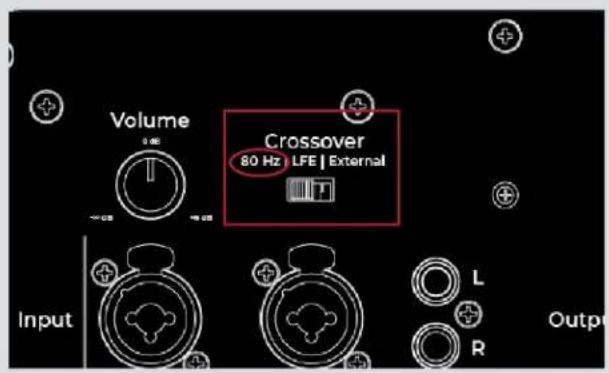
When using the subwoofer in a stereo configuration, send the right and left signal into the corresponding inputs in the WS-6.2. It does not matter if you use TRS, XLR, or RCA for input. Using XLR cables, connect your left and right speakers to the corresponding outputs from the WS-6.2.
The 80 Hz setting is the only setting that will send signal via the outputs. It also allows for the subwoofer to be bypassed. When the subwoofer is bypassed, full range (not high-passed) signal will be sent from the outputs.
Configuring Your System
Multichannel (x.1)
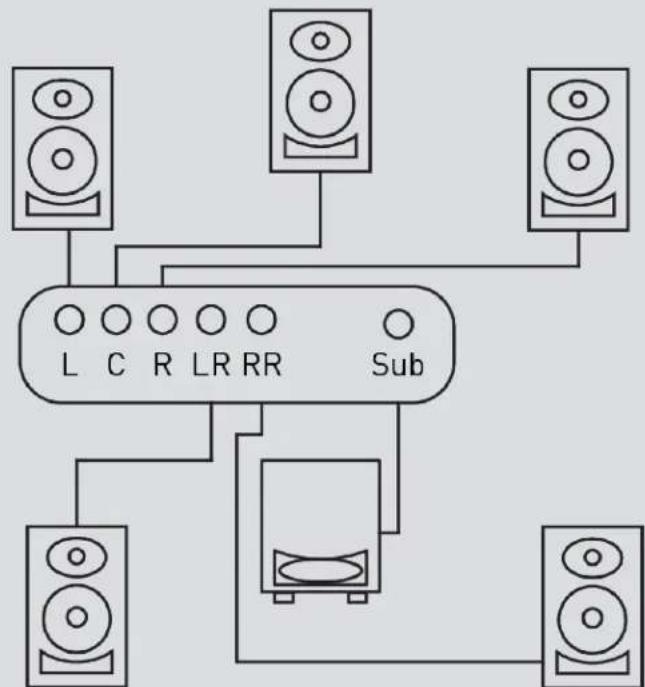
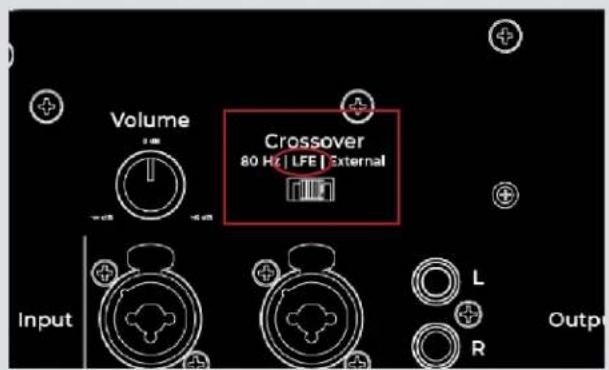
If you're using the WS-6.2 as the low frequency effects (LFE) channel in a multichannel setup, use the "LFE" setting. LFE is the ".1" channel in formats like 2.1, 5.1, 7.1, and 7.1.4. The format means that there will be a dedicated channel of audio that should only go to the sub.
The WS-6.2 is powerful enough for most 2.1 systems and some 5.1 systems in smaller rooms. With 7.1 and larger formats, one WS-6.2 may not be sufficient.
The LFE setting will engage a 120 Hz low pass filter that is industry standard for the LFE channel.
flowchart
graph TD
    A["Speaker"] --> B["L"]
    C["Speaker"] --> D["C"]
    E["Speaker"] --> F["R"]
    G["Speaker"] --> H["LR"]
    I["Speaker"] --> J["RR"]
    K["Sub"] --> B
    K --> D
    K --> F
    K --> H
    K --> I
    style B fill:#fff,stroke:#000
    style D fill:#fff,stroke:#000
    style F fill:#fff,stroke:#000
    style H fill:#fff,stroke:#000
    style I fill:#fff,stroke:#000
With larger formats like 5.1 and 7.1, you may wish to use multiple WS-6.2s This can be done easily if your interface or receiver will allow you to send an identical LFE channel on multiple outputs. One particularly useful arrangement with multiple subs is to have them against the side walls, 1/4 of the way into the room. Diagram is not to scale.
Kali Audio WS-6.2 Users' Guide 15
Configuring Your System
External Crossover
For a variety of reasons, you may wish to use an external crossover to send signal to the WS-6.2 and to your other speakers. For this, the “External” setting is available. If using the “External” setting, the WS-6.2 will play whatever signal is sent to the input, with no low pass filter. This means that even high frequency content may play through the sub, which is not desirable. Be sure that your low pass filter is engaged before playing the WS-6.2 at high levels when using the “External” setting.


Climate Considerations
The WS-6.2's enclosure is made of MDF wood and wrapped in vinyl, which is sensitive to heat and humidity. The product should be kept and used in a climate-controlled environment. Exposure to direct sunlight, moisture, or consistent humidity above 65% may cause the vinyl to peel and wrinkle. This is not covered under warranty.
First Time Setup
Once the subwoofer is in position, follow these steps to get it turned on and playing for the first time.
- Make sure that the power switch on the sub is set to the OFF position.
- Turn the volume control on the back of the sub all the way down.
- Plug the subwoofer into power.
- Plug in your audio cables from your source, and, if you're using the 80 Hz crossover, to your main speakers. Refer to pages 14 and 17 for more information about configuring your system. If you're using the 80 Hz crossover, also power off your main speakers, and set their output to a nominal level.
- Turn on your audio source.
- Power on the subwoofer and speakers.
- Slowly turn the volume on the subwoofer up to the center detent. If you hear distortion, turn the subwoofer back down and check that all of your connections are tight.
- Use the volume knob on the subwoofer to adjust its level relative to the main speakers.
Enjoy your new subwoofer!
Troubleshooting
1. I opened the subwoofer, and it is damaged.
If you received a speaker that is obviously damaged, please contact your dealer immediately.
2. The subwoofer is making no sound.
• Is the subwoofer plugged in?
- Is the subwoofer turned on? There should be a blue LED on the front of the subwoofer if it's on. If this light is off, the subwoofer is turned off.
• Is the volume turned up?
- Have you made sure that the subwoofer is not being bypassed using a footswitch?
- Are all cables plugged in to both your playback device and the subwoofer?
- Are you passing audio via your playback device?
3. The subwoofer sounds distorted.
- Is the subwoofer playing too loud? Turn down the volume on the back of the subwoofer. If the distortion goes away, you may be playing the subwoofer too loud. Besides the problem of distortion, this can be damaging to your hearing if you are close to the subwoofer.
- Is your source too loud? Turn the volume down at your source device. If the distortion goes away, you may be overdriving the input. If this is the case, turn the volume of the subwoofer up with the volume control on the back.
4. I hear crackling, hums, or buzzing.
- Are you using RCA?
a. If "yes," be advised that RCA is an unbalanced connection, and is prone to picking up noise as signal travels through the cable. This is especially true if you are using very long RCA cables.
- Is the subwoofer close to electronics like a television, wireless router, phone, motor, or radio? If so, these can interact with the speaker's electronics in ways that cause unwanted noise. Try moving the subwoofer at least .5 Meters (20 inches) from any such devices.
- Are there loose objects in the room that may be buzzing with the bass? Low frequencies can cause objects in a room to vibrate loudly. Make sure that small, hard objects like screws and other hardware are secure.
5. The subwoofer stops playing.
- If the subwoofer stops playing but the blue light stays on, you may be engaging it's thermal protect mode, which will shut the subwoofer down so that it does not damage itself. Power the subwoofer down, wait 2-3 minutes, and power it back on.
- If the subwoofer plays after being turned off and on again, reduce the output level of the sub, and make sure it is in a cool, well-ventilated area so that it does not overheat.
If none of the above solves your problem, contact your dealer to initiate a return.
Warranty
What does this warranty cover?
This warranty covers defects in materials or workmanship for a period of one year (365 days) after the purchase date of the product.
What will Kali do?
If your product is defective (materials or workmanship,) Kali will replace or repair the product at our discretion - free of charge.
How do you initiate a warranty claim?
Contact the retailer from whom you bought the product to initiate a warranty process. You will need the original receipt showing the date of purchase. The retailer may ask you to provide specific details about the nature of the defect.
What is not covered?
The following cases are NOT covered by this warranty:
• Damage from shipping
- Damage from dropping or otherwise mishandling the speakers
- Damage resulting from failure to heed any of the warnings outlined on pages 3 and 4 of the user's manual, including:
- Water damage.
- Damage from foreign substances or substances entering the port tube.
- Damage resulting from an unauthorized person servicing the product.
- Damage resulting from the product being left plugged in during an electrical storm.
The warranty applies only in the United States. International Customers should contact their dealer about their warranty policy.


- WS-6.2
- Studio Subwoofer User's Guide
- Table of Contents
- Important Safety Information
- Where does "WS" come from?
- Features
- Dual 6.5-Inch Woofers
- Output
- Low Noise Port Tube
- About Your Subwoofer
- Footswitch Bypass
- Limiter Circuit
- Small Form Factor
- Inputs and Controls
- Volume Control
- Crossover Selector
- Polarity Selector
- Footswitch Input
- XLR/TRS Combi Jack Inputs
- RCA Inputs
- XLR Outputs
- On/Off Switch
- Power Input
- Subwoofer Placement
- Configuring Your System
- Stereo
- Multichannel (x.1)
- External Crossover
- Climate Considerations
- First Time Setup
- Troubleshooting
- I opened the subwoofer, and it is damaged.
- The subwoofer is making no sound.
- The subwoofer sounds distorted.
- I hear crackling, hums, or buzzing.
- The subwoofer stops playing.
- Warranty
- What does this warranty cover?
- What will Kali do?
- How do you initiate a warranty claim?
- What is not covered?
Brand : Kali Audio
Model : WS-6.2
Category : Subwoofer