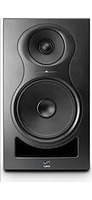
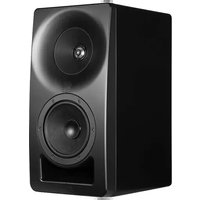
Independence IN-8 v2 - Loudspeaker Kali Audio - Free user manual and instructions
Find the device manual for free Independence IN-8 v2 Kali Audio in PDF.


| Product Type | Active Studio Monitor Speaker |
| Brand | Kali Audio |
| Model | Independence IN-8 v2 |
| Category | Speaker |
| Dimensions (H x W x D) | 15.5 x 10.2 x 12.0 inches (394 x 259 x 305 mm) |
| Weight | 21.5 lbs (9.75 kg) |
| Power Supply | 100-240 VAC, 50/60 Hz |
| Amplifier Power | 80W bi-amplified (40W LF + 40W HF) |
| Frequency Response | 45 Hz - 21 kHz (±3 dB) |
| Drivers | 8-inch woofer, 1-inch silk dome tweeter |
| Inputs | XLR, 1/4" TRS, RCA |
| Outputs | Subwoofer output (RCA) |
| Controls | Volume, HF trim, LF trim, boundary EQ |
| Enclosure Type | Bass-reflex (rear ported) |
| Cabinet Material | MDF with vinyl laminate |
| Protection Features | RF interference, over-temperature, subsonic filter, over-current |
| Cleaning | Wipe with dry cloth; avoid solvents |
| Safety | Class II equipment; no earth connection required |
| Spare Parts | Contact Kali Audio or authorized service centers |
| Reparability | Modular design; replaceable amplifier module and drivers |
| Included Accessories | Power cord, user manual, registration card |
Frequently Asked Questions - Independence IN-8 v2 Kali Audio
User questions about Independence IN-8 v2 Kali Audio
0 question about this device. Answer the ones you know or ask your own.
Ask a new question about this device
Download the instructions for your Loudspeaker in PDF format for free! Find your manual Independence IN-8 v2 - Kali Audio and take your electronic device back in hand. On this page are published all the documents necessary for the use of your device. Independence IN-8 v2 by Kali Audio.
USER MANUAL Independence IN-8 v2 Kali Audio
natural_image
Abstract logo design with blue wavy lines and the word 'KALI' below (no additional text or symbols)Project Independence
3-Way Coincident Studio Monitors
IN-5/IN-5-C/IN-8 v2 User's Guide

natural_image
Black KALI audio amplifier with two speakers and a circular top, no visible text or symbols on the speaker body.
natural_image
Abstract logo design with wavy blue lines and the word 'KALI' below (no additional text or symbols)Table of Contents
IMPORTANT SAFETY INFORMATION......3
ABOUT YOUR STUDIO MONITOR....5
FEATURES/2ND WAVE....7
FULL SPECIFICATIONS......8
INPUTS AND CONTROLS....9
DIP SWITCHES....12
CLIMATE CONSIDERATIONS....15
STANDBY MODE....15
FIRST TIME SETUP....15
TROUBLESHOOTING....16
WALL/CEILING MOUNTING....17

natural_image
Abstract logo design with wavy blue lines and the word 'KALI' below (no additional text or symbols)Important Safety Information
- Read these instructions.
- Keep these instructions.
- Heed all warnings.
- Follow all instructions.
- Do not use this apparatus near water.
-
Power the product down, and unplug it from power before cleaning.
-
Clean only with a dry cloth.
-
Do not block any ventilation openings.
-
Keep ventilation opening free of dust or other matter.
-
Do not install near any heat sources such as radiators, heat registers, stoves, or other apparatus (including amplifiers) that produce heat.
-
No naked flame sources (such as lighted candles,) should be placed on the product.
-
Do not defeat the safety purpose of the polarized or grounding-type plug. A polarized plug has two blades, with one blade wider than the other. A grounding-type plug has two blades and a third grounding prong. The wide blade or the third prong are provided for your safety. If the provided plug does not fit into your outlet, consult an electrician for replacement of the obsolete outlet.
-
Protect the power cord from being walked on or pinched, particularly at plugs, receptacles, and at the point where they exit the apparatus.
-
Use only attachments and/or accessories specified by the manufacturer.
-
Use only with a cart, stand, tripod, plate, bracket, or table specified by the manufacturer. When a cart is used, use caution when moving the cart/apparatus combination to avoid injury from tip-over.

natural_image
Silhouette of a person climbing a ladder inside a circle with no text or symbols- Unplug this apparatus during lightning storms or when unused for long periods of time.

natural_image
Abstract logo design with wavy blue lines and the word 'KALI' below (no additional text or symbols)Important Safety Information
- Refer all servicing to qualified service personnel. Servicing is required when:
A. The apparatus is damaged in any way
B. The power supply cord or plug is damaged
C. Liquid or other objects have fallen into the product
D. The product has been exposed to rain or moisture
E. The product does not operate normally
F. The product has been dropped
-
This apparatus shall not be exposed to dripping or splashing.
-
No object filled with liquids, such as a vase or a glass, should be placed on the apparatus.
-
This apparatus is to be used in a moderate climate. Do not expose to extremely high or low temperatures.
-
High sound pressure in excess of 85 dB can cause hearing damage and/or loss. Do not expose yourself to high sound pressure levels.


The lightning bolt with arrowhead symbol within an equilateral triangle is intended to alert the user to the presence of uninsulated “dangerous voltage” within the product’s enclosure that may be of sufficient magnitude to constitute a risk of electric shock to persons.

natural_image
Warning symbol with exclamation mark inside a triangle (no text or numbers)The exclamation point within an equilateral triangle is intended to alert the user of the presence of important operation and maintaining (servicing) instructions in the literature accompanying the appliance.

natural_image
Abstract logo design with blue wavy lines and the word 'KALI' below (no additional text or symbols)About Your Studio Monitor
Congratulations on your Kali Audio IN-Series Studio monitors! These monitors were designed to deliver exceptional accuracy in all sorts of recording, mixing, and production applications. The unique coincident architecture of the midrange and tweeter make the IN-Series an extraordinarily innovative system. Combining reference level accuracy, very low distortion, and wide bandwidth with a hyper-realistic 3-D image, the IN-Series will reveal an exceptional level of detail in every mix.
Where does "IN" come from?
The official name of this product line is “Project Independence.” Kali names all of our product lines after towns in California. Independence is a town in the Eastern Sierra. On the map, it is “one up” from Lone Pine. As the IN-Series shares many components with, and offers many improvements over, our Lone Pine series of monitors, we thought it was a fun way to distinguish the two products.
Features
3-Way Coincident Architecture
The IN-Series features an 5-inch woofer in the IN-5, and an 8-inch woofer in the IN-8. Both have a 4-inch mid-range driver, and a 1-inch soft dome tweeter. The mid-range driver and the tweeter are coincident, meaning that they share the same acoustic center. You might have heard the terms “coaxial” or “concentric” to describe this arrangement. Those terms are technically correct as well.
Because of the coincident placement of the mid-range and tweeter, and the crossover of the woofer to the mid-range IN-Series monitors act as an acoustic point source. This gives them an ideal directivity characteristic for a studio monitor. You will be able to hear a very lifelike stereo image, with details placed clearly and consistently. Off-axis lobing that is unavoidable in a 2-way system is virtually eliminated with the IN-Series monitors
Substantial work was done to optimize the mid-range driver not only for its own acoustic performance, but also for its role as the waveguide for the tweeter. The shape is very precise to allow for controlled directivity at mid range to tweeter crossover, ensuring accurate summing both on- and off-axis. Excursion on the midrange is limited to less than 1mm peak to peak, so that the oscillation of the mid-range does not have a negative effect on the tweeter.

natural_image
Abstract logo design with wavy blue lines and the word 'KALI' below (no additional text or symbols)About Your Studio Monitor
Features
Output
The IN-5 and IN-8 are designed to have a continuous output of 85 dB at 2.2 and 3.5 meters, respectively, with 20 dB of dynamic headroom. This makes the IN-5 ideal for most near-field monitoring applications, and the IN-8 ideal for near-to-mid-field applications.
20 dB of headroom ensures that momentary peaks in sound pressure level, including instruments like kick drum and effects like gunshots or explosions, can be reproduced accurately and with minimal distortion.
The IN-Series monitors are equipped with a limiter circuit that will protect the speakers from unsafe voltage levels. This will be plainly audible as distortion, indicating that the speaker is receiving too much input signal. If this is the case, it is recommended to reduce the volume of the playback material.
Low Noise Port Tube
The IN-Series monitors share port tube technology with Kali's LP-Series, which was designed to deliver all the benefits of a front-firing port tube, without any drawbacks associated with noise.
On most port tubes, air leaves at different speeds from different points of the opening, creating noisy turbulence. This turbulence can be heard as “chuffing,” or an audible air sound coming from the monitor. This sound will add to the noise floor and obscure the details of the low end.
The port tube on Kali's speakers was designed to ensure that all of the air leaves the port tube at the same velocity. This helps add to the low end response of the speaker, while keeping the bass clean, tight, and devoid of extra noise.
DSP
The IN-5 and IN-8 are equipped with digital signal processing (DSP.) The DSP on the IN-Series controls the loudspeaker's tuning, the limiter function, the crossover, the boundary EQs, and user definable HF and LF trim.

natural_image
Abstract logo design with blue wavy lines and the word 'KALI' below (no additional text or symbols)About Your Studio Monitor
Features
Boundary Compensation EQs
Kali's team came up with boundary compensation EQ settings at The Village Studios in Los Angeles to help you get the optimum sound for where you need to put your speakers. Combined with the LF and HF trims, this will ensure that the speakers sound their best no matter what room you're mixing in.
A full listing of the different boundary EQ settings and how to use them can be found on page 12 of this manual.
2nd Wave
The IN-Series uses Kali's 2nd Wave technology platform, which realizes several advantages over our older products. All IN-5s are part of the 2nd Wave, and IN-8s now have two versions: the current 2nd Wave version and the original version. The 2nd Wave version was launched on May 17, 2021, so if you bought your IN-8 before that date, it is an original version. Documentation for the original version can be found at KaliAudio.com/Product-History. This user's manual does not apply to the original version.
To learn more about our 2nd Wave platform, and to check whether an IN-8 you have is the original version or 2nd Wave, visit KaliAudio.com/secondwave.

natural_image
Abstract logo design with wavy blue lines and the word 'KALI' below (no additional text or symbols)Specifications
| IN-5 IN-8 | ||
| Powered: Yes | ||
| Amplifier Class: D | ||
| Power Configuration: Tri-Amped | ||
| HF Power: 40W (Continuous) | ||
| Midrange Power: 40W (Continuous) | ||
| LF Power: 80W (Continuous) 60W (Continuous) | ||
| Total Power: 160W (Continuous) | 140W (Continuous) | |
| HF Driver: 1" Textile Dome | ||
| Mid-Range Driver: 4" Optimized | Profile, Paper | |
| LF Driver: | 5-Inch Paper | 8-Inch Paper |
| Crossover (LF to Mid-Range:) | 280 Hz | 280 Hz |
| Crossover (Mid-Range to HF:) | 2800 Hz | 2800 Hz |
| Frequency Response: (-10dB) | 39 Hz - 25 kHz | 37 Hz - 25 kHz |
| Frequency Range: (+/-3 dB) | 47 Hz - 21 kHz | 45 Hz - 21 kHz |
| Recommended Listening Distance: | .5 - 3 Meters | .5 - 4 Meters |
| Max SPL (Peak @ 1M): | 115 dB | 117 dB |
| System THD(IN-5 85dB SPL @1mIN-8 90 dB SPL @1m): | <2% from 50 Hz - 220 Hz<1% from 220 Hz - 6800 Hz<0.5% above 6.8 kHz | <1% from 50 Hz - 250 Hz<0.5% from 250 Hz - 400 Hz<.3% above 400 Hz |
| Unbalanced Inputs: | 1 x RCA | |
| Balanced Inputs: | 1 x XLR, 1 x TRS | |
| TRS/XLR Input Sensitivity: | 97dB SPL @1m (anechoic) for +4dBu input. | |
| RCA Input Sensitivity:` | 97dB SPL @1m (anechoic) for -10dBV input. | |
| Enclosure: | Front Ported | |
| Height: | 15.1 Inches (38.2 cm) | 17.75 Inches (45.1 cm) |
| Depth: | 11.2 Inches (28.2 cm) | 11.25 Inches (28.5 cm) |
| Width: | 8.2 Inches (20.6 cm) | 10 Inches (25.4 cm) |
| Weight: | 19 lbs (8.43Kg) | 23 lbs (10.4 Kg) |

natural_image
Abstract logo design with wavy blue lines and the word 'KALI' below (no additional text or symbols)Inputs and Controls

natural_image
Abstract logo design with wavy blue lines and the word 'KALI' below (no additional text or symbols)Inputs and Controls
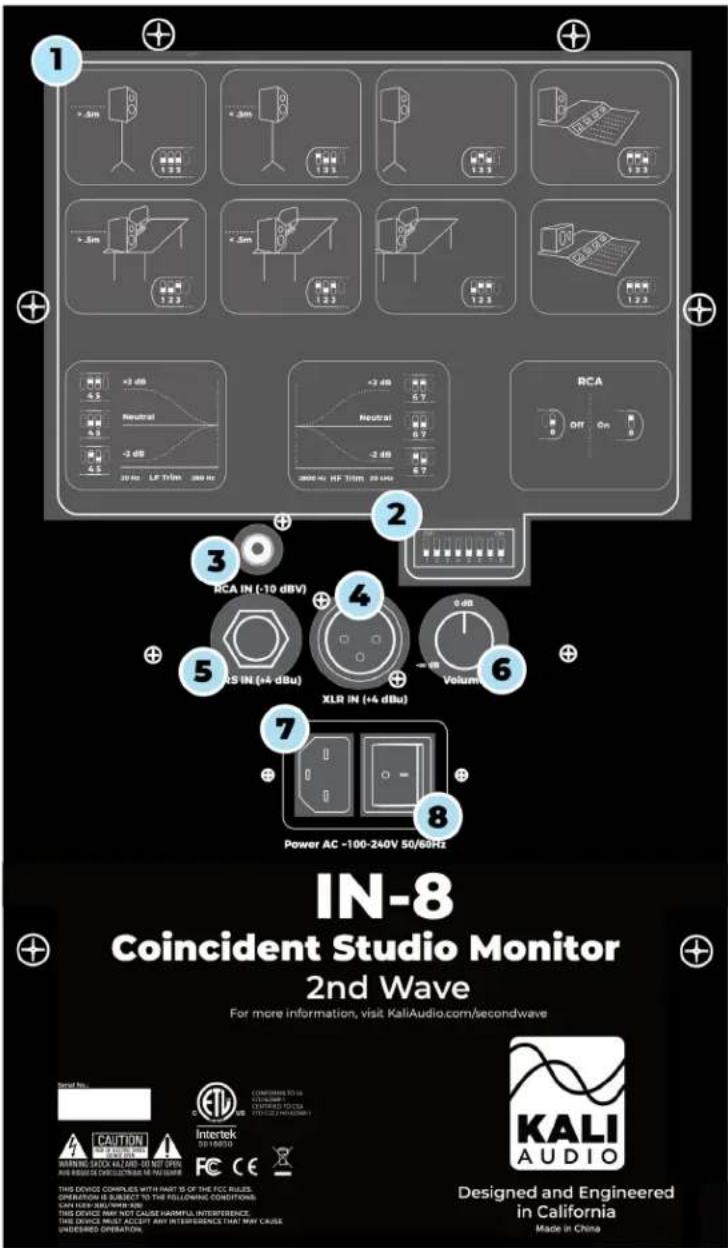
DIP Switch Quick Reference Guide
1
The quick reference guide on the back of the speaker can help you set the DIP switches to the appropriate positions for your application without needing to consult this manual.
2
DIP Switches
The DIP switches control Boundary EQ, HF and LF Trim, and power to the RCA input. A full explanation of the operation of the DIP switches can be found on page 11.
RCA Input (-10 dBV Sensitivity)
The RCA input is for use with consumer devices like record players, laptops, smart phones, and media players. Commonly, the playback device will either have an RCA or a 3.5mm (Aux) output. Cables from either of these outputs to RCA are easy to find.
3
By default, the RCA input on the speaker is OFF. This is to prevent interference when that input is not being used. When connecting to the RCA input, enable it by moving switch #8 on the DIP switches UP to the ON position. If the RCA input is no longer being used, be sure to move switch #8 back DOWN to the OFF posi-
4
XLR Input (+4 dBu Sensitivity)
The XLR input is for use with professional audio devices like mixers, interfaces, and controllers. Depending on your device, it will either use XLR or 14 " TRS outputs, and either can be used with this speaker. However, do not connect both XLR and TRS to the same speaker at the same time.
5
TRS Input (+4 dBu Sensitivity)
The TRS input is for use with professional audio devices like mixers, interfaces, and controllers. Depending on your device, it will either use XLR or 14 " TRS outputs, and either can be used with this speaker. However, do not connect both XLR and TRS to the same speaker at the same time.
Unbalanced, TS 1/4-inch cables should not be used.

natural_image
Abstract logo design with wavy blue lines and the word 'KALI' below (no additional text or symbols)Inputs and Controls
Volume Control
The volume control allows users to adjust the output of the speaker from -∞ to +6 dB. There is a center detent at the +0 dB setting, and this is where Kali recommends you leave the volume setting, adjusting the level instead from your device. Two notable exceptions to this recommendation are:
- If you are working in an asymmetrical room, it may be necessary to have one monitor louder than the other to achieve balance.
- If your playback device does not have an independent volume control, it
6
Power Input
Connect the provided power cord to this input. The IN-Series speakers have an international switch-mode power supply, so there is no need to set the speaker for your local voltage
7
On/Off Switch
Power the speaker on and off. Be sure to power the speaker off when connecting or disconnecting the power cable, during lightning storms, or during extended periods of disuse.

natural_image
Abstract logo design with wavy blue lines and the word 'KALI' below (no additional text or symbols)Boundary EQs & DIP Switch-
One of the most innovative features of the IN-Series monitors are the boundary compensation EQs. These EQs were made to compensate for low frequency interactions that the speakers will have with various surfaces in many common placements.
Each set of DIP switches controls one aspect of the speakers performance, independent of the other switches. For this reason, the explanations of the different DIP switch settings will only reference the set of switches currently applicable.
You'll notice that position 8 is for an speaker that is sitting horizontally on a console bridge. If you're using your speaker horizontally in any other application, the regular boundary EQ is valid for both horizontal and vertical placement.
Switches 1-3: Boundary Compensation EQs

Position 1: Free Space
The speaker is on a monitor stand, at least .5 meters (about 20 inches) away from any walls. This is the ideal position for the loudspeaker.
Switch 1: DOWN
Switch 2: DOWN
Switch 3: DOWN
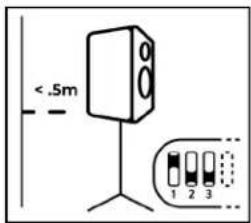
Position 2: On Stands, Close to a Wall
The speaker is on a monitor stand, and is within .5 meters (20 inches) of a wall, without being butted right against one.
Switch 1: UP
Switch 2: DOWN
Switch 3: DOWN

natural_image
Simple line drawing of a speaker with three speakers and a stand, no text or symbols presentPosition 3, On Stands, Against a Wall
The speaker is on a monitor stand, and is as close to a wall as it can be without pinching the cables on the back.
Switch 1: DOWN
Switch 2: UP
Switch 3: DOWN

natural_image
Abstract logo design with wavy blue lines and the word 'KALI' below (no additional text or symbols)DIP Switches
Switches 1-3: Boundary Compensation EQs
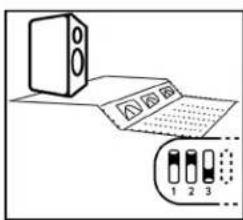
Position 4: Console Bridge, Vertically
The speaker is sitting vertically on a console bridge or meter bridge.
Switch 1: UP
Switch 2: UP
Switch 3: DOWN

Position 5: On a Desk, Away from Walls
The speaker is on a desk or table, and is more than .5 meters (20 inches) away from any walls.
Switch 1: DOWN
Switch 2: DOWN
Switch 3: UP
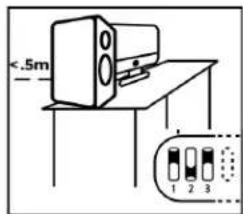
Position 6: On a Desk, Close to a Wall
The speaker is on a desk or table, and is within .5 meters (20 inches) of a wall, without being butted right against one.
Switch 1: UP
Switch 2: DOWN
Switch 3: UP

natural_image
Simple line drawing of a desk with a computer monitor and a separate inset showing three labeled boxes (1, 2, 3) without any text or symbols.Position 7: On a Desk, Against a Wall
The speaker is on a desk or table, and is as close to a wall as possible without pinching any cables.
Switch 1: DOWN
Switch 2: UP
Switch 3: UP

Console Bridge, Horizontally
The speaker is sitting horizontally on a console bridge.
Switch 1: UP
Switch 2: UP
Switch 3: UP

natural_image
Abstract logo design with wavy blue lines and the word 'KALI' below (no additional text or symbols)DIP Switches
Switches 4&5: Low Frequency Trim
The Low Frequency trim will add or subtract 2 dB from the Low Frequency response of the speaker. This can be done as a matter of personal taste, or if the room you're mixing in requires additional adjustment beyond what is offered by the boundary compensation EQs.

Switch 4: Engage LF Trim
DOWN: LF Trim Disengaged
UP: LF Trim Engaged
Switch 5: Adjust LF Trim:
DOWN: -2 dB in Low Frequencies
UP: +2 dB in Low Frequencies
Note: Switch 5 does not function independent of switch 4. If switch 4 is
DOWN, the LF trim will be DISENGAGED, and switch 5 will have no effect.
Switches 6&7: High Frequency Trim
The High Frequency trim will add or subtract 2 dB from the High Frequency response of the speaker. This can be done as a matter of personal taste, or if the room you're mixing in requires additional adjustment beyond what is offered by the boundary compensation EQs.

Switch 6: Engage HF Trim
DOWN: HF Trim Disengaged
UP: HF Trim Engaged
Switch 7: Adjust HF Trim:
DOWN: -2 dB in High Frequencies
UP: +2 dB in Low Frequencies
Note: Switch 7 does not function independent of switch 6. If switch 6 is DOWN, the HF trim will be DISENGAGED, and switch 7 will have no effect.
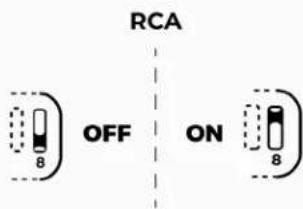
Switch 8: RCA
Switch 8 turns the RCA input on and off. By default, the RCA input on the speaker is OFF. This is to prevent interference when that input is not being used. When connecting to the RCA input, enable it by moving switch #8 on the DIP switches UP to the ON position. If the RCA input is no longer being used, be sure to move switch #8 back DOWN to the OFF position.

natural_image
Abstract logo design with wavy blue lines and the word 'KALI' below (no additional text or symbols)Climate Considerations
The IN-series studio monitor's enclosure is made of MDF wood and wrapped in vinyl, which is sensitive to heat and humidity. The product should be kept and used in a climate-controlled environment. Exposure to direct sunlight, moisture, or consistent humidity above 65% may cause the vinyl laminate to detach. Additionally, do not set anything on top of the speakers, as this can cause discoloration or warping of the vinyl. This is not covered under warranty.
Standby Mode
The IN-series studio monitors do not feature a standby mode. If you wish to save energy when not using the speakers, it is recommended to turn them off. Using an external switch, such as a surge protector, lightswitch, or smart plug, will not harm the speaker.
First Time Setup
- Before you plug the speaker in, make sure that the power switch is in the OFF position
- Plug the speaker in
- Connect audio cables
If you're connecting RCA, make sure that DIP switch #8 is switched UP to the ON position
If you're connecting XLR or TRS, make sure that DIP switch #8 is switched DOWN to the OFF position
Do not connect more than one audio cable to the speaker at the same time.
- Turn the volume knob counter clockwise as far as it will go
- Turn the speaker on
- Start playing material from your playback device at a low volume
- Slowly turn the volume knob clockwise to the center detent, -0 dB position. Make sure you hear what you're playing
- Set the boundary EQ for your application. Refer to page 12 above.
- Repeat these steps for every speaker you're using.
- Sit in your listening position, and turn the volume up on your playback device to the desired level
- Enjoy your new studio monitors!

natural_image
Abstract logo design with wavy blue lines and the word 'KALI' below (no additional text or symbols)Troubleshooting
1. I opened the speaker, and it is damaged.
If you received a speaker that is obviously damaged, please contact your dealer immediately.
2. The speaker is making no sound.
• Is the speaker plugged in?
- Is the speaker turned on? There should be a blue LED on the front of the speaker if it's on. If this light is off, the speaker is turned off.
• Is the volume turned up?
- Are all cables plugged in to both your playback device and the speaker?
- Are you passing audio via your playback device?
- Are you using RCA? If so, have you moved DIP switch #8 UP to the ON position?
If you've answered "Yes" to all the above and the speaker is still not making any sound, refer to number 5 below.
3. The speaker sounds distorted.
- Is the speaker playing too loud? Turn down the volume on the back of the speaker. If the distortion goes away, you may be playing the speaker too loud. Besides the problem of distortion, this can be damaging to your hearing if you are close to the speaker.
If you've turned down the volume on the speaker, and you're still hearing distortion, refer to number 5 below.
4. I hear cracks, hums, or buzzing.
- Are you using RCA?
a. If "yes," be advised that RCA is an unbalanced connection, and is prone to picking up noise as signal travels through the cable. This is especially true if you are using very long RCA cables.
b. If "no," be sure that the DIP switch # 8 is moved DOWN to the OFF position.
- Is the speaker close to electronics like a television, wireless router, phone, motor, or radio? If so, these can interact with the speaker's magnet in ways that cause unwanted noise. Try moving the speaker at least .5 Meters (20 inches) from any such devices.
- Are there loose objects in the room that may be buzzing with the bass? Low frequencies can cause objects in a room to vibrate loudly. Make sure that small, hard objects like screws and other hardware are secure.
If none of the above solves the problem, refer to number 5 below.
5. Isolate the problem
There are many issues in the signal path which might be causing any of the above problems. Before you initiate a return, do your best to make sure that the problem isn't with your cables or your playback device. Here's a simple way to check:
- Disconnect your speaker from your source.
- Plug in the problematic speaker and allow it to play for a minute. Take careful note of the problems you're hearing.
- Disconnect the problematic speaker, and plug that same cable into another speaker. If you're hearing the same issues, there is likely a problem in your signal path, and not the speaker.
If you've determined that your problem is with your speaker, contact your dealer to initiate a return.

natural_image
Abstract logo design with blue wavy lines and the word 'KALI' below (no additional text or symbols)Wall/Ceiling Mounting
The IN-5-C, as distinct from the IN-5, comes with an attached mounting bracket to facilitate mounting the unit on a wall or ceiling. Kali Audio only supports wall mounting the IN-5-C; no other model is supported.
Do not use this product or any part of this product for any purpose or configuration not explicitly specified in these instructions. Kali Audio hereby disclaims any and all liability for injury or damage resulting from incorrect assembly, mounting, or installation of this product and its component parts.
The IN-5-C may be mounted directly to a wall, or attached to a 3rd party wall mount. If mounting to a ceiling, a 3rd party mount that is rated for the IN-5-C's weight must be used. Kali Audio recommends the SM-1 mount from Triad-Orbit. The IN-5-C cannot be ceiling mounted without additional hardware. Please contact Kali Customer Service regarding mounting instructions using Triad-Orbit's solutions.
Please consult with a qualified installation contractor if:
- You don't understand these directions or you have any doubts about your ability to perform a safe installation.
- You are uncertain about the nature of your wall or mounting surface.
The IN-5-C has two sets of mounting holes:
- The exterior oblong holes. These are in a 120mm x 53mm configuration. They are 6.5mm tall and 13.5mm wide.
- The interior circular holes. These are in a 42mm x 42mm configuration. They are 6.5mm in diameter.
Either set of these holes may be used to secure the unit to a wall or to a wall mount. When mounting to a wall, it is highly recommended to screw directly into a stud, or to use appropriate anchors for your specific mounting substrate. When attaching to a Tri-ad-Orbit wall mount, use an M6x12 bolt, nut, and lock washer to secure the IN-5-C to the wall mount.
The hardware that supports wall and ceiling mounting for the IN-5-C is not present in the IN-5. The exterior bracket of an IN-5-C may not be fitted to a regular IN-5 for mounting. Aside from the mounting hardware, the IN-5-C is identical to a regular IN-5. There are no acoustic or electronic differences between the two models.

natural_image
Abstract logo design with wavy blue lines and the word 'KALI' below (no additional text or symbols)IN-5-C Physical Dimensions
| Height: 15.1 Inches (38.2 cm) | |
| Depth: 14.2 Inches (33.2 cm) | |
| Width: 8.2 Inches (20.6 cm) | |
| Weight: 20 lbs (8.93Kg) |

IN-5-C Rear View IN-5-C Side View

natural_image
Abstract logo design with wavy blue lines and the word 'KALI' below (no additional text or symbols)Warranty
What does this warranty cover?
This warranty covers defects in materials or workmanship for a period of one year (365 days) after the purchase date of the product.
What will Kali do?
If your product is defective (materials or workmanship,) Kali will replace or repair the product at our discretion - free of charge.
How do you initiate a warranty claim?
Contact the retailer from whom you bought the product to initiate a warranty process. You will need the original receipt showing the date of purchase. The retailer may ask you to provide specific details about the nature of the defect.
What is not covered?
The following cases are NOT covered by this warranty:
• Damage from shipping
• Damage from dropping or otherwise mishandling the speakers
- Damage resulting from failure to heed any of the warnings outlined on pages 3 and 4 of the user's manual, including:
- Water damage.
- Damage from foreign substances or substances entering the port tube.
- Damage resulting from an unauthorized person servicing the product.
- Damage to the outside covering of the speaker resulting from long-term exposure to heat and humidity.
- Damage resulting from the product being left plugged in during an electrical storm.
The warranty applies only in the United States. International Customers should contact their dealer about their warranty policy.


- Project Independence
- 3-Way Coincident Studio Monitors
- IN-5/IN-5-C/IN-8 v2 User's Guide
- Table of Contents
- Important Safety Information
- About Your Studio Monitor
- Where does "IN" come from?
- Features
- 3-Way Coincident Architecture
- Output
- Low Noise Port Tube
- DSP
- Boundary Compensation EQs
- 2nd Wave
- Inputs and Controls
- DIP Switch Quick Reference Guide
- 1
- 2
- DIP Switches
- RCA Input (-10 dBV Sensitivity)
- 3
- 4
- XLR Input (+4 dBu Sensitivity)
- 5
- TRS Input (+4 dBu Sensitivity)
- Volume Control
- Power Input
- On/Off Switch
- Boundary EQs & DIP Switch-
- Switches 1-3: Boundary Compensation EQs
- Position 1: Free Space
- Position 2: On Stands, Close to a Wall
- Position 3, On Stands, Against a Wall
- Position 4: Console Bridge, Vertically
- Position 5: On a Desk, Away from Walls
- Position 6: On a Desk, Close to a Wall
- Position 7: On a Desk, Against a Wall
- Console Bridge, Horizontally
- Switches 4&5: Low Frequency Trim
- Switch 4: Engage LF Trim
- Switch 5: Adjust LF Trim:
- Switches 6&7: High Frequency Trim
- Switch 6: Engage HF Trim
- Switch 7: Adjust HF Trim:
- Switch 8: RCA
- Climate Considerations
- Standby Mode
- First Time Setup
- Troubleshooting
- I opened the speaker, and it is damaged.
- The speaker is making no sound.
- The speaker sounds distorted.
- I hear cracks, hums, or buzzing.
- Isolate the problem
- Wall/Ceiling Mounting
- IN-5-C Physical Dimensions
- Warranty
- What does this warranty cover?
- What will Kali do?
- How do you initiate a warranty claim?
- What is not covered?
Brand : Kali Audio
Model : Independence IN-8 v2
Category : Loudspeaker