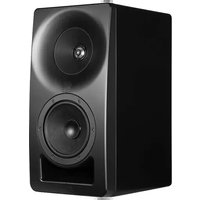
SM-5-C - Loudspeaker Kali Audio - Free user manual and instructions
Find the device manual for free SM-5-C Kali Audio in PDF.


| Product Type | Studio Monitor Speaker |
| Brand | Kali Audio |
| Model | SM-5-C |
| Driver Configuration | 2-way Coaxial |
| Woofer Size | 5 inches |
| Tweeter Size | 1 inch Soft Dome |
| Frequency Response | 45 Hz - 21 kHz (±3 dB) |
| Power Output (RMS) | 80 W (Class D) |
| Amplifier Type | Class D |
| Max SPL | 115 dB |
| Crossover Frequency | 3 kHz |
| Input Connectors | XLR, TRS (Balanced), RCA (Unbalanced) |
| Input Impedance | 10 kΩ (Balanced), 20 kΩ (Unbalanced) |
| Dimensions (H x W x D) | 11.6 x 7.9 x 10.5 inches |
| Weight | 13 lbs (5.9 kg) |
| Enclosure Type | Front-ported Bass Reflex |
| Finish | Black Vinyl |
| Cleaning Instructions | Wipe with a dry, lint-free cloth. Do not use solvents. |
| Safety Warnings | Do not expose to water. No user-serviceable parts. Disconnect before cleaning. |
| Spare Parts Availability | Contact Kali Audio or authorized dealers. |
| General Information | Coaxial design for point-source imaging. Suitable for nearfield monitoring. |
Frequently Asked Questions - SM-5-C Kali Audio
User questions about SM-5-C Kali Audio
0 question about this device. Answer the ones you know or ask your own.
Ask a new question about this device
Download the instructions for your Loudspeaker in PDF format for free! Find your manual SM-5-C - Kali Audio and take your electronic device back in hand. On this page are published all the documents necessary for the use of your device. SM-5-C by Kali Audio.
USER MANUAL SM-5-C Kali Audio
Project Santa Monica
natural_image
Coastal beach scene with a large speaker and Ferris wheel at sunset, no visible text or symbolsSM-5-C
Passive 3-Way Studio Monitor User's Guide
Table of Contents
IMPORTANT SAFETY INFORMATION....3
ABOUT YOUR STUDIO MONITORS....4
FULL SPECIFICATIONS....6
AMPLIFICATION AND SIGNAL CHAIN....7
EXAMPLE SIGNAL CHAINS....8
LOUDSPEAKER TUNING AND LIMITER PARAMETERS....9
For 3rd Party Amplifiers
CONNECTING AN AMPLIFIER....12
LOADING TUNINGS INTO AN LEA AMPLIFIER....14
MOUNTING....17
LIMITED WARRANTY....18
Important Safety Information
- Read these instructions.
- Keep these instructions.
- Heed all warnings.
-
Follow all instructions.
-
Do not use this apparatus near water.
-
Clean only with a dry cloth.
-
Do not block any ventilation openings.
-
Keep ventilation opening free of dust or other matter.
-
Do not install near any heat sources such as radiators, heat registers, stoves, or other apparatus (including amplifiers) that produce heat.
-
No naked flame sources (such as lighted candles,) should be placed on the product.
-
Use only attachments and/or accessories specified by the manufacturer.
-
Use only with a cart, stand, tripod, plate, bracket, or table specified by the manufacturer. When a cart is used, use caution when moving the cart/apparatus combination to avoid injury from tip-over.
-
Refer all servicing to qualified service personnel. Servicing is required when:
A. The apparatus is damaged in any way
B. The power supply cord or plug is damaged
C. Liquid or other objects have fallen into the product
D. The product has been exposed to rain or moisture
E. The product does not operate normally
F. The product has been dropped
-
This apparatus shall not be exposed to dripping or splashing.
-
No object filled with liquids, such as a vase or a glass, should be placed on the apparatus.
-
This apparatus is to be used in a moderate climate. Do not expose to extremely high or low temperatures.
-
High sound pressure in excess of 85 dB can cause hearing damage and/or loss. Do not expose yourself to high sound pressure levels.
About Your Studio Monitors
Congratulations on your Kali Audio SM-Series Studio Monitors! These studio monitors are designed for the most demanding, high-precision monitoring applications. We're confident that these monitors will allow you to perceive every detail of the material that you're working on, and that the results will translate faithfully across playback platforms.
Where does "SM" come from?
The official name of this product line is “Project Santa Monica.” Kali names all of our product lines after towns in California. Santa Monica and nearby neighborhoods in West Los Angeles are home to some of the world’s most storied recording studios. Project Santa Monica pays tribute to those studios and the historic records that have come out of them.
Features
3-Way Coincident Architecture
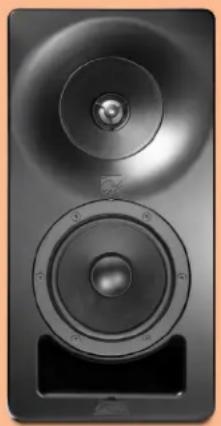
The SM-5-C features a 5-Inch woofer, 4-Inch midrange, and 1-Inch metal dome tweeter. The mid-range and tweeter are coaxial, meaning that they share an acoustic center. In other words, the tweet-er sits within the midrange. They are also coincident, meaning that they are physically time-aligned.
This architecture, together with the physical placement and crossover of the woofer, makes the SM-5-C an acoustic point source. This gives the loudspeaker an ideal directivity characteristic, resulting in a lifelike stereo image where details are placed clearly and consistently. Off-axis lobing that is unavoidable in 2-way systems is virtually eliminated in the SM-5-C.
Precision Drivers
The drivers in the SM-5-C are carefully engineered for high dynamic range, smooth response, and low distortion.
The woofer design emphasizes high output and very low distortion. The woofer has been refined with inductance linearization and flux stabilization features within the motor. These features reduce magnetic flux modulation, reducing distortion dramatically.
The midrange is not only optimized for its own frequency handling, but also for its role as the tweet-er's waveguide. It controls the directivity of the tweeter so that off-axis reflections in all directions are congruent with the direct sound of the loudspeaker, which is part of what gives the SM-5-C such excellent imaging. Peak-to-peak excursion on the midrange does not exceed 1mm, eliminating inter-modulation distortion that is typical in coaxial designs.
The 1-inch metal alloy dome tweeter has been engineered to allow for high output and low distortion to the limits of human hearing. The geometry of the tweeter reduces high-Q ultrasonic resonances, resulting in smoother HF response in the audible frequency band. In other words, the harshness that is problematic in some metal domes is eliminated on the SM-5-C.
About Your Speakers
Features
Low Noise Port Tube
Like all of Kali's studio monitors, the SM-5-C features a front-firing port tube with a unique geometry that eliminates chuffing and port compression.
Low Diffraction Baffle
The baffle around the midrange follows the shape of that driver, blending seamlessly from the edge of the driver and into the rest of the speaker cabinet. This eliminates on-axis diffraction artifacts in the frequency response, and helps reinforce the excellent imaging characteristics of the SM-5-C.
Optimized Crossover
Since the SM-5-C uses amplifier DSP tuning to manage frequency response optimization, the cross-over network can be purely optimized for its use in directivity transition. This level of optimization allows for premium components to be used, including ultra-low dissipation polypropylene capacitors, air-core inductors, and non-inductive resistors.
The crossover network is fully optimized for bi-amplification (LF+MF/HF) use, but care has also been taken to allow for single-wire use.
Wall/Ceiling Mounting
The SM-5-C features mounting holes on both the top and bottom of the loudspeaker. Kali recommends using the SM-KP1 U-bracket from Triad-Orbit®, but any speaker mount with a 4.25 x 2-Inch bolt pattern that is capable of holding the SM-5-C's 21lb weight will also work.
Instructions for mounting the SM-5-C with the Triad-Orbit® bracket can be found on page 17.
natural_image
Close-up of a black audio amplifier speaker with two circular speakers and a rectangular base (no visible text or symbols)Full Specifications
| Self-Powered: No | |
| Amplification Options: | Single wireBi-amped (Woofer, Midrange+Tweeter) |
| MR+HF Power Handling: 20VRMS into 3 Ohm (100W at 4 Ohm) | |
| LF Power Handling: 20VRMS into 3 Ohm (100W at 4 Ohm) | |
| Single Wire Power Handling: 20VRMS into 3 Ohm (100W at 4 Ohm) | |
| HF Driver: 1-Inch Metal Alloy Dome Tweeter | |
| Midrange Driver: 4-Inch Optimized Profile Paper Cone | |
| LF Driver: 5-Inch Optimized Profile Paper Woofer | |
| LF-to-Midrange Crossover: 280 Hz | |
| Midrange-to-HF Crossover: 2800 Hz | |
| Frequency Response: (-10dB) 39 Hz- 25 kHz | |
| Frequency Range: (+/-3dB) 47 Hz - 21 kHz | |
| Recommended Listening Distance: Up to 4 Meters | |
| Max SPL with peak limiter engaged: | 117 dB @ 1m |
| Loudspeaker THD, Single Wire: (85dB SPL at 1M) | <1% from 100-700 Hz, <0.5% above 700 Hz |
| Loudspeaker THD, Bi-Ampled: (85dB SPL at 1M) | <0.75 % from 100-450 Hz, <0.5% above 450 Hz |
| Inputs: | 2-Pin, 5.08mm pitch Euroblock Connector6-pin, 5.08mm pitch Euroblock Connector |
| Sensitivity | 87 dB SPL for 2.83V @ 1m |
| Enclosure: | Front Ported |
| Height | 15.6 Inches (39.6 cm) |
| Width: | 7.9 Inches (20 cm) |
| Depth: | 9.8 Inches (24.8 cm) |
| Weight: | 21 lbs (9.5 kg) |
Amplification and Signal Chain
For full output with minimum distortion, Kali recommends bi-amplifying the speakers using an LEA® amplifier with at least 100W per channel. Therefore the minimum choice for a pair of SM-5-Cs would be an LEA® Connect 164.
Nearly full output and acceptable distortion may also be attained using the single wire tuning and one of LEA®'s 80W amplifiers. This means that it is possible to amplify up to four speakers using an LEA® Connect 84 or up to 8 using an LEA® Connect 88. Max SPL will be 1 dB lower and distortion will be slightly higher at full output.
Single Wire vs. Bi-Amped
While Kali recommends bi-amplifying the speakers, single wire use is more convenient and economical. Single wire mode adds a small amount of distortion from the lower frequency cutoff of the system through 700 Hz vs. bi-amped at comparable playback levels. The single wire tuning also introduces a frequency response anomaly at the high end of the loudspeaker's response, although this may be corrected with full-range room calibration.
Using an LEA® amplifier
Configuration files for LEA® amplifiers can be found by clicking this link. Refer to pages 12-14 for instructions to program these files into your LEA® amplifier.
3rd-Party Amplifier Minimum Requirements
If you'd like to use a different amplifier, you'll need to make sure that it can deliver 20VRMS into a 3 Ohm load. Most amplifiers rated for 100W at 4 Ohm should be sufficient, but you'll need to verify that the amplifier you select is capable of handling a 3 Ohm load. Use of an amplifier with <100W per channel power delivery other than the LEA® Connect 84 and Connect 88 amplifiers is not supported.
The amplifier, or some other component after the amplifier in your signal chain, will need to include a peak limiter. Using the SM-5-Cs without a peak limiter will void your warranty. Kali Audio is not responsible for damage incurred to the speakers if a peak limiter is not used. Peak limiter specifications can be found on pages 9-11. It is also recommended to use an RMS limiter.
Loudspeaker Tuning and Room Tuning
The SM-5-Cs must be used with a signal processor that can provide at least 8 bands of EQ per speaker. The recommended LEA® amplifiers have this built in. If you're using a 3rd party amplifier, you should search for one that also has this feature. Otherwise, you can use a processor like Avid®'s MTRX Studio to apply loudspeaker tunings.
It is recommended to tune the loudspeakers for the room that they're being used in as well. This tuning may processed by a dedicated signal processor like the Avid® MTRX studio, or via a software solution like Sonarwork®s SoundID. If you're using one processor for both loudspeaker and room tuning, program in the loudspeaker tuning parameters found on pages 9-11, and then add additional channels of EQ for room tuning.
Kali Audio SM-5-C Users' Guide 7
Example Signal Chains
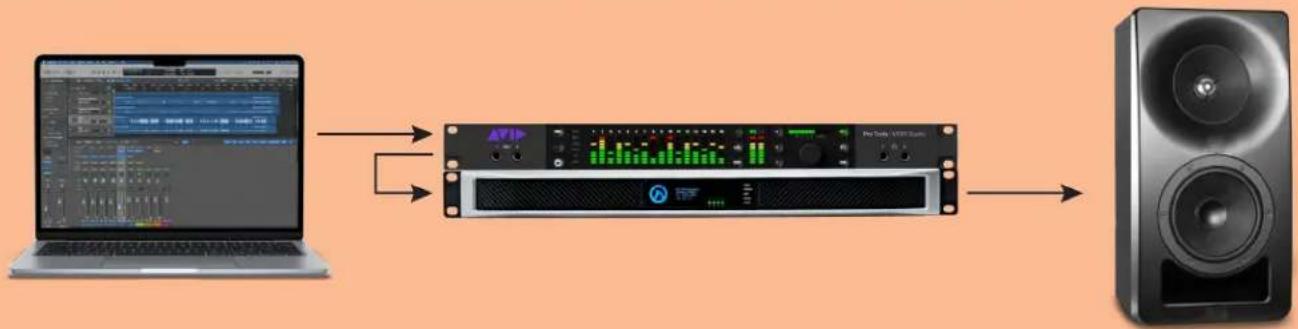
- Source -> Signal processing -> Conversion -> Amplifier -> Loudspeakers. (Recommended.)
flowchart
graph LR
    A["Laptop"] --> B["Pro Study AEP30000"]
    B --> C["Speaker"]
    B --> D["Audio Channel"]
    D --> E["Output"]
The computer outputs to an Avid® MTRX Studio, which handles room calibration. The MTRX studio outputs balanaced audio to the LEA® amplifier. The LEA® amplifier processes speaker tuning and outputs to the speakers.
- Source + signal processing in computer -> Dante® -> Amplifier -> Loudspeakers.

The computer handles room calibration in software with a program like Sonarworks® SoundID. The computer uses Dante Virtual Soundcard® as the output to a Dante®-capable LEA® amplifier. The LEA® amplifier processes speaker tuning and outputs to the speakers.
- Source + signal processing + loudspeaker processing in computer -> Conversion -> Amplifier -> Loudspeakers.

flowchart
graph LR
    A["Laptop"] --> B["Audio Data Processing"]
    B --> C["Audio Output"]
    C --> D["Speaker Output"]
    B --> E["Audio Display"]
    E --> F["Audio Mask"]
    F --> G["Audio Spectrum"]
The computer handles room calibration in software with a program like Sonarworks® SoundID. The computer also handles loudspeaker tuning with a separate EQ processing program. The computer outputs to an I/O device like an Apogee® Symphony I/O. The amplifier only processes voltage limiting functions and outputs to the speakers.
Kali Audio SM-5-C Users' Guide 8
Loudspeaker Tuning and Limiter Parameters
Bi-amped 48k Processing
| LF Channel: | |
| LF Rolloff: Butterworth 12dB/Oct High Pass, 47.4 Hz | |
| Band 1: 56.78 Hz, Q: 1, Gain: +4.5 dB | |
| Band 2: 154 Hz, Q: 2, Gain: +1.3 dB | |
| Band 3: 260 Hz, Q: 1.41, Gain: +2.4 dB | |
| Band 4: 297 Hz, Q: 1.42, Gain +2.1 dB | |
| LF-to-MR Crossover: Linkwitz-Riley 24dB/Oct Low Pass, 259 Hz | |
| Peak Limiter: Threshold: 28V, Attack Time: 4ms, Release: 40ms | |
| HF Channel: | |
| MR-to-LF Crossover: Butterworth 6dB/Oct High Pass, 1430 Hz | |
| Band 1: 297 Hz, Q: 1.42, +2.1 dB | |
| Band 1: 565 Hz, Q: 4.67, Gain: +1.2 dB | |
| Band 2: 1520 Hz, Q: 5.44, Gain: +1.7 dB | |
| Band 3: 3300 Hz, Q: 0.82, Gain: +3.4 dB | |
| Band 4: 9100 Hz, Q: 1.1, Gain: -8 dB | |
| Band 5: 9700 Hz, Q: 3.2, Gain: +0.7 dB | |
| Band 7: 12300 Hz, Q: 4.5, Gain: -2.6 dB | |
| Band 8: 17000 Hz, Q: 2.2, Gain: 6.5 | |
| RMS Limiter: | Threshold: 10VRMS, Attack: 20ms, Release: 20,000ms |
Loudspeaker Tuning and Limiter Parameters
Bi-amped 96k Processing
| LF Channel: | |
| LF Rolloff: Butterworth 12dB/Oct High Pass, 47.4 Hz | |
| Band 1: 56.78 Hz, Q: 1, Gain: +4.5 dB | |
| Band 2: 154 Hz, Q: 2, Gain: +1.3 dB | |
| Band 3: 260 Hz, Q: 1.41, Gain: +2.4 dB | |
| Band 4: 297 Hz, Q: 1.42, Gain +2.1 dB | |
| LF-to-MR Crossover: Linkwitz-Riley 24dB/Oct Low Pass, 259 Hz | |
| Peak Limiter: Threshold: 28V, Attack Time: 4ms, Release: 40ms | |
| HF Channel: | |
| MR-to-LF Crossover: Butterworth 6dB/Oct High Pass, 1430 Hz | |
| Band 1: 297 Hz, Q: 1.42, +2.1 dB | |
| Band 1: 565 Hz, Q: 4.67, Gain: +1.2 dB | |
| Band 2: 1520 Hz, Q: 5.44, Gain: +1.7 dB | |
| Band 3: 3300 Hz, Q: 0.82, Gain: +3.4 dB | |
| Band 4: 9100 Hz, Q: 1.1, Gain: -8 dB | |
| Band 5: 9700 Hz, Q: 3.84, Gain: +0.7 dB | |
| Band 7: 12300 Hz, Q: 5.17, Gain: -2.6 dB | |
| Band 8: 17000 Hz, Q: 2.75, Gain: 6.5 | |
| RMS Limiter: | Threshold: 10VRMS, Attack: 20ms, Release: 20,000ms |
Loudspeaker Tuning and Limiter Parameters
Single Wire 48k Processing
| LF Rolloff: Butterworth 12dB/Oct High Pass, 47.4 Hz | |
| Band 1: 47 Hz, Q: 1.4, Gain: +2.8 dB | |
| Band 2: 121.5 Hz, Q: 2.05, Gain: -3.6 dB | |
| Band 3: 330 Hz, Q: 2.1, Gain: -4 dB | |
| Band 4: 994 Hz, Q: 1, Gain: -7.9 dB | |
| Band 5: 3567 Hz, Q: 2.3, Gain: +2.2 dB | |
| Band 6: 9572 Hz, Q: 0.9, Gain: -3.2 dB | |
| Band 7: 10700 Hz, Q: 7, Gain: +1.1 dB | |
| Band 8: 16660 Hz, Q: 1.2, Gain: +6.6 dB | |
| Peak Limiter: Threshold: 28V, Attack Time: 4ms, Release: 40ms | |
Single Wire 96k Processing
| LF Rolloff: Butterworth 12dB/Oct High Pass, 47.4 Hz | |
| Band 1: 47 Hz, Q: 1.4, Gain: +2.8 dB | |
| Band 2: 121.5 Hz, Q: 2.05, Gain: -3.6 dB | |
| Band 3: 330 Hz, Q: 2.1, Gain: -4 dB | |
| Band 4: 994 Hz, Q: 1, Gain: -7.9 dB | |
| Band 5: 3567 Hz, Q: 2.3, Gain: +2.2 dB | |
| Band 6: 9572 Hz, Q: 1, Gain: -3.2 dB | |
| Band 7: 10700 Hz, Q: 10, Gain: +1.1 dB | |
| Band 8: 16660 Hz, Q: 2, Gain: +6.6 dB | |
| Peak Limiter: Threshold: 28V, Attack Time: 4ms, Release: 40ms | |
Connecting an Amplifier
The SM-5-C uses Euroblock (sometimes referred to by the brand name “Phoenix®”) connectors for quick connection and disconnection of speaker wire. The recommended LEA® amplifiers and many other professional amplifiers also use Euroblock connectors.
You should purchase and size speaker wire for an appropriate distance between the speakers and the amplifier. Follow the instructions below to wire the Euroblock terminals and connect to an amp.
Single Wire
Use the 2-pin Euroblock connector, which is on the left hand side of the back of the speaker. Remove the connector from the back of the speaker.
Unscrew the two flathead screws on the top of the connector. This will lift the terminal clamps, allowing the wire to be inserted.

Fig. 1: The 2-pin Euroblock Connector

natural_image
Two copper-colored electrical cables with terminal leads, shown from different angles (no text or symbols visible)Fig. 2: Exposed ends of the speaker wire. L: Crimped, R: Uncrimped.
Insert the ends of the wire into the terminals of the Euroblock connector. On the SM-5-C, the right terminal is positive, and the left terminal is negative.
Screw the terminal clamps down so that the wires are tightly secured. Gently push the entire Euroblock plug into the back of the speaker. For single wire use, make sure that the shorted Bi-Amp Euroblock connector is inserted in the Bi-Amp section as shown in Figure 3.
Trim the end of your speaker wire so that \~1/4-inch (6mm) of wire is exposed. Neatly twist this wire so that there are no loose strands.
Alternatively, use a wire crimper to add a ferrule to the exposed end of the wire. This will keep the wire from fraying and make connections easier and longer lasting.

Fig. 3: Final assembly using Single Wire.
Bi-amped
Use the 6-pin Euroblock connector, which is on the right hand side of the back of the speaker. Remove the connector from the back of the speaker.
Unscrew all 6 flathead screws on the top of the connector. This will lift the terminal clamps, allowing the wire to be inserted. If applicable, remove the shorting bridges from the plug. The shorting bridges are shown in Figure 3.
Trim the end of your speaker wire so that 1/4-inch (6mm) of wire is exposed. Neatly twist this wire so that there are no loose strands.
Alternatively, use a wire crimper to add a ferrule to the exposed end of the wire. This will keep the wire from fraying and make connections easier and longer lasting.
Kali Audio SM-5-C Users' Guide 12
Connecting an Amplifier
natural_image
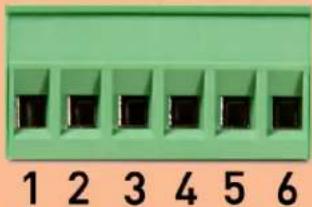
Green terminal block with six slots, labeled 1 to 6 below (no text or symbols on the slots)Fig. 4: The terminals of the 6-pin connector.
Insert the ends of the wire into the terminals of the Euroblock connector. As noted on the back of the speaker, the terminals are, from left to right:
1: HF positive terminal
2: Not used
3: HF negative terminal
4: LF negative terminal
5: Not used
6: LF positive terminal.
Screw the terminal clamps down so that the wires are tightly secured. Gently push the entire Euroblock plug into the back of the speaker. There is no need to short the single wire connector. Your speaker is ready for use!

natural_image
Black electronic speaker with dual speakers and a circular head (no visible text or symbols)Loading Tunings into an LEA® Amplifier
To load tunings into an LEA® amplifier, first download the tuning files, available at this link, from the Kali website. Note that single wire has its own tuning, and that bi-amped use requires tunings for both the LF channel and the MF+HF channel.
Once those tunings are downloaded, connect to your LEA® amp.

Select the crossover tab at the top of the LEA® control screen.
In one of the channels, scroll down to the bottom of the menu options, and click "Import."
For single wire use, just go one at a time.
For bi-amped use, it's arbitrary which channel is LF and which is MF+HF, but do make sure to keep them as pairs. The screenshots here use the first channel for MF+HF, and the second channel for LF.

In the import pop-up that appears, make sure to de-select "Inputs." Leaving "Inputs" selected will route the same input to each of your outputs, which you'll need to remedy later.
Click "Choose File."

Select the appropriate .json file, and click "Upload."
Loading Tunings into an LEA® Amplifier
After selecting the file, hit "Import" on the pop-up.
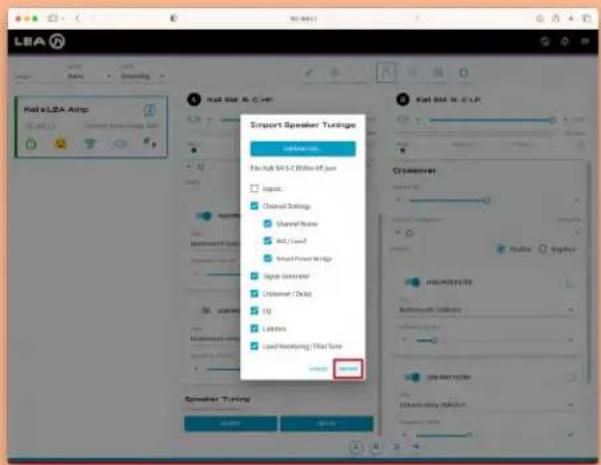

The pop-up should show a message that says "Import Succeeded."
Click "OK."
The settings for this channel are now loaded.

Click into the Settings tab at the top of the window. From here, you can rename the channel. It may be useful to name the channel to correspond to the speaker it is outputting to.
Loading Tunings into an LEA® Amplifier
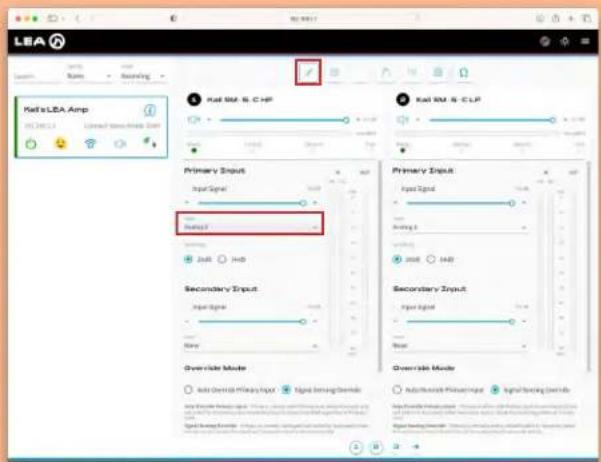
Select the Input tab at the top of the LEA® control screen.
Select the appropriate input channel that will be used for this speaker. For bi-amped use, the same input channel should be selected for both the MF+HF channel and the LF channel, as shown here.
For single wire use, each channel should be assigned its own input channel.
For bi-amped use, repeat these steps for the other channel going to the loudspeaker, then start again for each other loudspeaker.
For single wire use, repeat these steps for each loudpseaker.

natural_image
Black studio speaker with circular head and speaker grille (no visible text or symbols)Mounting
Kali Audio recommends using Triad-Orbit®’s SM-KP1 to mount the SM-5-C. This mount is sold most places where SM-5-Cs are available. The SM-5-C includes 8 x M6 25mm panhead hex screws and 8 x rubber washers to be used with the SM-KP1. To install the SM-KP1:
- Remove the 4 screws that come installed in the top and the bottom of the SM-5-C. Discard these or save them in case you want to take the SM-KP1 off at some other time.
- Slide the SM-KP1 over the speaker. On the top and bottom, you should be able to see through the holes on the SM-KP1 to the holes on the SM-5.
- Install the rubber washers on the M6 x 25mm screws. Put the washer as close to the screw head as possible.
- Use the screws to secure the SM-KP1 to the SM-5-C. Hand tighten them so that the rubber washer is fully engaged.
If you'd like to use a different mount, you will need a mount with a 4.25-inch (108mm) x 2-inch (50.8mm) hole pattern. The mount must also be able to hold the SM-5-C's 21-lb weight.
Whichever mount you choose, follow the instructions provided by the mount's manufacturer. Kali Audio is not responsible for damage or injury resulting from failing to follow the instructions included with the speaker mount.
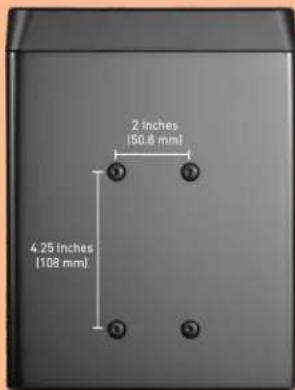
Fig. 1: Top of the SM-5-C showing mounting hole position and spacing.

Fig. 2: Bottom of the SM-5-C showing mounting hole position and spacing.

natural_image
Black rectangular electronic device with a metallic connector and mounting bracket (no visible text or symbols)Fig. 3: SM-5-C with KP-1 mount and SW-1 swivel accessory mounted.
Warranty
What does this warranty cover?
This warranty covers defects in materials or workmanship for a period of one year (365 days) after the purchase date of the product. If you have just received your speaker, and it is obviously damaged, contact your dealer IMMEDIATELY to initiate a warranty claim.
What will Kali do?
If your product is defective (materials or workmanship,) Kali will replace or repair the product at our discretion - free of charge.
How do you initiate a warranty claim?
Contact the retailer from whom you bought the product to initiate a warranty process. You will need the original receipt showing the date of purchase. The retailer may ask you to provide specific details about the nature of the defect.
What is not covered?
The following cases are NOT covered by this warranty:
- Damage from failing to use a peak limiter.
• Damage from shipping - Damage from dropping or otherwise mishandling the speakers
-
Damage resulting from failure to heed any of the warnings outlined on pages 3 and 4 of the user's manual, including:
-
Water damage.
- Damage from foreign substances/objects or substances entering the port tube.
- Damage resulting from an unauthorized person servicing the product.
- Damage resulting from the product being left plugged in during an electrical storm.
The warranty applies only in the United States. International Customers should contact their dealer about their warranty policy.
AVID®, TRIAD-ORBIT®, LEA®, SONARWORKS®, DANTE®, APOGEE® trademarks are property of their respective owners.


- Project Santa Monica
- SM-5-C
- Table of Contents
- Important Safety Information
- About Your Studio Monitors
- Features
- 3-Way Coincident Architecture
- Precision Drivers
- About Your Speakers
- Low Noise Port Tube
- Low Diffraction Baffle
- Optimized Crossover
- Wall/Ceiling Mounting
- Amplification and Signal Chain
- Single Wire vs. Bi-Amped
- Using an LEA® amplifier
- 3rd-Party Amplifier Minimum Requirements
- Loudspeaker Tuning and Room Tuning
- Example Signal Chains
- Loudspeaker Tuning and Limiter Parameters
- Connecting an Amplifier
- Single Wire
- Bi-amped
- Loading Tunings into an LEA® Amplifier
- Mounting
- Warranty
- What does this warranty cover?
- What will Kali do?
- How do you initiate a warranty claim?
- What is not covered?
Brand : Kali Audio
Model : SM-5-C
Category : Loudspeaker