
HW-S68B - Soundbar SAMSUNG - Free user manual and instructions
Find the device manual for free HW-S68B SAMSUNG in PDF.


| Product type | Soundbar |
| Brand | Samsung |
| Model | HW-S68B |
| Color | Black |
| Dimensions (W x H x D) | Approximately 680 x 60 x 100 mm |
| Weight | Approximately 2.5 kg |
| Power supply | 100-240 V, 50/60 Hz |
| Power consumption | 30 W (operating) |
| Audio channels | 2.1 (with wireless subwoofer) |
| Total power | 320 W |
| Supported audio formats | Dolby Audio, DTS Virtual:X |
| Connectivity | HDMI ARC, Bluetooth 4.2, USB, Optical |
| Main functions | Surround mode, Game Mode, Voice Enhancement, Bass Boost |
| Maintenance and cleaning | Clean with a soft, dry cloth. Avoid chemical products. |
| Safety | Do not expose to moisture, do not block ventilation, use the provided power plug. |
| Spare parts and repairability | Subwoofer, remote control, cables. Contact Samsung after-sales service. |
| General information | Compatibility with Samsung TVs via OneRemote. 2-year warranty. |
Frequently Asked Questions - HW-S68B SAMSUNG
User questions about HW-S68B SAMSUNG
0 question about this device. Answer the ones you know or ask your own.
Ask a new question about this device
Download the instructions for your Soundbar in PDF format for free! Find your manual HW-S68B - SAMSUNG and take your electronic device back in hand. On this page are published all the documents necessary for the use of your device. HW-S68B by SAMSUNG.
USER MANUAL HW-S68B SAMSUNG
Thank you for purchasing this Samsung product.
To receive more complete service, please register
your product at www.samsung.com/register
SAFETY INFORMATION
SAFETY WARNINGS
TO REDUCE THE RISK OF ELECTRIC SHOCK, DO NOT REMOVE THE COVER (OR BACK).
NO USER-SERVICEABLE PARTS ARE INSIDE.
REFER SERVICING TO QUALIFIED SERVICE PERSONNEL.
Refer to the table below for an explanation of symbols which may be on your Samsung product.
 | CAUTIONRISK OF ELECTRIC SHOCK.DO NOT OPEN. |  |
 | This symbol indicates that high voltage is present inside. It is dangerous to make any kind of contact with any internal part of this product. | |
 | This symbol indicates that this product has included important literature concerning operation and maintenance. | |
 | Class II product: This symbol indicates that it does not require a safety connection to electrical earth (ground). If this symbol is not present on a product with a power cord, the product MUST have a reliable connection to protective earth (ground). | |
 | AC voltage: This symbol indicates that the rated voltage marked with the symbol is AC voltage. | |
 | DC voltage: This symbol indicates that the rated voltage marked with the symbol is DC voltage. | |
 | Caution, Consult instructions for use: This symbol instructs the user to consult the user manual for further safety related information. | |
CAUTION
WARNING
- To reduce the risk of fire or electric shock, do not expose this appliance to rain or moisture.
CAUTION
• TO PREVENT ELECTRIC SHOCK, MATCH WIDE BLADE OF PLUG TO WIDE SLOT, FULLY INSERT.
- This apparatus shall always be connected to a AC outlet with a protective grounding connection.
- To disconnect the apparatus from the mains, the plug must be pulled out from the mains socket, therefore the mains plug shall be readily operable.
- Do not expose this apparatus to dripping or splashing. Do not put objects filled with liquids, such as vases, on the apparatus.
- To turn this apparatus off completely, you must pull the power plug out of the wall socket. Consequently, the power plug must be easily and readily accessible at all times.
PRECAUTIONS
- Ensure that the AC power supply in your house complies with the power requirements listed on the identification sticker located on the bottom of your product. Install your product horizontally, on a suitable base (furniture), with enough space around it for ventilation (7-10 cm). Make sure the ventilation slots are not covered. Do not place the unit on amplifiers or other equipment which may become hot. This unit is designed for continuous use. To fully turn off the unit, disconnect the AC plug from the wall outlet. Unplug the unit if you intend to leave it unused for a long period of time.
- During thunderstorms, disconnect the AC plug from the wall outlet. Voltage peaks due to lightning could damage the unit.
- Do not expose the unit to direct sunlight or other heat sources. This could lead to overheating and cause the unit to malfunction.
- Protect the product from moisture (i.e., vases) and excess heat (e.g., a fireplace) or equipment creating strong magnetic or electric fields. Unplug the power cable from the AC wall socket if the unit malfunctions. Your product is not intended for industrial use. It is for personal use only. Condensation may occur if your product has been stored in cold temperatures. If transporting the unit during the winter, wait approximately 2 hours until the unit has reached room temperature before using.
- The battery used with this product contains chemicals that are harmful to the environment. Do not dispose of the battery in the general household trash. Do not expose the battery to excess heat, direct sunlight, or fire. Do not short circuit, disassemble, or overheat the battery.
CAUTION: Danger of explosion if the battery is replaced incorrectly. Replace only with the same or equivalent type.
CONTENTS
01 Checking the Components 6
02 Product Overview 7
Front Panel / Top Panel of the Soundbar 7
Bottom Panel of the Soundbar 9
03 Using the Remote Control 10
Inserting Batteries before using the Remote Control (AAA batteries X 2) ____ 10
How to Use the Remote Control ____ 10
Active Voice Amplifier (AVA) 14
Using the Hidden Buttons (Buttons with more than one function) ____ 14
Output specifications for the different sound effect modes 15
Adjusting the Soundbar volume with a TV remote control 16
04 Connecting the Soundbar 17
Connecting Electrical Power 17
Connecting the Samsung Wireless Rear Kit and Subwoofer to your Soundbar 17
05 Connecting to a TV 18
Connecting the TV that supports HDMI ARC (Audio Return Channel) 18
Connecting using an Optical Cable 20
Connecting via Bluetooth 21
Connecting via Wi-Fi 23
Connecting to a TV that supports Dolby Atmos® 24
Using the Q-Symphony Function 26
Using the SpaceFit Sound 27
06 Connecting an External Device 28
Connecting using an Optical Cable 28
07 Connecting a Mobile Device 29
Method 1. Connecting via Bluetooth 29
Method 2. Connecting via Wi-Fi (Wireless Network) 32
Using the Tap Sound 33
08 Connecting via Apple AirPlay 2 34
09 Installing the Wall Mount 35
Installation Precautions ____ 35
Wallmount Components 35
10 Installing the Soundbar in front of TV 37
11 Software Update 38
Auto Update 38
USB Update 38
Reset 39
12 Troubleshooting 40
13 Licence 42
14 Open Source Licence Notice 43
15 Important Notes About Service 43
16 Specifications and Guide 44
Specifications 44
01 CHECKING THE COMPONENTS
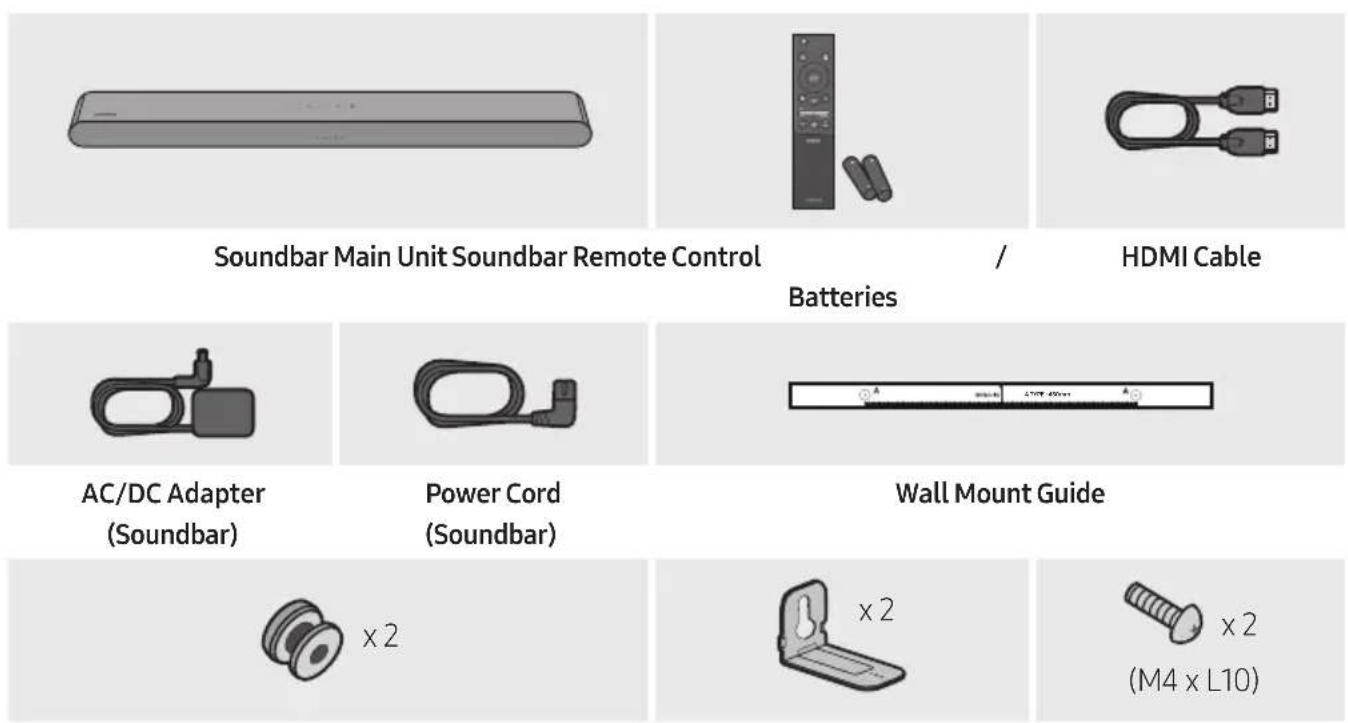
Holder-Screw Bracket-Wall Mount Screw
- For more information about the power supply and power consumption, refer to the label attached to the product. (Label: Bottom of the Soundbar Main Unit)
- To purchase additional components or optional cables, contact a Samsung Service Centre or Samsung Customer Care.
- For more information about the wallmount see page 35.
- Design, specifications, and App screen are subject to change without prior notice.
- The appearance of the accessories may differ slightly from the illustrations above.
02 PRODUCT OVERVIEW
Front Panel / Top Panel of the Soundbar
| 1 | LED indicator | The LED Indicator flashes, glows, or changes colour depending on the Soundbar's current mode or status. The colour of the LED indicator and the number of lights indicate the active mode as described below. | ||||
 White LED White LED |  White LED White LED | [WCKS]Multicolour LED |  White LED White LED |  White LED White LED | ||
| The Multicolour LED changes to White, Cyan, Green, Red, and Blue depending on the mode or status. | ||||||
| 2 | Multi Function Button | In standby mode, press the (Multi Function) button to turn on the Soundbar.Press the (Multi Function) button to change the mode. Each time you change the mode, the LED lights in white and then turns off. | ||||
| LED Indicator | 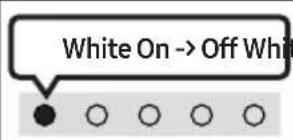 |  |  | |||
 | “Digital Audio In” or “TV ARC” | “Wi-Fi” “Bluetooth” | ||||
| 3 | Volume Button | Press the (Volume) button to adjust the volume. | ||||
| 4 | MicOn/OffButton | Press the ∅ (Mic On/Off) button to turn the microphone on or off.When the microphone is off, the LED Indicator will light red. | ||||
- When you plug in the AC cord, the power button will begin working in 4 to 6 seconds.
- When you turn on this unit, there will be a 4 to 5 second delay before it produces sound.
- If you hear sounds from both the TV and Soundbar, go to the Settings menu for the TV audio and change the TV speaker to External Speaker.
- You can turn on and off audio feedback by using SmartThings app. To learn about using the SmartThings app, refer to "Method 2. Connecting via Wi-Fi (Wireless Network)".
Bottom Panel of the Soundbar

| 1 | DC 19V (Power Supply In)Connect the AC/DC power adapter. (See page 17) |
| 2 | SERVICEConnect a USB storage device to upgrade the product's software. |
| 3 | DIGITAL AUDIO IN (OPTICAL)Connect to the digital (optical) output of an external device. (See page 28) |
| 4 | HDMI (ARC)Connect to the HDMI (ARC) port on a TV. (See page 18) |
- When disconnecting the power cable of the AC/DC power adapter from a wall outlet, pull the plug. Do not pull the cable.
- Do not connect this unit or other components to an AC outlet until all connections between components are complete.
03 USING THE REMOTE CONTROL
Inserting Batteries before using the Remote Control (AAA batteries X 2)
Slide the back cover in the direction of the arrow until it is completely removed.
Insert 2 AAA batteries (1.5V) oriented so that their polarity is correct. Slide the back cover back into position.

How to Use the Remote Control

1
Power
Turns the Soundbar on and off.

• Auto Power Down Function
The unit turns off automatically in the following situations:
- In "Digital Audio In" or "TV ARC" / "Wi-Fi" / "Bluetooth" mode if there is no audio signal for 18 minutes.
2
→ (Source)
Press to select a source connected to the Soundbar.
• Audio Feedback On/Off
You can turn the Audio Feedback on or off. Press and hold the → (Source) button on the remote control for 5 seconds while the Soundbar is off (Standby mode).

| [KK22] | [CTAK]  Press the 📄 (Mute) button to mute the sound.Press it again to unmute the sound. Press the 📄 (Mute) button to mute the sound.Press it again to unmute the sound. | |
| LEDIndicator |  | |
| VolumePush the button up or down to adjust the volume. | |
| [0707] | CH LEVELBy pressing the button, you can adjust the volume of the each speaker. If the Rear Speakers (sold separately) are connected, the setting “Rear Level” is supported. To adjust the volume of the “Rear Level” between -6 to +6 by using the Up/Down buttons. If the Rear Speakers (sold separately) are connected, the setting “Rear Level” is supported. To adjust the volume of the “Rear Level” between -6 to +6 by using the Up/Down buttons. | |
Volume
CH LEVEL
6

(Sound Control)
By pressing the button, you can set the audio function. The desired item can be adjusted using the Up/Down buttons. Each time the mode changes, the Multicolour LED blinks in white.
| LED Indicator | |
 | "SpaceFit Sound" → "Active Voice Amplifier" → "Voice enhancement" → "Night mode" → "Sync" → "Virtual" |
- Press and hold the 🎨 (Sound Control) button for about 5 seconds to adjust the sound for each frequency band. 150Hz, 300Hz, 600Hz, 1.2kHz, 2.5kHz, 5kHz, and 10kHz are selectable using the Left/Right buttons and each can be adjusted to a setting between -6 to +6 using the Up/Down buttons. (Make sure the Sound mode is set to "Standard".)
- "Voice enhancement" makes it easier to hear spoken dialog in movies and TV.
- "Night mode" is optimized for night time viewing with the settings adjusted to bring the volume down but keep the dialog clear.
- If the video on the TV and audio from the Soundbar are not synchronized, select "Sync" in Sound Control, and then set the audio delay between 0~300 milliseconds by using the Up/Down buttons.
- "Sync" is only supported for some functions.
- The "Virtual" function can be turned On/Off by using the Up/Down buttons.
7

Bluetooth PAIR
Switch the Soundbar to Bluetooth pairing mode.
When you press the button, the LED display changes as shown below.
- Until pairing is complete, the Multicolour LED changes as Red → Green → Blue in turn.
|r |  |
 |
8
▶II (Play / Pause)
You can also play or pause music by pressing the button.
| 9 | Up/Down/Left/RightPress Up/Down/Left/Right on the button to select or set functions.• Music SkipPress the Right button to select the next music file. Press the Left button to select the previous music file.• ID SETPress and hold the Up button for 5 seconds to complete ID SET (when connecting to a wireless subwoofer or wireless rear speakers). | |
| 10 | i (Info)Press the button to display information about the current function. (See page 7.)When connected to Dolby Atmos®, the LED indicator blinks cyan 3 times. | |
| 11 | SOUND MODEBy pressing the button, you can select the desired audio mode. Each time the mode changes, the Multicolour LED blinks in white. | |
| LEDIndicator | White Blinks X1 | |
| "Adaptive Sound" → "DTS Virtual:X" → "Music" → "Game" → "Standard" | ||
| • Adaptive SoundAnalyzes the content in real time and automatically provides the optimal sound field based on the characteristics of the content.• DTS Virtual:X Immersive 3D sound from any content.• MusicProvides more natural and room filling sound for music content.• GameProvides stereoscopic sound to immerse you in the action while gaming.• StandardOutputs the original sound. | ||
| 12 | WOOFER (BASS) LEVELPush the button up or down to adjust the level of the woofer (bass) to -12 or between -6 to +6. To set the woofer (bass) volume level to 0 (Default), press the button. | |
| 13 | TONE CONTROLBy pressing the button, you can adjust the volume of the treble or bass sound. The desired item can be adjusted using the Up/Down buttons. (This feature is available in all sound modes except "Standard" mode.) | |
| LEDIndicator | White Blinks X1 | |
| "Treble" → "Bass" | ||
| LED Indicator |  |
 | “Adaptive Sound” → “DTS Virtual:X” → “Music” → “Game” → “Standard” |
- Adaptive Sound
- DTS Virtual:X
- Music
- Game
- Standard
12
WOOFER (BASS) LEVEL
13
TONE CONTROL
| LED Indicator |  |
 | “Treble” → “Bass” |
Active Voice Amplifier (AVA)
- Analyzes external noise in real time while soundbar is playing, so that voice audio can always be heard clearly. • No data is saved during the analysis.
Using the Hidden Buttons (Buttons with more than one function)
| Hidden Button | Reference page | |
| Remote Control Button Function | ||
| WOOFER (Up) | TV remote control On/Off (Standby) | page 16 |
| Up ID SET page 13 | ||
| [0A3Z] [2D6Z] | 7 Band EQ page 12 | |
 | Audio Feedback On/Off (Standby) page 10 | |
Output specifications for the different sound effect modes
| Effect Input | Output | ||
| With Subwoofer Only | With Subwoofer & Wireless Rear Speaker Kit | ||
| Adaptive Sound | 2.0 ch 5.1 ch 7.1 ch | ||
| 5.1 ch 5.1 ch 7.1 ch | |||
| Dolby Atmos® 5.1 ch 7.1 ch | |||
| DTS Virtual:X | 2.0 ch 5.1 ch 7.1 ch | ||
| 5.1 ch 5.1 ch 7.1 ch | |||
| Dolby Atmos® 5.1 ch 7.1 ch | |||
| Music | 2.0 ch 5.1 ch 7.1 ch | ||
| 5.1 ch 5.1 ch 7.1 ch | |||
| Dolby Atmos® 5.1 ch 7.1 ch | |||
| Game | 2.0 ch 5.1 ch 7.1 ch | ||
| 5.1 ch 5.1 ch 7.1 ch | |||
| Dolby Atmos® 5.1 ch 7.1 ch | |||
| Standard | 2.0 ch 2.1 ch 2.1 ch | ||
| 5.1 ch 5.1 ch 5.1ch | |||
| Dolby Atmos® 5.1 ch 7.1 ch | |||
- The Samsung Wireless Rear Speaker Kit and Subwoofer can be purchased separately. To purchase a Kit or the Subwoofer, contact the vendor you purchased the Soundbar from.
- When the input source is Dolby Atmos®, the Subwoofer-only setup provides 5.1 channel audio, while the Subwoofer & Wireless Rear Speaker Kit setup provides 7.1 channel audio.
Adjusting the Soundbar volume with a TV remote control
Adjust the Soundbar volume using the TV's remote control.
- This function can be used with IR remote controls only. Bluetooth remote controls (remote controls that require pairing) are not supported.
- Set the TV speaker to External Speaker to use this function. • Manufacturers supporting this function: Samsung, VIZIO, LG, Sony, Sharp, PHILIPS, PANASONIC, TOSHIBA, Hisense, RCA
- Turn Off the Soundbar.
- Push up and hold the WOOFER button for 5 seconds.
Each time you push the WOOFER button up and hold it for 5 seconds, the mode switches in the following order: "Off-TV Remote" (Default mode), "Samsung-TV Remote", "All-TV Remote".
The LED indicator status changes each time the mode is changed, as shown below.
| Remote Control Button LED Indicator Status | ||
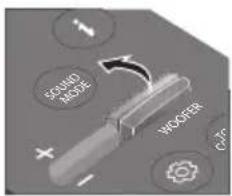  |  "Off-TV Remote"(Default mode) "Off-TV Remote"(Default mode) | Disable the TV remote control. |
  |  "Samsung-TV Remote" "Samsung-TV Remote" | Enable a Samsung TV's IR remote control. |
  | 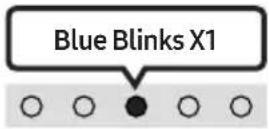 "All-TV Remote" "All-TV Remote" | Enable a third-party TV's IR remote control. |
04 CONNECTING THE SOUNDBAR
Connecting Electrical Power
Use the power components to connect the Soundbar to an electrical outlet in the following order:
- For more information about the required electrical power and power consumption, refer to the label attached to the product. (Label: Bottom of the Soundbar Main Unit)
- First connect the power cable to the AC/DC adapter. Connect the AC/DC adapter (with the power cable) to the Soundbar.
- Connect the power cord to a wall socket.
![graph TD A["AC/DC Adapter"] --> B["Power Cord"] B --> C["Bottom of the Soundbar Main Unit"] C --> D["DC 19V"] C --> E["Service"]](/content/2026/06/1399505/images/a06781dabbad12b660520c52c3f9d73851744016ea5812d4b2254d170be5f435.jpg)
NOTES
- If you unplug and reconnect the power cord when the product is turned on, the Soundbar turns on automatically.
- Make sure to rest the AC/DC Adapter flat on a table or the floor. If you place the AC/DC Adapter so that it is hanging with the AC cord input facing upwards, water or other foreign substances could enter the Adapter and cause the Adapter to malfunction.
Connecting the Samsung Wireless Rear Kit and Subwoofer to your Soundbar
Expand to true wireless surround sound by connecting the Samsung Wireless Rear Speaker Kit (SWA-9100S or SWA-9200S, sold separately) and Wireless Subwoofer (SWA-W510, sold separately) to your Soundbar.
For detailed information on connections, see the Samsung Wireless Rear Speaker Kit and Wireless Subwoofer manual.
05 CONNECTING TO A TV
Connecting the TV that supports HDMI ARC (Audio Return Channel)

CAUTION
- When both the HDMI cable and optical cable are connected, the HDMI signal is received first.
- To connect the HDMI cable between the TV and Soundbar, be sure to connect the terminals marked ARC. Otherwise, the TV sound may not be output.
- The recommended cable is High Speed HDMI Cable with Ethernet.

- With the Soundbar and TV turned off, connect the HDMI cable as shown in the figure.
- Turn on the Soundbar and TV.
- TV sound is output from the Soundbar.
- When the TV sound is not output, press the ⬤ (Multi Function) button at the top of the Soundbar or the → (Source) button on the remote control to select the “Digital Audio In” mode.
- When the sound is not output, check the HDMI Cable connection again.
- Use the volume buttons on the TV's remote control to change the volume on the Soundbar.
NOTES
- When you connect the TV that supports the HDMI ARC (Audio Return Channel) to the Soundbar with an HDMI cable, you can transmit the digital video and audio data without connecting a separate optical cable.
- We recommend you use a coreless HDMI cable if possible. If you use a cored HDMI cable, use one whose diameter is less than 14 mm.
- This function is not available if the HDMI cable does not support ARC.
- When the audio in a broadcast is encoded in Dolby Digital and the “Digital Output Audio Format” on your TV is set to PCM, we recommend that you change the setting to Dolby Digital. When the setting on the TV is changed, you will experience better sound quality. (The TV menu may use different words for Dolby Digital and PCM depending on the TV manufacturer.)
Connecting using an Optical Cable
Pre-connection Checklist
- When both the HDMI cable and optical cable are connected, the HDMI signal is received first.
- When you use an optical cable and the terminals have covers, be sure to remove the covers.

![graph TD A["TV"] --> B["OPTICAL OUT"] B --> C["Optical Cable (not supplied)"] C --> D["DIGITAL AUDIO IN (OPTICAL)"] D --> E["Bottom of the Soundbar"] E --> F["Top of the Soundbar"] F --> G["- + ∅"]](/content/2026/06/1399505/images/b2d89639f6b316ddb24511068250ea423e09cef6c54739ba0f4a4b67b3c3e438.jpg)
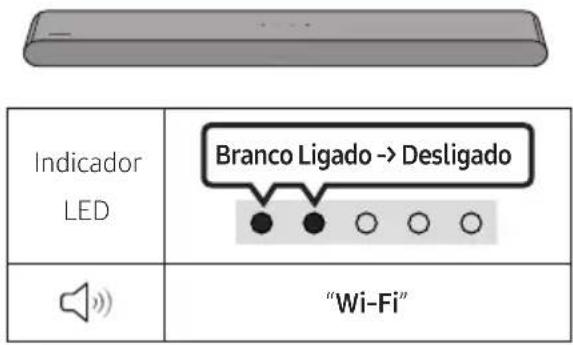
| LEDIndicator | White On→Off | “Digital Audio In” |
- With the TV and Soundbar turned off, connect the DIGITAL AUDIO IN (OPTICAL) port on the Soundbar and the OPTICAL output port on the TV with the optical cable (not supplied), as shown in the figure.
- Turn on the Soundbar and TV.
- Press the ⬆ (Multi Function) button at the top of the Soundbar or the ➞ (Source) button on the remote control and then select the "Digital Audio In" mode. Then the announcement, "Digital Audio In" is output.
- The TV sound is output from the Soundbar.
Connecting via Bluetooth
When a Samsung TV is connected using Bluetooth, you can hear stereo sound without the hassle of cabling.
- Only one Samsung TV can be connected at a time.
- Samsung TV that supports Bluetooth can be connected. Check the specifications of your TV.

The initial connection
1.
| Bluetooth Pairing button LED | Indicator |
| OR When in "Bluetooth" mode | Red → Green → Blue Blinks ○ ○ ● ○ ○ Pairing → Cyan Blinks X3 ○ ○ ● ○ ○ Connection is complete |
| · Until pairing is complete, the Multicolour LED changes as Red → Green → Blue in turn. | |
| "Ready to connect via Bluetooth." |
- Select Bluetooth mode on the Samsung TV.
(e.g., Home (☐) → Menu → Settings (☒) → All Settings (☒) → Sound → Sound Output → Bluetooth Speaker List → S-Series Soundbar (Bluetooth))
- Select "S-Series Soundbar" from the list on the TV's screen.
An available Soundbar is indicated with "Need Pairing" or "Paired" on the TV's Bluetooth device list. To connect the Samsung TV to the Soundbar, select the message, and then establish a connection.
- You can now hear Samsung TV sound from the Soundbar.
- If there is a connection log between the Soundbar and Samsung TV, the Soundbar is automatically connected by changing its mode to "Bluetooth".
If the device fails to connect
- If you have an existing Soundbar (e.g., S-Series Soundbar) on the list of speakers on the Samsung TV, delete it.
- Then repeat steps 1 through 3.
Disconnecting the Soundbar from the Samsung TV
Press the ⬤ (Multi Function) button at the top of the Soundbar or the ➞ (Source) button on the remote control to select a mode other than "Bluetooth".
- Disconnecting takes time because the Samsung TV must receive a response from the Soundbar. (The time required may differ, depending on the Samsung TV model.)
Notes on Bluetooth connection
- Locate a new device within 1 m to connect via Bluetooth communication.
- If asked for a PIN code when connecting a Bluetooth device, enter <0000>.
- The Soundbar automatically turns off after 18 minutes in the Ready state.
- The Soundbar may not perform Bluetooth search or connection correctly under the following circumstances:
- If there is a strong electrical field around the Soundbar.
- If several Bluetooth devices are simultaneously paired with the Soundbar.
- If the Bluetooth device is turned off, not in place, or malfunctions.
- Electronic devices may cause radio interference. Devices that generate electromagnetic waves must be kept away from the Soundbar main unit - e.g., microwaves, wireless LAN devices, etc.
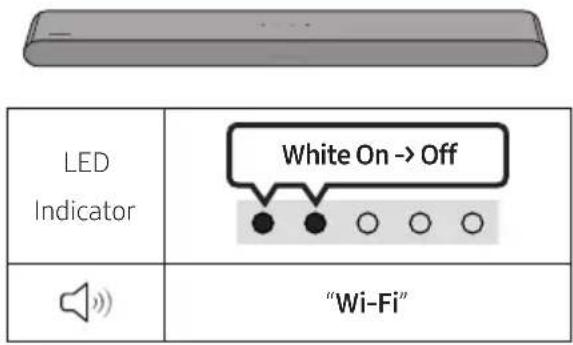
Connecting via Wi-Fi
Pre-connection Checklist
• Wi-Fi connection is available only on Samsung TV. - Check whether the wireless router (Wi-Fi) is turned on and the TV is connected to the router. - The TV and Soundbar must be connected to the same wireless network (Wi-Fi). - If your wireless router (Wi-Fi) uses a DFS channel, you will not be able to establish a Wi-Fi connection between the TV and Soundbar. Contact your Internet service provider for details. - Because the menus may differ depending on the year of manufacture, refer to your TV manual. - To connect the TV to the Soundbar via Wi-Fi, connect the Soundbar to the wireless router first. See page 32, for details on how to establish a Wi-Fi connection.
- For more information about Wi-Fi connection to the Soundbar, see page 32, "Method 2. Connecting via Wi-Fi (Wireless Network)".
- Change the input source of the TV by using the Audio menu to Soundbar.
• Samsung TVs released in 2017 or later
Home (☑) → Menu → Settings (💡) → All Settings (💡) → Sound → Sound Output → S-Series Soundbar (Wi-Fi)
Connecting to a TV that supports Dolby Atmos®
Pre-connection Checklist
- Dolby Atmos® is supported in "TV ARC" or "Wi-Fi" mode.
- Make sure that the content supports Dolby Atmos®.

- With the Soundbar and TV turned off, connect the HDMI cable as shown in the figure.
- Turn on the Soundbar and TV.
- TV sound is output from the Soundbar.


- Connect the Soundbar and TV to the same wireless network (Wi-Fi).
- For sound output of the TV, select Soundbar.
- TV sound is output from the Soundbar.
NOTES
- Configuring Dolby Atmos® on a BD player or other device connected to the TV. Open the audio output options on the settings menu of your BD player or other device and make sure that "No Encoding" is selected for Bitstream. For example, on a Samsung BD Player, go to Home Menu → Sound → Digital Output and then select Bitstream (unprocessed).
- This function is available in some Samsung TVs and some Soundbar models.
Using the Q-Symphony Function
For Q-Symphony, the Soundbar syncs with a Samsung TV to output sound through two devices for optimum surround effect. When the Soundbar is connected, the menu, "TV+Soundbar" appears under the Sound Output menu of the TV. Select the corresponding menu.


• TV menu example: TV + S-Series Soundbar (HDMI)


• TV menu example: TV + S-Series Soundbar (Wi-Fi)
NOTES
• It can operate according to the Codec supported by TV. - This function is supported only when the HDMI Cable or Optical Cable (not supplied) or Wi-Fi is connected. • The message displayed may differ with the TV model. - Ensure that your TV and Soundbar are connected to the same wireless router/frequency. - This function is available in some Samsung TVs and some Soundbar models.
Using the SpaceFit Sound
Provides optimized sound quality by analyzing the listening spaces.
Method 1. Connecting via Soundbar
To enable this function, turn on the SpaceFit Sound mode with the remote control of the Soundbar.
( ⚙️ (Sound Control) → "SpaceFit Sound Off" → ▲ (Up) → "SpaceFit Sound On")
• This is available in all Sound modes.
Method 2. Connecting via TV
To enable this function, turn on the Adaptive Sound+ mode on your Samsung TV menu.
(Home (💡) → Menu → Settings (💡) → All Settings (💡) → General → Intelligent Mode Settings → Adaptive Sound+)
- The sound mode on your Soundbar will automatically change to Adaptive Sound+ if you enable the Adaptive Sound+ mode on your TV.
NOTE
- This function works when the Soundbar connects to some of the Samsung TVs.
06 CONNECTING AN EXTERNAL DEVICE
Connecting using an Optical Cable
![graph TD A["BD / DVD player / Set-top box / Game console"] --> B["Optical OUT"] B --> C["Top of the Soundbar"] C --> D["Digital Audio IN (OPTICAL)"] D --> E["Bottom of the Soundbar"] E --> F["Optical Cable (not supplied)"] F --> G["Hand pointing at the Top of the Soundbar"]](/content/2026/06/1399505/images/f7f003a4dd70cc67504a23119b50b72c60836c02293dc314e3634b4e47a9aa72.jpg)

- With the external device and Soundbar turned off, connect the DIGITAL AUDIO IN (OPTICAL) port on the Soundbar and the OPTICAL output port on the external device with the optical cable (not supplied), as shown in the figure.
- Turn on the Soundbar and external device.
- Press the Ⓐ (Multi Function) button at the top of the Soundbar or the ➕ (Source) button on the remote control and then select the "Digital Audio In" mode. Then the announcement, "Digital Audio In" is output.
- The external device sound is output from the Soundbar.
07 CONNECTING A MOBILE DEVICE
Method 1. Connecting via Bluetooth
When a mobile device is connected using Bluetooth, you can hear stereo sound without the hassle of cabling.
- When you connect a paired Bluetooth device with the Soundbar off, the Soundbar automatically turns on.

The initial connection
- When connecting to a new Bluetooth device, make sure the device is within 1 m distance.
1.
| Bluetooth Pairing button LED | Indicator |
| OR When in "Bluetooth" mode | Red → Green → Blue Blinks ○○○○○○ Pairing → Cyan Blinks X3 ○○○○○○ Connection is complete • Until pairing is complete, the Multicolour LED changes as Red → Green → Blue in turn. |
| "Ready to connect via Bluetooth." |
- On your device, select "S-Series Soundbar" from the list that appears.
- Play music files from the device connected via Bluetooth through the Soundbar.
If the device fails to connect
- If you have an existing Soundbar (e.g., S-Series Soundbar) on the list of speakers on the Mobile device, delete it.
- Then repeat steps 1 and 2.
Notes on Bluetooth connection
- Locate a new device within 1 m to connect via Bluetooth communication.
- If asked for a PIN code when connecting a Bluetooth device, enter <0000>.
- The Soundbar automatically turns off after 18 minutes in the Ready state.
- The Soundbar may not perform Bluetooth search or connection correctly under the following circumstances:
- If there is a strong electrical field around the Soundbar.
- If several Bluetooth devices are simultaneously paired with the Soundbar.
- If the Bluetooth device is turned off, not in place, or malfunctions.
- Electronic devices may cause radio interference. Devices that generate electromagnetic waves must be kept away from the Soundbar main unit - e.g., microwaves, wireless LAN devices, etc.
• The Soundbar supports SBC data (44.1kHz, 48kHz).
- Connect only to a Bluetooth device that supports the A2DP (AV) function.
- You cannot connect the Soundbar to a Bluetooth device that supports only the HF (Hands Free) function.
- When connecting the Soundbar to a Bluetooth device, place them as close to each other as possible.
- The farther the Soundbar and Bluetooth device are from each other, the lower the sound quality will become.
The Bluetooth connection may break when the devices are out of the effective range.
- The Bluetooth connection may not function as intended in areas with poor reception.
- A Bluetooth device may experience noise or malfunction under the following conditions:
- When the body is in contact with the signal transceiver on the Bluetooth device or Soundbar
- In corners or when there is an obstacle in proximity, such as a wall or partition, where electrical changes may occur.
- - When exposed to radio interference from other products operating on the same frequency ranges, such as medical equipment, microwave ovens, and wireless LAN devices.
- Obstacles such as doors and walls may still impact the sound quality even when the devices are within the effective range.
- Note that your Soundbar cannot be paired with other Bluetooth devices while using the Bluetooth option.
- This wireless device may cause electrical interference during operation.
Disconnecting the Bluetooth device from a Soundbar
You can disconnect a Bluetooth device from the Soundbar. For instructions, see the Bluetooth device's user manual.
• The Soundbar will be disconnected. - If the Soundbar is disconnected from the Bluetooth device, the multicolour LED indicator on the Soundbar blinks "Red" three times.
Disconnecting the Soundbar from the Bluetooth device
Press the ⬆ (Multi Function) button at the top of the Soundbar or the ➞ (Source) button on the remote control to select the mode other than "Bluetooth".
- Disconnecting takes time because the Bluetooth device must receive a response from the Soundbar. (Disconnection time may differ, depending on the Bluetooth device)
Method 2. Connecting via Wi-Fi (Wireless Network)
To connect a Soundbar to a mobile device via a wireless network (Wi-Fi), the SmartThings app is required.
The initial connection
- Install and launch the SmartThings app from your mobile device (smartphone or tablet).
- On the app, follow the screen instructions to add the Soundbar.
- The automatic pop-up (the second screenshot below) may not show on some devices. If the pop-up window does not appear, press “+” on the Home screen. The Soundbar is added to the app.
• The illustration below may differ according to the app version.
![graph LR A["SmartThings App"] --> B["Home Screen"] B --> C["(AV) Samsung Soundbar"] C --> D["Get started with your Soundbar"] D --> E["Add new device"] E --> F["Start"] F --> G["Add device Auto pop-up"]](/content/2026/06/1399505/images/50324f1fc2f05f8b99ed15260b950c0bbe01743b9b37f489bba64b6d8b663369.jpg)
Using the Tap Sound
Tap the Soundbar with your mobile device to play audio from the mobile device through the Soundbar.
- This function may not be supported, depending on the mobile device.
- This function is only compatible with Samsung mobile devices with Android 8.1 or later.
![graph LR A["SmartThings App"] --> B["Mobile device"] B --> C["Top of the Soundbar"]](/content/2026/06/1399505/images/e2a3d8f489050a4cd1a404219c7329186b3c9f662c03eba33ae2af7ba26d27e9.jpg)
- Turn on the Tap Sound function on your mobile device.
- For details on how to turn on the function, refer to "Enable the Tap Sound function" below.
- Tap the Soundbar with the mobile device. Select "Start now" in the displayed message window. A connection is established between the mobile device and Soundbar via Bluetooth.
- Play audio from the mobile device through the Soundbar.
- This function connects a mobile device to the Soundbar via Bluetooth by detecting vibration that occurs when the device touches the Soundbar.
- Make sure the mobile device does not tap a sharp corner of the Soundbar. The Soundbar or mobile device may become scratched or damaged.
- It is recommended that the mobile device be covered with a case. Lightly tap the wide area in the upper portion of the Soundbar, without using excessive force.
- To use this function, update the SmartThings app to the latest version. The function may not be supported, depending on the app version.
Enable the Tap Sound function
Use the SmartThings app to turn on the Tap View, Tap Sound function.
- On the mobile device, run the SmartThings app.
- Select (≡→_) in the SmartThings app screen displayed on the mobile device.
- Set "Tap View, Tap Sound" to On to allow the function to work when a mobile device moves close to the Soundbar.
NOTES
- When the mobile device is in power-saving mode, the Tap Sound function does not work.
- The Tap Sound function may not work if there are devices near the Soundbar that cause radio interference such as electric devices. Make sure devices that may cause radio interference are placed at a sufficient distance away from the Soundbar.
08 CONNECTING VIA APPLE AIRPLAY 2
• This feature may not be available in some countries. - This Samsung Soundbar supports AirPlay 2 and requires iOS 11.4 or later.
With AirPlay 2, you can stream music, podcasts, and other audio from your Apple devices to the Samsung Soundbar.
- Make sure the Soundbar is powered on and connected to the same Wi-Fi network as your Apple device.
- Select from an AirPlay-supported app or Control Centre on your iPhone, iPad, or Mac.
- Select the Soundbar from the list of available devices to play the current audio to.
09 INSTALLING THE WALL MOUNT
Installation Precautions
• Install on a vertical wall only. - Do not install in a place with high temperature or humidity. - Verify whether the wall is strong enough to support the product's weight. If not, reinforce the wall or choose another installation point. • Purchase and use the fixing screws or anchors appropriate for the kind of wall you have (plaster board, iron board, wood, etc.). If possible, fix the support screws into wall studs.
• Purchase wall mounting screws according to the type and thickness of the wall you want to mount the Soundbar on.
- Diameter: M5
– Length: 35 mm or longer recommended.
- Connect cables from the unit to external devices before you install the Soundbar on the wall.
- Make sure the unit is turned off and unplugged from the power source before you install it. Otherwise, it may cause an electric shock.
Wallmount Components
Wall Mount Guide


Holder-Screw Screw Bracket-Wall Mount
- Place the Wall Mount Guide against the wall surface.
• The Wall Mount Guide must be level. - If your TV is mounted on the wall, install the Soundbar at least 5 cm below the TV.

- Align the Wall Mount Guide's Centre Line with the centre of your TV (if you are mounting the Soundbar below your TV), and then fix the Wall Mount Guide to the wall using tape.
- If you are not mounting below a TV, place the Centre Line in the centre of the installation area.
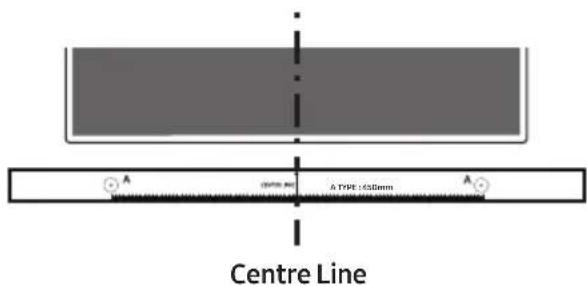
- Use a pen to mark the positions of the holes and remove the Wall Mount Guide.

- Using an appropriately sized drill bit, drill a hole in the wall at each marking.
- If the markings do not correspond to the positions of studs, make sure you insert appropriate anchors into the holes before you insert the support screws. If you use anchors, make sure the holes you drill are large enough for the anchors you use.
- Push a screw (not supplied) through each Holder-Screw, and then screw each screw firmly into a support screw hole.

- Install the 2 Bracket-Wall Mounts in the correct orientation on the bottom of the Soundbar using 2 Screws.

- When assembling, make sure the hanger part of the Bracket-Wall Mounts are located behind the rear of the Soundbar.

Right end of Soundbar
- The actual product may look different from the above image, depending on the model.
- Install the Soundbar with the attached Bracket-Wall Mounts by hanging the Bracket-Wall Mounts on the Holder-Screws on the wall.
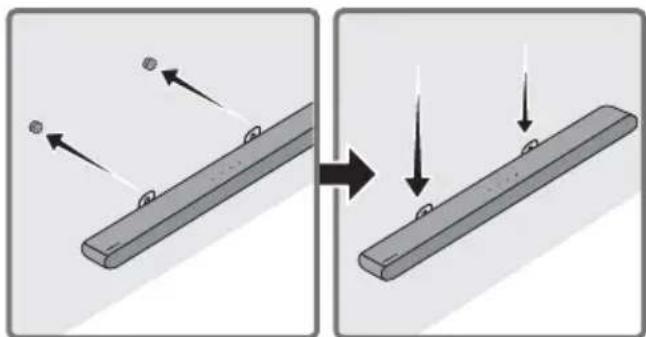
- Slide the Soundbar down as shown below so that the Bracket-Wall Mounts rest securely on the Holder-Screws.
- Insert the Holder-Screws into the wide (bottom) part of the Bracket-Wall Mounts, and then slide the Bracket-Wall Mounts down so that the Bracket-Wall Mounts rest securely on the Holder-Screws.
![graph TD A["Component 1"] --> B["Component 2"] style A fill:#f9f,stroke:#333 style B fill:#bbf,stroke:#333](/content/2026/06/1399505/images/6924d5b87277500c95c38168745b17662a4e8c19d8a3fc900068ecf3dfd519eb.jpg)
10 INSTALLING THE SOUNDBAR IN FRONT OF TV

Align the centre of the Soundbar to the centre of the TV as illustrated in the image.
At this time, place the Soundbar at least 3cm away from the TV so that there is no interference with voice recognition.
NOTES
• Make sure the Soundbar is placed on a flat and solid surface. - Insufficient gap from the TV may cause voice recognition and acoustic problems.
11 SOFTWARE UPDATE
Auto Update
When the Soundbar is connected to the Internet, software updates occur automatically even when the Soundbar is turned off.
- To use the Auto Update function, the Soundbar must be connected to the Internet. The Wi-Fi connection to the Soundbar will be terminated if the Soundbar's power cord is disconnected or the power is cut off. If the power is cut off, when the power comes back on or you reconnect the power cord, turn on the Soundbar, and then reconnect it to the Internet.
USB Update

Samsung may offer updates for the Soundbar's system firmware in the future.
When an update is available, you can update the Soundbar by connecting the USB drive that contains the update firmware to the SERVICE port of the Soundbar.
- Go to (www.samsung.com) → search for the model name from the customer support menu option.
- For more information about update, refer to Upgrade Guide.
- Download the upgrade file (USB type).
- Unzip the file to create a folder with the file name.
- Store the created folder in a USB and then connect it to the Soundbar.
- Turn on the Soundbar. Then the product is updated within 3 minutes.

- During update, do not turn it off or remove the USB.
- If the yellow LED is on after the software update is completed, this means that an additional update is in progress. When this happens, don't turn off the power or remove the USB.
- If update does not proceed, reconnect the Soundbar power cord.
- When the latest version is installed, no update is performed.
- Depending on the USB type, update may not be supported.
- If there is no update file available

- If the update file is for the same version or lower

Reset
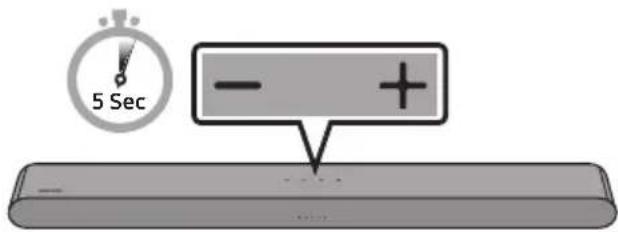
With the Soundbar on, press the - + (Volume) buttons on the body at the same time for at least 5 seconds. The LED display changes as shown below and then the Soundbar is reset.
![graph TD A["White moves from left to right and right to left"] --> B["Cyan Blinks X3"] B --> C["Red Blinks → Off"]](/content/2026/06/1399505/images/fa0338f0e8af92401651899a049b85e0fc6f870e868ce8f9903099b0173bac76.jpg)
CAUTION
- All the settings of the Soundbar are reset. Be sure to perform this only when a reset is required.
12 TROUBLESHOOTING
Refer to the instructions below if this product does not function properly.
Soundbar does not turn on.
→Check whether the power cord of the Soundbar is correctly inserted into the outlet.
Soundbar works erratically.
→After removing the power cord, insert it again. →Power cycle the external device and try again. →If there is no signal, the Soundbar automatically turns off after a certain period of time. Turn on the power. (See page 10.)
Remote control does not work.
→Point the remote directly at the Soundbar. →Replace the batteries with new ones.
The red LED indicator light on the soundbar stays on.
→The microphone is turned off. Turn on the microphone. (See page 8.)
The Soundbar does not output any sound.
→The volume of the Soundbar is too low or muted. Adjust the volume. →When any external device (STB, Bluetooth device, mobile device, etc.) is connected, adjust the volume of the external device. →For sound output of the TV, select Soundbar. (Samsung TV: Home ( →Menu → Settings ( →All Settings ( →Sound → Sound Output → Select Soundbar)
→The cable connection to the Soundbar may not be loose. Remove the cable and connect again. →Remove the power cord completely, reconnect, and turn the power on. →Reset the product and try again. (See page 39.)
If the TV is not connected via HDMI (ARC).
→Check whether the HDMI cable is correctly connected to the ARC terminal. (See page 18) →Connection may not be possible due to the connected external device (set-top box, game console, etc.). Directly connect the Soundbar. →HDMI-CEC may not be activated on the TV. Turn on the CEC on the TV menu. (Samsung TV: Home ( → Menu → Settings ( ) ⚙️ All Settings ( ➕ → Connection → External Device Manager → Anynet+ (HDMI-CEC) ON)
There is no sound in when connecting to the TV in HDMI (ARC) mode.
→Your device is unable to play the input signal. Change the TV's audio output to PCM or Dolby Digital. (For a Samsung TV: Home ( → Menu → Settings ( → All Settings ( )→Sound → Expert Settings → Digital Output Audio Format)
The Soundbar will not connect via Bluetooth.
→When connecting a new device, switch to Bluetooth Pairing for connection. (Press the
* PAIR button on the remote control or press the ⏻ (Mic On/Off) button on the body for at least 5 seconds.)
→If the Soundbar is connected to another device, disconnect that device first to switch the device.
→Reconnect it after removing the Bluetooth speaker list on the device to connect.
(Samsung TV: Home (→Menu →
Settings ( ⚙→ All Settings ( ) ➕ Sound → Sound Output → Bluetooth Speaker List)
→Remove and reconnect the power plug, then try again.
→Reset the product and try again. (See page 39.)
The sound drops out when connected via Bluetooth.
→Some devices can cause radio interference if they are located too close to the Soundbar. e.g., microwaves, wireless routers, etc.
→If your device that is connected via Bluetooth moves too far away from the Soundbar, it may cause the sound to drop out. Move the device closer to the Soundbar.
→If a part of your body is in contact with the Bluetooth transceiver or the product is installed on metal furniture, the sound may drop out. Check the installation environment and conditions for use.
Unable to connect to Wi-Fi.
→Check whether your wireless router is on. →Turn off the router, turn it back on, and then try again. →The Soundbar will not connect if the wireless signal is too weak. Try moving the router closer to the Soundbar, or eliminating any obstacles that are between the Soundbar and the router, if possible. →If your wireless router is new, you will need to reconfigure the speaker's network settings.
The Soundbar does not turn on automatically with the TV.
→When you turn off the Soundbar while watching TV, power synchronization with the TV is disabled. First turn off the TV.
The AVA function is not available in the following cases.
→The AVA function will not be available using Q-Symphony function. →The AVA function will not be available when the microphone is turned off.
After connecting the TV to the Soundbar, I switched the Soundbar mode. Then no sound is output from the TV.
If you connect your Soundbar to a mobile device while the Soundbar is connected to the TV, the Soundbar outputs sound from the mobile device while keeping the TV connection. So the TV sound will not be delivered anywhere.
Disconnect the mobile device, and the TV sound will be output from the Soundbar again.
13 LICENCE
Dolby
ATMOS
Dolby, Dolby Atmos, and the double-D symbol are registered trademarks of Dolby Laboratories Licensing Corporation. Manufactured under license from Dolby Laboratories. Confidential unpublished works. Copyright © 2012-2021 Dolby Laboratories. All rights reserved.
dts.
For DTS patents, see http://patents.dts.com. Manufactured under license from DTS, Inc. (for companies headquartered in the U.S./Japan/Taiwan) or under license from DTS Licensing Limited (for all other companies). DTS, Digital Surround, Virtual:X, and the DTS logo are registered trademarks or trademarks of DTS, Inc. in the United States and other countries. © 2021 DTS, Inc. ALL RIGHTS RESERVED.

The terms HDMI and HDMI High-Definition Multimedia Interface, and the HDMI Logo are trademarks or registered trademarks of HDMI Licensing Administrator, Inc. in the United States and other countries.

- Use your phone, tablet or computer as a remote control for Spotify. Go to spotify.com/connect to learn how - The Spotify Software is subject to third party licenses found here: https://www.spotify.com/connect/third-party-licenses.

- Apple, Airplay, iPhone, iPad, and Mac are trademarks of Apple Inc., registered in the U.S. and other countries. - Use of the Works with Apple badge means that an accessory has been designed to work specifically with the technology identified in the badge and has been certified by the developer to meet Apple performance standards.

[ENERGY STAR]
ENERGY STAR qualified model only
- Your Samsung product is ENERGY STAR qualified in its factory default setting. Change to certain features, settings and functionality in this product can change the power consumption, possibly beyond the limits required for ENERGY STAR qualification.
- Environmental Protection Agency and Department of Energy. ENERGY STAR is a joint program of the Government agencies, designed to promote energy efficient products and practices.
Refer to www.energystar.gov for more information about the ENERGY STAR Program.
ENERGY STAR qualified model only
(Applicable to Thin Client models only)
As an ENERGY STAR® Partner, SAMSUNG has determined that this product meets the ENERGY STAR® guidelines for energy efficiency.
- The ENERGY STAR Program has been designed to reduce greenhouse gas emissions and save energy through voluntary labeling.
- Power management settings of this product have been enabled by default, and have various timing settings from 1 minute to 5 hours.
- The product can be woken from sleep mode by pressing a button on the chassis.
ENERGY STAR qualified model only (The other models)
- As an ENERGY STAR Partner, Samsung has determined that this product or product models meet the ENERGY STAR guidelines for energy efficiency.
14 OPEN SOURCE LICENCE NOTICE
To send inquiries and requests for questions regarding open sources, contact Samsung Open Source (http://opensource.samsung.com)
15 IMPORTANT NOTES ABOUT SERVICE
- Figures and illustrations in this User Manual are provided for reference only and may differ from actual product appearance.
- An administration fee may be charged if either
(a) an engineer is called out at your request and there is no defect with the product (i.e. where the user manual has not been read).
(b) you bring the unit to a repair centre and there is no defect with the product (i.e. where the user manual has not been read).
- You will be informed of the administration fee amount before a technician visits.
16 SPECIFICATIONS AND GUIDE
Specifications
| Model Name | HW-S60B / HW-S61B / HW-S66B / HW-S67B / HW-S68B |
| Weight 2.7 kg | |
| Dimensions (W x H x D) 670.0 x 62.0 x 105.0 mm | |
| Operating Temperature Range +5°C to +35°C | |
| Operating Humidity Range 10 % ~ 75 % | |
| AMPLIFIERRated Output power (30W x 2) + (30W x 2) + (30W x 2) + 20W | |
| Supported play formats | Dolby 5.1ch / Dolby Digital Plus / Dolby ATMOS (Dolby Digital Plus) / DTS 5.1ch / LPCM 2ch |
| WIRELESS DEVICE OUTPUT POWERWi-Fi max transmitter power | 100mW at 2.4GHz – 2.4835GHz, 200mW at 5.15GHz – 5.25GHz, 100mW at 5.25GHz – 5.35GHz & 5.47GHz – 5.725GHz |
| WIRELESS DEVICE OUTPUT POWERBT max transmitter power | 100mW at 2.4GHz – 2.4835GHz |
NOTES
• Samsung Electronics Co., Ltd reserves the right to change the specifications without notice. • Weight and dimensions are approximate.
Precaution: The Soundbar will restart automatically if you turn on/turn off Wi-Fi.
| Overall Standby Power Consumption (W) | 4.2W |
| Wi-Fi Port deactivation method | Press the CH LEVEL button on the remote control of the Soundbar for 30 seconds to turn Wi-Fi On / Off. |
| Bluetooth Port deactivation method | Press the TONE CONTROL button on the remote control of the Soundbar for 30 seconds to turn Bluetooth On / Off. |
Hereby, Samsung declares that this radio equipment is in compliance with Directive 2014/53/EU and the relevant UK statutory requirements.
The full text of the declaration of conformity is available at the following internet address:
http://www.samsung.com go to Support and enter the model name.
This equipment may be operated in all EU countries and in the UK.
The 5GHz WLAN (Wi-Fi or SRD) function of this equipment may only be operated indoors.
[Correct disposal of batteries in this product]
(Applicable in countries with separate collection systems)
This marking on the battery, manual or packaging indicates that the batteries in this product should not be disposed of with other household waste at the end of their working life. Where marked, the chemical symbols Hg, Cd or Pb indicate that the battery contains mercury, cadmium or lead above the reference levels in EC Directive 2006/66.
If batteries are not properly disposed of, these substances can cause harm to human health or the environment.
To protect natural resources and to promote material reuse, please separate batteries from other types of waste and recycle them through your local, free battery return system.

Correct Disposal of This Product
(Waste Electrical & Electronic Equipment)
(Applicable in countries with separate collection systems)
This marking on the product, accessories or literature indicates that the product and its electronic accessories (e.g. charger, headset, USB cable) should not be disposed of with other household waste at the end of their working life. To prevent possible harm to the environment or human health from uncontrolled waste disposal, please separate these items from other types of waste and recycle them responsibly to promote the sustainable reuse of material resources.
Household users should contact either the retailer where they purchased this product, or their local government office, for details of where and how they can take these items for environmentally safe recycling.
Business users should contact their supplier and check the terms and conditions of the purchase contract. This product and its electronic accessories should not be mixed with other commercial wastes for disposal.
For information on Samsung's environmental commitments and product specific regulatory obligations e.g. REACH, WEEE, Batteries, visit:
www.samsung.com/uk/aboutsamsung/sustainability/environment/our-commitment/data/
COMMISSION REGULATION (EU) 2019/1782
Ecodesign requirements for external power supplies :
www.samsung.com/global/ecodesign_component
INFORMATIONS RELATIVES À LA SÉCURITÉ
AVERTISSEMENTS
TO AVOID THE RISK OF ELECTRIC SHOCK, DO NOT REMOVE THE COVER.
THE DEVICE CONTAINS NO USER-SERVICEABLE PARTS; CONTACT A QUALIFIED AFTER-SALES SERVICE.
02 PRODUCT OVERVIEW
▶II (Play/Pause)
Initial connection
1.
![graph LR TV["TV"] --> OpticalOut["OPTICAL OUT"] OpticalOut --> CableOptique["Câble optique (non fourni)"] CableOptique --> DigitalAudioIn["DIGITAL AUDIO IN (OPTICAL)"] DigitalAudioIn --> PartieSupérieure["Partie supérieure de la Soundbar"] DigitalAudioIn --> PartieInférieure["Partie inférieure de la…](/content/2026/06/1399505/images/a75211ef1f7a1e58d7bd97c656564dbe15e28d858608185b43b013ff1ae60926.jpg)

08 CONNECTION VIA APPLE AIRPLAY 2
10 INSTALLING THE SOUNDBAR IN FRONT OF THE TV
Dolby, Dolby Atmos, and the double-D symbol are registered trademarks of Dolby Laboratories Licensing Corporation. Manufactured under license from Dolby Laboratories. Confidential unpublished works. Copyright © 2012-2021 Dolby Laboratories. All rights reserved.
10 INSTALLING THE SOUNDBAR IN FRONT OF THE TV

Dolby, Dolby Atmos, and the double-D symbol are registered trademarks of Dolby Laboratories Licensing Corporation. Manufactured under license from Dolby Laboratories. Confidential unpublished works. Copyright © 2012-2021 Dolby Laboratories. All rights reserved.
The terms HDMI and HDMI High-Definition Multimedia Interface, and the HDMI Logo are trademarks or registered trademarks of HDMI Licensing Administrator, Inc. in the United States and other countries.
For DTS patents, see http://patents.dts.com. Manufactured under license from DTS, Inc. (for companies headquartered in the U.S./Japan/Taiwan) or under license from DTS Licensing Limited (for all other companies). DTS, Digital Surround, Virtual:X, and the DTS logo are registered trademarks or trademarks of DTS, Inc. in the United States and other countries. © 2021 DTS, Inc. ALL RIGHTS RESERVED.

The terms HDMI and HDMI High-Definition Multimedia Interface, and the HDMI Logo are trademarks or registered trademarks of HDMI Licensing Administrator, Inc. in the United States and other countries.

• Apple, AirPlay, iPhone, iPad, and Mac are trademarks of Apple Inc., registered in the U.S. and other countries. - Use of the Works with Apple badge means that an accessory has been designed to work specifically with the technology identified in the badge and has been certified by the developer to meet Apple performance standards.

[ENERGY STAR]
ENERGY STAR qualified model only
- Your Samsung product is ENERGY STAR qualified in its factory default setting. Changing certain features, settings, and functionality in this product can change the power consumption, possibly beyond the limits required for ENERGY STAR qualification.
- Environmental Protection Agency and Department of Energy. ENERGY STAR is a joint program of these government agencies, designed to promote energy-efficient products and practices.
Refer to www.energystar.gov for more information about the ENERGY STAR Program.
ENERGY STAR qualified model only (Applicable to Thin Client models only)
As an ENERGY STAR® Partner, SAMSUNG has determined that this product meets the ENERGY STAR® guidelines for energy efficiency.
- The ENERGY STAR Program has been designed to reduce greenhouse gas emissions and save energy through voluntary labeling.
- Power management settings of this product have been enabled by default, and have various timing settings from 1 minute to 5 hours.
- The product can wake from sleep mode with a button press on the chassis.
ENERGY STAR qualified model only (The other models)
- As an ENERGY STAR Partner, Samsung has determined that this product or product models meets the ENERGY STAR guidelines for energy efficiency.
14 FREE LICENSE NOTICE
WOOFER LEVEL (BASS)
TONE CONTROL

08 CONNECTION VIA APPLE AIRPLAY 2
Dolby, Dolby Atmos, and the double-D symbol are registered trademarks of Dolby Laboratories Licensing Corporation. Manufactured under license from Dolby Laboratories. Confidential unpublished works. Copyright © 2012-2021 Dolby Laboratories. All rights reserved.
dts.
For DTS patents, see http://patents.dts.com. Manufactured under license from DTS, Inc. (for companies headquartered in the U.S./Japan/Taiwan) or under license from DTS Licensing Limited (for all other companies). DTS, Digital Surround, Virtual:X, and the DTS logo are registered trademarks or trademarks of DTS, Inc. in the United States and other countries. © 2021 DTS, Inc. ALL RIGHTS RESERVED.

The terms HDMI and HDMI High-Definition Multimedia Interface, and the HDMI Logo are trademarks or registered trademarks of HDMI Licensing Administrator, Inc. in the United States and other countries.

• Apple, Airplay, iPhone, iPad, and Mac are trademarks of Apple Inc., registered in the U.S. and other countries. - Use of the Works with Apple badge means that an accessory has been designed to work specifically with the technology identified in the badge and has been certified by the developer to meet Apple performance standards.

[ENERGY STAR]
ENERGY STAR qualified model only
- Your Samsung product is ENERGY STAR qualified in its factory default setting. Change to certain features, settings and functionality in this product can change the power consumption, possibly beyond the limits required for ENERGY STAR qualification. - Environmental Protection Agency and Department of Energy. ENERGY STAR is a joint program of the Government agencies, designed to promote energy efficient products and practices.
Refer to www.energystar.gov for more information of the ENERGY STAR Program.
ENERGY STAR qualified model only
(Applicable to Thin Client models only)
As an ENERGY STAR® Partner, SAMSUNG has determined that this product meets the ENERGY STAR® guidelines for energy efficiency.
– The ENERGY STAR Program has been to reduced greenhouse gas emissions and save energy through voluntary labeling. – Power management setting of this product have been enabled by default, and have various timing setting from 1 minutes to 5 hours. - The product can wake with a button press on the chassis from sleep mode.
ENERGY STAR qualified model only (The other models)
- As an ENERGY STAR Partner, Samsung has determined that this product or product model meets the ENERGY STAR guidelines for energy efficiency.
14 NOTICE OF
OPEN SOURCE LICENSE
http://www.samsung.com/it/aboutsamsung/sustainability/environment/our-commitment/data/
COMMISSION REGULATION (EU) 2019/1782
![graph LR TV["TV"] --> OpticalOut["OPTICAL OUT"] OpticalOut --> CableOplicato["Cable óptico (no suministrado)"] CableOplicato --> DigitalAudioIn["DIGITAL AUDIO IN (OPTICAL)"] DigitalAudioIn --> ParteSuperior["Parte superior de la Soundbar"] DigitalAudioIn --> ParteInferior["Parte inferior de la Sound…](/content/2026/06/1399505/images/dafaa812c862c43f57246d401a51f2a2135256cabfe1396e61933864d63d4a6e.jpg)
Dolby, Dolby Atmos, and the double-D symbol are registered trademarks of Dolby Laboratories Licensing Corporation. Manufactured under license from Dolby Laboratories. Confidential unpublished works. Copyright © 2012-2021 Dolby Laboratories. All rights reserved.
dts.
For DTS patents, see http://patents.dts.com. Manufactured under license from DTS, Inc. (for companies headquartered in the U.S./Japan/Taiwan) or under license from DTS Licensing Limited (for all other companies). DTS, Digital Surround, Virtual:X, and the DTS logo are registered trademarks or trademarks of DTS, Inc. in the United States and other countries. © 2021 DTS, Inc. ALL RIGHTS RESERVED.

The terms HDMI and HDMI High-Definition Multimedia Interface, and the HDMI Logo are trademarks or registered trademarks of HDMI Licensing Administrator, Inc. in the United States and other countries.

- Apple, Airplay, iPhone, iPad, and Mac are trademarks of Apple Inc., registered in the U.S. and other countries.
- Use of the Works with Apple badge means that an accessory has been designed to work specifically with the technology identified in the badge and has been certified by the developer to meet Apple performance standards.

[ENERGY STAR]
ENERGY STAR qualified model only
- Your Samsung product is ENERGY STAR qualified in its factory default setting. Change to certain features, settings and functionality in this product can change the power consumption, possibly beyond the limits required for ENERGY STAR qualification.
- Environmental Protection Agency and Department of Energy. ENERGY STAR is a joint program of the Government agencies, designed to promote energy efficient products and practices.
Refer to www.energystar.gov for more information about the ENERGY STAR Program.
ENERGY STAR qualified model only
(Applicable to Thin Client models only)
As an ENERGY STAR® Partner, SAMSUNG has determined that this product meets the ENERGY STAR® guidelines for energy efficiency.
- The ENERGY STAR Program has been designed to reduce greenhouse gas emissions and save energy through voluntary labeling.
- Power management settings of this product have been enabled by default, and have various timing settings from 1 minute to 5 hours.
- The product can wake with a button press on the chassis from sleep mode.
ENERGY STAR qualified model only (The other models)
- As an ENERGY STAR Partner, Samsung has determined that this product or product models meets the ENERGY STAR guideline for energy efficiency.
14 OPEN SOURCE LICENSE NOTICE
www.samsung.com/uk/aboutsamsung/sustainability/environment/our-commitment/data/
![graph LR A["TV"] --> B["OPTICAL OUT"] B --> C["Cabo ótico (não fornecido)"] C --> D["DIGITAL AUDIO IN (OPTICAL)"] D --> E["Parte inferior do Soundbar"] E --> F["Parte superior do Soundbar"] F --> G["- + ∅"]](/content/2026/06/1399505/images/78c5e756a20e935483c092180112a199f90cde37b7a60f2bc46a2f5ed239d89b.jpg)


- Example of TV menu: TV + S-Series Soundbar (Wi-Fi)
NOTES
10 INSTALLING THE SOUNDBAR IN FRONT OF THE TV

Dolby, Dolby Atmos, and the double-D symbol are registered trademarks of Dolby Laboratories Licensing Corporation. Manufactured under license from Dolby Laboratories. Confidential unpublished works. Copyright © 2012-2021 Dolby Laboratories. All rights reserved.
dts.
For DTS patents, see http://patents.dts.com. Manufactured under license from DTS, Inc. (for companies headquartered in the U.S./Japan/Taiwan) or under license from DTS Licensing Limited (for all other companies). DTS, Digital Surround, Virtual:X, and the DTS logo are registered trademarks or trademarks of DTS, Inc. in the United States and other countries. © 2021 DTS, Inc. ALL RIGHTS RESERVED.

The terms HDMI and HDMI High-Definition Multimedia Interface, and the HDMI Logo are trademarks or registered trademarks of HDMI Licensing Administrator, Inc. in the United States and other countries.

- Apple, Airplay, iPhone, iPad, and Mac are trademarks of Apple Inc., registered in the U.S. and other countries. - Use of the Works with Apple badge means that an accessory has been designed to work specifically with the technology identified in the badge and has been certified by the developer to meet Apple performance standards.

[ENERGY STAR]
ENERGY STAR qualified model only
- Your Samsung product is ENERGY STAR qualified in its factory default setting. Change to certain features, settings and functionality in this product can change the power consumption, possibly beyond the limits required for ENERGY STAR qualification.
- Environmental Protection Agency and Department of Energy. ENERGY STAR is a joint program of the Government agencies, designed to promote energy efficient products and practices.
Refer to www.energystar.gov for more information of the ENERGY STAR Program.
ENERGY STAR qualified model only (Applicable to Thin Client models only)
As an ENERGY STAR® Partner, SAMSUNG has determined that this product meets the ENERGY STAR® guidelines for energy efficiency.
– The ENERGY STAR Program has been to reduced greenhouse gas emissions and save energy through voluntary labeling. - Power management setting of this product have been enabled by default, and have various timing setting from 1 minutes to 5 hours. - The product can wake with a button press on the chassis from sleep mode.
ENERGY STAR qualified model only (The other models)
- As an ENERGY STAR Partner, Samsung has determined that this product or product models meets the ENERGY STAR guideline for energy efficiency.
14 OPEN SOURCE LICENSE NOTICE
To send questions and requests for clarification regarding open sources, contact Samsung Open Source by email (http://opensource.samsung.com)
15 IMPORTANT NOTE ABOUT SERVICE
www.samsung.com/uk/aboutsamsung/sustainability/environment/our-commitment/data/
Active Voice Amplifier (AVA) 14
| Led-lampje | |
 | “SpaceFit Sound” → “Active Voice Amplifier” → “Voice enhancement” → “Night mode” → “Sync” → “Virtual” |
| Led-lampje | Rood → Groen → Blauw knipperendKoppelen → Cyaan knippert X3Verbinding is voltooid | |
 | "Ready to connect via Bluetooth." | |
8
Active Voice Amplifier (AVA)
![graph TD A["TV"] --> B["OPTICAL OUT"] B --> C["Optische kabel (niet meegeleverd)"] C --> D["DIGITAL AUDIO IN (OPTICAL)"] D --> E["Onderkant van de Soundbar"] E --> F["Bovenkant van de Soundbar"] F --> G["- + ∅"]](/content/2026/06/1399505/images/624b810b09a8b63c22317c7eb708fefc13195c0790c47b24f4723913d5256898.jpg)
| Led-lampje | "Digital Audio In" |
• Samsung TVs from 2017 or later
Start (☑) → Menu → Settings (☑) → All Settings (☑) → Sound → Sound Output → S-Series Soundbar (Wi-Fi)
| Led- lampje | Wit Aan -> Uit | "TV ARC" |
(Sound Adjustment) → "SpaceFit Sound Off" → ▲ (Up) → "SpaceFit Sound On")
12 TROUBLESHOOTING
Dolby, Dolby Atmos, and the double-D symbol are registered trademarks of Dolby Laboratories Licensing Corporation. Manufactured under license from Dolby Laboratories. Confidential unpublished works. Copyright © 2012-2021 Dolby Laboratories. All rights reserved.
dts.
For DTS patents, see http://patents.dts.com. Manufactured under license from DTS, Inc. (for companies headquartered in the U.S./Japan/Taiwan) or under license from DTS Licensing Limited (for all other companies). DTS, Digital Surround, Virtual:X, and the DTS logo are registered trademarks or trademarks of DTS, Inc. in the United States and other countries. © 2021 DTS, Inc. ALL RIGHTS RESERVED.

The terms HDMI and HDMI High-Definition Multimedia Interface, and the HDMI Logo are trademarks or registered trademarks of HDMI Licensing Administrator, Inc. in the United States and other countries.

Works with Apple AirPlay
- Apple, Airplay, iPhone, iPad, and Mac are trademarks of Apple Inc., registered in the U.S. and other countries.
- Use of the Works with Apple badge means that an accessory has been designed to work specifically with the technology identified in the badge and has been certified by the developer to meet Apple performance standards.

[ENERGY STAR]
ENERGY STAR qualified model only
- Your Samsung product is ENERGY STAR qualified in its factory default setting. Changing certain features, settings, and functionality in this product can change the power consumption, possibly beyond the limits required for ENERGY STAR qualification.
- Environmental Protection Agency and Department of Energy. ENERGY STAR is a joint program of these government agencies, designed to promote energy efficient products and practices.
Refer to www.energystar.gov for more information about the ENERGY STAR Program.
ENERGY STAR qualified model only
(Applicable to Thin Client models only)
As an ENERGY STAR® Partner, SAMSUNG has determined that this product meets the ENERGY STAR® guidelines for energy efficiency.
- The ENERGY STAR Program has been designed to reduce greenhouse gas emissions and save energy through voluntary labeling.
- Power management settings of this product have been enabled by default, and have various timing settings from 1 minute to 5 hours.
- The product can wake with a button press on the chassis from sleep mode.
ENERGY STAR qualified model only (The other models)
- As an ENERGY STAR Partner, Samsung has determined that this product or product models meets the ENERGY STAR guideline for energy efficiency.
14 OPEN SOURCE LICENSE NOTICE
www.samsung.com/uk/aboutsamsung/sustainability/environment/our-commitment/data/
COMMISSION REGULATION (EU) 2019/1782
![graph LR TV["TV"] --> OpticalOut["OPTICAL OUT"] OpticalOut --> OptischesKabel["Optisches Kabel (nicht mitgeliefert)"] OptischesKabel --> DigitalAudioIn["Digital Audio In (OPTICAL)"] DigitalAudioIn --> OberseiteSoundBar["Oberseite der Soundbar"] OberseiteSoundBar --> Counter1["Counter 1"] Counter1 --…](/content/2026/06/1399505/images/9671cc8899822918bf723167224221da411e404a20894ce3e559bbd4d09dfcfb.jpg)

Dolby, Dolby Atmos, and the double-D symbol are registered trademarks of Dolby Laboratories Licensing Corporation. Manufactured under license from Dolby Laboratories. Confidential unpublished works. Copyright © 2012-2021 Dolby Laboratories. All rights reserved.
dts.
For DTS patents, see http://patents.dts.com. Manufactured under license from DTS, Inc. (for companies headquartered in the U.S./Japan/Taiwan) or under license from DTS Licensing Limited (for all other companies). DTS, Digital Surround, Virtual:X, and the DTS logo are registered trademarks or trademarks of DTS, Inc. in the United States and other countries. © 2021 DTS, Inc. ALL RIGHTS RESERVED.

The terms HDMI and HDMI High-Definition Multimedia Interface, and the HDMI Logo are trademarks or registered trademarks of HDMI Licensing Administrator, Inc. in the United States and other countries.

Works with Apple AirPlay
• Apple, Airplay, iPhone, iPad, and Mac are trademarks of Apple Inc., registered in the U.S. and other countries. - Use of the Works with Apple badge means that an accessory has been designed to work specifically with the technology identified in the badge and has been certified by the developer to meet Apple performance standards.

[ENERGY STAR]
ENERGY STAR qualified model only
- Your Samsung product is ENERGY STAR qualified in its factory default setting. Change to certain features, settings and functionality in this product can change the power consumption, possibly beyond the limits required for ENERGY STAR qualification.
- Environmental Protection Agency and Department of Energy. ENERGY STAR is a joint program of the Government agencies, designed to promote energy efficient products and practices.
Refer to www.energystar.gov for more information of the ENERGY STAR Program.
ENERGY STAR qualified model only
(Applicable to Thin Client models only)
As an ENERGY STAR® Partner, SAMSUNG has determined that this product meets the ENERGY STAR® guidelines for energy efficiency.
– The ENERGY STAR Program has been designed to reduce greenhouse gas emissions and save energy through voluntary labeling. – Power management settings of this product have been enabled by default, and have various timing settings from 1 minute to 5 hours. - The product can wake with a button press on the chassis from sleep mode.
ENERGY STAR qualified model only (The other models)
- As an ENERGY STAR Partner, Samsung has determined that this product or product models meets the ENERGY STAR guideline for energy efficiency.
14 OPEN SOURCE LICENSE NOTICE
www.samsung.com/uk/aboutsamsung/sustainability/environment/our-commitment/data/
COMMISSION REGULATION (EU) 2019/1782
TABLE OF CONTENTS
01 Check the components 6
Active Voice Amplifier (AVA)
![graph LR TV["TV"] --> OpticalOut["Optical OUT"] OpticalOut --> Optiskkabel["Optisk kabel (medföljer inte)"] Optiskkabel --> DigitalAudioIn["Digital Audio In (Optical)"] DigitalAudioIn --> UndersidanSoundbar["Undersidan av Soundbar"] DigitalAudioIn --> OversidanavSoundbar["Översidan av Soundbar"]](/content/2026/06/1399505/images/495d4531f92b551d040ee3fb1f47dfb2e92d62401e6a0ec0ed357e38696e3854.jpg)
| LED-indikator | "Digital Audio In" |
08 CONNECTING VIA APPLE AIRPLAY 2
Dolby, Dolby Atmos, and the double-D symbol are registered trademarks of Dolby Laboratories Licensing Corporation. Manufactured under license from Dolby Laboratories. Confidential unpublished works. Copyright © 2012-2021 Dolby Laboratories. All rights reserved.
dts.
For DTS patents, see http://patents.dts.com. Manufactured under license from DTS, Inc. (for companies headquartered in the U.S./Japan/Taiwan) or under license from DTS Licensing Limited (for all other companies). DTS, Digital Surround, Virtual:X, and the DTS logo are registered trademarks or trademarks of DTS, Inc. in the United States and other countries. © 2021 DTS, Inc. ALL RIGHTS RESERVED.

The terms HDMI and HDMI High-Definition Multimedia Interface, and the HDMI Logo are trademarks or registered trademarks of HDMI Licensing Administrator, Inc. in the United States and other countries.

• Apple, Airplay, iPhone, iPad, and Mac are trademarks of Apple Inc., registered in the U.S. and other countries. - Use of the Works with Apple badge means that an accessory has been designed to work specifically with the technology identified in the badge and has been certified by the developer to meet Apple performance standards.

[ENERGY STAR]
ENERGY STAR qualified model only
- Your Samsung product is ENERGY STAR qualified in its factory default setting. Change to certain features, settings and functionality in this product can change the power consumption, possibly beyond the limits required for ENERGY STAR qualification.
- Environmental Protection Agency and Department of Energy. ENERGY STAR is a joint program of the Government agencies, designed to promote energy efficient products and practices.
Refer to www.energystar.gov for more information of the ENERGY STAR Program.
ENERGY STAR qualified model only (Applicable to Thin Client models only)
As an ENERGY STAR® Partner, SAMSUNG has determined that this product meets the ENERGY STAR® guidelines for energy efficiency.
- The ENERGY STAR Program has been to reduced greenhouse gas emissions and save energy through voluntary labeling.
- Power management setting of this product have been enabled by default, and have various timing setting from 1 minutes to 5 hours.
- The product can wake with a button press on the chassis from sleep mode.
ENERGY STAR qualified model only (The other models)
- As an ENERGY STAR Partner, Samsung has determined that this product or product models meets the ENERGY STAR guideline for energy efficiency.
14 OPEN SOURCE LICENSE NOTICE
www.samsung.com/uk/aboutsamsung/sustainability/environment/our-commitment/data/
COMMISSION REGULATION (EU) 2019/1782
Active Voice Amplifier (AVA) 14
Active Voice Amplifier (AVA)
![graph LR TV["TV"] --> OpticalOut["Optical OUT"] OpticalOut --> Optiskkabel["Optisk kabel (følger ikke med)"] Optiskkabel --> DigitalAudioIn["Digital Audio In (Optical)"] DigitalAudioIn --> BunnenavSoundbar["Bunnen av Soundbar"] BunnenavSoundbar --> Display["Oversiden av Soundbar"]](/content/2026/06/1399505/images/15d7bbb6724278a91d5a95d13b8a3c3428648d0372d9e29aa5e1a1c889db673a.jpg)
| LED-indikator | «Digital Audio In» |
08 CONNECT TO VIA APPLE AIRPLAY 2
Dolby, Dolby Atmos, and the double-D symbol are registered trademarks of Dolby Laboratories Licensing Corporation. Manufactured under license from Dolby Laboratories. Confidential unpublished works. Copyright © 2012-2021 Dolby Laboratories. All rights reserved.
dts.
For DTS patents, see http://patents.dts.com. Manufactured under license from DTS, Inc. (for companies headquartered in the U.S./Japan/Taiwan) or under license from DTS Licensing Limited (for all other companies). DTS, Digital Surround, Virtual:X, and the DTS logo are registered trademarks or trademarks of DTS, Inc. in the United States and other countries. © 2021 DTS, Inc. ALL RIGHTS RESERVED.

The terms HDMI and HDMI High-Definition Multimedia Interface, and the HDMI Logo are trademarks or registered trademarks of HDMI Licensing Administrator, Inc. in the United States and other countries.

Works with Apple AirPlay
- Apple, Airplay, iPhone, iPad, and Mac are trademarks of Apple Inc., registered in the U.S. and other countries.
- Use of the Works with Apple badge means that an accessory has been designed to work specifically with the technology identified in the badge and has been certified by the developer to meet Apple performance standards.

[ENERGY STAR]
ENERGY STAR qualified model only
- Your Samsung product is ENERGY STAR qualified in its factory default setting. Change to certain features, settings and functionality in this product can change the power consumption, possibly beyond the limits required for ENERGY STAR qualification.
- Environmental Protection Agency and Department of Energy. ENERGY STAR is a joint program of the Government agencies, designed to promote energy efficient products and practices.
Refer to www.energystar.gov for more information of the ENERGY STAR Program.
ENERGY STAR qualified model only
(Applicable to Thin Client models only)
As an ENERGY STAR® Partner, SAMSUNG has determined that this product meets the ENERGY STAR® guidelines for energy efficiency.
- The ENERGY STAR Program has been to reduced greenhouse gas emissions and save energy through voluntary labeling.
- Power management setting of this product have been enabled by default, and have various timing setting from 1 minutes to 5 hours.
- The product can wake with a button press on the chassis from sleep mode.
ENERGY STAR qualified model only (The other models)
- As an ENERGY STAR Partner, Samsung has determined that this product or product models meets the ENERGY STAR guideline for energy efficiency.
14 LISENSMERKNADER OM ÅPEN KILDEKODE
www.samsung.com/uk/aboutsamsung/sustainability/environment/our-commitment/data/
KOMMISJONSFORORDNING (EU) 2019/1782
Active Voice Amplifier (AVA) 14
"Adaptive Sound" → "DTS Virtual:X" → "Music" → "Game" → "Standard"
"Adaptive Sound" → "DTS Virtual:X" → "Music" → "Game" → "Standard"
"Adaptive Sound" → "DTS Virtual:X" → "Music" → "Game" → "Standard"
"Adaptive Sound" → "DTS Virtual:X" → "Music" → "Game" → "Standard"
"Adaptive Sound" → "DTS Virtual:X" → "Music" → "Game" → "Standard"
"Adaptive Sound" → "DTS Virtual:X" → "Music" → "Game" → "Standard"
"Adaptive Sound" → "DTS Virtual:X" → "Music" → "Game" → "Standard"
"Adaptive Sound" → "DTS Virtual:X" → "Music" → "Game" → "Standard"
"Adaptive Sound" → "DTS Virtual:X" → "Music" → "Game" → "Standard"
Active Voice Amplifier (AVA)
![graph TD A["TV"] --> B["OPTICAL OUT"] B --> C["Optinen kaapeli (ei mukana)"] C --> D["Digital Audio IN (OPTICAL)"] D --> E["Soundbarin yläosa"] E --> F["Soundbarin pohja"] F --> G["- + ∅"]](/content/2026/06/1399505/images/0ae68f1ab4ec46e3bc19c6f3baa7f5af3fa3fd27de748ada1078f6cde7206b8c.jpg)
First connection
1.
Dolby, Dolby Atmos, and the double-D symbol are registered trademarks of Dolby Laboratories Licensing Corporation. Manufactured under license from Dolby Laboratories. Confidential unpublished works. Copyright © 2012-2021 Dolby Laboratories. All rights reserved.
dts.
For DTS patents, see http://patents.dts.com. Manufactured under license from DTS, Inc. (for companies headquartered in the U.S./Japan/Taiwan) or under license from DTS Licensing Limited (for all other companies). DTS, Digital Surround, Virtual:X, and the DTS logo are registered trademarks or trademarks of DTS, Inc. in the United States and other countries. © 2021 DTS, Inc. ALL RIGHTS RESERVED.

The terms HDMI and HDMI High-Definition Multimedia Interface, and the HDMI Logo are trademarks or registered trademarks of HDMI Licensing Administrator, Inc. in the United States and other countries.

Works with Apple AirPlay
- Apple, AirPlay, iPhone, iPad, and Mac are trademarks of Apple Inc., registered in the U.S. and other countries.
- Use of the Works with Apple badge means that an accessory has been designed to work specifically with the technology identified in the badge and has been certified by the developer to meet Apple performance standards.

[ENERGY STAR]
ENERGY STAR qualified model only
- Your Samsung product is ENERGY STAR qualified in its factory default setting. Changing certain features, settings, and functionality in this product can change the power consumption, possibly beyond the limits required for ENERGY STAR qualification.
- Environmental Protection Agency and Department of Energy. ENERGY STAR is a joint program of the government agencies, designed to promote energy efficient products and practices.
Refer to www.energystar.gov for more information on the ENERGY STAR Program.
ENERGY STAR qualified model only
(Applicable to Thin Client models only)
As an ENERGY STAR® Partner, SAMSUNG has determined that this product meets the ENERGY STAR® guidelines for energy efficiency.
- The ENERGY STAR Program has been designed to reduce greenhouse gas emissions and save energy through voluntary labeling.
- Power management settings of this product have been enabled by default, and have various timing settings from 1 minute to 5 hours.
- The product can wake with a button press on the chassis from sleep mode.
ENERGY STAR qualified model only (The other models)
- As an ENERGY STAR Partner, Samsung has determined that this product or product model meets the ENERGY STAR guidelines for energy efficiency.
14 NOTICE OF LICENSE FOR THE ORIGINAL LANGUAGE SOURCE
www.samsung.com/uk/aboutsamsung/sustainability/environment/our-commitment/data/
COMMISSION REGULATION (EU) 2019/1782
| 1 | DC 19V (Strømforsyning ind)Tilslut AC/DC strømadapter. (Se side 17) |
| 2 | SERVICETilslut en USB-lagringsenhed for at opgradere produktets software. |
| 3 | DIGITAL AUDIO IN (OPTICAL)Tilslut den digitale (optiske) udgang af en ekstern enhed. (Se side 28) |
| 4 | HDMI (ARC)Tilslut til HDMI (ARC) jackstik på et tv. (Se side 18) |
| LED-indikator | |
| [WTHT7] | "SpaceFit Sound" → "Active Voice Amplifier" → "Voice enhancement" → "Night mode" → "Sync" → "Virtual" |
12 WOOFER (BASS) LEVEL
13 TONE CONTROL
Active Voice Amplifier (AVA)
![graph LR A["TV"] --> B["OPTICAL OUT"] B --> C["Optisk kabel (medfølger ikke)"] C --> D["DIGITAL AUDIO IN (OPTICAL)"] D --> E["Soundbaren set ovenfra"] E --> F["Soundbarens bund"] F --> G["- + ∅"]](/content/2026/06/1399505/images/233318caae08460480bb1242639c6141ca7ea8985afdb7c59ace099a85dbe9dd.jpg)
| LED-indikator | “Digital Audio In” |
AF SOUNDBAR FOR TV

Dolby, Dolby Atmos, and the double-D symbol are registered trademarks of Dolby Laboratories Licensing Corporation. Manufactured under license from Dolby Laboratories. Confidential unpublished works. Copyright © 2012-2021 Dolby Laboratories. All rights reserved.
dts.
For DTS patents, see http://patents.dts.com. Manufactured under license from DTS, Inc. (for companies headquartered in the U.S./Japan/Taiwan) or under license from DTS Licensing Limited (for all other companies). DTS, Digital Surround, Virtual:X, and the DTS logo are registered trademarks or trademarks of DTS, Inc. in the United States and other countries. © 2021 DTS, Inc. ALL RIGHTS RESERVED.

The terms HDMI and HDMI High-Definition Multimedia Interface, and the HDMI Logo are trademarks or registered trademarks of HDMI Licensing Administrator, Inc. in the United States and other countries.

- Use your phone, tablet, or computer as a remote control for Spotify. Go to spotify.com/connect to find out how to do it. - Spotify software is subject to third-party licenses. Learn more here: https://www.spotify.com/connect/third-party-licenses.

- Apple, Airplay, iPhone, iPad, and Mac are trademarks of Apple Inc., registered in the U.S. and other countries. - Use of the Works with Apple badge means that an accessory has been designed to work specifically with the technology identified in the badge and has been certified by the developer to meet Apple performance standards.

[ENERGY STAR]
ENERGY STAR qualified model only
- Your Samsung product is ENERGY STAR qualified in its factory default setting. Changing certain features, settings, and functionality in this product can change the power consumption, possibly beyond the limits required for ENERGY STAR qualification.
- Environmental Protection Agency and Department of Energy. ENERGY STAR is a joint program of the Government agencies, designed to promote energy efficient products and practices.
Refer to www.energystar.gov for more information on the ENERGY STAR Program.
ENERGY STAR qualified model only
(Applicable to Thin Client models only)
As an ENERGY STAR® Partner, SAMSUNG has determined that this product meets the ENERGY STAR® guidelines for energy efficiency.
- The ENERGY STAR Program has been designed to reduce greenhouse gas emissions and save energy through voluntary labeling.
- Power management settings of this product have been enabled by default, and have various timing settings from 1 minute to 5 hours.
- The product can wake with a button press on the chassis from sleep mode.
ENERGY STAR qualified model only (The other models)
- As an ENERGY STAR Partner, Samsung has determined that this product or product models meets the ENERGY STAR guideline for energy efficiency.
Active Voice Amplifier (AVA)
![graph LR TV["TV"] --> OpticalOut["OPTICAL OUT"] OpticalOut --> CableOptic["Cablu optic (nefurnizat)"] CableOptic --> DigitalAudioDigital["DIGITAL AUDIO IN (OPTICAL)"] DigitalAudioDigital --> SoundBar1["Soundbar"] SoundBar1 --> PieC["- - + ∅"] PieC --> Display["Hand icon"] DigitalAudioDigital --> Par…](/content/2026/06/1399505/images/c28ea739aae65c60fba20cdf3c537b20897db9a0f3b1970ef09ab9021ca1e618.jpg)
| IndicatorLED | Alb pornit -> oprit | „Digital Audio In” |
First connection
1.
08 CONNECTING VIA APPLE AIRPLAY 2
Dolby, Dolby Atmos, and the double-D symbol are registered trademarks of Dolby Laboratories Licensing Corporation. Manufactured under license from Dolby Laboratories. Confidential unpublished works. Copyright © 2012-2021 Dolby Laboratories. All rights reserved.
dts.
For DTS patents, see http://patents.dts.com. Manufactured under license from DTS, Inc. (for companies headquartered in the U.S./Japan/Taiwan) or under license from DTS Licensing Limited (for all other companies). DTS, Digital Surround, Virtual:X, and the DTS logo are registered trademarks or trademarks of DTS, Inc. in the United States and other countries. © 2021 DTS, Inc. ALL RIGHTS RESERVED.

The terms HDMI and HDMI High-Definition Multimedia Interface, and the HDMI Logo are trademarks or registered trademarks of HDMI Licensing Administrator, Inc. in the United States and other countries.

- Apple, Airplay, iPhone, iPad, and Mac are trademarks of Apple Inc., registered in the U.S. and other countries.
- Use of the Works with Apple badge means that an accessory has been designed to work specifically with the technology identified in the badge and has been certified by the developer to meet Apple performance standards.

[ENERGY STAR]
ENERGY STAR qualified model only
- Your Samsung product is ENERGY STAR qualified in its factory default setting. Change to certain features, settings and functionality in this product can change the power consumption, possibly beyond the limits required for ENERGY STAR qualification. - Environmental Protection Agency and Department of Energy. ENERGY STAR is a joint program of the Government agencies, designed to promote energy efficient products and practices.
Refer to www.energystar.gov for more information of the ENERGY STAR Program.
ENERGY STAR qualified model only (Applicable to Thin Client models only)
As an ENERGY STAR® Partner, SAMSUNG has determined that this product meets the ENERGY STAR® guidelines for energy efficiency.
- The ENERGY STAR Program has been designed to reduce greenhouse gas emissions and save energy through voluntary labeling.
- Power management settings of this product have been enabled by default, and have various timing settings from 1 minute to 5 hours.
- The product can wake with a button press on the chassis from sleep mode.
ENERGY STAR qualified model only (The other models)
- As an ENERGY STAR Partner, Samsung has determined that this product or product models meets the ENERGY STAR guideline for energy efficiency.
14 OPEN SOURCE LICENSE NOTICE
15 IMPORTANT NOTE ABOUT SERVICE
www.samsung.com/uk/aboutsamsung/sustainability/environment/our-commitment/data/
COMMISSION REGULATION (EU) 2019/1782
Active Voice Amplifier (AVA) 14
Active Voice Amplifier (AVA)
![graph LR A["TV"] --> B["OPTICAL OUT"] B --> C["Optичен кабел (не е доставен)"] C --> D["DIGITAL AUDIO IN (OPTICAL)"] D --> E["Долна страна на Soundbar"] E --> F["Горна страна на Soundbar"] F --> G["- + ∅"]](/content/2026/06/1399505/images/54e7d65b6643db14f964ae15a279ed4af871afe591867955b3128de236e09fb3.jpg)

10 INSTALLING THE SOUNDBAR IN FRONT OF THE TV
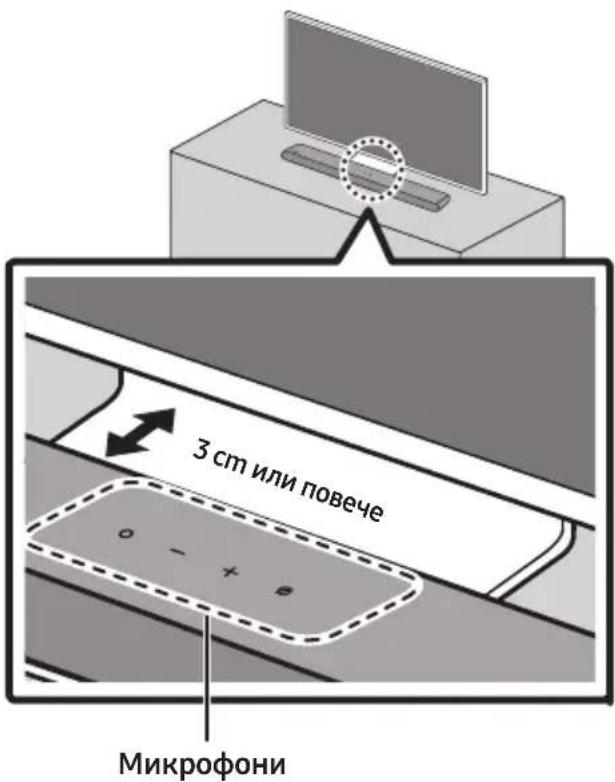
Dolby, Dolby Atmos, and the double-D symbol are registered trademarks of Dolby Laboratories Licensing Corporation. Manufactured under license from Dolby Laboratories. Confidential unpublished works. Copyright © 2012-2021 Dolby Laboratories. All rights reserved.
dts.
For DTS patents, see http://patents.dts.com. Manufactured under license from DTS, Inc. (for companies headquartered in the U.S./Japan/Taiwan) or under license from DTS Licensing Limited (for all other companies). DTS, Digital Surround, Virtual:X, and the DTS logo are registered trademarks or trademarks of DTS, Inc. in the United States and other countries. © 2021 DTS, Inc. ALL RIGHTS RESERVED.
HDMI™
HIGH-DEFINITION MULTIMEDIA INTERFACE
The terms HDMI and HDMI High-Definition Multimedia Interface, and the HDMI Logo are trademarks or registered trademarks of HDMI Licensing Administrator, Inc. in the United States and other countries.

• Apple, Airplay, iPhone, iPad, and Mac are trademarks of Apple Inc., registered in the U.S. and other countries. - Use of the Works with Apple badge means that an accessory has been designed to work specifically with the technology identified in the badge and has been certified by the developer to meet Apple performance standards.

[ENERGY STAR]
ENERGY STAR qualified model only
- Your Samsung product is ENERGY STAR qualified in its factory default setting. Change to certain features, settings and functionality in this product can change the power consumption, possibly beyond the limits required for ENERGY STAR qualification.
- Environmental Protection Agency and Department of Energy. ENERGY STAR is a joint program of the Government agencies, designed to promote energy efficient products and practices.
Refer to www.energystar.gov for more information of the ENERGY STAR Program.
ENERGY STAR qualified model only (Applicable to Thin Client models only)
As an ENERGY STAR® Partner, SAMSUNG has determined that this product meets the ENERGY STAR® guidelines for energy efficiency.
– The ENERGY STAR Program has been to reduced greenhouse gas emissions and save energy through voluntary labeling. - Power management setting of this product have been enabled by default, and have various timing setting from 1 minutes to 5 hours. - The product can wake with a button press on the chassis from sleep mode.
ENERGY STAR qualified model only (The other models)
- As an ENERGY STAR Partner, Samsung has determined that this product or product models meets the ENERGY STAR guideline for energy efficiency.
14 OPEN SOURCE LICENSE NOTICE
Active Voice Amplifier (AVA) 14
Remote control operation

1
Power supply
Active Voice Amplifier (AVA)
![graph LR A["TV"] --> B["OPTICAL OUT"] B --> C["Przewód optyczny (sprzedawany oddzielnie)"] C --> D["DIGITAL AUDIO IN (OPTICAL)"] D --> E["Panel dolny listwy Soundbar"] E --> F["Górna czȩść listwy Soundbar"] F --> G["- + Ø"]](/content/2026/06/1399505/images/6d25486f68e25acd06c72a13193f1adb353b4d06030aa191c559b18b4c12c0b6.jpg)
Dolby, Dolby Atmos, and the double-D symbol are registered trademarks of Dolby Laboratories Licensing Corporation. Manufactured under license from Dolby Laboratories. Confidential unpublished works. Copyright © 2012-2021 Dolby Laboratories. All rights reserved.
dts.
For DTS patents, see http://patents.dts.com. Manufactured under license from DTS, Inc. (for companies headquartered in the U.S./Japan/Taiwan) or under license from DTS Licensing Limited (for all other companies). DTS, Digital Surround, Virtual:X, and the DTS logo are registered trademarks or trademarks of DTS, Inc. in the United States and other countries. © 2021 DTS, Inc. ALL RIGHTS RESERVED.

The terms HDMI and HDMI High-Definition Multimedia Interface, and the HDMI Logo are trademarks or registered trademarks of HDMI Licensing Administrator, Inc. in the United States and other countries.

- Apple, Airplay, iPhone, iPad, and Mac are trademarks of Apple Inc., registered in the U.S. and other countries.
- Use of the Works with Apple badge means that an accessory has been designed to work specifically with the technology identified in the badge and has been certified by the developer to meet Apple performance standards.

[ENERGY STAR]
ENERGY STAR qualified model only
- Your Samsung product is ENERGY STAR qualified in its factory default setting. Change to certain features, settings and functionality in this product can change the power consumption, possibly beyond the limits required for ENERGY STAR qualification.
- Environmental Protection Agency and Department of Energy. ENERGY STAR is a joint program of the Government agencies, designed to promote energy efficient products and practices.
Refer to www.energystar.gov for more information of the ENERGY STAR Program.
ENERGY STAR qualified model only
(Applicable to Thin Client models only)
As an ENERGY STAR® Partner, SAMSUNG has determined that this product meets the ENERGY STAR® guidelines for energy efficiency.
- The ENERGY STAR Program has been to reduced greenhouse gas emissions and save energy through voluntary labeling.
- Power management setting of this product have been enabled by default, and have various timing setting from 1 minutes to 5 hours.
- The product can wake with a button press on the chassis from sleep mode.
ENERGY STAR qualified model only (The other models)
- As an ENERGY STAR Partner, Samsung has determined that this product or product models meets the ENERGY STAR guideline for energy efficiency.
14 OPEN SOURCE LICENSE INFORMATION
www.samsung.com/uk/aboutsamsung/sustainability/environment/our-commitment/data/
COMMISSION REGULATION (EU) 2019/1782
Active Voice Amplifier (AVA) 14
Active Voice Amplifier (AVA)

08 CONNECTING VIA APPLE AIRPLAY 2
Dolby, Dolby Atmos, and the double-D symbol are registered trademarks of Dolby Laboratories Licensing Corporation. Manufactured under license from Dolby Laboratories. Confidential unpublished works. Copyright © 2012-2021 Dolby Laboratories. All rights reserved.
dts.
For DTS patents, see http://patents.dts.com. Manufactured under license from DTS, Inc. (for companies headquartered in the U.S./Japan/Taiwan) or under license from DTS Licensing Limited (for all other companies). DTS, Digital Surround, Virtual:X, and the DTS logo are registered trademarks or trademarks of DTS, Inc. in the United States and other countries. © 2021 DTS, Inc. ALL RIGHTS RESERVED.

The terms HDMI and HDMI High-Definition Multimedia Interface, and the HDMI Logo are trademarks or registered trademarks of HDMI Licensing Administrator, Inc. in the United States and other countries.

- Apple, Airplay, iPhone, iPad, and Mac are trademarks of Apple Inc., registered in the U.S. and other countries.
- Use of the Works with Apple badge means that an accessory has been designed to work specifically with the technology identified in the badge and has been certified by the developer to meet Apple performance standards.

[ENERGY STAR]
ENERGY STAR qualified model only
- Your Samsung product is ENERGY STAR qualified in its factory default setting. Change to certain features, settings and functionality in this product can change the power consumption, possibly beyond the limits required for ENERGY STAR qualification. - Environmental Protection Agency and Department of Energy. ENERGY STAR is a joint program of the Government agencies, designed to promote energy efficient products and practices.
Refer to www.energystar.gov for more information of the ENERGY STAR Program.
ENERGY STAR qualified model only (Applicable to Thin Client models only)
As an ENERGY STAR® Partner, SAMSUNG has determined that this product meets the ENERGY STAR® guidelines for energy efficiency.
- The ENERGY STAR Program has been to reduced greenhouse gas emissions and save energy through voluntary labeling.
- Power management setting of this product have been enabled by default, and have various timing setting from 1 minutes to 5 hours.
- The product can wake with a button press on the chassis from sleep mode.
ENERGY STAR qualified model only (the other models)
As an ENERGY STAR Partner, Samsung has determined that this product or product models meets the ENERGY STAR guideline for energy efficiency.
14 NOTE ON OPEN SOURCE LICENSE
Active Voice Amplifier (AVA) 14
Active Voice Amplifier (AVA)
![graph LR TV["TV"] --> OpticalOut["Optical OUT"] OpticalOut --> hornAstranazariadeniaSoundbar hornAstranazariadeniaSoundbar --> DigitalAudioIn["Digital Audio In (Optical)"] DigitalAudioIn --> SpodnáčastzariadeniaSoundbar Optickýkabel["nie je súčastou dodávky"]](/content/2026/06/1399505/images/7ed9b3476a95ad5f14e5eb4bb901ffdcd5e47f98d211d78f700a83b0348fd8b0.jpg)
Initial connection
1.
- SAFETY INFORMATION
- SAFETY WARNINGS
- CAUTION
- WARNING
- PRECAUTIONS
- CONTENTS
- CHECKING THE COMPONENTS
- PRODUCT OVERVIEW
- USING THE REMOTE CONTROL
- CONNECTING THE SOUNDBAR
- CONNECTING TO A TV
- CONNECTING AN EXTERNAL DEVICE
- CONNECTING A MOBILE DEVICE
- CONNECTING VIA APPLE AIRPLAY
- INSTALLING THE WALL MOUNT
- INSTALLING THE SOUNDBAR IN FRONT OF TV
- SOFTWARE UPDATE
- TROUBLESHOOTING
- LICENCE
- OPEN SOURCE LICENCE NOTICE
- IMPORTANT NOTES ABOUT SERVICE
- SPECIFICATIONS AND GUIDE
- HOLDER-SCREW BRACKET-WALL MOUNT SCREW
- BOTTOM PANEL OF THE SOUNDBAR
- INSERTING BATTERIES BEFORE USING THE REMOTE CONTROL (AAA BATTERIES X 2)
- HOW TO USE THE REMOTE CONTROL
- POWER
- AUTO POWER DOWN FUNCTION
- → (SOURCE)
- AUDIO FEEDBACK ON/OFF
- VOLUME
- CH LEVEL
- (SOUND CONTROL)
- BLUETOOTH PAIR
- II (PLAY / PAUSE)
- ADAPTIVE SOUND
- DTS VIRTUAL:X
- MUSIC
- GAME
- STANDARD
- WOOFER (BASS) LEVEL
- TONE CONTROL
- ACTIVE VOICE AMPLIFIER (AVA)
- ADJUSTING THE SOUNDBAR VOLUME WITH A TV REMOTE CONTROL
- CONNECTING ELECTRICAL POWER
- NOTES
- CONNECTING THE SAMSUNG WIRELESS REAR KIT AND SUBWOOFER TO YOUR SOUNDBAR
- CONNECTING THE TV THAT SUPPORTS HDMI ARC (AUDIO RETURN CHANNEL)
- CONNECTING USING AN OPTICAL CABLE
- PRE-CONNECTION CHECKLIST
- CONNECTING VIA BLUETOOTH
- THE INITIAL CONNECTION
- IF THE DEVICE FAILS TO CONNECT
- DISCONNECTING THE SOUNDBAR FROM THE SAMSUNG TV
- NOTES ON BLUETOOTH CONNECTION
- CONNECTING VIA WI-FI
- CONNECTING TO A TV THAT SUPPORTS DOLBY ATMOS®
- USING THE Q-SYMPHONY FUNCTION
- USING THE SPACEFIT SOUND
- METHOD 1. CONNECTING VIA SOUNDBAR
- METHOD 2. CONNECTING VIA TV
- NOTE
- METHOD 1. CONNECTING VIA BLUETOOTH
- DISCONNECTING THE BLUETOOTH DEVICE FROM A SOUNDBAR
- DISCONNECTING THE SOUNDBAR FROM THE BLUETOOTH DEVICE
- METHOD 2. CONNECTING VIA WI-FI (WIRELESS NETWORK)
- USING THE TAP SOUND
- ENABLE THE TAP SOUND FUNCTION
- INSTALLATION PRECAUTIONS
- WALLMOUNT COMPONENTS
- AUTO UPDATE
- USB UPDATE
- SAMSUNG MAY OFFER UPDATES FOR THE SOUNDBAR'S SYSTEM FIRMWARE IN THE FUTURE
- RESET
- SOUNDBAR DOES NOT TURN ON
- SOUNDBAR WORKS ERRATICALLY
- REMOTE CONTROL DOES NOT WORK
- THE RED LED INDICATOR LIGHT ON THE SOUNDBAR STAYS ON
- THE SOUNDBAR DOES NOT OUTPUT ANY SOUND
- IF THE TV IS NOT CONNECTED VIA HDMI (ARC)
- THERE IS NO SOUND IN WHEN CONNECTING TO THE TV IN HDMI (ARC) MODE
- THE SOUNDBAR WILL NOT CONNECT VIA BLUETOOTH
- THE SOUND DROPS OUT WHEN CONNECTED VIA BLUETOOTH
- UNABLE TO CONNECT TO WI-FI
- THE SOUNDBAR DOES NOT TURN ON AUTOMATICALLY WITH THE TV
- THE AVA FUNCTION IS NOT AVAILABLE IN THE FOLLOWING CASES
- AFTER CONNECTING THE TV TO THE SOUNDBAR, I SWITCHED THE SOUNDBAR MODE. THEN NO SOUND IS OUTPUT FROM THE TV
- DOLBY
- ATMOS
- DTS
- [ENERGY STAR]
- ENERGY STAR QUALIFIED MODEL ONLY
- (APPLICABLE TO THIN CLIENT MODELS ONLY)
- ENERGY STAR QUALIFIED MODEL ONLY (THE OTHER MODELS)
- [CORRECT DISPOSAL OF BATTERIES IN THIS PRODUCT]
- (APPLICABLE IN COUNTRIES WITH SEPARATE COLLECTION SYSTEMS)
- CORRECT DISPOSAL OF THIS PRODUCT
- (WASTE ELECTRICAL & ELECTRONIC EQUIPMENT)
- COMMISSION REGULATION (EU)
- INFORMATIONS RELATIVES À LA SÉCURITÉ
- AVERTISSEMENTS
- INITIAL CONNECTION
- CONNECTION VIA APPLE AIRPLAY
- DOLBY, DOLBY ATMOS, AND THE DOUBLE-D SYMBOL ARE REGISTERED TRADEMARKS OF DOLBY LABORATORIES LICENSING CORPORATION. MANUFACTURED UNDER LICENSE FROM DOLBY LABORATORIES. CONFIDENTIAL UNPUBLISHED WORKS. COPYRIGHT © 2012-2021 DOLBY LABORATORIES. ALL RIGHTS RESERVED
- INSTALLING THE SOUNDBAR IN FRONT OF THE TV
- THE TERMS HDMI AND HDMI HIGH-DEFINITION MULTIMEDIA INTERFACE, AND THE HDMI LOGO ARE TRADEMARKS OR REGISTERED TRADEMARKS OF HDMI LICENSING ADMINISTRATOR, INC. IN THE UNITED STATES AND OTHER COUNTRIES
- ENERGY STAR QUALIFIED MODEL ONLY (APPLICABLE TO THIN CLIENT MODELS ONLY)
- FREE LICENSE NOTICE
- WOOFER LEVEL (BASS)
- NOTICE OF
- OPEN SOURCE LICENSE
- OPEN SOURCE LICENSE NOTICE
- IMPORTANT NOTE ABOUT SERVICE
- WORKS WITH APPLE AIRPLAY
- TABLE OF CONTENTS
- CHECK THE COMPONENTS
- CONNECT TO VIA APPLE AIRPLAY
- LISENSMERKNADER OM ÅPEN KILDEKODE
- KOMMISJONSFORORDNING (EU)
- FIRST CONNECTION
- NOTICE OF LICENSE FOR THE ORIGINAL LANGUAGE SOURCE
- AF SOUNDBAR FOR TV
- HDMI™
- REMOTE CONTROL OPERATION
- POWER SUPPLY
- OPEN SOURCE LICENSE INFORMATION
- NOTE ON OPEN SOURCE LICENSE
Brand : SAMSUNG
Model : HW-S68B
Category : Soundbar