
42CJ3E - Television SHARP - Free user manual and instructions
Find the device manual for free 42CJ3E SHARP in PDF.


Pick your language and provide your email: we'll send you a specifically translated version.
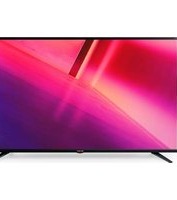
| Product Type | LED TV |
| Brand | Sharp |
| Model | 42CJ3E |
| Screen Size | 42 inches (107 cm) |
| Screen Resolution | Full HD 1920 x 1080 pixels |
| Display Technology | LED |
| Connectivity | 2 x HDMI, 1 x USB, 1 x SCART input, 1 x Digital optical output, 1 x Headphone jack, 1 x Antenna input, 1 x Ethernet port, Built-in Wi-Fi |
| Tuner | DVB-T2 / DVB-C / DVB-S2 |
| Audio Power | 2 x 8 W |
| Power Consumption (Typical) | 65 W |
| Standby Consumption | 0.5 W |
| Power Supply | 220-240 V, 50/60 Hz |
| Dimensions with stand (W x H x D) | 956 x 617 x 215 mm |
| Dimensions without stand (W x H x D) | 956 x 565 x 79 mm |
| Weight with stand | 8.5 kg |
| Weight without stand | 8.2 kg |
| Main Functions | Video engine, aspect ratio, parental control, timer, EPG (Electronic Program Guide), game mode, subtitles |
| Maintenance and Cleaning | Unplug the device, clean with a soft dry cloth. Do not use abrasive or liquid products. |
| Safety | Ensure a stable surface, do not block ventilation slots, avoid exposure to moisture and direct heat. |
| Spare Parts and Repairability | Remote control (included), batteries (included), stand base, mounting screws. For any parts, contact Sharp after-sales service. |
Frequently Asked Questions - 42CJ3E SHARP
How to install the Sharp 42CJ3E TV?
Place the TV on a stable and flat surface. Attach the supplied stand base following the manual instructions. Connect the antenna or satellite cable, then the power supply. Turn on the device with the remote control or the power button.
How to connect an HDMI device?
Connect an HDMI cable to the TV's HDMI port and to your device's output (Blu-ray player, console, etc.). Select the corresponding HDMI input using the SOURCE button on the remote control.
What to do if the image is blurry or distorted?
Check the output resolution of your source (for example, set it to 1920x1080). Make sure the HDMI or antenna cable is properly connected. In the menu, adjust picture settings: contrast, brightness, sharpness.
How to search for channels?
Press MENU, go to Settings > Channel Search (or Installation). Select the tuner type (DTT, cable, satellite) and start the automatic search. Channels will be sorted automatically.
The remote control no longer works, what to do?
Check the batteries: replace them if necessary. Make sure no obstacles block the TV's infrared sensor. If the problem persists, use the physical buttons on the back or side of the TV for basic control.
How to update the TV software?
Connect the TV to the Internet via Wi-Fi or Ethernet. Go to MENU > Settings > Software Update (or System). Select Online Update and follow the instructions. Do not turn off power during the update.
How to mount the TV on the wall?
Use a VESA-compatible wall mount (size: 200 x 200 mm). Remove the stand, then screw the mount to the back of the TV. Ensure the wall can support the weight (approx. 8.5 kg). Follow the wall mount instructions.
The screen stays black, what to do?
Check that the TV is turned on (power indicator). Make sure the power cord is properly plugged in and the outlet works. Try pressing the SOURCE button to select an active input. If the problem persists, contact after-sales service.
How to activate parental control?
Press MENU, go to Settings > Parental Control (or Lock). Enter a PIN code (default 0000 or 1234). You can then block channels, inputs, or programs based on their rating.
Can I use headphones with this TV?
Yes, plug headphones into the Headphone jack (3.5 mm) located on the back or side of the TV. The sound from the speakers will be automatically muted. You can adjust the headphone volume independently via the audio menu.
User questions about 42CJ3E SHARP
0 question about this device. Answer the ones you know or ask your own.
Ask a new question about this device
No questions yet. Be the first to ask one.
Download the instructions for your Television in PDF format for free! Find your manual 42CJ3E - SHARP and take your electronic device back in hand. On this page are published all the documents necessary for the use of your device. 42CJ3E by SHARP.
USER MANUAL 42CJ3E SHARP
Manual assistant
Powered by Anthropic
Waiting for your message
Product information
Brand : SHARP
Model : 42CJ3E
Category : Television