
MultiSync E224F - Monitor SHARP - Free user manual and instructions
Find the device manual for free MultiSync E224F SHARP in PDF.


| Product type | LCD Monitor |
| Brand | Sharp |
| Model | MultiSync E224F |
| Screen size | 21.5 inches (54.6 cm) |
| Native resolution | 1920 x 1080 (Full HD) |
| Panel type | IPS |
| Brightness | 250 cd/m² |
| Contrast ratio | 1000:1 |
| Response time | 5 ms |
| Viewing angles (H/V) | 178°/178° |
| Connectivity | VGA, DVI-D, DisplayPort, USB Hub (2 ports) |
| Dimensions (with stand) | 504 x 384 x 204 mm |
| Weight (with stand) | 5.2 kg |
| Power supply | 100-240 V AC, 50/60 Hz |
| Power consumption | 22 W (typical), 0.5 W (standby) |
| Key features | Height adjustment, tilt, pivot, swivel; built-in speakers (2 x 1 W); blue light filter |
| Care and cleaning | Clean with a soft dry cloth; do not use abrasive cleaners or solvents |
| Security | Kensington lock; CE, RoHS compliant |
| Spare parts and repairability | Repairability index not provided; contact customer service for parts |
| General information | User manual available for download on the manufacturer's website |
Frequently Asked Questions - MultiSync E224F SHARP
User questions about MultiSync E224F SHARP
0 question about this device. Answer the ones you know or ask your own.
Ask a new question about this device
Download the instructions for your Monitor in PDF format for free! Find your manual MultiSync E224F - SHARP and take your electronic device back in hand. On this page are published all the documents necessary for the use of your device. MultiSync E224F by SHARP.
USER MANUAL MultiSync E224F SHARP
MODEL: E224F/E224F-BK, E244F/E244F-BK, E274F/E274F-BK
| US/CA | EU | GB CN JP | ||
 |  |  |  |  |
| 120 V* 230 V | 230 V 220 V 100 V |
[EU] https://www.sharpnecdisplays.eu/p/hq/en/home.xhtml
[Global website]
https://www.sharp-nec-displays.com/dl/en/dp_manual/index.html


Registration Information
NEC is a registered trademark of NEC Corporation.
DisplayPort™ and the DisplayPort™ logo are trademarks owned by the Video Electronics Standards Association (VESA®) in the United States and other countries.

MultiSync® is a trademark or registered trademark of Sharp NEC Display Solutions, Ltd. in Japan and other countries.
The terms HDMI, HDMI High-Definition Multimedia Interface, HDMI Trade Dress and the HDMI Logos are trademarks or registered trademarks of HDMI Licensing Administrator, Inc.
All other brands and product names are trademarks or registered trademarks of their respective owners.

Contents

Quick Start
Step 1

Step 2
CAUTION:


Step 4
Step 5
Flexible Arm Installation
1
2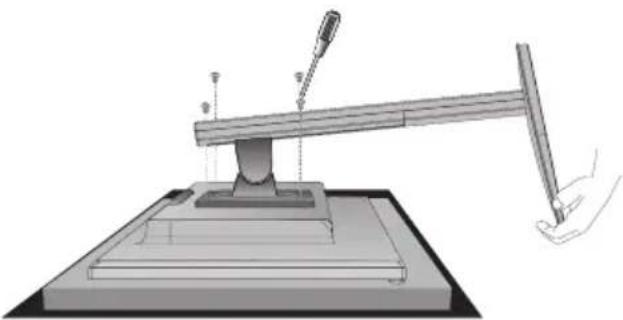
3
4
5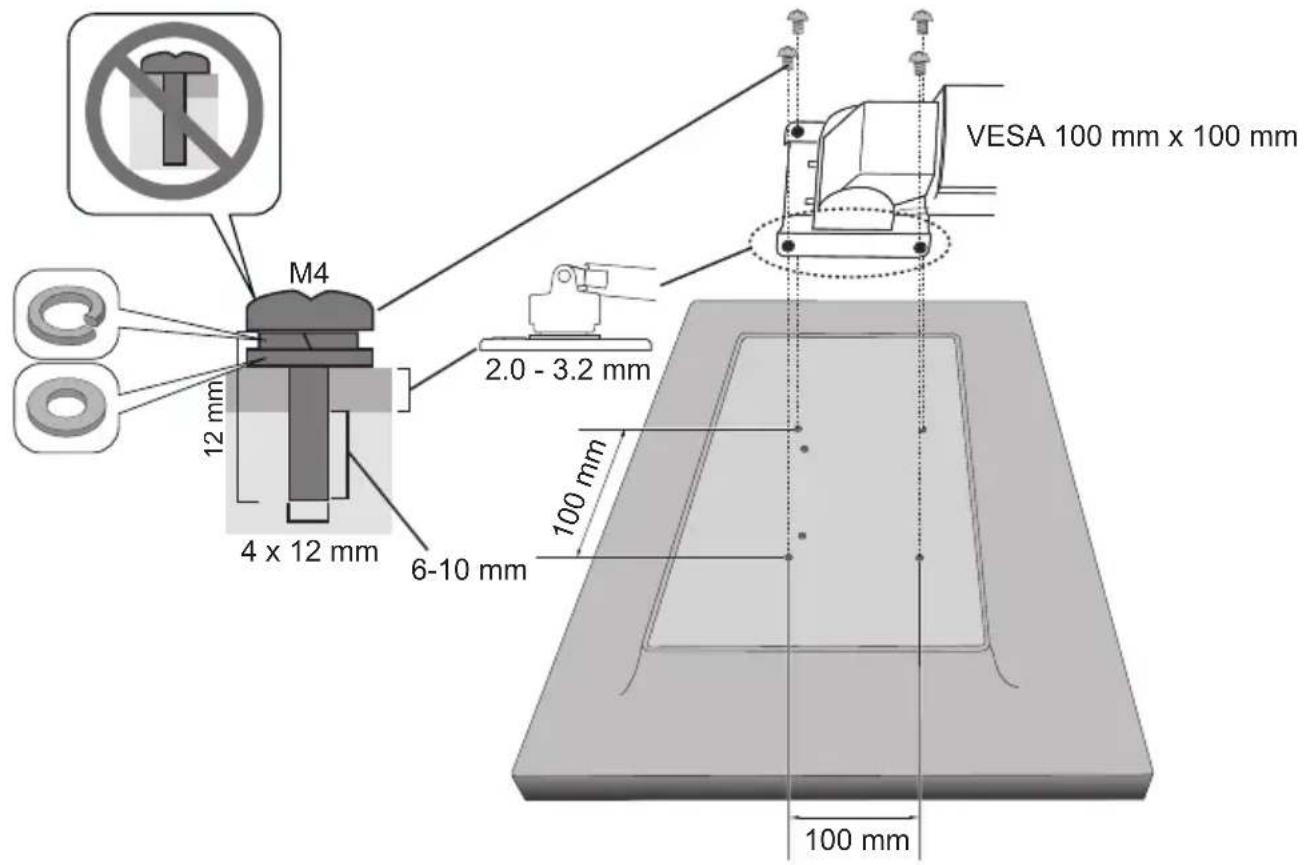
6
Important Information ....English-1
Troubleshooting .... English-6
NOTE: This product can only be serviced in the country where it was purchased.
Remember to save your original box and packing material to transport or ship the monitor.
Type and number of power cords included will depend on the country where the LCD monitor is to be shipped.
Make sure all contents are in the box before starting monitor assembly.
(1) The contents of this manual may not be reprinted in part or whole without permission. (2) The contents of this manual are subject to change without notice. (3) Great care has been taken in the preparation of this manual; however, should you notice any questionable points, errors or omissions, please contact us. (4) The image shown in this manual is indicative only. If there is inconsistency between the image and the actual product, the actual product shall govern. (5) Notwithstanding articles (3) and (4), we will not be responsible for any claims on loss of profit or other matters deemed to result from using this device. (6) This manual is commonly provided to all regions so it may contain descriptions that are pertinent for other countries.
Important Information
Safety Precautions and Maintenance
FOR OPTIMUM PERFORMANCE, PLEASE NOTE THE FOLLOWING WHEN SETTING UP AND USING THE LCD COLOR MONITOR:
About the Symbols
To ensure safe and proper use of the product, this manual uses a number of symbols to prevent injury to you and others as well as damage to property. The symbols and their meanings are described below. Be sure to understand them thoroughly before reading this manual.
 WARNING WARNING | Failing to heed this symbol and handling the product incorrectly could result in accidents leading to major injury or death. |
 CAUTION CAUTION | Failing to heed this symbol and handling the product incorrectly could result in personal injury or damage to surrounding property. |
Examples of symbols
 | △ Indicates a warning or caution.This symbol indicates you should be careful of electric shocks. |
 | ⊗ Indicates a prohibited action.This symbol indicates something that must be prohibited. |
 | ● Indicates a mandatory action.This symbol indicates that the power cord should be unplugged from the power outlet. |
| WARNING | ||
| 1 |  UNPLUG THE POWER CORD UNPLUG THE POWER CORD | Unplug the power cord if the product malfunctions.Should the product emit smoke or strange odors or sounds, or if the product has been dropped or the cabinet broken, turn off the product's power, then unplug the power cord from the power outlet. Contact your dealer for repairs. Never try to repair the product on your own.Doing so is dangerous. |
| 2 |  HAZARDOUS VOLTAGE HAZARDOUS VOLTAGE DO NOT DISASSEMBLE DO NOT DISASSEMBLE PROHIBITED PROHIBITED | Do not open or remove the product's cabinet.Do not disassemble the product.There are high voltage areas in the product. Opening or removing product covers and modifying the product may expose you to electric shock, fire, or other risks.Refer all servicing to qualified service personnel. |
| 3 |  PROHIBITED PROHIBITED | Do not use the product if it has structural damage or if its stand has cracked or peeled.If you notice any structural damage such as cracks or unnatural wobbling, please refer servicing to qualified service personnel. If the product is used in this condition, the product may fall or cause personal injury. |
| 4 |  PROHIBITED PROHIBITED REQUIRED REQUIRED | Handle the power cord with care.Damaging the cord could lead to fire or electric shock.Do not place heavy objects on the cord.Do not place the cord under the product.Do not cover the cord with a rug, etc.Do not scratch or modify the cord.Do not bend, twist or pull the cord with excessive force.Do not apply heat to the cord.If the cord gets damaged (exposed core wires, broken wires, etc.), turn off the product's power, then unplug the power cord from the power outlet. Ask your dealer to replace it. |
| 5 |  PROHIBITED PROHIBITED | Do not touch the power plug if you hear thunder.Doing so could result in electric shock. |
| 6 |  REQUIRED REQUIRED | Please use the power cord provided with this product in accordance with the power cord table.If a power cord is not supplied with this product, please contact us. For all other cases, please use the power cord with the plug style that matches the power socket where the product is located.The compatible power cord corresponds to the AC voltage of the power outlet and has been approved by, and complies with, the safety standards in the country of purchase. |
| 7 | REQUIREDPROHIBITED | Please install the product in accordance with the following information.When transporting, moving, or installing the product, please use as many people as necessary to be able to lift the product without causing personal injury or damage to the product.Please refer to the instructions included with the optional mounting equipment for detailed information about attaching or removing.Do not cover the vent on the product. Improper installation of the product may result in damage to the product, an electric shock or fire.Do not install the product in the locations below:Poorly ventilated spaces.Near a radiator, other heat sources, or in direct sunshine.Continual vibration areas.Humid, dusty, steamy, or oily areas.Outdoors.High-temperature environment where humidity changes rapidly and condensation is likely to occur.Do not mount the product in any configuration or position not described in the user's manual.Please check the Specifications for the available Tilt range when installing the product. |
| 8 | PROHIBITEDREQUIRED | Prevent tipping and falling for earthquakes or other shocks.To prevent personal injury or damage to the product caused by tipping over due to earthquakes or other shocks, make sure to install the product in a stable location and take measures to prevent falling.The product must be mounted to an approved flexible arm (e.g. TUEV GS mark) or stand that supports the weight of the product to prevent damage and personal injury that could result from the product tipping over or falling.Only use the screws that were removed from the product's stand or the specified screws to avoid damage to the product or the stand.Please tighten all screws (Recommended Fasten Force: 98 - 137 N•cm) when installing the product to a flexible arm or stand. A loose screw may cause the product to fall, causing damage to the product or personal injury.Attaching the flexible arm should be performed by two or more people if the product cannot be placed face-down on a flat surface for installation.Stability Hazard.The product may fall, causing serious personal injury or death. To prevent injury, this product must be securely attached to the floor/ wall in accordance with the installation instructions.Many injuries, particularly to children, can be avoided by taking simple precautions such as:ALWAYS use stands or installation methods recommended by the manufacturer of the product set.ALWAYS use furnitures that can safely support the product.ALWAYS ensure the product is not overhanging the edge of the supporting furniture.ALWAYS educate children about the dangers of climbing on furniture to reach the product or its controls.ALWAYS route cords and cables connected to your product so they cannot be tripped over, pulled or grabbed.NEVER place a product in an unstable location.NEVER place the product on tall furniture (for example, cupboards or bookcases) without anchoring both the furniture and the product to a suitable support.NEVER place the product on cloth or other materials that may be located between the product and supporting furniture.NEVER place items that might tempt children to climb, such as toys and remote controls, on the top of the product or furniture on which the product is placed.ALWAYS use wall mounting accessories when installing the product at a high location.NEVER place the product on a monitor stand when installing the product at a high location.If the existing product is going to be retained and relocated, the same considerations as above should be applied. |
| 9 |  PROHIBITED PROHIBITED | Do not place this product on a sloping or unstable cart, stand or table.Doing so could lead to falling or tipping and cause personal injury. |
| 10 |  PROHIBITED PROHIBITED HAZARDOUS VOLTAGE HAZARDOUS VOLTAGE | Do not insert objects of any kind into the cabinet slots.It may cause electric shock, fire, or product failure. Keep objects away from children and babies.If objects get into the cabinet slot, turn off the product's power, then unplug the power cord from the power outlet. Contact your dealer for repairs. |
| 11 |  DO NOT WET DO NOT WET | Do not spill any liquids into the cabinet or use your product near water.Immediately turn off the power and unplug your product from the wall outlet, then refer servicing to qualified service personnel. It may cause an electric shock or start a fire. |
| 12 |  PROHIBITED PROHIBITED | Do not use flammable gas sprays to remove dust when cleaning the product.Doing so could lead to a fire. |
| 13 |  PROHIBITED PROHIBITED | Usage of the product must not be accompanied by fatal risks or dangers that, could lead directly to death, personal injury, severe physical damage or other loss, including nuclear reaction control in nuclear facility, medical life support system, and missile launch control in a weapon system. |
CAUTION
 CAUTION CAUTION | ||
| 1 |  REQUIRED REQUIRED DO NOT TOUCH WITH WET HANDS DO NOT TOUCH WITH WET HANDS UNPLUG THE POWER CORD UNPLUG THE POWER CORD HAZARDOUS VOLTAGE HAZARDOUS VOLTAGE | Handling the power cord.Handle the power cord with care. Damaging the cord could lead to fire or electric shock.When connecting the power cord to the product's AC IN terminal, make sure the connector is fully and firmly inserted.Make sure the power cord cannot be easily disconnected.Do not connect or disconnect the power cord with wet hands.When connecting or disconnecting the power cord, pull the power cord out by holding onto its plug.When cleaning the product, for safety purposes, unplug the power cord from the power outlet beforehand. Regularly dust off the power cord by using a soft dry cloth.Before moving the product, make sure the monitor power is off, then unplug the power cord from the power outlet and check that all cables connecting the product to other devices are disconnected.When you are not planning to use the product for an extended period of time, always unplug the power cord from the power outlet.This equipment is designed to be used in the condition of the power cord connected to the earth.If the power cord is not connected to the earth, it may cause electric shock. Please make sure the power cord is connected to the wall outlet directly and earthed properly. Do not use a 2-pin plug converter adapter. |
| 2 |  REQUIRED REQUIRED | Please confirm the distribution system in building installation shall provide the circuit breaker rated 120/240 V, 20 A (maximum). |
| 3 | PROHIBITED!REQUIRED | Do not bind the power cord.It may trap heat and cause a fire. |
| 4 | PROHIBITED | Do not climb on the table where the product is installed. Do not install the product on a wheeled table if the wheels on the table have not been properly locked. The monitor may fall, causing damage to the product or personal injury. |
| 5 | !REQUIRED | Installation, removal, and adjustment of the stand.Handle with care when pulling the stand as it might pinch your fingers.Please securely hold the monitor stand while removing the screws to prevent the monitor stand from falling. It may case personal injury.Before rotating the screen, disconnect the power cord and all cables from the product. Otherwise, the power cord or cables might pull with excessive force and cause personal injury or damage to the product.When rotating the screen, slide it to the highest level and set it to the maximum tilt. Otherwise, it could cause personal injury or knock the screen on the desk. |
| 6 | PROHIBITED | Do not tilt the monitor downward beyond 5 degrees. Doing so can cause the LCD panel to separate and potentially fall out causing damage to the product or personal injury. |
| 7 | PROHIBITED | Do not push the product.The product may fall, causing damage to the product or personal injury. |
| 8 | PROHIBITED | Do not impact the LCD panel surface, it can cause serious damage to the product or personal injury. |
| 9 | !REQUIRED | Suitable for entertainment purposes at controlled luminous environments, to avoid disturbing reflections from the screen. |
| 10 | PROHIBITED | Do not connect headphones to the product while you are wearing them.Depending on the volume level, it may damage your ears and cause loss of hearing. |
| 11 | PROHIBITED | Do not play with the plastic bag which covers the product.Do not use this bag for any other purpose. To avoid the danger of suffocation, do not place this bag over your head, nose or mouth. Do not place this bag over another person's head, nose or mouth.Keep this bag away from children and babies. |
| 12 | !REQUIRED | To ensure the product's reliability, please clean the ventilation holes at the rear side of the cabinet at least once a year to remove dirt and dust. Failure to do so could lead to electric shock or damage to the product. |
| 13 | !REQUIRED | Avoid locations with extreme temperatures and humidity.Failure to do so could lead to fire or electric shock or damage to the product.The usage environment for this product is as follows:The operating temperature: 5 °C to 35 °C/41 °F to 95 °F/humidity: 20 to 80% (without condensation)The storage temperature: -10 °C to 60 °C/14 °F to 140 °F/humidity: 10 to 85% (without condensation) |
Troubleshooting
No picture
- Make sure the signal cable is fully connected to the monitor and the computer.
- Make sure the computer's display card is fully seated in its slot.
- Make sure there is no DisplayPort converter adapter connected. The monitor does not support DisplayPort converter adapter.
- Make sure both the computer and monitor are powered on.
- The monitor may be in power saving mode. The monitor automatically goes into standby at the preset time period after the video signal is lost.
- Make sure that a supported resolution has been selected on the display card or system being used. If in doubt, please refer to the user's manual of the display controller or system to change the resolution.
- Check the monitor and your display card with respect to compatibility and recommended signal timings.
- Check the signal cable connector for bent or pushed-in pins.
- Make sure the connected device outputs a signal to the monitor.
| youth in the 6th week, it was a good way to be able to get an easy way. |  |
| youth in the 7th week, it was a good way to be able to get an easy way. |  |
(For Customers in U.K.)
IMPORTANT
- The wires in this mains lead are coloured in accordance with the following code:
GREEN-AND-YELLOW: "Earth"
BLUE: "Neutral"
BROWN: "Live"
- As the colours of the wires in the mains lead of this apparatus may not correspond with the coloured markings identifying the terminals in your plug proceed as follows:
- The wire which is coloured GREEN-AND-YELLOW must be connected to the terminal in the plug which is marked by the letter E or by the safety earth symbol or coloured green or green-and-yellow.
- The wire which is coloured BLUE must be connected to the terminal which is marked with the letter N or coloured black.
- The wire which is coloured BROWN must be connected to the terminal which is marked with the letter L or coloured red.
- Ensure that your equipment is connected correctly. If you are in any doubt consult a qualified electrician.
WARNING: THIS APPARATUS MUST BE EARTHED.
NOTE: Adjustment of the volume control as well as the equalizer to other settings than the center position may increase the ear-/headphones output voltage and therefore the sound pressure level.
Installing a security cable
As a security measure, you can secure the monitor to a fixed object with an optional security cable. Please follow the security cable supplier's recommended instructions to install.
NOTE: A security cable (purchased separately) is designed as a deterrent, it is not guaranteed to prevent the device from being mishandled or stolen.

Cable information
CAUTION: Use the provided specified cables with this product so as not to interfere with radio and television reception. Use of other cables and adapters may cause interference with radio and television reception.

Cable information
WEEE Mark (European Directive 2012/19/EU and amendments)


Disposing of your used product: In the European Union
EU-wide legislation as implemented in each Member State requires that used electrical and electronic products carrying the mark (left) must be disposed of separately from normal household waste. This includes monitors and electrical accessories, such as signal cables or power cords. When you dispose of such products, please follow the guidance of your local authority or ask the shop where you purchased the product, or if applicable, follow applicable legislation or agreement you may have. The mark on electrical and electronic products may only apply to the current European Union Member States.
Outside the European Union
If you wish to dispose of used electrical and electronic products outside the European Union, please contact your local authority and ask for the correct method of disposal.








Disposal of used product: in the European Union




Sharp NEC Display Solutions, Ltd.
4-28, Mita 1-chome, Minato-ku, Tokyo, Japan
Made in China
Service & Support in Europe
Please contact:
Sharp NEC Display Solutions Europe GmbH.
Landshuter Allee 12-14, D-80637 München
Phone: +49 (0) 89/99699-0
Fax: +49 (0) 89/99699-500
For the latest information please see
https://www.sharpnecdisplays.eu/p/hq/en/home.xhtml
Data is subject to change without notice.

- REGISTRATION INFORMATION
- CONTENTS
- QUICK START
- FLEXIBLE ARM INSTALLATION
- IMPORTANT INFORMATION
- SAFETY PRECAUTIONS AND MAINTENANCE
- ABOUT THE SYMBOLS
- CAUTION
- TROUBLESHOOTING
- NO PICTURE
- (FOR CUSTOMERS IN U.K.)
- IMPORTANT
- INSTALLING A SECURITY CABLE
- CABLE INFORMATION
- WEEE MARK (EUROPEAN DIRECTIVE 2012/19/EU AND AMENDMENTS)
- DISPOSING OF YOUR USED PRODUCT: IN THE EUROPEAN UNION
- OUTSIDE THE EUROPEAN UNION
- DISPOSAL OF USED PRODUCT: IN THE EUROPEAN UNION
- SERVICE & SUPPORT IN EUROPE
Brand : SHARP
Model : MultiSync E224F
Category : Monitor