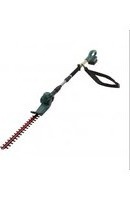
ET1304 - Hedge Trimmers McGregor - Free user manual and instructions
Find the device manual for free ET1304 McGregor in PDF.


| Product Type | Hedge Trimmer |
| Brand | McGregor |
| Model | ET1304 |
| Category | Hedge Trimmers |
| Power Source | Corded Electric |
| Motor Power | 600 W |
| Cutting Length | 60 cm |
| Blade Type | Dual Action, Laser Cut |
| Tooth Spacing | 30 mm |
| Weight | 3.5 kg |
| Dimensions (L x W x H) | 1000 x 200 x 200 mm |
| Cable Length | 10 m |
| Noise Level | 95 dB(A) |
| Vibration Level | 2.5 m/s² |
| Safety Features | Double switch, blade guard, safety stop |
| Maintenance | Lubricate blades after each use, clean with damp cloth |
| Storage | Hang on wall bracket, keep dry |
Frequently Asked Questions - ET1304 McGregor
User questions about ET1304 McGregor
0 question about this device. Answer the ones you know or ask your own.
Ask a new question about this device
Download the instructions for your Hedge Trimmers in PDF format for free! Find your manual ET1304 - McGregor and take your electronic device back in hand. On this page are published all the documents necessary for the use of your device. ET1304 by McGregor.
USER MANUAL ET1304 McGregor
natural_image
Green manual tool with long-handled blade and handle, no visible text or symbolsMcGregor 18V CORDLESS POLE HEDGE TRIMMER
4522371 (Model: MCLHT184IE)
VI: 11/24

CAUTION Read the instructions before using the machine
These instructions contain important information that will help you get the best from your pole hedge trimmer, ensuring it is assembled correctly and safely. If you need help or have damaged or missing parts, call the Customer Helpline on 0345 605 2062
AFTER SALES SUPPORT O345 605 2062 SAN NO.: O3218ABBH071
Contents
Safety information....2
In the box....21
Assembly....22
Preparation....24
Operation....29
Maintenance and Storage ....31
Troubleshooting....32
Technical data....33
Recycling and Disposal 35
Getting help....35
Guarantee....36
Produced in China for Argos Limited,
London, EC1N 2HT, UK.
Argos (N.I.) Ltd, Forestside Shopping Centre,
Upper Galwally, Belfast, BT8 6FX, UK.
https://bit.ly/Coreservice-McGregor

Safety Information
Important - Please read these instructions fully before operating or maintaining
Warning Symbol
The following warning symbols appear throughout this manual and indicate the appropriate safety measures you should take when operating and maintaining the pole hedge trimmer.
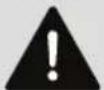
Warning!

To reduce the risk of injury, the user must read the instruction manual.

Wear ear protection.

Wear eye protection.

Wear head protection.

Wear suitable foot protection.

Wear suitable hand protection.

Keep bystanders away.

Conforms to relevant UK regulatory requirements

Conforms to relevant EU regulatory requirements.

DANGER! Keep hands away from the blades.

Do not operate or expose the product to rain or wet conditions.
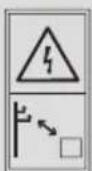
Keep sufficient distance away from electrical power lines.

Safety Information
Important - Please read these instructions fully before operating or maintaining
Warning Symbol

Guaranteed sound power level data is 96dB.
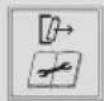
Remove the battery pack before any adjustment or maintenance.
Warning symbols on the charger

Before use, carefully read through the user manual.

The charger is for indoor use only.

Charger is of protection class II. That means it is equipped with enhanced or double insulation.
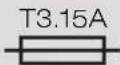
Protective 3.15A limited with B0Q-SP06-20ZB.

Pole orientation.

WEEE symbol. Waste electrical products should not be disposed of with household waste. Please recycle where facilities exist. Check with your local authority or local store for recycling guidelines.
Warning symbols on the battery

Do not dispose of batteries in rivers or immerse them in water.

Do not subject the battery to strong sunlight over long periods, and do not leave it on a heater (max. 45°C).

Do not throw on fire.

Contains a Li-ion battery. Do not dispose of waste batteries in domestic waste. Contact your local authority to find out how to dispose of batteries.
Li-Ion
General machine safety warnings

WARNING! Read all safety warnings and all instructions provided on or with this machine.
Failure to follow the warnings and instructions may result in electric shock, fire and/or serious injury. The term ‘machine’ in the warnings refers to your mains-operated (corded) machine or battery-operated (cordless) machine.
Save all warnings and instructions for future reference.
- This product is not intended for use by persons (including children) with reduced physical, sensory or mental capabilities, or lack of experience and knowledge, unless they have been given supervision or instruction concerning use of the product by a person responsible for their safety.
- Children should be supervised to ensure that they do not play with the product.
- The garden machine must be kept out of reach of children.

Safety Information
Important - Please read these instructions fully before operating or maintaining
Work area safety
- Keep work area clean and well lit. Cluttered or dark areas invite accidents.
- Do not operate machines in explosive atmospheres, such as in the presence of flammable liquids, gases or dust. Machines create sparks which may ignite the dust or fumes.
- Keep children and bystanders away while operating a machine. Distractions can cause you to lose control.
Electrical safety
- Machine plugs must match the socket. Never modify the plug in any way. Do not use any adaptor plugs with earthed (grounded) machines. Unmodified plugs and matching sockets will reduce the risk of electric shock.
- Avoid body contact with earthed or grounded surfaces, such as pipes, radiators, ranges and refrigerators. There is an increased risk of electric shock if your body is earthed or grounded.
- Do not expose machines to rain or wet conditions. Water entering a machine will increase the risk of electric shock.
- Do not abuse the cord. Never use the cord for carrying, pulling or unplugging the machine. Keep the cord away from heat, oil, sharp edges or moving parts. Damaged or entangled cords

Safety Information
Important - Please read these instructions fully before operating or maintaining
Electrical safety
increase the risk of electric shock.
- When operating a machine outdoors, use an extension cord suitable for outdoor use. Use of a cord suitable for outdoor use reduces the risk of electric shock.
- If operating a machine in a damp location is unavoidable, use a residual current device (RCD with a tripping current of 30mA or less) protected supply. Use of an RCD reduces the risk of electric shock.
Personal safety
- Stay alert, watch what you are doing and use common sense when operating a machine. Do not use a machine while you are tired or under the influence of drugs, alcohol or medication. A moment of inattention while operating machines may result in serious personal injury.
- Use Personal Protective Equipment(PPE). Always wear eye protection. Protective equipment, such as a dust mask, non-skid safety shoes, hard hat, or hearing protection used for appropriate conditions will reduce personal injuries.
- Prevent unintentional starting. Ensure the switch is in the off-position before connecting to the power source and/or battery pack, picking up or carrying the tool.
Important - Please read these instructions fully before operating or maintaining
Personal safety
Carrying machines with your finger on the switch or energising machines that have the switch on invites accidents.
- Remove any adjusting key or wrench before turning the machine on.
A wrench or a key left attached to a rotating part of the machine may result in personal injury. - Do not overreach. Keep proper footing and balance at all times. This enables better control of the machine in unexpected situations.
- Dress properly. Do not wear loose clothing or jewellery. Keep your hair, clothing and gloves away from moving parts. Loose clothes, jewellery or long hair can be caught in moving parts.
Machine use and care
- Do not force the machine. Use the correct machine for your application. The correct machine will do the job better and safer at the rate for which it was designed.
- Do not use the machine if the switch does not turn it on and off. Any machine that cannot be controlled with the switch is dangerous and must be repaired.
- Disconnect the plug from the power source and/or the battery pack from the machine be-
Important - Please read these instructions fully before operating or maintaining
Machine use and care
fore making any adjustments, changing accessories, or storing machines. Such preventive safety measures reduce the risk of starting the machine accidentally.
- Store idle machines out of the reach of children and do not allow persons unfamiliar with the machine or these instructions to operate the machine. machines are dangerous in the hands of untrained users.
- Maintain machines. Check for misalignment or binding of moving parts, breakage of parts and any other condition that may affect the machine's operation. If damaged, have the machine repaired before use. Many accidents are caused by poorly maintained machines.
- Keep cutting tools sharp and clean. Properly maintained cutting tools with sharp cutting edges are less likely to bind and are easier to control.
- Use the machine, accessories and tool bits etc. in accordance with these instructions, taking into account the working conditions and the work to be performed. Use of the machine for operations different from those intended could result in a hazardous situation.
Important - Please read these instructions fully before operating or maintaining
Battery tool use and care
- Recharge only with the charger specified by the manufacturer. A charger that is suitable for one type of battery pack may create a risk of fire when used with another battery pack.
- Use machines only with specifically designated battery packs. Use of any other battery packs may create a risk of injury and fire.
- When battery pack is not in use, keep it away from other metal objects ,like paper clips, coins, keys, nails, screws or other small metal objects, that can make a connection from one terminal to another. Shorting the battery terminals together may cause burns or a fire.
- Under abusive conditions, liquid may be ejected from the battery; avoid contact. If contact accidentally occurs, flush with water. If liquid contacts eyes, additionally seek medical help. Liquid ejected from the battery may cause irritation or burns.
- Do not use a battery pack or tool that is damaged or modified. Damaged or modified batteries may exhibit unpredictable behaviour resulting in fire, explosion or risk of injury.
- Do not expose a battery pack or tool to fire or excessive temperature. Exposure to fire or temperature above 130°C may cause explosion.

Safety Information
Important - Please read these instructions fully before operating or maintaining
Battery tool use and care
- Follow all charging instructions and do not charge the battery pack or tool outside the temperature range specified in the instructions. Charging improperly or at temperatures outside the specified range may damage the battery and increase the risk of fire.
Pole Hedge trimmer safety warnings
- To reduce the risk of electrocution, never use the extended-reach hedge trimmer near any electrical power lines. Contact with or use near power lines may cause serious injury or electric shock resulting in death.
- Always use two hands when operating the extended-reach hedge trimmer. Hold the extended-reach hedge trimmer with both hands to avoid loss of control.
- Always use head protection when operating the extended-reach hedge trimmer overhead. Falling debris can result in serious personal injury.
- Keep all parts of the body away from the blade. Do not remove cut material or hold material to be cut when blades are moving. Blades continue to move after the switch is turned off. A moment of inattention while operating the hedge trimmer may result in serious personal injury.
Important - Please read these instructions fully before operating or maintaining
Battery tool use and care
- Carry the hedge trimmer by the handle with the blade stopped and taking care not to operate any power switch. Proper carrying of the hedge trimmer will decrease the risk of inadvertent starting and resultant personal injury from the blades.
- When transporting or storing the hedge trimmer, always fit the blade cover. Proper handling of the hedge trimmer will decrease the risk of personal injury from the blades.
- When clearing jammed material or servicing the unit, make sure all power switches are off and the battery pack is removed or disconnected. Unexpected actuation of the hedge trimmer while clearing jammed material or servicing may result in serious personal injury.
- When clearing jammed material or servicing the unit, make sure all power switches are off and the lock-off is in the locked position. Unexpected actuation of the hedge trimmer while clearing jammed material or servicing may result in serious personal injury.
- Hold the hedge trimmer by insulated gripping surfaces only, because the blade may contact hidden wiring. Blades contacting a "live" wire may make exposed metal parts of the hedge trimmer "live" and could give the operator an electric shock.
Important - Please read these instructions fully before operating or maintaining
Pole Hedge trimmer safety warnings
- Keep all power cords and cables away from cutting area. Power cords or cables may be hidden in hedges or bushes and can be accidentally cut by the blade.
- Do not use the hedge trimmer in bad weather conditions, especially when there is a risk of lightning. This decreases the risk of being struck by lightning.
- Always ensure that all guards are fitted when using the device. Never attempt to use an incomplete tool or a tool with unauthorised modifications.
- Always wear ear protection, goggles and a helmet during operation.
- Check the hedge for foreign objects before operation, e.g. wire fences.
- Take care to avoid hard objects (e.g. metal wire, railings) when trimming. Should you accidentally hit any such object, immediately switch the tool off, remove the battery, and check for any damage.
- Should the tool start to vibrate abnormally, immediately switch it off, remove the battery, and check for any damage.
- Never attempt to force the blades to come to a standstill.

Safety Information
Important - Please read these instructions fully before operating or maintaining
Pole Hedge trimmer safety warnings
- Avoid operating while people, especially children and pets, are nearby.
- Regularly check the blades for damage and wear. Do not use the machine when the blades are damaged. Do not operate the tool with a damaged or excessively worn cutting blades.
- WARNING! The cutting elements continue to rotate a little after the trimmer has been switched off. Never touch the blades while the tool is running. Remove the battery before carrying out investigation or maintenance or the hedge trimmer.
Safety warnings for battery packs
- Keep the battery pack clean and dry. Wipe the battery pack terminals with a clean, dry cloth if they become dirty.
- Do not subject the battery pack to mechanical shock.
- Do not expose the battery pack to heat or fire. Avoid storing in direct sunlight.
- Do not keep the battery pack on charge when it is not in use.
- Remove the battery from the equipment when it is not in use.
- Keep the battery pack out of the reach of children.
Important - Please read these instructions fully before operating or maintaining
Safety warnings for battery packs
- In the event of battery leakage, do not allow the liquid to come into contact with the skin or eyes. If contact has been made, wash the affected area with copious amounts of water and seek medical advice.
- The battery pack needs to be charged before use. Always refer to this instruction manual and use the correct charging procedure.
- After extended periods of storage, it may be necessary to charge and discharge the battery pack several times to obtain maximum performance.
- The battery pack gives its best performance when it is operated at normal room temperature (20°C ± 5°C).
- When discharging several battery packs, keep battery packs of different electrochemical systems separate from each other.
- Retain the original product literature for future reference.
- Do not dismantle, open or shred cells or battery packs.
- Dispose of safely in an environmentally-friendly manner. Not with domestic, household waste.
Important - Please read these instructions fully before operating or maintaining
Safety warnings for charger
- Before charging, ensure your charger matches the local AC supply.
- Do not use in damp or wet conditions.
- Do not open or probe the charger.
- The charger is intended for indoor use only.
- Only use your charger to charge batteries of the type supplied with your machine. Other batteries could explode, causing personal injury and property damage.
- Only two battery packs are allowed to be charged continuously, in order to prevent overheating of the charger. It is necessary to allow the charger to cool down before charging another battery.
- When charging is complete, unplug the charger from the mains socket and remove the battery pack from the charger. Do not leave the battery pack in the charger.
- Never carry the charger by its cord or pull the cord to disconnect from the socket. Keep the cord away from heat, oil and sharp edges.
- Never attempt to charge non-rechargeable batteries.
- The cord of the charger is not changeable; do not continue to use it, if the cord is damaged.

Safety Information
Important - Please read these instructions fully before operating or maintaining
Maintenance and storage
- Disconnect the product from the power supply (i.e. remove the plug from the power supply or the battery pack) and check for damage after use.
- Disconnect the product from the power supply (i.e. remove the plug from the power supply or the battery pack) before carrying out maintenance or cleaning work.
- Use only the manufacturer's recommended replacement parts and accessories.
- Inspect and maintain the product regularly. Have the product repaired only by an authorised service centre or similar qualified specialist.
- When not in use, store the product out of the reach of children.
Transportation
- Switch the product off and disconnect the battery pack from the product before transporting it anywhere.
- Always carry the product by its handle/gripping surface.
- Carry the hedge trimmer by the handle with the cutter blade stopped. When transporting or storing the hedge trimmer always fit the cutting device cover. Proper handling of the hedge trimmer

Safety Information
Important - Please read these instructions fully before operating or maintaining
Transportation
will reduce possible personal injury from the cutter blades.
- Protect the product from heavy impact or strong vibrations which may occur during transportation in vehicles.
- Secure the product to prevent it from slipping or falling over.
Service
- Have your machine serviced by a qualified repair person using only identical replacement parts.
This will ensure that the safety of the machine is maintained. - Never service damaged battery packs .Service of battery packs should only be performed by the manufacturer or authorized service providers
Vibration and noise reduction
To reduce the impact of noise and vibration emission, limit the time of operation, use low-vibration and low-noise operating modes as well as wear personal protective equipment.
Take the following points into account to minimize the vibration and noise exposure risks:
Important - Please read these instructions fully before operating or maintaining
Vibration and noise reduction
- Only use the product as intended by its design and these instructions.
- Ensure that the product is in good condition and well maintained.
- Use correct application tools for the product and ensure they in good condition.
- Keep tight grip on the handles/gripping surface.
- Maintain this product in accordance with these instructions and keep it well lubricated (where appropriate).
- Plan your work schedule to spread any high vibration tool use across a longer period of time.
- Prolonged use of the product exposes the user to vibrations that can cause a range of conditions collectively known as hand-arm vibration syndrome (HAVS) e.g. fingers going white; as well as specific diseases such as carpal tunnel syndrome.
- To reduce this risk when using the product, always wear protective gloves and keep your hands warm.
- The symptoms of HAVS include any combination of the following: Tingling and numbness in the fingers; Not being able to feel things properly; Loss of strength in the hands; Fingers going white (blanching) and becoming red and painful on recovery (particularly in the cold and wet, and

Safety Information
Important - Please read these instructions fully before operating or maintaining
Vibration and noise reduction
probably only in the tips at first). Seek medical advice immediately if such symptoms are experienced.
Emergency
Familiarise yourself with the use of this product by means of this instruction manual. Memorise the safety directions and follow them to the letter. This will help to prevent risks and hazards.
- Always be alert when using this product, so that you can recognise and handle risks early. Fast intervention can prevent serious injury and damage to property.
- Switch off and remove the battery pack if there is any malfunction. Have the product checked by a qualified specialist and repaired, if necessary, before you put it into operation again.
Residual risks
Even if you are operating this product in accordance with all the safety requirements, potential risks of injury and damage remain. The following dangers can arise in connection with the structure and design of this product:

Safety Information
Important - Please read these instructions fully before operating or maintaining
Vibration and noise reduction
- Health defects resulting from vibration emission if the product is being used over long periods of time or not adequately managed and properly maintained.
- Injuries and damage to property due to broken application tools or the sudden impact of hidden objects during use.
- Danger of injury and property damage caused by flying objects.

WARNING! This product produces an electro-magnetic field during operation! This field may under some circumstances interfere with active or passive medical implants! To reduce the risk of serious or fatal injury, we recommend persons with medical implants to consult their doctor and the medical implant manufacturer before operating this product!
In the Box
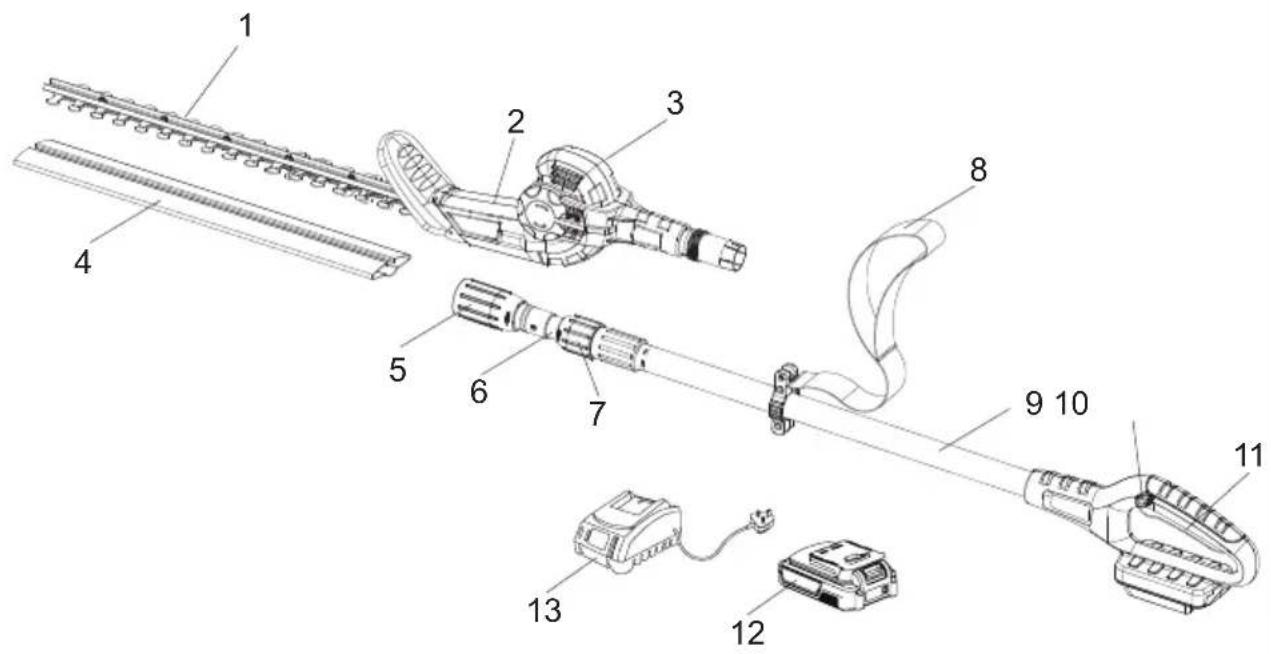
Parts
- Blade
- Working head
- Working head adjusting knob
- Blade sheath
- Working head attachment lock
- Telescopic pole
- Telescopic pole lock
- Shoulder strap
- Pole tube
- Safety lock-off button
- Main switch
- Battery pack
- Charger
Assembly
Assemble the working head
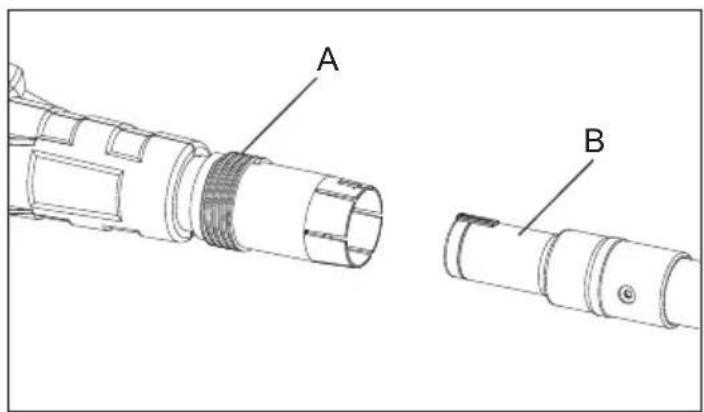
Before using the pole hedge trimmer, a one-time assembly is required. When removed from the box, the two parts are disconnected as shown in photo below.
Assemble the working head (A) to the telescopic pole handle (B). When inserted, the two parts must be inserted fully. Lock the working head attachment lock (C) fully.

natural_image
Technical line drawing of a mechanical component with labeled part C (no text or symbols beyond label)Assembly
Disassemble the working head
When removing, turn working head attachment lock (C) to unlock, then pull the pole out.

natural_image
Technical line drawing of a mechanical component with labeled section C (no text or symbols beyond label)Attach the shoulder strap
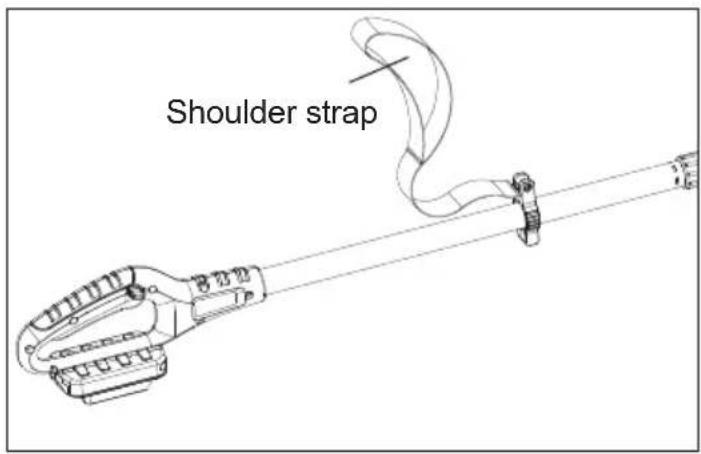
Fix the hook of the shoulder strap into the lifting lug on the pole tube of the pole hedge trimmer.
Preparation
Adjust the telescopic pole
Loosen the telescopic pole lock (D) and extend the upper part of the handle to the desired handle length. Then tight the telescopic pole lock to fix the tube tight. The telescopic handle extends from 173cm to 215cm.

Adjust the working head angel
Hold the working head tightly. Push the working head adjusting button (E) and then turn the working head to the desired position. Release the adjusting button again and check whether the working head is locked in place.
Note: The working head can be locked in six positions (-45°, -22.5°, 0°, 22.5°, 45°, 67.5°)

Preparation
Checking battery capacity

WARNING!
The charger and battery pack are specifically designed to work together so do not attempt to use any other devices. Never insert or allow metallic objects into your charger or battery pack connections; an electrical failure and hazard will occur.
The battery needs to be charged before first use and whenever it fails to produce sufficient power on jobs that were easily done before.
- Press the battery capacity level button to check the charging level of the battery pack. The battery capacity will be shown on the battery charging level indicators.

| Battery charging level indicators. | Battery capacity |
| ●○○□ | ≤ 35% and need to be charged |
| ●●○□ | 35-65% |
| ●●●□ | ≥ 65% |
Preparation
Charging the battery
- Connect the charger to a power supply. The red LED will illuminate.
- Slide the battery pack into the charger fully, the red indicator is on and the green indicator is flashing means the battery is in charging.
- Complete charging, the red LED is off and the green LED is on.
- Once the battery is fully charged, disconnect the charger from the mains and remove the battery pack from the charger.
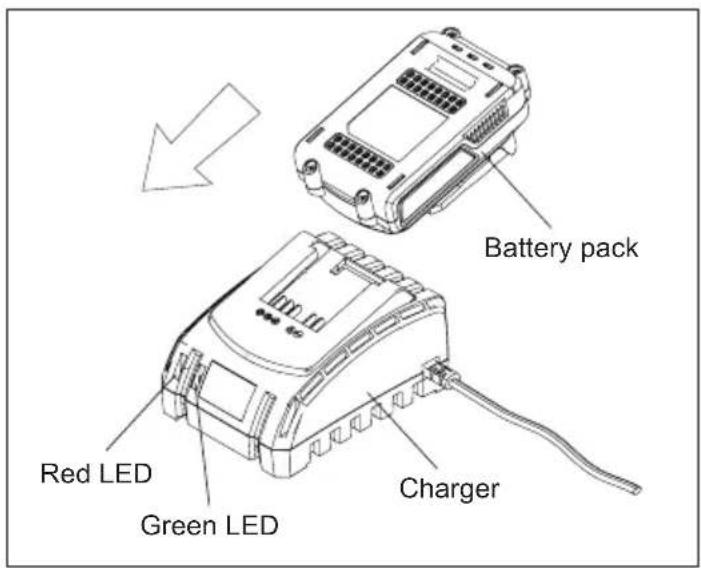
| LED Light on Charger (Red & Green) | Charger Status |
| Standby | |
| In charging | |
| Battery pack is fully charged | |
| (2 times/second) | Battery pack faulty |
| (1 time/second) | Battery pack overheat |

Note! It is not recommended to charger the battery pack immediately after using the machine. The battery pack should be cooled for a period of time.

Note: Charging time varies from different battery pack capacities.
Preparation
Important charging notes
- Never allow the battery to completely discharge before recharging. The battery pack should be placed on the charger whenever the battery pack is noticeably running down or the tool no longer performs a task it previously performed.
- Avoid conducting short charges. Make sure that the battery is fully charged each time by allowing the charger to complete its full charging cycle.
- Avoid allowing loose items like screws or nails, etc., to be stored with battery packs, as these or similar items can short battery packs and cause a fire or explosion.
- Always unplug the charger when not in use and store in a dry and secure place.
- Avoid charging or storing your battery in temperatures below 0^ C and above 40^ C.
- After use, allow the battery pack to cool down for approximately 30 minutes before attempting to recharge.
If the battery pack does not charge properly:
- Check the main socket by plugging in a lamp or other appliance.
- Move the charger and battery pack to a location where the surrounding air temperature is approximately 18-24°C.
-
If charging problems persist, please contact service centre at 0345 605 2062.
-
The battery pack should be recharged when it fails to produce sufficient power on jobs which were easily done before. DO NOT CONTINUE to use under these conditions. Follow the charging procedure. You may also charge a partially used pack whenever you desire with no adverse effect on the battery pack.
8 Under certain conditions with the charger plugged into the power supply, the exposed charging contacts inside the charger can be shorted by foreign materials. Foreign materials of a conductive nature, such as, but not limited to, steel wool, aluminium foil, or any build-up of metallic particles, should be kept away from charger cavities. Always unplug the charger from the power supply when there is no battery pack in the cavity. Unplug the charger before attempting to clean.
- Do not immerse the charger in water or any other liquid.

WARNING!
Never attempt to open the battery pack for any reason. If the plastic housing of the battery pack breaks or cracks, dispose of the battery pack in accordance with local regulations; do not put it into further use.
Preparation
Install the battery pack

WARNING! Always release the On/Off switch before inserting or removing the battery pack.
- Remove the battery pack: Press the button on the end of the battery pack, then remove the pack from the trimmer.
- Install the battery pack: Align the ribs on both sides of the battery pack with the slots in the housing, and slip it into place. Always insert it all the way until it locks in place with a click sound. If it's not correctly inserted, it may accidentally fall out of the trimmer, causing injury to you or bystanders.

Remove the blade sheath

WARNING! Wear proper PPE list in page 2.

natural_image
Technical illustration of a mechanical tool with a hatched blade and bracket, showing a directional arrow (no text or symbols)Fit the shoulder strap
Put the straps over the shoulders. Adjust the length of the strap to fit your height.

natural_image
Line drawing of a person wearing a shirt and belt, holding a sash (no text or symbols)Operation
Switching on/off

WARNING! If any parts are missing, damaged or broken, do not operate your hedge trimmer until all damaged parts have been replaced or repaired. Failure to do so could result in serious personal injury.
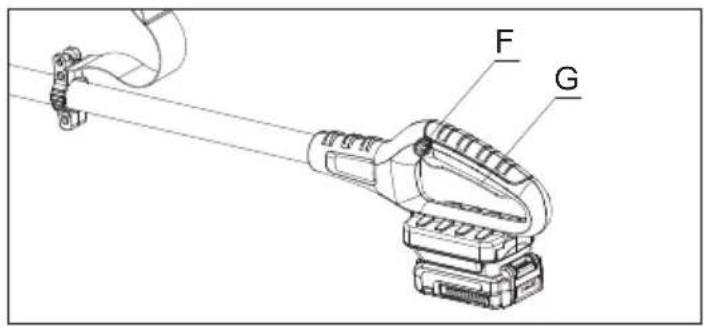
- Switching on
Push in the safety lock-off button (F) and then press the main switch (G) on the handle.
- Switching off
Release the main switch on the handle (G).
Cutting

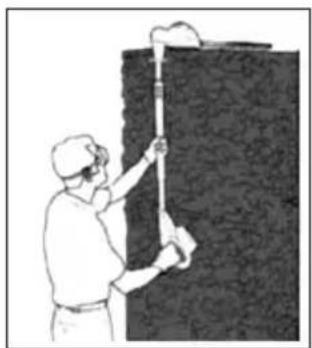
WARNING! DO NOT exceed the cutting capacity of this product! With its unique design, the pole trimmer can be used to trim and shape hard to reach areas on hedges and bushes, such as those shown below.
natural_image
Illustration of a worker cleaning a wall with a tool (no text or symbols visible)
natural_image
Line drawing of a person using a handheld tool to clean or brush (no text or symbols)NOTE: Use only an approved outdoor extension cable as described previously in this manual. Grasp the telescopic pole with one hand and the rear handle with your other hand. Adjust hand placement on the telescopic pole of garden tool to keep proper balance. Do not attempt to use the garden tool at a length which does not allow you to achieve proper footing and balance at all times.
Operation
Seasonal hedges and shrubs that lose their leaves in the winter should be trimmed in June and October.
Evergreen hedges and shrubs that retain their leaves in the winter should be trimmed in April and August.
Conifers and other fast-growing shrubs can be trimmed every six weeks from May onwards throughout the growing season.

WARNING!
Always keep both hands on the hedge trimmer handles. Never hold shrubs with one hand and operate hedge trimmer with the other. Failure to heed this warning can result in serious injury.

WARNING!
Clear the area to be cut before each use. Remove all objects such as cords, lights, wire, or loose string which can become entangled in the cutting blade and create a risk of serious personal injury.
Maintenance and Storage
Maintenance

WARNING!
Before any maintenance, always take off the battery pack and wear protective gloves.
. Never use water to clean the unit.
. Always clean the hedge trimmer immediately after use. Brush the blade using a stiff nylon brush to remove any debris.
. Always store the unit in a dry place.
. Inspect the hedge trimmer before each use.
. Have the unit professionally repaired if any damage occurs.
. The blade rail should be cleaned and treated with fine lubricating oil after each use.
. Use the blade sheath for transportation and storage.
Lubrication of the blade
For easier operation and longer life, lubricate the cutting blades before and after each use.
Before lubricating, make sure the battery is disconnected from the hedge trimmer.
Apply the oil (any kind of lubrication oil) so that it runs between the two blades.

natural_image
Illustration of a mechanical component interacting with a grooved surface (no text or symbols)Storage and transport
After cleaning the unit thoroughly. Store the unit in a safe, dry room, allowing the motor to cool down beforehand.
Store the unit out of the reach of children.
Use the original packaging to store the unit, whenever possible.
Troubleshooting
General Troubleshooting
Although your new cordless hedge trimmer is really easy to operate, if you do experience problems, please check the following:
| Problem Possible case Solution | ||
| Hedge trimmer does not operate | 1. Not connected to battery pack2. Low battery capacity | 1. Connect to battery pack2. Charge the battery pack |
| Hedge trimmer operates intermittently | 1. Internal wiring damaged2. On/Off switch defective | Contact service centre at 0345 605 2062 |
| Cutting blade hot 1. Cutting | blade dull2. Cutting blade is damaged3. Too much friction, due to lack of lubricant | Have blade sharpened.2. Have blade inspected/over-hauled3. Apply lubricant spray |
| Cutting time per battery charge too low | Too much friction, due to lack of lubricantBlade needs cleaningBattery not fully charged | Apply lubricant sprayClean bladeRecharge battery; also see “Charging The Battery” |
| The blades are running slow | Battery dischargedBattery stored outside of battery temperature | Recharge battery; also see “Charging The Battery”2. Allow battery to warm naturally to room temperature (within battery operating temperature 10–40 °C) |
| Battery charge indicator(a) does not light up | Mains plug of battery charger not plugged in (properly)Socket outlet, mains cable or battery charger defective | Insert mains plug (fully) into the socket outletContact service centre at 0345 605 2062 |
Technical Data
Technical Data Table
| Model MCLHT1841E | |
| Voltage 18V | --- |
| No load speed 1400/min | |
| Cutting length/tooth gap 41cm/14mm | |
| The telescopic handle extends 173cm-215cm | |
| A weighted sound pressure 85.73dB(A), K=3dB(A) | |
| A weighted sound power 87.34dB(A), K=4.2dB(A) | |
| Guaranteed sound power 96dB(A) | |
| Vibration Front handle: 0.544m/s | 2Rear handle: 1.477m/s2K=1.5m/s2 |
| Battery pack | |
| Model No. BOP-SP07-20ZM | |
| Battery voltage 18V | --- |
| Battery type Li-lon | |
| Battery capacity 2.0Ah | |
| Fully charge time (approx.) 1 hour | |
| Charger | |
| Model No. B0Q-SP06-20ZB | |
| Input 220-240V~ 50/60Hz 65W | |
| Output | 20V--- 2.4A |
| Insulation protection class | II |
| Part Number | Accessories |
| ABBH071008 | Blade cover |
| ABBA021044 | Charger |
| 0240228006 | Battery pack |
| ABBH071053 | Shoulder strap |
Technical Data

WARNING!
The sound values have been determined according to the noise test code given in EN 62841-1, using the basic standards ISO 11203 and ISO 3744.
The sound intensity level for the operator may exceed 80dB(A) and ear protection measures are necessary.
The declared vibration value (according to EN 62841-1) has been measured in accordance with a standard test method, and may be used for comparing one product with another. The declared vibration value may also be used in a preliminary assessment of exposure.
Depending on the actual use of the product, the vibration values can differ from the declared total. Adopt proper measures to protect yourself against vibration exposures. Take the whole work process into consideration, including times the product is running under no load or switched off.

WARNING! This machine may cause Hand-Arm Vibration Syndrome (HAVS) if its use is not adequately managed.
Preventative measures include, among others, regular maintenance and care of the product and cutting attachments, keeping hands warm and periodical breaks, as well as proper planning of work processes.
Recycling and Disposal
Recycling and disposal

The product comes in a package that protects it against damage during shipping. Keep the packaging until you are sure that all parts have been delivered and the product is functioning properly. Recycle the packaging afterwards.
Old products are potentially recyclable and do not, therefore, belong in your household waste. You are requested to assist us and our contribution to saving resources and protecting the environment by handing this product at an equipped collection centre.
Getting Help
Customer Helpline 0345 605 2062
Our dedicated UK based customer service centre is open 7 days a week to assist you with assembly, parts queries and technical support. We are open during office hours. Our experts are here to get you back enjoying your garden in no time.
Calling our service does not affect your statutory rights. UK/N.I. 0345 605 2062
Dear Customer,
In the unlikely event that your device develops a fault, please contact our Customer service department on the telephone number shown below.
- These guarantee terms cover additional guarantee rights and do not affect your statutory warranty rights. Claims must be accompanied by Proof of Purchase. This must be in the form of a Sales receipt or Bank statement and must show that the product has been purchased within 2 years prior to the claim, from the retailer that it was originally sold to.
- Our guarantee covers problems caused by material or manufacturing defects, and will result in the repair of these defects or replacement of the device with a like for like or similar article. Please note that our devices have not been designed for use in commercial, trade or industrial applications. Consequently, the guarantee is invalidated if the equipment is used in commercial, trade or industrial applications or for other equivalent activities.
- The following are also excluded from our guarantee :
A. Faults due to accidents, customer misuse or unauthorised repairs
B. Consumable parts such as shoulder strap, blade cover and other accessories that are compatible with the product.
C. Failure due to lack of routine maintenance.
D. Failure as a result of not using the equipment in accordance with the manual and safety instructions
E. The adjustment of chargers, or battery packs
-
The guarantee is valid for a period of 2 years starting from the purchase date of the device. Guarantee claims should be submitted before the end of the guarantee period within two weeks of the defect being noticed. No guarantee claims will be accepted after the end of the guarantee period. The original guarantee period remains applicable to the device even if repairs are carried out or parts are replaced. In such cases, the work performed or parts fitted will not result in an extension of the guarantee period, and no new guarantee will become active for the work performed or parts fitted. This also applies when an on-site Service is used.
-
Please keep your sales receipt in a safe place. If is covered by our guarantee your device will either be repaired under the terms of guarantee or we will send you a replacement device. This device may be re-conditioned or like for like replacement.

- McGregor 18V CORDLESS POLE HEDGE TRIMMER
- CAUTION Read the instructions before using the machine
- Contents
- Safety Information
- Warning Symbol
- Warning symbols on the charger
- Warning symbols on the battery
- General machine safety warnings
- WARNING! Read all safety warnings and all instructions provided on or with this machine.
- Save all warnings and instructions for future reference.
- Work area safety
- Electrical safety
- Personal safety
- Machine use and care
- Battery tool use and care
- Pole Hedge trimmer safety warnings
- Safety warnings for battery packs
- Safety warnings for charger
- Maintenance and storage
- Transportation
- Service
- Vibration and noise reduction
- Emergency
- Residual risks
- In the Box
- Parts
- Assembly
- Assemble the working head
- Disassemble the working head
- Attach the shoulder strap
- Preparation
- Adjust the telescopic pole
- Adjust the working head angel
- Checking battery capacity
- WARNING!
- Charging the battery
- Important charging notes
- Install the battery pack
- WARNING! Always release the On/Off switch before inserting or removing the battery pack.
- Remove the blade sheath
- WARNING! Wear proper PPE list in page 2.
- Fit the shoulder strap
- Operation
- Switching on/off
- Cutting
- Maintenance
- Lubrication of the blade
- Storage and transport
- Troubleshooting
- General Troubleshooting
- Technical Data
- Recycling and Disposal
- Getting Help
- Customer Helpline 0345 605 2062
- Dear Customer,
Brand : McGregor
Model : ET1304
Category : Hedge Trimmers