
WMD44ME - Microwave WHIRLPOOL - Free user manual and instructions
Find the device manual for free WMD44ME WHIRLPOOL in PDF.


| Product Type | Microwave Oven |
| Brand | Whirlpool |
| Model | WMD44ME |
| Capacity | 25 Liters |
| Power Output | 900 W |
| Voltage | 230 V |
| Frequency | 50 Hz |
| Dimensions (W x H x D) | 51.3 cm x 30.5 cm x 44.5 cm |
| Weight | About 14 kg |
| Control Type | Digital Touch + Rotary Knob |
| Display | LED |
| Door Type | Side Opening with Pull Handle |
| Interior Light | Yes |
| Turntable | Yes, 31.5 cm diameter |
| Defrost Function | Auto Defrost by Weight |
| Auto Cook Menus | 8 preset programs |
| Timer | Up to 95 minutes |
| Child Lock | Yes |
| Quick Start | Add 30 seconds per press |
| Energy Consumption | About 1.4 kWh/cycle |
| Cleaning | Wipe with damp cloth; avoid abrasive cleaners |
| Safety Features | Door interlock, overheat protection, child lock |
| Spare Parts Availability | Turntable, fuse, door switch available via service |
| Warranty | 2 years (parts and labor) |
Frequently Asked Questions - WMD44ME WHIRLPOOL
User questions about WMD44ME WHIRLPOOL
0 question about this device. Answer the ones you know or ask your own.
Ask a new question about this device
Download the instructions for your Microwave in PDF format for free! Find your manual WMD44ME - WHIRLPOOL and take your electronic device back in hand. On this page are published all the documents necessary for the use of your device. WMD44ME by WHIRLPOOL.
USER MANUAL WMD44ME WHIRLPOOL
THANK YOU FOR BUYING A WHIRLPOOL PRODUCT
In order to receive more complete assistance, please register your product on www.whirlpool.eu/register

Before using the appliance, carefully read the Safety Instruction.
PLEASE SCAN THE QR CODE ON YOUR APPLIANCE IN ORDER TO REACH MORE INFORMATION

PRODUCT DESCRIPTION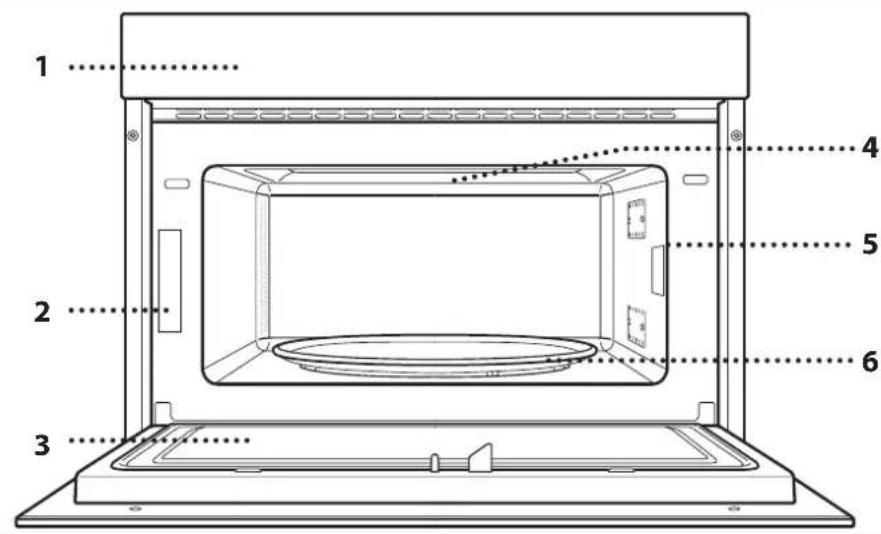
- Control panel
- Identification plate (do not remove)
- Door
- Upper heating element/grill
- Light
- Turntable
CONTROL PANEL DESCRIPTION
- LEFT-HAND DISPLAY
- PAUSE
To pause a cooking cycle.
- BACK
For returning to the previous screen.
- ON/OFF
For switching the oven on and off and for stopping an active function at any time.
- ROTARY KNOB / 6TH SENSE BUTTON
Turn this to navigate through the functions and adjust all of the cooking parameters. Press to select, set, access or confirm functions or parameters and eventually start the cooking program.
- START
For starting functions and confirming settings.
- TIME
For setting the time as well as setting or adjusting the cooking time.
- POWER
To adjust the microwave power.
- RIGHT-HAND DISPLAY
ACCESSORIES
TURNTABLE

Placed on its support, the glass turntable can be used with all cooking methods.
The turntable must always be used
as a base for other containers or accessories.
TURNTABLE SUPPORT

Only use the support for the glass turntable.
Do not rest other accessories on the support.
WIRE RACK

This allows you to place food closer to the grill, for perfectly browning your dish.
Place the wire rack on the turntable, making sure that it does not come
into contact with other surfaces.
The number and the type of accessories may vary depending on which model is purchased.
There are a number of accessories available on the market. Before you buy, ensure they are suitable for microwave use and resistant to oven temperatures.
Metallic containers for food or drink should never be used during microwave cooking.
CRISP PLATE
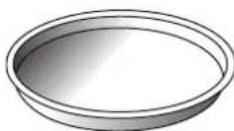
Only for use with the designated functions.
The Crisp plate must always be placed in the centre of the glass turntable and can be pre-heated
when empty, using the special function for this purpose only. Place the food directly on the Crisp plate.
HANDLE FOR CRISP PLATE

Useful for removing the hot Crisp plate from the oven.
Other accessories that are not supplied can be purchased separately from the After-sales Service.
Always ensure that foods and accessories do not come into contact with the inside walls of the oven.
Always ensure that the turntable is able to turn freely before starting the oven. Take care not to unseat the turntable whilst inserting or removing other accessories.
FUNCTIONS

6TH SENSE
These functions automatically select the best cooking method for all types of food.

REHEAT
For reheating ready-made food that is either frozen or at room temperature. The oven automatically calculates the settings required to achieve the best results in the shortest amount of time. Place food on a microwave-safe and heatproof dinner plate or dish.
| FOOD WEIGHT (g) | ||
 | PLATED MEAL 250 - 500 | |
 | FROZEN LASAGNA 250 - 500 | |
 | MILK/WATER 100 - 500 | |
 | SOUP 200 - 800 |

COOK
For cooking foods quickly and achieving optimal results. Use a heatproof container suitable for microwave use.
| FOOD WEIGHT (g) | ||
 | ROAST CHICKEN 800 - 1500 | |
 | POTATOES GRATIN 200 - 1000 | |
 | STUFFED VEGETABLES 200 - 800 | |
 | PORK RIBS 200 - 800 | |
 | SCRAMBLED EGGS 100 - 500 | |
 | POPCORN 90 |

CRISP
For quickly reheating and cooking frozen foods and giving them a golden, crunchy top. Only use this function with the crisp plate provided. Turn the food when prompted.
| FOOD WEIGHT (g) | ||
| PIZZA [FROZEN] 200 - 800 | ||
| BURGER PATTIES 200 - 600 | ||
| POTATOES FRIED [FROZEN] | 200 - 500 | |
| CHICKEN NUGGETS [FROZEN] | 100 - 500 | |
| FISH FINGERS [FROZEN] | 100 - 500 |
Required accessories: Crisp plate, handle for crisp plate

Hydro Self Clean
The action of the steam released during this special cleaning cycle allows dirt and food residues to
be removed with ease. Pour a cup of drinking water into a microwave proof container and activate the function.

MICROWAVE
For quickly cooking and reheating food or drinks.
| POWER (W) | RECOMMENDED FOR |
| 1000 | Quickly reheating drinks or other foods with a high water content. |
| 800 | Cooking vegetables. |
| 650 | Cooking meat and fish. |
| 500 | Cooking meaty sauces, or sauces containing cheese or egg. Finishing off meat pies or pasta bakes. |
| 350 | Slow, gently cooking. Perfect for melting butter or chocolate. |
| 160 | Defrosting frozen foods or softening butter and cheese. |
| 90 | Softening ice cream. |
| ACTION | FOOD | POWER (W) | DURATION (min.) |
| Reheat | 2 cups | 1000 | 1 - 2 |
| Reheat | Mashed potatoes(1 kg) | 1000 | 9 - 11 |
| Defrost | Minced Meat (500 g) | 160 | 13 - 14 |
| Cook | Sponge cake | 800 | 6 - 7 |
| Cook | Egg custard | 650 | 11 - 12 |
| Cook | Meat loaf | 800 | 18 - 20 |

CRISP
For perfectly browning a dish, both on the top and bottom of the food. This function must only be used with the special Crisp plate.
| FOOD | DURATION (min.) |
| Leavened cake | 7 - 10 |
| Hamburger | 8 - 10* |
* Turn food halfway through cooking.
Required accessories: Crisp plate, handle for the Crisp plate

DEFROST
For quickly defrosting various different types of food simply by specifying their weight. Food should be placed directly on the glass turntable, except for Crisp Bread Defrost. Turn the food when prompted.
CRISP BREAD DEFROST
This exclusive function allows you to defrost frozen bread. Combining both Defrost and Crisp technologies, your bread will taste and feel as if it were freshly baked. Use this function to quickly defrost and heat frozen rolls, baguettes & croissants. The Crisp Plate must be used in combination with this function, directly placed on wire shelf.
| FOOD WEIGHT (g) | ||
| TIMED DEFROST - | ||
| MEAT 100 - 2000 | ||
| POULTRY 100 - 2500 | ||
| FISH 100 - 1500 | ||
| CRISP BREAD DEFROST 50 - 500 |

GRILL
For perfectly browning a dish, both on the top and bottom of the food. This function must only be used with the special Crisp plate.
FOOD DURATION (min.)
Leavened cake 7 - 10
Hamburger 8 - 10 *
* Turn food halfway through cooking.
Required accessories: Wire rack
FIRST TIME USE
. SETTING THE TIME
You will need to set the time when you switch on the oven for the first time.
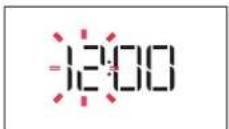
The two digits for the hour will start flashing: Turn the rotary knob to set the hour and then press ⓕ to confirm.
DAILY USE
1. SELECT A FUNCTION
When the oven is off, only the time is shown on the display. Press and hold to switch the oven on. Turn the rotary knob to view the main functions available on the left-hand display. Select one and press.


To select a sub-function (where available), select the main function and then press Ⓞ to confirm and go to the function menu.

GRILL+MW
For quickly cooking and gratinating dishes, combining the microwave and grill functions.
FOOD POWER (W) DURATION (min.)
| Potatoes gratin | 650 | 20 - 22 |
| Roast chicken | 650 | 40 - 45 |
Recommended accessories: Wire rack

The two digits for the minutes will start flashing. Turn the rotary knob to set the minutes and press ⓐ to confirm.
Please note: To change the time at a later point, press and hold ☑ for at least one second while the oven is off and repeat the steps above.
You may need to set the time again following lengthy power outages.


Turn the rotary knob to select from amongst the subfunctions available on the right-hand display and then press Ⓞ to confirm.
2. SET A FUNCTION
.6 TH SENSE / DEFROST
FOOD CLASS
Once you have chosen one of the automatic functions, you will need to select a category for the food you are cooking.

When the icon flashes, turn the rotary knob to select the category you require and then press ⓐ to confirm. WEIGHT
To achieve the best results, the 6th Sense (and Jet Defrost) require you to enter the weight of the food, selecting from amongst the default settings: the oven will calculate the ideal length of time for the function to run for each category of food.

When the default setting appears on the display and the 9 icon flashes, turn the rotary knob to set the weight and then press Ⓢ to confirm.
MANUAL FUNCTIONS
After having selected the function you require, you can change its settings.
The display will show the settings that can be changed in sequence.
MICROWAVE POWER

When the Mon flashes on the display, turn the rotary knob to adjust the power setting and then press ⚙ to confirm and continue to alter the settings that follow (if possible).
Please note: Once the function has been activated, the power can be changed by pressing ow to access the settings menu, then turning the rotary knob to change the setting.
DURATION

When the icon flashes on the display, use the rotary knob to set the cooking time you require and then press Ⓧ to confirm or press to confirm and start the function.
Note: During cooking, you can adjust the cooking time by turning the rotary knob; each time you press ☐, the cooking time increases by 30 seconds.
ACTIVATE THE FUNCTION
Once you have applied the settings you require, press ▶ to activate the function.
Every time the ▶ button is pressed again, the cooking time will be increased by a further 30 seconds.
Please note: You can press Ⓞ at any time to stop the function that is currently active.
JET START
When the oven is switched off, it is possible to press to activate cooking with the microwave function set at full power (1000 W) for 30 seconds.
SAFETY LOCK
This function is automatically activated to prevent the oven from being switched on accidentally.

Open and close the door, then press to start the function.
4. PAUSE
To pause an active function, for example to stir or turn the food, simply open the door.
To start it up again, close the door and press ▶.
AUTOMATIC PAUSE
(TURN OR STIR FOOD)
Certain functions will pause to allow you to turn or stir the food.

Once the oven has paused cooking, open the door and carry out the action you are prompted to perform before closing the door again and pressing ▶ to continue with cooking.
5. COOKING END
An audible signal will sound and the display will indicate that cooking is complete.

To extend the cooking time without changing the settings, turn the rotary knob to set a new cooking time and press ▶.
. KEY LOCK
To lock the keypad, press and hold for at least 5 seconds.

Do this again to unlock the keypad.
Please note: The key lock can also be activated while cooking is in progress. For safety reasons, the oven can be switched off at any time by pressing and holding [b].
CLEANING
Make sure that the appliance has cooled down before carrying out any maintenance or cleaning.
Never use steam cleaning equipment.
Do not use wire wool, abrasive scourers or abrasive/corrosive cleaning agents, as these could damage the surfaces of the appliance.
INTERIOR AND EXTERIOR SURFACES
- Clean the surfaces with a damp microfibre cloth. If they are very dirty, add a few drops of pH-neutral detergent. Finish off with a dry cloth.
- Clean the glass in the door with a suitable liquid detergent.
- At regular intervals, or in case of spills, remove the turntable and its support to clean the bottom of the oven, removing all food residue.
- The grill does not need to be cleaned as the intense heat burns away any dirt. Use this function on a regular basis.
ACCESSORIES
All accessories are dishwasher safe with the exception of the Crisp plate.
The Crisp plate should be cleaned using water and a mild detergent. For stubborn dirt, rub gently with a cloth. Always leave the Crisp plate to cool down before cleaning.
TROUBLESHOOTING
| Problem Possible cause Solution | ||
| The oven is not working. | Power cut.Disconnection from the mains. | Check for the presence of mains electrical power and whether the oven is connected to the electricity supply.Turn off the oven and restart it to see if the fault persists. |
| The oven makes noises, even when it is switched off. | Cooling fan active. | Open the door or hold or wait until the cooling process has finished. |
| The display shows the letter “F” followed by a number. | Software fault. | Contact the Call Center and state the number following the letter “F”. |
Policies, standard documentation and additional product information can be found by:
• Using the QR on your product - Visiting our website docs.whirlpool.eu • Alternatively, contact our After-sales Service (See phone number in the warranty booklet). When contacting our After-sales Service, please state the codes provided on your product's identification plate.


THANK YOU FOR PURCHASING A WHIRLPOOL PRODUCT
To provide you with more complete assistance, register your appliance at www.whirlpool.eu/register

Carefully read the safety instructions before using the appliance.
SCAN THE QR CODE ON YOUR APPLIANCE TO GET MORE INFORMATION

PRODUCT DESCRIPTION

- LEFT SCREEN
- PAUSE
To pause the cooking cycle.
- BACK
To return to the previous screen.
- ON/OFF
- LEFT DISPLAY
- PAUSE
- LEFT DISPLAY
- PAUSE
INTERIOR AND EXTERIOR SURFACES
. MANUAL FUNCTIONS
- LEFT DISPLAY
- STOP
Stops the cooking cycle.
- BACK
- LEFT DISPLAY
- PAUSE
- ON/OFF
THANK YOU FOR PURCHASING A WHIRLPOOL PRODUCT
- LEFT DISPLAY
- PAUSE
To pause the food preparation cycle.
- BACK
To return to the previous screen.
- ON/OFF
To turn the oven on and off or to pause or stop operation at any time.
- ROTARY KNOB/6 th SENSE BUTTON
Turn to navigate through functions and set all parameters for food preparation. Press to select, set, access or confirm functions or parameters and start the food preparation program.
- START
- RIGHT DISPLAY
ACCESSORIES
TURNTABLE

When placed on its stand, the glass turntable can be used for all food preparation modes.
(TURN OR STIR FOOD)
MANUAL SETTING FUNCTIONS
- LEFT DISPLAY
- PAUSE
- LEFT DISPLAY
- PAUSE


- ACCESSORIES
- TURNTABLE
- TURNTABLE SUPPORT
- WIRE RACK
- CRISP PLATE
- HANDLE FOR CRISP PLATE
- FUNCTIONS
- TH SENSE
- REHEAT
- COOK
- CRISP
- HYDRO SELF CLEAN
- MICROWAVE
- DEFROST
- CRISP BREAD DEFROST
- GRILL
- FIRST TIME USE
- SETTING THE TIME
- DAILY USE
- SELECT A FUNCTION
- GRILL+MW
- SET A FUNCTION
- TH SENSE / DEFROST
- MANUAL FUNCTIONS
- MICROWAVE POWER
- DURATION
- ACTIVATE THE FUNCTION
- JET START
- SAFETY LOCK
- PAUSE
- AUTOMATIC PAUSE
- COOKING END
- KEY LOCK
- CLEANING
- INTERIOR AND EXTERIOR SURFACES
- THANK YOU FOR PURCHASING A WHIRLPOOL PRODUCT
- SCAN THE QR CODE ON YOUR APPLIANCE TO GET MORE INFORMATION
- PRODUCT DESCRIPTION
- MANUAL SETTING FUNCTIONS
Brand : WHIRLPOOL
Model : WMD44ME
Category : Microwave