
KGN56CX30U - Refrigerator BOSCH - Free user manual and instructions
Find the device manual for free KGN56CX30U BOSCH in PDF.


| Product type | Combined refrigerator-freezer |
| Brand | Bosch |
| Model | KGN56CX30U |
| Height (cm) | 186 |
| Width (cm) | 91 |
| Depth (cm) | 70 |
| Net weight (kg) | 85 |
| Power supply | 220-240 V ~ 50 Hz |
| Energy class | A++ |
| Annual consumption (kWh) | 280 |
| Total net capacity (L) | 540 |
| Fridge capacity (L) | 385 |
| Freezer capacity (L) | 155 |
| Cooling system | Ventilated (NoFrost) |
| Water dispenser | Yes, external |
| Ice cube dispenser | Yes, in the door |
| Interior lighting | LED |
| Door alarm | Yes |
| Triple protection | Anti-condensation, anti-odor, anti-bacterial |
| Maintenance and cleaning | Clean with a soft cloth and soapy water; automatic defrost (NoFrost) |
| Safety | Child safety, control lock |
| Repairability | Spare parts available for 10 years, repair by a professional |
| Origin | Germany |
Frequently Asked Questions - KGN56CX30U BOSCH
User questions about KGN56CX30U BOSCH
0 question about this device. Answer the ones you know or ask your own.
Ask a new question about this device
Download the instructions for your Refrigerator in PDF format for free! Find your manual KGN56CX30U - BOSCH and take your electronic device back in hand. On this page are published all the documents necessary for the use of your device. KGN56CX30U by BOSCH.
USER MANUAL KGN56CX30U BOSCH
Register your new appliance now at MyBosch and enjoy benefits free of charge: bosch-home.com/welcome
Fridge-freezer combination
KGN56..
[en] Information for Use Fridge-freezer combination 26
3

4

5
6
7

8

9

10

11


13

You can find additional information and explanations online. Scan the QR code on the title page.

Table of contents
1 Safety 27
1.1 General information 27 1.2 Intended use 27 1.3 Restriction on user group ..... 27 1.4 Safe transport 28 1.5 Safe installation 28 1.6 Safe use 29 1.7 Damaged appliance .... 31
2 Preventing material damage .... 32
3 Environmental protection and saving energy .... 32
3.1 Disposing of packaging ..... 32 3.2 Saving energy 32
4 Installation and connection ..... 33
4.1 Scope of delivery 33 4.2 Criteria for the installation location 33 4.3 Installing the appliance ..... 34 4.4 Preparing the appliance for the first time 34 4.5 Connecting the appliance to the electricity supply 34
5 Familiarising yourself with your appliance .... 34
5.1 Appliance 34 5.2 Control panel 34
6 Features 35
6.1 Shelf 35 6.2 Storage container 35 6.3 Fruit and vegetable container with humidity control 35
6.4 Butter and cheese compartment 36
6.5 Door tray 36
6.6 Accessories 36
7 Basic operation 36
7.1 Switching on the appliance ..... 36
7.2 Operating tips 36 7.3 Switching off the appliance ..... 37 7.4 Setting the temperature ...... 37
8 Additional functions ...... 37
8.1 Super cooling 37 8.2 Super freezing 37 8.3 Holiday mode 38 8.4 Energy-saving mode 38 8.5 Freshness mode 38
9 Alarm 39
9.1 Door alarm 39 9.2 Temperature alarm 39
10 Refrigerator compartment ..... 39
10.1 Tips for storing food in the refrigerator compartment ..... 39 10.2 Chill zones in the refrigerator compartment 40
11 Freezer compartment 40
11.1 Freezing capacity 40 11.2 Fully utilising the freezer compartment volume ...... 40 11.3 Tips for storing food in the freezer compartment ..... 40 11.4 Tips for freezing fresh food ... 40 11.5 Shelf life of frozen food at -18 °C 41 11.6 Defrosting methods for frozen food 41
12 Defrosting 41
12.1 Defrosting in the refrigerator compartment 41 12.2 Defrosting in the freezer compartment 41
13 Cleaning and servicing ..... 41
13.1 Preparing the appliance for cleaning 42 13.2 Cleaning the appliance ..... 42
13.3 Removing the fittings ..... 42
14 Troubleshooting 43
14.1 Power failure 46
14.2 Conducting an appliance self-test 47
15 Storage and disposal ...... 47
15.1 Taking the appliance out of operation 47
15.2 Disposing of old appliance ... 47
16 Customer Service 48
16.1 Product number (E-Nr.) and production number (FD) ..... 48
17 Technical data 48

Safety
Observe the following safety instructions.
1.1 General information
- Read this instruction manual carefully.
- Keep the instruction manual and the product information safe for future reference or for the next owner. ■ Do not connect the appliance if it has been damaged in transit.
1.2 Intended use
Only use this appliance:
■ for chilling and freezing food and for making ice cubes. ■ in private households and in enclosed spaces in a domestic environment. ■ Up to an altitude of 2000 m above sea level.
1.3 Restriction on user group
This appliance may be used by children aged 8 or over and by people who have reduced physical, sensory or mental abilities or inadequate experience and/or knowledge, provided that they are supervised or have been instructed on how to use the appliance safely and have understood the resulting dangers.
Do not let children play with the appliance.
Cleaning and user maintenance must not be performed by children unless they are being supervised.
1.4 Safe transport
⚠ WARNING – Risk of injury!
The heavy weight of the appliance may result in injury when lifted.
▶ Do not lift the appliance on your own.
1.5 Safe installation
⚠ WARNING – Risk of electric shock!
Incorrect installation is dangerous.
- Connect and operate the appliance only in accordance with the specifications on the rating plate.
- Connect the appliance to a power supply with alternating current only via a properly installed socket with earthing.
- The protective conductor system of the domestic electrical installation must be properly installed. Never equip the appliance with an external switching device, e.g. a timer or remote control.
- When the appliance is installed, the mains plug of the power cord must be freely accessible. If free access is not possible, an isolating switch must be integrated into the permanent electrical installation according to the installation regulations.
- When installing the appliance, check that the power cable is not trapped or damaged.
If the insulation of the power cord is damaged, this is dangerous.
Never let the power cord come into contact with heat sources.
WARNING – Risk of explosion!
If the appliance's ventilation openings are closed off, a leak in the refrigeration circuit may result in a flammable mixture of gas and air.
Keep ventilation openings in the appliance casing or in the integrated casing clear of obstruction.
WARNING – Risk of fire!
It is dangerous to use an extended power cord and non-approved adapters.
- Do not use extension cables or multiple socket strips.
- Only use adapters and power cords approved by the manufacturer.
If the power cord is too short and a longer one is not available, please contact an electrician to have the domestic installation adapted.
Portable multiple socket strips or portable power supply units may overheat and cause a fire.
- Do not place portable multiple socket strips or power supply units on the back of the appliance.
1.6 Safe use
⚠ WARNING – Risk of electric shock!
An ingress of moisture can cause an electric shock.
▶ Only use the appliance in enclosed spaces. ▶ Never expose the appliance to intense heat or humidity. - Do not use steam- or high-pressure cleaners to clean the appliance.
⚠ WARNING – Risk of suffocation!
Children may put packaging material over their heads or wrap themselves up in it and suffocate.
- Keep packaging material away from children. ▶ Do not let children play with packaging material.
Children may breathe in or swallow small parts, causing them to suffocate.
- Keep small parts away from children.
- Do not let children play with small parts.
⚠ WARNING – Risk of explosion!
If the cooling circuit is damaged, flammable refrigerant may escape and explode.
- To accelerate the defrosting process, do not use any other mechanical devices or means other than those recommended by the manufacturer.
- If food is stuck to the freezer compartment, loosen it with a blunt object such as the handle of a wooden spoon.
Products which contain flammable propellants and explosive substances may explode, e.g. spray cans.
- Do not store products which contain flammable propellants (e.g. spray cans) or explosive substances in the appliance.
⚠ WARNING – Risk of fire!
Electrical devices within the appliance may cause a fire, e.g. heaters or electric ice makers.
▶ Do not operate electrical devices within the appliance.
⚠ WARNING – Risk of injury!
Containers that contain carbonated drinks may burst.
- Do not store containers that contain carbonated drinks in the freezer compartment.
Injury to the eyes caused by escaping flammable refrigerant and hazardous gases.
- Do not damage the tubes of the refrigerant circuit or the insulation.
The appliance may tip.
▶ Do not stand or support yourself on the base, runners or doors.
⚠ WARNING – Risk of burns!
Individual parts on the back of the appliance become hot during operation.
▶ Never touch these hot parts.
⚠ WARNING – Risk of cold burns!
Contact with frozen food and cold surfaces may cause burns by refrigeration.
▶ Never put frozen food straight from the freezer compartment into your mouth.
- Avoid prolonged contact of the skin with frozen food, ice and surfaces in the freezer compartment.
⚠️ CAUTION – Risk of harm to health!
To prevent food from being contaminated, you must observe the following instructions.
▶ If the door is open for an extended period of time, this may lead to a considerable temperature increase in the compartments of the appliance. ▶ Regularly clean the surfaces that may come into contact with food and accessible drain systems. - Store raw meat and fish in suitable containers in the refrigerating appliance so that they do not touch or drip on other food.
- If the fridge/freezer is empty for an extended period of time, switch off the appliance, defrost it, clean it and leave the door open to prevent the formation of mould.
Metal or metal-style parts in the appliance may contain aluminium. If acidic food comes into contact with aluminium in the appliance, aluminium foil ions may pass into the food.
▶ Do not consume soiled food.
1.7 Damaged appliance
⚠ WARNING – Risk of electric shock!
If the appliance or the power cord is damaged, this is dangerous.
▶ Never operate a damaged appliance. ▶ Never pull on the power cord to unplug the appliance. Always unplug the appliance at the mains. - If the appliance or the power cord is damaged, immediately unplug the power cord or switch off the fuse in the fuse box.
▶ Call customer service. → Page 48
Improper repairs are dangerous.
- Repairs to the appliance should only be carried out by trained specialist staff. ▶ Only use genuine spare parts when repairing the appliance.
- If the power cord of this appliance is damaged, it must be replaced by the manufacturer, the manufacturer's Customer Service or a similarly qualified person in order to prevent any risk.
⚠ WARNING – Risk of fire!

If the tubes are damaged, flammable refrigerant and harmful gases may escape and ignite.
- Keep naked flames and ignition sources away from the appliance. ▶ Ventilate the room. ▶ Switch off the appliance. → Page 37
- Unplug the mains plug from the mains or switch off the circuit breaker in the fuse box. ▶ Call customer service. → Page 48
2 Preventing material damage
ATTENTION
If not rolling freely, the appliance's castors may damage the floor when the appliance is moved.
- Transport the appliance using a sack truck. ▶ Use floor protection when moving the appliance, and do not move it in a zigzag fashion.
Using the appliance, base, runners or doors as a seat or climbing surface may damage the appliance.
- Do not stand or lean on the appliance, base, runners or doors.
Contamination with oil or fat may cause plastic parts and door seals to become porous.
- Keep plastic parts and door seals free of oil and grease.
Metal or metal-style parts in the appliance may contain aluminium. When aluminium comes into contact with acidic foods, it corrodes and discolours.
- Only store packaged food in the appliance.
If you clean fittings and accessories in the dishwasher, this may cause them to become deformed or discolour.
▶ Never clean fittings and accessories in the dishwasher.
3 Environmental protection and saving energy
3.1 Disposing of packaging
The packaging materials are environmentally compatible and can be recycled.
- Sort the individual components by type and dispose of them separately.
3.2 Saving energy
If you follow these instructions, your appliance will use less power.
Selecting the installation location
- Keep the appliance out of direct sunlight. ■ Install the appliance as far away as possible from heating elements, cookers and other heat sources:
- Maintain a 30 mm clearance to electric or gas cookers.
- Maintain a 300 mm clearance to oil or solid-fuel cookers. ■ Make sure there is a small gap between the side wall and the appliance. ■ Never cover or block the external ventilation openings.
Saving energy during use
Note: The arrangement of the fittings does not affect the energy consumption of the appliance.
- Open the appliance only briefly and then close it carefully. Never cover or block the interior ventilation openings or the exterior ventilation openings. Transport purchased food in a cool bag and place in the appliance quickly.
- Allow warm food and drinks to cool down before storing them.
- Thaw frozen food in the refrigerator compartment to utilize the low temperature of the food. Always leave some space between the food and the back panel.
Control panel energy-saving mode
If the appliance is not being used, the control panel automatically switches to control panel energy-saving mode.
In control panel energy-saving mode, the control panel brightness is reduced and the light bar lights up.
Control panel energy-saving mode is deactivated as soon as you operate the control panel or open the door.
You can switch off the light bar before switching on control panel energy-saving mode. → Page 33
Switching on the light bar
Press and hold 2° + 8° for 3 seconds until an audible signal sounds.
Switching off the light bar
Press and hold 2° + 8° for 3 seconds until an audible signal sounds.
4 Installation and connection
4.1 Scope of delivery
After unpacking all parts, check for any transport damage and for completeness of delivery.
If you have any complaints, contact your dealer or our after-sales service → Page 48.
The delivery consists of the following:
■ Free-standing appliance ■ Equipment and accessories 1 ■ Installation instructions ■ User manual ■ Customer service directory
■ Warranty enclosure 2 ■ Energy label ■ Information on energy consumption and noises
4.2 Criteria for the installation location
WARNING –
Risk of explosion!
If the appliance is in a space that is too small, a leak in the refrigeration circuit may result in a flammable mixture of gas and air.
- Only install the appliance in a space with a volume of at least 1 m 3 per 8 g refrigerant. The volume of refrigerant is indicated on the rating plate.
→ "Appliance", Fig. 1/4
Page 34
The weight of the appliance ex works may be up to 100 kg depending on the model.
The subfloor must be sufficiently stable to bear the weight of the appliance.
The surface must be level.
This refrigerator is intended for use at ambient temperatures of 10 °C to 43 °C.
The appliance is fully functional within the permitted room temperature.
If the appliance is operated at colder room temperatures, the appliance will not be damaged up to a room temperature of 5 °C.
Over-and-under and side-by-side installation
If you want to install 2 refrigerating appliances one over the other or side by side, you must maintain a clearance of at least 150 mm between the appliances.
Selected appliances can be installed without a minimum clearance. Ask your dealer or kitchen planner about this.
4.3 Installing the appliance
- Install the appliance in accordance with the enclosed installation instructions.
4.4 Preparing the appliance for the first time
- Remove the informative material.
- Remove the protective foil and transit bolts, e.g. remove the adhesive strips and carton.
- Clean the appliance for the first time. → Page 42
4.5 Connecting the appliance to the electricity supply
- Insert the mains plug of the appliance's power cable in a socket nearby. The connection data of the appliance can be found on the rating plate. → "Appliance", Fig. 1/4 Page 34
- Check the mains plug is inserted properly.
√ The appliance is now ready for use.
5 Familiarising yourself with your appliance
5.1 Appliance
You can find an overview of the parts of your appliance here.
→Fig. 1
A Refrigerator compartment → Page 39 B Freezer compartment → Page 40 1 Lighting 2 Inner ventilation openings 3 Temperature controller (storage container) → Page 37 4 Rating plate → Page 48 5 Storage container → Page 35 6 Fruit and vegetable container with humidity control → Page 35 7 Frozen food container → Page 43 8 Screw foot 9 Butter and cheese compartment → Page 36 10 Control panel → Page 34 11 Door tray for large bottles → Page 36
5.2 Control panel
You can use the control panel to configure all functions of your appliance and to obtain information about the operating status.
→Fig. 2
| 1 | Displays the set temperature for the refrigerator compartment in °C. |
| 2 | Displays the set temperature for the freezer compartment in °C. |
| 3 | The light bar provides visual feedback. |
| 4 | alarm switches the warning signal off. |
| 5 | eco switches energy-saving mode on or off. |
| 6 | holiday switches holiday mode on or off. |
| 7 | fresh switches freshness mode on or off. |
| 8 | 1 3 sec. switches the appliance on or off. |
| 9 | super (Freezer compartment) switches Super freezing on or off. |
| 10 | super (Refrigerator compartment) switches Super cooling on or off. |
6 Features
The features of your appliance depend on the model.
6.1 Shelf
To vary the shelf as required, you can remove the shelf and re-insert it elsewhere.
→ "Removing the shelf", Page 42
6.2 Storage container
The temperatures in the storage container are lower than in the refrigerator compartment. Temperatures below 0 °C may occur occasionally. In order to reach temperatures close to 0 °C in the storage container, set the refrigerator compartment temperature to 2 °C. → Page 37
Use the lower temperatures in the storage container to store highly perishable food, e.g. fish, meat and sausages.
6.3 Fruit and vegetable container with humidity control
Store fresh fruit and vegetables loose in the fruit and vegetable container. Cover any chopped fruit and vegetables, or store in air-tight packaging. You can adjust the humidity in the fruit and vegetable container using the humidity controller. This allows fresh fruit and vegetables to be stored for longer than with conventional storage.
→ Fig. 3
The air humidity in the fruit and vegetable container can be set according to the type and amount of food to be stored by moving the humidity controller:
■ Move inwards for low humidity ⚙ when primarily storing fruit or mixed items, or if the appliance is very full. ■ Move outwards for high humidity 🐘 when primarily storing vegetables or when the appliance is not very full.
Condensation may form in the fruit and vegetable container depending on the food and quantity stored.
Remove the condensation with a dry cloth and adjust the air humidity to a lower setting using the humidity controller.
To ensure that the quality and aroma are retained, store fruit and vegetables that are sensitive to cold outside of the appliance at temperatures of approx. 8 °C to 12 °C, e.g. pine-
en Basic operation
apple, bananas, citrus fruits, cucumbers, courgettes, peppers, tomatoes and potatoes.
6.4 Butter and cheese compartment
Store butter and hard cheese in the butter and cheese compartment.
6.5 Door tray
To adjust the door tray as required, you can remove the door tray and re-insert elsewhere.
→ "Removing door tray", Page 42
6.6 Accessories
Use original accessories. These have been made especially for your appliance.
The accessories for your appliance depend on the model.
Egg tray
Store eggs safely on the egg tray.
Bottle holder
The bottle holder prevents bottles from falling over when the appliance door is opened and closed.
→Fig. 4
Variable bottle shelf
Store bottles securely on the variable bottle shelf.
→ Fig. 5
Ice cube tray
Use the ice cube tray to make ice cubes.
Making ice cubes
Use only drinking water to make ice cubes.
- Fill the ice cube tray with drinking water up to 3/4 and place in the freezer compartment. If the ice cube tray is stuck to the freezer compartment, loosen it with a blunt object such as the handle of a wooden spoon.
- To loosen the ice cubes, twist the ice cube tray slightly or hold it briefly under flowing water.
7 Basic operation
7.1 Switching on the appliance
- Electrically connect the appliance.
→ Page 34
Note: If the appliance has been previously switched off using the control panel, press and hold ① for three seconds.
√ The appliance is now ready for use. √ The appliance begins to cool. √ A warning signal sounds and the temperature display flashes because the freezer compartment is still too warm.
- Switch off the warning tone using alarm.
"alarm" goes out as soon as the set temperature has been reached.
- Set the required temperature.
→Page 37
7.2 Operating tips
■ Once you have switched on the appliance, the set temperature is only reached after several hours. Do not put any food in the appliance until the set temperature has been reached. ■ The front panels of the housing are temporarily heated slightly. This
prevents condensation in the area of the door seal.
- When closing the door, make sure that the door is not blocked by stored items.
- When you close the door, a vacuum may be created. The door is then difficult to open again. Wait a moment until the vacuum is offset. ■ The temperature in the appliance varies due to the following conditions:
- How often the appliance is opened
- Load capacity
- Temperature of newly stored food
- Ambient temperature
- Direct sunlight
7.3 Switching off the appliance
Press and hold ① for 3 seconds.
7.4 Setting the temperature
Setting the refrigerator compartment temperature
Press the required temperature. To reach the set temperature, slide the temperature controller for the storage container to a position that is one third from the bottom.
→Page 37
The recommended temperature in the refrigerator compartment is 4 °C.
Setting the storage container temperature
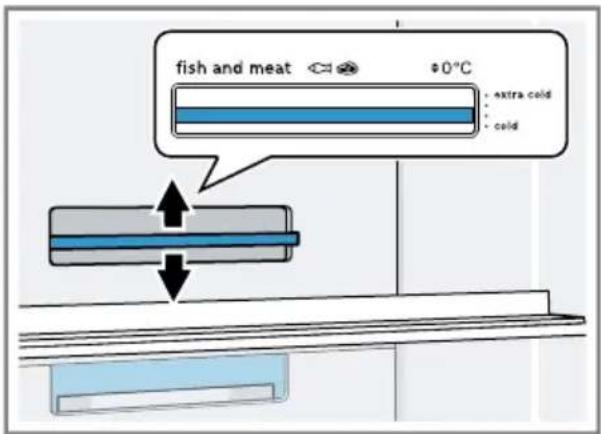
Select one of the options: To reduce the temperature, move the temperature controller up towards "extra cold".
To increase the temperature, move the temperature controller down towards "cold".
→Fig. 6
Setting the freezer compartment temperature
Press the required temperature. The recommended temperature in the freezer compartment is -18 °C.
8 Additional functions
Find out which additional functions can be used for your appliance.
8.1 Super cooling
With Super cooling, the refrigerator compartment cools as cold as possible.
Switch on Super cooling before placing large quantities of food in the refrigerator compartment.
Note: When Super cooling is switched on, increased noise may occur.
Switching on Super cooling
- Press super (Refrigerator compartment).
- "super" (Refrigerator compartment) lights up.
Note: After approx. 6 hours, the appliance switches to normal operation.
Switching off Super cooling
- Press super (Refrigerator compartment).
8.2 Super freezing
With Super freezing, the freezer compartment cools as cold as possible. Switch on Super freezing four to six hours before placing food weigh-
en Additional functions
ing 2 kg or more into the freezer compartment.
In order to utilise the freezer capacity, use Super freezing.
→ "Prerequisites for freezing capacity", Page 40
Note: When Super freezing is switched on, increased noise may occur.
Switching on Super freezing
- Press super (Freezer compartment). "super" (Freezer compartment) lights up.
Note: After approx. 54 hours, the appliance switches to normal operation.
Switching off Super freezing
- Press super (Freezer compartment).
8.3 Holiday mode
If you are going to be away for a long time, you can switch on energy-saving holiday mode on the appliance.
CAUTION -
Risk of harm to health!
The refrigerator compartment heats up while the holiday mode is switched on. The increased temperature may cause bacteria to increase and spoil the food.
- When the holiday mode is switched on, do not store any food in the refrigerator compartment.
The appliance automatically sets the temperatures.
| Refrigerator compartment | 14 °C |
| Freezer compartment | Temperature remains unchanged |
Switching on holiday mode
▶ Press holiday. ▼ "holiday" lights up.
Switching off holiday mode
Press holiday.
8.4 Energy-saving mode
You can set the appliance to save energy with the energy-saving mode. The appliance automatically sets the temperatures.
Refrigerator compartment: 8 °C
Freezer compartment: -16 °C
Switching on energy-saving mode
Press eco. "eco" lights up.
Switching off energy-saving mode
Press eco.
8.5 Freshness mode
In order to keep the food fresh for longer, you can switch on the freshness mode on the appliance.
The appliance automatically sets the temperatures.
| Refrigerator compartment | 2 °C |
| Freezer compartment | Temperature remains unchanged |
Switching freshness mode on
Press fresh. "fresh" lights up.
Switching off freshness mode
Press fresh.
9 Alarm
9.1 Door alarm
If the appliance door is open for a while, the door alarm switches on. A warning tone sounds, "alarm" flashes, the light bar flashes and the temperature display for the affected compartment flashes.
Switching off the door alarm
- Close the appliance door or press alarm. The warning tone is switched off.
9.2 Temperature alarm
If the freezer compartment becomes too warm, the temperature alarm is switched on.
A warning tone sounds and the set temperature (freezer compartment), "alarm" and the light bar flash.

CAUTION –
Risk of harm to health!
During the thawing process, bacteria may multiply and spoil the frozen food.
- Do not refreeze food after it has been defrosted or started to defrost. Refreeze food only after cooking.
- These items should no longer be stored for the maximum storage period.
The temperature alarm can be switched on in the following cases:
■ The appliance is switched on. Do not store any food until the appliance has reached the set temperature. ■ Large quantities of fresh food are being placed inside. Switch on Super freezing before placing large quantities of food in the appliance.
■ The freezer compartment door is open for too long. Check whether the frozen food has defrosted or thawed.
Switching off the temperature alarm
▶ Press alarm. √ The warning tone is switched off.
10 Refrigerator compartment
You can keep meat, sausage, fish, dairy products, eggs, prepared meals and pastries in the refrigerator compartment.
The temperature can be set from 2°C to 8°C.
The refrigerator compartment can also be used to store highly perishable foods in the short to medium term. The lower the selected temperature, the longer the food remains fresh.
10.1 Tips for storing food in the refrigerator compartment
■ Only store food when fresh and undamaged. ■ Store food covered or in air-tight packaging. ■ To avoid impeding the circulation of air and to prevent food from freezing, do not place food in front of the inner ventilation openings or in direct contact with the back wall. - Allow hot food and drinks to cool down first before placing in the appliance. - Observe the best-before date or use-by date specified by the manufacturer.
10.2 Chill zones in the refrigerator compartment
The air circulation in the refrigerator compartment creates different chill zones.
Coldest zone
The coldest zone is in the storage container.
Tip: Store highly perishable food such as fish, sausages and meat in the coldest zone.
Warmest zone
The warmest zone is at the very top of the door.
Tip: Store food that does not spoil easily in the warmest zone, e.g. hard cheese and butter. Cheese can then continue to release its aroma and the butter will still be easy to spread.
11 Freezer compartment
You can store frozen food, freeze food and make ice cubes in the freezer compartment.
The temperature can be set from -16 °C to -24 °C.
Long-term storage of food should be at -18 °C or lower.
The freezer compartment can be used to store perishable food long-term. The low temperatures slow down or stop the spoilage.
11.1 Freezing capacity
The freezing capacity indicates the quantity of food that can be frozen right through to the centre within a specific period of time.
Information on freezing capacity can be found on the rating plate.
→ "Appliance", Fig. 1 / Page 34
Prerequisites for freezing capacity
- Approx. 24 hours before storing fresh food in the appliance, switch on Super freezing.
→ "Switching on Super freezing", Page 38
- Store the food in the bottom frozen food container first.
11.2 Fully utilising the freezer compartment volume
Learn how to store the maximum amount of frozen food in the freezer compartment.
- Remove all fittings from the freezer compartment. → Page 42
- Stack the food directly on the shelves and on the floor of the freezer compartment.
11.3 Tips for storing food in the freezer compartment
■ Store food in air-tight packaging. - Do not bring food which is to be frozen into contact with frozen food. ■ Place the food over the whole area of the frozen food containers. - To ensure that the air can circulate freely in the appliance, push the frozen food containers in as far as they will go.
11.4 Tips for freezing fresh food
■ Freeze fresh and undamaged food only. ■ Freeze food in portions. - Cooked food is more suitable than food that can be eaten raw. ■ Vegetables: Wash, chop up and blanch before freezing. ■ Fruit: Wash, pit and perhaps peel, possibly add sugar or ascorbic acid solution.
- Food that is suitable for freezing includes baked items, fish and seafood, meat, game, poultry, eggs without shells, cheese, butter and quark, ready meals and leftovers.
- Food that is unsuitable for freezing includes lettuce, radishes, eggs in shells, grapes, raw apples and pears, yoghurt, sour cream, crème fraîche and mayonnaise.
Packing frozen food
If you select suitable packaging material and the correct type of packaging, you can determine the product quality and prevent freezer burn.
- Place the food in the packaging.
- Squeeze out the air.
- Pack food airtight to prevent it from losing flavour and drying out.
- Label the packaging with the contents and the date of freezing.
11.5 Shelf life of frozen food at -18 °C
| Food Storage time | |
| Fish, sausages, pre-pared meals and baked goods | up to 6 months |
| Poultry, meat up to | 8 months |
| Vegetables, fruit up to | 12 months |
The imprinted freezer calendar indicates the maximum storage duration in months at a constant temperature of -18 °C.
11.6 Defrosting methods for frozen food
⚠️ CAUTION – Risk of harm to health!
During the thawing process, bacteria may multiply and spoil the frozen food.
- Do not refreeze food after it has been defrosted or started to defrost. ▶ Refreeze food only after cooking.
- These items should no longer be stored for the maximum storage period. ■ Defrost animal-based food, such as fish, meat, cheese, quark, in the refrigerator compartment. ■ Defrost bread at room temperature. ■ Prepare food for immediate consumption in the microwave, in the oven, or on the hob.
12 Defrosting
12.1 Defrosting in the refrigerator compartment
The refrigerator compartment in your appliance defrosts automatically.
12.2 Defrosting in the freezer compartment
The fully automatic NoFrost system ensures that the freezer compartment remains frost-free. Defrosting is not required.
13 Cleaning and servicing
Customer Service must clean inaccessible points. Cleaning by customer service can give rise to costs.
13.1 Preparing the appliance for cleaning
- Switch off the appliance.
- Disconnect the appliance from the power supply. Unplug the appliance from the mains or switch off the circuit breaker in the fuse box.
- Take out all of the food and store it in a cool place. Place ice packs (if available) onto the food.
- Remove all fittings and accessories from the appliance.
13.2 Cleaning the appliance
⚠ WARNING – Risk of electric shock!
An ingress of moisture can cause an electric shock.
- Do not use steam- or high-pressure cleaners to clean the appliance. Liquid in the lighting, controls or inner ventilation openings can be dangerous.
- The rinsing water must not drip into the lighting, controls or inner ventilation openings.
ATTENTION
Unsuitable cleaning products may damage the surfaces of the appliance.
- Do not use hard scouring pads or cleaning sponges.
- Do not use harsh or abrasive detergents.
- Do not use cleaning products with a high alcohol content.
If you clean fittings and accessories in the dishwasher, this may cause them to become deformed or discoloured.
▶ Never clean fittings and accessories in the dishwasher. 1. Prepare the appliance for cleaning. → Page 42 2. Clean the appliance, the fittings, the accessories and the door seals with a dish cloth, lukewarm water and a little pH-neutral washing-up liquid. 3. Dry thoroughly with a soft, dry cloth. 4. Insert the fittings. 5. Electrically connect the appliance. 6. Putting the food into the appliance.
13.3 Removing the fittings
If you want to clean the fittings thoroughly, remove these from your appliance.
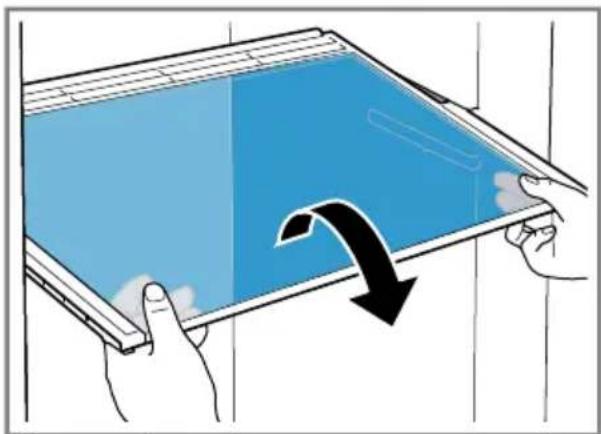
Removing the shelf
▶ Pull out and remove the shelf.
Removing door tray
Lift the door tray and remove it.
→ Fig. 8
Removing the storage container
- Pull out the storage container as far as it will go.
- Lift the storage container at the front ① and remove it ②
→ Fig. 9
Removing the fruit and vegetable container
- Pull out the fruit and vegetable container as far as it will go.
- Lift the fruit and vegetable container at the front ① and remove it ②.
→ Fig. 10
Removing the frozen food container
- Take out the frozen food container as far as it will go.
- Lift the frozen food container at the front ① and remove it ②
→ Fig. 11
Removing the front of the container
You can remove the front of the fruit and vegetable container to facilitate cleaning.
- Press in the snap-in hooks on the side of the container ① and remove the front from the container in a turning motion ②
→Fig. 12
14 Troubleshooting
You can rectify minor faults on your appliance yourself. Read the troubleshooting information before contacting after-sales service. This will avoid unnecessary costs.

WARNING –
Risk of electric shock!
Improper repairs are dangerous.
- Repairs to the appliance should only be carried out by trained specialist staff. ▶ Only use genuine spare parts when repairing the appliance. If the power cord of this appliance is damaged, it must be replaced by the manufacturer, the manufacturer's Customer Service or a similarly qualified person in order to prevent any risk.
Fault Cause and troubleshooting
| The appliance is not cooling, the displays and lighting are lit. | Showroom mode is switched on.1. Switch off the appliance. → Page 372. Wait 2 minutes.3. Switch the appliance back on. → Page 364. Wait 1 minute and then press and hold super (Refrigerator compartment) until 4 audible signals have sounded.5. After a short time, check whether your appliance is cooling. |
| The LED lighting does not work. | Different causes are possible.► Call customer service.The customer service number can be found in the enclosed customer service directory. |
| The refrigeration unit is switching on more frequently and for longer. | The appliance has been opened frequently.► Do not open appliance door unnecessarily. |
| Fault Cause and troubleshooting | |
| The refrigeration unit is switching on more frequently and for longer. | External ventilation openings are covered up.Remove any obstructions from in front of the external ventilation openings. |
Not a fault. Modern refrigeration machines switch on more frequently and have different power levels to cool more efficiently. Remove any obstructions from in front of the external ventilation openings.Install the appliance as far away as possible from heating elements, cookers and other heat sources. Avoid prolonged exposure of the appliance to direct sunlight.Only open the appliance door as briefly as necessary.Allow hot food and drinks to cool down first before storing in the appliance. Remove any obstructions from in front of the external ventilation openings.Install the appliance as far away as possible from heating elements, cookers and other heat sources. Avoid prolonged exposure of the appliance to direct sunlight.Only open the appliance door as briefly as necessary.Allow hot food and drinks to cool down first before storing in the appliance. | |
| A layer of frost forms on the back wall of the refrigerator compartment. | Not a fault. Modern refrigeration machines ensure a more even temperature in the refrigerator compartment. The back wall of the refrigerator compartment is defrosted automatically at regular intervals. Only open the appliance door as briefly as necessary.Pack the food airtight or cover it.Allow hot food and drinks to cool down first before storing in the appliance.Always leave some space between the food and the interior walls. Only open the appliance door as briefly as necessary.Pack the food airtight or cover it.Allow hot food and drinks to cool down first before storing in the appliance.Always leave some space between the food and the interior walls. |
| Side panels of the appliance are warm. | Not a fault. The side panels contain pipes which heat up during the cooling process. Units touching the appliance will not be damaged by the heat.No action required. |
Fault Cause and troubleshooting
| A warning tone sounds and the temperature display (refrigerator compartment), "alarm" and the light bar flash.The door alarm is switched on. | The refrigerator compartment door is open.► Close the refrigerator compartment door. |
| A warning tone sounds and the temperature display (freezer compartment), "alarm" and the light bar flash.The door alarm is switched on. | The freezer compartment door is open.► Close the freezer compartment door. |
| A warning tone sounds and the set temperature (freezer compartment), "alarm" and the light bar flash.The temperature alarm is switched on. | Different causes are possible.► Press alarm.The alarm is switched off. |
| External ventilation openings are covered up.► Remove any obstructions from in front of the external ventilation openings. | |
| Larger quantities of fresh food have been put in.► Do not exceed the max. freezing capacity.→ "Freezing capacity", Page 40 | |
| The set temperature is not reached.Fully automatic defrosting no longer works. | The freezer compartment door was open for a long time. The evaporator (refrigeration unit) in the noFrost system is heavily iced up.Requirement: Store the frozen food well insulated in a cool place.1. Switch off the appliance. → Page 372. Disconnect the appliance from the mains.Unplug the appliance from the mains or switch off the circuit breaker in the fuse box.3. Move the appliance away from the wall.4. Leave the appliance door open.√ After approx. 20 minutes, the condensation starts to run into the evaporation pan at the rear of the appliance.→ Fig. 13 |
| Fault Cause and troubleshooting | |
| The set temperature is not reached.Fully automatic de-frosting no longer works. | 5. To prevent the evaporation pan from overflowing,mop up the condensation water with a sponge.The evaporator is defrosted if no more condensationwater runs into the evaporation pan.6. Clean the interior of the appliance. → Page 427. Switch the appliance back on. → Page 36 |
| The temperature dif-fers greatly from the setting. | Different causes are possible.1. Switch off the appliance. → Page 372. Switch the appliance back on after five minutes.→ Page 36► If the temperature is too warm, check the tempera-ture again after a couple of hours.► If the temperature is too cold, check the temperature again on the following day. |
| Condensation accu-mulates on the sur-face of the appliance and on the shelves in-side. | The water contained in warm and humid air condenses on the colder surfaces of the appliance.1. Wipe away the condensation water with a soft, dry cloth.2. Open the appliance as briefly as possible.3. Ensure that the appliance is always closed properly. |
| The appliance hums,bubbles, buzzes,gargles, clicks or crackles. | Not a fault. A motor is running, e.g. refrigerating unit,fan. Refrigerant flows through the pipes. The motor,switches or solenoid valves are switching on or off.Automatic defrosting is running.No action required. |
The appliance makes noises. | The appliance is not level.► Align the appliance using a spirit level and the screw feet. |
| The appliance is not free-standing.► Observe the minimum clearances for the appliance. | |
| Fittings wobble or stick.► Check the removable fittings and, if required, replace these. | |
| Bottles or containers are touching.► Move the bottles or containers away from each other. | |
| Super freezing is switched on.No action required. | |
14.1 Power failure
During a power failure, the temperature in the appliance rises; this re-
duces the storage time and the quality of the frozen food.
On the website for your appliance, the technical data provides you with
the storage times for frozen food in the event of a fault.
Notes
- Open the appliance as little as possible during a power failure and do not place any other food in the appliance.
- Check the quality of the food immediately after a power failure.
- Dispose of any frozen food that has defrosted and is hotter than 5 °C.
- Cook or fry slightly thawed frozen food, and then either consume it or freeze it again.
14.2 Conducting an appliance self-test
Your appliance has an appliance self-test which displays faults that can be eliminated by your customer service.
- Switch off the appliance.
- Disconnect the appliance from the power supply. Unplug the appliance from the mains or switch off the circuit breaker in the fuse box.
- Electrically reconnect the appliance after 5 minutes. → Page 12
- One minute after switching on, press and hold super (Refrigerator compartment) for 3 to 5 seconds until an audible signal sounds. If, at the end of the appliance self-test, 2 audible signals sound and the temperature display indicates the set temperature, the temperature sensors on your appliance are OK. The appliance switches to normal operation. If, at the end of the appliance self-test, 5 audible signals sound and the temperature display LEDs light up with a different brightness, in-
→ Page 37
form customer service. The LEDs provide customer service with information about this fault.
15 Storage and disposal
15.1 Taking the appliance out of operation
- Switch off the appliance.
- Disconnect the appliance from the power supply. Unplug the appliance from the mains or switch off the circuit breaker in the fuse box.
- Remove all of the food.
- Clean the appliance. → Page 42
- To guarantee the ventilation inside the appliance, leave the appliance open.
→ Page 37
15.2 Disposing of old appliance
Valuable raw materials can be re-used by recycling.
WARNING -
Risk of harm to health!
Children can lock themselves in the appliance, thereby putting their lives at risk.
Leave shelves and containers inside the appliance to prevent children from climbing in. Keep children away from the redundant appliance.
⚠ WARNING – Risk of fire!
If the tubes are damaged, flammable refrigerant and harmful gases may escape and ignite.
- Do not damage the tubes of the refrigerant circuit or the insulation.
Customer Service
- Unplug the appliance from the mains.
- Cut through the power cord.
- Dispose of the appliance in an environmentally friendly manner. Information about current disposal methods is available from your specialist dealer or local authority.
16 Customer Service
Detailed information about the warranty period and the warranty conditions in your country is available via the QR code on the enclosed document on service contacts and warranty conditions, from our customer service or on our website.
You can find the contact details for our customer service via the QR code on the enclosed document on service contacts and warranty conditions or on our website.
16.1 Product number (E-Nr.) and production number (FD)
If you contact Customer Service, you will require the product number (E-Nr.) and the production number (FD), which you can find on the appliance's rating plate.
→ "Appliance", Fig. 1 / Page 34 Make a note of your appliance's details and the Customer Service telephone number to find them again quickly.
17 Technical data
Refrigerant, cubic capacity and further technical specifications can be found on the rating plate.
→ "Appliance", Fig. 1 / Page 34
Compartiment congélation → Page 65
activate Super Freezing
deactivate Super Freezing
- Press holiday.
| Compartiment | -16 °C |
| congélation |
| Compartiment congélation |
→ "activate Super Freezing", Page 63
en Freezer compartment
▶ Press holiday. "holiday" lights up.
Discover all the different ways Bosch can assist you:
www.bosch-home.com/service
The contact details of all countries are listed in the attached service directory.
BSH Hausgeräte GmbH
Carl-Wery-Straße 34
81739 München, GERMANY
www.bosch-home.com
A Bosch Company

8001256267 (050922)
ar, en, fr, ru, el
- FRIDGE-FREEZER COMBINATION
- YOU CAN FIND ADDITIONAL INFORMATION AND EXPLANATIONS ONLINE. SCAN THE QR CODE ON THE TITLE PAGE
- TABLE OF CONTENTS
- SAFETY
- PREVENTING MATERIAL DAMAGE
- ENVIRONMENTAL PROTECTION AND SAVING ENERGY
- INSTALLATION AND CONNECTION
- FAMILIARISING YOURSELF WITH YOUR APPLIANCE
- FEATURES
- BASIC OPERATION
- ADDITIONAL FUNCTIONS
- ALARM
- REFRIGERATOR COMPARTMENT
- FREEZER COMPARTMENT
- DEFROSTING
- CLEANING AND SERVICING
- GENERAL INFORMATION
- INTENDED USE
- RESTRICTION ON USER GROUP
- SAFE TRANSPORT
- ⚠ WARNING – RISK OF INJURY
- SAFE INSTALLATION
- ⚠ WARNING – RISK OF ELECTRIC SHOCK
- WARNING – RISK OF EXPLOSION
- WARNING – RISK OF FIRE
- SAFE USE
- ⚠ WARNING – RISK OF SUFFOCATION
- ⚠ WARNING – RISK OF EXPLOSION
- ⚠ WARNING – RISK OF FIRE
- ⚠ WARNING – RISK OF BURNS
- ⚠ WARNING – RISK OF COLD BURNS
- ⚠️ CAUTION – RISK OF HARM TO HEALTH
- DAMAGED APPLIANCE
- ATTENTION
- DISPOSING OF PACKAGING
- SAVING ENERGY
- SELECTING THE INSTALLATION LOCATION
- SAVING ENERGY DURING USE
- CONTROL PANEL ENERGY-SAVING MODE
- SWITCHING ON THE LIGHT BAR
- SWITCHING OFF THE LIGHT BAR
- SCOPE OF DELIVERY
- CRITERIA FOR THE INSTALLATION LOCATION
- WARNING
- RISK OF EXPLOSION
- OVER-AND-UNDER AND SIDE-BY-SIDE INSTALLATION
- INSTALLING THE APPLIANCE
- PREPARING THE APPLIANCE FOR THE FIRST TIME
- CONNECTING THE APPLIANCE TO THE ELECTRICITY SUPPLY
- APPLIANCE
- CONTROL PANEL
- SHELF
- STORAGE CONTAINER
- FRUIT AND VEGETABLE CONTAINER WITH HUMIDITY CONTROL
- EN BASIC OPERATION
- BUTTER AND CHEESE COMPARTMENT
- DOOR TRAY
- ACCESSORIES
- EGG TRAY
- BOTTLE HOLDER
- VARIABLE BOTTLE SHELF
- ICE CUBE TRAY
- MAKING ICE CUBES
- SWITCHING ON THE APPLIANCE
- OPERATING TIPS
- SWITCHING OFF THE APPLIANCE
- SETTING THE TEMPERATURE
- SETTING THE REFRIGERATOR COMPARTMENT TEMPERATURE
- SETTING THE STORAGE CONTAINER TEMPERATURE
- SETTING THE FREEZER COMPARTMENT TEMPERATURE
- SUPER COOLING
- SWITCHING ON SUPER COOLING
- SWITCHING OFF SUPER COOLING
- SUPER FREEZING
- EN ADDITIONAL FUNCTIONS
- SWITCHING ON SUPER FREEZING
- SWITCHING OFF SUPER FREEZING
- HOLIDAY MODE
- CAUTION
- RISK OF HARM TO HEALTH
- SWITCHING ON HOLIDAY MODE
- SWITCHING OFF HOLIDAY MODE
- ENERGY-SAVING MODE
- SWITCHING ON ENERGY-SAVING MODE
- SWITCHING OFF ENERGY-SAVING MODE
- FRESHNESS MODE
- SWITCHING FRESHNESS MODE ON
- SWITCHING OFF FRESHNESS MODE
- DOOR ALARM
- SWITCHING OFF THE DOOR ALARM
- TEMPERATURE ALARM
- SWITCHING OFF THE TEMPERATURE ALARM
- TIPS FOR STORING FOOD IN THE REFRIGERATOR COMPARTMENT
- CHILL ZONES IN THE REFRIGERATOR COMPARTMENT
- COLDEST ZONE
- WARMEST ZONE
- FREEZING CAPACITY
- PREREQUISITES FOR FREEZING CAPACITY
- FULLY UTILISING THE FREEZER COMPARTMENT VOLUME
- TIPS FOR STORING FOOD IN THE FREEZER COMPARTMENT
- TIPS FOR FREEZING FRESH FOOD
- PACKING FROZEN FOOD
- DEFROSTING METHODS FOR FROZEN FOOD
- DEFROSTING IN THE REFRIGERATOR COMPARTMENT
- DEFROSTING IN THE FREEZER COMPARTMENT
- PREPARING THE APPLIANCE FOR CLEANING
- CLEANING THE APPLIANCE
- REMOVING THE FITTINGS
- REMOVING THE SHELF
- REMOVING DOOR TRAY
- REMOVING THE STORAGE CONTAINER
- REMOVING THE FRUIT AND VEGETABLE CONTAINER
- REMOVING THE FROZEN FOOD CONTAINER
- REMOVING THE FRONT OF THE CONTAINER
- TROUBLESHOOTING
- RISK OF ELECTRIC SHOCK
- POWER FAILURE
- NOTES
- CONDUCTING AN APPLIANCE SELF-TEST
- STORAGE AND DISPOSAL
- TAKING THE APPLIANCE OUT OF OPERATION
- DISPOSING OF OLD APPLIANCE
- CUSTOMER SERVICE
- PRODUCT NUMBER (E-NR.) AND PRODUCTION NUMBER (FD)
- TECHNICAL DATA
- ACTIVATE SUPER FREEZING
- DEACTIVATE SUPER FREEZING
- EN FREEZER COMPARTMENT
Brand : BOSCH
Model : KGN56CX30U
Category : Refrigerator